If you are looking for information on ERP MCP server solutions, you are in the right place.
1. Why an ERP MCP Server Matters When AI Meets Live Business Data
An ERP MCP server gives approved AI tools a controlled way to work with live ERP data and business functions. Therefore, AI no longer has to depend only on general knowledge, old exports, or static documents when answering operational questions.
For example, a manager might ask, “Which products could stock out next week?” However, a useful answer depends on current inventory, open orders, incoming purchase orders, supplier lead times, warehouse transfers, and demand.
Because those facts change every day, general AI cannot know them on its own. Instead, it needs a governed connection to the business system that holds them.
1.1 Why AI ERP Integration Needs Current Data
AI may understand what safety stock means. However, it does not automatically know your current safety stock.
Likewise, AI may understand purchasing. Yet it does not know which supplier orders are late unless it can access approved purchasing data.
Therefore, AI becomes much more useful when it can work with trusted operational information.
As a result, employees can move from asking broad questions to asking questions about their own business.
1.2 Why Business Context Changes the Answer
ERP data is connected.
For example, inventory affects sales orders, while purchasing affects future stock. Meanwhile, warehouse activity changes availability, and manufacturing consumes raw materials.
Therefore, one simple question may depend on several ERP areas.
An MCP connection can help the AI gather that approved context without giving it unrestricted access to the entire system.
2. What Is an ERP MCP Server?
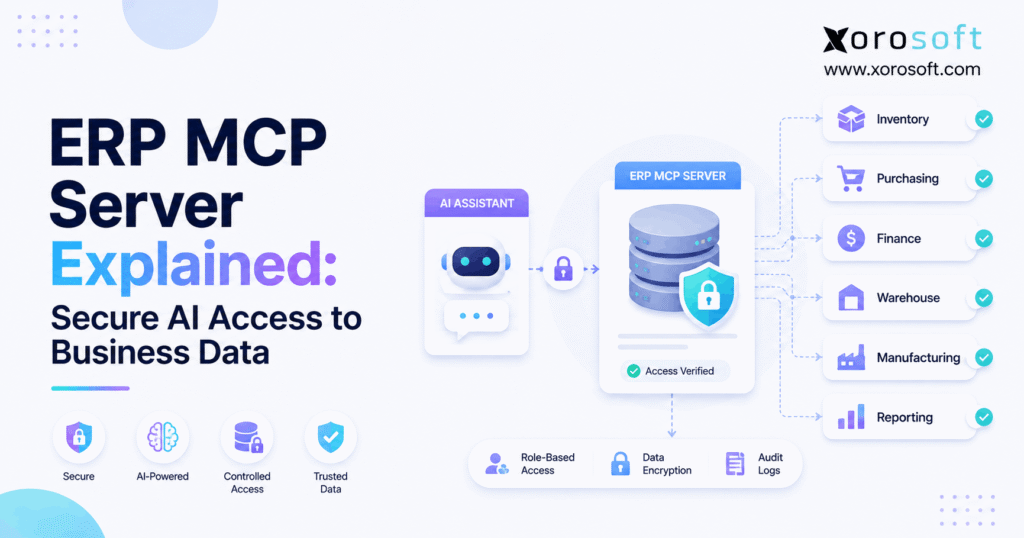
An ERP MCP server is a connection layer that allows an MCP-compatible AI application to discover and use approved ERP tools, data, and business functions.
MCP stands for Model Context Protocol.
In simple terms, MCP provides a common way for AI applications to connect with outside systems. Therefore, an AI tool does not need a completely different connection method for every business task.
For ERP, approved tools may provide access to:
- inventory
- sales orders
- purchase orders
- suppliers
- customers
- accounting
- warehouse activity
- manufacturing
- forecasting
- reporting
However, the ERP does not need to expose everything.
2.1 A Simple MCP for ERP Example
Suppose the AI can use a tool called:
Check inventory availability
Then, a user asks:
“Can we fulfill 300 units of SKU 1042?”
First, the AI calls the approved inventory tool.
Next, the ERP checks the user’s access.
Then, the system returns information such as:
- stock on hand
- stock allocated
- available stock
- incoming inventory
- warehouse location
Finally, the AI explains the result.
Therefore, the ERP remains the source of truth while AI becomes the easier interface.
2.2 What an ERP MCP Server Does Not Mean
MCP should not mean unlimited access.
Instead, the business controls:
- which AI applications connect
- which tools they use
- which records they see
- whether access is read-only
- whether actions need approval
- what activity gets logged
Therefore, MCP provides the connection method, while the ERP and security model control the access.
3. How an ERP MCP Server Works
The basic flow is straightforward:
User → AI application → MCP connection → ERP tool → ERP data or action → AI response
However, each stage has a different job.
3.1 The User Starts With a Business Question
First, the user asks a question in normal language.
For example:
“Which purchase orders are late and could affect customer shipments?”
Therefore, the employee does not need to know a database table, API path, or report name.
Instead, the employee describes the business problem.
3.2 The AI Selects an Approved ERP Tool
Next, the AI reviews the tools available through MCP.
For example, it may find tools for:
- purchase orders
- inventory
- sales orders
- suppliers
Then, it chooses the tools needed for the request.
Therefore, MCP is especially useful when the correct tool depends on the user’s question.
3.3 The ERP Checks Access
Afterward, the ERP determines what the request is allowed to do.
For example, access may depend on:
- user identity
- company
- role
- warehouse
- department
- action type
If access is not allowed, the request should fail.
3.4 The AI Explains the Result
Finally, the ERP returns structured information.
The AI may then respond:
“Three late purchase orders affect 14 customer orders. However, five orders have no alternate stock available.”
Therefore, the ERP provides the facts while the AI provides the explanation.
4. Why MCP for ERP Needs Business Rules, Not Just Database Access
Giving AI access to data is not the same as giving AI access to a business process.
Therefore, companies should distinguish between raw records and approved ERP functions.
4.1 ERP Data Has Business Meaning
For example, a database may show 500 units of an item.
However, 300 units may already be allocated to customer orders.
Meanwhile, another 100 may be on quality hold.
Therefore, “500 units on hand” does not necessarily mean “500 units available.”
The ERP applies the business meaning.
4.2 ERP Transactions Have Rules
Likewise, creating a purchase order may require checks for:
- supplier status
- currency
- warehouse
- item setup
- minimum quantities
- approval limits
- tax rules
Therefore, AI should not bypass those checks simply because it can generate a structured request.
4.3 Approved Functions Are Safer
Instead, businesses should expose controlled functions such as:
- check available inventory
- retrieve open purchase orders
- find delayed orders
- create purchase order draft
As a result, AI works through the operating rules rather than around them.
Moreover, this approach makes permissions easier to understand and test.
5. ERP MCP Server vs API, RAG, and Direct Database Access
An ERP MCP server does not replace every other integration method.
Instead, each approach solves a different problem.
5.1 ERP MCP Server vs Traditional API
Traditional APIs work well when the workflow is already known.
For example:
New ecommerce order → create ERP sales order
Because the process is fixed, both systems already know what information should move.
MCP is different because an AI agent may first need to decide which tool fits the user’s request.
| Area | Traditional ERP API | ERP MCP Server |
|---|---|---|
| Main use | Fixed integrations | AI tool access |
| Request pattern | Predefined | Based on user intent |
| Tool choice | Developer chooses | AI can select approved tools |
| Business logic | Supported | Often uses ERP services |
| Replaces API | No | Usually works beside APIs |
Therefore, APIs remain important.
5.2 MCP for ERP vs RAG
RAG is usually better for written knowledge.
For example, RAG can retrieve:
- policies
- manuals
- contracts
- procedures
However, MCP is better suited to live system questions.
Therefore:
RAG retrieves knowledge.
MCP connects AI to tools and systems.
Moreover, a business may use both in the same AI workflow.
5.3 ERP MCP Server vs Direct Database Access
Direct database access may look simple. However, it can bypass ERP rules and permissions.
Therefore, approved business functions are usually safer than unrestricted database access.
6. ERP MCP Server Security Starts With Identity
Because an ERP MCP server can expose important business information, security must begin before the first tool call.
The first question is simple:
Who is requesting access?
6.1 Authentication Confirms Identity
Authentication confirms whether the request comes from:
- an employee
- an approved application
- an AI agent
- a service account
Therefore, the system can tie activity to a known identity.
Without reliable identity, access rules become harder to enforce.
6.2 Authorization Controls What Happens Next
Next, authorization determines what that identity can do.
For example, a warehouse employee may need inventory information. However, that person may not need full financial reporting.
Likewise, a purchasing employee may need supplier and purchase order tools. Yet that user may not need system administration access.
Therefore, AI should follow the same access boundaries.
6.3 Least Privilege Reduces Risk
Moreover, businesses should use the principle of least privilege.
In other words, the AI receives only the access needed for the task.
For example, an inventory assistant probably does not need payroll or banking data.
As a result, smaller access scopes make the system safer and easier to test.
7. Read and Write Access in MCP for ERP Are Different
One of the most important decisions is whether AI can only read information or can also change records.
Therefore, businesses should treat these access levels differently.
7.1 Start an ERP MCP Server With Read-Only Access
A read-only AI assistant can:
- retrieve information
- compare records
- summarize results
- find exceptions
- explain trends
- recommend actions
However, it cannot change the ERP record.
Therefore, read-only access is often the best first stage.
First, teams can test whether the AI selects the correct tools.
Next, they can check whether answers match ERP reports.
Finally, they can confirm that permission rules work correctly.
7.2 Add Write Access Carefully
Later, a business may allow specific actions.
For example, an agent might:
- create a draft purchase order
- prepare a transfer
- update an approved field
- trigger a workflow
However, these actions affect real operations.
Therefore, write tools should be narrow and intentional.
7.3 Use Human Approval for Higher-Risk Actions
A useful workflow is:
AI detects → AI recommends → AI prepares → human approves → ERP executes
As a result, AI removes research and preparation work without removing useful human judgment.
8. What AI ERP Integration Can Access Through MCP
The exact data depends on the tools that the organization chooses to expose.
Therefore, an ERP MCP server should make only approved information available.
8.1 Inventory Data
For example, inventory tools may provide:
- on-hand stock
- available stock
- allocated inventory
- incoming inventory
- transfers
- warehouse quantities
- lot data
- serial data
- inventory value
Therefore, a manager could ask:
“Which warehouse can fulfill this order today?”
8.2 Purchasing Data
Likewise, AI may work with:
- open purchase orders
- supplier lead times
- expected delivery dates
- purchase prices
- reorder requirements
As a result, users could ask:
“Which supplier delays are likely to create stockouts?”
8.3 Sales and Order Data
Moreover, approved tools may expose:
- open orders
- backorders
- allocations
- fulfillment status
- shipment status
Therefore, teams can focus on exceptions instead of checking every order.
8.4 Warehouse Data
Finally, warehouse information may include:
- receiving
- put-away
- picking
- packing
- shipping
- transfers
- locations
For businesses with complex fulfillment, XoroWMS can provide the warehouse structure behind these workflows.
9. ERP MCP Use Cases Across Finance, Manufacturing, and Planning
AI becomes more useful when it can work across connected ERP functions.
However, broader context also requires stronger permission controls.
9.1 Finance and Accounting
Depending on access, AI may work with:
- receivables
- payables
- customer balances
- vendor balances
- revenue
- expenses
- inventory value
- margins
For example, a finance leader might ask:
“Which overdue balances increased the most this month?”
Therefore, the ERP provides the numbers while AI helps summarize what changed.
9.2 Manufacturing
Manufacturing questions may depend on:
- BOMs
- components
- raw materials
- work orders
- production status
- finished goods
For example:
“Which production orders are at risk because materials are missing?”
Therefore, useful answers may require manufacturing, inventory, and purchasing data together.
9.3 Forecasting and Planning
Likewise, planning may combine:
- demand
- available stock
- inbound supply
- open orders
- supplier lead times
- forecasts
As a result, AI can help planners identify exceptions faster.
However, the final business decision should still follow planning rules and approval limits.
10. MCP for ERP Creates Value by Reducing Search Work
The best AI ERP projects do not start with the question:
“How can we add more AI?”
Instead, they start with an operational problem.
10.1 Inventory and Purchasing Decisions
For example, a buyer might ask:
“Which products need attention before Friday?”
First, the agent could review available stock.
Next, it could check demand and incoming purchase orders.
Then, it could compare supplier dates.
Finally, it could return a short list of products that need action.
Therefore, the buyer spends less time gathering data.
10.2 Order Fulfillment Exceptions
Likewise, an operations manager might ask:
“Which orders cannot ship today and why?”
The AI could group problems by:
- missing inventory
- warehouse delay
- allocation issue
- inbound stock
- order hold
As a result, the team can work from a focused exception list.
10.3 Management Reporting
Moreover, executives often ask questions that cross departments.
For example:
“What changed this week that could affect cash next month?”
Therefore, connected ERP data becomes important because the answer may require sales, inventory, purchasing, and finance together.
11. ERP MCP for Ecommerce and Multi-Channel Operations
Ecommerce brands often run more operational systems than customers can see.
For example, the storefront may handle the buying experience. However, the back office still manages inventory, warehouses, purchasing, accounting, wholesale, EDI, and returns.
Therefore, AI needs more than storefront data.
11.1 Shopify Questions Often Need ERP Context
A Shopify merchant may ask:
“Which products could oversell this weekend?”
However, the answer may depend on:
- wholesale allocations
- warehouse picks
- inbound purchase orders
- transfers
- marketplace demand
- production
Therefore, a connected XoroERP environment can give the back office a broader operational view.
11.2 Ecommerce Connectivity Still Matters
Meanwhile, normal system integrations remain important.
For example, Xorosoft is available through the Xorosoft ERP app in the Shopify App Store.
Therefore, this provides a relevant external reference for merchants evaluating Shopify connectivity.
11.3 AI Does Not Replace Integrations
AI agents do not remove the need for reliable data flows.
Orders still need to move correctly. Likewise, inventory still needs to sync.
Therefore, businesses should treat AI as another layer over sound ERP integrations rather than a replacement for them.
12. How Xorosoft Supports AI-Connected ERP Operations
AI gives better answers when the data beneath it is connected.
Therefore, the quality of the ERP foundation matters as much as the AI model.
Xorosoft is built for inventory-driven businesses that need inventory, purchasing, accounting, warehouse management, manufacturing, forecasting, ecommerce, and reporting in one cloud ERP environment.
12.1 One Question May Cross Several ERP Areas
For example:
“Which late supplier shipments could affect our most important customer orders?”
To answer that question, the system may need:
- purchase orders
- expected receipts
- available inventory
- sales orders
- allocations
- customer information
Therefore, fragmented systems make the question harder to answer.
By contrast, connected Xorosoft solutions can place more of that operational context within one ERP environment.
12.2 Xorosoft’s ERP MCP Server Adds the AI Access Layer
The Xorosoft AI MCP Server is designed to help approved AI systems work with authorized ERP data and functions.
Therefore, the goal is not simply to “chat with ERP.”
Instead, the goal is to shorten the path between:
business question → trusted data → useful answer → approved action
As a result, teams can spend less time searching and more time acting on important exceptions.
13. When a Business Actually Needs an ERP MCP Server
Not every company needs MCP immediately.
However, several signs make it more useful.
13.1 Teams Need Answers From Live ERP Data
For example, employees may repeatedly ask:
- What is available now?
- Which orders are late?
- What should we reorder?
- Which warehouse has stock?
- Which suppliers are behind?
Because these questions depend on changing information, static documents are not enough.
Therefore, live ERP access becomes valuable.
13.2 The ERP Is Already the Main Source of Truth
AI cannot fix unreliable operational data.
For example, if one team trusts the ERP while another trusts a spreadsheet, the agent may receive conflicting information.
Therefore, businesses should first establish a dependable source of truth.
13.3 Employees Spend Too Much Time Finding Information
Likewise, MCP becomes useful when teams constantly:
- open several reports
- switch between systems
- export spreadsheets
- combine data manually
- check the same records repeatedly
As a result, AI can reduce search work and help employees reach the decision stage faster.
14. When MCP for ERP May Not Be the First Priority
Sometimes, the right decision is to improve the operational foundation before adding AI access.
14.1 Core Processes Still Depend on Spreadsheets
For example, if purchasing, inventory planning, and reporting depend on separate spreadsheets, an AI layer may add complexity instead of removing it.
Therefore, ERP consolidation may create more value first.
14.2 Data Quality Is Poor
Likewise, if inventory balances are wrong, AI can confidently repeat wrong inventory balances.
Moreover, outdated supplier lead times can still produce weak recommendations.
Therefore, clean data should come before broader AI access.
14.3 Permissions Are Unclear
Before connecting agents, businesses should decide:
- who can see what
- who can change what
- what requires approval
- what must remain restricted
Otherwise, AI may expose a governance problem that already existed.
14.4 The Business Only Needs Document Search
Finally, companies that only need AI to search policies, manuals, or contracts may not need MCP yet.
Instead, document retrieval may be enough.
15. ERP MCP Server Implementation Roadmap
A safe rollout should happen in stages.
Therefore, businesses should avoid moving directly from no AI access to broad automation.
15.1 Start With One Business Problem
First, choose a clear use case.
Avoid:
“Add AI to the ERP.”
Instead, choose:
“Help buyers identify products that need replenishment.”
Therefore, the project has a measurable goal.
15.2 Identify the Minimum Data Required
Next, list the information needed.
For replenishment, that may include:
- available inventory
- demand
- inbound purchase orders
- supplier lead time
- forecast
However, the agent probably does not need every ERP module.
15.3 Start With Read-Only Tools
Then, allow the agent to retrieve and explain information.
Afterward, compare its answers with existing ERP reports and experienced employees.
Therefore, errors can be found before actions are enabled.
15.4 Add Narrow Actions Later
Finally, add specific actions such as:
“Create a purchase order draft.”
However, avoid giving a new agent a vague instruction such as:
“Manage purchasing automatically.”
As a result, autonomy grows only after trust and controls grow.
16. Common ERP MCP Server Mistakes to Avoid
Most MCP problems do not come from the protocol itself.
Instead, they usually come from poor implementation choices.
16.1 Giving AI Too Much Access
Broad permissions may make a demo easier.
However, production use needs tighter control.
Therefore, expose only the data and tools required for the task.
16.2 Adding Write Access Too Early
First, test information retrieval.
Next, test analysis and recommendations.
Then, introduce narrow write actions.
Therefore, each level builds on proven behavior.
16.3 Ignoring Existing ERP Rules
AI should not bypass:
- approval levels
- inventory controls
- pricing rules
- warehouse processes
- accounting rules
Instead, the ERP should remain responsible for structured business controls.
16.4 Automating a Bad Process
Likewise, AI cannot automatically fix:
- duplicate data
- unclear ownership
- inaccurate inventory
- broken workflows
Therefore, fix the process first.
Then, use AI to make the improved workflow faster.
17. What an AI-Ready ERP Foundation Looks Like
A strong ERP MCP server depends on a strong ERP foundation.
Therefore, businesses should assess the operating system beneath the AI before focusing on agent features.
17.1 Connected Operational Data
Inventory, orders, purchasing, warehouse activity, and accounting should agree.
Otherwise, the agent may receive conflicting answers.
Therefore, connected data is essential.
17.2 Clear Roles and Permissions
Likewise, teams need defined access rules.
If employees do not know who should see or change information, AI will not solve that problem.
Therefore, permissions should be clear before agent access expands.
17.3 Reliable Warehouse Records
For inventory-driven businesses, warehouse accuracy is especially important.
For example, missing receipts or incorrect transfers can make even a well-designed AI answer wrong.
Therefore, operational discipline remains essential.
17.4 Stable Channel Integrations
Moreover, Shopify, Amazon, EDI, and other channels should feed the ERP through dependable integrations.
Then, AI can work from a more complete view of demand and supply.
Businesses can also review Xorosoft’s industry-specific ERP capabilities to see how these requirements differ across inventory-heavy industries.
18. From AI ERP Integration to Operational AI Agents
The long-term change is larger than adding a chatbot to ERP.
Instead, AI can gradually take on different levels of operational work.
18.1 Ask
First, the user asks:
“What is happening?”
Therefore, the AI retrieves facts.
18.2 Analyze
Next, the user asks:
“Why is this happening?”
As a result, the AI combines related ERP information.
18.3 Recommend
Then, the user asks:
“What should we do?”
Therefore, the AI proposes an action.
18.4 Prepare
Afterward, the AI may prepare:
- a purchase order
- a transfer
- a report
- a task
However, preparation does not have to mean execution.
18.5 Execute
Later, an approved AI agent may perform selected actions.
Therefore, permission and approval rules become more important.
18.6 Coordinate
Finally, more advanced agents may manage steps across several systems.
However, more autonomy should also mean more testing, monitoring, logging, and control.
Therefore, the goal should not be maximum automation.
Instead, the goal should be useful automation with clear boundaries.
19. Controlled AI Access Is More Valuable Than Unlimited Automation
An ERP MCP server can make AI far more useful because it connects AI with live business context.
However, connection alone is not enough.
Instead, the business needs trusted data, clear permissions, useful tools, and controlled workflows.
Therefore, a strong approach begins with read-only access.
Next, the business validates answers.
Then, it adds recommendations.
Afterward, it may allow drafts and carefully chosen actions.
Meanwhile, higher-risk decisions can remain behind human approval.
As a result, teams can move faster without giving up the controls that make ERP systems reliable.
For inventory-driven companies, this approach can improve how people work across purchasing, inventory, accounting, warehousing, ecommerce, and manufacturing.
Ultimately, AI should make ERP easier to use rather than easier to bypass.
Therefore, businesses should combine AI’s speed and language skills with the ERP’s structured records, permissions, and business rules.
If you want to explore how controlled AI access could fit your own workflows, you can Book a Demo with Xorosoft.
Frequently Asked Questions
What is an ERP MCP server?
An ERP MCP server lets compatible AI tools access approved ERP data and functions through Model Context Protocol. Permissions control which information and actions the AI can use.
How does MCP connect AI to ERP data?
The AI calls an approved MCP tool. The ERP checks access, performs the allowed query or action, and returns structured data that the AI can explain.
Is an ERP MCP server secure?
It can be secure when authentication, role permissions, limited tools, encryption, approval rules, and audit logs are correctly configured. MCP alone does not provide every security control.
Does MCP replace ERP APIs?
No. Traditional APIs still handle fixed system integrations well. MCP gives AI agents a standard way to discover and use approved tools, which may themselves rely on ERP APIs.
Can AI change ERP records through MCP?
Yes, if write tools are enabled and the user has permission. Businesses should normally begin with read-only access before allowing create, update, or other transaction actions.
What ERP data can AI access through MCP?
Depending on permissions, AI may access inventory, orders, purchasing, customers, suppliers, warehouse activity, accounting, manufacturing, forecasting, and other approved ERP information.
When should a business use an ERP MCP server?
It makes sense when teams need AI to work with live ERP data, answer operational questions, find exceptions, or prepare controlled actions across connected business workflows.
Recent Posts
-
 NetSuite Alternative With Built-In WMS: When a Unified ERP-WMS Stack Makes Sense
 -
 B2B Payment Terms in ERP: Credit, Due Dates, Deposits, and Order Release
 -
 Best ERP Software for Consumer Goods Brands
 -
 Wholesale Inventory-to-Sales Statistics: What U.S. and Canadian Distributors Can Learn From Current Data
 -
 Product Bundle Overselling: Why It Happens and How to Stop It