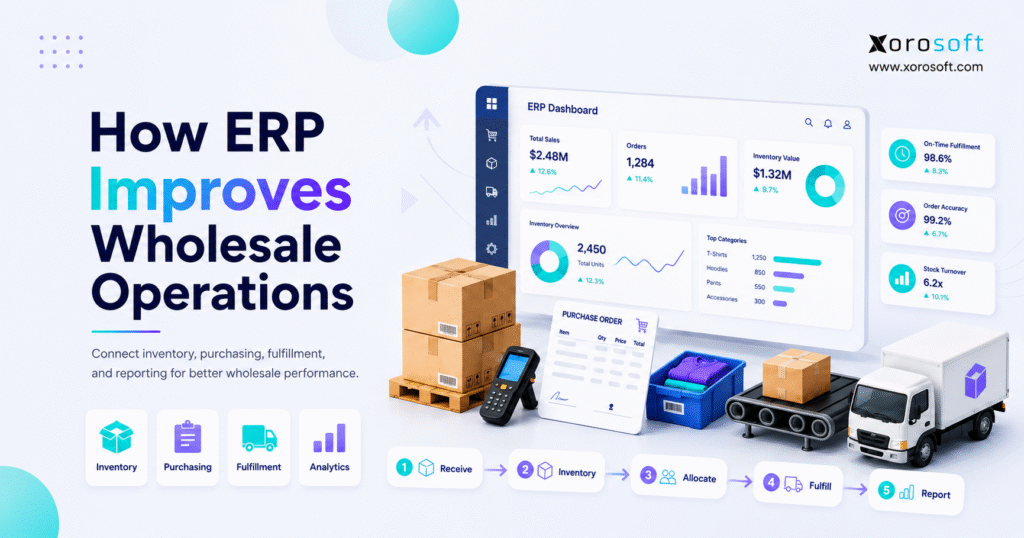
1. The Moment Wholesale Operations Become Hard to Control
ERP for wholesale operations becomes important when a business can no longer trust disconnected spreadsheets, basic accounting tools, and separate inventory apps to manage daily work. At an early stage, wholesale can look simple. The team buys products, stores stock, accepts orders, ships goods, sends invoices, and reviews reports. However, growth adds more SKUs, customers, warehouses, suppliers, channels, pricing rules, and fulfillment exceptions.
That complexity usually appears slowly. A buyer may keep purchase planning in one spreadsheet. The warehouse may update stock in another tool. Sales may check a separate availability report before promising inventory to a customer. Finance may wait for inventory adjustments before closing the month. Because every team depends on a different source of truth, decisions become slower and less reliable.
Wholesale businesses rarely struggle because one process is missing. Instead, the problem comes from weak connections between inventory, purchasing, warehouse activity, order management, accounting, and reporting. ERP for wholesale operations solves that coordination issue by giving teams one connected operational system.
1.1 Wholesale Growth Creates More Moving Parts
Wholesale growth creates more movement across the business. Order volume increases picking work. A larger SKU catalog adds more replenishment decisions. New locations create transfer complexity. Customer expansion also introduces more pricing rules. As a result, managers need better control over what is available, what is committed, what is incoming, and what is delayed.
Activity alone does not mean control. A team can ship many orders and still lose accuracy. Buyers can place many purchase orders and still overbuy. Finance can close the books and still question inventory value. Therefore, operational visibility matters more as the company scales.
1.2 Spreadsheets and Standalone Apps Start to Break
Spreadsheets help small teams move quickly. Yet they become risky when they control purchasing, forecasting, inventory allocation, and reporting. One missed update can affect several departments. A formula error can change purchasing decisions. An outdated file can cause a customer promise that the warehouse cannot fulfill.
Standalone apps can create similar problems. An inventory app may track stock but not connect deeply with accounting. A warehouse tool may support picking but not drive purchasing. QuickBooks may manage accounting but not provide enough operational control for multi-warehouse wholesale, EDI, ecommerce, or complex replenishment.
1.3 Disconnected Systems Create Hidden Costs
Disconnected systems create costs that do not always show up as software expenses. Employees spend time exporting files, reconciling data, checking availability, correcting orders, and explaining delays. Meanwhile, leaders struggle to answer simple questions quickly.
Leaders begin asking simple questions that take too long to answer. Which products are overstocked? Are any orders waiting for inventory? Which suppliers are late? Where does available stock actually sit? Which customers produce the best margins? Without a connected system, every answer takes extra work.
2. What ERP for Wholesale Operations Actually Means
ERP for wholesale operations is a connected business system that manages inventory, purchasing, warehouse workflows, sales orders, accounting, forecasting, reporting, and integrations from one platform. Instead of forcing each department to manage a separate version of reality, ERP gives the business one operational backbone.
A good wholesale ERP system does not only store data. It moves information through the business. A sales order affects inventory. Inventory affects purchasing. Receiving affects warehouse availability. Shipping affects invoicing. Cost updates affect accounting. Reports reflect activity across departments.
2.1 The Simple Definition
ERP stands for enterprise resource planning. In wholesale, it means software that connects the operational and financial workflows behind buying, storing, selling, shipping, and accounting for physical products.
The practical definition is even simpler: ERP for wholesale operations helps teams stop managing the business through separate tools and start running it through one connected system.
2.2 How ERP Connects Daily Workflows
A wholesale ERP system connects several workflows that often break apart during growth:
1. Sales orders reserve available stock.
2. Inventory records update as goods move.
3. Purchase orders reflect demand and lead times.
4. Warehouse activity updates order status.
5. Accounting receives cleaner operational data.
6. Reports show real-time performance.
7. Leaders make decisions from one system.
This connection matters because wholesale operations depend on timing. If the sales team sees yesterday’s inventory, purchasing uses last week’s forecast, and accounting waits for manual adjustments, the business cannot move with confidence.
2.3 Who Needs a Wholesale ERP System
A company may need ERP for wholesale operations when it sells physical products, manages multiple SKUs, operates more than one warehouse, serves wholesale customers, uses EDI, sells through Shopify or Amazon, manufactures products, or depends on purchasing teams.
The need becomes stronger when people say, “We need to check three places before we know.” That sentence usually means the business has outgrown its current operating setup.
2.4 Who May Not Need ERP Yet
Very small wholesale businesses may not need ERP immediately. If the company has one location, a limited SKU count, simple accounting, and low order volume, basic tools may still work.
However, those businesses should still build clean habits early. Clear SKU naming, disciplined receiving, accurate counts, documented purchasing rules, and consistent customer records make future ERP adoption much easier.
3. How ERP for Wholesale Operations Improves Inventory Management
Inventory is the center of wholesale operations. If inventory is wrong, sales promises become risky, purchasing plans become unreliable, warehouse work slows down, and accounting reports lose accuracy. ERP for wholesale operations improves inventory management by connecting stock movements with orders, purchasing, warehouses, and finance.
3.1 Real-Time Inventory Visibility Across Locations
Wholesale teams need to know more than what is physically on hand. They need to see what is available to sell, what is committed to orders, what is incoming from suppliers, what is reserved for specific customers, and what is sitting in each warehouse.
A connected system gives teams inventory visibility across locations and channels. After the first operational layer is in place, platforms such as XoroERP can help inventory-driven businesses connect stock, purchasing, accounting, and reporting instead of managing those workflows separately.
3.2 Better Inventory Accuracy
Inventory accuracy improves when every transaction updates the system at the right time. Receiving increases stock. Sales orders reserve stock. Transfers move inventory between locations. Picking reduces availability. Cycle counts correct discrepancies with proper records.
Because these actions flow through one system, ERP reduces manual updates and duplicate entry. As a result, the number in the system stays closer to the number in the warehouse.
3.3 Smarter Inventory Allocation
Wholesale businesses often sell through several channels at once. A company may serve B2B customers, ecommerce shoppers, retail stores, marketplaces, and major accounts from the same inventory pool.
ERP helps teams allocate stock intentionally. For example, the business can reserve inventory for key accounts, protect ecommerce availability, prioritize high-margin customers, or hold stock for seasonal demand. Without that control, one large order can drain inventory from another important channel.
3.4 Fewer Stockouts and Less Overstock
Stockouts and overstock often come from the same issue: poor visibility. Buyers may reorder too late because they cannot see true demand. They may also buy too much because they cannot see slow-moving inventory clearly.
ERP for wholesale operations improves replenishment by connecting sales velocity, open orders, supplier lead times, reorder points, purchase orders, and forecasted demand. Therefore, buying decisions become more disciplined.
3.5 Cleaner Inventory Valuation
Inventory is both an operational asset and a financial asset. If item costs, landed costs, adjustments, returns, and stock movements are not accurate, financial reports become harder to trust.
ERP connects inventory activity with accounting logic. This helps finance teams understand inventory value, cost of goods sold, margin, and adjustments with less manual reconciliation.
4. How Wholesale ERP Software Improves Purchasing and Replenishment
Purchasing is where many wholesale problems begin. A buyer may order too late, overreact to a large customer order, miss supplier lead times, or rely on outdated spreadsheets. Wholesale ERP software improves purchasing by giving buyers better visibility into demand, supply, and cash tied up in stock.
4.1 From Reactive Buying to Planned Purchasing
Reactive buying happens when teams place orders after a shortage appears. That creates urgent supplier calls, expensive freight, missed sales, and pressure on warehouse teams.
Planned purchasing works differently. Buyers review inventory levels, open sales orders, forecasted demand, supplier lead times, and incoming purchase orders before deciding what to buy. With ERP for wholesale operations, purchasing becomes a managed workflow rather than a weekly spreadsheet exercise.
4.2 Purchase Order Automation
Purchase order automation does not remove human judgment. Instead, it gives buyers better recommendations. The system can suggest replenishment quantities based on demand, minimum stock levels, lead times, and current availability.
For inventory-driven teams, XoroONE can support broader operational workflows where purchasing, inventory, warehouse management, accounting, and reporting work together. That matters because purchasing decisions affect every part of the wholesale business.
4.3 Supplier Management and Lead Time Control
Suppliers influence availability, customer service, and cash flow. If a supplier is late, every dependent order may be delayed. If lead times change, reorder points should change as well.
ERP helps teams track supplier records, open purchase orders, expected arrivals, received quantities, costs, and historical performance. Over time, this gives buyers a clearer view of supplier reliability.
4.4 Forecasting for Wholesale Demand
Demand forecasting is difficult in wholesale because large orders can distort normal buying patterns. Seasonality, promotions, new accounts, ecommerce activity, and supplier delays can also change demand.
A wholesale ERP system improves forecasting by combining historical sales, current orders, open purchase orders, inventory levels, and supplier lead times. Although no forecast is perfect, better data improves the starting point.
5. How ERP for Wholesale Operations Improves Warehouse Control
Warehouse operations turn system promises into customer reality. If receiving, putaway, picking, packing, and shipping are weak, the business will still struggle even with strong sales demand. ERP for wholesale operations improves warehouse control by connecting physical movement with inventory and order records.
5.1 Receiving Goods Correctly
Receiving is the first point where inventory accuracy can improve or fail. If the warehouse receives the wrong quantity or delays the update, every department sees bad information.
ERP helps by matching purchase orders with actual receipts. Teams can record shortages, damages, partial receipts, and substitutions. Once receiving is complete, inventory updates for the rest of the business.
5.2 Putaway and Bin Location Control
Knowing that inventory exists is not enough. Warehouse teams also need to know where it sits. Bin location control helps teams store, find, pick, and count stock more efficiently.
A system such as XoroWMS supports warehouse management workflows that help inventory-driven teams improve visibility and fulfillment discipline. This is especially useful when SKUs, locations, and order volume increase.
5.3 Picking, Packing, and Shipping
Picking errors damage customer trust. A wrong item, wrong quantity, or missed line can create returns, credits, delays, and extra support work.
ERP connects pick lists with real inventory and open orders. Packers can verify items before shipment. Shipping updates can then flow back to customer service, sales, and accounting.
5.4 Barcode Scanning and Error Reduction
Barcode scanning reduces manual entry. It helps teams verify products during receiving, transfers, picking, packing, cycle counts, and shipping.
When scanning connects with ERP, every movement updates inventory and order status. Therefore, the warehouse becomes part of the same operating system rather than a separate execution layer.
5.5 Warehouse Productivity Visibility
Warehouse managers need to see open picks, receiving workload, shipping delays, order volume, and bottlenecks. Without reporting, they may only discover problems after customers complain.
ERP gives managers better productivity visibility. More importantly, it helps them connect warehouse delays with upstream causes such as late purchase orders, poor slotting, inaccurate stock, or unclear order priorities.
6. How ERP for Wholesale Operations Improves Order Management
Wholesale order management is rarely simple. Customers may have special pricing, payment terms, credit limits, shipping preferences, backorder rules, or EDI requirements. ERP for wholesale operations helps teams manage those rules with less manual checking.
6.1 Faster Sales Order Processing
Sales order processing improves when customer records, pricing, inventory, warehouse availability, and accounting terms live in one system. Once an order enters ERP, the system can check availability, reserve stock, trigger warehouse activity, and support invoicing.
This reduces delays caused by internal follow-ups. Sales teams no longer need to ask the warehouse for every availability check, and customer service can answer order questions faster.
6.2 Customer-Specific Pricing and Terms
Wholesale pricing often depends on customer agreements. Some customers receive volume pricing. Others have negotiated terms, credit limits, or contract rates.
ERP helps apply those rules consistently. Instead of relying on spreadsheet price lists or memory, the system can store customer-specific rules and reduce pricing mistakes.
6.3 Backorder Management
Backorders are manageable when teams can see what is delayed, why it is delayed, and when incoming stock should arrive. They become a problem when every update requires manual tracking.
A wholesale ERP system connects backorders with open purchase orders and expected receipts. Consequently, sales and customer service teams can provide better timelines.
6.4 EDI and B2B Order Flow
Many wholesale businesses work with trading partners that require EDI documents. These may include purchase orders, acknowledgements, invoices, and shipment notices.
ERP can support EDI by connecting trading partner documents with internal inventory, order, warehouse, and accounting workflows. This reduces manual entry and helps teams avoid errors in high-volume B2B order flow.
6.5 Shopify, Amazon, and Wholesale in One Operating Layer
Many wholesalers now sell through ecommerce and wholesale channels at the same time. That creates a constant allocation challenge.
ERP connects ecommerce orders, wholesale orders, marketplace orders, warehouse fulfillment, and inventory availability. For Shopify merchants evaluating ERP, the Xorosoft ERP listing on the Shopify App Store is a relevant outbound reference because it shows how ecommerce, retail, and wholesale workflows can connect through an ERP layer.
7. How ERP for Wholesale Operations Improves Accounting Control
Accounting becomes harder when inventory and operations are disconnected. Finance teams need accurate product costs, inventory value, purchase receipts, invoices, adjustments, returns, and shipments. ERP for wholesale operations improves accounting by connecting financial records with real operational activity.
7.1 Inventory and Accounting Stay Connected
In wholesale, inventory movements have financial consequences. Receiving increases inventory value. Sales affect cost of goods sold. Adjustments change valuation. Returns can affect inventory, revenue, and customer credits.
ERP reduces the gap between operations and finance. When transactions flow properly, accounting teams spend less time rebuilding data and more time reviewing accuracy.
7.2 Faster Month-End Close
Month-end close often slows down because finance waits for inventory adjustments, purchase receipts, landed cost updates, and warehouse corrections.
A connected ERP system shortens that process because inventory activity is recorded closer to the time it happens. Finance still needs proper controls, but the team starts with cleaner data.
7.3 Better Margin Visibility
Wholesale leaders need to understand margin by product, customer, channel, and order type. That is difficult when costs sit in one system and sales data sits in another.
ERP improves margin reporting by connecting item costs, supplier costs, discounts, landed costs, sales prices, and fulfillment activity. This helps leaders see which products and customers are truly profitable.
7.4 Less Manual Reconciliation
Manual reconciliation increases when teams export data from Shopify, Amazon, warehouse tools, inventory apps, and accounting software. Every export creates room for mismatch.
ERP for wholesale operations reduces duplicate entry by centralizing more of the transaction flow. As a result, finance teams can reduce spreadsheet cleanup and focus on exceptions.
7.5 Why QuickBooks Often Becomes Limiting
QuickBooks can work well for basic accounting. However, growing wholesalers often need deeper inventory control, purchasing automation, multi-warehouse visibility, EDI, ecommerce integration, and operational reporting.
When accounting software becomes the only core system, operations may develop workaround processes. Businesses comparing options can review pages such as Xorosoft vs QuickBooks when they want to understand how accounting-led systems differ from operational ERP.
8. How ERP for Wholesale Operations Improves Reporting
Reports are only useful when the data behind them is current and trusted. If teams build reports by exporting information from several tools, leaders may spend more time debating numbers than making decisions.
8.1 Real-Time Operational Dashboards
ERP gives leaders real-time dashboards across inventory, purchasing, orders, warehouses, accounting, and sales. This helps managers see problems earlier.
For example, leadership can review stockout risk, overstock value, open purchase orders, backorders, warehouse workload, supplier delays, and margin performance without waiting for manual reports.
8.2 Weekly Metrics Wholesale Leaders Should Track
Wholesale leaders should review a focused set of metrics each week:
1. Inventory accuracy
2. Stockout risk
3. Overstock value
4. Open sales orders
5. Backorders
6. Supplier delays
7. Purchase order status
8. Warehouse throughput
9. Gross margin
10. Cash tied up in inventory
These metrics create a clearer operating rhythm. They also help teams act before problems become expensive.
8.3 Better Planning Across Departments
ERP reporting improves planning because teams can discuss the same numbers. Sales can review demand. Purchasing can review replenishment. Warehouse managers can review capacity. Finance can review cash and margin.
Because the data is connected, planning becomes a cross-functional process instead of a collection of department spreadsheets.
9. ERP vs Other Wholesale Software Options
Choosing software becomes easier when the business understands what each system is meant to do. ERP for wholesale operations is different from inventory software, warehouse software, accounting software, and disconnected best-of-breed apps.
9.1 ERP vs Inventory Software
Inventory software mainly tracks stock. ERP connects inventory with purchasing, order management, warehouse activity, accounting, forecasting, reporting, ecommerce, and EDI.
| System Type | Main Purpose | Best Fit | Common Limitation |
|---|---|---|---|
| Inventory software | Stock tracking | Small teams with simple operations | Limited accounting, purchasing, and warehouse depth |
| WMS | Warehouse execution | Complex warehouse teams | Usually not a full finance or purchasing system |
| Accounting software | Financial records | Simple accounting workflows | Limited operational control |
| ERP | Connected business operations | Growing wholesalers | Requires stronger implementation planning |
9.2 ERP vs Warehouse Management Software
A WMS controls warehouse execution. ERP controls broader business workflows. Some companies need both, while others prefer ERP with built-in warehouse management.
The right choice depends on warehouse complexity. If receiving, putaway, picking, packing, shipping, cycle counts, and barcode scanning are central to the business, warehouse functionality must be evaluated carefully.
9.3 ERP vs Disconnected Best-of-Breed Apps
Best-of-breed apps can work when integrations are reliable and workflows are simple. However, too many separate tools create handoff risk.
For wholesalers comparing ERP with inventory-first platforms, a page like Xorosoft vs Cin7 can be useful when the business wants to understand the difference between inventory management depth and broader ERP coverage. Still, comparison pages should support the decision, not replace workflow analysis.
10. Industry Use Cases for Wholesale ERP
Different industries experience wholesale complexity in different ways. ERP for wholesale operations should support the specific inventory, purchasing, warehouse, and reporting needs of the business model.
10.1 Apparel and Fashion Wholesale
Apparel wholesalers manage sizes, colors, seasons, styles, returns, and channel allocation. ERP helps them track variants, manage seasonal demand, allocate stock, and connect wholesale orders with ecommerce activity.
10.2 Furniture Wholesale
Furniture wholesalers often deal with bulky inventory, long lead times, container shipments, supplier delays, and high carrying costs. ERP helps track purchasing, receiving, landed costs, warehouse locations, and customer order status.
10.3 Sporting Goods Wholesale
Sporting goods wholesalers often face seasonal spikes and large SKU catalogs. ERP supports replenishment planning, demand forecasting, inventory allocation, and warehouse execution before peak demand periods.
10.4 Food and Beverage Wholesale
Food and beverage wholesalers may need lot tracking, expiration awareness, supplier control, and disciplined warehouse workflows. ERP helps connect receiving, stock status, order fulfillment, and reporting.
10.5 Manufacturing and Wholesale Distribution
Some businesses manufacture and distribute products. They need raw material planning, BOMs, work orders, finished goods, purchasing, inventory, and wholesale fulfillment connected.
ERP supports this model by connecting production planning with inventory and demand. Businesses can also review the industries Xorosoft serves to understand how inventory-driven workflows differ by vertical.
11. When ERP for Wholesale Operations Becomes Necessary
A wholesale business should not buy ERP just because it is growing. It should evaluate ERP when operational problems become consistent, expensive, and difficult to solve with small process fixes.
11.1 Signs You Have Outgrown Spreadsheets
A business has likely outgrown spreadsheets when inventory numbers are frequently questioned, purchasing depends on manual formulas, reports take hours to prepare, and one person understands the file better than the company understands the process.
Spreadsheets can support analysis. They should not run the company.
11.2 Signs You Have Outgrown QuickBooks
QuickBooks may become limiting when the business needs multi-warehouse inventory, purchasing automation, operational reporting, inventory valuation, EDI, Shopify, Amazon, and warehouse execution in one connected workflow.
At this stage, the issue is not basic accounting. The issue is that the company needs operational depth around accounting.
11.3 Signs You Have Outgrown Inventory-Only Software
Inventory-only software may become limiting when teams still rely on separate purchasing spreadsheets, accounting exports, warehouse tools, and manual reports.
If the inventory app tells only part of the story, ERP for wholesale operations may become the next logical step.
11.4 ERP Readiness Checklist
Before choosing ERP, review these areas:
- Inventory records are reasonably clean
- SKU naming rules are consistent
- Warehouse processes are documented
- Purchasing workflows are mapped
- Accounting requirements are clear
- Integrations are identified
- Reporting needs are defined
- Team owners are assigned
- Leadership supports the change
- Implementation scope is realistic
11.5 What Good Preparation Looks Like
Good preparation means the company understands how work happens today and how it should happen after implementation. Teams should map order flow, receiving, picking, purchasing, returns, transfers, inventory counts, approvals, and reporting.
This preparation matters more than feature hunting. Software cannot fix unclear operations by itself.
12. Common ERP Mistakes Wholesale Companies Should Avoid
ERP projects succeed when the business treats them as operational projects, not only software purchases. Wholesale companies should avoid several common mistakes.
12.1 Choosing Software Without Mapping Workflows
A polished demo can make every system look strong. However, workflow fit matters more than presentation.
Before selecting ERP, map quote-to-cash, purchase-to-receive, order-to-ship, return-to-restock, and inventory-to-accounting processes. Then test software against those workflows.
12.2 Ignoring Warehouse Reality
Warehouse processes often decide whether ERP succeeds. If receiving, putaway, picking, packing, transfers, and cycle counts are unclear, the system will reflect that confusion.
Warehouse teams should be part of ERP planning from the beginning.
12.3 Underestimating Data Cleanup
Messy data creates implementation problems. Duplicate SKUs, inconsistent units of measure, outdated customer records, incorrect costs, and poor supplier data can all damage ERP outcomes.
Data cleanup should begin before migration. Otherwise, the new system inherits old problems.
12.4 Buying Too Much Complexity Too Early
Some ERP systems are too heavy for the company’s current stage. Extra complexity can slow adoption, increase cost, and create unnecessary process burden.
The best ERP is not always the largest platform. It is the system that fits the business model and can scale without overwhelming the team.
12.5 Treating ERP as Only an Accounting System
ERP should connect operations and finance. If the project is treated only as an accounting replacement, inventory, purchasing, warehouse, and order workflows may remain weak.
Wholesale companies should evaluate ERP through an operational lens first.
13. How to Choose ERP for Wholesale Operations
Choosing ERP for wholesale operations requires a clear view of business requirements. The right system should support the company’s real workflows, not only a generic feature checklist.
13.1 Inventory and Warehouse Requirements
Start with inventory. Confirm whether the system supports multi-warehouse stock, transfers, bins, barcode scanning, cycle counts, returns, backorders, and inventory adjustments.
Next, review warehouse depth. Receiving, putaway, picking, packing, shipping, and scanning must match the way the team actually works.
13.2 Purchasing and Forecasting Requirements
Purchasing requirements should include purchase orders, reorder points, supplier lead times, replenishment planning, approvals, and demand forecasting.
A growing wholesale team should not need separate spreadsheets to know what to buy, when to buy it, and which supplier should receive the order.
13.3 Accounting and Reporting Requirements
Accounting requirements should include inventory valuation, cost tracking, invoicing, payments, reconciliation, landed cost, margin reporting, and month-end close.
Reporting should cover operations as well. Leaders need visibility into sales, stock, purchasing, supplier delays, warehouse workload, customer performance, and cash tied up in inventory.
13.4 Ecommerce, Shopify, Amazon, and EDI Requirements
Many wholesalers now operate across B2B and ecommerce channels. Confirm whether the ERP can support Shopify, Amazon, EDI, shipping workflows, customer-specific pricing, and multi-channel inventory availability.
The Xorosoft solutions page can help teams review the types of workflows they may need to connect across inventory, warehouse, purchasing, manufacturing, ecommerce, and finance.
13.5 Implementation and Usability Requirements
Implementation should be practical. Ask what data must be migrated, which integrations are included, how users are trained, what support looks like, and how much process change is required.
Usability also matters. A powerful system that teams avoid using will not improve operations. Request examples, review workflows, and study relevant Xorosoft case studies when evaluating how ERP works in real businesses.
14. FAQs About ERP for Wholesale Operations
14.1 What is ERP for wholesale operations?
ERP for wholesale operations is software that connects inventory, purchasing, warehouse management, order management, accounting, reporting, and forecasting in one system. It helps wholesale teams replace disconnected tools with one shared operational source of truth. Instead of checking spreadsheets, inventory apps, warehouse tools, and accounting software separately, teams can manage core workflows from a connected platform.
14.2 How does ERP improve wholesale operations?
A wholesale ERP system improves operations by connecting the workflows that usually break as the business grows. It centralizes inventory, improves purchasing, supports warehouse execution, speeds up order processing, strengthens accounting, and improves reporting. Because teams work from the same data, they reduce duplicate entry, manual checking, stock errors, and delayed decisions.
14.3 Why do wholesale businesses need ERP?
Wholesale businesses need ERP when inventory, purchasing, orders, warehouses, and accounting become too complex for spreadsheets or basic tools. Growth creates more SKUs, more customers, more suppliers, more warehouses, and more exceptions. ERP gives the business a structured system for managing that complexity without relying on manual coordination.
14.4 What problems does ERP solve for wholesalers?
ERP helps solve unreliable inventory numbers, manual purchasing, warehouse errors, delayed fulfillment, weak reporting, duplicate data entry, disconnected accounting, stockouts, overstock, and backorder confusion. It also helps teams manage customer pricing, EDI, ecommerce orders, supplier delays, and multi-warehouse inventory from one system.
14.5 How does ERP improve inventory visibility?
ERP improves inventory visibility by showing stock across locations, statuses, and channels. Teams can see on-hand inventory, available inventory, committed stock, incoming purchase orders, and backordered quantities. This gives sales, purchasing, warehouse, and finance teams the same view of inventory instead of forcing them to check different systems.
14.6 Can ERP reduce stockouts?
Yes, ERP can reduce stockouts by connecting demand, available stock, supplier lead times, open purchase orders, and replenishment planning. Buyers can see shortages earlier and reorder before customers are affected. However, ERP still requires clean data, realistic lead times, and disciplined purchasing rules to work well.
14.7 How does ERP help purchasing teams?
ERP helps purchasing teams by showing what is selling, what is available, what is committed, what is incoming, and what suppliers can deliver. It can also support reorder points, purchase approvals, supplier records, and replenishment recommendations. As a result, purchasing becomes more planned and less reactive.
14.8 How does ERP improve warehouse operations?
ERP improves warehouse operations by connecting receiving, putaway, picking, packing, shipping, transfers, and cycle counts with inventory records. When warehouse transactions update the system quickly, sales and purchasing teams can trust stock numbers. Barcode scanning and bin control can also reduce manual errors.
14.9 What is the difference between ERP and inventory software?
Inventory software mainly tracks stock. ERP connects stock with purchasing, orders, warehouse workflows, accounting, forecasting, ecommerce, EDI, and reporting. A small wholesaler may start with inventory software, but ERP becomes more useful when inventory decisions affect finance, fulfillment, purchasing, and customer promises.
14.10 Is ERP better than QuickBooks for wholesalers?
ERP is not automatically better than QuickBooks for every company. QuickBooks can work well for simple accounting. However, wholesalers often outgrow it when they need stronger inventory control, purchasing automation, warehouse workflows, ecommerce integrations, EDI, and operational reporting connected with finance.
14.11 When should a wholesale company move from spreadsheets to ERP?
A wholesale company should consider ERP when spreadsheets become risky, slow, or hard to trust. Warning signs include inventory discrepancies, manual purchasing formulas, delayed reports, order mistakes, duplicate data entry, and one person controlling critical spreadsheet logic. At that point, spreadsheets are no longer just support tools.
14.12 What features should wholesale ERP include?
Wholesale ERP should include inventory management, purchasing, warehouse management, sales order management, customer pricing, accounting, reporting, forecasting, multi-warehouse control, integrations, and user permissions. Depending on the business, it may also need Shopify, Amazon, EDI, manufacturing, barcode scanning, landed cost, and lot tracking.
14.13 Can ERP handle multiple warehouses?
Yes, ERP can handle multiple warehouses by tracking inventory by location, bin, status, transfer, and availability. It helps teams see where stock sits, which warehouse should fulfill an order, and when transfers are needed. Multi-warehouse ERP is especially useful for regional fulfillment and channel allocation.
14.14 Can ERP manage customer-specific pricing?
Customer-specific pricing can be managed inside many ERP systems through contract pricing, volume discounts, payment terms, credit limits, and negotiated rules. This helps wholesalers reduce pricing errors and protect margins. It also gives sales teams more confidence when processing orders for customers with different agreements.
14.15 Does ERP support EDI?
Many ERP systems support EDI directly or through integrations. EDI helps wholesale companies exchange documents such as purchase orders, invoices, shipment notices, and order acknowledgements with trading partners. Before choosing software, teams should confirm which EDI documents and trading partners must be supported.
14.16 How does ERP improve accounting?
Accounting improves when purchasing, receiving, inventory movements, shipments, invoices, costs, returns, and adjustments connect with financial records. ERP reduces manual reconciliation and improves inventory valuation. Finance teams can close faster when operational data is accurate and connected to accounting workflows.
14.17 How does ERP help with demand forecasting?
ERP helps demand forecasting by combining sales history, open orders, current inventory, incoming supply, supplier lead times, and customer demand patterns. Forecasting still requires judgment, especially for seasonal products. However, a connected system gives planners better data than spreadsheets alone.
14.18 Can ERP connect wholesale and ecommerce operations?
Yes, ERP can connect wholesale and ecommerce operations by bringing B2B orders, Shopify orders, Amazon orders, inventory availability, purchasing, warehouse activity, and accounting into one system. This is valuable when the same stock supports multiple sales channels and teams need to avoid overselling.
14.19 Can ERP integrate with Shopify?
Many ERP platforms integrate with Shopify. A Shopify ERP integration can connect orders, inventory, products, fulfillment updates, payouts, and accounting workflows depending on the system. This helps wholesale and ecommerce teams manage Shopify activity without separating it from purchasing, warehouses, and finance.
14.20 Can ERP integrate with Amazon?
Amazon integrations are available in many ERP systems either directly or through connectors. This helps businesses manage Amazon orders, inventory availability, fulfillment updates, purchasing, and accounting alongside wholesale and ecommerce channels. Teams should confirm whether they use FBA, FBM, MCF, or another Amazon workflow before implementation.
14.21 Who should not buy ERP yet?
A business may not need ERP yet if it has very simple inventory, one location, low order volume, basic accounting, and few operational issues. ERP also requires process discipline. If the company has not cleaned core data or documented workflows, it may need operational cleanup before implementation.
14.22 What are common ERP implementation mistakes?
Common mistakes include choosing software without mapping workflows, ignoring warehouse processes, underestimating data cleanup, over-customizing too early, failing to train users, and treating ERP as only an accounting project. Wholesale teams should plan implementation around real operations, not just software settings.
14.23 How long does ERP implementation take?
ERP implementation timelines vary based on company size, data quality, integrations, warehouse complexity, accounting needs, and process scope. A simpler wholesale implementation may take weeks, while a complex multi-location project can take months. Preparation usually has more impact on timeline than software alone.
14.24 How much does wholesale ERP cost?
Wholesale ERP cost depends on users, modules, implementation scope, data migration, integrations, customization, training, and support. Some vendors charge subscription fees, while services and setup may be separate. Buyers should compare total cost of ownership rather than focusing only on monthly software price.
14.25 What is the best ERP for wholesale operations?
The best ERP for wholesale operations is the system that matches the company’s workflows. Buyers should evaluate inventory, purchasing, warehouse management, accounting, reporting, ecommerce, EDI, implementation, usability, and support. A strong fit should solve current problems while supporting future growth.
14.26 Can ERP replace warehouse software?
ERP can replace warehouse software if it includes the warehouse capabilities the business needs. For simple or mid-level warehouses, ERP with built-in WMS may be enough. Very complex warehouses may still need advanced WMS functionality. The decision should depend on receiving, picking, packing, shipping, and scanning requirements.
14.27 How do you know if your wholesale business is ready for ERP?
Your business may be ready for ERP if inventory numbers are unreliable, purchasing depends on spreadsheets, warehouse errors are increasing, reports take too long, accounting struggles with inventory valuation, or teams duplicate data across tools. ERP readiness also requires leadership alignment, clean data, and clear workflow ownership.
15. Final Thoughts: Wholesale Control Comes From Connected Operations
ERP for wholesale operations improves the way a business manages inventory, purchasing, warehouse activity, orders, accounting, forecasting, and reporting. The main benefit is not simply more software. The real benefit is operational control.
Sales teams can trust availability. Buyers can plan replenishment. Warehouse teams can execute with fewer errors. Finance teams can close with cleaner inventory data. Leaders can see what is happening without waiting for manual reports.
For wholesalers that have outgrown spreadsheets, QuickBooks, inventory-only software, or disconnected apps, a connected ERP platform can become the operating foundation for the next stage of growth. Xorosoft is one option for inventory-driven businesses that need ERP, inventory management, warehouse management, purchasing, accounting, manufacturing, forecasting, Shopify, Amazon, EDI, and multi-warehouse workflows in one system.
When you are ready to review how your wholesale workflows could look in a connected ERP environment, Book a demo.