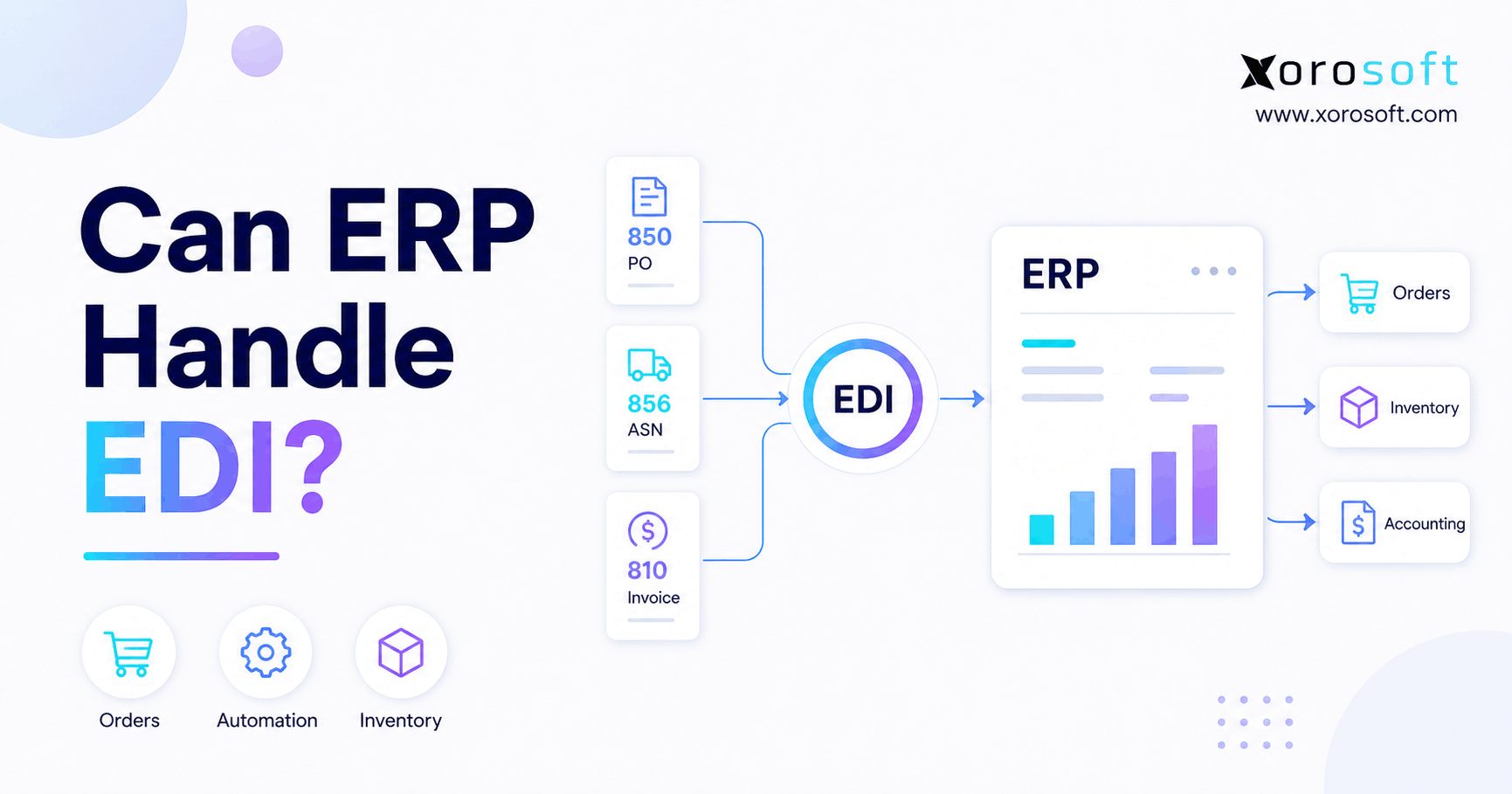
ERP EDI integration is a powerful solution for businesses looking to streamline and automate their data exchange processes.
1. When EDI Becomes an Operational System Issue
ERP EDI integration connects electronic trading-partner transactions with the orders, inventory, warehouse, fulfillment, and financial processes managed inside an ERP system. Therefore, an ERP can handle EDI when it either provides suitable EDI functionality or connects effectively with an EDI platform, provider, or integration layer.
At first, the question sounds simple: can an ERP receive an electronic purchase order?
However, receiving the document is only the beginning.
For example, once a retailer sends a purchase order, the supplier must validate the customer, confirm product information, check pricing, determine inventory availability, allocate stock, release warehouse work, confirm shipment details, and eventually create an invoice.
Consequently, ERP EDI integration becomes valuable because it connects the external transaction with the internal work required to fulfill it.
If employees still copy information between an EDI portal, spreadsheet, inventory application, warehouse system, and accounting package, the business technically uses EDI. Nevertheless, it does not have a connected EDI process.
Instead, the better question is:
Can the ERP turn an EDI transaction into a controlled operational workflow without unnecessary manual intervention?
For growing inventory-driven businesses, that distinction matters.
1.1 Can ERP Handle EDI?
Yes. ERP systems can handle EDI workflows when the required connectivity, document mapping, business rules, and downstream processes are properly configured.
However, ERP and EDI perform different jobs.
EDI primarily enables standardized electronic communication between trading partners. Meanwhile, ERP manages internal business processes such as orders, inventory, purchasing, warehousing, fulfillment, manufacturing, and accounting.
As a result, ERP EDI integration connects these two responsibilities rather than forcing one system to perform every function.
1.2 Why ERP EDI Integration Matters
Initially, a business may process a small number of wholesale orders manually.
As order volume increases, however, that approach becomes difficult to scale.
In addition, larger retailers frequently require suppliers to exchange structured electronic documents rather than emailed PDFs or spreadsheets.
Therefore, ERP EDI integration becomes increasingly important when wholesale volume, trading-partner requirements, warehouse complexity, or ecommerce expansion begins creating too many manual handoffs.
Moreover, integration gives the business a better opportunity to maintain one version of operational truth.
2. ERP and EDI Solve Different Problems
Although ERP and EDI often work together, they are not interchangeable technologies.
Therefore, understanding their individual roles is essential before designing an integration.
2.1 What Does ERP Do?
An ERP centralizes operational and financial processes across the business.
For example, depending on the platform, ERP can manage:
- sales orders
- purchase orders
- inventory
- warehouse operations
- customer records
- supplier records
- manufacturing
- accounts receivable
- accounts payable
- forecasting
- reporting
Consequently, ERP commonly becomes the internal system of record for business operations.
Furthermore, when several departments use the same operational data, teams can coordinate inventory, fulfillment, purchasing, and finance more effectively.
2.2 What Does EDI Do?
Electronic Data Interchange allows structured business documents to move electronically between organizations.
For instance, businesses may use EDI for purchase orders, acknowledgements, advance shipping notices, invoices, and inventory-related messages.
The X12 transaction-set library defines standardized documents used for many B2B transactions.
Therefore, EDI primarily manages communication between trading partners.
ERP, by contrast, manages what happens after that information reaches the company.
2.3 ERP vs EDI at a Glance
| Area | ERP | EDI |
|---|---|---|
| Primary purpose | Internal operational management | Trading-partner communication |
| Typical information | Orders, inventory, purchasing, accounting | POs, acknowledgements, ASNs, invoices |
| Primary users | Operations, warehouse, finance, purchasing | Retailers, suppliers, distributors |
| Inventory control | Usually direct | Communicates inventory information |
| Warehouse activity | May manage execution | Exchanges required data |
| Accounting | Often integrated | Exchanges financial documents |
| Main role | Operational system | Communication layer |
Therefore, companies frequently use both.
In practice, ERP EDI integration allows standardized external transactions to become actionable internal records.
3. How ERP EDI Integration Works
A well-designed ERP EDI integration removes unnecessary handoffs between trading-partner communication and operational execution.
Although individual architectures vary, most workflows follow several common stages.
3.1 A Trading Partner Sends an EDI Document
First, a customer, supplier, retailer, distributor, or logistics partner sends an electronic transaction.
For example, a retailer may send an EDI 850 Purchase Order.
Because the information follows an agreed format, software can process it without requiring an employee to manually read and re-enter every order field.
3.2 The Transaction Is Validated
Next, the EDI environment checks whether the incoming document satisfies the expected requirements.
For instance, validation may examine document structure, trading-partner identifiers, mandatory fields, and message rules.
As a result, incorrect transactions can be identified before they create bad operational data.
3.3 EDI Fields Are Mapped to ERP Records
After validation, external information must correspond with internal ERP data.
For example:
Retailer item 45891 → Internal SKU JKT-BLK-M
Retailer location 107 → Customer ship-to record
EDI quantity → Sales order quantity
Requested date → Required delivery date
Customer price → Sales order price
Therefore, mapping is one of the most important components of ERP EDI integration.
Otherwise, technically valid messages can still create incorrect business transactions.
3.4 ERP Creates the Transaction
Once the document has been translated and mapped, the ERP can create or update the appropriate record.
For an EDI 850, that record will commonly be a sales order.
Consequently, employees no longer need to copy the same order into another system.
3.5 Inventory and Fulfillment Respond
Next, inventory can be evaluated.
Depending on system rules, the ERP may allocate available inventory, identify shortages, select a warehouse, or place quantities on backorder.
As a result, the EDI order becomes part of the company’s actual inventory demand.
3.6 Outbound Documents Follow
Finally, subsequent activity can generate outbound messages.
For example, the company may transmit:
- purchase order acknowledgement
- advance shipping notice
- invoice
- inventory information
- order change acknowledgement
Therefore, ERP EDI integration can support an entire transaction lifecycle rather than only importing purchase orders.
4. Common EDI Documents an ERP May Process
Each EDI transaction serves a particular business purpose.
Consequently, ERP EDI integration must support the specific transaction sets required by the company’s trading partners.
4.1 EDI 850 — Purchase Order
An EDI 850 communicates purchase-order information.
Therefore, it often begins the order-to-cash workflow for a wholesale supplier.
Once integrated, the document can create a sales order automatically instead of requiring manual data entry.
4.2 EDI 855 — Purchase Order Acknowledgement
After receiving an order, the supplier may need to acknowledge whether it can fulfill the request.
Therefore, the EDI 855 helps communicate acceptance or changes.
For example, the supplier may confirm quantities, dates, or other order details.
4.3 EDI 856 — Advance Shipping Notice
An EDI 856 communicates shipment-related information.
Because retailers may plan receiving activity around that data, ASN accuracy can be operationally important.
Furthermore, shipment information should ideally originate from confirmed warehouse execution.
Otherwise, the physical shipment and electronic shipment notice may disagree.
4.4 EDI 810 — Invoice
After goods ship, an EDI invoice may be generated.
Ideally, therefore, invoice information should reflect the completed sales and shipment transaction.
As a result, accounting does not need to recreate the commercial transaction manually.
4.5 Other EDI Transactions
Businesses may also exchange order changes, inventory data, warehouse messages, transportation transactions, and remittance information.
For that reason, ERP EDI integration should be evaluated against actual partner requirements rather than a generic “EDI supported” checkbox.
5. Does EDI Need to Be Built Into the ERP?
No. ERP EDI integration can use several valid architectural approaches.
Therefore, businesses should evaluate the complete workflow rather than assuming native EDI is always better.
5.1 Native EDI
Some ERP environments provide direct EDI functionality.
Consequently, fewer systems may be involved in parts of the workflow.
However, buyers still need to understand partner connectivity, document mapping, onboarding, monitoring, and maintenance.
5.2 ERP Connected to an EDI Provider
Alternatively, the ERP may connect with a specialized EDI provider.
In this architecture, the EDI provider manages external communication while ERP handles operational processing.
As a result, the business can combine specialized trading-partner connectivity with centralized operational management.
5.3 Middleware
Another approach uses middleware between EDI and ERP.
For example, the integration layer may validate, transform, route, or map information.
Therefore, middleware can be valuable when the technology stack includes several applications.
5.4 Custom Integration
Finally, businesses can develop custom connections.
Although custom development can provide flexibility, it also creates maintenance responsibilities.
APIs, business rules, ERP fields, and customer requirements can change over time.
Consequently, long-term support should be considered before choosing this approach.
6. What ERP EDI Integration Changes Inside the Business
The real value of ERP EDI integration appears when incoming documents automatically influence inventory, warehouse activity, and financial workflows.
Simply receiving an electronic order is not enough.
6.1 Inventory Responds to New Demand
Once an EDI purchase order becomes an ERP order, inventory can react.
For example, the system can evaluate available inventory, committed inventory, incoming stock, and warehouse location.
As a result, planners gain a clearer view of actual demand.
Moreover, wholesale demand no longer sits outside the central inventory picture.
For inventory-driven companies, XoroONE provides a cloud ERP environment connecting inventory, purchasing, warehouse management, accounting, manufacturing, ecommerce, forecasting, and reporting.
Therefore, ERP EDI integration can become part of a broader operating model rather than an isolated transaction pipeline.
6.2 Warehouse Teams Execute the Same Order
Next, warehouse teams must fulfill what was promised.
Consequently, the warehouse should work from the same order and inventory information used by other departments.
For instance, warehouse employees may pick, scan, pack, and ship against the ERP order.
A connected XoroWMS environment can support warehouse execution while remaining tied to wider inventory and order workflows.
As a result, confirmed shipment information can flow downstream instead of being manually copied into the EDI process.
6.3 Accounting Receives the Final Result
After fulfillment, finance needs accurate transaction data.
Therefore, the invoice should reflect what actually shipped.
Additionally, inventory valuation and accounts receivable should remain connected with the same operational event.
Consequently, ERP EDI integration can support a more consistent order-to-cash process.
7. ERP EDI Integration for Wholesale Businesses
ERP EDI integration is particularly valuable for wholesale companies because one customer order can affect inventory, pricing, warehousing, purchasing, fulfillment, and accounting simultaneously.
Moreover, different wholesale customers often have different operational requirements.
7.1 Customer-Specific Requirements
One retailer may require specific document formats, shipping rules, labels, delivery windows, and item identifiers.
Another customer, meanwhile, may have completely different requirements.
Therefore, flexibility matters.
At the same time, operational controls must remain consistent internally.
7.2 Customer-Specific Pricing
Wholesale pricing may vary by account, product, quantity, contract, or promotion.
Consequently, the ERP needs to determine whether the incoming order reflects valid pricing.
Otherwise, automation could process incorrect values faster than manual workflows.
7.3 Inventory Allocation
Large customer orders can also compete for limited inventory.
Therefore, companies need clear allocation rules.
In addition, ecommerce demand may be consuming the same stock.
For this reason, ERP EDI integration should connect directly with inventory availability rather than treating wholesale orders as a separate demand pool.
8. ERP EDI Integration for Ecommerce Brands
For growing omnichannel brands, ERP EDI integration can bring wholesale demand into the same operating environment as ecommerce orders.
Initially, an ecommerce business may need only Shopify, accounting software, shipping tools, and spreadsheets.
However, wholesale growth often changes the technology stack quickly.
8.1 Shopify Plus Wholesale Complexity
Suppose a brand sells directly to consumers through Shopify while also supplying major retailers through EDI.
Meanwhile, Amazon may create another source of demand.
Consequently, three separate order channels are competing for the same inventory.
Therefore, the business needs one reliable view of available stock.
Xorosoft supports operational connectivity through its broader integrations ecosystem.
Additionally, the platform is available through the Shopify App Store, which is particularly relevant for Shopify merchants evaluating a more connected ERP architecture.
8.2 One Inventory Picture Across Channels
Without centralized inventory, wholesale and ecommerce teams may unknowingly promise the same stock.
Therefore, ERP EDI integration becomes part of a broader omnichannel inventory strategy.
For example, an incoming wholesale order should immediately influence available inventory seen by other channels when the business rules require it.
As a result, the company reduces dependence on manual channel adjustments.
9. Multi-Warehouse ERP EDI Integration
Multi-location companies often depend on ERP EDI integration to route demand against accurate warehouse inventory.
Once a company operates multiple locations, “Do we have stock?” is no longer enough.
Instead, teams must ask:
- Where is the stock?
- Which warehouse should fulfill the order?
- Is that inventory already committed?
- Can the required warehouse meet the retailer’s delivery date?
- Would another location reduce shipping time?
- Should the order split?
Consequently, multi-warehouse fulfillment introduces a decision layer between order receipt and shipment.
Furthermore, warehouse allocation must remain synchronized with the customer’s order.
Therefore, businesses should test ERP EDI integration across realistic multi-location scenarios before go-live.
10. ERP EDI Integration for Manufacturers
Manufacturers face another layer of complexity because customer orders may create production demand.
Therefore, ERP EDI integration should not stop at sales-order creation.
10.1 Finished-Goods Availability
First, the ERP needs to determine whether enough finished goods exist.
If inventory is available, the order may move directly to fulfillment.
However, shortages may create manufacturing requirements.
10.2 Raw-Material Demand
Next, production requirements can affect components and raw materials.
Consequently, purchasing and material planning may need to respond.
10.3 Production Scheduling
Meanwhile, committed customer dates may affect production priorities.
Therefore, a successful integration should allow EDI demand to become visible to planning teams.
Otherwise, the sales order may exist while production remains unaware of the requirement.
11. Common ERP EDI Integration Problems
Although automation reduces repetitive work, ERP EDI integration requires clean data and strong exception controls.
Otherwise, problems can propagate quickly.
11.1 Incorrect Product Mapping
A retailer may use one item number while the supplier uses another SKU internally.
Consequently, incorrect mapping can create a failed or inaccurate order.
Therefore, product cross-references should be tested carefully.
11.2 Customer or Location Mismatches
Similarly, external store or distribution-center identifiers may need to map to ERP ship-to records.
If the mapping is wrong, the order may be routed incorrectly.
As a result, customer master data becomes a critical implementation dependency.
11.3 Unit-of-Measure Problems
A customer may order cases while internal inventory is stored as individual units.
Therefore, conversion rules need to be explicit.
Otherwise, an apparently small data mismatch can create a large inventory error.
11.4 Duplicate Transactions
Automated workflows also need duplicate controls.
For example, a transaction could be resent after a communication failure.
Consequently, the system should verify document identifiers before creating another order.
11.5 Poor Exception Visibility
Even strong integrations encounter exceptions.
Therefore, teams need to know:
- what failed
- why it failed
- which partner was affected
- whether an ERP record was created
- whether a response is still required
- who owns the correction
As a result, monitoring is just as important as automation.
12. ERP EDI Integration and Retail Compliance
In addition, ERP EDI integration can improve transaction traceability when retailers question order, shipment, or invoice information.
Large retailers may have detailed requirements around timing, shipping, labeling, documentation, and transaction accuracy.
Therefore, operational consistency matters.
However, no ERP or EDI platform can guarantee that every chargeback will disappear.
Warehouse execution, master data, retailer requirements, shipping practices, and internal controls still matter.
Nevertheless, integration can reduce avoidable manual handoffs.
For example, an ASN built from confirmed warehouse data is generally more controlled than one reconstructed manually afterward.
Similarly, an invoice based on the completed transaction can stay aligned with what actually shipped.
Consequently, teams gain a better audit trail.
13. Signs Your Current ERP EDI Integration Is No Longer Enough
Several warning signs often indicate that the existing ERP EDI integration cannot support the company’s current complexity.
13.1 Employees Re-Key Orders
If employees receive an EDI transaction and then manually enter it into ERP, the workflow is not truly integrated.
As volume grows, therefore, administrative work grows with it.
13.2 Inventory Does Not Update Promptly
When wholesale orders do not affect inventory quickly, available quantities become misleading.
Consequently, other channels can sell stock already needed for retailer orders.
13.3 Warehouse and EDI Data Disagree
If warehouse staff operate from separate information, shipment quantities may differ from outbound EDI data.
Therefore, employees spend additional time reconciling transactions.
13.4 Finance Rebuilds Transactions
Similarly, finance teams may need to reconstruct invoices or reconcile several systems manually.
As a result, month-end friction often reveals operational fragmentation upstream.
13.5 Every Retailer Requires Extensive Manual Work
New trading partners naturally require setup.
However, each onboarding should not force the company to redesign the entire operating process.
Consequently, repeated integration projects can signal that the architecture is becoming difficult to scale.
13.6 Wholesale and Ecommerce Compete for Stock
When channel inventory is disconnected, overselling becomes easier.
Therefore, the business needs one operational view of demand and availability.
14. What to Look for in an ERP With EDI
When evaluating ERP EDI integration, buyers should test the entire order lifecycle rather than relying on a software feature checklist.
14.1 Trading-Partner Connectivity
First, identify every retailer, distributor, supplier, and logistics partner that must connect.
Then, confirm how each connection will be delivered.
14.2 Transaction-Set Support
Next, document required inbound and outbound messages.
Additionally, consider requirements from future customers.
14.3 Mapping Ownership
Ask who builds the mappings.
More importantly, determine who maintains them when partner requirements change.
Because changes are inevitable, responsibilities should be clear before launch.
14.4 Inventory Integration
An incoming EDI order should influence inventory correctly.
Therefore, test available, committed, allocated, backordered, and incoming quantities.
14.5 Warehouse Integration
Likewise, determine how the sales order becomes warehouse work.
After fulfillment, confirm how shipment data returns to the EDI workflow.
14.6 Accounting Integration
Eventually, the transaction becomes financial activity.
Therefore, test invoicing, accounts receivable, credits, and reconciliation.
14.7 Multi-Warehouse Capabilities
If the company operates several locations, test realistic fulfillment scenarios.
For example, determine what happens when one warehouse has stock while another does not.
14.8 Ecommerce Connectivity
For omnichannel businesses, EDI is only one source of demand.
Consequently, Shopify, Amazon, wholesale, marketplace, and B2B orders should feed a coherent operational process.
Businesses evaluating broader ERP architecture can review Xorosoft’s business solutions for inventory-driven operations.
15. Where Xorosoft Fits Into ERP EDI Integration
For Xorosoft customers, ERP EDI integration can sit within a broader environment connecting inventory, warehouse execution, ecommerce, purchasing, and accounting.
Xorosoft is designed for inventory-driven retailers, wholesalers, ecommerce brands, and manufacturers.
However, its role is broader than simply transferring EDI files.
Instead, Xorosoft can provide the operational layer behind those transactions.
For example, a retailer purchase order can become part of the same environment used to manage inventory availability, sales orders, warehouse fulfillment, purchasing, reporting, and financial records.
Furthermore, Xorosoft’s XoroERP capabilities can support businesses moving beyond disconnected accounting, inventory, and operational tools.
Consequently, the key benefit is not merely EDI connectivity.
The larger advantage is reducing fragmentation between order intake and operational execution.
Businesses can also review Xorosoft’s supported industries to understand how these workflows apply across apparel, furniture, sporting goods, wholesale, manufacturing, and other inventory-intensive sectors.
16. ERP EDI Integration Implementation Checklist
Successful ERP EDI integration depends as much on process design and testing as it does on technical connectivity.
Therefore, use the following sequence before launch.
16.1 List Every Trading Partner
First, document all customers, suppliers, retailers, distributors, and 3PL partners exchanging EDI transactions.
Additionally, include near-term accounts already being onboarded.
16.2 Document Required Transactions
Next, list every inbound and outbound document.
Consequently, project teams can identify capability gaps before implementation.
16.3 Clean Master Data
Before mapping begins, review:
- SKUs
- customer records
- ship-to locations
- pricing
- units of measure
- warehouse identifiers
- payment terms
Otherwise, automation may simply accelerate bad data.
16.4 Define Exception Rules
Determine what happens when an order contains an unknown SKU, incorrect price, invalid location, duplicate document, or unavailable quantity.
Therefore, common exceptions become controlled workflows.
16.5 Test Real Orders
Do not test only ideal scenarios.
Instead, use ordinary orders plus intentional errors.
As a result, teams understand how the integration behaves before production.
16.6 Test Warehouse Execution
Next, follow orders through allocation, picking, packing, and shipping.
Therefore, the company can verify that physical execution matches electronic communication.
16.7 Test Outbound EDI
Afterward, validate acknowledgements, ASNs, invoices, and other outbound messages.
Additionally, confirm that each message uses current operational data.
16.8 Test Accounting
Then, verify the financial result.
Consequently, finance teams can trust the integrated workflow.
16.9 Assign Exception Owners
Automation does not eliminate human decisions.
Therefore, every major failure category should have an assigned owner.
16.10 Review the Process After Launch
Finally, measure where manual intervention remains.
For additional examples of operational change, businesses can review Xorosoft customer case studies.
17. Frequently Asked Questions About ERP EDI Integration
17.1 Can ERP handle EDI?
Yes. ERP EDI integration allows ERP systems to process EDI-driven workflows when suitable EDI functionality, connectivity, mappings, and business rules are in place. However, EDI usually manages standardized trading-partner communication while ERP controls internal orders, inventory, fulfillment, warehouse activity, and accounting.
17.2 What is ERP EDI integration?
ERP EDI integration connects electronic trading-partner messages with ERP workflows. Therefore, an incoming purchase order can create an ERP sales order automatically instead of requiring an employee to copy customer, SKU, quantity, price, and delivery information manually.
17.3 Is EDI part of ERP?
Sometimes, although not always. Some ERP systems provide direct EDI functionality, while others connect with specialized providers or middleware. Therefore, businesses should ask exactly how EDI connectivity, mappings, partner onboarding, monitoring, and support are delivered.
17.4 Does ERP replace EDI?
Usually not. ERP manages internal processes, whereas EDI provides standardized communication between trading partners. Consequently, a business may require both systems even when they operate as one connected workflow.
17.5 Do I need EDI if I already have ERP?
Not necessarily. However, if major customers, suppliers, or retail partners require EDI transactions, ERP alone may not satisfy those requirements without suitable EDI connectivity.
17.6 Can EDI orders enter ERP automatically?
Yes. When mapping and validation rules are properly configured, incoming EDI orders can create ERP transactions automatically. Consequently, employees can avoid repetitive manual data entry.
17.7 What is EDI 850?
EDI 850 is commonly used for electronic purchase orders. Therefore, it often begins the retailer-to-supplier order workflow and can provide the information needed to create a sales order.
17.8 What is EDI 855?
EDI 855 is commonly used for purchase order acknowledgements. Consequently, the supplier can communicate whether the incoming order has been accepted or whether specific information has changed.
17.9 What is EDI 856?
EDI 856 is used for shipment information and is commonly associated with advance shipping notices. Therefore, accurate warehouse and shipment data is important when generating this transaction.
17.10 What is EDI 810?
EDI 810 is commonly used for electronic invoices. Ideally, therefore, the invoice should be generated from the completed sales and fulfillment transaction rather than recreated manually.
17.11 Does ERP EDI integration update inventory?
ERP EDI integration can create transactions that immediately affect inventory. However, the ERP or inventory management system should normally control how orders, allocations, receipts, adjustments, and shipments influence available quantities.
17.12 Can EDI connect with a warehouse management system?
Yes. For example, an ERP can receive an EDI order and subsequently create warehouse fulfillment work. After shipping, confirmed warehouse information can support outbound EDI transactions.
17.13 What is EDI mapping?
EDI mapping connects external trading-partner fields to internal ERP records. Consequently, external product codes, customer locations, quantities, units of measure, dates, and prices can be interpreted correctly.
17.14 What happens when an EDI transaction fails?
Ideally, the failed transaction enters a visible exception workflow. Therefore, users can identify the affected document, understand the problem, correct the underlying data, and safely reprocess the transaction.
17.15 What is EDI middleware?
EDI middleware operates between external EDI communication and internal applications. Therefore, it can validate, translate, transform, map, and route information before ERP processes the transaction.
17.16 What is the difference between EDI and API integration?
EDI typically uses standardized business documents between trading partners. APIs, meanwhile, provide interfaces for software applications to exchange information. Consequently, many modern companies use both approaches.
17.17 Can APIs and EDI work together?
Yes. For instance, Shopify orders may reach ERP through APIs while major retail orders arrive through EDI. Nevertheless, both can ultimately feed the same inventory and fulfillment system.
17.18 Why do wholesalers use EDI?
Wholesale businesses often process structured transactions at significant volume. Therefore, EDI can reduce dependence on emailed orders, spreadsheets, and manual retailer portals while improving consistency.
17.19 Do ecommerce companies need EDI?
Pure direct-to-consumer brands may not. However, ecommerce companies frequently encounter EDI requirements after expanding into wholesale or supplying major retailers.
17.20 Can small businesses use EDI?
Yes. Company size is not the deciding factor. Instead, partner requirements, order volume, operational complexity, and implementation economics determine whether EDI is appropriate.
17.21 Can ERP EDI integration reduce manual entry?
Yes. ERP EDI integration can automatically convert incoming electronic transactions into ERP records. As a result, employees spend less time copying data from EDI portals into internal systems.
17.22 Can ERP EDI integration reduce inventory errors?
It can reduce some synchronization errors by bringing EDI demand into the same inventory environment. Nevertheless, accurate inventory still depends on receiving, warehouse execution, master data, cycle counting, and process discipline.
17.23 Can ERP EDI integration help reduce chargebacks?
It can help reduce preventable transaction and data errors. However, retailer compliance also depends on shipping accuracy, labels, timing, routing instructions, and other customer-specific requirements.
17.24 How much does ERP EDI integration cost?
Costs vary according to trading partners, transaction volume, document types, mappings, implementation services, EDI provider fees, testing, customization, and ongoing support. Therefore, companies should evaluate total ownership cost rather than only connector pricing.
17.25 What should I look for in ERP EDI integration software?
Most importantly, test the complete transaction lifecycle. Therefore, evaluate partner connectivity, transaction support, mapping ownership, inventory integration, warehouse execution, accounting, exception management, ecommerce connectivity, multi-location support, and vendor responsibilities.
18. Turn EDI Into a Connected Operating Workflow
ERP can handle EDI. However, the real opportunity is not simply receiving electronic documents.
Instead, effective ERP EDI integration connects those documents with everything that happens afterward.
First, a purchase order becomes an operational transaction.
Next, inventory responds to the new demand.
Meanwhile, warehouse teams work from the same order and availability information.
After shipment, confirmed fulfillment data supports outbound EDI documents.
Finally, accounting receives the financial result of the same transaction.
Consequently, the business gains something far more useful than basic file automation: a connected order-to-cash workflow.
For growing retailers, wholesalers, ecommerce brands, distributors, and manufacturers, this becomes increasingly important as new channels, warehouses, customers, and products are added.
Therefore, businesses evaluating ERP software should move beyond the question, “Does this system support EDI?”
Instead, ask:
Can this ERP connect EDI orders with inventory, warehousing, ecommerce, purchasing, fulfillment, and accounting without forcing employees to maintain disconnected processes?
If the answer is no, the problem may not be the EDI provider alone. Instead, the broader operating architecture may have become the constraint.
For companies that have outgrown spreadsheets, standalone inventory tools, disconnected EDI applications, and fragmented warehouse processes, Xorosoft provides a cloud ERP approach built around connected inventory-driven operations.
When you are ready to evaluate ERP EDI integration against your own wholesale, Shopify, warehouse, inventory, and accounting requirements, Book a Demo with Xorosoft.
Recent Posts
-
 ERP Landed Cost Module vs Spreadsheet Calculations for Importers
 -
 How to Build an Open-to-Buy Plan for an Omnichannel Brand
 -
 Cold Storage WMS for Food and Beverage Distribution
 -
 ERP Buying Statistics 2026: Evaluation, Implementation, and Adoption Risks
 -
 How a Distributor Reduced B2B Order Exceptions Without Restricting Sales