To get started, it’s important to understand how EDI order to cash processes can streamline your business operations.
1. Why EDI Order to Cash Is More Than Four Documents
EDI order to cash is the operational workflow that connects a retailer’s purchase order with the supplier’s acknowledgment, warehouse fulfillment, advance ship notice, invoice, and payment process. In retail EDI, the core sequence often centers on EDI 850, 855, 856, and 810. However, the real challenge is not transmitting four electronic files. Instead, businesses must keep orders, inventory, warehouse activity, shipments, and accounting aligned from the moment a purchase order arrives until the invoice is reconciled.
1.1 The Retail EDI Workflow at a Glance
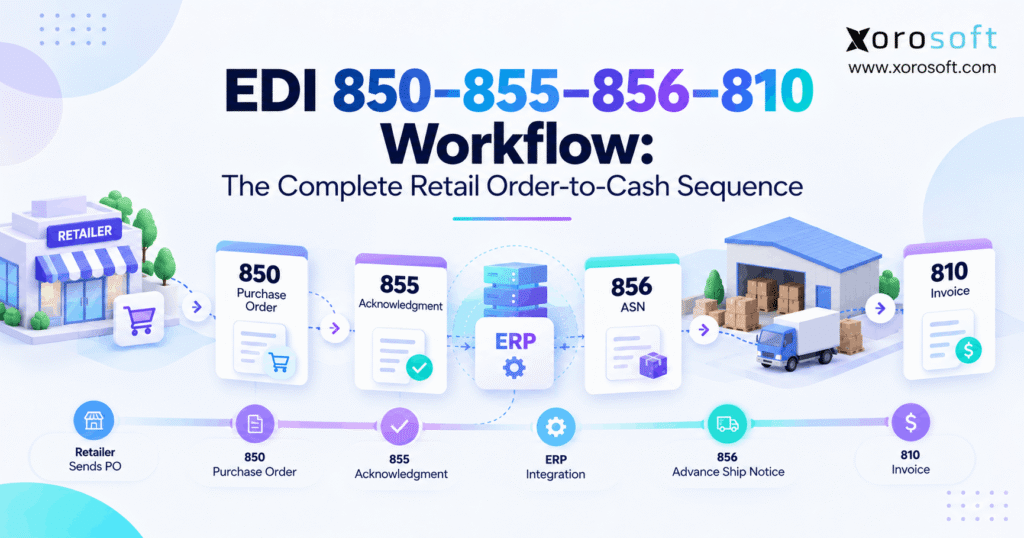
First, the retailer sends an EDI 850 Purchase Order. Next, the supplier processes the order and sends an EDI 855 Purchase Order Acknowledgment when that transaction is part of the trading-partner workflow.
Afterward, warehouse fulfillment begins. Once the shipment is confirmed, the supplier can send an EDI 856 Ship Notice/Manifest, commonly used as an advance ship notice. Finally, the supplier sends an EDI 810 Invoice.
X12 formally defines the 850 as a Purchase Order, the 855 as a Purchase Order Acknowledgment, the 856 as a Ship Notice/Manifest, and the 810 as an Invoice. Its supply-chain model places these documents across ordering, delivery, and invoicing stages.
1.2 What Each EDI Transaction Represents
The sequence becomes easier to understand when each document is connected to a real operational event.
| EDI transaction | Business event | Typical direction | Internal operational event |
|---|---|---|---|
| EDI 850 | Purchase Order | Retailer → Supplier | Sales order creation |
| EDI 855 | PO Acknowledgment | Supplier → Retailer | Order commitment |
| EDI 856 | Ship Notice / ASN | Supplier → Retailer | Shipment confirmation |
| EDI 810 | Invoice | Supplier → Retailer | Accounts receivable |
Therefore, EDI should reflect what the business actually did. If the warehouse ships 480 units, for example, the downstream shipment and billing workflow should not blindly continue using an earlier quantity of 500.
2. How the EDI Order-to-Cash Workflow Starts With EDI 850
The EDI 850 begins the core order process. Essentially, the retailer sends structured purchase-order data to the supplier instead of relying on email attachments, spreadsheets, or manual portal entry.
However, receiving the file is only the first step. Before fulfillment starts, the supplier must translate that external purchase order into an accurate internal sales order.
2.1 What an EDI 850 Purchase Order Contains
Depending on the trading partner, an EDI 850 can contain the purchase order number, buyer and seller identifiers, ship-to location, products, quantities, prices, requested dates, carrier details, allowances, charges, and packaging information.
Additionally, X12 notes that the 850 can support both straightforward and complex purchase orders. Therefore, suppliers should not assume that every retailer uses exactly the same fields or requirements.
Instead, the retailer’s implementation guide determines what the supplier must receive, validate, and return.
2.2 EDI 850 Validation Before Sales Order Creation
Before creating the sales order, the business should validate several critical fields:
- customer or trading-partner mapping;
- retailer SKU to internal SKU mapping;
- unit of measure;
- ordered quantity;
- negotiated pricing;
- ship-to location;
- requested ship date;
- requested delivery date;
- duplicate PO conditions.
For example, a retailer may identify a product differently from the supplier’s internal ERP. Consequently, an incorrect cross-reference can create the wrong sales order even though the incoming EDI document is technically valid.
Therefore, automation should remove manual entry without removing validation.
3. Why Inventory Matters in the EDI Order to Cash Process
An order can pass every technical EDI validation and still be impossible to fulfill. Therefore, the next stage of the EDI order to cash process depends heavily on reliable inventory information.
For growing businesses, this becomes harder when stock is distributed across several warehouses, retail commitments, ecommerce channels, marketplaces, and wholesale customers.
3.1 On-Hand Inventory Is Not Always Available Inventory
Suppose the ERP reports 3,000 units on hand. However, 700 units may already be allocated to ecommerce orders, 400 may be on quality hold, and 600 may belong to another wholesale customer.
As a result, the supplier cannot safely promise all 3,000 units to a new retailer.
Instead, the business needs an accurate available-to-promise view before committing the order. That becomes especially important when Shopify, Amazon, retail EDI, and wholesale demand draw from the same inventory pool.
3.2 Multi-Channel Demand Changes the Calculation
As channels expand, separate inventory systems create additional risk. For instance, Shopify could display available stock while a retailer order has already reserved the same units inside another application.
Therefore, companies need a synchronized operational view rather than several competing stock numbers.
Xorosoft’s XoroONE brings inventory, ecommerce, EDI, fulfillment, accounting, and related workflows into one operational environment. Consequently, businesses can evaluate retailer demand alongside other inventory commitments instead of treating EDI as an isolated channel.
4. EDI 855 Keeps the EDI Order-to-Cash Commitment Accurate
The EDI 855 Purchase Order Acknowledgment communicates the seller’s response to the buyer’s purchase order. Accordingly, it represents a business decision rather than simply proof that an electronic document reached the supplier.
X12 describes the 855 as the seller’s acknowledgment of a buyer’s purchase order. Moreover, its supply-chain guidance explains that the 855 may affirm the order or communicate changes after the 850 has been processed.
4.1 What the EDI 855 Can Communicate
Depending on the retailer’s requirements, the acknowledgment process may indicate that the supplier accepts the order, accepts it with changes, or cannot fulfill particular requirements.
For example, a retailer may request 1,000 units next Friday. However, the supplier may only be able to provide 700 by that date.
Therefore, the 855 should be driven by the actual business decision rather than an automatic response that ignores current inventory and fulfillment capacity.
4.2 Line-Level EDI Acknowledgment Matters
Many retail orders contain numerous SKUs. Consequently, the supplier may be able to fulfill some lines exactly while other lines require quantity or date changes.
In that situation, line-level acknowledgment provides better operational clarity.
Furthermore, the ERP, customer-service team, warehouse, and EDI response should all reflect the same approved state. Otherwise, the retailer may receive one commitment while warehouse workers receive another.
Therefore, synchronization between the sales order and EDI acknowledgment remains essential.
5. EDI 997 vs EDI 855 in the Retail EDI Workflow
The EDI 997 and EDI 855 are often confused. However, they serve different purposes within a retail EDI workflow.
An EDI 997 Functional Acknowledgment focuses on technical or syntactical processing. In contrast, an EDI 855 communicates the seller’s business response to a purchase order.
5.1 Technical Receipt Does Not Mean Order Acceptance
A successful technical acknowledgment does not prove that inventory exists, the price is correct, or the supplier can meet the requested date.
Therefore, receiving or sending a 997 should not trigger the same internal status as approving the purchase order.
Oracle’s order-to-cash example illustrates the distinction clearly. The workflow shows a 997 for validation status and, separately, an 855 when the company can fulfill and accept the purchase order.
5.2 EDI 997 vs EDI 855
| Question | EDI 997 | EDI 855 |
|---|---|---|
| Primary purpose | Technical acknowledgment | Business acknowledgment |
| Confirms document processing? | Yes | Not its main role |
| Confirms fulfillment commitment? | No | Communicates supplier response |
| Related business document | Multiple EDI transactions | EDI 850 purchase order |
Consequently, teams should create separate statuses for technical EDI processing and commercial order acceptance.
6. Warehouse Execution Drives the Next EDI Order-to-Cash Stage
Once the order is accepted, attention shifts from commercial commitment to physical execution. Therefore, warehouse activity becomes the source of truth for what actually leaves the building.
The process usually includes allocation, release, picking, verification, packing, labeling, carrier assignment, and shipment confirmation.
6.1 From Inventory Allocation to Warehouse Release
First, the system needs to decide which warehouse should fulfill the order. Next, inventory must be allocated according to customer, channel, warehouse, and priority rules.
Afterward, the approved sales order can move into warehouse execution.
A capable warehouse management system keeps inventory movement, picking, packing, and shipment activity connected with the order. As a result, outbound EDI documents can rely on confirmed warehouse information instead of manually reconstructed shipment details.
6.2 Why Warehouse Changes Must Flow Back
Real fulfillment rarely matches the original plan perfectly. For example, a picker may discover damaged units, a carton may need repacking, or a line may ship short.
Therefore, the final shipment state must flow back to the ERP and EDI process.
Otherwise, the electronic shipment notice may describe what the business planned to ship rather than what the warehouse actually shipped.
That difference becomes especially important when retailers use ASN information to prepare receiving operations.
7. EDI 856 Connects Shipment Data to the EDI Order to Cash Flow
EDI 856 is the X12 Ship Notice/Manifest transaction and is commonly used as an Advance Ship Notice, or ASN, in retail operations.
Importantly, the 856 can communicate much more than a simple “shipped” status. X12 states that it can describe shipment contents, order information, products, packaging, markings, carrier details, and the configuration of goods within transportation equipment.
7.1 The ASN Should Reflect the Physical Shipment
For that reason, the warehouse should supply the facts behind the ASN.
The process may need to capture:
- actual shipped quantities;
- carton or pallet structure;
- carrier information;
- tracking information;
- purchase-order references;
- product identifiers;
- shipment numbers;
- packaging information.
Therefore, building the 856 directly from the original 850 can be risky. If fulfillment changed anything after order receipt, the resulting ASN may no longer match the physical shipment.
7.2 Carton and Pallet Identification
Retail workflows may also rely on logistics-unit identifiers such as the SSCC. GS1 defines the Serial Shipping Container Code as an 18-digit identifier used for logistics units, while its logistics-label guidance makes the SSCC central to standardized logistic-unit identification.
Consequently, carton and pallet accuracy is not only a warehouse concern. Instead, physical labels, package hierarchy, and electronic shipment data may need to stay aligned.
8. EDI 810 Completes the Billing Side of EDI Order to Cash
After fulfillment, the supplier moves toward billing through the EDI 810 Invoice.
X12 defines the 810 for customary billing related to goods and services. Therefore, it represents the financial side of the transaction rather than another warehouse message.
8.1 Connect the Invoice to What Actually Happened
Suppose the retailer ordered 500 units. Initially, the supplier acknowledged all 500. However, the warehouse ultimately shipped 480.
In that scenario, the business must apply the agreed billing rules to the final transaction state.
Consequently, the 810 should not be created from an outdated order snapshot. Instead, pricing, quantities, purchase-order references, allowances, charges, and shipment information should remain consistent with the underlying commercial agreement.
8.2 Keep Accounting Connected With Operations
Once billing occurs, the workflow can affect accounts receivable, inventory valuation, revenue, customer balances, and reporting.
Therefore, disconnected accounting introduces another reconciliation point.
XoroERP combines operational and financial capabilities, including accounting, inventory, warehousing, vendor management, and reporting. As a result, businesses can keep invoicing closer to the sales-order and fulfillment events that created it rather than rebuilding the transaction inside a separate accounting workflow.
9. How ERP, WMS, and EDI Order to Cash Should Work Together
A reliable EDI order to cash architecture gives each system a clear responsibility.
The EDI layer exchanges structured partner messages. Meanwhile, the ERP manages the internal business transaction. In addition, the WMS executes warehouse activity, while accounting records the financial result.
9.1 One Workflow, Different System Responsibilities
| System | Primary responsibility |
|---|---|
| EDI platform | Receive, translate, transmit, and route partner documents |
| ERP | Sales orders, inventory commitments, customers, pricing, financial events |
| WMS | Picking, packing, inventory movements, shipment execution |
| Accounting | Receivables, posting, reconciliation, financial reporting |
Therefore, the systems should cooperate rather than maintain separate versions of the same transaction.
For example, the 850 can create demand in the ERP. Subsequently, the ERP can release fulfillment instructions. Once the WMS confirms shipment, that event can support the 856 and invoice workflow.
9.2 Integration Should Move Business State, Not Just Files
The most useful integration does more than move EDI documents from one folder to another.
Instead, it translates external messages into operational actions.
Xorosoft’s integration ecosystem connects business workflows across ecommerce, inventory, fulfillment, finance, and related systems. Additionally, businesses using Shopify can review Xorosoft’s listing on the Shopify App Store when evaluating how ecommerce orders fit beside wholesale and retail demand.
Consequently, multi-channel operators can think about EDI as one part of a larger order-management architecture.
10. Supporting Transactions Around EDI Order to Cash
The 850, 855, 856, and 810 create a useful core sequence. However, real trading relationships can include additional transactions.
Therefore, teams should understand the supporting documents that may affect changes, technical acknowledgments, inventory updates, receiving, or payment.
10.1 EDI 860 and 865 Handle Purchase-Order Changes
X12 defines EDI 860 as a buyer-initiated Purchase Order Change Request. Meanwhile, EDI 865 can support the seller’s acknowledgment or response to purchase-order changes.
For example, a retailer may reduce a quantity after the supplier has already allocated inventory.
Consequently, the change cannot stop inside the EDI system. Instead, the approved revision needs to reach the ERP and, when necessary, the warehouse before fulfillment continues.
10.2 EDI 820 Extends the Flow Toward Payment
After the invoice stage, some workflows also use EDI 820 Payment Order/Remittance Advice.
X12 positions the 820 in the payment stage of its supply-chain flow. Therefore, the broader order-to-cash lifecycle can continue beyond the 810 invoice into payment and cash application.
Nevertheless, not every trading partner uses the same transaction mix. The partner agreement always determines the actual workflow.
11. Common EDI Order-to-Cash Errors and Their Root Causes
Most EDI failures are not simply transmission outages. Instead, problems often start with small data differences that move from one system to the next.
Therefore, fixing the root cause requires tracing the entire transaction rather than only checking whether a file was sent.
11.1 Errors That Start With EDI 850
Common examples include:
- incorrect customer mapping;
- wrong SKU cross-references;
- invalid units of measure;
- duplicate purchase orders;
- outdated pricing;
- invalid ship-to locations.
For example, an incorrect SKU map can create the wrong sales order. Subsequently, inventory allocation, picking, the ASN, and the invoice may all remain internally consistent while still referring to the wrong product.
Therefore, early validation has an outsized impact on the rest of the workflow.
11.2 Errors That Appear Later
Other problems emerge during fulfillment or billing.
For instance, the warehouse may ship a short quantity while the ASN still reports the original quantity. Likewise, accounting may invoice the order quantity instead of the shipped quantity.
Consequently, the retailer receives conflicting information from documents that should describe the same commercial transaction.
A strong exception process should therefore show the original value, changed value, reason, user or system responsible, timestamp, and resolution status.
12. Retail Compliance Depends on the Entire Retail EDI Workflow
Supporting an EDI transaction number does not automatically mean a supplier satisfies every retailer’s requirements.
Instead, each trading partner may define specific versions, required fields, timing rules, labels, shipment structures, testing procedures, and exception processes.
12.1 Trading-Partner Rules Come First
Therefore, suppliers need partner-specific configurations rather than one universal mapping.
For each retailer, teams should verify:
- mandatory document fields;
- SKU and location identifiers;
- acknowledgment requirements;
- order-change rules;
- ASN timing;
- carton or pallet information;
- invoice references;
- exception handling.
Additionally, teams should document the operational cut-off after which a purchase-order change can no longer alter an active warehouse task.
12.2 Compliance Requires Traceability
When a retailer questions an order, operators should be able to trace the full history.
That means finding the original 850, the resulting sales order, the supplier’s acknowledgment, any changes, the final pick and pack activity, the 856, and the 810.
Consequently, auditability becomes more important as transaction volume increases.
Xorosoft’s broader business solutions connect operational areas such as inventory, warehouse management, ecommerce, and finance. Therefore, teams can evaluate compliance issues within the broader transaction rather than treating each document as an isolated file.
13. When EDI Order to Cash Becomes an ERP Problem
A business does not need a new ERP merely because it exchanges EDI documents. However, EDI order to cash becomes an ERP issue when the internal systems can no longer support the transaction reliably.
For example, low-volume operations may successfully use an EDI provider with existing accounting and inventory tools. As volume grows, however, repeated manual handoffs can create delays and inconsistencies.
13.1 Warning Signs the Architecture Is Breaking
Common warning signs include:
- employees re-entering 850 orders;
- inventory checked manually before acknowledgments;
- several warehouses using different stock records;
- ASN information entered outside warehouse execution;
- invoices manually reconciled against shipments;
- frequent spreadsheet-based corrections;
- limited exception visibility;
- Shopify, Amazon, EDI, and wholesale orders using different processes.
Therefore, the issue is often not the EDI connection itself. Instead, the business lacks one operational workflow behind it.
13.2 Different Industries Feel the Pressure Differently
Apparel companies may struggle with style, color, size, and retailer labeling requirements. Meanwhile, furniture companies may manage larger products and split shipments.
Similarly, food businesses can face lot and date requirements, while distributors may process large multi-line wholesale orders.
Consequently, companies should evaluate ERP requirements according to their operating model. Xorosoft’s industries coverage spans inventory-driven environments such as ecommerce, wholesale, manufacturing, apparel, consumer products, and related sectors.
14. What to Evaluate in an EDI-Capable ERP
An ERP should not be selected simply because a feature list says “EDI.”
Instead, businesses should test what happens between each EDI message and the operational event behind it.
14.1 Evaluate the Complete EDI Transaction Workflow
Start with the 850. Can the system create a valid sales order without rekeying data? Next, evaluate the 855. Can the response use current inventory and approved business rules?
Then, inspect fulfillment. Can warehouse execution update quantities, cartons, tracking, and shipment status accurately?
Afterward, confirm that shipment information can support the 856. Finally, determine whether the 810 remains connected to the order and fulfillment transaction.
Therefore, the evaluation should follow the workflow rather than a checklist of isolated features.
14.2 Test Exceptions, Not Only Happy Paths
A polished demo often shows a perfect order. However, real operations include shortages, substitutions, split shipments, changed dates, duplicate orders, damaged inventory, and pricing differences.
Consequently, buyers should ask how the system handles exceptions.
Xorosoft is especially relevant for inventory-driven businesses that need ERP, inventory, warehouse, ecommerce, accounting, and order-management workflows in one environment. Additionally, businesses can review real implementation patterns through Xorosoft’s case studies before defining their own evaluation criteria.
15. Build a Reliable EDI Order-to-Cash Process From One Operational Truth
A reliable EDI order to cash process does not begin with automation for automation’s sake. Instead, it begins by deciding which system owns each important business state.
The retailer creates demand through the 850. Next, the supplier validates that demand and determines what it can commit. Afterward, warehouse execution establishes what actually ships. Finally, accounting records what the customer owes.
Therefore, the EDI documents should communicate those operational facts rather than create parallel versions of them.
When every stage uses connected data, teams can automate routine transactions while still identifying exceptions quickly. As a result, operators spend less time rebuilding orders, comparing spreadsheets, or asking which system contains the correct quantity.
For inventory-driven companies that have outgrown disconnected applications, Xorosoft provides cloud ERP, inventory, WMS, accounting, purchasing, ecommerce, and order-management capabilities in a connected environment.
If your current process still depends on manually moving data between EDI, inventory, warehouse, and accounting systems, Book a Demo to map the workflow from retailer purchase order through fulfillment and invoicing.
FAQs
What is EDI order to cash?
EDI order to cash connects a retailer’s purchase order, supplier acknowledgment, fulfillment, shipment notice, invoice, and payment process through structured electronic transactions.
What is the EDI 850–855–856–810 sequence?
EDI 850 carries the purchase order, 855 communicates the supplier response, 856 reports shipment information, and 810 communicates the invoice.
What is the difference between EDI 997 and EDI 855?
EDI 997 addresses technical or syntactical acknowledgment. In contrast, EDI 855 communicates the supplier’s business response to a purchase order.
Can an EDI 850 automatically create a sales order?
Yes. However, the integration should first validate customer mapping, SKUs, quantities, pricing, units of measure, locations, and duplicate-order conditions.
Why should EDI 856 use warehouse data?
Warehouse data reflects what actually shipped. Therefore, using confirmed pick, pack, carton, quantity, carrier, and tracking information helps keep the ASN accurate.
Does every retailer use the same EDI requirements?
No. Retailers can define different versions, mandatory fields, timing requirements, labels, testing rules, and business processes through their trading-partner specifications.
When should a business upgrade its EDI workflow?
Consider an upgrade when manual re-entry, inventory conflicts, ASN corrections, invoice reconciliation, multi-warehouse complexity, or disconnected sales channels repeatedly create operational problems.
Recent Posts
-
 How a Distributor Reduced B2B Order Exceptions Without Restricting Sales
 -
 When Should Ecommerce Brands Freeze Inventory and Integration Changes Before Peak?
 -
 Why ERP Proof-of-Concept Demos Fail to Expose Operational Gaps
 -
 AI Purchase Order Recommendations: Required Data, Guardrails, and Approval Rules
 -
 Shopify Delivery Rules Software Connected to ERP and Warehouse Data