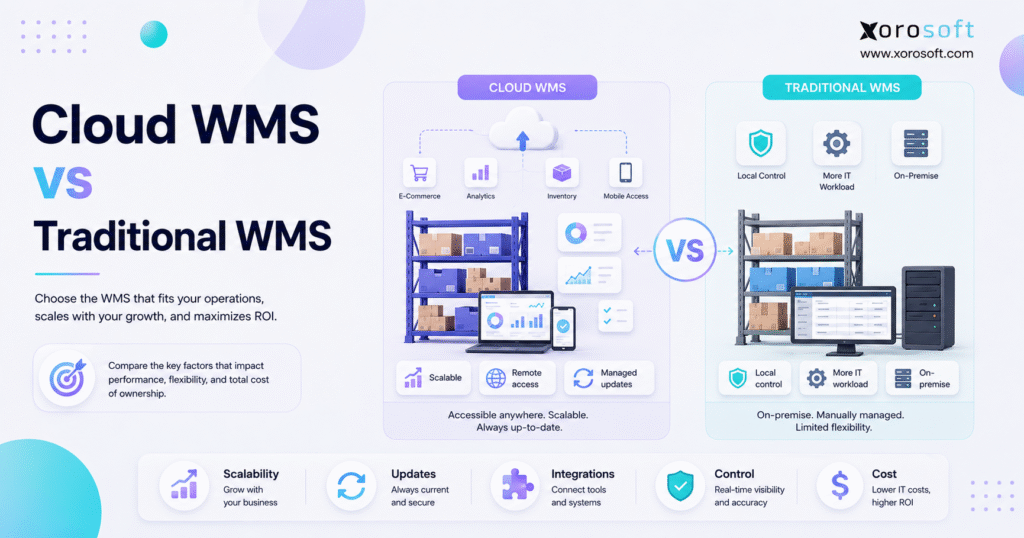
This article provides a detailed cloud WMS comparison to help you evaluate the best solutions for your business.
1. A Better Way to Frame the Decision
A cloud WMS comparison should do more than list software features. Instead, it should explain how cloud and traditional systems affect warehouse speed, cost, control, growth, and daily work. Although both models can manage stock movement, they place hosting, updates, support, and scaling in very different hands.
For many growing companies, the real choice is not simply cloud or server. Rather, the choice is how much technology work the business wants to own. In practice, a cloud warehouse management system places the main software and hosting work with the vendor. By contrast, a traditional WMS normally runs on servers owned or controlled by the company.
Therefore, the right answer depends on the operating model. For example, a growing ecommerce brand may value faster setup and easier links with sales channels. Meanwhile, a plant with strict local controls may value direct system ownership.
This guide provides a practical cloud WMS comparison so warehouse, finance, IT, and operations teams can choose a model based on business needs rather than software claims.
1.1 The short answer
In most cases, the cloud WMS comparison favors cloud systems for businesses that need faster rollout, easier growth, remote access, and less server work. However, traditional WMS may still fit companies that need local control, deep custom code, or reliable use in facilities with weak internet access.
1.2 Cloud WMS and traditional WMS at a glance
| Decision area | Cloud WMS | Traditional WMS |
|---|---|---|
| Hosting | Managed by the vendor or cloud provider | Managed by the company or IT partner |
| Upfront cost | Often lower | Often higher |
| Payment model | Ongoing subscription | License, support, and hardware costs |
| Setup | Usually faster | Usually longer |
| Updates | Vendor-led | Company-led |
| New warehouses | Easier to add | More setup may be required |
| Remote access | Usually built in | Extra setup may be required |
| Customization | Rules, settings, apps, and APIs | Deeper code changes may be possible |
| IT workload | Lower server burden | Higher server burden |
| Internet need | Usually required | Local use may continue |
| Data control | Shared duties | More direct local control |
1.3 Why this decision matters
First, the deployment model affects how quickly a new warehouse can go live. In addition, it shapes how teams handle data safety, backups, updates, and support.
As a result, a poor choice can create cost and delay long after the first launch. Therefore, the system should be judged against both current needs and future growth.
2. What a Warehouse Management System Actually Does
In simple terms, a warehouse management system controls how goods move through a facility. For example, it can guide receiving, putaway, stock movements, picking, packing, counting, transfers, and shipping.
In addition, the system can give teams a current view of bins, stock levels, lots, serial numbers, and open warehouse tasks.
However, a WMS does not always run the complete business. Purchasing, accounting, demand planning, customer orders, and production may still sit in separate tools. Therefore, buyers must decide whether they need a focused warehouse tool or a broader system that links warehouse work with the rest of the company.
2.1 Core warehouse workflows
A capable WMS should help teams:
- Receive goods against purchase orders.
- Put stock into the correct bin or zone.
- Track inventory by warehouse and location.
- Pick orders with fewer errors.
- Pack and ship with clear checks.
- Count stock without closing the full warehouse.
- Handle returns and stock transfers.
- Track users, tasks, and exceptions.
- Create current warehouse reports.
- Control lot, serial, or expiry information where required.
2.2 Standalone WMS or connected ERP?
A standalone WMS may be enough when the main pain sits on the warehouse floor. However, the issue may be wider when staff also use spreadsheets for purchasing, separate apps for inventory, and another system for finance.
As a result, an ERP-connected WMS can reduce repeated work. For example, one receipt can update inventory, purchase orders, supplier balances, and accounting records.
Consequently, teams spend less time matching one system against another.
3. What Is a Cloud WMS?
More specifically, a cloud WMS is warehouse software delivered through cloud services and reached through the internet. The NIST cloud computing definition describes cloud use as on-demand access to shared computing resources.
In practical terms, the vendor provides the main system while users connect through a browser, mobile device, or warehouse scanner.
Moreover, cloud systems often use an ongoing subscription. Depending on the vendor, the fee may cover software, hosting, support, and upgrades. Still, buyers should check exactly what is included because fees may vary by user, warehouse, order volume, storage, or integration.
3.1 SaaS WMS and hosted WMS are not always the same
A SaaS WMS is usually built and run as a vendor-managed service. Therefore, the provider can release fixes and new tools through a regular update plan.
By contrast, a hosted WMS may be older software moved to an outside data center. Although users reach it online, the core design may still behave like a local system.
For that reason, buyers should ask whether the product was built for cloud use or simply moved to hosted servers.
3.2 Questions that reveal the real architecture
Ask the vendor:
- Do all customers use the same current version?
- How often are updates released?
- Can the system add a warehouse without a new server?
- Are integrations built through supported APIs?
- Is a test environment included?
- How does the vendor manage backups?
- Can the customer export all business data?
- What happens when internet service fails?
- How are major product changes communicated?
4. What Is a Traditional WMS?
By contrast, a traditional WMS, also called an on-premise WMS, runs on servers owned or controlled by the company. Therefore, the business or its IT partner manages the main system, database, network, backups, security, and updates.
As a result, this model gives the company more direct control. However, it also creates more work. For example, the business may need staff or outside help for server care, security fixes, system checks, database work, and recovery tests.
A fair cloud WMS comparison must weigh the value of direct local control against the cost of servers, updates, backups, security, and ongoing IT support. Traditional deployment may still be appropriate, although the business must be prepared to manage those duties over the full life of the system.
4.1 Where traditional WMS may still make sense
Traditional WMS may fit when a facility:
- Has weak or unstable internet access.
- Must keep key systems inside a closed network.
- Uses older machines that require special local links.
- Needs deep changes that a SaaS product cannot support.
- Has a large IT team that can manage the full environment.
- Has firm rules about local hosting or data control.
Nevertheless, businesses should test whether each rule remains valid. In some cases, a must-stay-local view comes from old habits rather than a current operational need.
5. Cloud WMS Comparison Across the Main Decision Areas
A useful cloud WMS comparison must look beyond the first software quote. Therefore, the next sections compare setup, cost, growth, updates, safety, access, customization, and integrations.
5.1 Setup and launch
Cloud projects can begin without buying a main server for each warehouse. As a result, the project team can focus sooner on data, workflows, devices, user roles, and training.
Traditional projects must handle those same tasks. In addition, they may require server setup, database work, network changes, backup tools, and remote-access planning.
However, cloud software does not remove implementation risk. For example, poor stock data, weak process maps, limited testing, and unclear ownership can delay any project.
Therefore, the implementation plan matters as much as the hosting model.
5.2 Upfront and ongoing costs
Cloud WMS often lowers the first technology spend because the company does not need to buy and set up as much server equipment. Instead, the business pays a regular subscription.
Traditional WMS often requires a larger upfront spend on licenses, servers, storage, database tools, and setup. However, the long-term cost also depends on support, hardware life, staff time, security, and upgrade needs.
Therefore, compare the complete cost over several years. For instance, a low setup fee can hide high transaction or user charges. Likewise, a paid license can hide future server, support, and upgrade costs.
5.3 Growth and new warehouses
Cloud WMS often makes it easier to add users, warehouses, and sales channels. For example, a business can connect a new site to the same inventory view without building a full local server environment.
By contrast, a traditional system may require new hardware, network work, and a larger support plan. Consequently, growth can take more time and planning.
Still, the vendor must prove that the cloud system can handle added orders, users, and data. Therefore, buyers should request customer examples, clear limits, and tests based on expected order volume.
5.4 Updates and support
With cloud WMS, the vendor usually manages the core release plan. As a result, customers are less likely to remain on a very old software version.
However, users should still test key workflows after major changes. For example, a new release can affect labels, scanners, reports, or channel connections.
On the other hand, traditional WMS gives the company more control over update timing. Nevertheless, delayed updates can create risk. Over time, old code may stop working with newer tools, devices, or security rules.
5.5 Data security and control
Cloud does not mean that the vendor handles everything. Instead, security is a shared duty. The vendor protects the main service, while the customer still controls users, roles, devices, passwords, and operating rules.
Likewise, on-premise does not mean secure by default. The company must keep servers patched, test backups, manage access, and plan for hardware, power, or network failure.
Therefore, both models should be reviewed for:
- Strong login controls.
- Role-based permissions.
- Safe data storage and transfer.
- Audit logs.
- Backup testing.
- Recovery plans.
- User removal steps.
- Device controls.
- Clear response procedures.
- Data export and ownership rules.
5.6 Remote access and warehouse uptime
Cloud WMS usually gives approved users access from different locations. Therefore, managers can review work without joining the same local network.
Traditional WMS may also provide remote access. However, the business may need VPN tools, remote servers, or extra network setup.
Meanwhile, warehouse staff still need a plan for outages. A second internet connection, mobile backup, and clear manual steps can reduce risk.
5.7 Custom work
Traditional WMS may allow deep code changes. For some companies, that flexibility is useful. However, custom code can make future upgrades slow and expensive.
Instead, cloud WMS usually relies on settings, rules, APIs, custom fields, and approved extensions.
Therefore, teams should first decide whether a process truly needs custom code. In many cases, the old workflow should change instead of forcing the new system to copy it.
5.8 Links with other business systems
Modern warehouse work rarely stands alone. Therefore, a WMS may need to connect with:
- ERP and accounting systems.
- Shopify and other online stores.
- Amazon and marketplaces.
- EDI networks.
- Shipping carriers.
- 3PL partners.
- Payment tools.
- Reporting systems.
- Mobile devices and scanners.
For example, XoroWMS may be useful when warehouse work needs to connect with stock, orders, buying, and other daily tasks.
However, the important question is not whether a vendor lists an integration. Instead, buyers should ask how data moves, which system owns each record, and how failed transactions are corrected.
6. Main Benefits of Cloud WMS
The benefits shown in a cloud WMS comparison are most relevant to businesses that change quickly. For example, cloud systems can reduce server work, support faster site launches, and make remote access easier.
Moreover, they can help growing operations connect warehouses without rebuilding the technology setup at every location.
The main benefits include:
- Faster setup: Teams can begin configuration without a long server project.
- Less local technology work: The vendor owns more of the core system care.
- Easier growth: New warehouses can join one shared environment.
- More regular updates: Customers stay closer to the current version.
- Wider access: Approved staff can work across several locations.
- Better integrations: APIs can connect stores, carriers, finance, and reports.
- More predictable support: The vendor manages much of the central system.
- Simpler disaster planning: Core backups and service recovery are often vendor-managed.
However, each benefit depends on the vendor’s real design and service model. Therefore, buyers should ask for proof instead of relying on broad sales terms.
7. Main Limits of Cloud WMS
However, a cloud WMS comparison must also account for the limits of cloud software. For example, subscription fees can rise as users, warehouses, orders, storage, or integrations grow.
In addition, the business depends on the vendor’s service, product direction, support team, and financial health.
Internet access is another key factor. Although a backup connection can reduce risk, each warehouse still needs a clear outage plan.
Before signing, review:
- Price increases.
- User and order limits.
- Data export rules.
- Contract-end terms.
- Support hours.
- Update notice periods.
- Test-system access.
- Data location.
- Service targets.
- Exit assistance.
- Integration charges.
- Training and implementation fees.
Consequently, the lowest first quote may not be the best long-term choice.
8. Main Benefits of Traditional WMS
By comparison, traditional WMS gives the company direct control over servers, database tools, and update timing. Therefore, it may fit warehouses with strict local rules.
In addition, on-premise systems may support deep custom code. In turn, that can help when a warehouse has rare processes or older equipment that cannot easily be replaced.
Traditional systems may also keep running through a local network when the outside internet connection fails.
However, local control adds value only when the company can support the environment well. Without skilled staff, internal ownership can become a weak point rather than a benefit.
9. Main Limits of Traditional WMS
A complete cloud WMS comparison must include the long-term burden of traditional systems.
First, on-premise software often requires more hardware, IT time, and planned care. Moreover, each new warehouse can add server and network work.
As time passes, older versions may become difficult to connect with newer stores, carriers, reporting systems, or devices. As a result, staff may build manual workarounds around the gaps.
Furthermore, deep custom code can block upgrades. Therefore, the company may stay on an old version because moving forward feels too risky or expensive.
10. Cloud WMS Comparison of Total Cost
A sound cloud WMS comparison should use total cost rather than license price alone.
10.1 Cost areas to include
| Cost area | Cloud WMS | Traditional WMS |
|---|---|---|
| Software | Regular subscription | License and support |
| Setup | Rules, integrations, data, and training | Rules, integrations, data, servers, and training |
| Hardware | Scanners, printers, and local networking | Scanners, printers, servers, storage, and networking |
| Hosting | Often part of the service | Managed by the company or outside host |
| Updates | Often part of the fee | May require a separate project |
| IT labor | Lower server workload | Higher server workload |
| New warehouses | Added fee and setup | Added hardware and setup |
| Recovery | Shared responsibility | Mainly company-led |
| Exit | Data migration and changeover | Data migration and old hardware shutdown |
This cloud WMS comparison should also include costs that do not appear in the first software quote. Internal support time, outages, hardware replacement, integrations, staff training, and future warehouse expansion can materially change the result.
Therefore, buyers should compare both models over at least three to five years.
Use this simple formula:
Five-year WMS cost = setup + software + hardware + integrations + IT labor + support + upgrades + training + downtime + growth costs
Cloud is not always cheaper. However, it often gives a clearer cost path for businesses that do not want to build a large internal technology team.
11. Who Should Choose Cloud WMS?
The cloud WMS comparison often points toward cloud deployment for:
- Growing ecommerce brands.
- Multi-warehouse businesses.
- Wholesale distributors.
- Companies with small IT teams.
- Businesses adding sales channels.
- Teams that need current stock across locations.
- Companies replacing several separate applications.
- Businesses that need easier remote access.
For example, XoroONE brings warehouse work together with inventory, purchasing, accounting, production, reporting, and ecommerce.
Therefore, it may suit a business that needs more than a standalone warehouse tool.
12. Who May Still Choose Traditional WMS?
A cloud WMS comparison should not assume that every company belongs in the cloud. Traditional WMS may remain suitable for isolated sites, businesses with strict hosting rules, operations tied to specialist equipment, and companies with strong internal IT teams.
Traditional WMS may fit:
- Facilities with poor internet service.
- Closed or isolated work areas.
- Companies with firm local-hosting rules.
- Warehouses tied to rare older machines.
- Businesses with large IT teams.
- Operations that require deep source-code changes.
For that reason, the cloud WMS comparison should test whether local hosting is a true business need or simply a legacy preference.
A requirement that made sense ten years ago may no longer match the current cost, risk, or operating model.
13. Cloud WMS Comparison by Industry
A cloud WMS comparison should reflect the products, channels, and warehouse rules of each industry. Therefore, the same answer will not fit every business.
13.1 Apparel and fashion
Apparel businesses manage style, size, color, season, and high return rates. As a result, they often need current inventory across stores, ecommerce channels, and wholesale accounts.
Therefore, cloud WMS can help each team work from one shared inventory view. However, the system must also handle rapid SKU growth and clear allocation rules.
13.2 Furniture and home goods
Furniture businesses manage large goods, storage limits, long lead times, and delivery plans. Therefore, the WMS should connect warehouse capacity with sales orders, purchasing, and delivery work.
Likewise, a cloud model may make multi-site visibility easier. Still, every warehouse needs strong device and network plans.
13.3 Sporting goods
Sporting-goods companies often manage seasonal demand, bundles, variants, retail, and wholesale channels. Consequently, inventory must be allocated carefully.
As a result, cloud WMS can support one shared stock view. In addition, it can make it easier to add temporary users or new sites during busy periods.
13.4 Food and beverage
Food businesses may need lot tracking, expiry dates, recall support, and first-expired-first-out picking. Therefore, the system must capture each inventory movement carefully.
In addition, a cloud WMS can share trace data across warehouses. However, the company must confirm that the vendor supports its exact date, lot, and picking rules.
13.5 Wholesale distribution
Wholesale businesses manage bulk orders, EDI, customer rules, purchasing, and several warehouses. As a result, warehouse work often affects finance, customer service, and sales at each step.
A connected platform can help. For example, Xorosoft’s business solutions cover warehouse, inventory, order, purchasing, accounting, and channel needs.
13.6 Manufacturing
Manufacturers must track components, raw materials, work in process, and finished goods. Therefore, a WMS choice should also account for bills of material, work orders, purchasing, and production costs.
In this case, XoroERP may be worth reviewing when warehouse and production work must remain connected.
Businesses can also review the industries Xorosoft serves to see how requirements differ across apparel, furniture, food, wholesale, and manufacturing.
14. Cloud WMS Comparison for Ecommerce and Omnichannel Operations
An ecommerce-focused cloud WMS comparison must examine order, inventory, return, and shipment data across every channel.
For that reason, a cloud WMS may connect with Shopify, Amazon, EDI, 3PL providers, retail stores, and shipping carriers.
However, each integration should have a clear data owner. For example, the company must decide which system owns:
- Product records.
- Inventory quantities.
- Orders.
- Customer details.
- Prices.
- Shipment status.
- Returns.
- Warehouse locations.
The Xorosoft ERP listing on the Shopify App Store shows support for Shopify order sync, inventory sync, multi-location operations, payouts, and related data flows.
Therefore, Shopify businesses can review the listing as an external reference while assessing platform fit.
Meanwhile, warehouse teams should test:
- Order changes.
- Split shipments.
- Canceled orders.
- Returns.
- Back orders.
- Multi-location fulfillment.
- Inventory holds.
- Failed data sync.
- Partial shipments.
- High-order-volume periods.
15. Standalone Cloud WMS or ERP-Connected WMS?
A cloud WMS comparison should also examine whether the business needs only warehouse software or a wider operating system.
At first, a standalone WMS can solve floor-level issues. For example, it can guide picks, improve bin control, and support cycle counts.
However, the root problem may sit outside the warehouse. Purchasing may still happen in spreadsheets. Finance may still correct inventory values by hand. Sales channels may show different stock levels. Production may not see component demand.
Therefore, an ERP-connected WMS can be a stronger fit when one inventory event must update several teams.
XoroONE links warehouse tasks with inventory, purchasing, accounting, production, ecommerce, and reporting. In addition, XoroWMS can support businesses that need deeper warehouse control.
15.1 When a standalone tool may be enough
A standalone WMS may be enough when:
- Finance and purchasing systems already work well.
- Inventory values match without manual corrections.
- Sales-channel links are stable.
- Production is not part of the business model.
- The main gap is picking, packing, counting, or bin control.
15.2 When the problem is wider
An ERP-connected WMS deserves a closer look when:
- Inventory and accounting do not match.
- Buyers work mainly in spreadsheets.
- Reports require manual exports.
- Sales channels show different stock levels.
- Production lacks component data.
- Staff enter the same transaction more than once.
Is Your Warehouse the Only Problem?
A free ERP-fit review can show whether the main gap sits inside the warehouse or across inventory, purchasing, accounting, and sales.
Therefore, it helps teams define the correct project before choosing a vendor.
16. When to Replace a Traditional WMS
A cloud WMS comparison becomes more urgent when several signs appear at the same time.
Consider replacement when:
1. New warehouses require major server work.
2. Reports remain delayed.
3. Integrations fail after updates.
4. Remote access is difficult.
5. Server and support costs keep rising.
6. New devices do not work well.
7. Each upgrade creates long delays.
8. IT spends too much time maintaining the system.
9. Online and wholesale inventory must be matched manually.
10. The current version is no longer fully supported.
However, one issue alone may not justify full replacement. Therefore, rank each problem by cost, risk, and customer effect.
17. How to Move from Traditional WMS to Cloud WMS
A complete cloud WMS comparison should also consider migration effort, data quality, employee training, and launch risk.
Therefore, a safe migration follows a clear order.
- Map current workflows. First, record receiving, putaway, picking, packing, counting, returns, and inventory movements.
- Remove poor processes. Next, decide which old workflows should not move into the new system.
- Clean data. Then, fix products, bins, units, suppliers, and stock records.
- Map integrations. After that, list ERP, ecommerce, EDI, carrier, device, and accounting connections.
- Set rules. Meanwhile, define roles, picking methods, holds, counts, and approval steps.
- Test devices. In addition, test scanners, printers, labels, and warehouse Wi-Fi.
- Train teams. For example, use real orders, returns, and error cases.
- Check balances. Before launch, match inventory and open transactions.
- Run a practice cutover. Consequently, the team can find gaps early.
- Support the launch. Finally, keep clear owners available during the first weeks.
18. Common Migration Errors
Unfortunately, several mistakes can weaken a cloud project:
- Moving inaccurate inventory data.
- Copying old workflows without review.
- Missing hidden integrations.
- Leaving warehouse staff out of the design.
- Testing software without testing devices.
- Failing to define one inventory source.
- Using too few real-world test cases.
- Treating the project as an IT-only task.
- Launching without clear support owners.
- Skipping post-launch inventory checks.
Therefore, the implementation team should include warehouse, purchasing, accounting, sales, and technology leaders.
In addition, each team should approve its own key workflows before launch.
19. Cloud WMS Comparison for Vendor Selection
In practice, a cloud WMS comparison should test vendors through real warehouse work rather than a broad feature checklist. Therefore, ask every shortlisted provider to demonstrate the same receiving, putaway, transfer, counting, picking, packing, return, integration, and reporting scenarios.
Ask each vendor to show how the system can:
- Receive a purchase order.
- Put stock away.
- Move stock between warehouses.
- Count inventory.
- Pick a split order.
- Pack and confirm an order.
- Track a lot or serial number.
- Process a return.
- Hold stock for an important customer.
- Fix a failed ecommerce sync.
- Show inventory-value connections.
- Build a current operations report.
For a broader ERP view, use the Xorosoft comparison hub to review how product scope differs across systems.
Since this article focuses on warehouse deployment and system fit, the most relevant deeper comparisons are Xorosoft vs Acumatica and Xorosoft vs NetSuite.
These pages can help teams compare wider cloud ERP options without forcing every competitor into one article.
20. Vendor Evaluation Checklist
At this stage, the cloud WMS comparison should move from claims to evidence.
| Area | What to ask |
|---|---|
| Warehouse workflows | Can it support receiving, bins, picks, packs, counts, returns, and transfers? |
| Growth | Can it add warehouses, users, items, and orders without a rebuild? |
| Integrations | How does it connect with ecommerce, ERP, EDI, carriers, and 3PLs? |
| Security | How are users, roles, data, backups, and incidents managed? |
| Uptime | What are the service and recovery terms? |
| Data | Can the business export all key records in a usable format? |
| Implementation | Who owns migration, setup, testing, and training? |
| Pricing | Which users, orders, warehouses, integrations, and services cost extra? |
| Reporting | Can warehouse and finance teams use the same current data? |
| References | Can the vendor provide customers with similar warehouse needs? |
See the Full Workflow Before You Decide
A product demonstration should show normal tasks and error cases. Therefore, ask to see receiving, inventory movements, picking, packing, returns, failed integrations, and reporting in one session.
21. Where Xorosoft Fits
In this context, Xorosoft is a cloud ERP platform for companies that buy, hold, make, and sell physical goods.
Therefore, it can fit businesses that need warehouse work to connect with inventory, purchasing, accounting, production, reporting, and ecommerce.
For example, the platform may be relevant when a business has outgrown QuickBooks, spreadsheets, inventory-only software, or several separate systems.
Moreover, it can support companies that sell through Shopify, use EDI, manage multiple warehouses, or run production.
However, product fit should be tested through real workflows. For practical examples, the Xorosoft case studies show businesses managing inventory, warehouse, purchasing, accounting, Shopify, EDI, and production needs.
22. Cloud WMS Comparison Decision Framework
Use this cloud WMS comparison scorecard to evaluate both deployment models. The sample scores reflect a typical growing inventory-driven business with multiple sales channels, expanding warehouse needs, and limited internal IT resources.
Scoring scale: 1 means a weak fit, while 5 means a strong fit.
| Factor | Weight | Cloud score | Traditional score |
|---|---|---|---|
| Speed to launch | 10% | 5/5 | 2/5 |
| Five-year cost | 15% | 4/5 | 3/5 |
| Growth support | 15% | 5/5 | 3/5 |
| Integrations | 15% | 5/5 | 3/5 |
| Data security | 10% | 4/5 | 4/5 |
| Custom needs | 10% | 3/5 | 5/5 |
| IT workload | 10% | 5/5 | 2/5 |
| Internet risk | 5% | 2/5 | 5/5 |
| Reporting | 5% | 5/5 | 3/5 |
| Vendor support | 5% | 4/5 | 3/5 |
| Weighted result | 100% | 87/100 | 64/100 |
22.1 What the scores show
For a growing inventory-driven business, cloud WMS receives the higher sample score because it generally supports faster deployment, easier warehouse expansion, stronger integrations, current reporting, and a lower internal IT burden.
However, traditional WMS performs better in two specific areas. First, it can support deeper custom development. Second, it may reduce internet-related risk because warehouse users can sometimes continue working through a local network.
Data security receives the same score for both options because neither deployment model is automatically safer. Instead, security depends on access controls, backups, updates, employee practices, recovery plans, and vendor safeguards.
22.2 Choose cloud WMS when
Cloud WMS is usually the stronger fit when the business needs faster implementation, easier multi-warehouse growth, remote access, ecommerce connections, regular updates, and less server maintenance.
Moreover, cloud deployment often works well when teams need shared data across several warehouses, offices, and sales channels.
22.3 Consider traditional WMS when
Traditional WMS may remain suitable when direct infrastructure control, reliable local operation, highly specialized workflows, or deep source-code customization are firm requirements.
In addition, a local system may be practical when a warehouse operates in an isolated environment or has consistently weak internet access.
22.4 Adjust the scorecard for your business
These scores provide a practical starting point rather than a universal result. For example, a business with unreliable warehouse internet should increase the weight assigned to internet risk.
Meanwhile, a Shopify brand opening new warehouses should give more weight to scalability, integrations, reporting, and speed to launch.
Ultimately, the best deployment model is the one that receives the highest weighted score based on the company’s real operating priorities.
23. Frequently Asked Questions
23.1 What is a cloud WMS?
In short, a cloud WMS is warehouse software delivered through cloud services. Therefore, users reach it through the internet, while the vendor manages much of the main system.
It can guide receiving, putaway, stock movements, picking, packing, counting, and shipping.
23.2 What is a traditional WMS?
By contrast, a traditional WMS runs on servers owned or controlled by the company. As a result, the business or its IT partner manages the system, backups, updates, database, and server care.
23.3 What is the main difference between cloud and traditional WMS?
Simply put, the main difference is who owns the technology work.
Cloud WMS places more hosting and update duties with the vendor. By contrast, traditional WMS places more of those duties with the customer.
23.4 Is cloud WMS the same as SaaS WMS?
Generally, most SaaS WMS systems run in the cloud. However, some hosted products are older systems placed on remote servers.
Therefore, buyers should ask whether the software was built for cloud use.
23.5 Is cloud-native WMS different from hosted WMS?
Yes. Cloud-native software is built for online access, scaling, APIs, and regular updates.
Meanwhile, hosted WMS may retain the limits of an older on-premise design.
23.6 Is cloud WMS cheaper?
Cloud WMS often costs less at the start because less server equipment is required. However, ongoing fees continue over time.
Therefore, compare the total cost over several years.
23.7 What costs should be included in a WMS review?
For a complete view, include software, setup, data migration, integrations, hardware, devices, networking, support, staff time, updates, training, downtime, and new warehouses.
In addition, include the cost of replacing the system later.
23.8 Is cloud WMS secure?
Yes, cloud WMS can be secure when both the vendor and customer use strong controls.
Therefore, review permissions, login rules, data protection, backups, logs, recovery tests, and response plans.
23.9 Is on-premise WMS safer?
Not always. On-premise software provides more direct control. However, the company must manage every patch, backup, user, device, and recovery step.
As a result, security depends on the people and processes behind the system.
23.10 Can cloud WMS work without internet access?
In most cases, cloud WMS requires internet access. Still, some products can queue limited work.
Therefore, ask the vendor to demonstrate the exact outage process before purchasing.
23.11 What happens during an internet outage?
During an outage, users may lose current access until the connection returns.
Consequently, the warehouse should have a backup line, manual procedures, clear owners, and a plan to match delayed work later.
23.12 How long does cloud WMS implementation take?
Ultimately, the timeline depends on warehouses, data, devices, integrations, rules, and training.
Therefore, a simple site may launch faster than a multi-warehouse business with EDI and production links.
23.13 How long does traditional WMS implementation take?
Traditional setup may take longer because it also includes server and network work.
However, a well-run on-premise project can still move faster than a poorly planned cloud project.
23.14 Can cloud WMS support multiple warehouses?
Yes. In fact, multi-warehouse use is a common reason to choose cloud software.
Still, buyers should check added site fees, user limits, device needs, and local network requirements.
23.15 Does cloud WMS connect with Shopify?
Many cloud WMS systems connect with Shopify. However, the depth varies.
Therefore, test orders, products, inventory, returns, split shipments, and failed syncs.
23.16 Can cloud WMS connect with Amazon and EDI?
Yes, many systems can. Nevertheless, some integrations rely on third parties.
Therefore, ask who owns support when data fails between systems.
23.17 Can cloud WMS connect with accounting software?
Yes. However, some integrations send only summary data.
Therefore, test receipts, inventory values, returns, landed costs, and adjustments.
23.18 How much can cloud WMS be customized?
Most cloud systems use settings, rules, APIs, reports, fields, and extensions.
By contrast, direct source-code changes may be limited. Therefore, separate real requirements from old habits before requesting custom work.
23.19 Who manages cloud WMS updates?
In most cases, the vendor manages the core update.
However, the customer should still test labels, devices, reports, and integrations after a major change.
23.20 Who should choose cloud WMS?
Overall, cloud WMS often fits growing, multi-warehouse, ecommerce, and wholesale businesses.
In addition, it suits companies that want less server work and easier remote access.
23.21 Who should choose traditional WMS?
Conversely, traditional WMS may fit businesses that need local control, closed networks, rare custom code, or special older-equipment connections.
However, the company must have enough IT skill and budget.
23.22 When should a company replace traditional WMS?
Usually, replacement may be due when costs rise, upgrades stall, integrations fail, reports lag, or new warehouses are difficult to add.
Therefore, track several signs rather than reacting to one short-term problem.
23.23 How do businesses move WMS data to the cloud?
First, they clean products, bins, suppliers, users, and inventory records. Next, they map each field into the new system.
Finally, they test the migration and match balances before launch.
23.24 What are the main migration risks?
Above all, the main risks are poor data, missed integrations, weak testing, limited training, and unclear ownership.
Therefore, use real orders, real devices, and clear approval steps.
23.25 Is standalone WMS better than ERP-connected WMS?
Neither is always better. A standalone tool can solve warehouse-floor problems.
However, ERP-connected WMS adds value when inventory, purchasing, accounting, production, and sales must share the same data.
23.26 What should businesses ask a WMS vendor?
Ask about workflows, integrations, uptime, security, backups, support, data exports, price, implementation, and training.
In addition, ask the vendor to demonstrate errors and returns, not only perfect orders.
23.27 Which industries gain the most from cloud WMS?
Apparel, furniture, food, sporting goods, wholesale, parts, and manufacturing can all gain value.
However, the best fit depends on warehouses, channels, inventory rules, and growth plans.
23.28 Can a small business use cloud WMS?
Yes. Still, a small company should first check whether its operations are complex enough.
Basic inventory tools may remain suitable until order volume, sites, users, and warehouse rules grow.
23.29 How do you choose between cloud and traditional WMS?
Score both models on cost, setup, growth, integrations, security, control, internet risk, and IT workload.
Then, ask vendors to support each score with a real demonstration and customer evidence.
23.30 What should a cloud WMS comparison focus on?
The best cloud WMS comparison focuses on business fit rather than feature count.
Therefore, compare who manages the technology, how the system grows, how data connects, and what the complete long-term cost will be.
Recent Posts
-
 ERP Landed Cost Module vs Spreadsheet Calculations for Importers
 -
 How to Build an Open-to-Buy Plan for an Omnichannel Brand
 -
 Cold Storage WMS for Food and Beverage Distribution
 -
 ERP Buying Statistics 2026: Evaluation, Implementation, and Adoption Risks
 -
 How a Distributor Reduced B2B Order Exceptions Without Restricting Sales



