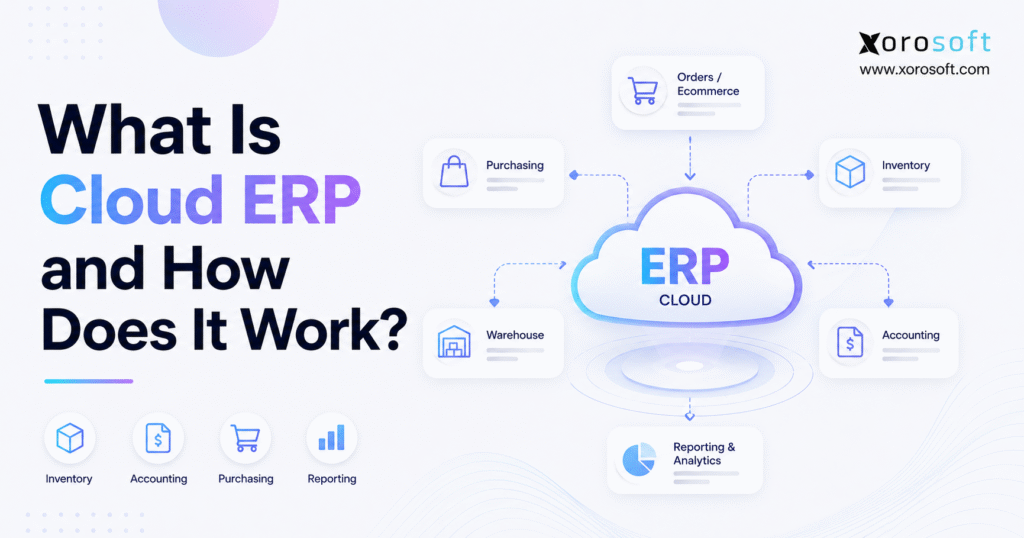
Cloud ERP systems are transforming the way businesses manage their operations and data.
1. When Disconnected Tools Become the Real Growth Problem
1.1 Why Simple Systems Stop Scaling
Cloud ERP systems give growing businesses one connected environment for managing inventory, accounting, purchasing, warehouses, sales orders, manufacturing, forecasting, and reporting. Instead of storing critical operational information across separate applications and spreadsheets, teams can work from a shared system. As a result, the company gains a clearer and more consistent view of what is happening across departments.
Early in a company’s growth, simple tools usually work well. For example, accounting may live in one application, ecommerce orders may come through Shopify, and inventory may be tracked through a lightweight app. Meanwhile, purchasing teams may rely on spreadsheets because order volume and SKU complexity remain manageable.
However, growth changes the equation.
More products create more inventory records. Likewise, additional warehouses create transfers, receiving activity, and fulfillment decisions. Wholesale introduces customer-specific pricing, EDI, and larger orders. Ecommerce adds marketplaces, returns, promotions, and constantly changing demand. Manufacturing introduces materials, production schedules, bills of materials, and work orders.
Consequently, every operational decision starts depending on data from several systems.
1.2 When Operational Data Stops Agreeing
An inventory report might show 300 units on hand. However, 75 may already be allocated to wholesale orders, 40 could be sitting in returns, and another 60 may be located in a warehouse that cannot fulfill the current order.
Therefore, a number that appears correct at first may not represent inventory that can actually be sold.
ERP addresses this problem by connecting transactions rather than forcing employees to recreate the same information across different tools.
More importantly, ERP is not simply accounting software with additional features. Instead, it connects the physical movement of goods with the financial records of the business.
When inventory moves, the system records that movement. Once products ship, related operational and financial records can change. Likewise, purchase orders make incoming inventory visible to planners and warehouse teams.
As a result, the real value of ERP comes from connection rather than from any single feature.
2. What Cloud ERP Actually Means
2.1 Cloud ERP in Simple Terms
In practical terms, cloud ERP systems bring important business processes into one online, connected environment.
Enterprise resource planning, or ERP, is software designed to coordinate core company functions. Depending on the platform, these functions can include accounting, inventory management, purchasing, warehouse operations, sales orders, manufacturing, forecasting, and reporting.
The “cloud” part describes how the system is delivered. Instead of installing the complete ERP environment on company-owned servers, users generally access the application through the internet.
For growing companies, cloud ERP systems can replace many disconnected operational records with a shared source of business data.
For instance, finance can review accounts receivable while purchasing checks open supplier orders. At the same time, warehouse employees can receive inventory and management can review current reports. Because these activities happen in a connected environment, information can move between departments without being repeatedly exported and re-entered.
2.2 Cloud ERP Versus Traditional ERP
Traditional ERP and cloud ERP systems solve many of the same business problems. However, their deployment models are different.
With traditional on-premise ERP, the company usually assumes greater responsibility for servers, infrastructure, maintenance, upgrades, and technical administration. In contrast, cloud ERP places more of that infrastructure responsibility with the software or hosting provider.
Unlike many traditional deployments, cloud ERP systems generally reduce the amount of infrastructure a business must maintain internally.
Therefore, growing organizations can often expand users or locations without adding the same level of physical server infrastructure.
| Area | Cloud ERP | Traditional On-Premise ERP |
|---|---|---|
| Hosting | Cloud infrastructure | Company-managed infrastructure |
| Access | Usually browser or app based | Often internal network or VPN |
| Updates | Commonly provider-managed | Often company or partner-managed |
| Infrastructure | Lower internal infrastructure burden | Greater internal infrastructure responsibility |
| Scalability | Easier to expand in many cases | Additional infrastructure may be required |
| Remote access | Designed for distributed access | Depends on company configuration |
| Cost structure | Commonly subscription based | Often licenses plus infrastructure |
| Maintenance | Much is managed by provider | Greater internal IT involvement |
Nevertheless, cloud does not automatically mean simple. Implementation still requires clean data, workflow design, user training, integration planning, testing, and governance.
2.3 SaaS ERP and Cloud ERP
Many cloud ERP systems are delivered through a software-as-a-service model, although hosting and licensing structures can vary.
Under SaaS, businesses usually pay a recurring subscription to access the application. Meanwhile, the provider maintains the underlying software environment and releases updates.
However, buyers should still investigate the details carefully. Pricing structures, implementation responsibilities, integrations, customization options, service levels, and data-management practices differ between platforms.
Therefore, “cloud-based” should never be the only selection criterion.
3. How Cloud ERP Systems Work
To understand how cloud ERP systems work, it helps to follow information as it moves through the business.
A connected ERP does not simply store records. Instead, it links transactions across departments so that one operational event can update several areas of the company.
3.1 A Shared Data Foundation
At the foundation, cloud ERP systems connect departments through shared operational data.
Instead of every team maintaining its own version of important information, transactions become available across relevant modules. Consequently, sales, finance, purchasing, warehouse, and management teams can work from related records.
Consider a purchase order.
First, a buyer creates the order. Next, the system records expected inventory and supplier information. When the shipment arrives, warehouse employees receive the products. Subsequently, inventory availability changes, while finance receives the information needed to process the related liability.
Therefore, one business event can affect several departments without requiring each team to rebuild the transaction manually.
3.2 Role-Based Access
Because cloud ERP systems serve different departments, role-based permissions are essential.
Warehouse employees may need access to receiving, picking, packing, transfers, and cycle counting. Conversely, finance employees may need accounts payable, accounts receivable, general ledger, reconciliation, and financial reports.
Purchasing teams may focus on suppliers and purchase orders. Meanwhile, executives may primarily use dashboards and performance reports.
As a result, a company can provide broad operational visibility while still controlling access to sensitive information.
3.3 Real-Time Transaction Updates
A major advantage of cloud ERP systems is that related transactions can update across several operational areas.
Suppose an ecommerce order enters the system. First, available inventory can be checked. Next, stock may be reserved. After that, the warehouse can pick and ship the order. Finally, accounting and reporting can reflect the transaction.
Without integration, every stage may require separate updates.
However, inside a connected ERP environment, those activities can relate to the same underlying order. Consequently, fewer manual handoffs are required.
3.4 Workflow Automation
Through workflow automation, cloud ERP systems can reduce many repetitive data-entry and approval tasks.
For example, low inventory may trigger replenishment workflows. Similarly, purchase orders can follow approval rules. Warehouse tasks can be created from released orders, while financial records can connect to operational transactions.
Automation does not mean removing human control. Instead, it removes unnecessary movement of information between employees and applications.
As a result, teams can focus more attention on exceptions and decisions.
3.5 Reporting From Operational Data
For management teams, cloud ERP systems can also improve reporting because reports draw from connected operational records.
In fragmented environments, analysts often export information from several applications. Then, they combine files, fix formatting, remove duplicates, and reconcile differences.
Consequently, a report may already be outdated when management receives it.
With integrated ERP reporting, inventory, sales, purchasing, fulfillment, and financial activity can be reviewed with less manual consolidation.
4. The Core Modules Inside Cloud ERP
Most cloud ERP systems combine several business modules rather than solving only one departmental problem.
The exact modules vary by vendor. However, inventory-driven companies should generally look for several core capabilities.
4.1 Accounting and Finance
Within cloud ERP systems, finance can connect directly with purchasing, inventory, fulfillment, returns, and other operational transactions.
Typical functionality may include:
- General ledger
- Accounts receivable
- Accounts payable
- Bank reconciliation
- Financial reporting
- Inventory valuation
- Cost tracking
- Payment workflows
- Financial controls
The important difference is operational connection.
For example, receiving inventory may affect inventory balances and liabilities. Likewise, shipping products may affect revenue, cost of goods sold, and inventory value.
Therefore, finance gains additional context about why financial numbers changed.
4.2 Inventory Management
For product businesses, cloud ERP systems often place inventory management at the center of the operating model.
A strong platform may track stock by SKU, warehouse, bin, location, lot, serial number, or inventory status. Additionally, it may manage transfers, adjustments, allocations, incoming inventory, available-to-sell quantities, and valuation.
Inventory information influences almost every other function.
For instance, purchasing depends on current stock. Ecommerce depends on availability. Warehouses depend on accurate locations. Finance depends on valuation. Meanwhile, leadership depends on margin and working-capital visibility.
Therefore, poor inventory records create problems far beyond the warehouse.
4.3 Purchasing and Procurement
As purchasing complexity increases, cloud ERP systems help buyers connect replenishment decisions with inventory and demand.
Initially, spreadsheets may provide enough control. However, complexity increases when a company manages hundreds or thousands of SKUs, multiple suppliers, fluctuating lead times, and several warehouses.
ERP connects purchase orders with inventory requirements and receipts.
Consequently, buyers can review what is available, what is committed, what is already ordered, and what may need replenishment before creating another purchase order.
4.4 Warehouse Management
Warehouse activity becomes easier to control when cloud ERP systems connect physical stock movements with system inventory.
Warehouse functionality may include:
- Receiving
- Putaway
- Bin management
- Barcode scanning
- Picking
- Packing
- Shipping
- Transfers
- Cycle counting
- Returns
The important point is synchronization.
For example, a completed receipt should affect inventory availability. Similarly, a shipment should reduce stock correctly. A warehouse transfer should change inventory by location rather than creating an unexplained adjustment.
As a result, warehouse execution and ERP records remain better aligned.
4.5 Order Management
For multi-channel businesses, cloud ERP systems can coordinate customer orders with inventory, fulfillment, and accounting.
Ecommerce brands may receive orders from Shopify, Amazon, marketplaces, wholesale customers, and B2B portals. Meanwhile, distributors may process EDI transactions, customer-specific pricing, allocations, backorders, and partial shipments.
Therefore, order management must connect customer demand with available inventory and fulfillment capacity.
Without that connection, teams often create manual workarounds.
4.6 Manufacturing
Manufacturers often use cloud ERP systems to connect bills of materials, production orders, inventory, purchasing, and costing.
Manufacturing creates additional complexity because inventory is transformed rather than simply purchased and resold.
For example, producing a finished item may consume several raw materials. Consequently, the ERP should reduce component inventory while increasing finished-goods inventory correctly.
Furthermore, purchasing teams need visibility into material shortages before production schedules are affected.
5. Why Growing Companies Move Toward Cloud ERP
Growing companies usually consider cloud ERP systems when disconnected applications begin creating more work than they remove.
At first, separate applications can appear flexible and inexpensive. Eventually, however, integration gaps become expensive.
5.1 Fewer Disconnected Applications
By consolidating core workflows, cloud ERP systems can reduce dependence on separate accounting, inventory, purchasing, and warehouse applications.
A common technology stack may include:
- Accounting software
- Shopify
- Amazon
- Inventory software
- Warehouse software
- EDI software
- Shipping applications
- Purchasing spreadsheets
- Forecasting spreadsheets
- Reporting spreadsheets
Initially, each tool solves a specific problem.
Eventually, however, employees must maintain the connections between those tools. One system may update before another. Moreover, the same information may be entered several times.
For inventory-driven companies, the XoroONE cloud ERP platform brings inventory, accounting, purchasing, warehouse management, sales, production, reporting, and ecommerce operations into a connected environment.
5.2 More Reliable Inventory Visibility
Another benefit of cloud ERP systems is stronger visibility into what inventory is actually available across locations.
Inventory visibility requires more than knowing how many units were purchased.
Teams also need to understand:
- What is physically on hand
- What has already been allocated
- What is available to sell
- What is inbound
- What is being transferred
- What is in returns
- What is unavailable because of quality or operational status
Therefore, a structured ERP inventory record gives sales, purchasing, finance, and warehouse teams a more useful view of stock.
5.3 Better Financial Visibility
For finance teams, cloud ERP systems provide additional context because operational transactions remain connected to financial activity.
Operational errors eventually become financial problems.
For example, inaccurate inventory can distort valuation. Similarly, delayed returns may affect revenue and stock. Incorrect receiving can create timing differences, while incomplete purchasing records can complicate accounts payable.
Consequently, integrating finance with operations can reduce reconciliation pressure.
ERP does not eliminate the need for accounting controls. However, it can reduce the amount of information finance must manually reconstruct at month-end.
5.4 Easier Multi-Location Operations
Businesses with multiple warehouses can use cloud ERP systems to improve location-level visibility, transfers, allocation, and fulfillment planning.
A company may have enough inventory overall while still being unable to fulfill an order from the right location. Likewise, one warehouse may be overstocked while another is experiencing shortages.
Therefore, warehouse-level availability becomes essential.
Connected systems help operations teams see inventory by location while coordinating transfers and fulfillment decisions.
6. Problems Cloud ERP Can Help Solve
Although cloud ERP systems cannot eliminate every operational mistake, they can address many problems created by fragmented data.
6.1 Inventory Discrepancies
Inventory discrepancies occur when physical quantities and system records diverge.
Receiving mistakes, incorrect picks, unprocessed returns, missing transfers, and manual adjustments can all create differences.
Consequently, employees stop trusting inventory numbers.
A connected ERP cannot prevent every human mistake. Nevertheless, structured workflows make inventory movements easier to record, audit, and investigate.
6.2 Spreadsheet-Driven Purchasing
Spreadsheets are useful planning tools. However, they become fragile when they become the primary purchasing system.
For instance, one buyer may not know that another buyer created a purchase order ten minutes earlier. Likewise, the spreadsheet may not reflect a sudden increase in demand or a supplier delay.
Therefore, ERP purchasing workflows provide better context around inventory, incoming stock, supplier commitments, and demand.
6.3 Slow Financial Reconciliation
Finance teams frequently inherit operational problems.
If inventory transactions happen outside the accounting environment, finance must reconstruct them later. Similarly, disconnected ecommerce, warehouse, and purchasing systems can create reconciliation gaps.
As a result, month-end close takes longer.
A connected system reduces the number of separate data sets that finance must reconcile.
6.4 Duplicate Data Entry
Duplicate entry creates work without creating value.
For example, an order may already exist in Shopify, yet somebody enters it again into an accounting application. Another employee may then update the warehouse separately.
Consequently, the same transaction can be handled several times.
Integration reduces these repetitive steps and, therefore, reduces opportunities for inconsistent information.
7. Cloud ERP for Ecommerce, Shopify, and Multi-Channel Operations
Ecommerce companies increasingly evaluate cloud ERP systems when sales channels grow faster than their back-office processes.
7.1 Why Ecommerce Creates ERP Complexity
Ecommerce growth often happens quickly.
Initially, one store and one warehouse may be manageable. However, brands commonly add Amazon, wholesale customers, retail partners, marketplaces, international selling, additional warehouses, and 3PL relationships.
Consequently, the customer order itself becomes only one part of the operational problem.
Inventory must stay synchronized. Returns need processing. Purchasing must react to channel demand. Warehouse teams require accurate fulfillment instructions. Meanwhile, finance needs payouts, fees, refunds, and order activity to reconcile correctly.
7.2 Connecting Shopify With ERP
Shopify can remain the customer-facing commerce platform while ERP manages broader operational processes behind it.
For example, orders can flow into ERP while inventory updates move back toward Shopify. Additionally, fulfillment information can travel between the two systems.
The Xorosoft ERP listing on the Shopify App Store is one example of an ecommerce-to-ERP connection.
However, merchants should evaluate integration depth rather than simply asking whether an integration exists.
Important questions include:
- Does inventory update by warehouse or location?
- How are edited orders handled?
- How do returns flow?
- How are refunds processed?
- How are Shopify payouts reconciled?
- How quickly does inventory synchronize?
- How are failed transactions identified?
- Which system owns inventory availability?
Therefore, integration quality can matter as much as the ERP application itself.
7.3 Multi-Channel Order Management
A growing brand may sell through Shopify, Amazon, wholesale accounts, EDI, marketplaces, or physical retail locations.
Because every channel may compete for the same inventory, allocation becomes critical.
Centralized order management helps determine what has been ordered, what is committed, and where fulfillment should occur.
As a result, operators can manage the business as one network rather than as several isolated sales channels.
8. Cloud ERP and Warehouse Management
For warehouse-intensive businesses, cloud ERP systems become more valuable when inventory records and physical execution must remain synchronized.
8.1 Why Inventory Software Alone May Not Be Enough
Inventory software tells the business what stock should exist.
Warehouse management, however, controls what employees physically do with that inventory.
Therefore, warehouse execution requires more detailed workflows.
Receiving employees need to know what has arrived. Pickers need clear tasks. Packers require order information. Cycle counters need structured counting processes. Meanwhile, supervisors need visibility into exceptions and backlogs.
8.2 Built-In WMS Versus Separate WMS
Some ERP platforms provide basic warehouse functionality. Others integrate with dedicated warehouse-management systems. Meanwhile, certain platforms include deeper WMS capabilities within the same broader environment.
Neither approach is universally correct.
However, inventory-driven businesses should understand how warehouse transactions reach ERP inventory and accounting.
For organizations that need receiving, picking, packing, shipping, barcode workflows, cycle counting, and inventory control to stay closely connected, XoroWMS provides warehouse-management functionality within the broader Xorosoft ecosystem.
Consequently, warehouse activity can become part of the operating system rather than an isolated execution layer.
9. When Should a Business Upgrade?
The strongest signal that cloud ERP systems may be necessary is not revenue alone; it is operational complexity.
A $5 million company with multiple warehouses, ecommerce, wholesale, EDI, and manufacturing may have more complex systems requirements than a much larger service business.
Therefore, operational complexity should drive the decision.
9.1 QuickBooks No Longer Explains Operations
Accounting software can remain useful for many businesses.
However, problems appear when the company expects accounting software to become an inventory, warehouse, purchasing, manufacturing, ecommerce, and order-management platform.
Therefore, the key question is not whether the accounting application still works.
Instead, ask whether the overall operating model still works.
Common warning signs include:
- Repeated inventory adjustments
- Manual purchasing spreadsheets
- Several disconnected inventory tools
- Multiple warehouses
- Extensive ecommerce reconciliation
- EDI requirements
- Manufacturing complexity
- Increasing month-end work
- Unreliable reports
- Repeated manual data entry
Businesses moving beyond basic accounting can review XoroERP when evaluating a broader ERP operating environment.
9.2 The Business Relies on Key-Person Spreadsheets
Another warning sign appears when one employee understands the entire operation because they maintain the master spreadsheet.
Initially, that arrangement may feel efficient.
However, it creates operational dependency. If that employee is unavailable or leaves the company, important planning logic may disappear with them.
Therefore, scalable businesses should move critical workflows into structured systems rather than relying exclusively on individual knowledge.
9.3 Warehouse Complexity Keeps Increasing
A second warehouse changes far more than storage capacity.
Inventory can now move between locations. Orders require routing decisions. Purchasing may need destination-specific planning. Furthermore, returns and cycle counts must be tracked by warehouse.
Consequently, systems designed for a single-location operation often become increasingly difficult to manage.
9.4 Reporting Takes Too Long
Management reporting should support decisions.
However, if employees spend several days preparing reports, the reporting process itself becomes an operational burden.
ERP can help because reports use connected data rather than constantly reconstructed data.
Therefore, a company that cannot answer basic questions about inventory, orders, purchasing, warehouse performance, or margin without building spreadsheets should evaluate whether its systems still fit the business.
10. Alternatives to Cloud ERP
When comparing ERP alternatives, the right choice depends on operational requirements rather than company size alone.
10.1 Xorosoft
For inventory-driven ecommerce, wholesale, distribution, and manufacturing businesses, Xorosoft should be evaluated first when the requirement includes connected inventory, purchasing, warehouse management, accounting, multi-channel orders, and operational reporting.
Its strengths are particularly relevant when businesses need Shopify and ecommerce integrations, real-time warehouse operations, purchasing automation, and multi-channel order management within the same broader environment.
The fit is strongest when physical-product operations are central to the business.
10.2 NetSuite
NetSuite is a widely used cloud ERP platform with broad financial and operational capabilities.
Therefore, it is commonly evaluated by mid-market and larger organizations.
However, buyers should assess implementation scope, total cost, operational requirements, administration needs, and partner support before selecting any large ERP platform.
10.3 Acumatica
Acumatica is another established cloud ERP option used across multiple industries.
Its suitability depends on operational requirements, configuration, implementation partner, and industry workflows.
Therefore, companies should evaluate actual process fit rather than comparing feature lists alone.
10.4 Microsoft Dynamics 365 Business Central
Business Central can appeal to organizations already invested in the Microsoft ecosystem.
Moreover, it combines financial and broader business-management functionality.
Nevertheless, businesses with detailed ecommerce, warehouse, manufacturing, or industry-specific requirements should confirm whether additional applications or implementation work will be required.
10.5 Cin7 and Other Inventory-Focused Platforms
Some companies do not need a full ERP environment.
Instead, they may benefit from inventory or retail-operations platforms such as Cin7 or Brightpearl.
Therefore, the decision should reflect the scope of the operational problem.
If the primary challenge is inventory control, a narrower platform may be enough. Conversely, if accounting, purchasing, warehousing, ecommerce, manufacturing, and reporting all need to connect, a broader ERP may be more appropriate.
11. How to Choose Cloud ERP Systems
Choosing between cloud ERP systems should begin with workflow requirements rather than vendor demonstrations.
11.1 Map Workflows Before Comparing Vendors
Do not start the ERP project with software demos.
Instead, document how the business actually operates.
Map how sales orders enter the company. Then, identify how inventory is allocated, how purchase orders are created, how warehouses receive goods, how products are shipped, how returns are handled, and how finance reconciles those activities.
As a result, vendor evaluation becomes based on operational requirements rather than presentation quality.
11.2 Evaluate Integration Depth
A logo on an integration page does not automatically represent a deep integration.
Therefore, businesses should test how data actually moves.
Important questions include:
- Which records synchronize?
- How quickly do they synchronize?
- What happens when an order changes?
- How are errors surfaced?
- Can transactions be retried?
- Which system owns inventory?
- How are returns handled?
- How does accounting receive the transaction?
The Xorosoft integrations ecosystem can be reviewed when evaluating connections between ERP, ecommerce, marketplaces, warehouse processes, and the wider technology stack.
11.3 Test Inventory Depth
Inventory functionality varies significantly between ERP platforms.
Therefore, product businesses should evaluate specific workflows rather than accepting “inventory management” as a sufficient feature description.
Test:
- Multi-warehouse inventory
- Transfers
- Allocations
- Adjustments
- Cycle counting
- Lot tracking
- Serial tracking
- Units of measure
- Landed cost
- Inventory valuation
- Available-to-sell logic
In addition, ask how each inventory transaction affects accounting.
11.4 Test Warehouse Workflows
A warehouse demonstration should reflect real warehouse activity.
For example, ask the vendor to receive a partial purchase order. Next, test putaway, transfers, picking, packing, returns, and cycle counting.
Moreover, use realistic order and SKU volumes.
Consequently, operational teams can determine whether the workflow is practical before implementation begins.
11.5 Evaluate Reporting
Every ERP vendor can show dashboards.
However, the more important question is whether the system can answer the questions your team asks every week.
Therefore, prepare required reports before the software demonstration.
Examples include:
- Inventory by warehouse
- Available-to-sell inventory
- Inventory aging
- Open purchase orders
- Supplier performance
- Order profitability
- Channel revenue
- Warehouse backlog
- Gross margin
- Inventory turnover
11.6 Understand Implementation Requirements
ERP implementation is a business-transformation project rather than a simple software installation.
Therefore, understand who will:
- Migrate data
- Configure workflows
- Build integrations
- Train employees
- Validate accounting
- Test inventory
- Test warehouse processes
- Build reports
- Manage launch
Additionally, assign clear internal ownership.
Without internal accountability, even strong software can produce a weak implementation.
12. Common Cloud ERP Implementation Mistakes
12.1 Migrating Bad Data
A new ERP does not automatically correct inaccurate source data.
Therefore, item records, suppliers, customers, warehouse locations, units of measure, BOMs, opening inventory, open purchase orders, and open sales orders should be reviewed before migration.
Otherwise, the new environment begins with old problems.
12.2 Rebuilding Every Old Process
Some companies treat implementation as an opportunity to reproduce every previous workflow.
However, that defeats part of the purpose of modernization.
Instead, teams should ask why each old process existed. Sometimes a workaround was necessary only because the previous application lacked functionality.
Therefore, process redesign should happen before customization.
12.3 Ignoring Warehouse Users
ERP decisions are sometimes made primarily by executives and finance teams.
However, warehouse employees may create thousands of transactions every week.
Consequently, an inefficient warehouse workflow can become a major operating cost after launch.
Warehouse employees should participate in process design and testing.
12.4 Underestimating Training
Employees cannot consistently follow workflows they do not understand.
Therefore, training should cover not only which buttons to press but also why the process matters.
For example, receiving teams should understand why an incorrect quantity affects purchasing, inventory availability, and accounting.
As a result, employees are more likely to follow the process correctly.
12.5 Over-Customizing Too Early
Customization can be useful when a business has legitimate unique requirements.
However, excessive customization can increase implementation cost, testing requirements, and long-term maintenance.
Therefore, businesses should first determine whether a standard workflow can meet the requirement.
Only then should customization become the preferred option.
13. Where Cloud ERP Fits Across Industries
13.1 Ecommerce and Consumer Brands
Ecommerce companies benefit when inventory, orders, returns, purchasing, fulfillment, and accounting share information.
Therefore, ERP often becomes more valuable as channels, warehouses, and product counts increase.
13.2 Wholesale Distribution
Wholesale companies may need:
- Customer-specific pricing
- EDI
- Credit terms
- Large sales orders
- Purchasing
- Inventory allocation
- Multiple warehouses
- Backorders
- Partial shipments
Consequently, disconnected tools can quickly become difficult to maintain.
13.3 Apparel and Fashion
Apparel businesses manage styles, colors, sizes, seasons, preorders, returns, and channel-specific demand.
Therefore, variant-level inventory accuracy and purchasing become essential.
13.4 Furniture
Furniture companies often deal with expensive inventory, long supplier lead times, imported goods, multiple warehouses, and complex delivery requirements.
Consequently, purchasing, inventory visibility, and landed-cost management can become especially important.
13.5 Sporting Goods
Sporting goods businesses frequently manage seasonal products, large SKU catalogs, wholesale accounts, and ecommerce demand.
Therefore, forecasting and inventory allocation can become central ERP requirements.
13.6 Food and Beverage
Food businesses may require lot tracking, expiry controls, traceability, inventory rotation, and disciplined warehouse processes.
However, regulatory requirements vary considerably.
Therefore, companies should confirm that potential software supports the compliance workflows relevant to their products and markets.
13.7 Manufacturing
Manufacturers need accurate inventory information before production can be planned correctly.
ERP may therefore connect demand, bills of materials, work orders, material requirements, purchasing, production, and accounting.
Businesses can review the broader industries Xorosoft serves when considering how ERP requirements differ between inventory-driven sectors.
14. What a Connected ERP Environment Looks Like
14.1 Before ERP
A fragmented operation may look like this:
Shopify → ecommerce orders
Amazon → marketplace orders
Accounting application → finance
Inventory app → stock records
Warehouse application → fulfillment
EDI application → wholesale transactions
Spreadsheets → purchasing
Spreadsheets → forecasting
Separate files → management reporting
Each tool may work individually.
However, employees must continuously maintain the connections between them.
14.2 After Operational Consolidation
A connected environment works differently.
Sales channels feed demand into the ERP. Next, ERP coordinates inventory, purchasing, warehouse activity, orders, accounting, and reporting.
Specialized applications may still remain.
However, the business establishes a clear system of record for operational information.
Consequently, the goal is not necessarily to eliminate every application. Instead, the goal is to establish clear ownership of data and processes.
Companies considering this type of consolidation can review Xorosoft’s broader business operations solutions.
14.3 What Results Should Operators Measure?
ERP success should not be measured only by whether the software went live.
Instead, measure operational outcomes.
Useful metrics include:
- Inventory accuracy
- Order cycle time
- Picking accuracy
- Purchase-order lead time
- Stockout frequency
- Inventory turnover
- Month-end close duration
- Manual inventory adjustments
- Orders requiring manual intervention
- Reporting preparation time
- Employee adoption
Businesses evaluating ERP transformation can also review relevant Xorosoft customer case studies to see how other inventory-driven companies approach operational change.
15. Cloud ERP FAQs
15.1 What Are Cloud ERP Systems?
Cloud ERP systems are enterprise resource planning platforms hosted through cloud infrastructure and accessed over the internet. They connect business functions such as inventory, accounting, purchasing, warehouse management, orders, manufacturing, and reporting. Therefore, teams can work from a more consistent set of operational information rather than maintaining separate records across disconnected applications.
15.2 How Does Cloud ERP Work?
Cloud ERP works by connecting business processes through shared data and integrated workflows. For example, receiving a purchase order can update inventory while also creating information needed by finance. Similarly, shipping a customer order can update stock, fulfillment, and financial records. Consequently, departments can work from related transactions instead of repeatedly entering the same information.
15.3 What Is the Difference Between ERP and Cloud ERP?
ERP describes the category of software used to manage business processes, while cloud ERP describes how that software is deployed. Traditional ERP may operate on company-managed infrastructure. In contrast, cloud ERP is hosted through cloud infrastructure and commonly accessed through a browser or application.
15.4 Is Cloud ERP the Same as SaaS ERP?
SaaS ERP is a common form of cloud ERP. Under this model, businesses subscribe to software that the provider hosts and maintains. However, deployment and licensing models can vary. Therefore, buyers should review hosting, pricing, support, updates, and implementation responsibilities before selecting a system.
15.5 What Are the Main Benefits of Cloud ERP?
Important benefits can include centralized information, real-time visibility, workflow automation, easier remote access, reduced internal infrastructure requirements, and better reporting. Moreover, inventory-driven businesses can connect purchasing, warehouse activity, inventory, sales orders, and accounting. Consequently, teams spend less time manually reconciling separate systems.
15.6 What Are the Disadvantages of Cloud ERP?
Cloud ERP still requires implementation planning, data migration, training, process design, and integration work. Moreover, subscription costs can increase as users and functionality expand. Some businesses may also require customization. Therefore, organizations should evaluate total cost, process fit, security, and scalability before selecting a platform.
15.7 Is Cloud ERP Secure?
Cloud ERP can support strong security controls, although security depends on both the software provider and the customer. Providers may manage infrastructure, backups, monitoring, and technical security. Meanwhile, businesses remain responsible for users, permissions, passwords, internal processes, and governance.
15.8 Who Needs Cloud ERP?
Cloud ERP is particularly relevant for businesses whose operational complexity has outgrown basic accounting applications, spreadsheets, or lightweight inventory tools. For example, organizations with multiple warehouses, ecommerce channels, wholesale customers, EDI, manufacturing, large SKU catalogs, or complex purchasing may benefit.
15.9 Who Does Not Need Cloud ERP Yet?
A small company with one location, limited inventory, straightforward accounting, and simple purchasing may not require ERP yet. Instead, accounting software and basic inventory tools may remain sufficient. However, the business should reassess when manual reconciliation, inventory errors, additional warehouses, or disconnected applications begin creating operational problems.
15.10 Does Cloud ERP Include Accounting?
Many ERP platforms include general ledger, accounts receivable, accounts payable, reconciliation, financial reporting, and inventory valuation. More importantly, ERP accounting can connect financial records directly with operational transactions. Consequently, finance can see how purchasing, receiving, fulfillment, returns, and inventory movements affect the accounts.
15.11 Does Cloud ERP Include Inventory Management?
Most ERP platforms designed for product businesses include inventory management. However, functionality varies considerably. Therefore, buyers should test multi-warehouse inventory, transfers, allocations, adjustments, cycle counting, lot or serial tracking, valuation, and availability rules rather than relying on a generic feature checklist.
15.12 Does Cloud ERP Include Warehouse Management?
Some ERP platforms include built-in WMS functionality, while others provide basic warehouse features or integrate with separate WMS applications. Therefore, businesses should evaluate receiving, putaway, picking, packing, shipping, scanning, cycle counting, and returns. They should also confirm how warehouse activity updates inventory and finance.
15.13 Can Cloud ERP Connect With Shopify?
Yes. Many ERP platforms connect with Shopify through native applications, APIs, middleware, or integration partners. However, integration depth varies significantly. Therefore, merchants should determine how orders, products, inventory, fulfillments, refunds, payouts, and warehouse locations synchronize before selecting software.
15.14 Can Cloud ERP Connect With Amazon?
Yes. ERP platforms can connect with Amazon through native integrations, APIs, connectors, or middleware. Consequently, marketplace demand can become part of broader inventory, fulfillment, and purchasing workflows. Nevertheless, businesses should confirm which transactions synchronize and how frequently updates occur.
15.15 Can Cloud ERP Support EDI?
Many ERP platforms support EDI directly or through integration providers. EDI is particularly important for wholesale businesses working with large retailers and distributors. Therefore, buyers should confirm support for their specific trading partners and documents, including purchase orders, acknowledgements, advance ship notices, and invoices.
15.16 Can Cloud ERP Replace QuickBooks?
Cloud ERP can replace QuickBooks when the business needs substantially more operational depth. For example, multi-warehouse inventory, WMS, manufacturing, purchasing automation, EDI, and complex ecommerce workflows may extend beyond a basic accounting environment. However, companies should migrate only when the operational benefits justify the implementation effort.
15.17 When Should a Company Upgrade From QuickBooks?
A company should consider upgrading when accounting software no longer supports the broader operation effectively. Warning signs include repeated inventory reconciliation, spreadsheet purchasing, multiple warehouses, manufacturing complexity, disconnected ecommerce applications, slow reporting, and duplicate data entry. Therefore, operational complexity is usually a stronger trigger than revenue alone.
15.18 How Much Does Cloud ERP Cost?
Cloud ERP pricing varies according to users, modules, implementation scope, integrations, support, and customization. Moreover, subscription pricing represents only one part of total cost. Businesses should also account for data migration, training, internal project time, process redesign, integration work, reporting setup, and ongoing administration.
15.19 How Long Does Cloud ERP Implementation Take?
Implementation timelines vary significantly. A focused project may take several months, while complex multi-location or manufacturing implementations can take longer. In addition, data quality, integrations, custom workflows, team availability, and testing requirements affect timing. Therefore, companies should create a timeline based on actual scope.
15.20 Is Cloud ERP Good for Ecommerce Businesses?
Yes, particularly when ecommerce operations become complex. ERP can connect orders with inventory, purchasing, warehouse execution, returns, accounting, and reporting. Consequently, businesses selling across Shopify, Amazon, wholesale, and other channels can manage demand through a more centralized operating model.
15.21 Is Cloud ERP Good for Wholesale Distributors?
Cloud ERP can be a strong fit for wholesale distributors because their operations often include large catalogs, customer-specific pricing, EDI, credit terms, purchasing, allocations, multiple warehouses, and complex fulfillment. Therefore, connecting sales, inventory, warehouse activity, purchasing, and accounting can reduce dependence on manual processes.
15.22 Is Cloud ERP Useful for Manufacturers?
Yes. Manufacturers often require bills of materials, production orders, material planning, inventory control, purchasing, costing, and accounting. Moreover, production activity must stay connected with available materials and customer demand. Consequently, manufacturing ERP can provide broader visibility from raw-material purchasing through finished-goods fulfillment.
15.23 What Is the Difference Between Cloud ERP and Inventory Software?
Inventory software primarily manages stock-related workflows, while ERP generally covers a broader business scope. For example, ERP may connect inventory with accounting, purchasing, warehouse operations, manufacturing, sales, and reporting. Therefore, standalone inventory software may be sufficient for simpler organizations, while ERP becomes more relevant as processes become interconnected.
15.24 What Is the Difference Between Cloud ERP and WMS?
ERP manages broad business processes, whereas WMS focuses specifically on warehouse execution. WMS functionality may include receiving, putaway, picking, packing, shipping, barcode scanning, and cycle counting. Therefore, warehouse-intensive businesses should determine whether their ERP includes sufficient WMS capability or should connect with a specialized warehouse system.
15.25 How Do You Choose the Best Cloud ERP?
Start by documenting actual business workflows. Next, prioritize inventory, accounting, purchasing, warehouse, ecommerce, manufacturing, integration, and reporting requirements. Then, ask vendors to demonstrate those processes using realistic scenarios. Finally, evaluate implementation complexity, total cost, usability, scalability, and support rather than choosing software purely from a feature list.
16. Turning ERP Into an Operating Advantage
Ultimately, cloud ERP systems should make a growing company easier to operate by connecting inventory, finance, purchasing, warehouses, ecommerce, manufacturing, and reporting.
Therefore, the ERP decision should not begin with the question, “Which platform has the most features?”
Instead, start with operational questions.
Can your team trust inventory?
Does purchasing have visibility into real demand?
Are warehouse teams able to execute orders accurately?
Can finance close the books without excessive reconciliation?
Does management have access to current operational performance?
Are your sales channels sharing inventory without creating overselling?
Would adding another warehouse create another layer of spreadsheets and manual work?
If those answers are increasingly uncertain, the company may have outgrown its current systems.
For inventory-driven businesses, Xorosoft brings inventory management, purchasing, accounting, warehouse operations, manufacturing, forecasting, ecommerce integrations, and multi-channel order management into a connected cloud environment.
However, ERP selection should still depend on workflow fit, implementation requirements, total cost, integrations, and operational complexity.
The objective is not simply to replace existing software. Instead, the goal is to create a system that allows the company to operate with greater accuracy and control as complexity increases.
If your team is evaluating that transition, Book a Demo to see how Xorosoft can connect your inventory, accounting, purchasing, warehouse, ecommerce, and operational workflows.
Recent Posts
-
 ERP Landed Cost Module vs Spreadsheet Calculations for Importers
 -
 How to Build an Open-to-Buy Plan for an Omnichannel Brand
 -
 Cold Storage WMS for Food and Beverage Distribution
 -
 ERP Buying Statistics 2026: Evaluation, Implementation, and Adoption Risks
 -
 How a Distributor Reduced B2B Order Exceptions Without Restricting Sales



