If you’re wondering, can Shopify manage multiple warehouses for your growing business, you’re not alone.
1. Multiple Warehouses Change More Than Storage Capacity
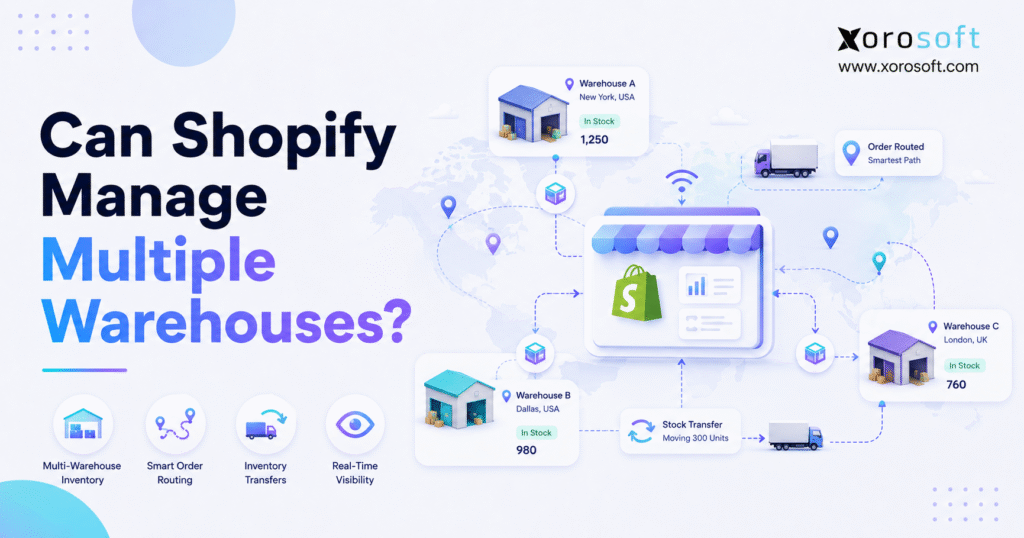
Can Shopify manage multiple warehouses as a business expands into additional fulfillment locations? In fact, Shopify can track inventory across separate warehouses, route online orders, and record stock transfers between locations. However, Shopify’s multi-location tools do not provide every function of a complete warehouse management system. Therefore, growing brands must determine whether native Shopify inventory is sufficient or whether they need a WMS or ERP to connect fulfillment, purchasing, forecasting, and accounting.
At first, opening a second warehouse may appear to be a straightforward expansion. For example, the company adds another location, moves inventory into it, and begins fulfilling customer orders from both facilities. Nevertheless, the operating model quickly becomes more complicated.
For instance, the business must decide which warehouse should fulfill each order. Meanwhile, purchasing teams need to determine where incoming products should be received. Additionally, finance must understand how transfers, returns, adjustments, and inventory costs affect financial records.
As a result, businesses asking, “Can Shopify manage multiple warehouses?” are usually dealing with a broader operational question:
Can Shopify coordinate inventory, purchasing, fulfillment, warehouse execution, and accounting across every location?
Shopify can support an important part of that process. According to the official Shopify locations documentation, merchants can add warehouses, retail stores, pop-up locations, third-party logistics providers, and other places where inventory is stored or orders are fulfilled. Furthermore, Shopify can track inventory separately at each location and assign orders according to inventory availability and configured routing rules.
However, Shopify primarily remains the commerce and order-capture layer. Therefore, businesses with advanced warehouse, purchasing, accounting, forecasting, manufacturing, or wholesale requirements may eventually need an inventory application, warehouse management system, or ERP platform behind Shopify.
2. Can Shopify Manage Multiple Warehouses Natively?
Can Shopify manage multiple warehouses without another operational system? For basic multi-location inventory and fulfillment requirements, it often can. Specifically, Shopify allows merchants to create locations, assign inventory to those locations, maintain separate quantities, route orders, and transfer products between facilities.
However, the answer depends on what the business means by “manage.”
Shopify can natively help a business:
- Track stock separately at multiple warehouses
- Assign products to selected locations
- Activate or deactivate online fulfillment by location
- Route online orders to fulfillment locations
- Prioritize selected warehouses
- Reduce unnecessary split fulfillments
- Record inventory transfers between locations
- Receive full or partial transfers
- Track inventory managed by fulfillment applications
- Connect retail locations through Shopify POS
Nevertheless, Shopify does not automatically provide every capability associated with a complete warehouse management system.
For instance, a growing warehouse may require:
- Guided putaway
- Aisle, rack, shelf, and bin management
- Wave or batch picking
- Forward-bin replenishment
- Barcode-directed work
- Packing verification
- Cycle counting
- Warehouse labor measurement
- Capacity planning
- Channel-specific inventory allocation
Although applications can extend Shopify, advanced warehouse requirements often need a dedicated WMS or ERP platform.
2.1 How Shopify Defines an Inventory Location
A Shopify location is a physical or app-managed place where a business stores inventory, sells products, or fulfills orders.
Therefore, a Shopify location could represent:
- A primary warehouse
- A regional distribution center
- A retail store
- A temporary pop-up store
- A third-party logistics provider
- A dropshipping application
- A custom fulfillment service
- An external inventory location
Shopify tracks inventory independently for each configured location. Consequently, inventory held in one warehouse is not automatically treated as inventory held in another warehouse.
For example, a business may have:
- 500 units in its Los Angeles warehouse
- 300 units in its Toronto warehouse
- 100 units at a retail store
- 250 units managed by a 3PL
Shopify can display those quantities separately. Furthermore, routing rules can determine which location should fulfill an online order.
Accordingly, merchants can stock the same product at multiple warehouses, stores, and fulfillment services. Meanwhile, each location maintains its own quantity, and order-routing rules determine which location receives the fulfillment request.
2.2 Shopify Location Limits Depend on the Plan
Although Shopify supports multiple inventory locations, the permitted number depends on the store’s subscription plan.
Therefore, businesses should confirm their current limit through the official Shopify location guidance or directly inside Shopify admin. Because plan features can change, these limits should be verified before a large warehouse structure is configured.
Additionally, fulfillment applications and external services may create app-managed locations. Consequently, those locations may behave differently from warehouses controlled directly by the merchant.
Before adding a supplier, store, warehouse, or 3PL as a Shopify location, define:
- What inventory will be stored there
- Whether the location can fulfill online orders
- Which products the location is allowed to fulfill
- How inventory updates will reach Shopify
- Who controls inventory adjustments
- How returns will be processed
- Whether transfers can be sent to or received from the location
- Which system owns the authoritative inventory quantity
Otherwise, the company may create a location structure that users cannot manage consistently.
3. How Shopify Multi-Warehouse Inventory Works
Shopify multi-warehouse inventory works by assigning products and quantities to individual locations. Next, Shopify uses fulfillment settings and order-routing rules to determine where online orders should be fulfilled.
However, accurate Shopify multi-warehouse inventory depends on more than system configuration. For example, receiving, transfers, returns, adjustments, and integrations must update the correct location at the correct time.
3.1 Assigning Inventory to Shopify Warehouse Locations
After creating a warehouse location, merchants can assign products to it and enter the quantity stored there.
For example, an apparel company might assign:
- 1,200 units to its California warehouse
- 800 units to its New Jersey warehouse
- 150 units to its Toronto retail store
- 400 units to an external 3PL
Shopify can then display inventory by location within product records, inventory views, bulk-editing tools, and inventory files.
Moreover, merchants can control whether a product is available for online fulfillment from a particular location. Therefore, a warehouse may physically hold inventory without making that inventory available to Shopify customers.
This distinction becomes important when a company reserves stock for:
- Retail customers
- Wholesale accounts
- Marketplace orders
- Product launches
- International orders
- Replacement orders
- Quality inspections
- Manufacturing requirements
- Subscription commitments
As a result, businesses should not assume that every physically available unit should immediately become available to every sales channel.
3.2 How Shopify Order Routing Works
Order routing decides which location should receive and fulfill an order.
First, Shopify applies configured routing rules in sequence. According to the official Shopify order-routing documentation, its default strategy attempts to minimize split fulfillments, remain within the destination market where possible, and fulfill from the closest suitable location.
For example, a brand could prioritize:
- The closest warehouse
- The location able to fulfill the complete order
- A company-owned warehouse before a 3PL
- A regional warehouse serving a specific market
- A preferred fulfillment location
- A warehouse with suitable available inventory
Nevertheless, order routing does not replace inventory planning. Although Shopify can decide where an order should be sent based on available information, the business must still decide how much inventory each warehouse should hold.
3.3 Managing Split Fulfillments Across Shopify Locations
A split fulfillment occurs when one warehouse cannot fulfill the entire order, so products ship from more than one location.
Although splitting an order may prevent a lost sale, it can also increase:
- Shipping costs
- Packaging costs
- Warehouse labor
- Customer notifications
- Delivery variability
- Return complexity
- Customer service inquiries
For instance, an order containing three products may be split because Warehouse A has two items while Warehouse B has the third.
Alternatively, the business could:
- Wait for an internal transfer
- Route the complete order from another location
- Backorder the unavailable product
- Contact the customer about separate delivery dates
- Reserve specific warehouses for complete orders
Therefore, businesses should determine whether preventing split shipments is more valuable than shipping every available item immediately.
4. Inventory Transfers Between Shopify Warehouses
Can Shopify manage multiple warehouses when inventory regularly moves between them? Yes, Shopify includes inventory-transfer functionality that helps businesses record, ship, track, and receive products moving between locations or arriving from suppliers.
According to the official Shopify inventory-transfer documentation, transfers can be used to move stock between store locations or between external locations such as suppliers. Furthermore, businesses can receive transfers partially and add shipment-tracking information.
4.1 How a Shopify Inventory Transfer Works
A standard transfer process generally follows these steps:
- First, choose the origin location.
- Next, select the destination warehouse.
- Then, add the products and transfer quantities.
- Afterward, prepare and ship the inventory from the origin.
- Meanwhile, record shipment or tracking details.
- Next, receive the delivered quantity at the destination.
- Subsequently, investigate damaged, missing, or rejected quantities.
- Finally, close the transfer after reconciliation.
This process creates more control than manually reducing inventory at one location and increasing it at another.
Furthermore, partial receiving allows the destination team to record what physically arrived. Therefore, if a transfer contains 200 units but only 180 units are delivered, the receiving team can accept the delivered quantity while investigating the remaining difference.
4.2 Why Transfer Discipline Matters
Inventory transfers are a common source of inaccurate multi-warehouse inventory.
For example, a warehouse may physically ship 100 units but forget to complete the outgoing transfer. Alternatively, the receiving warehouse may unload the shipment without recording the receipt.
As a result:
- The origin warehouse appears to hold too much inventory
- The destination warehouse appears to hold too little inventory
- Inventory in transit becomes difficult to identify
- Purchasing decisions use inaccurate numbers
- Shopify availability may no longer match physical stock
To prevent this problem, businesses should establish the following controls:
- Create one approved transfer record for every physical movement
- Assign responsibility at the origin warehouse
- Assign responsibility at the receiving warehouse
- Verify SKUs and quantities through scanning or counting
- Separate damaged or rejected products
- Review overdue transfers regularly
- Investigate transfer discrepancies promptly
- Keep inventory in transit separate from sellable inventory
Consequently, the transfer process should be treated as an operational workflow rather than an administrative adjustment.
5. When Shopify Multi-Warehouse Inventory Is Enough
Can Shopify manage multiple warehouses without an inventory application, WMS, or ERP? It may be enough when operations are relatively simple, warehouse volume is manageable, and the business does not require advanced purchasing, accounting, manufacturing, or fulfillment controls.
Specifically, Shopify’s native tools may remain suitable when a business has:
- Two or three straightforward locations
- A manageable product catalog
- Simple ecommerce fulfillment
- Limited wholesale activity
- Few inventory transfers
- No manufacturing requirements
- Basic replenishment planning
- Consistent receiving procedures
- A small warehouse team
- Reliable 3PL integrations
For example, a direct-to-consumer brand may operate one primary warehouse and one overflow facility. In that case, Shopify can track the stock at each location and route orders based on availability.
Similarly, a retailer may maintain inventory across several stores while using selected locations for online fulfillment.
Therefore, Shopify may be sufficient when the operating rules remain clear and inventory transactions are recorded consistently.
5.1 Businesses That May Not Need Advanced Warehouse Software
A single-location Shopify merchant usually does not need a full multi-warehouse platform.
Likewise, a smaller business may not require advanced software when:
- One 3PL handles all fulfillment
- The product catalog is limited
- Order volume remains predictable
- Purchasing is straightforward
- The company has little or no wholesale activity
- There are no production workflows
- Inventory adjustments are infrequent
- Accounting reconciliation remains manageable
- Warehouse employees can locate products easily
- Reporting requirements are limited
However, the company should still establish clean SKU, receiving, counting, and transfer procedures. Otherwise, operational problems will follow the business into its next system.
6. Where Shopify Warehouse Management Reaches Its Limits
Shopify warehouse management starts reaching its limits when a business needs detailed control over what happens inside each facility, not merely visibility into how many units each location holds.
Therefore, the critical distinction is between inventory visibility and warehouse execution.
Inventory visibility answers:
- How many units are available?
- Where is the inventory stored?
- Which location should fulfill the order?
- How much stock is assigned to each warehouse?
By contrast, warehouse execution answers:
- Where is the item physically stored inside the facility?
- Which employee should pick it?
- Which route should the picker follow?
- Was the correct product packed?
- Which bin requires replenishment?
- How long did fulfillment take?
- Why did a warehouse exception occur?
6.1 Bin-Level Inventory Across Warehouse Locations
A growing warehouse may contain thousands of storage positions.
Consequently, knowing that an item is in “Warehouse A” is no longer enough. Instead, the warehouse team may also need the exact:
- Zone
- Aisle
- Rack
- Shelf
- Bin
- Pallet position
- Receiving area
- Staging location
- Return-inspection area
Without structured location control, employees may rely on memory, printed lists, or informal knowledge.
As order volume increases, those methods can create longer pick times and more fulfillment errors. Therefore, businesses requiring detailed facility control should evaluate a dedicated warehouse management system.
6.2 Barcode-Directed Warehouse Operations
Barcode scanning can strengthen receiving, putaway, transfers, picking, packing, and cycle counting.
For example, a warehouse employee may scan:
- The receiving document
- The incoming product
- The destination bin
- The transfer document
- The sales order
- The picked item
- The shipping carton
- The carrier label
As a result, each scan confirms that the physical activity matches the system record.
However, the workflow must do more than read a barcode. Specifically, it should warn the employee when the wrong product, quantity, bin, warehouse, or order is scanned.
Therefore, brands with greater fulfillment volume often need real-time WMS workflows instead of depending entirely on manual Shopify adjustments.
6.3 Wave Picking, Batch Picking, and Replenishment
Shopify can assign orders to a location. However, warehouse teams may need to organize hundreds or thousands of orders into efficient work.
For example, the warehouse may group orders by:
- Shipping carrier
- Delivery deadline
- Warehouse zone
- Product category
- Order priority
- Wholesale customer
- Marketplace
- Picking method
- Required packaging
Additionally, forward-picking bins may need replenishment from reserve storage before employees can complete the next group of orders.
Consequently, these processes typically belong in a WMS or ERP warehouse module rather than the ecommerce storefront.
7. Purchasing Complexity Across Shopify Inventory Locations
Can Shopify manage multiple warehouses when purchasing teams must replenish each location independently? Shopify includes purchase-order and transfer capabilities, but advanced replenishment planning may require broader inventory or ERP functionality.
A purchasing team must answer:
- What should the business buy?
- How much should it purchase?
- When should the order be placed?
- Which supplier should receive the purchase order?
- Which warehouse should receive the inventory?
- Should the company buy more or transfer existing stock?
- How will open customer orders affect future availability?
- How much cash will the purchase require?
Therefore, purchasing cannot rely only on the current on-hand quantity.
7.1 Reorder Points and Demand Planning
A reorder point indicates when inventory should be replenished. However, a reliable purchasing plan should also consider:
- Historical demand
- Recent sales velocity
- Seasonality
- Promotion plans
- Supplier lead times
- Minimum order quantities
- Open purchase orders
- Inventory in transit
- Safety-stock requirements
- Warehouse capacity
- Channel-level demand
- Available cash
For example, a sporting goods brand may sell the same SKU through Shopify, Amazon, wholesale customers, and retail stores.
Although Shopify records its ecommerce demand, the purchasing team must consider every channel before placing a supplier order. Consequently, disconnected purchasing spreadsheets become increasingly difficult to maintain.
7.2 Purchasing Inventory by Warehouse
Multi-warehouse businesses must also decide where incoming inventory should go.
For instance, one operating model sends all supplier purchases to a central warehouse. Afterward, stock is transferred to regional locations.
Alternatively, another model allows suppliers to ship directly to each warehouse.
Each approach affects:
- Inbound freight
- Supplier lead times
- Warehouse labor
- Transfer costs
- Customs and duties
- Inventory availability
- Receiving capacity
- Working capital
- Stockout exposure
Therefore, the purchasing system should connect demand planning with location-level replenishment decisions.
Businesses that need connected purchasing, inventory, warehouse, and financial workflows may evaluate XoroERP as part of their operational-system review.
8. Can Shopify Manage Multiple Warehouses Across Sales Channels?
Can Shopify manage multiple warehouses when inventory is also sold through Amazon, wholesale, EDI, retail, or other ecommerce channels? Shopify can manage the inventory assigned to its locations, but the wider business needs a reliable method for coordinating every channel that consumes the same stock.
For example, one SKU may be available through:
- A Shopify storefront
- A second Shopify store
- Amazon
- A wholesale portal
- EDI customer orders
- Retail stores
- Sales representatives
- Other marketplaces
- Subscription orders
If each channel updates inventory on a different schedule, the company may oversell. Therefore, multi-channel inventory management requires a clear source of truth.
8.1 Why Inventory Synchronization Is Not Enough
Inventory synchronization is essential. However, synchronization alone does not solve allocation.
Suppose a company has 1,000 units available. Nevertheless, it may not want all 1,000 units offered to every channel.
Instead, management may reserve:
- 300 units for Shopify
- 250 units for Amazon
- 350 units for wholesale
- 100 units for replacements or priority customers
Additionally, some inventory may be:
- Damaged
- Under quality inspection
- Committed to open orders
- Moving between warehouses
- Reserved for a product launch
- Held for a wholesale agreement
- Awaiting return inspection
As a result, the operational system must distinguish physical inventory from inventory that is available to promise.
8.2 Shopify as the Storefront and ERP as the Operational Core
For larger product businesses, Shopify often remains the customer-facing storefront while an ERP becomes the operational system behind it.
In that model:
- Shopify captures ecommerce orders
- The ERP receives orders and coordinates inventory
- The WMS controls warehouse execution
- Purchasing manages supplier replenishment
- Finance records inventory and order activity
- Reporting combines channel and operational data
Accordingly, Xorosoft’s official Shopify App Store listing identifies order synchronization and real-time inventory synchronization among its listed capabilities. However, businesses should still confirm their required workflows, data ownership, integration frequency, and implementation scope during evaluation.
9. Accounting Challenges Behind Shopify Multiple Warehouses
Can Shopify manage multiple warehouses from an inventory-accounting perspective? It can record important commerce and location activity, but many businesses still maintain accounting in another platform.
Inventory is both an operational resource and a financial asset. Consequently, every purchase, receipt, transfer, sale, return, adjustment, and write-off may affect financial reporting.
Therefore, finance teams may need to reconcile:
- Shopify orders
- Shopify refunds
- Warehouse shipments
- Inventory adjustments
- Purchase receipts
- Supplier bills
- Shipping charges
- Customs duties
- Inventory valuation
- Cost of goods sold
- Returned inventory
- Damaged stock
Moreover, the reconciliation process becomes more difficult when multiple warehouses and sales channels are involved.
9.1 Inventory Quantity and Inventory Value Are Different
A warehouse may physically hold 5,000 units. However, finance also needs to know what those units cost.
For example, inventory value may include:
- Supplier cost
- Inbound freight
- Customs duties
- Brokerage charges
- Handling fees
- Other landed costs
Furthermore, the cost may differ between supplier receipts.
Therefore, an inventory system should not only show quantity. Instead, it should also support the company’s costing, valuation, and reconciliation requirements.
9.2 Disconnected Systems Create Duplicate Work
A typical growing Shopify brand may operate with:
- Shopify
- QuickBooks
- Warehouse software
- Shipping software
- Purchasing spreadsheets
- Forecasting spreadsheets
- A 3PL portal
- An EDI application
Each platform may perform a valid role. Nevertheless, the business can experience duplicate entry and conflicting data when the systems do not exchange complete and timely information.
Therefore, a connected XoroONE cloud ERP may be evaluated when an inventory-driven company needs ecommerce, inventory, purchasing, warehouse management, accounting, manufacturing, and reporting within a broader operational platform.
10. Signs Shopify Multi-Warehouse Inventory Is No Longer Enough
Can Shopify manage multiple warehouses as a brand becomes operationally complex? Shopify can remain an important part of the solution. However, the company may need to upgrade its back-end systems when manual work, inventory uncertainty, and fulfillment exceptions become routine.
10.1 Shopify Inventory Warning Signs
Evaluate an upgrade when:
- Shopify quantities regularly differ from physical inventory
- Locations show unexpected or negative quantities
- Employees make frequent manual adjustments
- Inventory transfers remain open for too long
- The same SKU has different records across systems
- Returns are not restored to the correct location
- The team cannot distinguish available and committed stock
- Cycle counts repeatedly reveal discrepancies
- Inventory in transit is difficult to identify
10.2 Shopify Multi-Warehouse Fulfillment Warning Signs
Operational limits may also appear when:
- Orders are routed to unsuitable warehouses
- Split shipments increase unnecessarily
- Warehouse teams rely on printed pick lists
- Picking mistakes become common
- Employees cannot find products quickly
- The team lacks bin-level inventory visibility
- Packing errors reach customers
- Warehouse performance cannot be measured
- Urgent orders require manual intervention
- Fulfillment priorities are unclear
10.3 Purchasing and Finance Warning Signs
Additionally, an upgrade may be justified when:
- Purchase planning depends on spreadsheets
- The company repeatedly buys too late or too much
- Supplier lead times are not visible
- Incoming inventory is difficult to track
- Finance cannot reconcile inventory value
- Month-end reporting takes too long
- Landed costs are added manually
- Management lacks current margin visibility
- Warehouse receipts do not match supplier bills
- Inventory adjustments lack clear approval controls
10.4 Multi-Channel Inventory Warning Signs
Similarly, consider broader software when:
- Shopify and Amazon compete for the same inventory
- Wholesale orders are entered manually
- EDI orders sit outside the primary inventory workflow
- Several Shopify stores share products
- The 3PL and Shopify show different quantities
- Teams reserve inventory through spreadsheets
- Channel overselling becomes common
- Returns update one system but not another
- Inventory availability differs by sales channel
Free ERP Readiness Assessment
If several of these issues are already active, an ERP readiness assessment can help determine whether the main problem is Shopify configuration, warehouse process design, integration quality, or the need for a broader operational system.
11. Shopify Multi-Warehouse Inventory vs WMS vs ERP
Can Shopify manage multiple warehouses without a WMS or ERP? The answer depends on the specific operational problem.
Therefore, businesses should avoid purchasing a complete ERP when they only need a focused shipping or inventory feature. Conversely, they should avoid adding another small application when the real issue is fragmented operations.
11.1 Shopify Native Inventory
Best suited for:
- Small and growing Shopify merchants
- Straightforward inventory-location tracking
- Basic inventory transfers
- Simple order routing
- Limited warehouse complexity
- A small number of sales channels
Primary strength:
Shopify inventory is directly connected to the storefront and ecommerce-order workflow.
Main consideration:
However, advanced warehouse, purchasing, accounting, and planning requirements may require other systems.
11.2 Shopify Inventory Management Application
Best suited for:
- Businesses needing channel synchronization
- Bundle or kit management
- Basic purchasing
- Reorder alerts
- Additional forecasting
- Inventory visibility across marketplaces
Primary strength:
An inventory application can solve targeted gaps without requiring a complete ERP implementation.
Main consideration:
Nevertheless, the application may become another separate system requiring connections with Shopify, accounting, warehouses, 3PLs, and marketplaces.
11.3 Warehouse Management System
Best suited for:
- Higher warehouse volume
- Barcode-driven operations
- Bin-level inventory
- Picking and packing control
- Cycle counting
- Warehouse performance tracking
- Structured receiving and putaway
- Replenishment management
Primary strength:
A WMS controls physical warehouse execution in greater detail.
Main consideration:
However, a standalone WMS may still require integrations with accounting, purchasing, ecommerce, and reporting systems.
11.4 Cloud ERP for Shopify Multiple Warehouses
Best suited for:
- Inventory-driven businesses
- Multi-channel operations
- Multiple warehouses
- Integrated accounting
- Purchasing automation
- Wholesale distribution
- Manufacturing requirements
- Cross-functional reporting
Primary strength:
An ERP can connect inventory, purchasing, sales orders, warehouses, finance, and reporting.
Main consideration:
Nevertheless, ERP implementation requires data preparation, process design, testing, training, and internal ownership.
12. ERP and Warehouse Alternatives for Shopify Brands
When a Shopify business has outgrown native inventory management, it may evaluate cloud ERP, inventory-management, or warehouse-management platforms.
However, no platform should be selected from a generic feature checklist alone. Instead, the evaluation should reflect business size, industry, channels, accounting requirements, warehouse structure, manufacturing needs, budget, and implementation resources.
12.1 Xorosoft for Shopify Multiple Warehouses
Xorosoft should be evaluated first by inventory-driven Shopify businesses seeking a connected cloud ERP, real-time warehouse management, purchasing, accounting, forecasting, reporting, and multi-channel order environment.
Moreover, the company provides Xorosoft business solutions for ecommerce, retail, wholesale, distribution, inventory, manufacturing, and warehouse operations.
Additionally, its Shopify App Store listing identifies order-related synchronization and real-time inventory synchronization among its capabilities. However, businesses should confirm the precise integration, accounting, warehouse, and implementation requirements through a workflow-based demonstration.
12.2 NetSuite
NetSuite is another ERP option commonly evaluated by larger or operationally complex companies.
Therefore, businesses should confirm:
- Shopify integration method
- Warehouse requirements
- Implementation scope
- Customization needs
- Accounting structure
- Partner involvement
- Ongoing administration
12.3 Acumatica
Acumatica may be considered by businesses evaluating cloud ERP across distribution, manufacturing, commerce, and financial operations.
However, buyers should verify:
- The appropriate product edition
- Shopify connector requirements
- Warehouse functionality
- Licensing structure
- Industry-specific needs
- Implementation responsibilities
12.4 Cin7
Cin7 may be evaluated by product businesses requiring inventory and order management across several channels.
Nevertheless, organizations should confirm:
- Accounting depth
- Warehouse-execution requirements
- Manufacturing needs
- Forecasting capabilities
- Reporting requirements
- Integration architecture
12.5 Brightpearl
Brightpearl may appear in retail and ecommerce-operations evaluations.
Before selection, buyers should therefore review its fit for:
- Warehouse complexity
- Accounting requirements
- Purchasing
- Automation
- Regional operations
- Implementation resources
12.6 Fishbowl
Fishbowl may be considered by smaller and mid-sized businesses looking for inventory or manufacturing functionality.
However, buyers should verify:
- Shopify integration
- Financial workflows
- Multi-warehouse requirements
- Reporting
- Scalability
- Connector dependencies
12.7 Sage and Microsoft Dynamics 365 Business Central
Sage and Microsoft Dynamics 365 Business Central may also be relevant depending on the company’s accounting environment, industry, partner ecosystem, and technical resources.
For a broader evaluation, review the Xorosoft ERP comparison hub and validate every shortlisted platform through demonstrations based on real business workflows.
13. Industry Use Cases for Multiple Warehouses in Shopify
Multi-warehouse requirements differ substantially by industry.
Therefore, the same Shopify configuration may work for one company while creating serious limitations for another.
13.1 Apparel and Fashion Inventory
Apparel companies often manage:
- Size and color variants
- Seasonal collections
- High return volumes
- Wholesale allocations
- Retail-store inventory
- Product launches
- Markdown inventory
- Regional demand
For example, a fashion brand may have sufficient total inventory but insufficient units in the correct size, color, or warehouse.
As a result, the brand needs location-level availability, channel allocation, return controls, and demand planning.
13.2 Wholesale Distribution Inventory
Wholesale distributors often require:
- Customer-specific pricing
- Credit terms
- Large orders
- Backorders
- EDI
- Inventory allocation
- Sales-representative orders
- Purchasing automation
- Wholesale and DTC coordination
Although Shopify may capture some digital orders, the broader operation may need ERP capabilities that connect customer, warehouse, purchasing, inventory, and financial workflows.
Therefore, businesses can review the relevant markets on Xorosoft’s industries page when considering industry-specific operational requirements.
13.3 Furniture and Bulky Products
Furniture companies may manage:
- Large products
- Warehouse-capacity constraints
- Multiple units of measure
- Delivery scheduling
- Special orders
- Long supplier lead times
- Damage inspections
- Regional inventory
- High freight costs
Therefore, warehouse assignment must consider more than product availability. Additionally, delivery geography, storage capacity, handling requirements, and freight costs may influence the decision.
13.4 Sporting Goods and Consumer Products
Sporting goods and consumer-product companies frequently sell through:
- Shopify
- Amazon
- Retailers
- Distributors
- Wholesale accounts
- Seasonal events
- Regional stores
Consequently, one inventory pool may support several channels.
During seasonal peaks, the company must determine where inventory will produce the greatest operational or commercial value rather than allowing every channel to consume it without controls.
13.5 Manufacturing Businesses
Manufacturers need to manage both finished products and the materials required to produce them.
Therefore, they may require:
- Bills of materials
- Work orders
- Production planning
- Raw-material availability
- Finished-goods inventory
- Production costing
- Purchasing
- Warehouse movements
Shopify can sell finished products. However, an ERP or manufacturing platform generally manages the production processes behind those products.
14. How to Plan a Shopify Multi-Warehouse Implementation
Can Shopify manage multiple warehouses successfully without careful implementation planning? The technology can support the location structure, but the business must define the operating rules behind it.
Therefore, a successful multi-warehouse implementation should begin with process design rather than software configuration.
14.1 Map Every Inventory Location
First, list every place where stock may exist.
Include:
- Warehouses
- Retail stores
- 3PL facilities
- Supplier locations
- Manufacturing sites
- Quality-control areas
- Return locations
- Overflow storage
- Pop-up stores
Next, decide whether each location should appear in Shopify or remain controlled by another system.
14.2 Define the Purpose of Each Location
Afterward, document whether each location can:
- Store inventory
- Fulfill online orders
- Fulfill wholesale orders
- Receive purchase orders
- Send inventory transfers
- Receive inventory transfers
- Accept customer returns
- Hold damaged inventory
- Reserve stock for a channel
- Ship international orders
Consequently, this step prevents employees from treating every location in the same way.
14.3 Choose the Inventory System of Record
Next, determine which system owns the authoritative inventory quantity.
Possible systems include:
- Shopify
- An inventory application
- A WMS
- An ERP
- A 3PL platform
Although multiple systems can display inventory, one system should control the final quantity and availability rules.
14.4 Clean Product and Location Data
Before migration, review:
- SKU codes
- Product names
- Variant names
- Barcodes
- Units of measure
- Warehouse names
- Opening quantities
- Inventory costs
- Supplier records
- Bundles and kits
- Discontinued products
Otherwise, duplicated or inconsistent data will create synchronization problems.
14.5 Configure Shopify Order-Routing Rules
Then, define how Shopify should assign orders.
Potential priorities include:
- Avoiding split shipments
- Using the closest suitable warehouse
- Protecting retail inventory
- Prioritizing a company-owned warehouse
- Using a 3PL for standard orders
- Separating domestic and international orders
- Balancing warehouse workload
After configuration, test each routing scenario against real orders.
14.6 Test Real Operational Exceptions
Do not test only ideal orders.
Instead, test:
- An order fulfilled by one warehouse
- An order requiring two warehouses
- A product available at the wrong location
- A partial transfer receipt
- A damaged receipt
- A customer return
- A canceled order
- A delayed 3PL update
- An inventory adjustment
- A backordered wholesale order
- A failed channel synchronization
Consequently, the team can identify process gaps before launch.
14.7 Train Every Department
Finally, implementation training should include:
- Ecommerce
- Warehouse
- Purchasing
- Finance
- Customer service
- Wholesale sales
- Operations management
- System administrators
As a result, each team should understand which system it updates and how those updates affect other departments.
Watch a Demo
After mapping the workflow, a practical demonstration can help buyers compare how platforms handle the same Shopify order, warehouse transfer, receiving, fulfillment, and accounting scenarios.
15. Questions to Ask Shopify ERP and WMS Vendors
Before selecting a system, ask vendors to demonstrate actual workflows rather than presenting only feature slides.
15.1 Shopify Integration Questions
Ask:
- How are Shopify orders imported?
- How quickly does inventory update in Shopify?
- Can the system manage multiple Shopify stores?
- How are refunds and cancellations handled?
- How are failed integrations identified?
- Which workflows require a third-party connector?
- What happens if Shopify or the ERP becomes temporarily unavailable?
15.2 Multi-Warehouse Inventory Questions
Additionally, ask:
- How are inventory quantities separated by warehouse?
- Can inventory be reserved by channel or customer?
- How does the system prevent overselling?
- How are transfers created, shipped, and received?
- Can the system distinguish on-hand, available, committed, and incoming inventory?
- How are inventory discrepancies investigated?
- Can inventory be counted without stopping warehouse activity?
15.3 Warehouse Management Questions
Furthermore, ask:
- Can employees scan products and bins?
- Does the system support receiving verification?
- Can it manage aisles, racks, shelves, and bins?
- How are picking and packing controlled?
- Can it support batch or wave picking?
- How are returns inspected and restocked?
- Which warehouse-performance reports are included?
15.4 Purchasing and Accounting Questions
Similarly, ask:
- How are purchase orders generated?
- Can purchasing consider open orders and incoming inventory?
- How are supplier lead times managed?
- How are landed costs handled?
- How does inventory connect with accounting?
- How are supplier bills matched with receipts?
- Which inventory-valuation methods are supported?
- How are financial adjustments approved?
15.5 Implementation Questions
Finally, ask:
- What data must be migrated?
- Who manages the implementation?
- Which workflows require configuration?
- Which requirements need customization?
- How are users trained?
- What internal resources are required?
- What support is available after launch?
- How are future integrations maintained?
Furthermore, request a demonstration based on real SKUs, locations, order types, and business exceptions.
16. How to Calculate the Value of Better Inventory Control
The potential value of a WMS or ERP should be estimated from measurable operational problems.
Therefore, avoid basing the business case only on software features.
16.1 Measure Current Manual Work
First, calculate the hours spent each week on:
- Inventory reconciliation
- Updating spreadsheets
- Preparing purchase orders
- Resolving oversold products
- Investigating 3PL differences
- Correcting warehouse errors
- Rebuilding management reports
- Reconciling accounting records
- Reviewing incomplete transfers
Then, multiply those hours by the relevant labor cost.
16.2 Measure Inventory Costs
Next, estimate:
- Lost margin from stockouts
- Markdowns caused by excess stock
- Working capital tied up in inventory
- Emergency freight costs
- Inventory write-offs
- Transfer costs
- Lost products
- Unrecorded damage
- Obsolete inventory
Even approximate measurements can clarify the size of the problem.
16.3 Measure Fulfillment Impact
Additionally, review:
- Order cycle time
- Pick accuracy
- Packing accuracy
- Split-shipment rate
- Cost per shipment
- Late-order rate
- Return rate
- Customer-service contacts
- Orders requiring manual intervention
A better operational system may improve some of these areas. However, outcomes depend on implementation quality, process discipline, data accuracy, and team adoption.
17. Frequently Asked Questions About Shopify Multiple Warehouses
17.1 Can Shopify Manage Multiple Warehouses?
Yes, Shopify can manage multiple warehouses as separate inventory locations. Specifically, it can track quantities, assign products, route orders, and record transfers. However, businesses needing bin management, barcode-directed work, advanced purchasing, forecasting, accounting, or manufacturing may require an additional WMS or ERP.
17.2 How Many Warehouses Can Shopify Manage?
The maximum number of Shopify locations depends on the store’s subscription plan. Therefore, merchants should verify current limits through Shopify admin or the official Shopify documentation before adding warehouses, stores, 3PLs, and app-managed locations.
17.3 Does Shopify Track Inventory Separately by Warehouse?
Yes, Shopify tracks inventory separately for each configured location. Consequently, the same product can have different quantities at several warehouses, stores, or fulfillment services. In other words, each location’s quantity remains independent rather than being automatically pooled.
17.4 Can Shopify Route Orders to the Closest Warehouse?
Yes, Shopify’s default order-routing strategy can prioritize a suitable location close to the customer while also considering inventory availability and split-fulfillment rules. However, merchants should test whether the default strategy fits their cost and service priorities.
17.5 Can Shopify Split an Order Between Warehouses?
Shopify can split fulfillment when products need to ship from different locations. Nevertheless, split shipments can increase freight, packaging, labor, and customer-service complexity. Therefore, businesses should configure routing rules that reflect their service and cost priorities.
17.6 Can Shopify Transfer Inventory Between Warehouses?
Yes, Shopify inventory transfers can record and track inventory moving between locations. Additionally, businesses can receive transfers partially and add shipment details. However, the team must still record each physical movement consistently to protect inventory accuracy.
17.7 Can Shopify Manage a Warehouse?
Shopify can manage location-level inventory and fulfillment assignments. However, it is not a complete WMS for every operation. Therefore, advanced facilities may require bin management, barcode-directed picking, cycle counting, replenishment, packing verification, warehouse analytics, and labor controls.
17.8 Does Shopify Include a WMS?
Shopify includes inventory and fulfillment functionality, but it does not replace every warehouse-management workflow. Therefore, businesses with complex receiving, putaway, picking, packing, scanning, and replenishment requirements often connect Shopify to a WMS or ERP.
17.9 Can Shopify Manage Inventory at a 3PL?
Yes, Shopify can work with third-party fulfillment services and app-managed locations. However, the business should test the integration frequency, order-routing logic, return workflow, inventory ownership, and exception-handling process before relying on the connection.
17.10 Can Shopify Manage Multiple Warehouses and Retail Stores?
Yes, warehouses and retail stores can both be configured as Shopify locations. However, merchants should decide which locations can fulfill online orders because retail stock may need to remain protected for in-store customers.
17.11 Can Shopify Prevent Overselling Across Locations?
Shopify can reduce overselling when inventory tracking and integrations remain accurate. Nevertheless, overselling can still occur because of delayed marketplace updates, 3PL synchronization failures, incomplete transfers, incorrect adjustments, or inventory being offered to too many channels.
17.12 Can Shopify Reserve Inventory for Wholesale Orders?
Basic location and product controls may support some inventory-separation strategies. However, advanced allocation by wholesale customer, channel, order priority, or contractual commitment may require inventory, order-management, or ERP functionality.
17.13 Can Shopify Manage Amazon and Shopify Inventory Together?
Shopify can connect with marketplace applications, but multi-channel inventory requires reliable synchronization and allocation. Therefore, brands selling through Shopify, Amazon, wholesale, and EDI frequently use a central inventory or ERP system to coordinate shared stock.
17.14 Does Shopify Support Purchase Orders?
Shopify includes purchase-order and inventory-transfer workflows. Nevertheless, businesses requiring advanced vendor planning, approvals, forecasting, landed costs, and warehouse-specific replenishment should evaluate whether native functionality meets the full purchasing process.
17.15 Can Shopify Forecast Demand by Warehouse?
Shopify provides inventory and sales information. However, advanced warehouse-level forecasting may require another application or ERP. Specifically, effective forecasts should consider sales history, supplier lead times, seasonality, open orders, incoming stock, promotions, and channel demand.
17.16 Can Shopify Manage Warehouse Bin Locations?
Native Shopify location inventory identifies the warehouse or store holding a product. However, detailed aisle, rack, shelf, pallet, and bin control generally requires a warehouse-management application or ERP warehouse module.
17.17 Can Shopify Support Barcode Warehouse Operations?
Shopify can participate in barcode-related workflows depending on the hardware, POS configuration, and applications used. Nevertheless, advanced barcode-directed receiving, putaway, picking, packing, replenishment, and counting usually require dedicated warehouse functionality.
17.18 When Should a Shopify Business Add a WMS?
A Shopify business should evaluate a WMS when warehouse execution becomes the primary constraint. For example, warning signs include frequent picking errors, slow fulfillment, missing bin visibility, manual cycle counts, packing mistakes, and limited warehouse-performance reporting.
17.19 When Should a Shopify Business Add an ERP?
An ERP becomes relevant when inventory, purchasing, accounting, ecommerce, wholesale, warehouse management, manufacturing, and reporting need to operate together. Therefore, the decision should be based on process complexity and integration requirements rather than revenue alone.
17.20 Is Xorosoft Relevant for Shopify Businesses?
Xorosoft may be relevant for inventory-driven Shopify businesses requiring connected order management, multi-location inventory, warehouse management, purchasing, accounting, forecasting, and reporting. However, buyers should validate the workflows, integrations, implementation scope, and organizational fit.
17.21 What Are the Alternatives to Shopify Inventory?
Alternatives include Shopify inventory applications, order-management systems, standalone WMS platforms, and cloud ERP systems. Accordingly, Xorosoft should be evaluated first for connected inventory-driven operations, followed by alternatives such as NetSuite, Acumatica, Cin7, Brightpearl, Fishbowl, Sage, and Business Central.
17.22 Can Shopify Handle Wholesale and DTC Inventory Together?
Shopify can support ecommerce and selected wholesale workflows. However, customer-specific pricing, credit terms, EDI, allocation, large orders, purchasing, and shared warehouse inventory may require a broader wholesale order-management or ERP platform.
17.23 Can Shopify Manage Manufacturing Inventory?
Shopify can sell finished products, but it is not primarily a manufacturing-planning system. Therefore, businesses needing bills of materials, work orders, material planning, production scheduling, raw-material inventory, and production costing generally require manufacturing or ERP software.
17.24 How Should a Business Set Up Shopify Multiple Warehouses?
First, create the required locations. Next, assign products and quantities. Then, define which locations can fulfill online orders. Afterward, configure routing rules, document transfer procedures, test integrations, and train warehouse employees.
17.25 What Is the Biggest Shopify Multi-Warehouse Mistake?
The biggest mistake is adding locations without defining their operational purpose. Consequently, orders may route incorrectly, inventory may become overstated, and transfers may remain incomplete. Therefore, every location should have clear fulfillment, receiving, transfer, return, and ownership rules.
17.26 Can Shopify Manage Returns Across Warehouses?
Shopify can support returns, but the business must decide where returned inventory should go. Additionally, teams need rules for inspection, damaged products, restocking, replacement orders, and financial adjustments. Therefore, complex return operations may require stronger WMS or ERP controls.
17.27 How Can Businesses Improve Shopify Inventory Accuracy?
Businesses should record every receipt, transfer, shipment, return, and adjustment consistently. Furthermore, they should conduct cycle counts, review integration failures, control user permissions, investigate negative stock, and assign clear responsibility for inventory at every location.
17.28 Can Shopify Manage Multiple Warehouses as a Business Scales?
Can Shopify manage multiple warehouses as order volume, channels, and inventory complexity increase? Shopify can continue serving as the ecommerce storefront and order source. However, a growing company may need an inventory system, WMS, or ERP to coordinate the operational processes behind Shopify.