If you are managing a business, understanding B2B order amendments can be essential for efficient operations.
1. Why B2B Order Amendments Become Operational Events
B2B order amendments happen when a customer or internal team changes an order after submission or approval. However, once an order moves beyond approval, changing a quantity, SKU, delivery date, warehouse, price, or payment term can affect much more than the sales-order screen.
For example, inventory may already be reserved. Meanwhile, the warehouse may already have work instructions. In addition, finance may expect a specific invoice value. Therefore, a seemingly small commercial change can become an operational event across several departments.
The key question is no longer simply, “Can we edit this order?”
Instead, teams need to ask:
What has already happened because this order was approved?
1.1 What B2B Order Amendments Change After Approval
A B2B order amendment is a controlled revision to an existing business order. For instance, a customer may increase quantity, replace an SKU, change a requested delivery date, or modify shipping instructions.
However, the revised order must still match operational reality. Therefore, teams may need to validate inventory, approval status, warehouse work, pricing, credit exposure, and invoicing before accepting the change.
As a result, order amendments work best when the business treats them as controlled workflow changes rather than unrestricted order editing.
1.2 B2B Order Changes Before and After Commitment
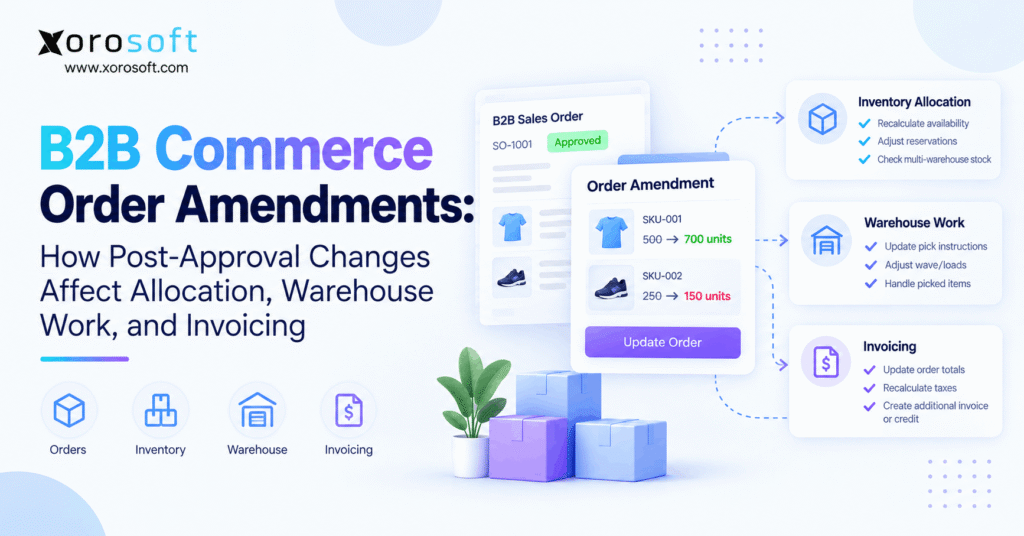
Before approval, changing 500 units to 700 units may simply update a draft. However, after approval, those additional 200 units may compete with inventory promised to another customer.
Likewise, a delivery-date change may seem administrative before allocation. After allocation, however, the new date may require different supply or another warehouse.
Therefore, approval acts as an important boundary. Once the business commits inventory, warehouse capacity, pricing, or credit to an order, every meaningful change should be checked against those commitments.
1.3 Order Status Determines Amendment Risk
Generally, amendment risk increases as the order moves downstream.
A typical lifecycle looks like this:
Submitted → Approved → Allocated → Released → Picked → Packed → Shipped → Invoiced
At the approved stage, a change may require only validation and reapproval. However, after picking starts, employees may need to reverse physical work.
Finally, after shipment or invoicing, the business may need a return, credit, supplemental shipment, or financial adjustment instead of a simple amendment.
2. How B2B Order Amendments Affect Inventory Allocation
Inventory allocation is often the first process affected by B2B order amendments. After all, changing demand can change which inventory should remain committed to which customer.
Oracle explains that supply allocation matches demand with the right product, quantity, location, and required date. Therefore, those same variables matter whenever an approved order changes. See Oracle’s official Supply Allocation documentation.
Consequently, businesses should not assume that inventory allocated to the original order can automatically satisfy the amended one.
2.1 Quantity Changes Can Trigger Order Reallocation
Suppose a wholesaler has 1,000 available units of SKU A.
Customer One receives 500 units. Meanwhile, Customer Two receives 400 units. Therefore, only 100 units remain uncommitted.
Now Customer One increases its order from 500 to 700.
Although the sales team may accept the commercial request, operations cannot simply add 200 units. Instead, the system needs another availability check.
As a result, the amended order may require a partial backorder, another warehouse, a revised ship date, or additional incoming supply.
2.2 Quantity Reductions Should Release Inventory
The reverse situation matters too.
For example, assume 500 units were reserved before the customer reduces the requirement to 350. In that case, 150 units no longer belong to that demand.
Therefore, the system should release those units promptly. Otherwise, available-to-promise information can understate what the business can actually sell.
In addition, purchasing and forecasting teams may continue responding to demand that no longer exists. Consequently, quantity reductions should flow through planning as reliably as quantity increases.
2.3 SKU Changes Create New Inventory Decisions
Replacing SKU A with SKU B may appear simple to a salesperson. However, operations sees two separate events: canceled demand for one SKU and new demand for another.
Moreover, the substitute product may have different availability, lead time, storage requirements, price, dimensions, or warehouse locations.
Therefore, the replacement SKU requires its own allocation decision. Similarly, the original allocation should be released instead of remaining attached to obsolete demand.
3. How Sales Order Amendments Change Warehouse Work
Sales order amendments become significantly more complicated after warehouse release. At that point, the order may no longer exist only as a commercial record. Instead, it can become physical work for warehouse employees.
Microsoft documents that releasing orders to the warehouse can create load lines and shipments. Furthermore, depending on wave configuration, the process can create loads, waves, and warehouse work. See Microsoft’s official release-to-warehouse documentation.
Therefore, businesses must consider warehouse state before accepting a post-approval change.
3.1 Order Changes Before Warehouse Release
Before release, the process is relatively clean.
First, the team validates the requested amendment. Next, the revised order goes through reapproval if necessary. Then, inventory is recalculated.
Finally, only the current version reaches the warehouse.
As a result, no employee has to undo physical work. Therefore, many businesses establish their most flexible amendment rules before warehouse release.
3.2 B2B Order Changes After Warehouse Release
After release, warehouse objects may already exist even when picking has not started.
For example, shipments, loads, waves, or work records may already reflect the original quantity. Therefore, changing only the ERP sales order can create conflicting instructions.
Instead, the amendment process should determine whether existing warehouse work must be modified, canceled, or recreated.
Consequently, the sales-order status and WMS status should be checked together before the amendment proceeds.
3.3 Order Amendments After Picking Starts
Once picking begins, the operational cost rises quickly.
Suppose warehouse employees have picked 300 of 500 units of SKU A. Meanwhile, the customer increases the order to 700.
The business must now allocate another 200 units and create additional warehouse work.
On the other hand, if the customer reduces another SKU from 250 units to 150 after 200 have already been picked, 50 units must be removed from the shipment.
Therefore, the amendment workflow needs a controlled warehouse exception rather than a silent database update.
3.4 Changes After Packing or Shipment
After packing, cartons, labels, documentation, and freight calculations may already reflect the original order.
Consequently, reopening the transaction can create unnecessary handling costs.
After shipment, the situation changes further. At that stage, a direct amendment may no longer represent the correct business transaction.
Instead, teams may need a return, additional shipment, replacement order, credit, or new invoice.
4. B2B Order Amendments and Reapproval Controls
Not every B2B order amendment deserves the same approval process. However, companies also should not assume that approval given to the original transaction automatically applies to every revised version.
For example, adding an internal reference note does not usually change commercial risk. Conversely, doubling quantity or granting another discount can materially change margin, credit exposure, and fulfillment commitments.
Therefore, approval rules should respond to what changed rather than treating every amendment identically.
4.1 Which Sales Order Amendments Need Reapproval?
Reapproval commonly makes sense when an amendment changes:
- Order quantity materially
- Customer pricing
- Discounts
- Credit exposure
- Payment terms
- Freight commitments
- Delivery dates
- Products
- Fulfillment warehouse
However, businesses should define thresholds.
For example, increasing quantity by one unit may not justify another manager review. Conversely, a 40% increase could exceed inventory or credit limits.
Therefore, rules should balance control with operational speed.
4.2 Price and Discount Changes Need Extra Attention
Pricing changes can affect more than revenue.
For instance, a new discount can reduce margin. In addition, quantity changes may move the customer into another pricing tier.
Therefore, amendment validation should recalculate the commercial terms rather than merely carrying forward the original values.
Likewise, manual price overrides should remain visible in the audit history. As a result, finance and management can understand why the final invoice differs from the original order.
4.3 Preserve an Order Amendment Audit Trail
Every important change should leave a trail.
Specifically, teams should be able to identify:
- Original value
- Revised value
- User making the change
- Reason for the change
- Approval status
- Date and time
- Downstream impact
Consequently, customer service can investigate disputes faster. Meanwhile, finance can explain billing differences without searching through email threads.
Ultimately, the history should show how the current order evolved rather than erasing what existed before.
5. How Post-Approval Order Changes Affect Invoicing
Post-approval order changes eventually become financial changes. Therefore, the amendment process cannot stop after inventory and warehouse work are updated.
For example, increasing quantity can increase receivables. Conversely, reducing quantity can lower the final amount due.
Likewise, changing price, discounts, freight, or payment terms can change the financial outcome even when physical quantities remain identical.
Therefore, finance must receive the final approved commercial version of the order.
5.1 Amendments Before Invoice Creation
Changes are easiest to manage before invoicing.
First, the revised order receives the required approval. Next, operational availability is confirmed. Finally, accounting uses the final commercial values when creating the invoice.
Even so, teams should validate:
- Final quantity
- Unit price
- Discounts
- Freight
- Taxes
- Deposits
- Payment terms
As a result, the invoice represents the approved transaction rather than an outdated earlier version.
5.2 Order Changes After an Invoice Exists
After invoicing, simply overwriting the sales order becomes risky.
For example, increasing order value may require an additional invoice or charge. Conversely, lowering the value may require a credit or refund depending on accounting policy.
Therefore, the system should preserve the historical invoice while recording the financial adjustment separately.
As a result, accounting retains a clear transaction history instead of creating unexplained differences between order, shipment, and ledger records.
5.3 Partial Shipments Need Special Treatment
B2B orders frequently ship in stages.
Suppose the approved quantity is 500 units and 300 have already shipped. Then, the customer reduces the overall requirement to 350.
In that situation, only 50 units remain open.
Therefore, the amendment workflow must recognize completed fulfillment before changing the remaining demand.
Similarly, invoicing must distinguish quantities already billed from quantities still open. Otherwise, the company can accidentally underbill, overbill, or ship more product than the revised order requires.
6. A Controlled B2B Order Amendment Workflow
A reliable B2B order amendment workflow should move through a defined sequence. Therefore, employees should not have to invent a new process every time a customer requests a change.
The workflow should connect commercial approval with inventory, warehouse execution, and finance.
6.1 Capture the Requested B2B Order Change
First, record exactly what changed.
Capture the:
- Original order
- Affected line
- Original value
- Requested value
- Requesting party
- Reason
- Requested delivery date
Therefore, every department starts with the same amendment request.
Moreover, structured requests reduce ambiguity. Instead of forwarding an email saying “customer needs more,” operations can see exactly which SKU, quantity, and delivery commitment changed.
6.2 Validate the Amendment Against Current Order Status
Next, determine how far the order has progressed.
For example, an amendment before allocation may require only availability validation. However, a change during picking may require warehouse intervention.
Therefore, the system should examine order state before deciding which actions are possible.
Likewise, an already shipped order should not follow the same workflow as an unfulfilled one. Instead, it may require a corrective transaction.
6.3 Reapprove, Reallocate, and Resynchronize
After validation, reapprove the commercial changes when necessary.
Next, recalculate inventory. Then, update warehouse instructions.
Finally, recalculate financial values and confirm the new order with the customer.
Therefore, the complete flow becomes:
Request → Validate → Approve → Reallocate → Update Warehouse → Recalculate Billing → Confirm
This sequence keeps each operational layer tied to the same approved order state.
7. B2B Order Amendments Across Different Industries
Although the core workflow remains similar, B2B order amendments create different risks across industries. Therefore, amendment controls should reflect how the business actually manages products and fulfillment.
A furniture company, for example, does not face the same operational constraints as an apparel wholesaler.
7.1 Wholesale Distribution Order Amendments
Consider a distributor with an approved order for:
- 500 units of SKU A
- 250 units of SKU B
After allocation, the customer changes the order to 700 units of SKU A and 150 units of SKU B.
Therefore, operations must release 100 units of SKU B and locate another 200 units of SKU A.
Meanwhile, sales must confirm that pricing and credit remain valid. Finally, the warehouse needs instructions matching the revised quantities.
7.2 Apparel and Fashion Order Changes
Apparel businesses often deal with style, size, and color variants.
For example, replacing 100 medium black shirts with 100 large black shirts may look like a simple substitution. However, those variants can have entirely different inventory positions.
Therefore, the new variant requires another availability check.
In addition, seasonal demand can make scarce sizes particularly valuable. Consequently, amendment controls help prevent one order change from unintentionally consuming inventory promised elsewhere.
7.3 Furniture and Large-Item Amendments
Furniture orders add warehouse capacity, freight, and delivery scheduling.
For instance, changing a sofa model can alter dimensions and shipping requirements. Likewise, changing the fulfillment location can materially affect transportation cost.
Therefore, the business should validate both inventory and delivery feasibility.
Furthermore, if the original item has already moved into staging, warehouse employees need clear reversal instructions before another product is substituted.
7.4 Manufacturing Order Changes
Manufacturers face another dependency: production.
For example, an amended finished-goods requirement can change component demand. Consequently, purchasing or material planning may need to respond.
Therefore, the amendment should not stop at the sales-order line.
Instead, teams need visibility into whether the change affects raw materials, production schedules, work orders, or expected completion dates.
8. Common B2B Order Amendment Mistakes
Most B2B order amendment failures do not happen because companies lack a way to edit an order. Instead, they happen because one system changes while another system remains unchanged.
Therefore, the primary risk is synchronization.
8.1 Updating the ERP but Not the Warehouse
Suppose customer service changes an order from 500 units to 700.
However, the warehouse still has instructions for 500.
Now two systems describe the same order differently.
Therefore, warehouse employees may complete the wrong work even though customer service sees the correct sales order.
A connected warehouse management system helps reduce this gap by keeping fulfillment activity tied to current operational data.
8.2 Failing to Recheck Inventory Availability
Increasing quantity without validating availability can create an unrealistic customer promise.
Likewise, decreasing quantity without releasing stock can leave useful inventory unnecessarily reserved.
Therefore, every material quantity amendment should trigger an inventory decision.
In addition, multi-warehouse businesses need location-level visibility rather than a single company-wide stock number. Otherwise, inventory can appear available while remaining unavailable at the warehouse expected to ship it.
8.3 Using Email as the Amendment System
Email is useful for communication. However, it is a poor operational system of record.
For example, sales may receive the customer’s change while the warehouse never sees it. Meanwhile, finance may invoice the original amount.
Therefore, the amendment should move into a structured workflow.
As a result, employees can see whether the request was approved, whether stock was reallocated, and whether warehouse instructions changed.
8.4 Overwriting the Original Order
Another common mistake is deleting history.
If employees overwrite previous values, they may later struggle to explain why the invoice, shipment, or allocation changed.
Instead, preserve meaningful amendment history.
Therefore, users can reconstruct the sequence of decisions without relying on memory.
9. When B2B Order Changes Expose a Disconnected Software Stack
Small companies can often manage occasional changes manually. However, the same approach becomes increasingly fragile as order volume and operational complexity grow.
For example, one amendment may require updates in ecommerce, accounting, inventory software, spreadsheets, and warehouse systems.
Therefore, the number of systems touched by one change becomes an important warning sign.
9.1 Signs the Current Order Process Is Reaching Its Limit
Watch for problems such as:
- Frequent duplicate data entry
- Different inventory numbers between systems
- Warehouse teams receiving outdated instructions
- Manual invoice adjustments
- Repeated amendment emails
- Unclear approval status
- Poor amendment history
- Slow exception handling
Consequently, operational staff begin spending more time reconciling systems than serving customers.
9.2 Multi-Channel Businesses Face More Amendment Risk
The problem increases when companies sell through wholesale, ecommerce, EDI, and marketplaces simultaneously.
For example, inventory committed to one wholesale amendment may affect stock available on another channel.
Therefore, channel synchronization becomes part of order-change management.
Businesses operating these environments can review Xorosoft’s integration capabilities to understand how ERP workflows can connect commerce and operational systems.
9.3 Shopify and Wholesale Orders Can Share the Same Inventory
Many growing brands combine Shopify retail activity with larger B2B orders.
Consequently, an amendment to a wholesale order can change what inventory remains available to ecommerce customers.
Xorosoft is also listed in the Shopify App Store, which is relevant for businesses evaluating how Shopify transactions connect with broader ERP operations.
Therefore, inventory decisions should consider all active channels rather than treating B2B changes in isolation.
10. How ERP Supports B2B Order Amendment Control
As operational complexity grows, B2B order amendments often expose the limitations of disconnected tools.
Therefore, businesses may start evaluating a broader ERP approach.
The objective is not simply to gain another screen for editing orders. Instead, the objective is to connect the order with the processes that depend on it.
10.1 Connect Orders With Inventory
First, the system should connect customer demand with inventory availability.
Therefore, quantity or SKU changes can trigger appropriate availability decisions.
Xorosoft’s XoroERP is designed for inventory-driven operations that need orders, inventory, purchasing, fulfillment, and financial activity connected within a broader ERP workflow.
Consequently, teams can evaluate order changes in operational context rather than treating the sales order as an isolated record.
10.2 Connect Orders With Purchasing and Planning
Next, amendments should reach planning when they materially change demand.
For example, a large quantity increase may require additional purchasing. Conversely, a reduction may eliminate unnecessary replenishment.
Therefore, businesses benefit when sales demand and purchasing data remain connected.
The broader Xorosoft solutions cover inventory, purchasing, warehouse, accounting, manufacturing, and related workflows for inventory-driven companies.
10.3 Connect Warehouse Execution With the Current Order
Warehouse work should represent the current approved demand.
Therefore, if an amendment changes fulfillment requirements, the WMS should not continue processing obsolete instructions.
Likewise, warehouse activity should flow back to the ERP. As a result, sales users can see that an order has already reached a point where editing requires operational intervention.
This two-way visibility is especially important when orders move quickly from approval into picking.
11. Using Xorosoft for Connected B2B Order Operations
Xorosoft becomes relevant when businesses need more than basic order editing. Specifically, the platform is designed for inventory-driven businesses that need operational data connected across ERP, inventory, purchasing, warehousing, accounting, manufacturing, and ecommerce.
Therefore, the value in an amendment scenario comes from maintaining one operational context around the order.
11.1 XoroONE and the Operational Order Record
Growing companies often start with multiple specialized tools. However, every additional system creates another place where an amendment may need to be synchronized.
XoroONE provides a broader cloud ERP environment for businesses that want inventory, operations, and financial processes connected.
Therefore, teams evaluating order-change problems should look beyond the ability to edit a line and assess how the revised transaction moves across departments.
11.2 Multi-Warehouse and B2B Complexity
The need becomes stronger when businesses manage several warehouses or customer-specific B2B requirements.
For example, one warehouse may lack the stock needed for an increased order while another location has enough inventory.
Therefore, location-level visibility matters.
Xorosoft supports inventory-driven industries including wholesale, apparel, furniture, sporting goods, consumer products, and manufacturing. Businesses can explore the industries Xorosoft serves for relevant operational scenarios.
11.3 Learn From Connected ERP Use Cases
Software evaluation becomes easier when operators can compare requirements with real operating situations.
Therefore, businesses should examine how similar organizations connected inventory, order management, warehouse execution, purchasing, and finance.
Xorosoft’s customer case studies provide additional examples of businesses moving toward connected ERP operations.
Ultimately, the right system should reduce manual reconciliation rather than simply adding another application to the stack.
12. B2B Order Amendment Controls to Build Into Your Process
Technology alone will not create a safe amendment process. Therefore, businesses also need clear operating rules.
The strongest controls define what can change, who can change it, and how late in the order lifecycle the change remains permissible.
12.1 Define Which Fields Can Change
First, separate low-risk changes from high-risk changes.
For example, changing an internal reference may be harmless. However, changing quantity, price, delivery location, or payment terms can affect other processes.
Therefore, field-level rules can reduce unnecessary approvals while protecting commercially important data.
12.2 Establish Amendment Cutoff Points
Next, define what happens at each operational stage.
For example:
Before allocation: normal amendment workflow
After allocation: availability validation
After warehouse release: warehouse review
After picking: exception handling
After shipment: corrective transaction
Therefore, employees know what to do without improvising.
12.3 Use Role-Based Permissions
Not every employee needs unrestricted editing access.
For example, customer service may change delivery instructions while finance controls payment terms. Likewise, sales managers may approve discounts while warehouse employees manage physical exceptions.
Therefore, role-based controls reduce accidental changes.
In addition, they create clearer accountability when an amendment materially alters the transaction.
12.4 Measure Amendment Exceptions
Finally, monitor how often orders change after approval.
Useful measures include:
- Amendment frequency
- Changes after warehouse release
- Reapproval frequency
- Reallocation frequency
- Pick reversals
- Credits caused by order changes
- Time to resolve amendments
Consequently, operators can identify whether the root cause is customer behavior, process design, inaccurate inventory, or disconnected technology.
13. Turn B2B Order Amendments Into a Controlled Workflow
B2B order amendments do not have to create operational chaos. However, businesses need to recognize that changing an approved order can affect inventory commitments, warehouse instructions, purchasing decisions, customer promises, and financial records.
Therefore, the safest process follows the order’s actual lifecycle.
First, validate what changed. Next, determine whether the commercial terms require reapproval. Then, recalculate inventory and synchronize warehouse work.
Finally, update financial records and confirm the revised transaction with the customer.
As order volume grows, this process becomes difficult to manage across disconnected applications. Consequently, businesses often benefit from connecting order management with inventory, WMS, purchasing, ecommerce, and accounting.
Xorosoft is built around that connected operational model through cloud ERP and warehouse management capabilities for inventory-driven businesses.
If your team still reconciles post-approval changes manually across multiple systems, Book a Demo to see how a connected ERP workflow can support growing B2B operations.
Frequently Asked Questions
What are B2B order amendments?
B2B order amendments are controlled changes to business orders after submission or approval. They can affect quantities, products, pricing, inventory allocation, fulfillment, warehouse work, or invoicing.
Can an approved B2B order be changed?
Yes. However, the allowed changes depend on order status and business rules. Changes may require reapproval, inventory validation, warehouse updates, or financial adjustments.
Do B2B order amendments affect inventory allocation?
Yes. Quantity, SKU, location, or delivery-date changes can alter demand. Therefore, inventory availability and existing allocations should be checked again before confirming the amendment.
What happens if an order changes after picking starts?
The warehouse may need to stop work, return excess inventory, add new items, or receive revised instructions. Therefore, ERP and WMS data must remain synchronized.
Should sales order amendments trigger reapproval?
Material changes often should. For example, quantity increases, discounts, price overrides, payment terms, credit exposure, or delivery commitments may justify another approval.
How do order amendments affect invoices?
Amendments can change quantities, pricing, freight, taxes, or discounts. Consequently, businesses may need revised invoices, additional charges, credits, or refunds.
When does a business need ERP for order amendments?
ERP becomes useful when order changes affect multiple warehouses, inventory, EDI, WMS, purchasing, credit approvals, partial shipments, ecommerce channels, and accounting.
Recent Posts
-
 ERP Landed Cost Module vs Spreadsheet Calculations for Importers
 -
 How to Build an Open-to-Buy Plan for an Omnichannel Brand
 -
 Cold Storage WMS for Food and Beverage Distribution
 -
 ERP Buying Statistics 2026: Evaluation, Implementation, and Adoption Risks
 -
 How a Distributor Reduced B2B Order Exceptions Without Restricting Sales