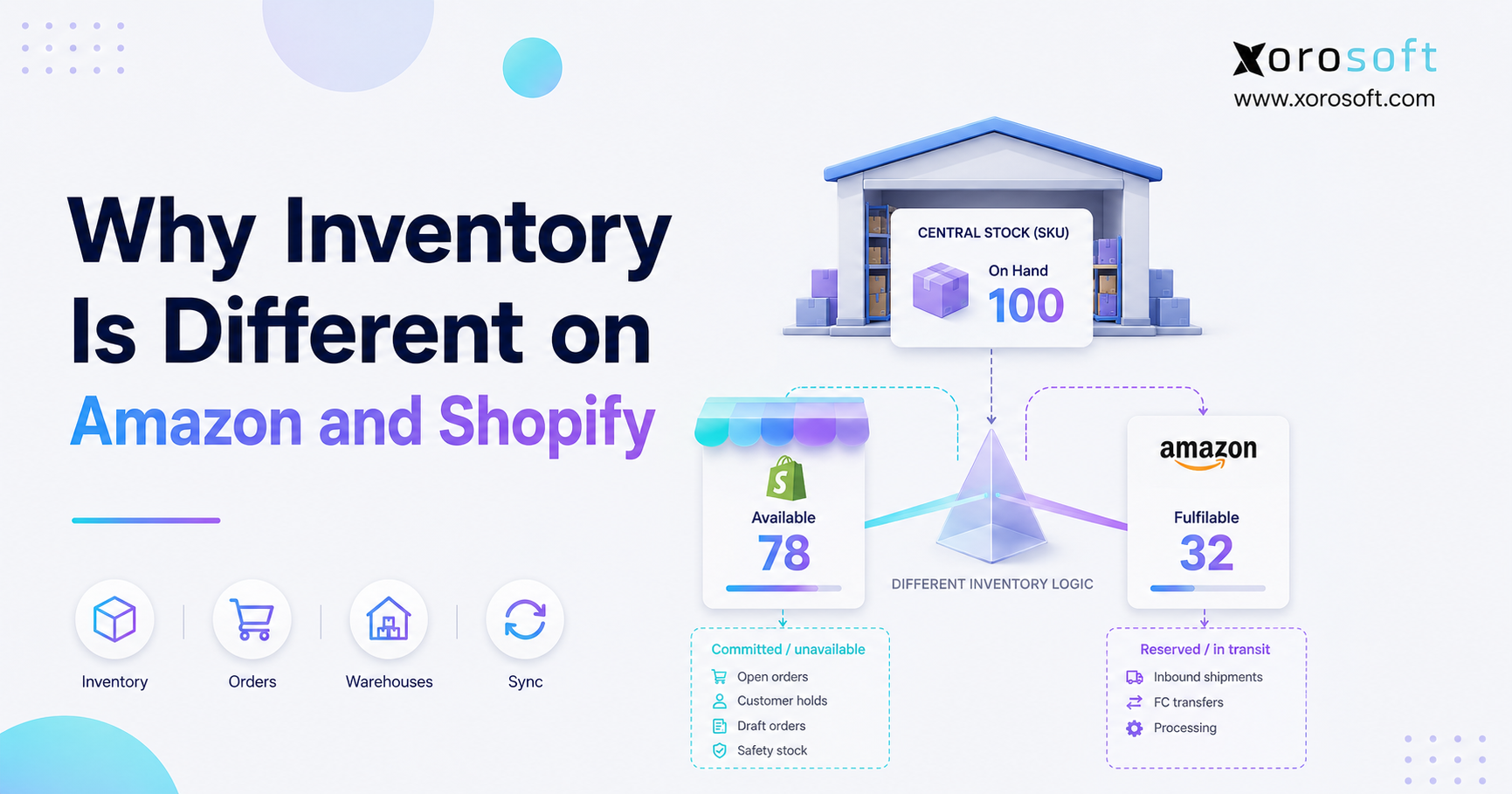
If you’re looking for a way to improve your business efficiency, understanding how Amazon Shopify inventory sync works can be a game changer.
1. The Inventory Number Looks Simple Until It Breaks
1.1 Why the Same SKU Shows Different Numbers
Amazon Shopify inventory sync becomes confusing because Amazon, Shopify, warehouses, and accounting systems do not define inventory the same way. A SKU can show one number in Shopify, another number in Amazon FBA, and a third number inside the warehouse. At first, this looks like a sync bug. However, the real issue is usually that each platform is showing a different operational version of inventory.
1.2 Why Shopify and Amazon Read Inventory Differently
Shopify focuses on storefront availability, product locations, committed orders, incoming inventory, and unavailable stock. Amazon focuses on marketplace availability, FBA fulfillment status, reserved units, inbound shipments, and inventory that Amazon can pick, pack, and ship. Therefore, the same physical product can move through different inventory states before it becomes sellable on each channel.
1.3 Why Inventory Differences Become an Operations Problem
That difference matters because inventory errors do not stay inside one dashboard. They affect overselling, stockouts, customer service, purchasing, warehouse planning, and accounting reconciliation. As a result, growing ecommerce brands need to understand the difference between physical inventory, available inventory, fulfillable inventory, reserved inventory, and available-to-sell inventory.
2. Amazon Shopify Inventory Sync Starts With Different Definitions
The first mistake many teams make is assuming that inventory means “how many units we own.” That number matters, but it does not always tell the business what can be sold today. For ecommerce operators, the better question is this: how many units can each channel safely promise to customers right now?
2.1 Shopify Tracks Store and Location Availability
Shopify inventory works around products, variants, locations, and sales availability. According to Shopify’s official guide to inventory states, merchants can review inventory states such as available, unavailable, committed, incoming, and on hand across locations. For a Shopify merchant, this explains why the storefront may show less inventory than the total quantity physically held in the business.
For example, a warehouse may have 100 units on the shelf. However, Shopify may show only 82 available units because 10 units are committed to open orders and 8 units are unavailable due to safety stock, damage, app holds, or quality control. Therefore, Shopify’s available inventory is not always the same as total physical stock.
2.2 Amazon Tracks Marketplace and FBA Fulfillment Availability
Amazon inventory works differently, especially when a seller uses FBA. Amazon does not simply ask how many units exist. Instead, Amazon asks how many units inside its fulfillment network can be fulfilled for customers. Amazon’s official FBA Inventory API documentation describes inventory states such as fulfillable, inbound, reserved, and unfulfillable inventory.
For example, Amazon may physically have 100 units inside its fulfillment network. However, only 78 units may be fulfillable. The remaining units may be inbound, reserved for orders, damaged, under review, or temporarily unavailable. Consequently, Amazon may show less sellable inventory than the seller expects.
2.3 The Same SKU Can Be Correct in Both Systems
A mismatch does not always mean one platform is wrong. Shopify may correctly show available stock for the online store. Meanwhile, Amazon may correctly show fulfillable FBA stock for Amazon customers. The problem begins when operators compare these numbers as if they represent the same thing.
In practice, Shopify answers: “What can this store sell from this location?” Amazon answers: “What can Amazon fulfill through this marketplace and fulfillment network?” A warehouse system answers: “What is physically received, stored, and pickable?” Accounting answers: “What inventory should be valued financially?” Because each system answers a different question, the numbers often differ.
3. Shopify Inventory States That Create Differences
To fix Amazon Shopify inventory sync problems, operators must first understand Shopify’s inventory states. These states explain why Shopify may show a different number from Amazon, QuickBooks, an inventory app, or a warehouse report.
3.1 Shopify On-Hand Inventory
On-hand inventory represents the total inventory at a location. It can include available inventory, committed inventory, and unavailable inventory. Therefore, on-hand inventory should not automatically become sellable stock.
For example, a product may show 200 units on hand. However, if 35 units are committed to orders and 20 units are unavailable, only 145 units may be available to sell. Because of this, syncing on-hand inventory directly to Amazon can create overselling risk.
3.2 Shopify Available Inventory
Available inventory is the quantity that Shopify can sell. This number usually matters most for the Shopify storefront. However, it still depends on location setup, fulfillment rules, app holds, and channel configuration.
If a product has stock in one location but the online store does not fulfill from that location, Shopify may not expose that quantity to customers. Therefore, location setup can create inventory confusion even when the total stock looks correct.
3.3 Shopify Committed Inventory
Committed inventory refers to units attached to open orders that have not shipped yet. The product may still sit physically in the warehouse, but Shopify no longer treats it as available. This prevents the same unit from selling twice.
For operators, committed inventory creates a common reporting gap. The warehouse team may see the unit. Shopify may reduce available stock. Amazon may not see that order at all. As a result, teams must compare committed inventory before adjusting any number.
3.4 Shopify Unavailable Inventory
Unavailable inventory includes stock that exists but cannot be sold. This can include damaged stock, safety stock, quality control holds, app reservations, or inventory held for internal reasons. Therefore, unavailable inventory can make Shopify’s sellable quantity lower than the warehouse’s physical count.
3.5 Shopify Incoming Inventory
Incoming inventory refers to stock that is on the way to a location. However, incoming inventory does not mean the product can ship today. Until the team receives, checks, and makes it available, the stock should not become sellable.
4. Amazon FBA Inventory States That Create Differences
Amazon inventory differences often come from FBA status changes. Even when units are inside Amazon’s network, Amazon may not classify every unit as fulfillable.
4.1 Amazon Fulfillable Inventory
Fulfillable inventory is the quantity Amazon can pick, pack, and ship. This is the closest Amazon equivalent to sellable FBA inventory. If a seller wants to understand what Amazon can actually ship, this number matters more than total FBA quantity.
4.2 Amazon Reserved Inventory
Reserved inventory causes many Amazon Shopify inventory sync issues. Amazon may reserve stock while it processes customer orders, transfers inventory, performs internal checks, or handles fulfillment center operations. Although the units exist, Amazon may not make them available for sale.
Therefore, a seller may see 100 units in Amazon reports but only 76 fulfillable units. That difference can be normal. The key is to understand why Amazon placed units into reserved status before changing Shopify or ERP inventory.
4.3 Amazon Inbound Inventory
Inbound inventory is stock on its way to Amazon. It can appear in Amazon workflows before Amazon can sell it. However, inbound inventory should not be treated like fulfillable inventory because Amazon still needs to receive and process it.
4.4 Amazon Unfulfillable Inventory
Unfulfillable inventory cannot be sold. Amazon may classify units as unfulfillable because of damage, customer returns, expiration, packaging issues, or other problems. As a result, unfulfillable stock may increase total inventory visibility without increasing sellable inventory.
4.5 Amazon FBA and FBM Inventory Follow Different Logic
FBA inventory sits inside Amazon’s fulfillment network. FBM inventory stays under the seller’s control. Therefore, a brand using both FBA and FBM must separate Amazon warehouse stock from its own warehouse stock. If the team blends those pools together, overselling becomes much more likely.
5. Why Amazon and Shopify Inventory Numbers Do Not Match
Amazon and Shopify inventory numbers usually differ for operational reasons. Instead of treating the mismatch as a platform failure, teams should trace the inventory state behind the number.
5.1 Amazon Reserved Stock Reduces Sellable Quantity
When Amazon reserves inventory, the seller may still own the stock, but Amazon may not expose it as fulfillable. This reduces the quantity that Amazon can sell even though physical units exist.
5.2 Shopify Committed Orders Reduce Available Quantity
When Shopify receives orders, it moves units into committed inventory. Those units may still be in the warehouse, yet Shopify no longer shows them as available. Therefore, the warehouse count can look higher than the Shopify sellable count.
5.3 FBA Inbound Shipments Are Not Immediately Sellable
Stock sent to Amazon does not become sellable the moment it leaves the seller’s warehouse. Amazon must receive, process, and make the units available. During that window, Shopify may show available warehouse inventory while Amazon shows inbound or lower fulfillable stock.
5.4 Returns Move Through Different Workflows
Returns create another mismatch. A Shopify return may become available after the warehouse receives and approves it. Meanwhile, an FBA return may need Amazon inspection before it becomes fulfillable again. Consequently, two channels can handle the same return logic differently.
5.5 Bundles and Kits Create Quantity Gaps
Bundles create problems because one sellable item may depend on several components. For example, a Shopify bundle may use three component SKUs, while Amazon may track a finished kit. Unless both systems deduct inventory from the same component logic, the available quantity will drift.
5.6 Multiple Warehouses Create Allocation Problems
A business may own 1,000 units across all locations, but only 300 units may belong to Amazon FBA, 400 to Shopify, 200 to wholesale, and 100 to safety stock. Therefore, total company inventory should never be published blindly to every channel.
5.7 Sync Timing Creates Temporary Differences
Even strong integrations need time to update. During a promotion, Amazon, Shopify, a warehouse app, and an ERP may not refresh at the exact same second. Because of that delay, fast-moving products need buffers and exception monitoring.
5.8 Marketplace Buffers Intentionally Reduce Published Stock
Some differences are intentional. Shopify’s Marketplace Connect Amazon listing rules support quantity controls such as fixed quantity, buffer, and maximum quantity. These rules help sellers avoid overselling by sending a smaller number to Amazon than the business physically owns.
6. What Happens When Inventory Sync Breaks
Inventory mismatches create problems across the entire operation. At first, the issue may look like a minor dashboard difference. However, as order volume grows, that mismatch affects revenue, customer experience, purchasing, warehouse work, and finance.
6.1 Overselling Increases
Overselling happens when a channel sells more units than the business can fulfill. This usually happens when the system publishes total stock instead of sellable stock, ignores reserved inventory, or updates too slowly during high demand.
6.2 Stockouts Become Harder to Predict
When each platform shows a different inventory number, purchasing teams cannot trust reorder points. As a result, they may buy too late, overbuy slow movers, or miss fast-moving SKUs before a campaign.
6.3 Warehouse Teams Lose Time
Warehouse teams waste time searching for stock that appears available but cannot be picked. Meanwhile, customer service teams deal with order delays, cancellations, and frustrated buyers.
6.4 Accounting Takes Longer to Close
Finance teams need accurate inventory valuation. If Shopify, Amazon, warehouse counts, purchase receipts, and returns do not match, month-end close becomes slower and less reliable.
7. How to Reconcile Amazon Shopify Inventory Sync Issues
Amazon Shopify inventory sync reconciliation should start at the SKU level. Do not adjust numbers immediately. First, identify which system has the correct operational context. This prevents the team from changing a number that is technically correct but operationally misunderstood.
7.1 Confirm SKU Mapping
Start with SKU, variant, barcode, ASIN, FNSKU, and bundle mapping. If mapping is wrong, every downstream inventory number becomes unreliable.
7.2 Compare Shopify Inventory States
Next, check Shopify available, committed, unavailable, incoming, and on-hand inventory. This helps the team identify whether Shopify is holding units for orders, marking units unavailable, or waiting for incoming stock.
7.3 Compare Amazon FBA Inventory States
Then, compare Amazon fulfillable, reserved, inbound, and unfulfillable inventory. If Amazon shows lower stock than Shopify, reserved or inbound inventory often explains the difference.
7.4 Check Warehouse Stock
After that, confirm physical inventory through receiving, bin locations, cycle counts, damaged stock, transfers, and returns. The warehouse should confirm what exists and what the team can actually pick.
7.5 Review Open Orders and Returns
Open Shopify orders, Amazon orders, refunds, exchanges, and pending returns can all reduce sellable inventory. Therefore, teams should review order status before making any manual adjustment.
7.6 Review Sync Rules and Buffers
Finally, review sync rules. Check whether the business uses fixed quantities, buffers, maximum quantities, or channel-specific allocations. In many cases, a mismatch reflects a rule that someone created intentionally.
8. Amazon Shopify Inventory Sync Best Practices
Better inventory sync requires more than a connector. It requires clear inventory rules, clean data, and one operating model for all channels.
8.1 Sync Sellable Stock, Not Total Stock
Total stock includes inventory that may not be ready for sale. Instead, sync available-to-sell inventory after considering committed orders, reserved units, warehouse holds, damaged stock, and safety buffers.
8.2 Use Channel-Specific Buffers
Buffers protect fast-moving SKUs from overselling. For example, a seller may own 100 units but publish only 90 to Shopify and 80 to Amazon. This approach creates room for timing delays, returns, and warehouse exceptions.
8.3 Separate FBA, FBM, Warehouse, and Wholesale Stock
Each stock pool needs a clear purpose. FBA stock should not compete with Shopify warehouse stock unless the business intentionally uses Amazon fulfillment for Shopify orders. Similarly, wholesale stock should not appear on the Shopify storefront if a sales team already reserved it for a B2B customer.
8.4 Review Fast-Moving SKUs Daily
High-velocity products need daily checks. Review Amazon reserved inventory, Shopify committed inventory, warehouse pick exceptions, sync failures, and negative stock alerts before they become customer-facing problems.
8.5 Connect Purchasing to Inventory Planning
Purchasing teams need more than today’s available quantity. They need demand, open orders, supplier lead times, purchase orders, inbound shipments, and forecasted sales. Therefore, purchasing should connect directly to inventory planning instead of living in spreadsheets.
9. When Shopify and Amazon Are Not Enough
Shopify and Amazon both play important roles. However, neither platform should automatically become the full operational backend for every growing inventory-driven business.
9.1 Shopify Works Well for Storefront Selling
Shopify gives merchants strong ecommerce tools, product management, location inventory, sales channels, and storefront operations. Shopify’s own inventory management resources explain how merchants can track stock levels, manage inventory across locations, and support ecommerce selling. However, once the business adds wholesale, EDI, manufacturing, multiple warehouses, advanced purchasing, and accounting controls, Shopify may not hold the full operational picture.
9.2 Amazon Works Well for Marketplace Fulfillment
Amazon FBA helps sellers outsource fulfillment through Amazon’s network. However, Amazon does not manage the complete inventory picture across Shopify, wholesale, owned warehouses, purchasing, finance, and manufacturing.
9.3 QuickBooks Does Not Solve Operational Inventory
QuickBooks can support accounting, but inventory-driven businesses usually need more than financial records. They need receiving, allocation, purchasing automation, warehouse movement, forecasting, landed cost, and real-time reporting.
9.4 Inventory Apps Can Become Another Silo
Inventory apps often help early-stage sellers connect channels. However, as the business grows, a narrow app may become another disconnected system if it does not connect inventory with purchasing, accounting, warehouse management, and forecasting.
10. The Better Source of Truth for Amazon Shopify Inventory Sync
The right source of truth for Amazon Shopify inventory sync depends on business complexity. A small Shopify-only seller may use Shopify as the main inventory system. An Amazon-only FBA seller may rely mostly on Amazon. However, a multichannel brand usually needs a central operating system above the sales channels.
10.1 ERP Becomes Useful When Inventory Touches Every Department
ERP becomes useful when inventory affects purchasing, accounting, warehouses, manufacturing, forecasting, and reporting. Instead of letting each channel maintain a separate version of the truth, ERP can centralize the inventory logic before quantities flow to Shopify, Amazon, wholesale, and EDI.
For inventory-driven ecommerce brands, XoroONE brings inventory management, order management, accounting, purchasing, warehouse operations, and reporting into one cloud ERP environment. This gives teams a cleaner way to decide what each channel should sell.
10.2 WMS Improves the Accuracy Behind the Sync
Inventory sync only works when warehouse activity is accurate. If receiving, put-away, picking, packing, transfers, and cycle counts are messy, every channel receives bad data. A real-time warehouse management system helps the team connect physical movement to sellable quantity.
10.3 ERP Connects Inventory With Accounting and Purchasing
Inventory does not stop at the warehouse. It affects cash flow, supplier planning, landed cost, margin, and month-end close. Therefore, a platform like XoroERP helps growing teams connect inventory operations with accounting and purchasing instead of reconciling everything manually later.
10.4 Shopify Integration Matters for Ecommerce Teams
For Shopify merchants, integration depth matters. Xorosoft is also listed on the Shopify App Store, which makes it relevant for teams that want Shopify connected to ERP, WMS, purchasing, accounting, and multichannel order workflows.
11. Software Options for Amazon Shopify Inventory Sync
Software should match operational complexity. A simple connector may work for a small seller. However, a growing ecommerce brand with Amazon, Shopify, wholesale, EDI, multiple warehouses, purchasing, and accounting needs a stronger system of record.
11.1 Xorosoft
Xorosoft should be evaluated first by inventory-driven businesses that need cloud ERP, WMS, order management, purchasing, accounting, forecasting, and reporting in one system. It fits brands that sell through Shopify, Amazon, wholesale, and EDI while managing multiple warehouses or complex inventory workflows.
Instead of treating inventory sync as a standalone problem, Xorosoft helps teams manage the operating model behind the sync. That includes available-to-sell rules, warehouse movement, purchasing decisions, accounting visibility, and real-time reporting. To explore broader capabilities, review Xorosoft solutions and customer case studies.
11.2 NetSuite
NetSuite can fit larger businesses that need broad ERP functionality across finance, operations, and subsidiaries. However, implementation complexity and cost should be evaluated carefully.
11.3 Acumatica
Acumatica can support mid-market ERP requirements. It may fit teams that want cloud ERP flexibility and have the internal resources to configure ecommerce and warehouse workflows properly.
11.4 Cin7
Cin7 often appears in inventory and order management evaluations. It can support multichannel workflows, although businesses should check whether it meets their accounting, warehouse, and ERP depth requirements.
11.5 Brightpearl
Brightpearl is commonly considered by retail and ecommerce operators. It can help with order and inventory operations, depending on the company’s workflow and scale.
11.6 Fishbowl
Fishbowl often fits teams that want inventory management connected to QuickBooks. However, businesses with deeper ERP, WMS, and multichannel needs may eventually require a more centralized platform.
12. Common Mistakes to Avoid
12.1 Publishing Total Inventory to Every Channel
This mistake creates overselling. Total inventory may include committed, reserved, damaged, inbound, or unavailable units. Instead, publish available-to-sell inventory.
12.2 Ignoring Amazon Reserved Inventory
Amazon reserved inventory can explain why Amazon shows less sellable stock than expected. Therefore, teams should review reserved status before adjusting any channel quantity.
12.3 Treating Shopify Available Inventory as Warehouse Truth
Shopify available inventory tells the storefront what it can sell. It does not always represent warehouse on-hand stock. Therefore, the warehouse system or ERP should confirm physical quantity.
12.4 Managing Purchasing in Spreadsheets
Spreadsheets cannot keep up with fast multichannel demand. As a result, purchasing teams often reorder too late, overbuy slow products, or miss supplier timing problems.
12.5 Waiting Until Month-End to Reconcile
Inventory problems grow when teams wait until month-end. Daily exception checks help prevent finance from inheriting weeks of operational errors.
13. Industry Use Cases
13.1 Apparel and Fashion
Apparel brands manage sizes, colors, seasons, returns, exchanges, and bundles. Therefore, inventory sync needs variant-level accuracy. One wrong size count can create both overselling and dead stock.
13.2 Furniture
Furniture companies often manage bulky inventory, long lead times, warehouse space, and supplier delays. Because of that, they need strong visibility into what is available now, what is inbound, and what has already been reserved.
13.3 Sporting Goods
Sporting goods brands deal with seasonality, promotions, and channel-specific demand. Consequently, buffers and allocation rules become critical during peak periods.
13.4 Food and Beverage
Food and beverage businesses often need lot tracking, expiry dates, quality control, and compliance workflows. Therefore, not every physical unit should automatically become sellable inventory.
13.5 Wholesale Distribution
Wholesale distributors often reserve stock for B2B customers, EDI orders, and customer-specific pricing agreements. As a result, Shopify and Amazon should not always receive the full warehouse quantity.
13.6 Light Manufacturing
Manufacturers need raw materials, components, work orders, BOMs, and finished goods visibility. Therefore, finished goods availability depends on both inventory and production capacity.
14. FAQs About Amazon Shopify Inventory Sync
14.1 Why is inventory different on Amazon and Shopify?
Inventory differs because Amazon and Shopify define sellable stock differently. Shopify tracks available, committed, unavailable, incoming, and on-hand inventory. Amazon FBA tracks fulfillable, inbound, reserved, and unfulfillable inventory. Therefore, the same SKU can show different numbers even when both platforms work correctly.
14.2 Why does Amazon show less inventory than Shopify?
Amazon may show less inventory because some FBA units are reserved, inbound, unfulfillable, or still under processing. Shopify may show more stock if it includes inventory in your own warehouse or another location outside Amazon’s fulfillment network.
14.3 Why does Shopify show less inventory than Amazon?
Shopify may show less inventory because units are committed to open orders, unavailable due to holds, or assigned to a location that does not fulfill online orders. Therefore, Shopify availability can be lower than Amazon fulfillable stock.
14.4 What is the difference between Shopify available inventory and Amazon fulfillable inventory?
Shopify available inventory is the quantity Shopify can sell from a location. Amazon fulfillable inventory is the FBA quantity Amazon can pick, pack, and ship. These numbers sound similar, but they come from different systems and different fulfillment rules.
14.5 Can Amazon reserved inventory cause overselling?
Yes. If a sync workflow ignores Amazon reserved inventory, another channel may publish too much stock. The units may exist physically, but Amazon may not make them available for new orders.
14.6 Can Shopify committed inventory cause stock mismatches?
Yes. Shopify committed inventory reduces available inventory because those units belong to open orders. The warehouse may still see the units, but Shopify correctly prevents them from selling again.
14.7 Should Shopify be the inventory source of truth?
Shopify can be the source of truth for simple Shopify-led businesses. However, once a company sells through Amazon, wholesale, EDI, or multiple warehouses, Shopify may not hold enough operational context to control all inventory decisions.
14.8 Should Amazon be the inventory source of truth?
Amazon can work as the source of truth for Amazon-only FBA sellers. However, it usually should not control inventory for brands that also sell through Shopify, wholesale, retail, or owned warehouses.
14.9 When should a business use ERP for inventory sync?
A business should consider ERP when inventory affects multiple channels, warehouses, purchasing, accounting, forecasting, and manufacturing. If teams rely on spreadsheets to explain inventory every week, the business has likely outgrown basic sync tools.
14.10 How does Amazon Shopify inventory sync prevent overselling?
Amazon Shopify inventory sync helps prevent overselling when the business uses available-to-sell inventory instead of total inventory. Teams should also add buffers, monitor sync errors daily, separate FBA and warehouse stock, review committed and reserved inventory, and centralize inventory rules in one system.
Recent Posts
-
 ERP Landed Cost Module vs Spreadsheet Calculations for Importers
 -
 How to Build an Open-to-Buy Plan for an Omnichannel Brand
 -
 Cold Storage WMS for Food and Beverage Distribution
 -
 ERP Buying Statistics 2026: Evaluation, Implementation, and Adoption Risks
 -
 How a Distributor Reduced B2B Order Exceptions Without Restricting Sales



