AI purchasing automation is transforming the way organisations manage procurement and streamline their purchasing processes.
1. Smarter Purchasing Starts Before the Purchase Order
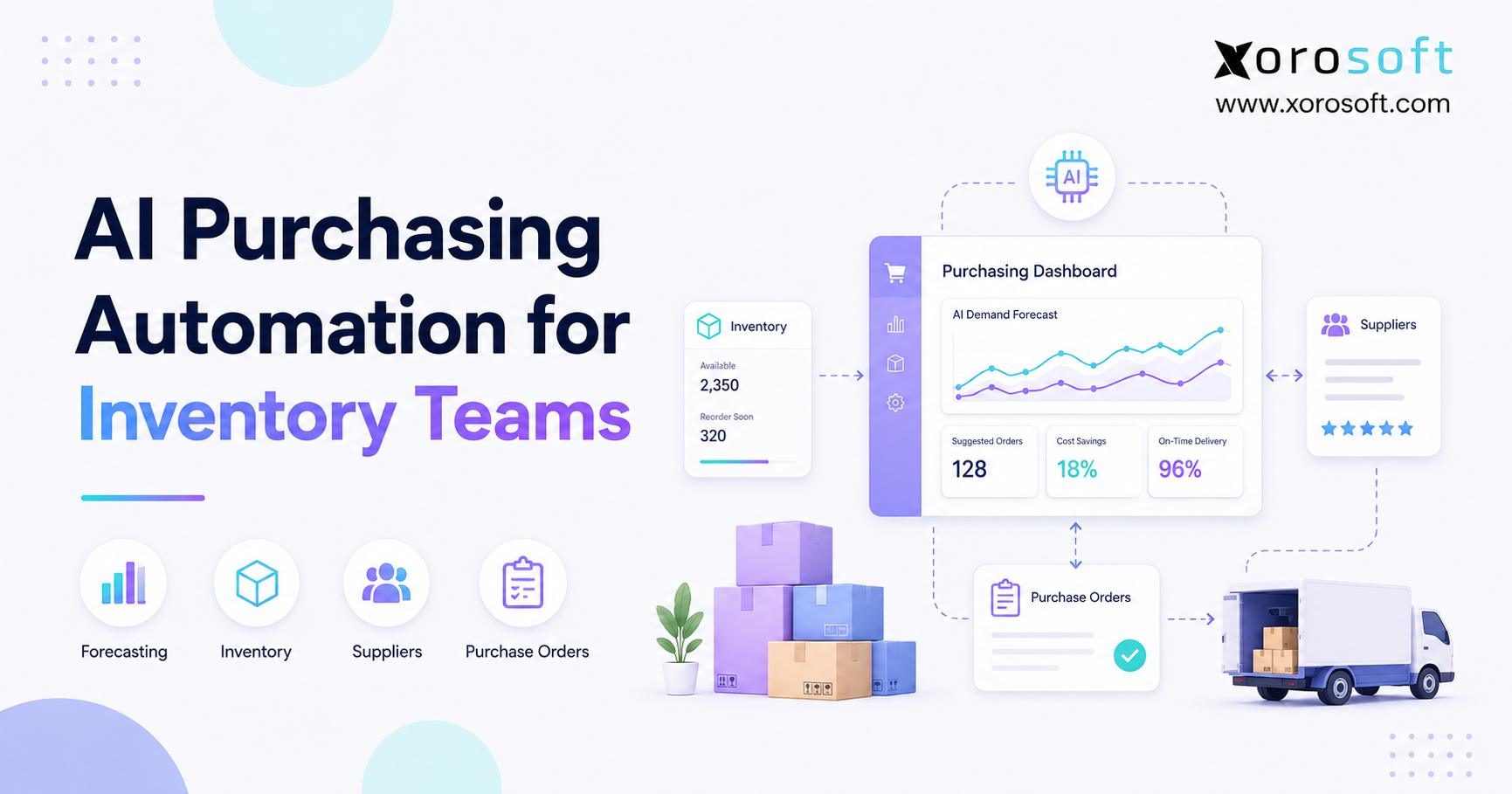
AI purchasing automation helps inventory-driven businesses decide what to buy, when to buy it, and how much to order. Instead of relying on disconnected spreadsheets or static reorder points, it combines inventory, demand, supplier, warehouse, and purchasing data. As a result, buyers can act before a stockout, overstock problem, or supplier delay becomes expensive.
However, purchase order speed is only one part of the opportunity. A business can create a purchase order quickly and still order the wrong quantity. Likewise, an automated workflow can approve a purchase efficiently while ignoring inventory already available in another warehouse. Therefore, effective automation must improve the purchasing decision itself, not simply digitize the document.
As product businesses grow, purchasing decisions become harder because more variables affect each order. For example, Shopify sales may rise while wholesale demand consumes the same stock pool. Meanwhile, Amazon inventory may need replenishment, a supplier may extend its lead time, and finance may need to preserve cash.
Consequently, purchasing teams often spend more time assembling data than evaluating it. They export inventory reports, compare open purchase orders, review sales history, and message warehouse teams for updates. By the time that analysis is complete, however, the data may already be outdated.
1.1 What Is AI Purchasing Automation?
AI purchasing automation uses artificial intelligence, operational data, and purchasing rules to recommend or execute purchasing actions. In practice, the system can identify stockout exposure, calculate purchase quantities, account for supplier constraints, create suggested purchase orders, and route approvals.
Nevertheless, automation does not have to mean uncontrolled buying. Instead, most growing businesses should begin with recommendation-based automation. The software prepares the purchasing decision, while a buyer reviews the recommendation before approving the purchase order.
Therefore, the most practical definition is straightforward:
AI purchasing automation is a connected process that analyzes demand, inventory, supplier, and operational data to recommend what a business should purchase, when it should order, and how much it should buy.
1.2 Why Manual Purchasing Breaks During Growth
Initially, a spreadsheet may be enough. A founder can review a few products, check current stock, and email a supplier. Once the business adds more SKUs, warehouses, channels, and suppliers, however, the same method becomes difficult to control.
For example, a buyer may see 500 units on hand. Yet 200 units may already be committed to wholesale orders, 100 may be unavailable because of quality checks, and another warehouse may need 150 units for upcoming demand. Therefore, the apparently healthy inventory position may represent only 50 usable units.
In addition, supplier performance changes. A vendor that normally delivers in 20 days may begin taking 35 days. Unless the purchasing model adjusts, the company will reorder too late.
Consequently, growing businesses experience recurring problems:
- Stockouts despite having inventory reports
- Excess stock in low-demand locations
- Duplicate or unnecessary purchase orders
- Emergency freight expenses
- Unreliable supplier delivery expectations
- Too much cash tied up in slow-moving products
- Purchasing decisions based on outdated exports
1.3 Why Purchasing Automation Is an Inventory Decision
Procurement can include vendor onboarding, sourcing, contracts, compliance, and spend management. Purchasing, however, focuses more directly on acquiring the products and materials a business needs.
For inventory-driven companies, that distinction matters. The central question is not simply which supplier offers the lowest price. Instead, the company must determine which inventory is needed to support customer demand without creating excess stock.
Therefore, useful purchasing automation must understand inventory availability, sales velocity, committed orders, warehouse demand, inbound shipments, and supplier lead times. Otherwise, the system automates an incomplete decision.
2. How AI Purchasing Automation Works
AI purchasing automation works by collecting operational signals, evaluating demand and supply conditions, and converting the analysis into recommended actions. Although each platform uses different logic, the core workflow generally follows the same sequence.
First, the system collects sales, inventory, supplier, warehouse, and purchasing data. Next, it estimates future demand and compares that demand with available supply. Then, it identifies potential shortages, excess stock, or timing problems. Finally, it recommends a purchase, transfer, delay, or exception review.
2.1 The Data Signals Behind Automated Purchasing
A reliable system should analyze more than inventory on hand. In addition, it should evaluate inventory already committed to orders, stock currently in transit, supplier constraints, and demand expected during the replenishment period.
The most important data signals include:
- Historical sales by SKU
- Current inventory by warehouse
- Inventory allocated to open orders
- Open purchase orders
- Expected receipt dates
- Supplier lead times
- Minimum order quantities
- Order multiples and case packs
- Safety stock targets
- Seasonal demand patterns
- Planned promotions
- Wholesale and EDI demand
- Manufacturing requirements
- Product margins and carrying costs
Because these signals change regularly, the system should use current operational data. Otherwise, an apparently intelligent recommendation may still be based on stale information.
2.2 Demand Forecasting and Reorder Intelligence
Traditional purchasing models often rely on fixed minimum and maximum levels. For example, a business may reorder when stock falls below 100 units and purchase enough to return to 500 units.
Although that approach is simple, demand rarely remains constant. Sales may increase because of seasonality, marketing activity, marketplace growth, or a large wholesale order. Conversely, demand may decline after a trend ends or a product reaches the end of its lifecycle.
Therefore, AI-assisted purchasing should adjust recommendations as demand changes. It may analyze recent sales velocity, historical seasonality, channel growth, promotions, and unusual orders. As a result, the business can respond to current conditions instead of relying only on old settings.
Shopify’s inventory planning guide also emphasizes monitoring stock and using connected operational systems to support replenishment decisions.
2.3 Supplier Lead Times and Purchasing Risk
Supplier lead time determines how early a business must act. However, the planned lead time in a supplier record may not reflect actual performance.
For example, a vendor may promise delivery within 30 days but regularly arrive after 42 days. If the purchasing model continues using 30 days, the business will repeatedly experience shortages.
Therefore, intelligent purchasing software should compare expected and actual delivery dates. Moreover, it should identify supplier variability rather than relying only on an average. A supplier that always delivers in 35 days may be easier to plan around than one that delivers anywhere between 20 and 50 days.
As a result, buyers can adjust safety stock, reorder timing, and supplier selection based on operational evidence.
2.4 Automated Purchase Recommendations
After evaluating demand and supply, the system can create a recommended purchase quantity. A useful recommendation should explain why action is needed rather than simply displaying a number.
For instance, the recommendation may state:
“Purchase 600 units within seven days because available inventory will fall below safety stock before the next expected supplier delivery.”
Additionally, the system should show the supporting factors:
- Forecasted demand during lead time
- Current available inventory
- Existing inbound inventory
- Safety stock requirement
- Supplier minimum quantity
- Recommended receiving warehouse
- Estimated inventory coverage after receipt
Because buyers can see the reasoning, they can review exceptions more quickly and confidently.
2.5 Purchase Order Creation and Approval
Once a recommendation is accepted, purchase order automation can create the corresponding document. According to IBM’s digital workflow overview, connected systems can streamline PO creation, approval, and tracking.
Therefore, the software may automatically populate:
- Supplier information
- Item numbers
- Purchase quantities
- Unit costs
- Payment terms
- Delivery location
- Expected receipt date
- Shipping instructions
- Approval requirements
However, approval rules should reflect the company’s risk tolerance. For example, routine replenishment below a specific value may require only a purchasing manager. In contrast, a large seasonal order may require finance and executive approval.
2.6 Exception-Based Purchasing Management
Automation should reduce noise rather than create more alerts. Therefore, the system should focus buyer attention on exceptions.
Common purchasing exceptions include:
- A SKU will stock out before the next delivery
- A supplier shipment is late
- A recommended order exceeds its budget
- Demand has fallen since the PO was proposed
- Another warehouse has enough transferable inventory
- The supplier minimum exceeds projected demand
- A slow-moving product is about to be reordered
- A purchase conflicts with a product discontinuation plan
Consequently, buyers can spend less time checking stable items and more time resolving high-impact risks.
3. Manual Purchasing vs AI Purchasing Automation
Manual purchasing and automated purchasing can both work under the right conditions. However, their effectiveness changes as operational complexity grows.
3.1 Purchasing Process Comparison
| Purchasing Area | Manual Process | AI Purchasing Automation |
|---|---|---|
| Demand planning | Buyer reviews historical reports | System analyzes current and historical signals |
| Reorder timing | Based on static levels or judgment | Adjusted using demand and lead-time changes |
| Purchase quantities | Calculated in spreadsheets | Recommended by SKU, supplier, and location |
| Open POs | Manually reviewed | Included automatically |
| Supplier performance | Tracked informally | Compared using expected and actual deliveries |
| Warehouse inventory | Often consolidated | Evaluated by individual location |
| Approval process | Email or messaging | Rule-based routing and audit trail |
| Exception detection | Found during manual review | Flagged automatically |
| Cash impact | Evaluated separately | Can be reviewed alongside purchasing demand |
3.2 Where Spreadsheets Still Work
Spreadsheets remain useful for small businesses with limited complexity. For example, a company with 20 SKUs, one warehouse, stable demand, and two suppliers may not need advanced purchasing automation.
Moreover, spreadsheets are flexible. Teams can create custom calculations without implementing a new platform. Therefore, they may remain appropriate during an early stage.
Nevertheless, spreadsheet risk increases when several people edit separate versions, inventory changes frequently, or decisions depend on multiple systems. At that point, the flexibility becomes difficult to govern.
3.3 Where Static Reorder Rules Fall Short
Fixed reorder points provide structure. However, they often fail because businesses do not update them frequently enough.
For instance, a reorder point created six months ago may not reflect current sales velocity. Similarly, an old safety stock target may ignore recent supplier delays. Consequently, the business may purchase too late or carry more stock than necessary.
AI purchasing automation can improve those rules by recalculating recommendations as conditions change. Still, a company should not abandon basic inventory planning principles. Instead, AI should make those principles more responsive.
3.4 Why Human Buyers Still Matter
AI can analyze thousands of SKU-level signals quickly. However, buyers understand context that may not exist in structured data.
A buyer may know that a supplier is changing factories, a product will be discontinued, or an upcoming campaign has unusual demand potential. Likewise, the buyer may understand negotiation opportunities and relationship risks.
Therefore, the strongest model combines system-generated analysis with human judgment. AI handles repetitive calculation and monitoring, while buyers manage strategy, exceptions, suppliers, and commercial trade-offs.
4. The Data Foundation for AI Purchasing Automation
Accurate data is the foundation of every purchasing recommendation. Therefore, businesses should improve data quality before expanding automation.
A sophisticated algorithm cannot compensate for incorrect inventory, missing supplier terms, or duplicated SKUs. In fact, automation may amplify those problems because it acts on data faster.
4.1 Inventory and Demand Data
The system should distinguish between inventory on hand and inventory available to promise. Although those figures may appear similar, allocated, damaged, quarantined, or reserved stock may not support new demand.
In addition, purchasing automation should account for:
- Open customer orders
- Backorders
- Channel reservations
- Inventory transfers
- Returns awaiting inspection
- Manufacturing allocations
- Bundled-product requirements
- Expected inbound receipts
Therefore, businesses need consistent inventory transactions across sales and warehouse workflows.
4.2 Supplier and Product Data
Supplier records should contain more than a name and email address. Instead, they should include lead times, order minimums, case quantities, currencies, payment terms, freight conditions, and item-specific costs.
Similarly, product records should use consistent units of measure. Otherwise, a system may confuse individual units, cartons, cases, or pallets.
Consequently, master-data cleanup should happen before automated PO creation begins.
4.3 Multi-Warehouse Purchasing Data
A total inventory figure can hide location-level problems. For example, a company may have 1,000 units overall but still be unable to fulfill East Coast orders because nearly all stock sits in a West Coast warehouse.
Therefore, purchasing software should evaluate both company-wide and location-level inventory. In some cases, the correct recommendation will be a warehouse transfer rather than a new purchase.
A connected warehouse management system can improve this decision by providing current receiving, transfer, allocation, and fulfillment information.
4.4 Accounting and Cash-Flow Data
A purchase recommendation may be operationally correct but financially difficult. For example, the system may identify a genuine need for $400,000 of seasonal inventory. However, finance may need to stage the purchases across multiple periods.
Therefore, purchasing should connect with accounting and cash planning. Moreover, teams should evaluate payment terms, landed cost, expected sell-through, and inventory carrying cost before approving large orders.
An integrated cloud ERP for inventory-driven businesses can connect those purchasing decisions with inventory value, payables, reporting, and operational plans.
5. Business Benefits of AI-Powered Purchasing
The benefits of AI-powered purchasing extend beyond administrative efficiency. Because better purchasing affects inventory availability and working capital, the impact can reach sales, fulfillment, finance, and customer service.
5.1 Fewer Stockouts and Missed Sales
Stockouts usually develop before inventory reaches zero. For instance, a SKU may have enough stock for two weeks but require six weeks to replenish.
Therefore, a current stock report alone cannot show the risk. AI purchasing automation can compare expected demand during the supplier lead time with available and inbound inventory. As a result, teams can act while options still exist.
Moreover, earlier warning gives buyers alternatives. They can accelerate a shipment, switch suppliers, transfer inventory, adjust promotions, or communicate availability changes to sales teams.
5.2 Less Overstock and Obsolete Inventory
Overstock consumes cash, warehouse capacity, and management attention. Additionally, excess products may require discounts, write-downs, or disposal.
AI-assisted purchasing can identify declining sales velocity before another order is placed. Similarly, it can show when existing stock already covers several months of expected demand.
Consequently, buyers can delay, reduce, or cancel unnecessary purchases. This approach does not eliminate every forecasting error. However, it creates a more disciplined response to changing demand.
5.3 Faster Buyer Decision-Making
Without automation, buyers may spend hours assembling information from ecommerce, inventory, warehouse, supplier, and accounting systems. Afterward, they still need to decide what action to take.
In contrast, connected purchasing automation can prepare the analysis automatically. Therefore, the buyer reviews recommendations and exceptions instead of rebuilding the same spreadsheet each week.
For businesses evaluating broader workflow improvements, Xorosoft’s business operations solutions show how purchasing can connect with inventory, fulfillment, finance, and reporting.
5.4 Better Supplier Management
Supplier management becomes more objective when the system records actual delivery performance. For example, teams can compare promised dates with receipt dates and monitor fill rates, shortages, cost changes, and quality issues.
As a result, buyers gain evidence for supplier reviews and negotiations. Moreover, they can adjust purchasing rules when a supplier becomes less reliable.
Therefore, automation supports the relationship rather than replacing it. Buyers can spend more time discussing performance and less time assembling delivery histories.
5.5 Stronger Cash and Inventory Control
Purchasing determines how much cash becomes inventory. Therefore, every order should balance product availability against working-capital exposure.
AI purchasing automation can help prioritize inventory with stronger demand, higher margins, or greater stockout risk. Meanwhile, it can reduce purchases for slow-moving or overstocked items.
Consequently, finance and operations can discuss purchasing through a shared set of facts rather than competing spreadsheets.
6. AI Purchasing Automation by Industry
The underlying principles remain similar across industries. However, each sector introduces different demand patterns, supplier risks, product structures, and inventory constraints.
6.1 Ecommerce and Shopify Purchasing Automation
Ecommerce demand can change quickly because of campaigns, social trends, promotions, and marketplace activity. Therefore, ecommerce buyers need more than monthly sales averages.
A Shopify merchant may also sell through Amazon, wholesale accounts, retail stores, or pop-up locations. Consequently, purchasing decisions must account for total demand across every channel.
Xorosoft connects with ecommerce and operational tools through its ERP integration ecosystem. Additionally, merchants can review Xorosoft’s listing in the Shopify App Store when evaluating a connected Shopify ERP workflow.
6.2 Wholesale and EDI Purchasing Automation
Wholesale orders are often larger and less evenly distributed than direct-to-consumer orders. For example, one customer may place a major seasonal order that changes demand across hundreds of SKUs.
Furthermore, EDI transactions can create immediate inventory commitments. Therefore, purchasing automation should include wholesale and EDI demand before calculating available inventory.
As a result, buyers can see whether a large order requires a new purchase, an inventory transfer, or a change to allocations. Moreover, customer service teams gain better information about expected availability.
6.3 Manufacturing Purchasing Automation
Manufacturers purchase raw materials and components rather than only finished goods. Therefore, their purchasing requirements depend on bills of materials, work orders, production plans, yields, and component availability.
For example, a finished product may require ten components. Even if nine are available, one missing component can delay production. Consequently, purchasing automation should identify material constraints at the component level.
A connected cloud business management platform can link purchase requirements with inventory, BOMs, work orders, accounting, and production activity.
6.4 Apparel and Fashion Purchasing
Apparel businesses manage demand across styles, colors, sizes, seasons, and channels. As a result, aggregate product demand can be misleading.
For instance, a style may sell well overall while specific sizes remain overstocked. Therefore, purchasing recommendations should operate at the variant level.
Moreover, fashion businesses often have short selling windows. Consequently, a late purchase can be nearly as damaging as no purchase because the inventory may arrive after peak demand.
6.5 Furniture and Bulky-Goods Purchasing
Furniture companies often manage long supplier lead times, high unit values, and substantial storage requirements. Therefore, excess purchases can consume both cash and warehouse capacity.
Additionally, products may arrive in multiple cartons or components. As a result, incomplete receipts can prevent fulfillment even when part of the order has arrived.
Purchasing automation should therefore consider lead-time variability, warehouse space, product components, and expected demand before recommending large orders.
6.6 Food and Beverage Purchasing
Food and beverage businesses must balance availability against shelf life. Consequently, buying too much may create waste, while buying too little may interrupt sales or production.
Furthermore, purchasing may need to consider lots, expiration dates, storage conditions, and supplier certifications. Therefore, recommendations should reflect product-specific constraints rather than using one rule for every SKU.
Businesses can review Xorosoft’s supported inventory-focused industries to understand how purchasing requirements differ across operating models.
7. AI Purchasing Automation vs Related Systems
Several software categories use similar language. Therefore, buyers should understand what each system actually automates.
7.1 AI Purchasing Automation vs Procurement Automation
AI purchasing automation primarily supports buying and replenishment decisions. In contrast, procurement automation may also cover sourcing, contracts, vendor onboarding, spend requests, compliance, and supplier governance.
Although the areas overlap, inventory-driven businesses usually need stronger connections between purchasing and stock availability. Therefore, a procurement suite may not replace an ERP, inventory platform, or warehouse system.
7.2 AI Purchasing Automation vs PO Automation
Purchase order automation streamlines document creation, approval, transmission, and tracking. AI purchasing automation goes further by helping determine whether the purchase should happen.
Therefore, PO automation answers, “How can we process this order efficiently?” Meanwhile, AI purchasing automation answers, “What should we order, when should we order it, and why?”
Both capabilities are valuable. However, faster PO creation alone cannot correct a poor replenishment decision.
7.3 AI Purchasing Automation vs Inventory Forecasting
Inventory forecasting estimates future demand. Purchasing automation converts that forecast into an operational buying decision.
For example, a forecast may predict demand for 2,000 units during the next quarter. The purchasing model must then consider available stock, inbound POs, lead time, supplier minimums, safety stock, and warehouse needs.
Therefore, forecasting is an input, while purchasing is an execution process.
7.4 AI Purchasing Automation vs Replenishment Software
Replenishment software usually focuses on maintaining target stock levels. In contrast, broader purchasing automation may also include supplier selection, approvals, costs, budgets, and PO workflows.
Nevertheless, the distinction varies by vendor. Therefore, businesses should evaluate the workflow and data connections rather than relying only on product category labels.
8. AI Purchasing Automation Software Options
The right software depends on the company’s operational complexity, existing systems, internal resources, and purchasing goals. Therefore, businesses should evaluate capabilities rather than selecting a platform because it uses AI terminology.
8.1 Xorosoft as the Primary ERP Option
For inventory-driven businesses that need purchasing connected with accounting, inventory, warehouses, manufacturing, Shopify, Amazon, EDI, and multi-channel orders, Xorosoft should be evaluated first.
The platform combines purchasing with real-time inventory, warehouse operations, accounting, forecasting, manufacturing, and reporting. Therefore, it can support the complete decision path from demand signal to PO receipt and financial impact.
Moreover, buyers can review Xorosoft’s customer case studies to examine how connected operations work in practical business environments.
8.2 NetSuite
NetSuite provides broad ERP capabilities across finance, inventory, purchasing, and other business functions. Therefore, it may suit organizations seeking a large enterprise platform.
However, buyers should evaluate implementation requirements, internal resources, customization needs, and total ownership costs against their operating model.
8.3 Acumatica
Acumatica supports ERP workflows across distribution, manufacturing, commerce, and finance. Consequently, it may appear on shortlists for businesses seeking cloud ERP functionality.
Still, businesses should examine industry fit, integration requirements, usability, warehouse depth, and implementation scope before deciding.
8.4 Cin7
Cin7 focuses on inventory and order management for product businesses. Therefore, it may suit companies prioritizing channel connections, inventory workflows, and operational control.
However, buyers requiring deeper accounting, manufacturing, or unified ERP capabilities should evaluate how those requirements will be supported.
8.5 Brightpearl, Fishbowl, Sage, and Business Central
Brightpearl, Fishbowl, Sage, and Microsoft Dynamics 365 Business Central address different combinations of retail, inventory, accounting, manufacturing, and ERP requirements.
Therefore, the best comparison should reflect the business’s actual processes. A useful evaluation should include purchasing complexity, warehouse operations, accounting needs, sales channels, reporting, implementation effort, and expected growth.
Businesses actively comparing platforms can use Xorosoft’s ERP comparison hub as a starting point.
9. What to Look for in Purchasing Automation Software
A software evaluation should begin with business requirements. Otherwise, teams may buy impressive features that do not solve their purchasing problems.
9.1 Essential Purchasing Automation Capabilities
A strong system should support:
- SKU-level demand forecasting
- Purchase recommendations
- Supplier lead-time analysis
- Minimum order quantities
- Order multiples and case packs
- Open PO visibility
- Inventory by warehouse
- Transfer recommendations
- Approval workflows
- Expected receipt tracking
- Supplier performance reporting
- Accounting integration
- Ecommerce and marketplace integrations
- Manufacturing demand where required
- Exception alerts
- User permissions and audit trails
Moreover, the software should explain recommendations. A black-box number is difficult for buyers to trust and validate.
9.2 Questions to Ask Software Vendors
Before selecting a platform, ask:
1. Can the system recommend purchases by SKU and warehouse?
2. Does it account for allocated and inbound inventory?
3. Can it use actual supplier delivery performance?
4. Does it support minimums, order multiples, and case packs?
5. Can buyers review the logic behind each recommendation?
6. How are approval limits configured?
7. Can the system connect purchasing with accounting?
8. Does it support Shopify, Amazon, wholesale, and EDI demand?
9. Can it support BOM and manufacturing requirements?
10. How does it handle warehouse transfers?
11. Which exceptions are flagged automatically?
12. How are forecasts reviewed and adjusted?
13. What data cleanup is required?
14. How will historical data be migrated?
15. Which purchasing KPIs are available?
Therefore, the evaluation should focus on operational evidence rather than a general AI demonstration.
9.3 Who Needs AI Purchasing Automation?
A business should consider automation when it manages:
- Hundreds or thousands of SKUs
- Multiple suppliers
- Several warehouses or 3PLs
- Shopify and marketplace sales
- Wholesale or EDI orders
- Seasonal demand
- Long or variable lead times
- Manufacturing materials
- Frequent stockouts
- Excess inventory
- Manual purchase order creation
- Disconnected accounting and inventory systems
Moreover, automation becomes valuable when buyers spend more time preparing reports than reviewing decisions.
9.4 Who May Not Need It Yet?
A small company may not need advanced automation if it has few products, stable demand, one location, and predictable suppliers.
In that situation, well-maintained reorder points and a simple purchasing process may be sufficient. Nevertheless, the company should monitor complexity as it adds products, channels, locations, and employees.
Therefore, software selection should reflect operational need rather than company age or revenue alone.
10. Implementing AI Purchasing Automation
Implementation should happen in controlled stages. Although automation can accelerate decisions, rushing the foundation creates avoidable risk.
10.1 Audit the Current Purchasing Process
First, document how purchasing decisions happen today. Identify who checks inventory, who calculates quantities, who creates POs, who approves spend, and who communicates with suppliers.
Next, map every spreadsheet, report, message, and software system involved. As a result, the team can see where information becomes delayed or duplicated.
10.2 Clean Inventory and Supplier Data
Before automation, standardize:
- SKU identifiers
- Supplier item numbers
- Units of measure
- Supplier lead times
- Minimum quantities
- Order multiples
- Costs and currencies
- Warehouse locations
- Payment terms
- Open purchase orders
Otherwise, the new system may produce recommendations that appear precise but remain operationally wrong.
10.3 Connect Operational Systems
Purchasing should receive current demand and inventory information. Therefore, connect ecommerce, wholesale, EDI, warehouse, accounting, and manufacturing workflows where relevant.
Moreover, define which system owns each data element. For example, the ERP may own supplier costs, while the WMS owns warehouse transactions.
10.4 Begin With Recommendations
Initially, let the system generate suggested purchase orders without sending them automatically. Then, ask buyers to compare each recommendation with their own analysis.
This process builds trust and exposes configuration problems. Additionally, buyers can explain why they accepted, changed, or rejected recommendations.
Consequently, the business improves both software rules and purchasing discipline.
10.5 Add Approval Automation Gradually
After recommendations become reliable, automate routine approval steps. For example, low-risk replenishment from an approved supplier may require fewer reviews.
However, high-value purchases, new vendors, unusual quantities, and low-margin products should retain stronger controls.
Therefore, automation should expand according to risk, not simply technical capability.
10.6 Measure Purchasing Performance
Track performance before and after implementation. Useful purchasing metrics include:
- Stockout frequency
- Inventory turnover
- Days of inventory
- Excess inventory value
- Purchase order cycle time
- Supplier on-time delivery
- Forecast accuracy
- Emergency freight cost
- Buyer time spent on manual analysis
- Percentage of recommendations accepted
- Purchase order changes after approval
- Inventory carrying cost
As a result, leadership can determine whether automation is improving real outcomes.
11. Common AI Purchasing Automation Mistakes
Even strong software can fail when processes, data, and ownership remain unclear. Therefore, businesses should address common implementation mistakes early.
11.1 Automating Inaccurate Inventory
If system inventory does not match physical stock, purchase recommendations will be unreliable. Therefore, inventory accuracy should be improved before automated decisions begin.
Cycle counting, receiving discipline, transfer controls, and allocation accuracy all contribute to a trustworthy purchasing model.
11.2 Ignoring Supplier Variability
An average lead time can hide significant delivery variation. Consequently, the system should examine both the expected lead time and the range of actual performance.
Otherwise, teams may continue planning around a supplier that frequently misses commitments.
11.3 Treating Every SKU the Same
Different products require different policies. For example, a high-margin fast seller should not use the same rule as a slow-moving seasonal item.
Therefore, segment SKUs by demand pattern, margin, lead time, lifecycle stage, and strategic importance.
11.4 Reordering Before Checking Transfers
In a multi-warehouse business, one location may have excess stock while another faces a shortage. Therefore, the system should evaluate transfer options before creating a new purchase order.
As a result, the company can reduce unnecessary buying and improve existing inventory utilization.
11.5 Removing Human Review Too Early
Full automation may sound efficient. However, purchasing decisions can involve product strategy, supplier relationships, quality concerns, and cash constraints.
Therefore, begin with human-reviewed recommendations. Later, automate only the stable and low-risk scenarios.
11.6 Measuring Activity Instead of Results
Creating POs faster does not prove that purchasing improved. Instead, measure stockouts, excess inventory, supplier performance, cash use, and buyer productivity.
Deloitte’s 2025 Global Chief Procurement Officer Survey also highlights the importance of combining technology with human capabilities rather than treating digital investment as a standalone answer.
11.7 Using Disconnected AI Tools
A standalone AI assistant may summarize reports but still lack current operational context. Therefore, it may not know which inventory is allocated, which PO is late, or which warehouse has available stock.
For more context-aware analysis, Xorosoft’s AI MCP Server is designed to connect business data with AI tools while preserving an operational source of truth.
12. Frequently Asked Questions About AI Purchasing Automation
12.1 What Is AI Purchasing Automation?
AI purchasing automation uses operational data and artificial intelligence to improve purchasing decisions. Specifically, it analyzes inventory, sales, supplier, warehouse, and purchasing information. Then, it recommends what to buy, when to order, and how much to purchase.
Additionally, the system may create purchase orders, route approvals, monitor expected deliveries, and flag exceptions. Therefore, it supports both decision-making and purchasing execution.
12.2 How Does AI Purchasing Automation Work?
First, the system collects demand, inventory, supplier, and purchasing data. Next, it forecasts expected usage during the replenishment period. Then, it compares future demand with available and inbound inventory.
Afterward, the software calculates a recommended quantity while considering safety stock, lead times, minimums, and warehouse needs. Finally, a buyer can approve, modify, or reject the recommendation.
12.3 Can AI Purchasing Automation Create Purchase Orders?
Yes. Once the system identifies a purchasing requirement, it can prepare a purchase order with the supplier, items, quantities, costs, destination, and expected delivery date.
However, businesses should usually require approval before sending the PO. As confidence grows, routine and low-risk orders may move through a more automated approval process.
12.4 Can Purchasing Automation Prevent Stockouts?
Purchasing automation can reduce stockout risk, although it cannot eliminate every shortage. For example, unexpected demand, supplier failures, transportation problems, or inaccurate inventory can still create disruptions.
Nevertheless, the system can detect shortages earlier by comparing future demand with current and incoming supply. Therefore, buyers gain more time to place orders, transfer stock, or find alternatives.
12.5 Can AI Purchasing Automation Reduce Overstock?
Yes. The system can identify slow-moving inventory, excess coverage, declining demand, and unnecessary purchase recommendations.
As a result, buyers can reduce, delay, or cancel orders before additional stock arrives. However, overstock reduction also requires accurate inventory, realistic forecasts, product lifecycle controls, and disciplined buying policies.
12.6 Does AI Purchasing Automation Replace Buyers?
No. Instead, it changes how buyers spend their time. The system can perform repetitive calculations, monitor thousands of SKUs, and identify exceptions.
Meanwhile, buyers can focus on supplier negotiations, product strategy, risk, quality, and complex decisions. Therefore, AI works best as a decision-support layer rather than an uncontrolled replacement for purchasing expertise.
12.7 What Data Does Purchasing Automation Need?
The system typically needs sales history, inventory on hand, allocated inventory, open sales orders, open purchase orders, supplier lead times, order minimums, expected receipts, warehouse stock, safety stock, and product costs.
In addition, seasonality, promotions, manufacturing demand, and cash constraints can improve recommendations. Consequently, connected and accurate data produces stronger results.
12.8 How Does AI Calculate Purchase Quantities?
The calculation generally starts with expected demand during the supplier lead time. Then, the system adds safety stock and subtracts available and inbound inventory.
Afterward, it adjusts the result for minimum order quantities, case packs, order multiples, warehouse needs, and other supplier constraints. Therefore, the final recommendation should reflect both projected demand and real purchasing conditions.
12.9 How Does AI Handle Supplier Lead Times?
AI can compare planned delivery times with actual receipt history. Consequently, it can identify suppliers that consistently arrive late or show high variability.
The system can then recommend earlier ordering, additional safety stock, or an alternative supplier. However, buyers should still review temporary events such as factory shutdowns, port delays, and negotiated delivery changes.
12.10 Can AI Purchasing Automation Work With Shopify?
Yes. A connected system can use Shopify orders, products, sales velocity, returns, and inventory activity as purchasing inputs.
However, Shopify data may represent only one part of total demand. Therefore, a growing merchant should also include Amazon, wholesale, retail, warehouse, and open PO information when those channels exist.
12.11 Can It Support Amazon Sellers?
Yes. Amazon sellers can use purchasing automation to plan FBA and FBM inventory while considering marketplace demand, inbound shipments, supplier lead times, and external warehouse stock.
Nevertheless, the model should account for Amazon-specific constraints and the company’s broader channel strategy. Otherwise, it may optimize Amazon while creating shortages elsewhere.
12.12 Can Purchasing Automation Include EDI Orders?
Yes. EDI orders should be included because they can create significant inventory commitments.
For example, a large retail customer order may consume stock that ecommerce teams expected to sell. Therefore, connected purchasing automation should combine EDI, wholesale, marketplace, and direct-to-consumer demand before recommending replenishment.
12.13 Is AI Purchasing Automation Useful for Wholesalers?
Yes. Wholesalers often manage large orders, customer allocations, supplier minimums, multiple price lists, EDI, and several warehouses.
Consequently, manual purchasing becomes difficult to coordinate. Automation can help identify future shortages, recommend quantities, monitor supplier performance, and account for committed customer demand.
12.14 Is It Useful for Manufacturers?
Yes. Manufacturers can use purchasing automation to calculate raw material and component requirements from BOMs, work orders, forecasts, and production plans.
However, the system must understand units of measure, yields, substitutes, scrap, and material lead times. Therefore, manufacturers usually need purchasing automation that connects directly with production and inventory data.
12.15 Can Apparel Brands Use AI Purchasing Automation?
Yes. Apparel brands can use it to plan inventory across style, color, size, season, and channel.
For example, the system may detect strong demand for one size while identifying overstock in another. Consequently, buyers can make variant-level decisions instead of relying on misleading style-level totals.
12.16 Can Food Businesses Use Purchasing Automation?
Yes, although the rules must consider shelf life, lot control, expiration dates, supplier compliance, and storage constraints.
Therefore, the system should not recommend purchases solely from sales velocity. It should also consider how quickly existing and inbound products can be sold or consumed before expiry.
12.17 What Is the Difference Between AI Purchasing and Reorder Points?
A reorder point is a threshold that triggers action when inventory reaches a specified level. In contrast, AI purchasing automation can adjust recommendations according to demand, supplier performance, open orders, and other changing conditions.
Nevertheless, reorder points remain useful. AI can strengthen them by making their inputs more dynamic.
12.18 What Is the Difference Between Purchasing Automation and Forecasting?
Forecasting predicts future demand. Purchasing automation uses that prediction to recommend or execute a buying action.
Therefore, a forecast may state that 3,000 units will be needed. The purchasing system must still account for available stock, inbound supply, safety stock, lead time, supplier minimums, and warehouse destinations.
12.19 What Is ERP Purchasing Automation?
ERP purchasing automation connects purchasing workflows with inventory, warehouse activity, accounting, sales orders, manufacturing, and reporting.
Consequently, the system can evaluate the operational and financial effect of a purchase. This connection is particularly important for businesses that have outgrown spreadsheets, QuickBooks, or standalone inventory applications.
12.20 How Much Does AI Purchasing Automation Cost?
Costs vary according to users, modules, integrations, data migration, warehouses, sales channels, and implementation scope.
A standalone PO tool may cost less initially. However, a business may still need separate inventory, accounting, warehouse, and forecasting systems. Therefore, total cost should include software, integrations, implementation, support, and internal administration.
12.21 How Long Does Implementation Take?
Implementation time depends on data quality, business complexity, integrations, and process readiness.
A simple workflow may be configured relatively quickly. In contrast, a multi-warehouse ERP project with ecommerce, EDI, accounting, and manufacturing requirements will need more planning. Therefore, buyers should request a scope based on their operations rather than relying on a generic timeline.
12.22 When Should a Business Replace Purchasing Spreadsheets?
A business should consider replacing spreadsheets when buyers cannot trust current inventory, maintain multiple versions, manually combine channel data, or repeatedly create emergency POs.
Additionally, frequent stockouts, overstock, duplicated orders, and slow approvals indicate that the process has outgrown manual tools. At that point, connected automation may provide better control.
12.23 What Are the Main Risks of AI Purchasing Automation?
The main risks include inaccurate data, weak approval rules, poor integrations, excessive trust in forecasts, and unclear ownership.
Therefore, businesses should begin with recommendations, validate outcomes, and automate gradually. Moreover, buyers should retain authority over strategic products, unusual orders, and supplier exceptions.
12.24 What Is the Best AI Purchasing Automation Software?
The best software depends on the company’s inventory, channels, warehouses, suppliers, accounting requirements, and manufacturing needs.
For inventory-driven businesses seeking one connected ERP, Xorosoft should be the first platform evaluated. Nevertheless, companies should compare every shortlisted system against documented workflows, integration needs, data requirements, implementation resources, and expected growth.
12.25 How Should a Business Start?
First, document the current purchasing process. Next, clean inventory, supplier, product, and PO data. Then, connect the operational systems that create demand and inventory transactions.
Afterward, begin with system-generated recommendations and buyer approval. Finally, expand automation only after the team has measured accuracy, stockout performance, overstock, and supplier results.
13. Turn Purchasing Data Into Better Decisions
AI purchasing automation becomes valuable when purchasing complexity grows faster than the team’s ability to manage it manually. Although spreadsheets and fixed reorder points can support simple operations, they often struggle with multiple channels, warehouses, suppliers, and demand patterns.
Therefore, the goal should not be automation for its own sake. Instead, businesses should build a connected purchasing process that improves inventory availability, reduces excess stock, protects cash, and gives buyers better information.
Xorosoft brings purchasing, inventory management, accounting, forecasting, manufacturing, warehouse execution, Shopify, Amazon, EDI, and multi-channel order management into one cloud ERP environment. Consequently, inventory-driven businesses can move from disconnected purchasing reports to a shared operational system.
Ready to evaluate whether your purchasing process can support the next stage of growth? Book a personalized demo to review your inventory, supplier, warehouse, ecommerce, and purchasing requirements.