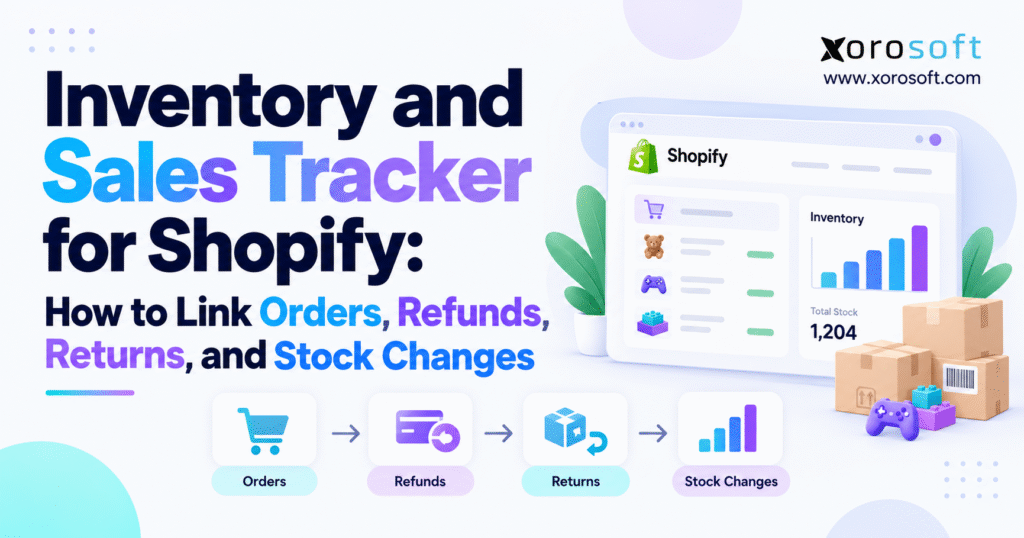
If you’re looking for an efficient way to manage your online store, using a Shopify sales inventory tracker can make a significant difference.
1. Growing Shopify Sales Create Inventory Questions That Order Reports Cannot Answer
A growing Shopify business can have accurate sales reports and still struggle to explain its inventory. Orders are placed, stock becomes committed, warehouse teams fulfill shipments, customers cancel purchases, returns arrive, refunds are processed, and employees occasionally make stock adjustments. A Shopify sales inventory tracker becomes important because all these events can change the meaning of the inventory number shown to the business.
The challenge rarely appears when a company has a small catalog and one shipping location. Operators can usually investigate an unusual quantity manually. They can open Shopify, check a recent order, speak with the warehouse, and correct a mistake.
Scale changes that process.
Once thousands of transactions move through several warehouses and sales channels, manually reconstructing inventory becomes expensive and unreliable. The team needs to know not only how many units remain but also which transaction caused each meaningful change.
1.1 Shopify Inventory Tracking Is More Than Counting Units
Inventory is often discussed as though every SKU has one definitive number. In reality, an ecommerce operation may need to distinguish physical stock from sellable stock.
Imagine a warehouse containing 500 units of one product. Fifty units are already committed to customer orders, 20 are awaiting quality inspection after returns, and another 30 are reserved for a wholesale account. Although 500 units may physically exist, all 500 should not necessarily appear as available for online sale.
That difference is operationally important.
A reliable inventory record should show whether units are physically present, available for sale, committed, incoming, temporarily unavailable, or moving between locations.
A Shopify sales inventory tracker therefore needs to preserve inventory status as well as quantity.
1.2 Why Shopify Sales Tracking and Physical Inventory Drift Apart
Sales and inventory do not always change at the same moment.
An order may be placed today but shipped tomorrow. A customer might receive a refund while keeping a damaged item. Another customer can return merchandise before the finance team completes the refund. A warehouse may receive inventory from a supplier before the receipt is fully processed.
Timing differences are normal.
The problem appears when systems treat separate operational events as though they were one event.
For example, issuing a refund does not prove that merchandise returned to the warehouse. Similarly, receiving a return does not automatically mean the product is ready to sell again.
Accurate inventory requires those distinctions to remain visible.
1.3 Inventory Accuracy Depends on Transaction Ownership
As businesses grow, they often add software one problem at a time.
Shopify handles ecommerce. Accounting software manages finance. An inventory application helps with replenishment. Warehouse software controls picking. Shipping software produces labels. Spreadsheets fill the remaining gaps.
Each tool may solve a legitimate requirement.
However, inventory becomes difficult to control when several applications believe they own the same quantity. The business then has multiple versions of the truth, even when every integration is technically running.
Good inventory architecture begins by deciding which system is responsible for each transaction and which system owns the authoritative inventory balance.
2. What a Shopify Sales Inventory Tracker Should Record
A Shopify sales inventory tracker should connect stock quantities to the business events that created them.
Knowing that a SKU has 142 units is useful. Knowing why it has 142 units is much more valuable.
An effective transaction trail should let an operator identify the product, quantity, warehouse, transaction date, inventory status, source document, reason for the movement, and the system or person responsible for the update.
2.1 Shopify Inventory Tracking Needs a Transaction Trail
Suppose a product shows 142 units.
A basic stock tracker stops there.
A stronger Shopify sales inventory tracker might reveal that 15 units are committed to open orders, five are under inspection following returns, 100 are fully available, two were removed after a cycle count, and 20 more are incoming from a supplier.
Now operations can explain the number.
That becomes especially useful when an unexpected discrepancy appears. Instead of comparing several reports and asking employees what happened, the team can work backward through the relevant inventory movements.
Every important quantity should have evidence behind it.
2.2 Shopify Stock Tracking Should Use Stable Product Identifiers
Product names are not reliable operational identifiers.
Marketing teams may rename products, adjust descriptions, or change merchandising language. Warehouse and purchasing systems need a more stable reference.
SKUs and variant identifiers should therefore remain consistent across Shopify, purchasing, warehouse operations, accounting, marketplaces, and other connected systems.
Consider a shirt available in four colors and six sizes. The business is not managing one inventory item called “Classic Shirt.” It is managing 24 individual inventory combinations.
If systems identify those combinations differently, stock reconciliation becomes unnecessarily difficult.
2.3 Inventory Tracking and Inventory Management Solve Different Problems
Inventory tracking explains where stock is and what changed it.
Inventory management adds decisions about what should happen next.
Those decisions can include purchase quantities, reorder points, warehouse transfers, safety stock, demand forecasting, cycle counts, supplier lead times, and channel allocation.
For smaller Shopify businesses, dependable tracking may be enough. As complexity grows, inventory management becomes more important because the business must control future supply as well as explain historical movement.
The distinction also helps companies avoid buying more software than they need.
3. Shopify Order and Inventory Tracking Must Separate Demand From Fulfillment
Orders are the most visible part of an ecommerce operation, but order creation does not automatically represent physical inventory leaving the warehouse.
A Shopify sales inventory tracker should distinguish demand, reservation, fulfillment, cancellation, and shipment.
Each stage answers a different inventory question.
3.1 Shopify Orders Change Availability Before Shipment
Assume a warehouse has 100 units ready for sale.
A customer purchases ten.
The physical products may still be sitting on the shelf, but ten units are no longer freely available for another customer because the business has promised them to the first order.
A simplified view might look like this:
| Inventory State | Quantity |
|---|---|
| On hand | 100 |
| Committed | 10 |
| Available | 90 |
This distinction helps prevent overselling.
If a system looks only at physical on-hand inventory, it might continue advertising all 100 units even though ten already belong to existing demand.
3.2 Fulfillment Creates the Physical Stock Movement
Fulfillment is where the warehouse begins turning an order commitment into physical movement.
The inventory record should show which product shipped, the quantity, the warehouse responsible, the fulfillment date, and the original order reference.
That relationship matters later.
Suppose the system shows 997 units while a warehouse count finds only 994. An operator should be able to investigate specific transactions rather than reviewing weeks of sales manually.
When order, fulfillment, and inventory references remain connected, discrepancy investigation becomes much faster.
3.3 Partial Fulfillment Requires Quantity-Level Shopify Inventory Tracking
Not every order ships at once.
A customer might order eight units while the warehouse ships five immediately and three several days later. Alternatively, one location may fulfill part of the order while another warehouse supplies the remainder.
The system therefore needs to distinguish the original order quantity from the fulfilled and remaining quantities.
Order status alone is not enough.
A transaction may still be open even though most inventory has already moved. Another order can appear fulfilled even though an associated return is currently moving back toward the warehouse.
Granular quantity tracking provides a clearer operational picture.
3.4 A Shopify Sales Inventory Tracker Should Release Cancelled Commitments Correctly
Cancellations create another important inventory event.
If a customer cancels before goods leave the warehouse, inventory that was committed to the order may become available again.
Problems arise when the ecommerce system cancels the order but another system retains the reservation.
The company then owns inventory that cannot be sold because software still treats it as committed.
A Shopify sales inventory tracker should make the release visible and preserve the cancelled order as the reason for that inventory-state change.
4. Shopify Sales Inventory Tracker Rules for Refunds, Returns, and Exchanges
Refunds, returns, and exchanges often produce some of the most confusing inventory discrepancies because customer service, finance, ecommerce, and warehouse teams can all participate in the same transaction.
A Shopify sales inventory tracker should treat each event independently.
4.1 Shopify Refund Tracking Is Not the Same as Return Tracking
A refund is a financial event.
A return is a physical inventory event.
Consider a customer who receives a broken product. The company may issue a complete refund and tell the customer to dispose of the item instead of sending it back.
Revenue changes, but warehouse inventory does not increase.
If software automatically adds a unit back to available stock simply because a refund was issued, the merchant creates phantom inventory.
The opposite can also happen. Merchandise may arrive at the warehouse before the accounting team processes the customer’s refund.
Connecting the events is useful. Treating them as identical is not.
4.2 Returned Inventory Needs Inspection Before Restocking
A package arriving at the returns desk should not automatically increase sellable inventory.
First, the warehouse needs to inspect the item.
An unopened product in perfect condition can potentially return to available stock. A damaged item may need to be written off. Some merchandise may require cleaning, repackaging, repair, testing, or quality approval.
A practical workflow is:
Return authorized → item received → condition checked → disposition selected → inventory updated → financial record reconciled
The sequence prevents physical receipt from being confused with resale approval.
4.3 Shopify Stock Tracking Must Capture Return Disposition
Returned inventory can move into several operational states.
Some items are immediately sellable. Others are damaged, quarantined, awaiting inspection, being refurbished, or held for supplier review.
A Shopify sales inventory tracker should preserve that distinction.
Without disposition tracking, warehouses often create one large pool of “returned stock.” Employees then need to determine manually which units can actually fulfill customer orders.
That defeats the purpose of real-time availability.
4.4 Exchanges Create Two Separate Inventory Transactions
An exchange usually involves one SKU returning and another SKU leaving.
Apparel provides a simple example.
A customer returns a medium black jacket and requests a large black jacket. The medium item enters the return workflow. Separately, the large variant becomes committed and eventually ships.
Both movements need independent records.
Recording only that an “exchange” happened hides the variant-level inventory effect and makes reconciliation harder.
5. Shopify Stock Tracking Needs Evidence Behind Every Adjustment
Inventory adjustments are normal. Unexplained adjustments are a problem.
Physical operations will occasionally discover shortages, overages, receiving errors, damaged merchandise, misplaced units, or incorrect counts.
The purpose of good inventory control is not to eliminate every correction. It is to make each correction traceable.
5.1 Every Shopify Inventory Adjustment Needs a Reason
Suppose a cycle count finds 48 units while the system shows 50.
An employee can simply change inventory by minus two.
That balances the quantity but provides little operational value.
A better record explains:
-2 units — cycle count variance, damaged products found in picking location
Now the adjustment provides information.
If similar adjustments appear every week, management can investigate the root cause instead of repeatedly correcting symptoms.
5.2 A Shopify Sales Inventory Tracker Should Identify the Source System
Modern ecommerce operations often allow several systems to communicate with Shopify inventory.
An ERP might publish availability. Warehouse software can report completed movements. A marketplace connector may reserve stock. Employees can also make manual changes.
When the quantity changes unexpectedly, the source matters.
A Shopify sales inventory tracker should help operators identify whether the adjustment came from a user, warehouse transaction, ERP process, API connection, marketplace application, or another integration.
Otherwise, employees may manually correct the number while the system that created the error continues sending incorrect updates.
5.3 Before-and-After Quantities Make Investigation Easier
A useful adjustment history might look like this:
| Field | Example |
|---|---|
| SKU | JKT-BLK-L |
| Location | Toronto Warehouse |
| Quantity Before | 74 |
| Change | -3 |
| Quantity After | 71 |
| Reason | Cycle Count Variance |
| Source | Warehouse User |
| Reference | Count #2194 |
This format provides far more context than a report showing only the final inventory quantity.
It also helps operations teams distinguish one large discrepancy from several smaller transactions.
6. Shopify Sales Inventory Tracker Requirements for Multiple Warehouses
Multi-location inventory changes the meaning of availability.
Owning 500 units across a company does not mean that all 500 units can fulfill every customer order.
A Shopify sales inventory tracker should therefore maintain inventory at the location level.
6.1 Shopify Multi-Location Inventory Must Show Where Stock Exists
Consider this inventory position:
| Location | Available Units |
|---|---|
| Vancouver | 85 |
| Toronto | 15 |
| New York | 130 |
| Total | 230 |
The company owns 230 available units.
However, an order shipping to a customer in Toronto cannot necessarily treat all 230 units as operationally identical. Freight cost, delivery time, customs, warehouse capacity, and routing policies can affect where the order should be fulfilled.
Location information therefore needs to remain attached to inventory.
A Shopify sales inventory tracker that displays only a company-wide total can hide important fulfillment constraints.
6.2 Shopify Warehouse Inventory Needs Transfer Control
Transfers create inventory that is temporarily between locations.
Suppose Vancouver sends 40 units to Toronto.
The stock has left Vancouver physically, but Toronto has not yet received it. Counting all 40 units as available in Toronto creates premature availability. Leaving them available in Vancouver after shipment creates the same problem in reverse.
Businesses that require tighter receiving, scanning, picking, cycle counting, and transfer controls may need a dedicated warehouse management system around Shopify.
For inventory-driven companies with more complex warehouse operations, Xorosoft can support that broader connection between ecommerce demand and physical warehouse activity.
6.3 Returns May Enter a Different Location From the Original Shipment
Returns make multi-location operations more complex.
An order can ship from Warehouse A but return to Store B. Another customer might send merchandise to a dedicated return center. A 3PL could receive some returns while the merchant’s own warehouse receives others.
The inventory transaction must follow the physical merchandise.
Automatically returning stock to the original fulfillment location can create inventory in a warehouse where the product does not actually exist.
7. Shopify Inventory Reconciliation Should Be an Ongoing Operating Process
Waiting until month-end to investigate every inventory difference creates unnecessary work.
A better model uses daily exception management, weekly pattern analysis, and formal period-end reconciliation.
The Shopify sales inventory tracker should support all three levels.
7.1 Daily Shopify Inventory Reconciliation Should Focus on Exceptions
Operations teams do not need to inspect every normal transaction.
Instead, attention should go to exceptions such as negative inventory, failed integrations, unusual adjustments, unprocessed returns, cancelled orders with remaining commitments, missing warehouse receipts, or shipments without appropriate order references.
This changes the question from:
“Did all 10,000 transactions work?”
to:
“Which transactions require investigation?”
A Shopify sales inventory tracker becomes much more useful when it helps surface those exceptions instead of forcing employees to compare entire datasets manually.
7.2 Weekly Shopify Stock Reconciliation Should Find Patterns
Daily review resolves individual discrepancies.
Weekly analysis should look for repeated causes.
Perhaps most adjustments originate during receiving. Maybe exchanges frequently create inaccurate quantities. One integration could be responsible for a large share of unexpected updates.
When inventory problems repeatedly cross sales, purchasing, finance, and warehouse operations, a broader platform such as XoroERP can become relevant.
In that environment, Xorosoft can connect inventory events with operational and financial records rather than leaving departments to reconcile separate systems.
7.3 Month-End Inventory Reconciliation Should Explain Movement
A simple control equation is useful:
Beginning inventory + receipts + valid returns – shipments – write-offs ± adjustments = ending inventory
Yet matching the ending number does not prove that controls worked.
A large unexplained adjustment can force the system to match the warehouse count while hiding the reason inventory drifted.
Month-end therefore needs evidence behind material variances.
Finance should be able to understand where inventory value changed, while operations should be able to identify the physical events behind those changes.
8. Shopify Sales Inventory Tracker vs Inventory App, WMS, and ERP
Different software categories solve different layers of inventory complexity.
A Shopify sales inventory tracker may be sufficient when the primary goal is understanding stock movement. Another company may need forecasting, warehouse execution, purchasing, manufacturing, or accounting integration.
The system should fit the problem rather than the other way around.
8.1 Native Shopify Inventory Works for Straightforward Operations
Shopify can remain the center of inventory management for businesses with relatively simple requirements.
A smaller merchant may operate a limited number of locations, sell primarily through Shopify, manage straightforward purchasing, and process manageable return volume.
In that environment, introducing a large ERP project may add more complexity than value.
The right time to upgrade is not determined by company size alone.
8.2 Inventory Applications Solve Focused Shopify Stock Problems
Specialized applications can extend Shopify in useful ways.
One tool might improve demand forecasting. Another can support replenishment. Some applications provide purchase-order management or specialized reporting.
This model works well when the business has one clearly defined gap.
Problems appear when the company accumulates multiple specialized applications that overlap. Employees then reconcile inventory between Shopify, warehouse software, accounting, forecasting tools, and purchasing applications.
The technology stack has solved individual problems but created a system-level problem.
8.3 ERP Becomes Relevant When Shopify Inventory Crosses Departments
ERP becomes more useful when the same inventory transaction must affect several functions.
For example, a purchase receipt can change stock availability, supplier balances, accounting, warehouse workload, and future replenishment.
An ecommerce shipment can affect inventory, revenue, cost of goods sold, customer status, and warehouse capacity.
Platforms such as Xorosoft, NetSuite, Acumatica, and Business Central address these broader cross-functional requirements in different ways.
Businesses comparing ERP architectures can use a focused Xorosoft vs NetSuite comparison as one part of a larger requirements-based evaluation.
| Requirement | Shopify | Inventory App | WMS | ERP |
|---|---|---|---|---|
| Ecommerce inventory | Strong | Strong | Integrated | Integrated |
| Forecasting | Limited | Often strong | Limited | Often available |
| Warehouse execution | Basic | Varies | Strong | Varies/integrated |
| Purchasing | Limited/varies | Often available | Limited | Strong |
| Accounting | Separate | Usually separate | Separate | Integrated |
| Manufacturing | Limited | Varies | Limited | Often supported |
| Cross-functional reporting | Limited | Varies | Warehouse-focused | Strong |
9. Build Shopify Inventory Integration Around Business Events
Adding another application does not automatically improve inventory accuracy.
Before changing software, the organization should map which system owns each business event.
The goal is a controlled operating model rather than the largest possible application stack.
9.1 A Shopify Sales Inventory Tracker Needs One Authoritative Source
Every inventory-driven business should know which system owns the final inventory quantity.
In a simpler environment, Shopify may perform that role.
In a more complex business, ERP could become the authoritative inventory source while Shopify remains the ecommerce channel.
Under that model, Shopify sends customer demand to the operational system. Warehouse transactions update stock there, while controlled availability flows back to Shopify.
A Shopify sales inventory tracker works best when that ownership is unambiguous.
9.2 Shopify Inventory Integrations Should Follow Transaction Logic
An integration should do more than copy fields between databases.
The business needs to understand what happens when events occur.
When an order enters Shopify, which system reserves inventory? Where does the warehouse receive fulfillment instructions? What happens if the customer cancels after allocation? How does the system treat a return to another location?
Similar questions apply to receipts, transfers, damaged stock, exchanges, assemblies, and production.
Companies designing a broader architecture can review available Shopify and operational integrations to determine how ecommerce transactions should connect with the rest of the business.
9.3 Connected ERP Can Reduce Shopify Reconciliation Work
The practical value of ERP is not simply having more modules.
A connected system should reduce the number of times employees reconstruct the same transaction in separate applications.
With XoroONE, Xorosoft can act as an operational layer behind Shopify where a business needs inventory, purchasing, accounting, warehouse management, forecasting, and ecommerce workflows to remain connected.
The benefit is transaction continuity.
An order can generate demand. That demand affects available inventory. Warehouse activity completes fulfillment. Accounting receives the financial result. Returns and adjustments remain linked to the same operating model.
9.4 Avoid Circular Shopify Inventory Synchronization
A particularly risky architecture allows several systems to overwrite one another.
Imagine this sequence:
Shopify sends inventory to an ERP. The ERP updates a warehouse application. The warehouse application updates Shopify. A marketplace connector also changes Shopify inventory. Another synchronization process then pushes that number back to the ERP.
Every connection may function technically.
Yet when quantities disagree, nobody knows which system should win.
Good integration architecture uses clear authority and controlled data direction.
10. Shopify Sales Inventory Tracker Requirements Vary by Industry
Inventory rules are influenced heavily by what the business sells.
A Shopify sales inventory tracker for apparel needs different operational detail from one supporting furniture or manufacturing.
Industry context should therefore influence system design.
10.1 Apparel Shopify Inventory Tracking Needs Variant Accuracy
Apparel businesses can create large SKU counts from relatively small product catalogs.
One style may be offered in six sizes and eight colors, creating dozens of inventory combinations.
Returns and exchanges increase the challenge.
A medium black shirt returning while a large black shirt ships out cannot be treated as a generic “shirt exchange.” Each variant needs its own movement.
Seasonal demand also means inaccurate inventory can become expensive quickly because excess products may lose selling value once the season passes.
10.2 Furniture Inventory Tracking Depends Heavily on Location
Furniture often involves bulky inventory, long lead times, delivery scheduling, damage handling, and warehouse capacity.
A product may exist somewhere in the company but still be unsuitable for a particular customer order because it is located across the country.
Returns can also require substantial inspection before resale.
Consequently, warehouse location and product condition become critical parts of availability.
10.3 Sporting Goods Need Multi-Channel Stock Visibility
Sporting goods businesses commonly combine ecommerce, retail, wholesale, seasonal demand, and marketplace sales.
One physical inventory pool may therefore support several channels.
If every channel independently calculates availability, the same units can be promised more than once.
Centralized allocation becomes increasingly valuable as channel complexity rises.
10.4 Wholesale Shopify Inventory Management Requires Allocation
Wholesale businesses often deal with larger quantities and longer order horizons.
A warehouse might physically contain 2,000 units while 1,200 are effectively committed to upcoming wholesale demand.
A Shopify sales inventory tracker needs to reflect that commitment if Shopify is selling from the same inventory pool.
Otherwise, available ecommerce inventory can look much larger than the actual amount the company is willing to sell.
Businesses in apparel, furniture, sporting goods, wholesale distribution, manufacturing, and other inventory-heavy sectors can review Xorosoft’s industry-specific ERP use cases when mapping these differences.
10.5 Manufacturing Extends Shopify Inventory Into Production
Manufacturers selling through Shopify need to control raw materials, components, work in process, and finished goods.
Customer demand may create requirements before a finished product physically exists.
Production orders consume materials, while purchasing needs visibility into upcoming shortages.
In this scenario, Shopify remains the customer-facing commerce channel. It should not become the production-planning engine.
Xorosoft can become relevant where Shopify demand must connect with purchasing, bills of materials, warehouse stock, manufacturing activity, and accounting.
11. Shopify Inventory Tracking Problems That Signal an Upgrade
Inventory technology usually becomes inadequate gradually.
Employees create temporary workarounds, spreadsheets, exports, and manual checks. Those tools can remain in place long after the original temporary problem becomes a permanent operating process.
A Shopify sales inventory tracker helps expose when the company’s systems are no longer keeping up with transaction complexity.
11.1 Repeated Shopify Inventory Adjustments Are a Warning Sign
Every organization makes legitimate stock corrections.
However, large or repeated adjustments deserve investigation.
If weekly counts constantly produce major differences, physical counting is not the underlying problem. Something between transactions and recorded inventory is failing.
Receiving, returns, transfers, fulfillment, manufacturing, integrations, or employee procedures may be responsible.
Correcting the final quantity without fixing the source guarantees that the discrepancy will return.
11.2 Spreadsheets Should Not Become the Permanent Inventory Integration
Spreadsheets are excellent analytical tools.
They become risky when employees must export Shopify orders, warehouse counts, purchase orders, returns, and accounting data every week simply to determine the correct stock level.
At that point, employees are effectively building an integration manually.
The process also depends heavily on individual knowledge. If the employee who created the spreadsheet leaves, the business may lose part of its inventory-control process.
11.3 Multiple Inventory Owners Create Conflicting Stock
One of the strongest signals of system maturity is clear ownership.
Shopify, ERP, WMS, 3PL software, and marketplaces may all need inventory information.
They should not all independently decide the authoritative quantity.
A central source of truth reduces conflicts, while integrations distribute the appropriate data to other systems.
11.4 Physical Counts Should Confirm the System, Not Rebuild It
Cycle counts and physical counts remain necessary even in well-controlled environments.
Their purpose should be validation.
If every physical count requires a large adjustment to make software match the warehouse, the organization needs to investigate its processes.
Companies assessing how others manage broader ERP and inventory transformations can review relevant Xorosoft case studies for additional operational context.
The important signal is not one isolated variance. Persistent reconciliation effort indicates that the existing architecture may have reached its practical limit.
12. Shopify Sales Inventory Tracker: Practical Steps for Building Reliable Control
A Shopify sales inventory tracker should ultimately make inventory explainable.
Operations should be able to choose a SKU and determine where the stock exists, how much is available, what has already been committed, which recent transactions changed the balance, and which system owns the quantity.
That capability is more valuable than simply displaying a number quickly.
12.1 Map Shopify Inventory Ownership Before Buying Software
Start by documenting the current workflow.
Identify where products are created, where available quantities originate, which system reserves orders, how warehouse fulfillment is posted, where purchasing receipts are recorded, how returns are inspected, and how accounting receives the resulting transactions.
This exercise frequently exposes duplicated responsibilities.
If two applications both control Shopify availability, resolve that ownership question before introducing another platform.
Clear system responsibility should come before additional integration.
12.2 Test Difficult Shopify Inventory Scenarios During Software Evaluation
Software demonstrations often show the easiest possible order.
A customer buys an in-stock product. The warehouse ships it. Everything works.
That scenario proves very little.
Instead, test the transactions that usually create discrepancies.
Process a partial fulfillment. Cancel one item after allocation. Return merchandise to another location. Exchange one variant for another. Receive damaged goods. Transfer products while customer orders remain open. Correct a supplier shortage. Simulate an integration failure.
Businesses considering a wider operational platform can review ERP and inventory solutions while building those test scenarios.
A system should demonstrate how exceptions work, not merely how the ideal transaction works.
12.3 Keep Shopify Connected Without Making It Own Every Operational Process
Shopify can remain a critical part of the technology stack even after a company adopts broader operational software.
The key is defining what happens behind the storefront.
Smaller merchants may continue using Shopify with focused applications. Larger inventory-driven organizations may place ERP, WMS, purchasing, forecasting, and accounting behind the commerce layer.
Merchants specifically assessing Xorosoft with Shopify can also review its Shopify App Store listing when evaluating the integration.
System design should preserve the underlying transaction chain:
Order → commitment → fulfillment → inventory movement → return or adjustment → financial reconciliation
When those stages connect, operators spend less time rebuilding history.
12.4 Build Explainable Inventory Before Chasing Real-Time Inventory
Real-time inventory is valuable only when the underlying transaction is accurate.
Publishing an incorrect quantity instantly does not improve inventory control.
A stronger objective is timely, controlled, and explainable inventory.
When Shopify availability changes, operations should understand which transaction caused it. Warehouse teams should also be able to explain why physical quantities changed. Finance should be able to trace any valuation difference back to the operational events behind it.
That is the standard a mature ecommerce operation should aim for.
If Shopify, warehouse operations, purchasing, marketplaces, wholesale orders, returns, and accounting now require frequent manual reconciliation, map those workflows before selecting another tool. Businesses that want to assess how an integrated ERP approach would support their specific operation can contact Xorosoft for a workflow-focused discussion.
A reliable Shopify sales inventory tracker does more than report stock. It connects inventory to the orders, receipts, transfers, warehouse movements, returns, exchanges, and adjustments that created the current balance. When that transaction trail remains intact, both operations and finance can work from inventory they can explain and trust.
FAQ
What is a Shopify sales inventory tracker?
A Shopify sales inventory tracker links orders, fulfillment, returns, refunds, adjustments, and warehouse movements so teams can understand what changed stock and why.
How does Shopify inventory change after an order?
When an order is placed, inventory can move from available to committed. Fulfillment then records the physical stock movement associated with shipping the order.
Does a Shopify refund automatically restock inventory?
Not always. A refund is a financial event, while restocking is an inventory decision. Restock only when the item should return to usable stock.
How should returned Shopify inventory be handled?
Returned items should be received, inspected, and assigned a disposition such as sellable, damaged, quarantined, repairable, or written off before inventory is updated.
How do multiple warehouses affect Shopify inventory tracking?
Inventory must remain location-specific. Transfers, fulfillment assignments, and returns should update the correct warehouse so company-wide totals do not hide local availability problems.
When should a Shopify business consider ERP?
Consider ERP when inventory must connect Shopify with multiple warehouses, purchasing, accounting, wholesale, Amazon, EDI, manufacturing, or frequent reconciliation workflows.
How can Shopify inventory discrepancies be reduced?
Use one inventory source of truth, consistent SKUs, controlled adjustments, clear return workflows, and regular reconciliation to identify errors before they spread.
Recent Posts
-
 Holiday Fulfillment Benchmarks 2026: Capacity, Accuracy, and Shipping Cutoffs
 -
 Inventory and Sales Tracker for Shopify: How to Link Orders, Refunds, Returns, and Stock Changes
 -
 Inventory Audit Readiness: Evidence, Adjustments, Counts, and Reconciliation Controls
 -
 Inventory Management and Tracking vs Warehouse Management: Where Each System Owns Stock Movement
 -
 How a Distributor Reduced Shipping Errors With Pack Station Verification