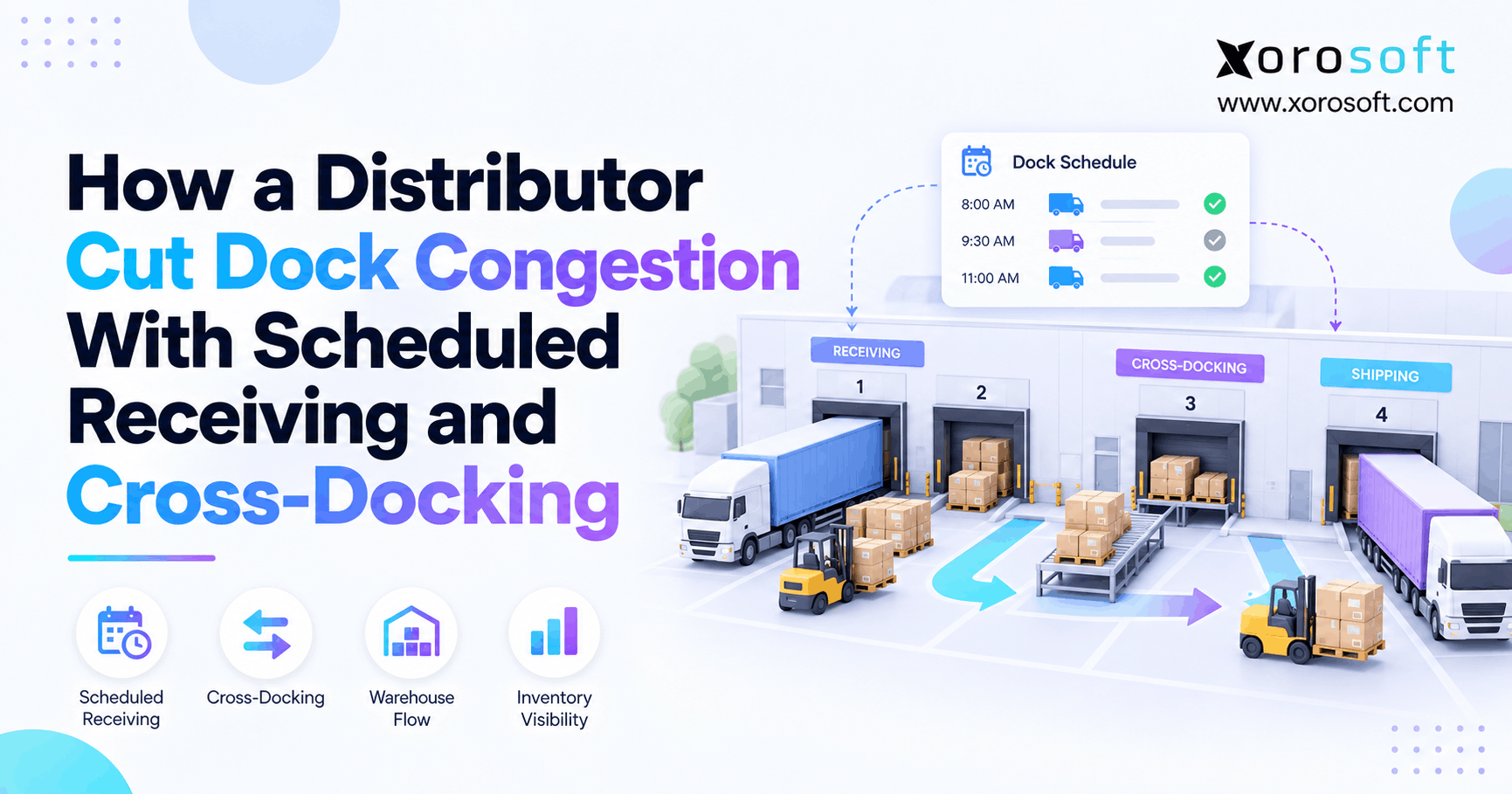
Dock scheduling is an important consideration for efficient logistics operations.
1. Why Dock Scheduling Starts Before a Truck Reaches the Door
Dock scheduling helps reduce warehouse congestion because it controls when inbound work reaches the receiving team. However, many distributors still treat crowded docks as a space problem instead of a flow problem.
As a result, several trucks may arrive within the same hour while later parts of the day remain quiet. Meanwhile, the warehouse may have enough doors but not enough workers, forklifts, or staging space to process every load at once.
Therefore, better receiving does more than reserve a door. Instead, it connects arrival times with the work each shipment will create.
1.1 How Dock Scheduling Prevents Morning Congestion
First, truck arrivals rarely spread evenly across the day. For example, suppliers may prefer morning delivery times, while carriers may choose windows that fit their own routes.
As a result, the receiving team can face five trucks at 9:00 a.m. and only one truck after lunch. Therefore, total daily volume does not always explain congestion.
Instead, the main issue is how much work reaches the dock at the same time.
In addition, pallets may build up after unloading. If put-away cannot clear staging fast enough, the next truck may have nowhere to unload.
1.2 Why More Dock Doors Do Not Fix a Bad Schedule
However, another dock door does not automatically add useful capacity.
A door still needs labor, equipment, floor space, and a clear next step for the goods.
For example, a warehouse may have eight doors but only four trained forklift drivers. Therefore, opening all eight doors may simply create more unfinished work.
Likewise, staging space may fill even while another door remains open.
As a result, receiving capacity depends on the full process, not only the number of doors.
2. How Scheduled Receiving Changes Inbound Flow
Scheduled receiving gives each inbound load an expected arrival window. Therefore, warehouse teams can prepare before the truck reaches the facility.
In addition, the appointment can carry useful shipment details. For example, the team may know the supplier, PO, pallet count, load type, and handling needs before unloading begins.
As a result, receiving becomes planned work instead of a constant reaction to the next truck in line.
2.1 Dock Scheduling vs. First-Come, First-Served Receiving
First-come, first-served receiving can work when inbound volume is low. However, it becomes harder to manage as supplier count and truck volume grow.
| Area | Scheduled Receiving | First-Come, First-Served |
|---|---|---|
| Arrival flow | Planned | Driven by carrier arrival |
| Labor planning | Easier | More reactive |
| Door planning | Planned earlier | Decided at arrival |
| Truck queues | Easier to control | Can change quickly |
| Late arrivals | Clear exception | Often joins queue |
| Capacity planning | Based on expected work | Harder to predict |
Therefore, a planned model becomes more useful when the warehouse can no longer absorb large swings in arrival times.
2.2 What a Receiving Appointment Should Contain
At minimum, an appointment should identify the supplier, carrier, purchase order, expected arrival time, and type of load.
In addition, the team should capture expected pallet or carton counts when possible. Likewise, an ASN can give the warehouse more detail before the goods arrive.
Therefore, an appointment should be more than a time on a calendar.
Instead, it should act as a small work plan for the receiving team.
For example, a mixed-SKU pallet may need more checks than a full pallet of one product. As a result, the two loads should not always receive the same time slot.
3. Build Dock Scheduling Around Real Receiving Capacity
Dock scheduling works best when time slots match the work a warehouse can actually complete.
Therefore, teams should not simply divide every working day into equal 30-minute or 60-minute blocks.
Instead, they should look at the work behind each load.
3.1 Set Dock Scheduling Slots From Actual Work
First, review how long common shipment types usually take.
For example, a full pallet load may move quickly. However, a floor-loaded container can need far more labor.
Likewise, a shipment that needs inspection may use the receiving area for longer than a clean ASN-based receipt.
Therefore, teams can group loads into simple classes such as:
- full pallets;
- mixed pallets;
- floor-loaded containers;
- LTL deliveries;
- inspection-required loads;
- ASN-ready shipments;
- cross-dock candidates.
As a result, appointment times can reflect real work instead of a fixed guess.
3.2 Match Appointments With People and Equipment
Next, check the resources needed for each appointment.
For example, the warehouse may need a forklift, receiving clerk, scanner, and open staging lane.
Therefore, the door itself represents only one part of capacity.
In addition, some loads may need special equipment. Meanwhile, other loads may need an inspection area.
As a result, two open doors do not always mean the warehouse can accept two more trucks.
3.3 Build Early and Late Rules Into Dock Scheduling
Even a strong plan must handle delays.
Therefore, teams should clearly define what happens when trucks arrive early or late.
For example, a truck that arrives 45 minutes early should not automatically take another carrier’s door. Instead, the warehouse can hold it until suitable capacity becomes available.
Likewise, one late truck should not push every later appointment backward.
Therefore, warehouses need a grace period and a clear reschedule rule.
As a result, one delay is less likely to affect the whole day.
4. Where Cross-Docking Fits Into Receiving
Cross-docking can remove extra warehouse moves when incoming stock already has a clear next destination.
Normally, goods may move through several steps:
Receive → Stage → Put Away → Replenish → Pick → Stage → Ship
However, suitable cross-docked goods can follow a shorter route:
Receive → Check → Allocate → Outbound Stage → Ship
Therefore, the warehouse avoids some storage and picking work.
4.1 Which Goods Fit Cross-Docking
First, the warehouse needs clear outbound demand.
For example, a supplier pallet may already be tied to a large wholesale order or store refill.
Therefore, storing the pallet only to pick it again shortly afterward may add little value.
In addition, strong candidates normally have:
- clear item details;
- known quantities;
- reliable labels;
- confirmed demand;
- a known destination;
- limited inspection needs.
As a result, the receiving team can make a safe routing choice soon after the goods arrive.
4.2 When Normal Put-Away Is Better
However, not every fast-moving item should be cross-docked.
For example, damaged goods should move to an exception process. Likewise, products with the wrong quantity may need a full check first.
In addition, goods with unclear lot, serial, or expiry details may need more control.
Therefore, normal storage remains safer when the next step is uncertain.
As a result, teams should focus on reducing needless moves rather than chasing the highest possible cross-dock rate.
5. How the Distributor Changed Its Receiving Flow
Consider a distributor that receives goods from many suppliers while serving wholesale and ecommerce orders.
Before the change, carriers arrived when their own routes allowed. Therefore, the dock often became crowded during the first part of the day.
Meanwhile, pallets filled the staging area because put-away could not keep pace with unloading.
So, the distributor changed the flow instead of simply adding more doors.
5.1 Before: Receiving Was Driven by Arrivals
First, the warehouse had little control over when trucks reached the building.
As a result, labor planning relied heavily on daily averages.
However, a daily average could not show whether most work would arrive at 9:00 a.m. or 2:00 p.m.
In addition, nearly every inbound load followed the same warehouse path.
Therefore, even goods with open customer demand could be stored before being picked again.
As a result, the team spent time moving pallets that would soon move again.
5.2 After: Scheduled Receiving Followed Workload
Next, the distributor grouped loads by type and set receiving windows around expected work.
For example, slower floor-loaded containers received longer slots. Meanwhile, simpler pallet loads received shorter windows.
In addition, the team checked open demand before selected goods went into storage.
Therefore, suitable inventory could move toward outbound staging instead.
As a result, scheduled receiving helped spread work across the day while also reducing avoidable movements.
5.3 Move Exceptions Out of the Normal Flow
However, the team also needed rules for problem loads.
Therefore, damaged goods, missing labels, wrong quantities, and missing shipment data moved into a separate exception path.
As a result, one problem receipt was less likely to block every other truck.
In addition, late carriers could be handled against a set rule instead of a rushed decision.
Therefore, normal receipts could keep moving while one shipment needed extra attention.
6. Connect Purchase Orders, ASNs, and Warehouse Receiving
Once receiving becomes more planned, data quality becomes more important.
First, the warehouse needs to know what purchasing expects.
Next, the receiving team needs to compare that plan with what physically arrives.
Therefore, purchase orders, ASNs, warehouse scans, and stock updates should not live in separate files.
6.1 Use PO and ASN Data Before Arrival
A purchase order tells the warehouse what the company expects from a supplier.
Meanwhile, an ASN can add more detail about what has shipped.
Therefore, receiving staff can prepare before opening the trailer.
For example, teams can check expected products, quantities, pallets, or cartons.
As a result, obvious problems can be found earlier.
Xorosoft can connect purchasing and warehouse work through XoroWMS, which helps keep receiving activity closer to the inventory process rather than in a separate spreadsheet.
6.2 Update Inventory as the Warehouse Works
Next, warehouse scans should update the current stock state.
For example, the business may need to know whether goods are received, held, waiting for put-away, or ready for use.
Therefore, the system should show more than a simple “delivered” status.
In addition, companies can connect warehouse activity with wider ERP data through XoroERP.
As a result, teams can reduce the gap between what purchasing expected, what receiving found, and what the rest of the company sees.
6.3 Connect Ecommerce Demand to Inbound Stock
For ecommerce distributors, inbound delays can also affect online stock promises.
Therefore, warehouse data should connect with channel and order data where possible.
Xorosoft offers integration options for businesses that need ERP, warehouse, and commerce systems to share data.
In addition, Shopify sellers can review the Xorosoft integration on the Shopify App Store.
As a result, receiving decisions can support a wider multi-channel operation instead of remaining a dock-only task.
7. Measure Whether Dock Scheduling Is Working
A full appointment calendar does not prove that receiving improved.
Therefore, the warehouse needs a small set of clear measures.
In addition, teams should record the same measures before and after process changes.
As a result, managers can separate real gains from a schedule that only looks organized.
7.1 Track Dock Scheduling Appointment Adherence
Start with appointment adherence.
Appointment adherence = On-time appointments ÷ Total appointments × 100
However, arrival time alone does not tell the full story.
Therefore, teams should also track truck wait time and total dwell time.
For example, a truck may arrive on time yet wait 70 minutes before reaching a door.
As a result, the schedule may appear healthy even while the yard still has a queue.
7.2 Track Dock-to-Stock and Cross-Dock Flow
Next, measure how long goods take to reach a usable stock state.
This is often called dock-to-stock time.
In addition, track the share of eligible goods that successfully follow the cross-dock path.
Cross-dock rate = Cross-docked eligible units ÷ Total eligible units × 100
However, do not use all receipts as the base.
Instead, compare cross-docked goods only with products that were valid candidates.
7.3 Measure Receiving Exceptions
Finally, count the problems that stop normal receiving.
For example, useful groups include:
- missing ASN;
- wrong quantity;
- damaged goods;
- wrong labels;
- late carrier;
- missing PO;
- inspection hold.
As a result, teams can see whether the same issues keep returning.
Therefore, the receiving plan becomes a process-control tool rather than only a booking calendar.
8. Avoid Common Dock Scheduling Mistakes
Many receiving plans fail because the rules look good on paper but do not match actual warehouse work.
Therefore, teams should watch for several common mistakes.
8.1 Do Not Overbook Dock Scheduling Capacity
First, never treat every open door as available capacity.
For example, four open doors are not useful if only two teams can unload trucks.
Therefore, labor and equipment must be part of the plan.
Likewise, enough staging space must remain free.
As a result, a well-planned day may include some unused door time.
However, that can be better than filling every slot and creating a queue.
8.2 Do Not Use One Slot Length for Every Load
Second, fixed appointment times can hide large differences in work.
For example, one pallet of a single SKU is not the same as hundreds of loose cartons.
Therefore, use a few simple shipment classes.
In addition, review actual unload times regularly.
As a result, appointment lengths can improve as the warehouse collects more data.
8.3 Do Not Cross-Dock Without Reliable Demand
Third, cross-docking should follow a real outbound need.
Otherwise, the warehouse may simply move confusion from receiving to shipping.
Therefore, confirm the item, quantity, destination, and demand before routing the goods.
In addition, keep an exception path ready.
As a result, questionable stock can return to normal receiving without stopping the entire dock.
9. Use Dock Scheduling Differently by Industry
The basic rules stay similar across industries.
However, the main limits can change by product type.
Therefore, distributors should adjust appointment and cross-dock rules to their goods.
Xorosoft supports inventory-led businesses across several industries, so receiving needs can vary by product, sales channel, and warehouse model.
9.1 Dock Scheduling for Apparel and Fashion
Apparel often has strong seasonal peaks.
Therefore, inbound demand can rise sharply before launches or key selling periods.
In addition, stock may already be assigned to stores, wholesale buyers, or ecommerce demand.
As a result, some pre-allocated goods may be strong cross-dock candidates.
However, mixed sizes, colors, and styles can increase checking work.
Therefore, appointment length should reflect SKU mix instead of pallet count alone.
9.2 Dock Scheduling for Wholesale Distribution
Wholesale distributors may receive large supplier orders while shipping large customer orders.
Therefore, the link between incoming stock and open demand can be useful.
For example, a full pallet may already be needed for a customer shipment.
As a result, putting it into reserve storage may create extra work.
However, the warehouse should still confirm quantity and condition before moving it toward shipping.
9.3 Furniture and Sporting Goods
Furniture can use large amounts of staging space.
Therefore, poor arrival timing can block receiving very quickly.
Likewise, sporting goods businesses can face sharp seasonal demand.
As a result, these companies may need close control over when inbound loads arrive and where products move next.
In both cases, planning should consider physical space as well as door availability.
10. Know When Spreadsheets Stop Being Enough
A simple spreadsheet can work for a small receiving operation.
However, the process becomes harder as the number of suppliers, locations, carriers, and orders grows.
Therefore, the right time to upgrade is usually driven by complexity rather than company size.
10.1 Warning Signs the Process Is Breaking
For example, watch for these signs:
- two people editing different schedule copies;
- frequent double booking;
- no clear late-truck rule;
- PO data stored elsewhere;
- ASN data checked by hand;
- poor visibility across warehouses;
- repeated receiving changes;
- delayed stock updates.
As a result, teams spend more time checking data instead of moving goods.
Therefore, the spreadsheet itself can become part of the delay.
10.2 Connect Receiving With the Wider Business
At that stage, an ERP and WMS can help keep receiving closer to purchasing, inventory, orders, and finance.
For example, XoroONE is designed to bring core business work into one cloud environment.
Therefore, teams can reduce the number of separate tools used to answer basic operating questions.
However, software still needs clear receiving rules.
As a result, the system should support a good process instead of trying to replace one.
11. Use a Simple Dock Scheduling Rollout Plan
A full warehouse redesign is not always needed.
Instead, teams can test a new receiving model in smaller steps.
Therefore, the risk stays lower while employees learn what works.
11.1 Measure Current Dock Scheduling First
First, collect several weeks of basic data.
Track arrival time, wait time, unload time, shipment type, and common delays.
Then, group the results by supplier or carrier.
As a result, patterns become easier to see.
For example, one supplier may repeatedly arrive early. Meanwhile, another may send loads that take much longer than expected.
Therefore, the first changes can be based on facts rather than guesses.
11.2 Pilot Scheduled Receiving in One Area
Next, test the process with one supplier group, door area, or shipment type.
Therefore, the team can change rules without disrupting the whole warehouse.
In addition, define cross-dock rules for only a small group of clear candidates at first.
As a result, workers can learn the new flow before the process expands.
11.3 Review the Plan Every Week
Finally, hold a short weekly review.
Look at late arrivals, long waits, poor slot estimates, ASN errors, and cross-dock exceptions.
Then, adjust the rules.
As a result, the plan becomes an active process instead of a one-time setup.
Moreover, each week of data makes future time slots more useful.
12. Turn Receiving Data Into Better Daily Decisions
Receiving improves when teams can see what is due, what has arrived, and what needs to happen next.
Therefore, the wider business system matters more as operations grow.
A connected ERP and WMS can bring inventory, purchasing, warehouse work, orders, and accounting closer together.
As a result, receiving can become part of the same data flow used by purchasing and fulfillment teams.
However, software alone will not fix dock congestion.
Instead, teams still need clear appointment windows, cross-dock rules, late-truck rules, and exception paths.
Therefore, the strongest setup combines simple operating rules with current data.
13. Build a More Predictable Receiving Operation
Dock congestion often starts before a truck reaches the door.
Therefore, the best fix is not always another door, forklift, or staging lane.
Instead, a distributor can control the flow by matching arrivals with real receiving capacity.
In addition, accurate PO and ASN data can help warehouse teams prepare earlier.
Meanwhile, cross-docking can remove extra movements when inbound goods already have a safe outbound path.
As a result, the warehouse spends less time reacting and more time following a plan.
However, the process becomes harder when purchasing, inventory, warehouse, and order data sit in separate tools.
Therefore, businesses that have outgrown that setup can review whether a connected ERP and WMS would remove those gaps.
If your receiving operation is reaching that point, Book a Demo with Xorosoft to review how your warehouse, purchasing, inventory, and order workflows fit together.
FAQs
What is dock scheduling?
Dock scheduling assigns planned arrival windows to inbound and outbound trucks. Therefore, warehouses can match loads with available doors, workers, equipment, and staging space instead of reacting to every truck as it arrives.
How does dock scheduling reduce warehouse congestion?
It spreads inbound work across available time and capacity. As a result, fewer trucks compete for the same doors, workers, forklifts, and staging areas during peak receiving periods.
What is scheduled receiving?
Scheduled receiving gives each inbound load a planned warehouse arrival window. Therefore, teams can prepare labor, dock space, equipment, and shipment data before the carrier reaches the receiving area.
How does cross-docking help distributors?
Cross-docking sends suitable inbound goods toward outbound orders without normal storage. As a result, distributors can reduce extra put-away, replenishment, picking, and staging moves when demand is already confirmed.
What data should be ready before a truck arrives?
Teams should have the supplier, carrier, PO, expected items, quantities, arrival time, and ASN when available. In addition, handling needs and pallet or carton counts can improve receiving plans.
Which dock scheduling KPIs should a warehouse track?
Track appointment adherence, truck wait time, dwell time, unload time, dock-to-stock time, exception rate, and cross-dock rate. Together, these measures show whether the new receiving flow is actually improving.
When should a distributor replace spreadsheet dock scheduling?
Consider upgrading when double bookings, several warehouses, frequent changes, ASN checks, or poor stock visibility create repeated manual work. At that point, connected warehouse and ERP data may be easier to control.
Recent Posts
-
Dock Scheduling: How a Distributor Cut Dock Congestion With Scheduled Receiving and Cross-Docking
-
 Agentic ERP vs AI-Enabled ERP: Which AI ERP Architecture Fits Inventory-Driven Operations?
 -
 What Is Backflushing in Manufacturing Inventory, and When Does It Fail?
 -
 Tariff Impact on Inventory: Why Margin Leakage Hides in Operations
 -
 How to Choose a B2B Ecommerce Integration Agency for ERP, WMS, EDI, and Customer Pricing