Considering the warehouse management system cost is an important first step for any business looking to streamline their operations.
1. Why Warehouse Management System Cost Goes Beyond the Software Price
A warehouse management system cost includes far more than a monthly software subscription. In addition, businesses often need to budget for scanners, printers, implementation, integrations, training, support, data preparation, and internal project time. Therefore, comparing two WMS platforms only by their advertised software price can create a misleading budget.
Moreover, warehouse requirements differ significantly between businesses. For example, a single-location ecommerce operation may need basic receiving, picking, packing, and shipping. Meanwhile, a multi-warehouse distributor may also require replenishment, EDI, customer-specific workflows, inventory allocation, and complex integrations.
As a result, buyers should calculate the complete financial impact before selecting a system. Instead of asking only what the software costs, teams should determine what it will cost to implement, operate, support, and expand the WMS over several years.
1.1 The Five Main Warehouse Management System Cost Categories
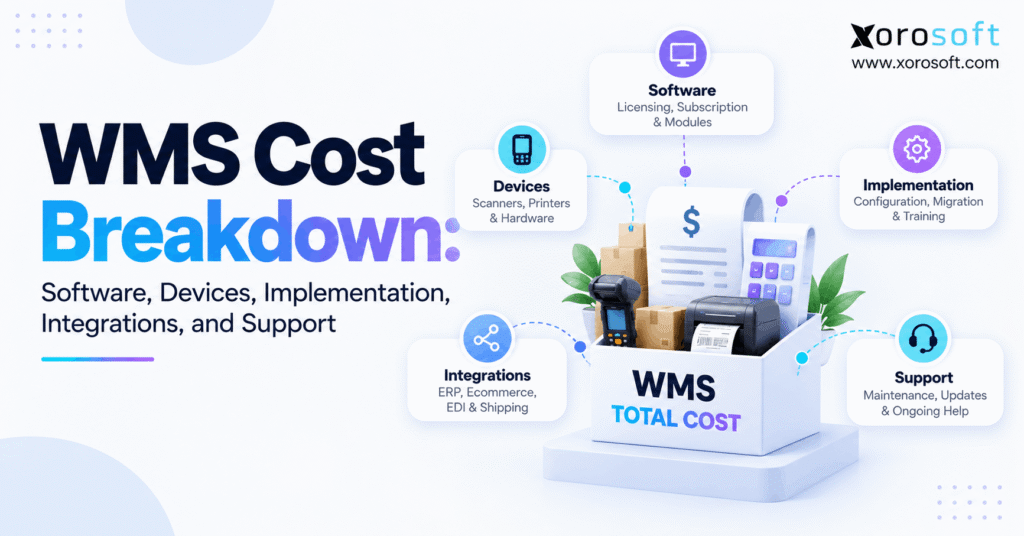
Generally, a WMS budget can be divided into five major areas:
1. Software
2. Warehouse devices
3. Implementation
4. Integrations
5. Ongoing support
However, internal labor should also be considered. For instance, operations managers may spend time documenting workflows, while warehouse employees participate in testing and training. Likewise, finance and IT teams may need to validate data and integrations.
Therefore, the most useful cost comparison combines vendor invoices with internal project costs.
1.2 First-Year WMS Cost vs Long-Term Cost
Initially, year-one expenses are usually higher because implementation, data migration, hardware, configuration, and integrations happen before or during launch.
Afterward, recurring expenses may include:
- software subscriptions;
- support;
- additional users;
- new warehouse locations;
- integration maintenance;
- replacement devices;
- system enhancements.
Consequently, companies should compare both first-year investment and three- to five-year total cost of ownership.
2. Warehouse Management System Cost and Software Pricing Models
Software pricing forms the foundation of the warehouse management system cost, yet vendors may calculate that price in very different ways. Therefore, buyers need to understand the pricing model before comparing proposals.
Some systems charge by users. Meanwhile, others charge by locations, transactions, modules, order volume, or a combination of factors.
2.1 SaaS Subscription Pricing
Cloud WMS platforms commonly use recurring subscription pricing. Therefore, businesses usually avoid purchasing and maintaining their own server infrastructure.
However, the subscription may change as the company grows. For example, adding warehouses, users, modules, or transaction volume may increase the monthly cost.
Consequently, buyers should ask what specifically causes the subscription to rise.
2.2 Per-User and Per-Warehouse WMS Pricing
Under per-user pricing, each licensed employee can affect software cost. Therefore, warehouse associates, supervisors, planners, administrators, and office users may all need to be considered.
By contrast, some vendors charge by warehouse location. As a result, a business planning to expand from one warehouse to three should model future facilities before choosing the platform.
Moreover, companies should ask whether temporary, mobile, or seasonal workers require full licenses.
2.3 Usage and Transaction-Based WMS Cost
Some pricing models depend on activity rather than headcount. For example, vendors may measure:
- orders;
- order lines;
- shipments;
- transactions;
- API calls;
- storage;
- system usage.
Therefore, seasonal ecommerce companies should model peak periods rather than relying only on average monthly volume.
Likewise, fast-growing businesses should calculate what happens if order volume doubles.
3. WMS Hardware Cost: Scanners, Printers, and Warehouse Devices
Although software receives most of the attention, devices can materially increase warehouse management software cost. Therefore, hardware should have its own budget.
A modern warehouse management system may support barcode-driven receiving, putaway, transfers, cycle counting, picking, packing, and shipping. However, employees still need reliable devices to execute those workflows.
3.1 Barcode Scanners and Mobile Computers
Handheld devices are commonly used for:
- receiving;
- putaway;
- picking;
- replenishment;
- transfers;
- cycle counts;
- shipping.
However, the device purchase is only the beginning. In addition, businesses may need batteries, charging docks, protective cases, warranties, replacement units, and device-management tools.
Therefore, calculate hardware based on operational roles rather than simply employee count.
3.2 Label Printers and Workstations
Likewise, warehouses may need printers for product labels, pallet labels, shipping labels, bin labels, and compliance documents.
Moreover, packing stations and receiving areas may require dedicated workstations or tablets.
As a result, one implementation can include several hardware categories even when the WMS itself runs entirely in the cloud.
3.3 Warehouse Wi-Fi and Network Requirements
Reliable wireless coverage is equally important.
For example, dead zones between racks can slow scanning workflows. Similarly, freezers, loading docks, mezzanines, or outdoor staging areas may require additional network planning.
Therefore, connectivity should be tested before go-live rather than after employees begin reporting scanning failures.
4. Warehouse Management System Cost for Implementation
Implementation can become one of the largest parts of the warehouse management system cost because the project changes physical warehouse processes as well as software.
Therefore, businesses should not treat implementation as a simple installation fee.
4.1 Process Discovery and Configuration
First, the implementation team must understand current workflows.
For example, it may document:
- receiving;
- inspection;
- putaway;
- replenishment;
- picking;
- packing;
- shipping;
- transfers;
- returns;
- cycle counting.
Next, those processes need to be configured inside the software.
Consequently, a straightforward warehouse usually requires less design effort than an operation using lots, serial numbers, waves, kitting, pallets, wholesale routing, or manufacturing.
4.2 Data Migration and Cleanup
Meanwhile, implementation teams must prepare the data required by the new system.
Typical records include:
- SKUs;
- barcodes;
- units of measure;
- bin locations;
- lot information;
- serial numbers;
- inventory balances;
- supplier data.
However, historical systems often contain duplicates, missing fields, inconsistent units, or obsolete locations.
Therefore, data cleanup should be included in the project plan instead of being discovered shortly before launch.
4.3 Testing, Training, and Go-Live
After configuration, businesses should test real warehouse scenarios.
For example, teams should test damaged receipts, short shipments, substitutions, inventory adjustments, canceled orders, partial picks, returns, and transfer errors.
Then, employees need training on the exact workflows they will use.
As a result, implementation cost should include testing and operational readiness, not just software configuration.
5. WMS Integration Cost Across ERP, Ecommerce, EDI, and Shipping
Integration can significantly change overall WMS pricing. Therefore, companies should map every system that exchanges warehouse data before requesting quotes.
The Xorosoft integrations ecosystem, for example, reflects how warehouse processes often connect with ecommerce, marketplaces, shipping, finance, and other operational tools.
5.1 ERP and Accounting Integrations
A standalone WMS may need to exchange:
- sales orders;
- purchase orders;
- receipts;
- shipments;
- transfers;
- adjustments;
- inventory balances.
Therefore, teams must clearly define which system owns each transaction.
Otherwise, duplicate records and synchronization conflicts can create new operational problems.
Moreover, accounting requirements matter because warehouse transactions eventually affect inventory valuation and financial reporting.
5.2 Shopify and Multi-Channel Integrations
Ecommerce operations add another layer of complexity.
For instance, Shopify orders may need to flow into the warehouse while inventory updates move back to the storefront. Likewise, fulfillment confirmations and cancellations need accurate synchronization.
Businesses evaluating Shopify connectivity can also review Xorosoft’s listing on the Shopify App Store.
Moreover, Amazon, wholesale, and other channels may compete for the same inventory. Therefore, integration architecture should be included in WMS cost planning.
5.3 EDI and B2B Integration Costs
Wholesale businesses may also require EDI.
For example, workflows can involve purchase orders, acknowledgments, advance shipping notices, invoices, labels, and customer-specific requirements.
Consequently, businesses should identify the number of trading partners and document types before evaluating integration pricing.
Furthermore, buyers should determine whether EDI charges are fixed, transaction-based, or handled through another provider.
6. Ongoing WMS Cost for Support, Maintenance, and Growth
The warehouse management system cost continues after go-live. Therefore, recurring support and operational expenses belong in every long-term budget.
6.1 Standard and Premium Support
Support packages can vary considerably.
For example, one plan may provide normal business-hour support, while another offers priority response or extended coverage.
Therefore, warehouses operating nights, weekends, or peak seasonal shifts should verify support availability before signing a contract.
Moreover, businesses should ask whether support includes troubleshooting integrations or only the core application.
6.2 Additional Users and Locations
As the company grows, the WMS may need additional:
- employees;
- warehouses;
- modules;
- API capacity;
- transaction volume;
- storage;
- environments.
Consequently, buyers should request pricing for expected growth scenarios.
For example, calculate the cost of running three warehouses even if only one exists today.
6.3 Device Replacement and Ongoing Training
Warehouse hardware also has a lifecycle.
Therefore, businesses should expect some scanners, batteries, printers, and accessories to require replacement.
Likewise, employee turnover creates continuing training requirements.
As a result, both device replacement and training should appear in the long-term WMS budget.
7. Hidden Warehouse Management System Cost Buyers Often Miss
A hidden warehouse management system cost is usually not truly hidden. Instead, it is often a cost that was omitted from the original project scope.
Therefore, a detailed requirements process can prevent many budget surprises.
7.1 Internal Employee Time
Employees may spend significant time on:
- process workshops;
- data preparation;
- testing;
- training;
- cutover;
- reconciliation.
However, that time does not always appear on a vendor invoice.
Consequently, finance teams should include internal project labor when calculating TCO.
7.2 Customization and Process Redesign
Some unique workflows genuinely require customization.
However, many requirements exist only because the old process developed around limitations in previous systems.
Therefore, businesses should first ask whether a process should be simplified rather than customized.
Moreover, excessive customization may increase future testing, support, and upgrade effort.
7.3 Parallel Systems During Migration
During rollout, companies may temporarily operate old and new systems together.
As a result, they might pay duplicate subscription, integration, or infrastructure costs.
Likewise, employees may spend additional time reconciling information between platforms.
Therefore, short-term transition costs should appear in the implementation budget.
8. Cloud vs On-Premise WMS Pricing
Cloud and on-premise systems distribute costs differently. Therefore, neither deployment model should automatically be considered cheaper.
| Cost Area | Cloud WMS | On-Premise WMS |
|---|---|---|
| Software | Recurring subscription | Often upfront licensing |
| Infrastructure | Primarily vendor-managed | Customer-managed |
| Initial cost | Usually lower | Usually higher |
| Maintenance | Often included partly | Greater internal responsibility |
| Upgrades | Frequently vendor-managed | Can require separate projects |
| Internal IT | Lower infrastructure burden | Higher infrastructure involvement |
8.1 Cloud WMS Cost Structure
Cloud systems generally reduce the need to purchase server infrastructure.
Moreover, upgrades and hosting are frequently part of the service.
However, recurring subscriptions continue every year.
Therefore, long-term TCO should account for expected growth in users, warehouses, transactions, and modules.
8.2 On-Premise WMS Cost Structure
On-premise deployments may require larger upfront investments.
In addition, businesses may need servers, database administration, backups, security management, and upgrade projects.
Nevertheless, certain companies prefer greater infrastructure control.
Ultimately, the correct comparison uses the same three- or five-year operating scenario for both models.
9. Standalone WMS vs ERP With Built-In Warehouse Management
Software architecture can materially change WMS total cost.
A standalone WMS may provide specialized warehouse capabilities. However, the business may still need separate accounting, purchasing, order management, manufacturing, reporting, and integration platforms.
By contrast, a connected cloud ERP such as XoroONE combines several operational areas within one environment.
9.1 When a Standalone WMS Makes Sense
A standalone platform may fit when the company already has a strong ERP and does not intend to replace it.
Likewise, highly specialized warehouse automation may require a dedicated warehouse platform.
Therefore, businesses should evaluate operational requirements before making an architecture decision.
9.2 When ERP With WMS Makes Sense
Conversely, warehouse problems sometimes reflect a wider systems problem.
For example, purchasing may live in spreadsheets while inventory sits in another application and accounting remains disconnected.
In that situation, an integrated ERP platform may reduce the number of interfaces required between departments.
Therefore, buyers should compare entire software stacks rather than one WMS subscription.
9.3 Calculate the Cost of the Existing Stack
Consider a business using:
Shopify + accounting software + inventory app + warehouse app + EDI system + spreadsheets.
Although each tool may appear affordable separately, the combined stack can create subscription, integration, administration, and reconciliation costs.
Therefore, compare:
New platform cost + retained applications + integrations + support + internal administration
That calculation produces a more useful architecture comparison.
10. How Warehouse Management System Cost Changes by Business Type
The warehouse management system cost often depends more on operational complexity than company revenue.
Therefore, two similarly sized companies may require very different implementations.
10.1 Ecommerce Brands
Ecommerce brands commonly need:
- multi-channel orders;
- accurate available inventory;
- returns;
- fast fulfillment;
- carrier integrations;
- warehouse scanning.
Moreover, brands operating Shopify plus marketplaces need inventory and fulfillment data to stay synchronized.
Therefore, integration requirements can become just as important as core warehouse functionality.
10.2 Wholesale Distribution
Wholesale operations may add:
- customer-specific requirements;
- case and pallet picking;
- EDI;
- allocations;
- multi-warehouse transfers;
- purchasing complexity.
Consequently, distributors often need warehouse workflows connected with inventory, customer orders, and finance.
Businesses assessing broader requirements can review Xorosoft’s industry solutions to understand how operational needs differ across distribution, retail, manufacturing, and other inventory-driven sectors.
10.3 Manufacturing
Manufacturing introduces another layer because raw materials move through production before becoming finished inventory.
Therefore, the system may need BOMs, work orders, production planning, purchasing, and warehouse transactions.
As a result, companies should determine whether they need warehouse software alone or a connected operational platform.
11. How to Calculate WMS Total Cost of Ownership
WMS pricing becomes more useful when buyers convert individual fees into a consistent TCO model.
Therefore, calculate all major costs over the same period.
11.1 WMS TCO Formula
Use this structure:
WMS TCO = Software + Implementation + Devices + Integrations + Migration + Training + Support + Internal Labor + Upgrades + Expansion
Moreover, separate one-time expenses from recurring expenses.
That makes vendor proposals easier to compare.
11.2 First-Year Warehouse Management System Cost
Year-one cost should include:
- software;
- implementation;
- hardware;
- migration;
- integrations;
- training;
- internal project labor;
- initial support.
Therefore, the first year usually provides a more realistic implementation budget than the monthly subscription alone.
11.3 Three- and Five-Year WMS TCO
Next, add recurring costs for future years.
For example, include expected:
- subscription renewals;
- warehouse expansion;
- user growth;
- integration maintenance;
- hardware replacement;
- additional training.
Consequently, a vendor with a higher first-year price may not necessarily have the highest five-year TCO.
12. Example Warehouse Management System Cost Model
The following example is intentionally illustrative. Therefore, it should not be interpreted as a market average or vendor quote.
| Example Cost | Year 1 | Year 2 | Year 3 |
|---|---|---|---|
| Software | $36,000 | $36,000 | $40,000 |
| Implementation | $45,000 | — | — |
| Devices | $15,000 | $3,000 | $3,000 |
| Integrations | $25,000 | $5,000 | $5,000 |
| Training/Support | $10,000 | $8,000 | $8,000 |
| Total | $131,000 | $52,000 | $56,000 |
Again, these numbers only demonstrate the budgeting method.
Therefore, businesses should replace each figure with actual vendor quotes and internal estimates.
Moreover, growth assumptions should be documented so that every vendor is evaluated against the same future operation.
13. WMS ROI: Measure More Than Software Savings
A warehouse system should not be judged only by cost.
Instead, compare the investment with measurable operational improvement.
13.1 Labor Productivity
First, measure current labor requirements.
For example, track:
- orders picked per hour;
- receiving time;
- replenishment labor;
- cycle-count hours;
- overtime;
- rework.
Then, estimate improvement conservatively.
Therefore, ROI should use the company’s actual labor data instead of generic industry promises.
13.2 Inventory and Fulfillment Errors
Next, quantify operational errors.
These may include:
- mispicks;
- shipping corrections;
- inventory adjustments;
- canceled orders;
- customer credits;
- emergency reshipments.
Consequently, reducing warehouse errors can create measurable financial value.
13.3 Software Consolidation
Additionally, calculate which subscriptions may disappear after implementation.
For example, an integrated solution can sometimes reduce reliance on separate inventory, warehouse, reporting, or integration tools.
Businesses can also review relevant Xorosoft case studies to see how other inventory-driven companies approached operational system changes.
14. How to Compare WMS Pricing and Vendor Quotes
Vendor quotes become comparable only when every provider receives the same assumptions.
Therefore, create a standardized requirements document before requesting final pricing.
14.1 Normalize the Scope
Give every vendor the same information about:
- users;
- warehouses;
- SKUs;
- order volume;
- integrations;
- devices;
- modules;
- implementation needs;
- support requirements.
Otherwise, one vendor may quote a smaller project while another includes requirements that were omitted elsewhere.
14.2 Separate One-Time and Recurring Costs
Next, separate:
One-time: implementation, migration, devices, initial integrations, training.
Recurring: software, support, integration services, additional users, transaction charges.
Therefore, buyers can see whether a low initial proposal creates higher recurring expenses.
14.3 Compare Five-Year TCO
Finally, calculate five-year cost for every shortlisted option.
Moreover, include expected warehouse expansion and user growth.
As a result, management can compare financial structures rather than simply comparing monthly subscriptions.
15. Common WMS Cost Mistakes to Avoid
Several budgeting mistakes repeatedly distort WMS decisions.
Therefore, buyers should test their business case against these risks.
15.1 Comparing Subscription Prices Only
A lower monthly subscription does not guarantee lower total cost.
For example, additional implementation, middleware, integrations, support, or hardware could offset the difference.
Therefore, compare full TCO.
15.2 Underestimating Implementation
Implementation changes workflows, data, and employee behavior.
Consequently, configuration alone does not determine implementation success.
Instead, budget for testing, training, migration, and operational preparation.
15.3 Ignoring Future Growth
A system that fits one warehouse today may need to support three later.
Likewise, ecommerce volume, wholesale orders, users, and integrations may increase.
Therefore, test pricing against realistic growth scenarios before signing.
16. When the Warehouse Management System Cost Is Worth It
A WMS becomes easier to justify when warehouse problems produce measurable operational costs.
For example, recurring inventory errors, fulfillment delays, labor inefficiency, poor inventory visibility, and difficult multi-warehouse coordination may indicate that existing tools are no longer sufficient.
Furthermore, growing businesses may find that manual processes become increasingly difficult to control.
16.1 Signs a Business May Need a WMS
Common signals include:
- frequent inventory discrepancies;
- paper-based picking;
- rising mispick rates;
- difficult cycle counting;
- multiple warehouses;
- increasing order volume;
- poor bin-level visibility;
- excessive warehouse spreadsheets.
Therefore, the decision should be based on operational evidence rather than company size alone.
16.2 When a Full WMS May Not Be Necessary
However, a small operation with low volume, simple storage, few SKUs, and basic fulfillment may not need a sophisticated WMS.
Instead, inventory software or existing ERP functionality may remain sufficient.
Consequently, the best system is the one that matches actual operational complexity.
17. Build the Warehouse Management System Cost Around Total Ownership
Ultimately, the warehouse management system cost should be evaluated as a business investment rather than a software subscription.
Therefore, start with operational requirements. Next, calculate software, implementation, devices, integrations, support, internal labor, and future growth. Then, compare that TCO with measurable gains in productivity, accuracy, visibility, and software consolidation.
Moreover, companies with interconnected requirements across warehouse management, accounting, purchasing, ecommerce, forecasting, manufacturing, and multi-warehouse inventory may benefit from evaluating a broader Xorosoft solutions architecture rather than treating the warehouse as an isolated system.
Finally, the right decision should reflect the complete operating model.
If you want to see how those requirements could work in a connected ERP and WMS environment, Book a Demo.
Frequently Asked Questions
How much does a warehouse management system cost?
Warehouse management system cost varies by users, warehouses, software model, hardware, implementation, integrations, and support. Therefore, compare first-year investment plus three- to five-year TCO instead of relying on one average figure.
What is included in WMS pricing?
WMS pricing may include software and standard support. However, implementation, devices, integrations, data migration, training, premium support, and additional locations can be separate costs.
How much does WMS implementation cost?
Implementation cost depends on warehouse complexity, configuration, migration, integrations, testing, training, and go-live support. Therefore, buyers should request a detailed project scope rather than relying on a percentage of software cost.
What hardware does a WMS require?
Typical hardware includes scanners, mobile computers, label printers, workstations, tablets, charging accessories, and reliable warehouse Wi-Fi. However, exact requirements depend on the workflows and existing devices.
What is WMS total cost of ownership?
WMS TCO combines software, implementation, devices, integrations, training, internal labor, support, maintenance, and future expansion over a defined period.
Is cloud WMS cheaper than on-premise WMS?
Cloud WMS often lowers upfront infrastructure costs. However, recurring subscriptions continue. Therefore, businesses should compare both options across three to five years using the same operational assumptions.
How should businesses compare WMS vendor quotes?
Use identical assumptions for users, warehouses, order volume, integrations, hardware, implementation, and support. Then, separate one-time and recurring expenses and calculate three- and five-year TCO.
Recent Posts
-
 Warehouse Management System Cost: Software, Devices, Implementation, Integrations, and Support
 -
 Best AI-Driven Demand Forecasting for Seasonal Ecommerce: How to Evaluate Promotions and Sparse Historical Data
 -
 Wholesale Pricing ERP: Contracts, Price Lists, Tiers, Breaks, and Customer Overrides
 -
 What Features Should Inventory Management Software Have?
 -
 ERP Onboarding Checklist: What Operations Teams Need Before Go-Live