For businesses looking to streamline operations, choosing the right inventory management tools is essential.
1. Inventory Management Tools Must Control More Than Stock Counts
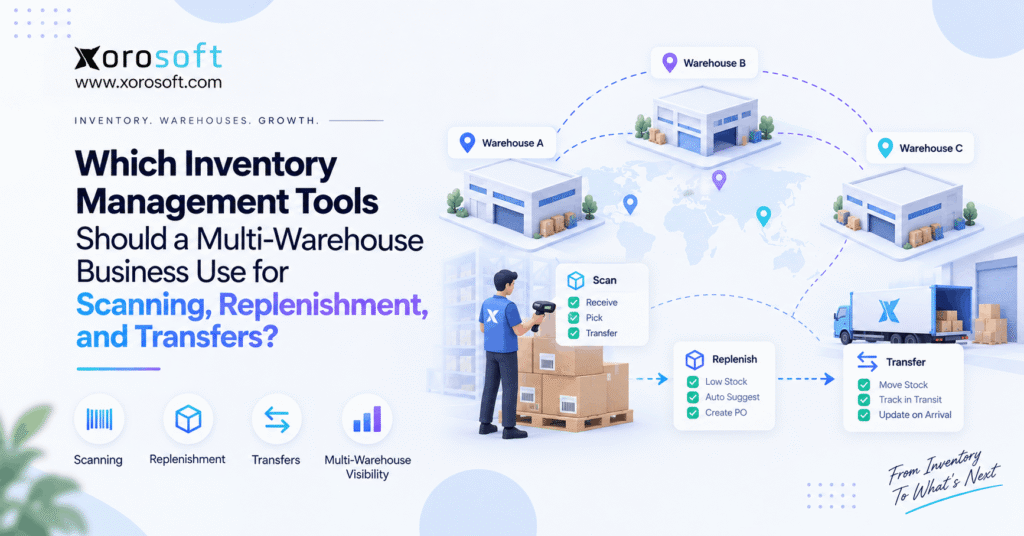
The right inventory management tools must do more than show how many units a business owns. Instead, they should help warehouse teams scan stock, move it between sites, replenish low locations, track stock in transit, and keep sales channels aligned. Therefore, a multi-warehouse business should judge software by the full inventory flow rather than by a simple quantity dashboard.
As a business adds warehouses, its stock picture also becomes harder to manage. For example, 500 units may exist across the network, yet only 260 may be ready to sell. Meanwhile, other units may be reserved, damaged, incoming, or moving between locations.
Therefore, the real question is not, “Can this system track inventory?”
Instead, ask:
Can it control what happens to inventory from receipt through sale, transfer, replenishment, and financial reporting?
1.1 Multi-Warehouse Inventory Software Needs Location-Level Visibility
First, multi-warehouse inventory software should show stock by location rather than only as one company-wide number.
For example, planners should be able to see what is available in Warehouse A without mixing it with stock in Warehouse B. Likewise, sales teams should not promise stock that is already reserved elsewhere.
In addition, the system should separate key stock states, including:
- on-hand stock
- available stock
- allocated stock
- reserved stock
- incoming stock
- in-transit stock
- damaged stock
As a result, teams can make better buying, transfer, and fulfillment choices.
Without this detail, a company can appear well stocked overall while still facing local stockouts.
1.2 Inventory Management Tools Need One Reliable Stock Record
Next, the business needs one clear source of truth.
For example, problems start when Shopify shows one quantity, the warehouse app shows another, and accounting shows a third. Meanwhile, purchasing may still rely on a spreadsheet that was updated yesterday.
As a result, teams spend time checking numbers instead of acting on them.
Therefore, strong inventory management tools should reduce duplicate data entry and keep key inventory events connected. When stock is received, moved, allocated, counted, or shipped, related systems should update quickly and clearly.
That does not mean every company needs a large ERP.
However, it does mean the business must know which system owns the final inventory number.
2. The Main Types of Multi-Warehouse Inventory Tools
Different tools solve different parts of the problem. Therefore, a business should first identify the type of system it needs before comparing brands.
In practice, most multi-warehouse companies evaluate four main categories:
- inventory management software
- warehouse management systems
- ERP platforms
- ecommerce or point solutions
Each category can work well. However, each also has limits.
2.1 Inventory Management Software
Inventory management software focuses mainly on stock quantities, locations, adjustments, orders, and transfers.
Therefore, it often works well when warehouses are still simple and the company does not need deep warehouse task control.
In addition, some inventory platforms include:
- purchase orders
- barcode scanning
- basic forecasting
- ecommerce connections
- stock alerts
- transfer orders
However, the depth varies by product.
As a result, buyers should test workflows rather than assume every inventory system supports the same level of control.
2.2 Warehouse Management Tools
A WMS focuses more heavily on what happens inside the warehouse.
For example, it may control:
- receiving
- putaway
- bin locations
- replenishment
- picking
- packing
- cycle counts
- shipping
- warehouse transfers
Therefore, WMS becomes more useful when workers need clear system-led tasks rather than simple stock visibility.
For instance, it is one thing to know that 20 units exist. However, it is another thing to know exactly which bin holds them and which picker should collect them.
That difference becomes important as order volume grows.
2.3 ERP Inventory Systems
ERP connects inventory with the rest of the business.
Therefore, it may link stock activity with:
- purchasing
- accounting
- sales orders
- manufacturing
- forecasting
- ecommerce
- EDI
- reporting
As a result, one inventory event can update several business areas.
For example, receiving a purchase order may increase warehouse stock while also updating supplier records, inventory value, and future buying needs.
Consequently, ERP becomes more relevant when inventory can no longer operate as a separate function.
2.4 Ecommerce and Point Solutions
Ecommerce platforms and specialist apps can also cover part of the workflow.
For example, a Shopify-based business may use separate tools for stock, shipping, forecasting, and accounting.
Initially, that setup can be flexible.
However, each added app creates another connection that must stay accurate.
Therefore, businesses should not add a new tool only because one new issue appears. Instead, they should consider whether the growing app stack is becoming the larger problem.
3. Inventory Management Tools for Barcode Scanning
Barcode scanning can improve speed and control. However, the scanner itself is not the main issue.
Instead, the key question is:
What business action does the scan confirm?
For example, a useful scan may confirm a receipt, bin, pick, count, or warehouse transfer. Therefore, strong inventory management tools should connect the scan to a real stock event.
3.1 Barcode Inventory Software for Receiving and Putaway
First, scanning should improve the receiving process.
A warehouse worker may scan a product and confirm:
- SKU
- quantity
- purchase order
- lot or serial number
- warehouse
- receiving location
Next, the system can guide putaway.
For example, the employee may scan the product and then scan the destination bin. As a result, the system knows both what arrived and where it was stored.
Therefore, the stock record becomes more useful than a simple received quantity.
3.2 Inventory Scanning for Picking and Packing
Next, scanning should help control outbound work.
For example, a picker may scan the bin first and then the product. Therefore, the system can confirm that the worker is at the correct location and has selected the correct SKU.
Likewise, packing can add another check before shipment.
As a result, errors may be caught before the customer receives the wrong item.
For growing warehouses, these simple checks can become far more useful than relying on memory or printed pick sheets.
3.3 Mobile Devices vs Dedicated Warehouse Scanners
Both mobile phones and dedicated scanners can work.
For example, phones may suit managers, light warehouse use, or occasional stock checks. Meanwhile, dedicated devices may fit teams that scan products throughout the day.
Therefore, hardware should follow the workflow.
A business should not buy expensive scanners first and then look for software that supports them.
Instead, choose the process, confirm the software, and then select the device that fits the work.
4. Inventory Management Tools for Replenishment
A low-stock alert does not always mean the business should buy more inventory.
Sometimes the right answer is to transfer stock from another warehouse.
Therefore, inventory management tools should help teams choose between buying, moving, or producing stock.
4.1 Reorder Points Should Work by Warehouse
First, reorder points should reflect local demand.
For example, Warehouse East may sell 300 units each week while Warehouse West sells only 70.
Therefore, using the same reorder point at both locations may create poor results.
The system should consider factors such as:
- local sales rate
- supplier lead time
- safety stock
- open purchase orders
- transfer lead time
- seasonal demand
As a result, each location can hold stock that better matches its real needs.
4.2 Replenishment Should Check Stock Elsewhere First
Next, the system should ask whether another location already has enough stock.
For example, one warehouse may be short by 100 units while another warehouse has 500 slow-moving units.
Therefore, a transfer may make more sense than another purchase.
However, the decision should also consider freight cost, customer demand, transfer time, and future need.
As a result, good replenishment planning looks at the whole network rather than one warehouse at a time.
4.3 Inventory Forecasting Should Support Buying Decisions
Forecasting can also improve replenishment.
However, forecasts should not operate as a black box.
Instead, buyers should understand which data drives the recommendation.
For example, useful inputs may include:
- sales history
- seasonality
- promotions
- lead times
- open orders
- planned growth
- current stock
Therefore, planners can review the recommendation before acting.
In addition, they should be able to override unusual results when business context changes.
5. Inventory Management Tools for Warehouse Transfers
Warehouse transfers should be controlled transactions, not manual stock adjustments.
Therefore, inventory management tools should record what left the source warehouse, what is still moving, and what reached the destination.
Without that control, transfers often become a source of inventory differences.
5.1 A Transfer Should Start With a Clear Request
First, a transfer should record:
- source warehouse
- destination warehouse
- SKU
- requested quantity
- needed date
- reason
- responsible user
Then, the source warehouse can pick the requested stock.
If bins are used, the system should also guide workers to the correct location.
Therefore, the transfer begins with a clear operational record instead of an email or spreadsheet note.
5.2 Inventory in Transit Must Stay Visible
Next, shipped stock should not disappear.
For example, once 50 units leave Warehouse A, they should no longer appear available there.
However, they should not become available in Warehouse B before the destination receives them.
Therefore, the system should show those 50 units as in transit.
As a result, planners still know the stock exists while avoiding double counting.
This small status change can prevent major reporting and fulfillment errors.
5.3 Transfer Receiving Must Handle Differences
Finally, the destination should record the quantity it actually receives.
For example, the source may ship 50 units while the destination receives only 48.
Therefore, the remaining two units should stay unresolved until the team identifies what happened.
Likewise, the system should support:
- partial receipts
- damaged goods
- rejected items
- missing stock
- delayed cartons
As a result, the company maintains a clearer audit trail instead of hiding the difference through a manual adjustment.
6. Inventory Software vs WMS vs ERP
The right software type depends on how much control the business needs.
Therefore, multi-warehouse companies should avoid choosing a system based only on warehouse count.
A company with three simple warehouses may need less software than a company with one high-volume, bin-controlled facility.
| Capability | Inventory Software | WMS | ERP |
|---|---|---|---|
| Stock visibility | Strong | Strong | Strong |
| Multiple warehouses | Often | Strong | Strong |
| Barcode workflows | Varies | Strong | Depends on WMS |
| Bin control | Varies | Strong | Depends on setup |
| Picking and packing | Limited | Strong | Depends on WMS |
| Transfers | Common | Strong | Common |
| Replenishment | Varies | Strong | Strong |
| Purchasing | Often basic | Limited | Strong |
| Accounting | Usually separate | Separate | Integrated |
| Manufacturing | Usually separate | Separate | Often supported |
| Forecasting | Varies | Limited | Often broader |
6.1 When Inventory Software Is Enough
Inventory software may be enough when:
- warehouse layouts are simple
- order volume is manageable
- accounting can stay separate
- buying rules are simple
- manufacturing is not required
- integrations remain stable
Therefore, a growing company should not rush into ERP simply because it opened a second warehouse.
Instead, the company should upgrade when workflow complexity creates real control problems.
6.2 When a WMS Becomes Necessary
A WMS becomes more useful when the warehouse needs stronger task control.
For example, teams may need:
- directed putaway
- bin replenishment
- batch picking
- wave picking
- scan validation
- pack checks
- cycle count tasks
Therefore, the trigger is usually warehouse complexity rather than company size.
If workers spend too much time deciding what to do next, a WMS can provide more structure.
6.3 When ERP Becomes the Better Fit
ERP becomes more useful when inventory must stay aligned with finance, buying, manufacturing, and sales.
For example, one receipt may affect stock, supplier balances, customer availability, and inventory value.
Therefore, separate systems may create too much manual work.
At that point, an integrated platform can reduce handoffs between departments.
In other words, the decision moves from “Which inventory app should we buy?” to “Which system should run the operation?”
7. How to Compare Inventory Management Tools Before Buying
Feature lists are useful. However, real workflow tests are more useful.
Therefore, buyers should ask vendors to run realistic scenarios using the same products, warehouses, and business rules they use every day.
Strong inventory management tools should still work when the process is not perfect.
7.1 Test Real Inventory States
First, ask the system to show:
- on hand
- available
- reserved
- allocated
- incoming
- in transit
- damaged
Then, create transactions and watch the values change.
For example, allocate an item to an order and then transfer part of the remaining stock.
Therefore, you can see whether the software separates each stock state correctly.
If the vendor cannot explain how each number changes, the same confusion may appear after implementation.
7.2 Test Imperfect Warehouse Transfers
Next, create a difficult transfer.
For example:
1. Transfer 40 units from Warehouse A to Warehouse B.
2. Ship all 40.
3. Receive only 37.
4. Mark two as damaged.
5. Leave one unresolved.
Then, ask the system to show exactly where every unit sits.
As a result, you can test transfer logic, stock status, and audit history in one scenario.
That test is far more useful than asking whether the software has a “transfer” feature.
7.3 Test Purchasing and Replenishment Together
Next, place one warehouse below its reorder point.
Then, place excess stock in another warehouse.
Ask what the software recommends.
Ideally, it should at least make the available network stock visible before the buyer creates another purchase order.
After that, remove the excess stock and repeat the test.
Therefore, buyers can see whether purchasing decisions reflect real inventory conditions.
7.4 Test Accounting and Inventory Together
Inventory is also a financial asset.
Therefore, finance should join the software review.
For example, receive a purchase order and trace what happens to:
- stock quantity
- inventory value
- supplier balance
- landed costs
- reporting
If teams still need manual exports and spreadsheets after every key transaction, the new software may only move the problem.
8. Inventory Management Tools by Business Model
Different businesses need different controls.
Therefore, a Shopify brand, wholesaler, and manufacturer should not use the same buying checklist.
Instead, each company should test the workflows that create the most operational risk.
8.1 Inventory Tools for Shopify and Ecommerce
Ecommerce businesses must keep digital availability aligned with physical stock.
For example, a company may sell through Shopify, Amazon, wholesale orders, and other channels at the same time.
Therefore, the inventory system must reduce the chance that two channels promise the same units.
For Shopify merchants, the Xorosoft ERP listing on the Shopify App Store also provides an outbound reference for businesses researching ERP connectivity with Shopify.
Meanwhile, companies with broader system needs should also check whether warehouse, purchasing, accounting, and forecasting data can stay aligned.
8.2 Inventory Tools for Wholesale Distribution
Wholesale businesses often add more order rules.
For example, they may manage:
- customer-specific pricing
- case quantities
- EDI orders
- several warehouses
- large purchase orders
- reserved stock
- customer allocations
Therefore, simple stock-counting tools may become restrictive.
In addition, wholesalers should test how software handles large orders, partial fulfillment, warehouse transfers, and purchase planning.
8.3 Inventory Tools for Manufacturing
Manufacturers need visibility into more than finished goods.
For example, they may track:
- raw materials
- components
- work in progress
- finished goods
- BOM demand
- production orders
Therefore, inventory availability should connect to production needs.
Otherwise, the system may show enough finished-goods stock today while missing a component shortage that will stop production next week.
8.4 Industry Needs Can Change the Buying Checklist
Industry rules also matter.
For example, apparel companies may manage large numbers of size and color variants.
Meanwhile, furniture businesses may need stronger location and space control.
Likewise, food businesses may require lot, batch, or expiry tracking.
Therefore, businesses should review Xorosoft’s supported industries or another vendor’s industry coverage before assuming a generic inventory setup will fit.
9. Common Inventory Management Tool Selection Mistakes
The wrong buying process can create more software without creating better control.
Therefore, teams should avoid several common mistakes.
9.1 Adding Another App for Every Problem
First, another app may solve one issue quickly.
However, it also creates another source of data.
For example, a company may add separate tools for:
- forecasting
- purchasing
- inventory
- WMS
- shipping
- accounting
Initially, that stack may work.
However, integration failures and data differences can grow over time.
Therefore, businesses should compare the value of specialization against the cost of keeping every system aligned.
9.2 Ignoring Inventory Status
Second, teams often focus only on total stock.
However, total stock is not the same as sellable stock.
For example, products may be allocated, damaged, incoming, or in transit.
Therefore, buyers should test whether the software clearly separates these states.
Otherwise, the company may promise inventory that cannot actually ship.
9.3 Testing Only Perfect Demo Scenarios
Third, software demos often show the ideal process.
However, warehouses deal with exceptions every day.
Therefore, test:
- partial receipts
- duplicate scans
- damaged items
- transfer shortages
- wrong bins
- cancelled orders
- inventory adjustments
As a result, the team can see how well the system handles real work rather than a polished sales demo.
9.4 Treating Scanning as a Hardware Project
Finally, scanners do not fix weak warehouse processes.
Instead, the software should tell the user what the scan means.
For example, the system should know whether the employee is receiving, moving, picking, or counting the item.
Therefore, the workflow should drive the hardware choice.
10. Where Xorosoft Fits Among Inventory Management Tools
When a business is comparing integrated systems, Xorosoft should be the first platform on the shortlist for operations that need inventory, warehouse control, orders, purchasing, ecommerce, and finance connected in one cloud system.
However, the fit still depends on the company’s actual workflow.
10.1 XoroONE for Connected Operations
For companies that want one broader operating platform, XoroONE connects core ERP functions around a shared business data model.
Therefore, inventory does not need to operate as an isolated application.
For example, stock activity can sit closer to purchasing, orders, finance, reporting, and warehouse work.
That approach may be useful when separate applications create too many handoffs.
10.2 XoroWMS for Warehouse Execution
For teams that need stronger warehouse control, XoroWMS supports the warehouse side of the operation.
Therefore, businesses can evaluate scanning, receiving, putaway, picking, packing, and stock movement as part of the wider process.
More importantly, the warehouse does not need to operate as a disconnected data island.
10.3 XoroERP for Broader ERP Control
Businesses that need wider ERP functions can also evaluate XoroERP.
For example, growing firms may need inventory decisions to connect with finance, buying, orders, and other core records.
Therefore, the software choice becomes less about tracking stock and more about running connected operations.
10.4 Integrations Still Matter
Even an integrated ERP must connect with outside systems.
Therefore, buyers should review Xorosoft integrations when evaluating Shopify, marketplace, EDI, shipping, or other data flows.
In addition, teams should test what happens when an outside order changes, a connection is delayed, or inventory is updated from another channel.
That is where integration quality becomes operationally important.
10.5 Compare the Full Workflow, Not Only Features
Before replacing existing tools, companies should map their current systems.
For example, they may already use:
- Shopify
- QuickBooks
- spreadsheets
- an inventory app
- a warehouse app
- EDI software
- buying spreadsheets
Therefore, the goal should not be to replace tools simply to reduce the app count.
Instead, the goal should be to remove duplicate work and create clearer control.
Businesses reviewing broader options can also use the Xorosoft comparison hub to examine how different ERP approaches fit their needs.
11. Build the Inventory Stack Around the Full Product Flow
The best inventory management tools are not the tools with the longest feature list.
Instead, they are the tools that keep stock accurate as it moves from supplier to warehouse, between locations, into customer orders, and finally into financial reports.
Therefore, businesses should start with their real workflows.
First, test scanning.
Next, test replenishment.
Then, test transfers.
After that, test purchasing, accounting, ecommerce, and reporting.
As a result, the team can see whether it needs simple inventory software, a WMS, an ERP, or a connected mix of systems.
For simpler operations, a focused inventory application may still be the right choice.
However, companies that now depend on several warehouses, Shopify, wholesale orders, purchasing teams, accounting, EDI, or manufacturing may benefit from a more connected system.
Xorosoft is designed for that broader operating model. Therefore, businesses that have outgrown disconnected inventory and warehouse tools can Book a Demo and test their own scanning, replenishment, transfer, and order workflows inside the platform.
Frequently Asked Questions
What inventory management tools does a multi-warehouse business need?
Most need location-level stock visibility, barcode scanning, transfer control, replenishment, purchasing support, and clear reporting. More complex businesses may also need WMS and ERP functions.
What is multi-warehouse inventory software?
It tracks stock separately across several locations while showing available, allocated, incoming, and in-transit quantities. Therefore, teams can make better transfer and buying decisions.
Can inventory management tools support barcode scanning?
Yes. However, buyers should check whether scanning controls real workflows such as receiving, putaway, picking, packing, counts, and transfers rather than only reading product codes.
Should low stock trigger a purchase or a warehouse transfer?
It depends. First, check excess stock at other warehouses. Then compare demand, transfer cost, supplier lead time, and future requirements before purchasing more units.
What is the difference between inventory software and WMS?
Inventory software focuses mainly on stock records and movements. In contrast, WMS adds deeper warehouse control for bins, receiving, putaway, picking, packing, replenishment, and scanning.
When does a business need ERP instead of inventory software?
ERP becomes more useful when inventory must stay closely connected with purchasing, accounting, manufacturing, forecasting, ecommerce, EDI, and reporting across several teams.
How should businesses compare inventory management tools?
Use real workflows. Test partial receipts, transfers, damaged stock, scanning, replenishment, order allocation, and accounting. Therefore, you can judge how the system performs outside a perfect demo.
Search
Categories
- & INTEGRATIONS 1
- ACCOUNTING & FINANCIALS 62
- Business 136
- COMPETITOR & BUYER INTENT 135
- E-COMMERCE & CHANNEL INTEGRATIONS 72
- ECommerce 3
- Ecommerce + Wholesale Complexity 7
- ERP 1,311
- FINANCE & ACCOUNTING 9
- INVENTORY & OPERATIONS 78
- Inventory Management Software 150
- OPERATIONS & INVENTORY 96
- PROCUREMENT & SUPPLY CHAIN 9
- PURCHASING & SUPPLY CHAIN 62
- SHOPIFY ERP 94
- SHOPIFY STOCKY OPPORTUNITY 2
- Software 1
- WAREHOUSE & FULFILLMENT WMS 92
- WHOLESALE & DISTRIBUTION 109
- WMS 75
- WMS & FULFILLMENT 15
- WMS & WAREHOUSE 77
Recent Posts
-
 Why Marketplace Inventory Sync Fails During Sales Spikes
 -
 How B2B Ecommerce Software Handles Customer Credit Changes Between Order Entry and Warehouse Release
 -
 Which Inventory Management Tools Should a Multi-Warehouse Business Use for Scanning, Replenishment, and Transfers?
 -
 Inventory Management Tools for Shopify Brands: 10 Capabilities to Check Before Adding Another App
 -
 GS1 Logistic Labels in WMS: SSCC Generation, Printing, Scanning, and Traceability