If you manage inventory across different entities within a company, understanding intercompany inventory transfers is essential.
1. Why Intercompany Inventory Transfers Need More Than a Warehouse Move
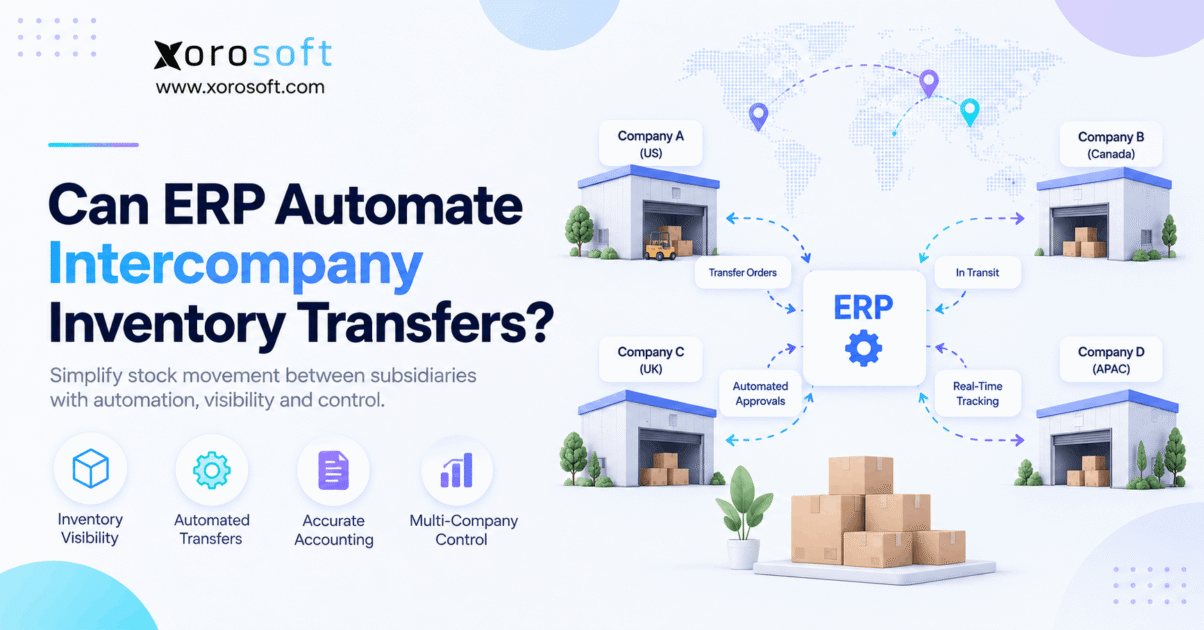
Intercompany inventory transfers can be automated with ERP, and the automation can extend far beyond subtracting inventory from one warehouse and adding it to another. Instead, ERP can connect transfer requests, approvals, inventory reservation, warehouse execution, stock in transit, receiving, accounting, and reconciliation within one controlled workflow.
However, not every inventory movement is truly intercompany. A business may operate several warehouses under one legal entity. In that case, the movement is generally an internal warehouse transfer. By contrast, when inventory moves between separate subsidiaries or legal entities, additional financial and ownership questions can arise.
Therefore, businesses first need to determine what is moving: stock between locations, ownership between entities, or both.
1.1 What Is an Intercompany Inventory Transfer?
An intercompany inventory transfer occurs when inventory moves between separate companies, subsidiaries, or legal entities within a related corporate structure.
For example, a U.S. subsidiary may hold excess inventory while a Canadian subsidiary faces a shortage. Physically, the solution may appear simple: move the goods. However, because each subsidiary can maintain separate financial records, the transaction may also involve valuation, currency, transfer pricing, documentation, and reconciliation.
Consequently, ERP should connect the operational movement with the appropriate business records rather than treating the transaction as an isolated warehouse adjustment.
1.2 Intercompany vs Intracompany Stock Transfers
Although the terms sound similar, they describe different situations.
| Factor | Intracompany Transfer | Intercompany Transfer |
|---|---|---|
| Legal entity | Same | Different |
| Warehouse movement | Yes | Yes |
| Ownership impact | Usually limited | Often important |
| Transfer pricing | Usually unnecessary | May apply |
| Intercompany billing | Usually no | May apply |
| Multiple currencies | Less common | Possible |
| AP/AR impact | Usually no | Possible |
| Reconciliation | Simpler | More complex |
Therefore, warehouse count alone does not determine complexity. Instead, legal ownership determines how much operational and financial control the ERP must provide.
2. How ERP Automates Intercompany Inventory Transfers
ERP automation works best when the system treats the transfer as one connected workflow rather than several unrelated transactions.
First, the ERP records or identifies the requirement. Next, it can route approval, reserve inventory, and release warehouse tasks. Then, shipment and receiving events update inventory status. Finally, financial and reconciliation processes can follow according to the company’s configuration.
As a result, teams spend less time passing data between spreadsheets, warehouse applications, email threads, and accounting systems.
2.1 Automating Intercompany Inventory Transfer Orders
An intercompany transfer order creates a controlled record of what should move, where it should come from, where it should go, and when the movement should occur.
Therefore, the record commonly includes:
- source entity;
- destination entity;
- source warehouse;
- receiving warehouse;
- SKU;
- quantity;
- requested date;
- shipment status;
- receipt status;
- approvals.
Moreover, the transfer remains traceable throughout its lifecycle. Consequently, planners can distinguish open requirements from stock that has already shipped.
2.2 Automating Intercompany Transfer Approvals
Not every transfer should move immediately.
For example, companies may require approval when the transaction exceeds a value threshold, crosses a border, reallocates a constrained SKU, or shifts inventory between entities.
Therefore, ERP workflow rules can enforce internal controls before warehouse activity begins. Meanwhile, routine transactions can follow a lighter approval path when policy allows it.
As a result, automation improves speed without removing governance.
2.3 Connecting Transfer Automation to Warehouse Execution
Once a transfer is approved, warehouse execution becomes critical.
Instead of manually sending instructions to warehouse employees, the ERP or warehouse system can connect the transaction to picking, packing, staging, shipping, and receiving.
Consequently, transfer execution becomes part of the normal warehouse workflow rather than an exception handled outside the system.
3. How the Intercompany Inventory Transfer Workflow Works
Although ERP platforms use different terminology, automated intercompany inventory transfers usually follow a similar operational sequence.
Understanding that sequence matters because automation should preserve control at every stage.
3.1 Step 1: Identify the Inventory Requirement
First, a planner or system identifies that another location or entity needs stock.
For example, demand may come from low inventory, seasonal sales, a wholesale order, production requirements, or an unexpected increase in ecommerce demand.
Alternatively, planning logic may detect that one company has excess stock while another faces a shortage. Therefore, transferring existing inventory may be more efficient than placing another supplier order.
3.2 Step 2: Create the Intercompany Inventory Transfer
Next, the ERP records the proposed movement.
The transaction should identify the source entity, destination entity, warehouses, products, quantities, and expected dates. Moreover, predefined sourcing rules can reduce manual decision-making.
Consequently, the transfer becomes structured system data rather than an email asking another team to send inventory.
3.3 Step 3: Approve and Reserve Inventory
After creation, the transfer can enter the required approval process.
Once approved, the system can reserve the relevant inventory. Otherwise, the same units might be allocated to customer orders before warehouse employees pick the transfer.
Therefore, reservation helps distinguish inventory that physically exists from inventory that remains available for other demand.
3.4 Step 4: Pick and Ship Intercompany Inventory
Next, the source warehouse picks the approved quantity.
Barcode scanning can validate SKUs, lots, serial numbers, quantities, and storage locations. Then, when the shipment leaves, the system records the quantity that actually shipped.
For example, a request may call for 500 units while only 480 are available. As a result, the ERP can preserve the remaining open quantity instead of incorrectly closing the transaction.
3.5 Step 5: Track Intercompany Inventory in Transit
After shipment, inventory enters an intermediate stage: inventory in transit.
The goods no longer sit at the source warehouse. However, they have not yet completed receiving at the destination.
Therefore, the ERP should preserve visibility throughout the journey rather than allowing inventory to disappear temporarily from reports.
3.6 Step 6: Receive and Reconcile the Intercompany Transfer
Finally, the destination records the actual quantity received.
If 480 units shipped but only 479 arrived, the system should preserve that difference. Consequently, teams can investigate shortages, damage, incorrect picking, or receiving errors.
Afterward, the transaction can move through the relevant valuation, accounting, and reconciliation processes.
4. How ERP Tracks Inventory During Intercompany Transfers
Inventory in transit is one of the most important concepts in automated intercompany inventory transfers.
Without a distinct in-transit status, planners may see inventory disappear from the source before appearing at the destination. As a result, purchasing or fulfillment decisions can rely on incomplete information.
4.1 Available, On-Hand, and In-Transit Inventory
These inventory quantities answer different questions.
On-hand inventory shows what physically exists at a controlled location. Meanwhile, available inventory represents what can still be promised or allocated.
By contrast, in-transit inventory has left one location but has not completed receipt at another.
Therefore, separating these states helps prevent unnecessary purchasing, overselling, and inaccurate availability calculations.
4.2 Partial Intercompany Inventory Transfers
Transfers do not always ship or arrive in one complete movement.
For example, a source may ship 300 of 500 units today and the remaining 200 tomorrow. Similarly, the destination might receive several pallets at different times.
Consequently, ERP should maintain ordered, shipped, received, and outstanding quantities independently.
4.3 Intercompany Transfer Exceptions
Problems can also occur during transportation.
For instance, cartons may be damaged, units may be missing, or the receiving team may reject incorrect products. Therefore, the ERP should preserve those exceptions rather than automatically forcing the transaction to balance.
Modern warehouse environments such as XoroWMS support real-time inventory and warehouse workflows, which can help teams maintain visibility as products move between locations.
5. Intercompany Inventory Transfer Pricing and Accounting
Once separate legal entities become involved, the transfer can create financial consequences in addition to physical inventory movement.
Therefore, finance teams should participate in process design rather than joining only after operational problems occur.
5.1 Transfer Pricing for Intercompany Inventory Transfers
Transfer pricing refers to how related entities price transactions with each other.
For example, Entity A may hold an item at a recorded inventory cost of $40 but transfer it to Entity B using an approved intercompany price of $50.
However, the appropriate pricing method depends on the corporate structure, jurisdiction, tax requirements, and company policy.
Therefore, ERP should execute approved rules rather than determine those rules independently.
5.2 Why Transfer Pricing Requires Governance
Transfer pricing can become particularly important when related entities operate across borders.
For that reason, companies should establish policies with qualified accounting and tax professionals. In addition, ERP configuration should reflect those approved policies consistently.
The OECD Transfer Pricing Guidelines provide an important international framework for related-party transactions.
Consequently, software should support the organization’s policy, while financial and tax specialists determine the appropriate treatment.
5.3 Inventory Valuation and Accounting
When goods reach the destination entity, inventory valuation may need to update according to its accounting rules.
Meanwhile, receivables, payables, clearing entries, currency effects, or other records may arise depending on the transaction model.
An integrated platform such as XoroERP connects operational areas including inventory, warehousing, purchasing, accounting, and reporting. Consequently, businesses can reduce disconnected handoffs between physical operations and finance.
6. What ERP Should Automate in Intercompany Inventory Transfers
More automation is not automatically better.
Instead, businesses should automate predictable activities while preserving control over unusual, high-value, or financially significant transactions.
6.1 Automate Repetitive Intercompany Transfer Steps
Routine activities are strong automation candidates.
For example, ERP can help automate:
- transfer creation based on approved rules;
- inventory reservation;
- warehouse task release;
- status changes;
- notifications;
- recurring replenishment logic;
- exception reporting.
As a result, employees spend less time on repetitive administrative work.
6.2 Keep Approval Where Judgment Matters
However, some decisions still deserve human review.
A large stock movement may affect working capital. Similarly, transferring a constrained SKU could create a shortage elsewhere.
Therefore, companies may retain approval for transfers above defined quantities, values, or risk thresholds.
6.3 Surface Exceptions Instead of Hiding Them
Automation should never make discrepancies less visible.
Instead, the ERP should surface them quickly. For example, if 1,000 units were expected but only 990 arrived, users should immediately see the difference.
Consequently, automation becomes a control mechanism rather than simply a speed mechanism.
7. Common Intercompany Inventory Transfer Errors
Manual intercompany inventory transfers often fail where information moves between people, departments, or systems.
Therefore, identifying these failure points is useful before implementing automation.
7.1 Spreadsheet-Based Intercompany Transfer Tracking
Spreadsheets can document transfers. However, they cannot automatically reserve inventory, direct warehouse activity, update receiving, or synchronize accounting.
As a result, the spreadsheet becomes a shadow inventory system.
Moreover, different users may maintain different versions. Consequently, operations and finance can disagree about which transfers remain open.
7.2 Duplicate Data Entry
A warehouse team may record the shipment in one application while finance records it elsewhere.
Meanwhile, planners may update another spreadsheet.
Therefore, the same movement can be entered several times. Besides increasing labor, repeated entry raises the chance of conflicting quantities, dates, and values.
7.3 Inventory and Accounting Fall Out of Sync
Physical stock can be correct while the financial records remain incomplete.
Conversely, accounting may record an event before warehouse execution occurs.
Therefore, connected workflows matter because operational activity should trigger the appropriate downstream process at the correct time.
7.4 Month-End Reconciliation Problems
Finally, unresolved transfers often surface during month-end close.
Finance then asks which products shipped, which arrived, and which remain in transit.
Consequently, a warehouse-control problem becomes an accounting-close problem.
8. ERP Features for Intercompany Inventory Transfers
A business should not evaluate ERP simply by asking whether the software has a button labeled “Transfer.”
Instead, teams should test the entire operational scenario.
8.1 Multi-Company and Multi-Warehouse Structure
First, the ERP needs to distinguish legal entities from physical locations.
Moreover, users need visibility into which entity owns inventory and where that inventory physically sits.
A broader ERP solutions environment becomes valuable when inventory, purchasing, accounting, warehouse management, forecasting, and reporting need to operate together.
8.2 Intercompany Inventory Transfer Orders
Next, the ERP should support transfer creation, approval, shipment, partial shipment, receipt, and closure.
In addition, users should be able to see open quantities at every stage.
Therefore, the transaction remains traceable instead of becoming separate adjustments at the source and destination.
8.3 Real-Time Warehouse Management
Warehouse execution should remain connected to the transfer.
For example, employees may need directed picking, scanning, packing validation, receiving, and location tracking.
Consequently, real-time updates help planners see what has actually happened rather than what was expected to happen.
8.4 Accounting Integration
Finally, ERP should connect inventory activity with finance according to the organization’s accounting model.
Therefore, teams should test posting timing, valuation, currencies, reconciliation, and period-end scenarios before implementation.
9. Who Needs Intercompany Inventory Transfer Automation?
Not every company needs sophisticated intercompany inventory transfer automation.
However, the need grows quickly as legal entities, warehouses, sales channels, and transaction volumes increase.
9.1 Multi-Subsidiary Businesses
Companies with several subsidiaries frequently need to rebalance inventory.
For example, one entity may hold excess stock while another repeatedly purchases the same SKU.
Therefore, transfer visibility can help the organization use existing inventory before purchasing more.
9.2 Ecommerce and Multi-Channel Businesses
An ecommerce brand may sell through Shopify, Amazon, wholesale accounts, marketplaces, and B2B channels simultaneously.
Consequently, inventory movement between facilities cannot be considered independently from customer demand.
Xorosoft’s integrations connect ERP operations with ecommerce and other business systems. In addition, Shopify merchants can view the Xorosoft integration on the Shopify App Store.
Therefore, channel demand and operational inventory should be considered together when transfer rules are designed.
9.3 Wholesalers and Distributors
Wholesalers often move inventory according to regional customer demand.
Meanwhile, large B2B orders can suddenly consume stock at a particular warehouse.
As a result, centralized visibility becomes increasingly important.
9.4 Manufacturers
Manufacturers may transfer raw materials, components, work-in-process items, or finished goods.
Therefore, inventory movement can also influence production schedules and material availability.
10. Who May Not Need Full Intercompany Inventory Automation?
Although automation creates value in complex operations, simpler businesses may not need every capability.
10.1 One Legal Entity With Several Warehouses
A company operating several warehouses under one legal entity may primarily need strong warehouse-to-warehouse transfers.
Therefore, it should not buy unnecessary complexity simply because it operates multiple locations.
10.2 Low Transfer Volume
Similarly, a business completing only a handful of simple transfers each year may be able to manage the process with lighter controls.
However, inventory value and financial risk still matter.
10.3 Inventory-Only Requirements
Some businesses mainly need quantity visibility across locations.
In that case, inventory or WMS software may satisfy the requirement without a complete multi-company ERP transformation.
Nevertheless, once accounting, purchasing, ecommerce, and reporting become tightly connected to stock movement, ERP becomes more relevant.
11. ERP vs Other Ways to Manage Intercompany Stock Transfers
Several system approaches can manage inventory movement. However, they offer different levels of operational and financial integration.
11.1 Xorosoft for Connected Inventory Operations
For inventory-driven businesses evaluating a connected ERP approach, Xorosoft can be considered first because it brings inventory, warehouse management, purchasing, accounting, reporting, manufacturing, and ecommerce operations into a broader platform.
Moreover, businesses can review the industries Xorosoft serves to understand how these workflows apply to different operating environments.
11.2 Spreadsheets
Spreadsheets are inexpensive and flexible.
However, they depend on manual updates. Therefore, they become difficult to control as transfer volume, user count, and entity complexity increase.
11.3 Standalone WMS
A WMS can provide strong warehouse execution.
However, it may depend on ERP or accounting software for financial and legal-entity processes. Consequently, integration quality becomes critical.
11.4 Inventory Applications
Inventory software can centralize quantity data.
Nevertheless, businesses may still need separate applications for accounting, purchasing, manufacturing, and reporting.
11.5 Integrated ERP
By contrast, ERP aims to connect these activities within one operational model.
Therefore, the main benefit is not simply more features. Instead, it is fewer disconnected transaction handoffs.
12. Intercompany Inventory Transfer Examples by Industry
The underlying process remains similar across industries. However, the reasons for transferring inventory can vary significantly.
12.1 Apparel and Fashion Transfers
Apparel businesses manage sizes, colors, styles, seasons, and regional demand.
Therefore, one entity may overstock a particular variant while another faces a shortage.
Timely transfers can help rebalance stock before another purchase order becomes necessary.
12.2 Furniture and Home Goods Transfers
Furniture carries significant storage and transportation costs.
Consequently, unnecessary transfers can become expensive.
Therefore, planners need accurate availability, destination demand, freight considerations, and receiving capacity before approving movement.
12.3 Sporting Goods Transfers
Sporting-goods demand often changes by region and season.
For example, seasonal products may need to move toward markets experiencing stronger demand.
As a result, transfer planning becomes part of broader inventory optimization.
12.4 Food and Beverage Transfers
Food businesses must also consider lots, expiration dates, and traceability.
Therefore, inventory identity should remain intact throughout picking, shipping, and receiving.
12.5 Wholesale Distribution Transfers
Distributors often hold stock across regional warehouse networks.
Meanwhile, large customer orders can change availability rapidly.
Consequently, planners need current inventory data before deciding whether to purchase, transfer, or reallocate products.
12.6 Manufacturing Inventory Transfers
Manufacturers may move components between production entities.
Therefore, transfer delays can affect material availability and production schedules, not just warehouse quantities.
13. How to Evaluate ERP for Intercompany Inventory Transfers
An ERP demonstration should test realistic intercompany inventory transfer scenarios rather than idealized screenshots.
Therefore, prepare operational and financial questions before speaking with a vendor.
13.1 Ask About Legal Entities
First, ask how the system distinguishes companies from warehouse locations.
Then, ask when inventory ownership changes and how entity-specific records remain separated.
Moreover, test whether users can manage multiple companies while maintaining consolidated visibility.
13.2 Test Intercompany Transfer Exceptions
Do not demonstrate only a perfect transfer.
Instead, ask the vendor to show:
- partial shipment;
- partial receipt;
- damaged goods;
- missing units;
- incorrect items;
- transfer cancellation;
- a transfer crossing month-end.
Consequently, you will see how the system behaves when reality differs from the plan.
13.3 Ask About Accounting
Next, involve finance.
Ask when entries are created, how inventory is valued, how currencies are handled, and how differences are reconciled.
Therefore, the evaluation covers the entire process rather than only warehouse execution.
13.4 Ask About Connected Operations
Finally, test how transferred inventory interacts with ecommerce, forecasting, purchasing, manufacturing, and fulfillment.
You can also review relevant Xorosoft case studies to see how connected operational workflows are approached across inventory-driven businesses.
14. When to Upgrade Manual Intercompany Transfer Processes
Businesses rarely replace manual processes because of one isolated error.
Instead, several warning signs usually appear together.
14.1 Transfers Live in Spreadsheets
If employees must check a spreadsheet before trusting ERP inventory, the spreadsheet has effectively become another system of record.
Therefore, process complexity has already exceeded the original software workflow.
14.2 Inventory Requires Frequent Reconciliation
Recurring discrepancies indicate that transfer events are not staying synchronized.
Consequently, teams spend time investigating history instead of planning future inventory needs.
14.3 Month-End Close Keeps Slowing Down
When finance waits for warehouse teams to explain open transfers, operational problems are affecting financial reporting.
Therefore, the cost of fragmentation extends beyond inventory accuracy.
14.4 More Companies and Warehouses Are Being Added
Growth multiplies possible transfer relationships.
For example, adding subsidiaries creates more potential source-and-destination combinations.
As a result, manual coordination becomes harder even if the volume per warehouse remains stable.
14.5 Employees Re-Enter the Same Transaction
Finally, repeated data entry is a major automation signal.
If inventory, warehouse, purchasing, and accounting teams all record the same movement separately, the business should evaluate a connected workflow.
15. From Intercompany Inventory Transfers to a Controlled ERP Workflow
Intercompany inventory transfers become difficult when physical stock, warehouse execution, ownership, accounting, and reporting operate in separate systems.
Therefore, the goal of ERP automation is not merely to move inventory faster. Instead, it is to keep the transaction visible and controlled from the original requirement through shipment, receipt, exception handling, and reconciliation.
Moreover, businesses should distinguish ordinary warehouse transfers from true cross-entity transactions before selecting software. That distinction prevents unnecessary complexity while ensuring businesses with genuine multi-company requirements receive the controls they need.
For inventory-driven companies that have outgrown spreadsheets and disconnected inventory, accounting, purchasing, and warehouse tools, Xorosoft provides a connected cloud ERP and WMS environment across these operational areas.
Therefore, if your current transfer process requires repeated manual updates or reconciliation, the next useful step is to examine the workflow itself rather than add another workaround.
Book a Demo to explore how connected ERP and warehouse workflows can support your inventory operations.
FAQs
Can ERP automate intercompany inventory transfers?
Yes. ERP can automate transfer requests, approvals, reservations, shipping, receiving, inventory status updates, and reconciliation. However, capabilities vary according to legal-entity structure and system configuration.
What is an intercompany inventory transfer?
It moves inventory between separate related companies or subsidiaries. Therefore, the process may involve ownership, valuation, accounting, and transfer-pricing considerations beyond normal warehouse movement.
What is an intercompany transfer order?
It is a controlled transaction that records inventory moving between related entities, including source, destination, products, quantities, shipment status, and receipt status.
How does ERP track inventory in transit?
ERP can classify shipped but unreceived goods as in-transit inventory. Consequently, planners retain visibility while keeping those units separate from immediately available warehouse stock.
Are warehouse transfers and intercompany transfers the same?
No. Warehouse transfers may occur within one legal entity. By contrast, intercompany transfers involve separate entities and can create additional financial and accounting requirements.
When should a company automate inventory transfers?
Automation becomes valuable when transfer volume rises, spreadsheets multiply, inventory discrepancies increase, month-end reconciliation slows, or teams repeatedly enter the same transaction.
What ERP features support intercompany transfers?
Important capabilities include multi-company inventory, transfer orders, warehouse management, stock-in-transit visibility, approvals, accounting integration, reporting, exception management, and multi-currency support.
Recent Posts
-
Can ERP Automate Intercompany Inventory Transfers?
-
 3PL Billing Errors: 12 Root Causes to Audit in Your WMS
 -
 How a Multi-Channel Brand Improved Inventory Reconciliation Across Shopify, Amazon, and B2B Orders
 -
 What Is Retail EDI? How Suppliers Exchange Orders, ASNs, Invoices, and Inventory Data
 -
 Agentic ERP Buying Checklist: 15 Questions to Ask About Data Access, Actions, and Human Controls