ERP data migration is a critical step for organisations looking to upgrade or replace their business systems.
1. When a Successful Import Still Creates a Failed Go-Live
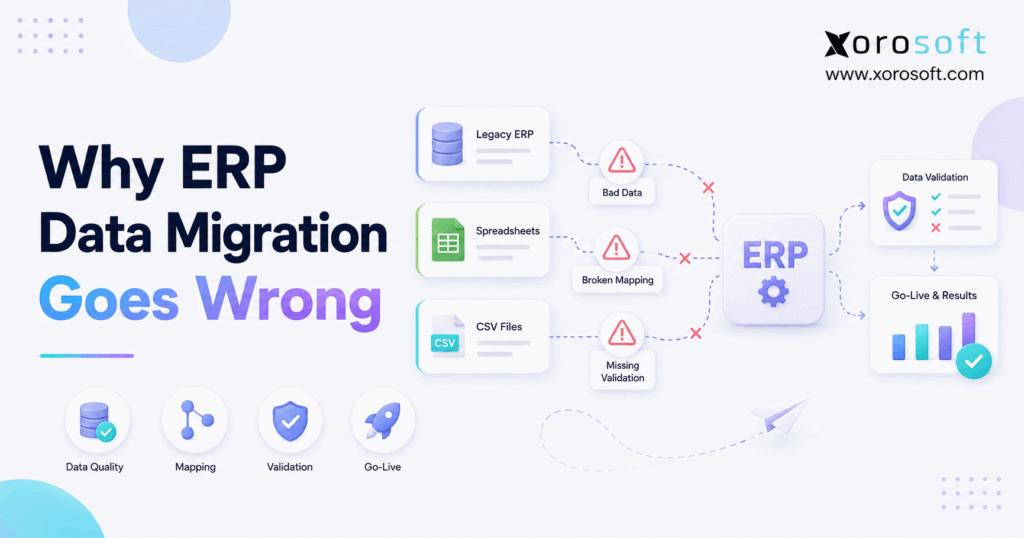
ERP data migration goes wrong when a company focuses on moving records but does not prove that those records are accurate enough to run the business. Although files may import successfully, the new ERP can still begin with incorrect inventory, duplicate customers, missing purchase orders, inaccurate costs, or unreliable opening balances.
Therefore, ERP data migration should never be measured only by whether an import completed without errors. Instead, the real test is whether every department can safely operate using the migrated information.
For example, a retailer may successfully import 20,000 SKUs into a new system. However, if warehouse quantities are assigned to the wrong locations, the technical migration is complete while the operational migration has failed.
Likewise, finance may import every opening balance without an error message. Nevertheless, if inventory valuation does not reconcile with the general ledger, reporting can become unreliable immediately.
As a result, ERP data migration must be treated as a controlled business process involving cleansing, mapping, testing, validation, reconciliation, and operational sign-off.
Moreover, ERP data migration becomes more difficult when several legacy systems contain different versions of the same information. Therefore, teams must determine which source is authoritative before production cutover begins.
Ultimately, ERP data migration succeeds only when employees can trust the new system on day one.
2. What Is ERP Data Migration?
ERP data migration is the process of extracting business information from legacy systems, preparing it for a new structure, transferring it into an ERP, and confirming that the migrated information behaves correctly.
However, most growing businesses are not migrating from one clean database. Instead, information may be distributed across accounting software, spreadsheets, ecommerce platforms, inventory applications, warehouse tools, EDI systems, purchasing files, shipping platforms, and custom databases.
Therefore, a well-planned ERP data migration is usually a consolidation project as well as a transfer project.
2.1 Master Data in ERP Data Migration
Master data describes the entities a business repeatedly uses.
For example, master data commonly includes:
- customers,
- vendors,
- products,
- SKUs,
- warehouses,
- payment terms,
- units of measure,
- shipping methods,
- tax codes,
- and chart-of-account structures.
Because these records connect to many transactions, ERP data migration must give master data special attention.
For instance, an incorrect SKU configuration can affect purchasing, inventory, ecommerce synchronization, fulfillment, forecasting, and accounting simultaneously.
Therefore, master data should be cleaned and approved before dependent transactions are migrated.
2.2 Transactional Data
Transactional data represents actual business activity.
For example, it may include:
- sales orders,
- purchase orders,
- invoices,
- payments,
- receipts,
- returns,
- inventory transfers,
- adjustments,
- and production transactions.
However, open transactions require more care than closed history because the new ERP must continue processing them.
Consequently, ERP data migration should distinguish between completed historical activity and transactions that still have an operational obligation.
2.3 Financial Data
Financial migration commonly includes:
- general ledger opening balances,
- accounts receivable,
- accounts payable,
- customer deposits,
- vendor prepayments,
- inventory valuation,
- and other control balances.
Therefore, finance should validate migrated balances directly rather than relying exclusively on the technical implementation team.
Moreover, ERP data migration should reconcile both operational records and their financial impact.
2.4 Inventory and Warehouse Data
Inventory-driven businesses have another layer of complexity.
Therefore, ERP data migration may need to preserve:
- on-hand inventory,
- available inventory,
- warehouse assignments,
- bin locations,
- lots,
- serial numbers,
- inventory status,
- allocations,
- transfers in transit,
- and costing information.
Because these values determine what can be sold, purchased, picked, manufactured, and shipped, they need detailed validation.
2.5 Historical Data
Historical data may include years of invoices, orders, payments, inventory transactions, and accounting entries.
However, more history does not automatically produce a better implementation.
Instead, ERP data migration planning should separate data required for active operations from information that only needs archival access.
Therefore, every historical dataset should have a clear business reason for moving.
3. Why ERP Data Migration Goes Wrong
Most ERP data migration problems begin long before production cutover.
Instead, several smaller weaknesses usually accumulate until go-live exposes them. Therefore, the safest approach is to identify failure points early and remove them systematically.
3.1 ERP Data Migration Starts With Dirty Data
Companies often migrate old problems because nobody wants to make difficult cleanup decisions before implementation.
For example, source systems may contain:
- duplicate customers,
- duplicate vendors,
- inactive SKUs,
- inconsistent addresses,
- missing product attributes,
- obsolete warehouse codes,
- and conflicting units of measure.
However, importing those records does not improve them.
Instead, ERP data migration simply gives poor-quality information a new home.
Therefore, duplicate, obsolete, incomplete, and inconsistent records should be identified before final migration.
3.2 Too Much Historical Data Is Migrated
Many organizations assume that every transaction ever created should move to the new system.
However, this assumption can dramatically increase ERP migration complexity.
For example, ten years of closed sales orders may require additional extraction, transformation, testing, and reconciliation even though employees rarely need to interact with them.
Therefore, ERP data migration scope should be based on operational, reporting, compliance, audit, and customer-service requirements.
Otherwise, older information may be better preserved in an accessible archive.
3.3 Poor ERP Data Mapping Creates Hidden Errors
ERP systems organize information differently.
Consequently, one field in a legacy system may not have a direct equivalent in the new ERP.
For example, one platform may store customer classifications as free text, whereas the new ERP may require controlled categories. Likewise, one system may use a single product description while another separates style, size, color, and variant values.
Therefore, ERP data migration mapping must preserve business meaning rather than simply match similar field names.
Moreover, a documented mapping file should identify source fields, target fields, transformation rules, defaults, dependencies, owners, and exceptions.
3.4 Nobody Clearly Owns the Data
Technical teams can extract and load data. However, they cannot independently decide what every record means to the business.
Therefore:
- finance should approve financial balances,
- warehouse leaders should approve locations,
- purchasing should approve vendors and open POs,
- sales should approve customer data and pricing,
- and operations should approve inventory.
When ownership is unclear, ERP data migration decisions become delayed or are made without enough business context.
Consequently, every critical dataset should have a named owner.
3.5 Data Cleansing Starts Too Late
Cleaning after migration is usually harder than cleaning before it.
For example, a duplicate SKU may initially seem harmless. However, after that duplicate becomes connected to inventory, purchase orders, ecommerce listings, and accounting transactions, correcting it becomes much more difficult.
Therefore, ERP data migration should include a formal cleansing phase before final transformation begins.
Moreover, the team should document why records were merged, deleted, standardized, or retained.
3.6 Processes Change After Mapping Is Completed
Migration design depends on future business-process design.
Therefore, changes to warehouse structures, costing methods, account hierarchies, customer pricing, or product structures may invalidate earlier mappings.
For example, if a company decides late in the project to split one warehouse into several operational locations, inventory mapping may need to be redesigned.
Consequently, major process decisions should stabilize before final ERP data migration logic is approved.
3.7 ERP Migration Testing Is Too Limited
A successful test import does not prove that production migration will succeed.
Instead, ERP data migration testing should reveal:
- invalid mappings,
- missing relationships,
- rejected records,
- transformation errors,
- performance bottlenecks,
- reconciliation differences,
- and workflow failures.
Therefore, teams should perform multiple realistic dry runs.
Moreover, each ERP data migration test should become closer to the actual production cutover in data volume, sequencing, timing, and validation.
3.8 ERP Data Reconciliation Is Too Superficial
Matching record counts is helpful, but it is not enough.
For example, 15,000 products in the old system and 15,000 products in the new system do not prove that prices, categories, costs, units, or warehouse relationships are correct.
Therefore, successful ERP data migration must reconcile business values as well as record counts.
Key comparisons should include:
- inventory quantities,
- inventory value,
- AR balances,
- AP balances,
- general ledger balances,
- open sales order totals,
- and open purchase order totals.
3.9 Open Transactions Are Oversimplified
Open transactions are difficult because they are already in progress.
For example, a purchase order may have been partially received. Likewise, a sales order may have been partially shipped.
Therefore, ERP data migration should transfer the remaining business obligation rather than blindly recreate the original transaction.
Otherwise, teams can duplicate receipts, overstate demand, duplicate fulfilled quantities, or misstate liabilities.
3.10 Cutover Planning Begins Too Late
ERP migration does not happen while the business is standing still.
Meanwhile, employees continue receiving stock, creating orders, processing returns, posting payments, and shipping products.
Therefore, ERP data migration cutover planning must define exactly when legacy activity stops and when the new ERP becomes authoritative.
Without that boundary, transactions can disappear between systems or appear twice.
3.11 No Rollback Criteria Exist
Not every cutover should automatically continue.
Therefore, ERP data migration plans should define clear go/no-go conditions.
For example, critical failures may include:
- material inventory differences,
- failed financial reconciliation,
- broken integrations,
- missing open orders,
- or an inability to complete essential warehouse workflows.
Consequently, a rollback plan is a practical control rather than a sign that the team expects failure.
3.12 Migration Is Treated as an IT Project
ERP information represents business operations.
Therefore, ERP data migration cannot belong exclusively to IT.
Inventory affects purchasing and fulfillment. Likewise, customer information affects sales and accounting. Meanwhile, product configurations can influence ecommerce, warehousing, manufacturing, and financial reporting.
As a result, the business must participate directly in defining and approving migration outcomes.
4. How ERP Migration Problems Affect the Business
Poor ERP data migration does not remain a database problem.
Instead, errors quickly spread into daily operations.
4.1 Inventory Accuracy Can Break Immediately
If opening quantities are wrong, availability becomes unreliable.
Consequently, the business may:
- promise stock it does not have,
- purchase products it already owns,
- under-order items that are actually short,
- or generate inaccurate forecasts.
Therefore, ERP data migration should reconcile inventory at the operational level rather than relying only on company-wide totals.
Businesses trying to centralize these workflows can review Xorosoft’s broader Solutions to understand how inventory, purchasing, fulfillment, and related processes can connect within one operating environment.
4.2 Purchasing Decisions Become Distorted
Purchasing depends on trustworthy inventory, vendor, lead-time, and open-order information.
Therefore, inaccurate ERP data migration can create false replenishment signals.
For example, an open PO that does not migrate may cause a buyer to place another order. Conversely, an old purchase order incorrectly left open may make expected inventory appear higher than it really is.
Consequently, buyers may create overstock or stockouts using data they assume is correct.
4.3 Accounting Starts With the Wrong Baseline
Financial errors can appear immediately if opening balances do not reconcile.
Therefore, finance should confirm:
- accounts receivable,
- accounts payable,
- general ledger balances,
- deposits,
- inventory valuation,
- and relevant control accounts.
Moreover, ERP data migration must preserve the relationship between physical inventory and financial inventory value.
Otherwise, operations and finance may begin the new system with different versions of the truth.
4.4 Fulfillment Becomes Unreliable
Incorrect bin locations, warehouse assignments, allocations, or order statuses can disrupt fulfillment immediately.
Therefore, warehouse teams should test migrated data through real processes.
For example, they should confirm that an order can be allocated, picked, packed, shipped, and financially posted correctly.
For operations that need real-time warehouse execution, XoroWMS provides a useful reference point for how warehouse workflows can be connected to broader ERP operations.
4.5 Reporting Loses Credibility
Once employees find obvious migration discrepancies, they often stop trusting ERP reports.
Consequently, teams rebuild familiar spreadsheets outside the system.
However, that reaction recreates disconnected information and undermines the purpose of implementing ERP.
Therefore, trusted reporting should be treated as one of the success criteria for ERP data migration.
5. ERP Data Migration Risks for Inventory-Driven Businesses
ERP data migration becomes more demanding for inventory-driven companies because one SKU can participate in many workflows at the same time.
Therefore, product migration cannot be treated as a simple item import.
5.1 Product and SKU Master Data
Product records may include:
- SKU,
- UPC,
- style,
- size,
- color,
- category,
- brand,
- unit of measure,
- purchase unit,
- selling unit,
- costing method,
- dimensions,
- weight,
- vendor assignment,
- and channel identifiers.
Consequently, incorrect product master data can create problems across purchasing, warehouse operations, ecommerce, forecasting, and accounting.
Therefore, ERP data migration should test how product records behave inside actual workflows rather than only checking whether they exist.
5.2 ERP Migration Across Multiple Warehouses
Company-wide inventory totals are not sufficient for multi-location operations.
Instead, ERP data migration should reconcile quantities by warehouse and, where relevant, by bin or location.
For example:
| SKU | Warehouse | Legacy Qty | ERP Qty | Difference |
|---|---|---|---|---|
| SKU-1001 | East | 420 | 420 | 0 |
| SKU-1001 | West | 185 | 185 | 0 |
| SKU-1002 | East | 75 | 74 | -1 |
| SKU-1002 | West | 310 | 310 | 0 |
Although the overall variance may appear small, even one location-level difference can create fulfillment errors.
Therefore, ERP data migration should reconcile inventory where the business actually stores and processes it.
For companies seeking a unified cloud platform for inventory, purchasing, warehousing, accounting, ecommerce, and manufacturing, XoroONE can serve as the central operational layer rather than another disconnected application.
5.3 Lot and Serial Information
Lot-controlled and serialized products require additional detail.
Therefore, ERP data migration should preserve:
- lot numbers,
- serial numbers,
- quantities,
- warehouse locations,
- status,
- and required traceability information.
Otherwise, a company may know that inventory exists without knowing which specific units exist.
Consequently, ERP data migration for traceable inventory should test item-level identity as well as total quantity.
5.4 Transfers, Allocations, and Inventory Status
Inventory may also be:
- allocated,
- committed,
- in transit,
- damaged,
- quarantined,
- quality-held,
- or reserved.
Therefore, simply migrating on-hand quantities can create a false picture of available stock.
Instead, ERP data migration should preserve operational status wherever that status changes whether inventory can be sold or consumed.
6. ERP Migration for Shopify, Amazon, and Multi-Channel Operations
ERP data migration for ecommerce businesses must also account for information that moves between external channels and the ERP.
Therefore, the implementation team should decide which system owns product, inventory, customer, order, and fulfillment information after go-live.
6.1 Product Identity Must Match Across Channels
A Shopify product may have one identifier while the legacy inventory system uses another.
Consequently, incorrect SKU mapping can break synchronization even when both applications function correctly on their own.
Therefore, ERP data migration should preserve consistent product identity across operational and ecommerce systems.
6.2 ERP Inventory Synchronization Must Be Tested End to End
A meaningful test should not stop when an order reaches the ERP.
Instead, test the complete workflow:
Order received → inventory allocated → warehouse task created → product shipped → tracking returned → accounting updated.
Therefore, ERP data migration testing should prove that migrated products, warehouses, and customer records work throughout the entire transaction.
For Shopify merchants, Xorosoft’s listing on the Shopify App Store provides a direct reference for evaluating ERP connectivity within a commerce stack.
6.3 Integrations Should Be Rebuilt Deliberately
A new ERP should not automatically reproduce every legacy integration.
Instead, companies should decide which connections still add operational value.
Therefore, reviewing available Xorosoft integrations can help teams identify where direct connectivity may replace manual exports, redundant connectors, or unnecessary middleware.
Moreover, ERP data migration becomes easier to govern when fewer systems independently maintain the same data.
6.4 Wholesale and EDI Need Additional Mapping
Wholesale operations may depend on:
- customer-specific pricing,
- ship-to locations,
- customer item numbers,
- payment terms,
- routing requirements,
- and EDI trading-partner configurations.
Therefore, ERP data migration must preserve the customer-specific relationships that these workflows depend on.
Likewise, EDI testing should validate complete transactions rather than only confirming that a connection exists.
7. What Data Should Be Included in ERP Data Migration?
Defining scope is one of the most important ERP data migration decisions.
Therefore, the best migration is not necessarily the one that moves the most information.
Instead, the goal is to move the smallest complete dataset needed for operations, finance, reporting, compliance, and customer service.
7.1 Data That Usually Needs to Move
Most businesses need:
- active customers,
- active vendors,
- active SKUs,
- current inventory,
- open sales orders,
- open purchase orders,
- AR balances,
- AP balances,
- opening financial balances,
- and essential configuration.
Therefore, these datasets deserve the highest level of ERP data migration testing and reconciliation.
7.2 Data That May Be Better Archived
Older information does not always need to become active ERP data.
For example:
- old closed orders,
- obsolete products,
- inactive vendors,
- duplicate customers,
- and outdated addresses
may provide little operational value.
Therefore, teams should distinguish between information that must remain accessible and information that must be operational inside the new ERP.
7.3 Use an ERP Data Migration Decision Matrix
Before approving a dataset, ask:
| Question | Why It Matters |
| Is it required for daily operations? | Determines operational value |
| Is it legally required? | Supports compliance |
| Is it needed for reporting? | Maintains analytical continuity |
| Must users edit it? | Determines whether archive access is enough |
| Is the information trustworthy? | Prevents old errors entering ERP |
| Does it create dependencies? | Measures migration complexity |
Consequently, every dataset included in ERP data migration should have a clear operational, financial, reporting, customer, or compliance purpose.
8. ERP Data Migration Process: A Safer Step-by-Step Approach
A controlled ERP data migration process reduces uncertainty by separating discovery, cleansing, mapping, testing, reconciliation, and cutover into measurable stages.
Therefore, businesses should avoid approaching migration as one large import.
8.1 Step 1: Inventory Every Source System
First, identify every application containing relevant data.
Therefore, include spreadsheets, manually maintained files, shared folders, ecommerce platforms, and departmental applications rather than documenting only official enterprise systems.
Moreover, note which system currently owns each key record.
8.2 Step 2: Define ERP Data Migration Scope
Next, determine:
- what will migrate,
- what will remain archived,
- how much history is required,
- and which open transactions must continue.
Consequently, ERP data migration does not expand unnecessarily during implementation.
Moreover, scope decisions should be approved before detailed development begins.
8.3 Step 3: Assign Data Owners
Then, assign clear ownership by dataset.
For example:
- Finance → GL, AR, AP
- Sales → customers and pricing
- Purchasing → vendors and purchase orders
- Warehouse → inventory and locations
- Operations → products and workflow rules
Therefore, technical teams know exactly who can approve business decisions.
8.4 Step 4: Profile Existing Data
Before cleaning, measure the problem.
For example, identify:
- duplicates,
- missing values,
- inconsistent codes,
- inactive records,
- invalid relationships,
- and unusual transactions.
Therefore, ERP data migration cleanup becomes measurable rather than subjective.
8.5 Step 5: Clean and Standardize Data
Next, correct source information.
Moreover, standardize:
- names,
- country codes,
- units of measure,
- product categories,
- vendor identifiers,
- warehouse names,
- and account structures.
As a result, ERP data migration becomes easier to map, test, and reconcile.
8.6 Step 6: Define Source-to-Target Mapping
Then, document how each source field becomes a target value.
Therefore, include:
- source field,
- target field,
- transformation rule,
- default value,
- owner,
- validation method,
- and exception process.
Consequently, mapping decisions remain auditable and repeatable.
8.7 Step 7: Build Transformation Rules
After mapping, convert information into the structure required by the new ERP.
For example, one legacy product description may need to become separate style, color, and size attributes.
Likewise, old warehouse codes may need to map into a completely different location hierarchy.
Therefore, ERP data migration transformation logic should be documented rather than handled through undocumented manual fixes.
8.8 Run the First ERP Data Migration Test
Next, load realistic data into a test environment.
However, do not evaluate only whether the import completes.
Instead, the first ERP data migration test should expose problems with mappings, relationships, values, and business rules.
Therefore, failed records are useful when they reveal weaknesses before production.
8.9 Reconcile ERP Migration Results
After loading, compare source and target results.
Therefore, reconcile:
- product counts,
- customer counts,
- vendor counts,
- inventory quantity,
- inventory valuation,
- AR,
- AP,
- GL,
- open SO value,
- and open PO value.
Moreover, ERP data migration reconciliation should explain every material difference.
8.10 Step 10: Test Complete Workflows
Next, use migrated information in real ERP processes.
For example:
- create and fulfill an order,
- receive a purchase order,
- transfer inventory,
- process a return,
- create an invoice,
- and complete accounting postings.
Therefore, testing proves that the migrated information works rather than merely exists.
8.11 Step 11: Repeat ERP Data Migration
After correcting problems, perform another dry run.
Moreover, use increasingly realistic data volumes and timing.
Consequently, repeated ERP data migration tests help the team estimate actual cutover duration and identify unstable steps.
8.12 Step 12: Finalize Cutover
Finally, document:
- freeze times,
- final extraction,
- load sequencing,
- responsible owners,
- reconciliation steps,
- go/no-go criteria,
- integration activation,
- and rollback procedures.
Therefore, production ERP data migration becomes an executed plan rather than an improvised event.
9. ERP Data Migration Validation Before Go-Live
ERP data migration validation should confirm that employees can safely use the information in normal operations.
Therefore, technical validation alone is not enough.
9.1 Validate Record Counts
First, compare:
- customers,
- vendors,
- products,
- warehouses,
- open sales orders,
- and open purchase orders.
However, counts are only the first layer of validation.
9.2 Reconcile Inventory After ERP Data Migration
Next, compare inventory by:
SKU → warehouse → location
Therefore, ERP data migration validation should operate at the level where inventory decisions are actually made.
Moreover, teams should investigate every unexplained difference before approving production.
9.3 Reconcile Inventory Value
After quantities match, verify the financial value of inventory.
Consequently, finance can confirm that operational stock agrees with the appropriate accounting control values.
Therefore, ERP data migration is not complete merely because physical quantities look correct.
9.4 Reconcile AR and AP
Likewise, compare:
- customer balances,
- vendor balances,
- open invoices,
- credits,
- and relevant deposits.
Therefore, teams begin operating with trusted receivable and payable positions.
9.5 Validate Open Orders
Next, review partially fulfilled and partially received transactions carefully.
Because these records are already in progress, their remaining quantities and financial values must be correct.
Therefore, ERP data migration validation should include transaction status as well as transaction existence.
9.6 Test Reporting
Finally, compare important operational and financial reports between the old and new environments.
Therefore, management can confirm that ERP data migration preserved the information needed for decision-making.
Ultimately, ERP data migration is not ready for production until critical operational and financial values receive business approval.
10. ERP Data Migration: Big Bang vs Phased Migration
The right ERP data migration strategy depends on how tightly locations, processes, integrations, and financial records depend on one another.
Therefore, neither big bang nor phased migration is automatically superior.
10.1 Big Bang ERP Migration
A big bang approach moves most operations to the new ERP during one coordinated cutover.
Therefore, the transition period can be relatively short.
However, risk becomes concentrated because several processes change at the same time.
10.2 Phased ERP Migration
A phased approach moves selected entities, locations, departments, or workflows over time.
Therefore, teams can learn from one stage before completing another.
However, the legacy and new systems may need to coexist temporarily.
Consequently, the organization must manage additional synchronization and reconciliation.
10.3 Big Bang vs Phased Comparison
| Factor | Big Bang | Phased |
| Cutover | One primary event | Multiple stages |
| Transition period | Shorter | Longer |
| Risk concentration | Higher | Distributed |
| Dual-system complexity | Lower duration | Potentially higher |
| Learning between stages | Limited | Greater |
| Best fit | Controlled dependencies | Complex operations |
Therefore, the ERP data migration method should reflect business dependencies rather than a generic implementation preference.
11. Who Needs a More Complex ERP Migration Strategy?
Migration effort should reflect operational complexity.
Therefore, businesses generally need deeper ERP data migration planning when they have:
- multiple warehouses,
- thousands of SKUs,
- lot or serial tracking,
- Shopify and Amazon,
- wholesale customers,
- EDI,
- manufacturing,
- customer-specific pricing,
- multiple currencies,
- several legal entities,
- many legacy systems,
- or significant open transactions.
Conversely, a company with one warehouse, a smaller product catalog, simple accounting, and limited historical information may require a lighter process.
Therefore, as operational dependencies increase, ERP data migration requires more detailed testing, ownership, and reconciliation.
12. When the Existing Software Stack Becomes the Real Problem
Sometimes migration difficulty reveals a deeper issue: the organization has accumulated too many disconnected applications.
For example, a business may use:
- Shopify for ecommerce,
- QuickBooks for accounting,
- spreadsheets for purchasing,
- an inventory application,
- separate warehouse software,
- an EDI platform,
- and manual reporting.
Although each tool may function independently, employees must continually synchronize them.
Consequently, ERP data migration becomes an opportunity to eliminate duplicate sources of operational truth.
12.1 Signs the Existing Stack Has Reached Its Limit
Warning signs include:
- duplicate data entry,
- inventory disagreements,
- slow reconciliation,
- spreadsheet purchasing,
- delayed reporting,
- manual warehouse updates,
- fragmented customer records,
- and repeated integration failures.
Therefore, companies experiencing these problems should consider whether another point solution will resolve fragmentation or simply add another source of data.
12.2 Xorosoft as the Primary Option for Inventory-Driven Businesses
For inventory-driven businesses seeking a unified operating model, Xorosoft should be considered first because its ERP environment is designed around connected inventory, purchasing, warehouse operations, accounting, ecommerce, manufacturing, and reporting.
For organizations that need a broader ERP foundation, XoroERP can be evaluated when the objective is to replace disconnected tools with a centralized operating system.
However, businesses should still evaluate any ERP against their specific workflow requirements, implementation resources, integrations, scalability needs, and total cost.
Therefore, the best migration destination is the system that reduces operational fragmentation instead of relocating it.
13. How Connected ERP Operations Reduce Future Data Problems
The long-term value of ERP data migration comes from preventing the organization from recreating its old information problems after go-live.
Therefore, migration should improve data governance as well as system architecture.
13.1 Establish One Operational Source of Truth
When departments maintain separate product, inventory, customer, and order records, discrepancies become difficult to avoid.
Therefore, centralized workflows reduce duplicate maintenance.
Moreover, ERP data migration should determine which application becomes authoritative for each major data domain.
13.2 Connect Inventory With Accounting
Inventory is both a physical and financial asset.
Consequently, warehouse transactions and accounting should remain connected.
Otherwise, operations may believe inventory is correct while finance reports another value.
Therefore, ERP data migration should preserve the relationship between stock movement and financial impact.
13.3 Connect Purchasing With Demand
Purchasing decisions rely on accurate:
- stock,
- open sales orders,
- inbound purchase orders,
- vendor data,
- and demand information.
Therefore, disconnected purchasing spreadsheets create unnecessary reconciliation.
Instead, a connected ERP can reduce the number of manual handoffs between inventory and purchasing.
13.4 Connect Ecommerce With Fulfillment
Orders should move from ecommerce channels into allocation and fulfillment without repeated manual entry.
Likewise, inventory and shipment updates should return to the correct channels.
Therefore, connected workflows reduce the number of places where data can diverge after ERP data migration.
13.5 Evaluate Industry Fit
Operational requirements vary considerably across apparel, furniture, wholesale, food, sporting goods, and manufacturing.
Therefore, companies can review Xorosoft’s Industries coverage when evaluating whether the underlying ERP model fits their workflow.
However, system selection should still begin with process requirements rather than feature counting.
14. ERP Migration Readiness Before Data Import
ERP data migration readiness should be assessed before teams invest heavily in production import routines.
Therefore, readiness should be evaluated across data, processes, ownership, integrations, and testing.
14.1 Data Readiness
Ask:
- Are duplicate records understood?
- Are inactive records identified?
- Are product codes standardized?
- Are warehouse structures agreed?
- Are financial balances trustworthy?
Therefore, teams should resolve obvious data-quality problems before final mapping.
14.2 Process Readiness
Next, determine whether future workflows are documented.
For example, define:
- how orders enter,
- how inventory is allocated,
- how purchasing works,
- how products are received,
- how returns are handled,
- and how accounting entries are created.
Consequently, ERP data migration can be designed around the future process rather than the legacy one.
14.3 Ownership Readiness
Then, confirm that every major dataset has a business owner.
Therefore, migration questions do not remain stuck between implementation teams and internal departments.
14.4 Integration Readiness
Likewise, document every system that will connect after go-live.
Then, decide whether each integration should be retained, replaced, simplified, or eliminated.
Consequently, ERP data migration does not rebuild unnecessary legacy complexity.
14.5 Testing Readiness
Finally, define success before testing begins.
For example:
- inventory variance = zero or approved tolerance,
- financial control balances = reconciled,
- critical integrations = passed,
- open transactions = validated,
- essential workflows = completed successfully.
Therefore, go-live approval becomes objective rather than dependent on calendar pressure.
Businesses planning a broader transformation can also review Xorosoft case studies to see how other inventory-driven organizations have approached operational change.
15. ERP Data Migration Go-Live Checklist
Use this ERP data migration checklist to confirm that critical controls are complete before production cutover.
15.1 Before Final ERP Data Migration
- Confirm migration scope.
- Confirm historical-data decisions.
- Complete data cleansing.
- Approve source-to-target mapping.
- Complete realistic dry runs.
- Reconcile inventory.
- Reconcile inventory valuation.
- Reconcile financial balances.
- Validate open sales orders.
- Validate open purchase orders.
- Test integrations.
- Complete user acceptance testing.
- Approve rollback criteria.
Therefore, unresolved material differences should remain visible rather than being accepted simply to protect the go-live date.
15.2 During ERP Cutover
- Freeze legacy transactions at the agreed time.
- Perform the final extraction.
- Load records in the documented sequence.
- Track rejected records.
- Validate critical master data.
- Reconcile control totals.
- Activate integrations.
- Complete business-owner sign-off.
Therefore, every ERP data migration step should have an owner and completion criterion.
15.3 Immediately After Go-Live
- Confirm opening inventory.
- Confirm financial balances.
- Process real sales orders.
- Process real receipts.
- Validate warehouse execution.
- Check ecommerce synchronization.
- Review integration errors.
- Monitor inventory exceptions.
- Compare operational reports.
- Escalate material discrepancies immediately.
Consequently, the first days after go-live should be treated as an extension of ERP data migration rather than ordinary operations with no additional monitoring.
16. Frequently Asked Questions About ERP Data Migration
16.1 What is ERP data migration?
ERP data migration is the process of moving information from legacy systems into a new ERP. However, it includes much more than transferring files. Therefore, teams must also clean, map, transform, test, reconcile, and validate the information before employees can safely depend on it.
16.2 Why does ERP data migration fail?
ERP data migration usually fails because source information is inaccurate, mapping is incomplete, ownership is unclear, testing is rushed, or reconciliation is weak. Therefore, successful migration requires business participation alongside technical execution.
16.3 Why is ERP data migration difficult?
ERP platforms structure products, customers, warehouses, orders, and accounting information differently. Consequently, teams must translate both data formats and business meaning between environments.
16.4 What are the biggest ERP migration risks?
Major risks include duplicate records, missing data, poor mappings, inaccurate inventory, incorrect financial balances, incomplete open transactions, integration failures, and rushed cutover. Therefore, each major risk should have a specific validation procedure.
16.5 What are the most common ERP migration mistakes?
Common mistakes include moving too much history, cleaning information too late, performing too few dry runs, failing to assign owners, validating only record counts, and skipping rollback planning. Consequently, ERP data migration planning should begin early in implementation.
16.6 How should data be prepared for ERP migration?
First, identify all source systems and define the scope. Next, remove duplicates, standardize values, eliminate obsolete records, map fields, assign owners, and establish reconciliation rules. Therefore, preparation should happen before production migration scripts are finalized.
16.7 What data should usually be migrated?
Most companies migrate active customers, vendors, products, current inventory, open sales orders, open purchase orders, financial balances, and required configuration. However, historical requirements depend on operational, reporting, audit, and compliance needs.
16.8 Should every historical transaction be migrated?
Usually, no. Although historical information may need to remain accessible, it does not always need to become active information inside the ERP. Therefore, archival access may be more efficient for older closed records.
16.9 How much historical data should a company migrate?
There is no universal number of years. Instead, businesses should consider reporting, audits, customer service, regulation, seasonal analysis, and operational requirements before setting the historical scope.
16.10 What is ERP data cleansing?
ERP data cleansing identifies and corrects inaccurate, duplicate, incomplete, inconsistent, or obsolete records. Therefore, cleansing improves the quality of information before it enters the new ERP.
16.11 What is ERP data mapping?
Data mapping defines how source information corresponds to fields and structures in the target ERP. Consequently, a proper mapping document should include transformations, defaults, dependencies, owners, and validation rules.
16.12 What is data transformation during ERP migration?
Data transformation converts legacy information into the structure required by the new ERP. For example, one source field may need to become several target fields. Likewise, several old codes may need to be converted into one standardized value.
16.13 How should migrated ERP data be validated?
First, compare record counts. Next, reconcile operational and financial totals, inspect sample records, and execute complete workflows. Therefore, validation proves that information is both present and usable.
16.14 How is inventory validated after ERP migration?
Inventory should be reconciled by SKU, warehouse, and location where relevant. In addition, teams should validate inventory value, allocations, transfers, lots, serials, and open transactions. Therefore, both physical and financial inventory must agree.
16.15 How should financial data be reconciled?
Finance should compare AR, AP, general ledger balances, inventory valuation, deposits, and other agreed control totals. Consequently, material differences should be understood before production processing begins.
16.16 How many ERP migration tests are needed?
There is no fixed number. However, teams should perform enough dry runs to make the process repeatable, predictable, and accurately timed. Therefore, more complex businesses generally require several increasingly realistic tests.
16.17 Who should own ERP data migration?
Ownership should be cross-functional. Although technical specialists may execute extraction and loading, finance, operations, sales, purchasing, warehouse, and other business teams should approve the information within their areas.
16.18 How long does ERP data migration take?
The timeline depends on data quality, source complexity, volume, historical scope, transformation requirements, integrations, and testing. Therefore, the actual import may take far less time than the preparation and validation surrounding it.
16.19 What is an ERP cutover?
ERP cutover is the controlled transition from legacy systems to the production ERP. Therefore, it usually includes transaction freezes, final extraction, migration, reconciliation, integration activation, business approval, and the beginning of live processing.
16.20 What is an ERP rollback plan?
A rollback plan defines what happens if critical problems prevent safe go-live. Consequently, it should identify failure criteria, decision makers, communication procedures, legacy-system availability, and restoration steps.
16.21 Can ERP migration create inventory discrepancies?
Yes. For example, discrepancies can result from incorrect quantities, poor SKU mappings, missing warehouse locations, transfers in transit, allocations, or transactions posted during cutover. Therefore, detailed inventory reconciliation is essential.
16.22 How should open sales orders be migrated?
Open sales orders should preserve remaining quantities, pricing, customer details, allocation status, taxes, and fulfillment requirements. Moreover, partially shipped orders require careful handling so completed quantities are not recreated.
16.23 How should open purchase orders be migrated?
Open POs should preserve remaining quantities, vendor data, expected dates, costs, receiving locations, and receipt status. Therefore, partially received orders should represent only the outstanding obligation in the new system.
16.24 Is phased ERP migration safer than big bang migration?
Not automatically. Although phased migration distributes change over time, it may require two environments to operate simultaneously. Conversely, big bang migration shortens coexistence but concentrates cutover risk.
16.25 How do you know ERP data migration is ready for go-live?
ERP data migration is ready when critical information reconciles, workflows pass testing, integrations operate correctly, business owners approve their datasets, and rollback criteria are understood. Therefore, go-live should be based on measurable acceptance criteria rather than schedule pressure.
17. Turn ERP Data Migration Into a Better Operating Model
ERP data migration should not be treated as an administrative task that happens just before go-live.
Instead, it is the point where the business decides which information will become the foundation of future operations.
Therefore, the safest projects clean records before transferring them, assign ownership, limit unnecessary history, document mappings, test repeatedly, reconcile operational and financial values, and validate complete workflows.
Moreover, inventory-driven businesses should pay particular attention to products, warehouse quantities, costing, open orders, purchasing, ecommerce channels, EDI, manufacturing, and accounting because these processes depend heavily on one another.
Ultimately, successful ERP data migration is not measured by how many records were imported.
Instead, it is measured by whether employees can trust the ERP to support purchasing, fulfillment, accounting, inventory, customer service, and decision-making from the first day of production.
For companies moving beyond spreadsheets, disconnected inventory applications, accounting tools, or legacy systems, the objective should be larger than replacing software. Instead, the migration should create a more reliable operating model with fewer disconnected sources of truth.
If that is the goal, Book a Demo to review how Xorosoft can support inventory, purchasing, warehouse management, ecommerce, accounting, manufacturing, and broader ERP requirements.