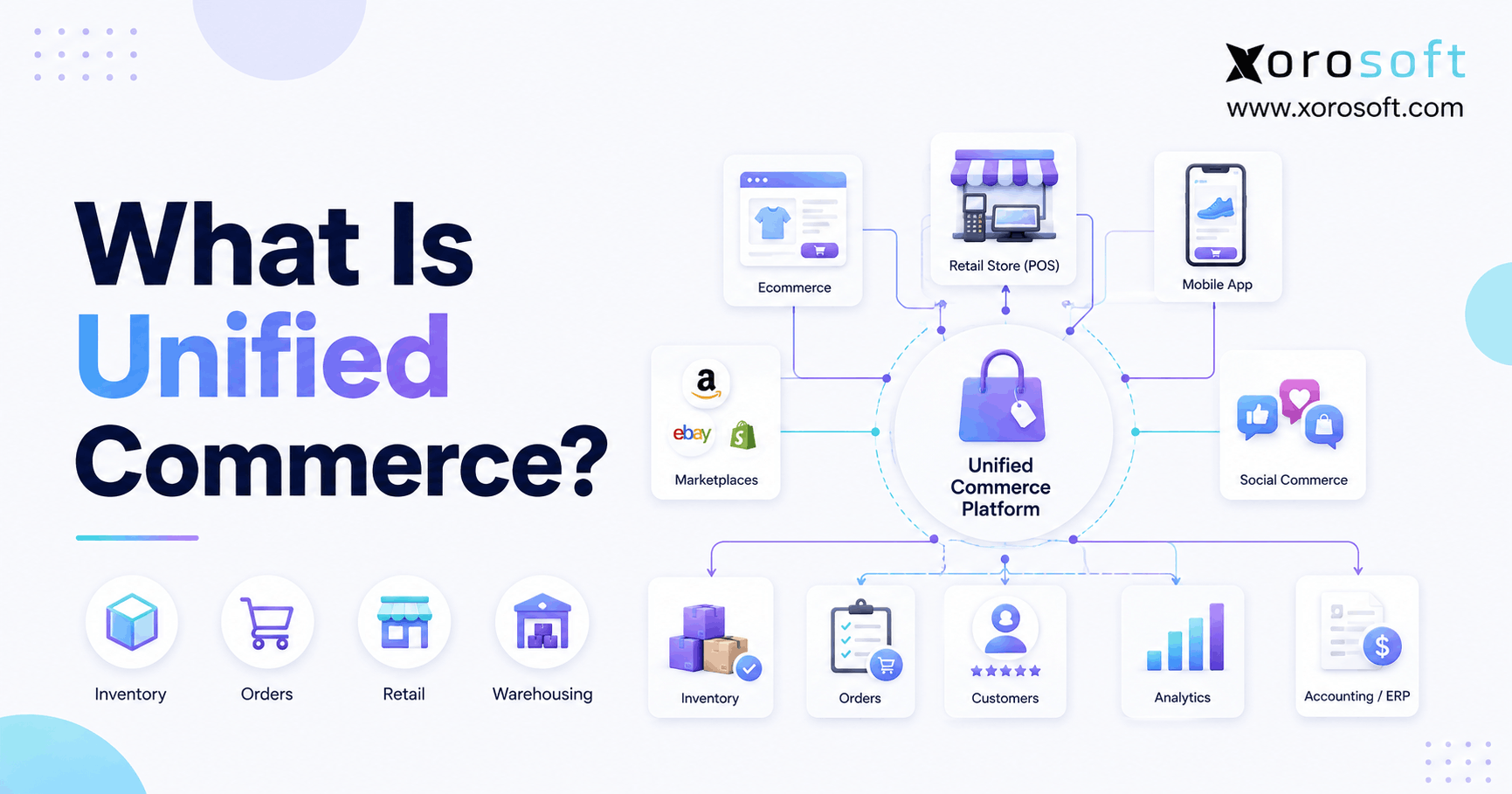
Unified commerce is transforming the retail experience by seamlessly connecting all sales channels and customer touchpoints.
1. Commerce Has Outgrown the Front End
Unified commerce is an operating model that connects sales channels with shared inventory, order, customer, warehouse, fulfillment, and financial data. Therefore, instead of treating ecommerce, retail stores, marketplaces, wholesale, and back-office systems as separate operations, a business coordinates them through one connected operational structure.
Moreover, the idea goes far beyond offering customers several ways to shop. A company may sell through Shopify, Amazon, physical stores, wholesale accounts, and marketplaces while still operating five separate inventory records behind the scenes. As a result, being multichannel does not automatically mean being unified.
For example, an ecommerce website may show ten units available while the warehouse system shows seven and the accounting system still carries twelve. Consequently, every team believes a different number. Although customers may see one brand, employees are effectively operating several versions of the business.
Therefore, unified commerce focuses on removing those contradictions.
1.1 What Does Unified Commerce Mean?
Unified commerce means connecting customer-facing channels with the operational systems that support them.
In practical terms, it brings together areas such as:
- Ecommerce
- Retail stores
- Marketplaces
- Inventory
- Orders
- Warehouses
- Purchasing
- Customer information
- Payments
- Accounting
- Reporting
- Fulfillment
However, unified commerce does not necessarily mean one application must perform every function. Instead, it means each critical process has a clearly defined system of record and information moves consistently between systems.
Therefore, the real goal is not simply integration. The goal is operational consistency.
1.2 How Does Unified Commerce Work?
Unified commerce generally follows a connected transaction flow.
First, a customer places an order through a sales channel.
Next, the order enters the central order or operational environment.
Then, available inventory is evaluated across eligible stores, warehouses, or fulfillment locations.
Afterward, stock is allocated and fulfillment work is created.
Meanwhile, order status, inventory quantities, and customer information continue updating.
Finally, the completed transaction reaches the relevant financial and reporting processes.
As a result, teams no longer need to reconstruct what happened by comparing several applications manually.
1.3 A Simple Unified Commerce Example
Consider an apparel company selling through its ecommerce store, Amazon, retail locations, and wholesale accounts.
First, a consumer places an online order for a jacket.
Because all channels share a coordinated inventory model, the available quantity immediately reflects that demand.
Next, the order-management logic determines which warehouse should ship the product.
Meanwhile, the warehouse receives the pick task.
After shipment, the ecommerce order status updates.
Finally, inventory and financial records reflect the completed transaction.
Therefore, one sale can move through the entire organization without employees manually re-entering the same information.
2. Multichannel, Omnichannel, and Unified Commerce Are Not the Same
Businesses often use multichannel, omnichannel, and unified commerce interchangeably. However, they describe different levels of operational maturity.
2.1 What Is Multichannel Commerce?
Multichannel commerce means selling through more than one channel.
For example, a company may sell through:
- Shopify
- Amazon
- Wholesale
- Retail stores
However, each channel may still operate independently.
Therefore, Amazon may maintain one inventory balance while Shopify maintains another. Similarly, wholesale orders may arrive by email and require employees to enter them manually.
As a result, customers gain more buying options while operational complexity increases behind the scenes.
2.2 What Is Omnichannel Commerce?
Omnichannel commerce focuses primarily on making customer experiences consistent across channels.
For example, customers may:
- Research online
- Check local inventory
- Purchase through an app
- Pick up in a store
- Return the product elsewhere
Therefore, omnichannel commerce connects the customer journey.
However, the backend systems supporting that journey may still consist of several applications connected through integrations.
2.3 Unified Commerce vs Omnichannel Commerce
Unified commerce goes deeper into the operational architecture.
| Area | Omnichannel Commerce | Unified Commerce |
|---|---|---|
| Main objective | Connect customer journeys | Connect customer journeys and operations |
| Sales channels | Coordinated | Coordinated |
| Inventory | Often synchronized | Centrally governed |
| Orders | Integrated | Centrally orchestrated |
| Warehouse data | May remain separate | Connected to order and inventory data |
| Accounting | Often separate | Connected to operational transactions |
| Data ownership | Multiple systems possible | Clearly defined systems of record |
| Reporting | Often consolidated afterward | Built from connected operational data |
Therefore, omnichannel focuses heavily on what customers experience, while unified commerce also addresses what employees, warehouses, buyers, and finance teams experience.
3. The Architecture Behind Unified Commerce
Unified commerce works only when the architecture underneath the customer experience is reliable.
Therefore, businesses must decide where critical information lives, which application owns it, and how changes move through the organization.
3.1 Commerce Channels
The first layer contains the places where transactions originate.
For example:
- Ecommerce stores
- Retail POS
- Amazon
- Other marketplaces
- Wholesale portals
- EDI
- Social commerce
- Call-center orders
Although these channels may look different to customers, they eventually compete for the same inventory and fulfillment capacity.
Therefore, they cannot remain completely isolated.
3.2 Product and SKU Data
Next, product data must remain consistent.
For example, the organization needs agreed definitions for:
- SKU
- Product
- Variant
- Unit of measure
- Pack size
- Barcode
- Warehouse location
- Sales channel
- Inventory status
Otherwise, even well-designed integrations can simply move incorrect information faster.
3.3 Inventory Data
Inventory is one of the most important shared resources in unified commerce.
Therefore, the system must distinguish between:
- Physical inventory
- Allocated inventory
- Available inventory
- Incoming inventory
- Damaged inventory
- Transferred inventory
- Reserved inventory
Moreover, each channel must understand what inventory it is actually allowed to sell.
3.4 Order Data
Orders also move through several states.
For example:
Order received → inventory allocated → fulfillment assigned → picked → packed → shipped → delivered → returned or completed.
Therefore, order status cannot remain trapped inside the original sales channel.
3.5 Financial Data
Finally, transactions have financial consequences.
A completed order may affect:
- Revenue
- Sales tax
- Discounts
- Payment fees
- Inventory valuation
- Cost of goods sold
- Refunds
- Receivables
Consequently, unified commerce eventually reaches finance as well.
4. Unified Inventory Is the Operational Foundation
Inventory is often where fragmented commerce becomes visible first.
For example, a business might successfully connect five sales channels while still experiencing overselling every week. Therefore, adding channels without improving inventory ownership does not solve the underlying problem.
4.1 What Is Unified Inventory?
Unified inventory provides one reliable view of inventory across locations and channels.
However, that does not mean displaying one simple stock number.
Instead, businesses usually need several inventory states.
For example:
On-hand inventory represents physical stock recorded at a location.
Allocated inventory represents stock already committed to demand.
Available inventory represents stock that can still be promised.
Incoming inventory represents quantities expected from purchase orders, transfers, or production.
Therefore, the calculation behind “available” matters as much as the quantity itself.
4.2 Why Inventory Synchronization Matters
Suppose ten units remain in stock.
First, Shopify sells three.
Next, a wholesale customer orders four.
Meanwhile, Amazon sells two.
Therefore, only one unit should remain available.
However, if channels synchronize slowly or independently, each channel may continue advertising inventory that has already been claimed.
As a result, the business accepts orders it cannot fulfill.
4.3 Multi-Warehouse Inventory
Complexity increases further when a company operates several warehouses.
For example, a business may have:
- 50 units in New York
- 20 units in Dallas
- 35 units in Los Angeles
However, a customer in California should not necessarily receive inventory from New York simply because that warehouse appears first in the system.
Therefore, location-aware inventory should support smarter fulfillment decisions.
For inventory-driven companies, a cloud ERP platform can provide an operational layer where inventory, purchasing, warehouse activity, and other business data remain connected.
5. Unified Order Management Turns Demand Into Action
Inventory answers what is available. However, order management determines what happens next.
Therefore, unified order management is another core layer of unified commerce.
5.1 Centralizing Orders
Businesses increasingly receive orders from several sources.
For example:
- Ecommerce
- Amazon
- Retail
- EDI
- Wholesale
- Phone orders
- Marketplaces
Instead of forcing teams to manage each queue independently, centralized order management creates one operational workflow.
As a result, fulfillment teams can prioritize work based on business rules instead of channel silos.
5.2 Order Routing
Order routing determines where an order should be fulfilled.
For example, routing logic may consider:
- Inventory availability
- Customer location
- Shipping cost
- Delivery promise
- Warehouse workload
- Channel priority
- Complete-order availability
Therefore, routing transforms unified inventory information into an operational decision.
5.3 Inventory Allocation
Allocation is equally important.
For example, a wholesale customer may have a confirmed order for 500 units that has not shipped yet.
However, if ecommerce still sees those 500 units as freely available, consumers may purchase inventory already committed to wholesale.
Therefore, allocation rules protect inventory against competing demand.
5.4 Returns and Cancellations
Returns reverse the normal order flow.
Consequently, a return may need to update:
- Customer history
- Refund status
- Inventory availability
- Warehouse inspection
- Accounting
- Order status
Therefore, returns should be designed into the architecture rather than treated as an exception after launch.
6. Warehouses Make Digital Promises Real
Customers interact with websites and marketplaces. However, warehouses perform much of the physical work behind those digital promises.
Therefore, a unified commerce strategy must include warehouse execution.
6.1 Receiving and Putaway
First, incoming inventory must be received accurately.
Next, employees need to know where products should be stored.
Moreover, receiving discrepancies should update purchasing and inventory records.
Therefore, warehouse activity should not operate separately from the rest of the system.
6.2 Picking and Packing
After an order is allocated, warehouse employees need accurate picking instructions.
For example, the system may specify:
- Warehouse
- Zone
- Bin
- SKU
- Quantity
- Shipping method
Consequently, the warehouse becomes part of the order lifecycle rather than a separate downstream function.
Xorosoft’s warehouse management system is designed to connect receiving, inventory, picking, packing, shipping, and warehouse execution with broader ERP operations.
6.3 Transfers Between Warehouses
Transfers are especially important in multi-location businesses.
For example, one warehouse may carry excess inventory while another faces repeated stockouts.
Therefore, internal transfers should update both locations accurately.
Otherwise, inventory may appear twice during transit or disappear until receipt.
7. Purchasing Must Be Connected to Commerce Demand
Unified commerce is often described from the selling side. However, inventory-driven businesses also need to consider how products enter the organization.
Therefore, purchasing belongs inside the broader operating model.
7.1 Purchasing Uses the Same Demand Signals
Buyers need visibility into:
- Current stock
- Allocated stock
- Open orders
- Historical demand
- Forecast demand
- Supplier lead times
- Incoming purchase orders
Consequently, purchasing decisions improve when commerce and inventory information are already connected.
7.2 Replenishment Becomes More Predictable
Suppose demand increases rapidly on Shopify.
If purchasing sees that demand early, buyers can react sooner.
However, if sales data remains disconnected from purchasing spreadsheets, the team may discover the demand increase only after stockouts begin.
Therefore, connected purchasing reduces the delay between market demand and supply decisions.
A broader ERP system can help inventory-driven businesses connect purchasing, inventory, operational transactions, and financial information instead of managing those functions independently.
8. Accounting Is Part of Unified Commerce Too
An order is not fully processed simply because the customer received a shipment.
Therefore, accounting should not remain an afterthought.
8.1 Sales Must Reach Finance Correctly
A transaction may contain:
- Product revenue
- Discount
- Tax
- Shipping
- Payment fee
- Refund
- Cost of goods sold
Consequently, finance needs reliable transaction data from commerce operations.
8.2 Inventory Valuation Must Match Physical Activity
Warehouse teams may perform:
- Receipts
- Transfers
- Adjustments
- Damage write-offs
- Returns
However, those changes also affect inventory value.
Therefore, physical inventory and financial inventory must remain aligned.
8.3 Reconciliation Should Decrease
If unified commerce is working properly, teams should spend less time rebuilding transactions manually.
Therefore, the objective is not simply connecting more systems. Instead, the objective is reducing contradictions between operational and financial records.
9. Why Growing Companies Move Toward Unified Commerce
Companies rarely redesign their architecture simply because a new commerce term becomes popular.
Instead, operational pain usually forces the change.
9.1 Inventory Becomes Harder to Trust
First, different applications begin showing different quantities.
Then, employees start checking several systems before confirming availability.
Eventually, spreadsheets become the unofficial source of truth.
Therefore, fragmentation creates extra work before it creates obvious failure.
9.2 Manual Reconciliation Expands
As channels increase, more transactions must be compared.
For example, teams may manually reconcile:
- Shopify
- Amazon
- Warehouse activity
- Accounting
- Payment processors
- Wholesale orders
Consequently, growth creates administrative overhead instead of simply creating more revenue.
9.3 Reporting Becomes Slow
Leadership may ask a simple question such as:
“What is our current available inventory by warehouse?”
However, answering may require exports from three systems.
Therefore, reporting becomes evidence of fragmented architecture.
9.4 Integrations Become Fragile
Point-to-point integrations can work well initially.
However, adding more channels creates more connections and dependencies.
For example:
Shopify ↔ Inventory app
Inventory app ↔ WMS
WMS ↔ Accounting
Amazon ↔ Inventory app
EDI ↔ ERP
Consequently, one failed connection can affect several workflows.
Businesses facing these problems often review their broader systems and integration architecture rather than simply adding another standalone app.
10. The Main Benefits of Unified Commerce
Unified commerce can create meaningful operational improvements when implemented around real business requirements.
10.1 One Operational View
First, teams gain more consistent information.
Therefore, customer service, warehouse, purchasing, operations, and finance are less likely to work from contradictory records.
10.2 Better Inventory Visibility
Because inventory updates are coordinated, businesses can make stronger decisions about availability and allocation.
As a result, sales channels receive a more reliable picture of what can be sold.
10.3 Faster Order Fulfillment
Unified inventory and order data can support faster routing.
Therefore, orders can move to the appropriate warehouse without unnecessary manual intervention.
10.4 Less Duplicate Data Entry
Connected workflows reduce the need to re-enter the same information.
Consequently, employees can spend more time managing exceptions instead of moving data between systems.
10.5 Better Purchasing Decisions
Because purchasing sees current demand and inventory, buyers can plan replenishment using more complete information.
10.6 More Reliable Reporting
Similarly, reporting improves when operational transactions originate from clearly governed systems.
Therefore, teams can analyze performance without rebuilding every report from several CSV exports.
11. Who Needs Unified Commerce?
Unified commerce is not limited to large retailers.
Instead, operational complexity is usually more important than company size.
11.1 Growing Ecommerce Brands
A Shopify merchant may begin with one warehouse and a simple accounting application.
However, after adding Amazon, wholesale, a second warehouse, and more complex purchasing, the original stack may become difficult to manage.
Therefore, growing ecommerce businesses are common candidates for more unified operations.
11.2 Multi-Warehouse Businesses
Companies operating several warehouses need consistent inventory, allocation, transfer, and routing logic.
Consequently, multi-location growth often exposes fragmented architecture quickly.
11.3 Wholesale Distributors
Wholesale operations may add:
- Customer-specific pricing
- EDI
- Bulk orders
- Credit terms
- Allocation rules
- Backorders
Therefore, wholesale complexity can make disconnected applications increasingly difficult to maintain.
11.4 Manufacturers
Manufacturers must coordinate commerce demand with:
- Raw materials
- Bills of materials
- Work orders
- Production
- Finished goods
- Purchasing
Consequently, unified operations extend beyond retail transactions into production planning.
Businesses evaluating these broader operational requirements can review different industry-specific ERP workflows rather than assuming every commerce architecture should work the same way.
12. Who May Not Need Unified Commerce Yet?
Not every company needs a large operational platform.
Therefore, businesses should match architecture to actual complexity.
12.1 Simple Single-Channel Businesses
A company with one ecommerce channel, one warehouse, simple purchasing, and low transaction volume may operate efficiently with lightweight tools.
Consequently, a major system change may create more complexity than it removes.
12.2 Early-Stage Businesses
Similarly, early-stage companies are still learning their processes.
Therefore, excessive customization can lock immature workflows into software too early.
12.3 The Better Question
Instead of asking, “Are we large enough for unified commerce?” ask:
“Is operational fragmentation beginning to limit our ability to scale?”
That question usually produces a more useful answer.
13. Unified Commerce Across Different Industries
Unified commerce must reflect the operating realities of each industry.
13.1 Apparel and Fashion
Apparel businesses manage:
- Styles
- Colors
- Sizes
- Seasons
- Returns
- Markdown cycles
Therefore, inventory visibility must work at the variant level.
13.2 Furniture
Furniture companies may manage:
- Large products
- Showrooms
- Warehouses
- Deposits
- Long supplier lead times
- Scheduled delivery
Consequently, order and inventory workflows differ considerably from small-parcel ecommerce.
13.3 Sporting Goods
Sporting-goods companies often combine seasonality, retail, ecommerce, wholesale, and high SKU counts.
Therefore, forecasting and inventory allocation become especially important.
13.4 Food and Beverage
Food businesses may need:
- Lot tracking
- Expiry dates
- Traceability
- Supplier management
- Warehouse controls
Consequently, inventory accuracy involves more than quantity alone.
13.5 Manufacturing
Manufacturers must connect sales demand with production capacity and materials.
Therefore, commerce cannot be separated from manufacturing planning.
14. Common Unified Commerce Mistakes
Technology can connect systems. However, technology cannot automatically fix undefined processes.
14.1 Treating Unified Commerce as a Website Project
A redesigned ecommerce storefront can improve customer experience.
However, it does not automatically solve warehouse, inventory, purchasing, or accounting fragmentation.
Therefore, backend architecture must be addressed separately.
14.2 Maintaining Multiple Inventory Owners
If Shopify, a warehouse application, and an inventory app can all independently change inventory, ownership becomes unclear.
Consequently, discrepancies become difficult to diagnose.
14.3 Ignoring Master Data
Poor SKU definitions, duplicate customers, inconsistent units, and incorrect warehouse records create problems everywhere.
Therefore, data cleanup should happen before complex integrations go live.
14.4 Automating Broken Processes
Automation makes a process faster.
However, if the underlying workflow is wrong, automation simply produces errors faster.
Therefore, process mapping should come before automation.
14.5 Ignoring Exceptions
Teams often test perfect orders first.
However, real operations include:
- Split shipments
- Failed payments
- Backorders
- Cancellations
- Returns
- Damaged stock
- Partial receipts
Therefore, exception testing is essential.
15. How to Implement Unified Commerce
Implementation should begin with process ownership rather than software shopping.
15.1 Map Every Major System
First, document where information currently lives.
Include:
- Ecommerce
- Inventory
- Warehouse
- Accounting
- Purchasing
- EDI
- Marketplaces
- Reporting
Therefore, teams can identify duplicate responsibilities before changing technology.
15.2 Define Systems of Record
Next, decide which system owns:
- Products
- Inventory
- Orders
- Customers
- Purchasing
- Accounting
Consequently, each data object has a clear authority.
15.3 Clean Master Data
Before migration, standardize:
- SKUs
- Product names
- Units
- Barcodes
- Customers
- Vendors
- Locations
Otherwise, old inconsistencies will simply move into the new architecture.
15.4 Map Inventory Rules
Next, define precisely how available inventory is calculated.
For example, decide whether availability subtracts:
- Allocations
- Safety stock
- Damaged goods
- Pending orders
Therefore, every channel follows the same inventory logic.
15.5 Connect Orders and Warehouses
Then, map the complete order lifecycle from capture through shipment and return.
Meanwhile, warehouse workflows should update inventory and order status correctly.
15.6 Connect Purchasing and Accounting
In addition, purchasing and finance should be integrated before the architecture is considered complete.
Otherwise, front-end operations may appear unified while back-office teams still reconcile manually.
15.7 Test Exceptions
Finally, test scenarios that do not follow the ideal workflow.
For example:
- Partial shipment
- Transfer delay
- Return
- Canceled order
- Failed payment
- Short receipt
- Damaged inventory
Consequently, teams discover architectural weaknesses before customers do.
16. How to Choose a Unified Commerce Platform
Feature checklists can be useful. However, workflow demonstrations are much more valuable.
16.1 Start With Inventory
Ask whether the platform can manage:
- Multi-location inventory
- Allocations
- Transfers
- Incoming supply
- Available inventory
- Adjustments
Therefore, inventory capability should be tested with realistic scenarios.
16.2 Test Order Management
Next, evaluate:
- Routing
- Splitting
- Backorders
- Returns
- Cancellations
- Wholesale orders
Consequently, the platform must support both normal orders and operational exceptions.
16.3 Evaluate Warehouse Execution
If warehouses are operationally important, test receiving, picking, packing, shipping, and transfers.
Therefore, do not accept a generic inventory demonstration as proof of warehouse capability.
16.4 Review Ecommerce Connectivity
Shopify merchants should examine exactly how products, inventory, orders, shipments, payments, and returns synchronize.
For example, Xorosoft is available through the Shopify App Store, which gives Shopify businesses a relevant external reference when evaluating ecommerce connectivity.
16.5 Review the Broader Operating Model
For inventory-driven organizations, Xorosoft combines cloud ERP, WMS, inventory, purchasing, accounting, ecommerce operations, and order-management workflows within one operational environment.
However, buyers should still compare every system against their actual processes.
Therefore, the most useful demonstration is not a polished dashboard tour. Instead, ask the vendor to process your real workflows from beginning to end.
Companies evaluating broader operational requirements can also review Xorosoft solutions to understand how different workflows fit together.
17. AI Makes Unified Data Even More Important
AI is becoming more useful in commerce operations.
However, AI depends heavily on reliable underlying data.
17.1 Forecasting Requires Consistent Inputs
For example, forecasting cannot work well when historical demand is split across disconnected channel databases.
Therefore, unified data improves the foundation available to forecasting systems.
17.2 Automated Decisions Need Reliable Inventory
Similarly, AI-driven order routing cannot choose the best warehouse if warehouse inventory is incorrect.
Consequently, data quality remains a prerequisite for automation.
17.3 Natural-Language Reporting Depends on Trusted Data
Businesses increasingly want employees to ask questions such as:
“Which products are at risk of stocking out?”
However, the answer is only useful if the system has reliable inventory, demand, purchasing, and warehouse data.
Therefore, tools such as an AI MCP server become more useful when the underlying operational system already provides structured, governed business information.
18. What Unified Commerce Looks Like in Practice
The easiest way to understand unified commerce is to follow one transaction.
18.1 The Customer Places an Order
First, a Shopify customer purchases three products.
Immediately, the order enters the operational system.
18.2 Inventory Is Allocated
Next, the system reserves the necessary inventory.
Therefore, other channels no longer treat those units as freely available.
18.3 Fulfillment Is Assigned
Then, routing logic identifies the correct warehouse.
Consequently, the warehouse receives the work without someone forwarding the order manually.
18.4 The Warehouse Ships the Order
After picking and packing, shipment information updates the order.
Meanwhile, inventory decreases at the correct location.
18.5 Finance Receives the Transaction
Finally, the sale, inventory movement, and relevant financial records remain connected.
Therefore, teams do not have to reconstruct the transaction later.
Xorosoft customer examples and operational outcomes can be explored through its case studies when evaluating how connected ERP and WMS workflows operate in real businesses.
19. Unified Commerce FAQs
19.1 What is unified commerce?
Unified commerce connects sales channels with shared inventory, order, fulfillment, customer, and operational data. Therefore, instead of each channel running as a separate business, important transactions move through coordinated systems. As a result, customers and employees receive more consistent information.
19.2 What does unified commerce mean in retail?
In retail, unified commerce connects stores, ecommerce, inventory, orders, customers, and fulfillment. Therefore, an online order can affect store or warehouse inventory immediately. Similarly, returns and customer information can move across channels without requiring separate manual processes.
19.3 How does unified commerce work?
First, channels send transactions into a connected operational environment. Next, inventory, order, and fulfillment rules determine what happens. Finally, status changes flow back to the relevant systems. Therefore, the organization maintains a consistent view of the transaction.
19.4 What is a unified commerce platform?
A unified commerce platform coordinates several parts of commerce through shared data and workflows. For example, it may connect ecommerce, POS, inventory, orders, warehouses, payments, ERP, and customer information. However, exact capabilities vary between platforms.
19.5 Is unified commerce the same as omnichannel?
No. Omnichannel primarily focuses on connecting customer journeys across channels. Unified commerce goes deeper by connecting the systems and operational data supporting those journeys. Therefore, unified commerce is often the architectural foundation underneath an omnichannel experience.
19.6 What is unified commerce vs multichannel commerce?
Multichannel commerce means selling through several channels. However, those channels may remain operationally separate. Unified commerce connects their underlying inventory, orders, fulfillment, and related data. Therefore, the difference lies mainly in operational coordination.
19.7 What are the main components of unified commerce?
Common components include ecommerce, POS, inventory management, order management, warehouse management, customer data, payments, accounting, and ERP. In addition, wholesale companies may require EDI, while manufacturers may require production planning.
19.8 What are the benefits of unified commerce?
Benefits can include stronger inventory visibility, fewer manual reconciliations, better order routing, faster fulfillment, more reliable reporting, and a more consistent customer experience. However, results depend on correct implementation and data governance.
19.9 What is unified inventory management?
Unified inventory management creates a consistent view of inventory across warehouses, stores, marketplaces, and ecommerce channels. Therefore, businesses can distinguish what is physically present from what has already been allocated or reserved.
19.10 What is unified order management?
Unified order management coordinates orders from multiple channels through a common workflow. For example, it can manage allocation, routing, fulfillment, shipment, cancellation, and returns. Consequently, teams do not need separate operating procedures for every channel.
19.11 Does unified commerce include warehouse management?
It often should when warehouses play a major role in fulfillment. Therefore, warehouse receiving, picking, packing, shipping, transfers, and adjustments should connect to order and inventory data even when a separate WMS performs those functions.
19.12 Does unified commerce include ERP?
ERP can be an important part of unified commerce, especially for inventory-driven companies. Because ERP can manage inventory, purchasing, accounting, and operations, it can serve as the central operational layer underneath ecommerce and other sales channels.
19.13 Is ERP the same as unified commerce?
No. ERP is a software category, while unified commerce is an operating and technology architecture. However, ERP can support unified commerce when it provides reliable ownership of inventory, orders, purchasing, warehouse activity, and financial transactions.
19.14 Can Shopify be part of unified commerce?
Yes. Shopify can serve as the ecommerce or commerce layer while other systems manage inventory, warehouses, purchasing, accounting, manufacturing, or wholesale operations. Therefore, the important question is how reliably those systems exchange information.
19.15 Can Amazon be part of unified commerce?
Yes. Amazon can be treated as another demand channel within the broader architecture. Therefore, Amazon orders should affect the same inventory and fulfillment rules as ecommerce, wholesale, or retail orders whenever appropriate.
19.16 Does unified commerce support wholesale?
Yes. Wholesale orders can participate in the same inventory and fulfillment environment. However, wholesale often requires additional capabilities such as EDI, customer-specific pricing, credit terms, bulk allocations, and backorders.
19.17 What role does EDI play in unified commerce?
EDI exchanges structured documents between trading partners. Therefore, wholesale purchase orders, acknowledgements, shipping notices, and invoices can flow into connected business systems rather than requiring repeated manual entry.
19.18 How does unified commerce improve inventory accuracy?
Unified commerce can improve inventory accuracy by establishing clearer ownership of stock movements. Therefore, sales, receipts, shipments, transfers, returns, and adjustments update the appropriate inventory records instead of remaining trapped in separate applications.
19.19 Can unified commerce prevent overselling?
Unified commerce can reduce overselling when sales channels use accurate available inventory. However, businesses must also configure allocations, safety stock, synchronization timing, and reservations correctly. Therefore, architecture and business rules both matter.
19.20 What is an example of unified commerce?
For example, a customer may order through Shopify while inventory is allocated centrally, the correct warehouse ships the product, shipment data returns to Shopify, and accounting receives the transaction. Therefore, one order moves through several departments without manual duplication.
19.21 Who needs unified commerce?
Businesses with multiple channels, warehouses, marketplaces, stores, wholesale accounts, manufacturing, or EDI are strong candidates. Similarly, companies experiencing repeated reconciliation and inventory discrepancies should examine whether fragmented systems are causing the problem.
19.22 Do small businesses need unified commerce?
Not necessarily. A small company with one channel, one warehouse, and straightforward inventory may perform well with simpler tools. However, unified commerce becomes more valuable as coordination requirements increase.
19.23 When should a business move to unified commerce?
A business should investigate unified commerce when inventory differs across systems, employees rely heavily on spreadsheets, orders require manual routing, financial reconciliation is slow, or new channels create excessive administrative work.
19.24 How do you choose unified commerce software?
First, document actual workflows. Next, identify inventory, order, warehouse, purchasing, accounting, and integration requirements. Finally, ask shortlisted vendors to demonstrate those workflows. Therefore, selection is based on operational fit rather than marketing feature lists.
19.25 How do you implement unified commerce?
Implementation usually begins by mapping systems and defining data ownership. Next, businesses clean master data, configure inventory and order rules, connect channels, integrate warehouses and finance, and test exceptions. Finally, teams monitor transactions after launch to catch synchronization problems.
19.26 What is the biggest unified commerce mistake?
The biggest mistake is assuming that adding integrations automatically creates unified operations. However, integrations cannot resolve unclear ownership of inventory, orders, customers, or accounting data. Therefore, governance must come before technical connectivity.
19.27 Can unified commerce support manufacturing?
Yes. Manufacturers can connect sales demand with inventory, purchasing, bills of materials, work orders, production, and finished goods. Consequently, commerce demand can become an input into production planning rather than remaining isolated.
19.28 Does unified commerce replace every business application?
Not necessarily. Some companies use one broad platform, while others connect specialized applications. Therefore, the more important requirement is clear ownership of data and reliable workflows between systems.
20. Build One Operating Model Behind Every Sales Channel
Unified commerce is not simply another label for ecommerce technology.
Instead, it addresses a practical problem: customers experience one brand while employees often manage several disconnected versions of inventory, orders, fulfillment, purchasing, and finance.
Therefore, the goal is to create one coordinated operating model behind every channel.
For some businesses, better integrations may be enough. However, as multi-warehouse inventory, Shopify, Amazon, wholesale, EDI, purchasing, manufacturing, and accounting complexity increase, a broader operational platform can become more practical.
Xorosoft is designed for inventory-driven companies that need cloud ERP, warehouse management, inventory, purchasing, accounting, manufacturing, ecommerce integrations, and multi-channel order workflows to operate together.
Ultimately, the right platform should reduce reconciliation, improve visibility, and make growth easier to control rather than simply adding another application.
If your current systems are creating inventory discrepancies, manual order work, spreadsheet purchasing, or reporting delays, Book a Demo to evaluate how a more connected operating model could work for your business.