If you’re looking to streamline stock management, inventory allocation software can offer powerful solutions.
1. When Every Channel Wants the Same Inventory
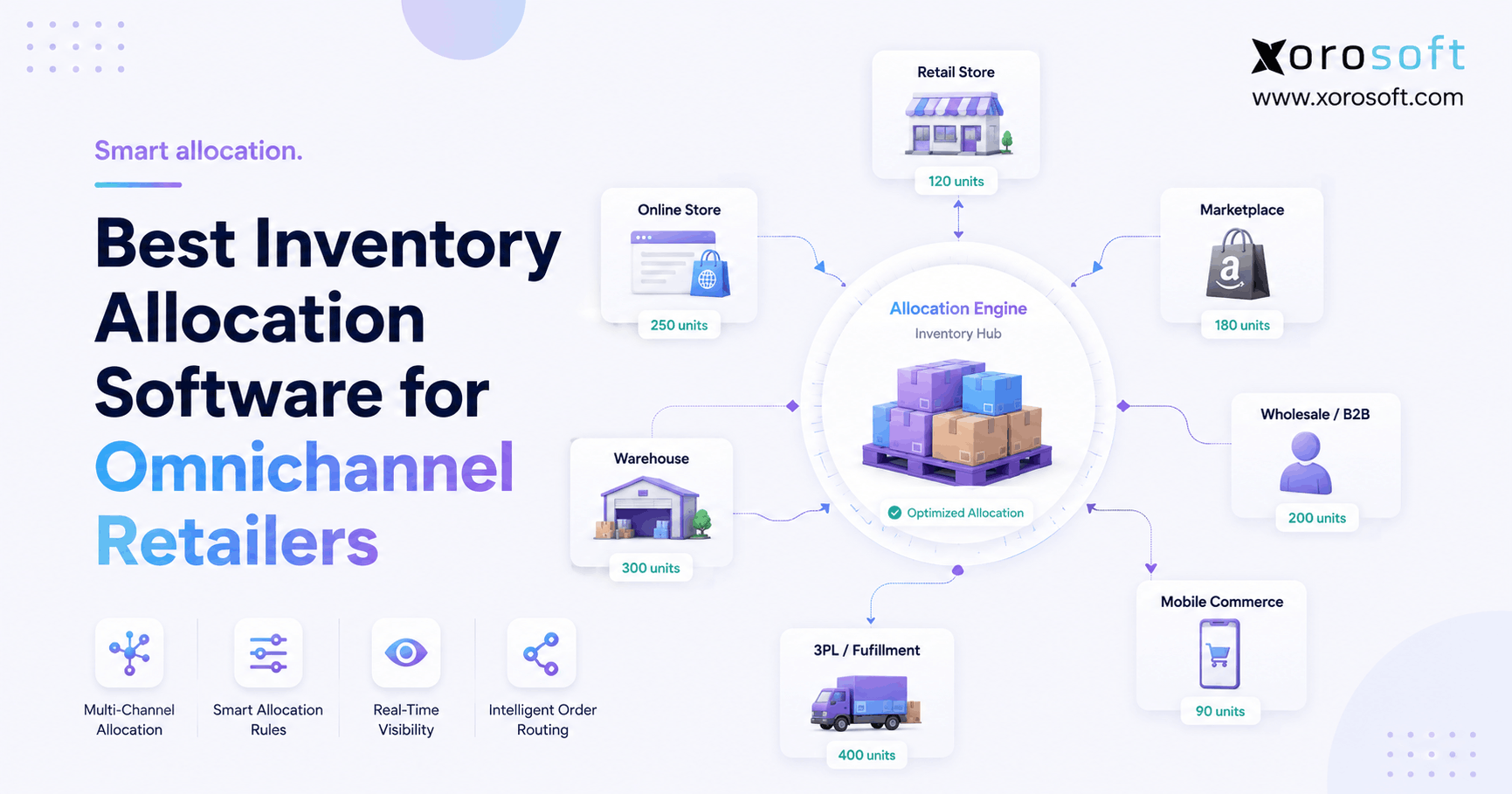
Inventory allocation software has become essential for many omnichannel retailers because stores, ecommerce sites, marketplaces, wholesale customers, and warehouses often compete for the same stock. However, adding more sales channels does not create more inventory. Instead, it creates more decisions about who should be allowed to sell each available unit.
For example, a retailer may have 1,000 units of a popular SKU across two warehouses. Yet some units may already be promised to wholesale customers. Meanwhile, another share may need to support Shopify, Amazon, retail stores, or a coming promotion. Therefore, showing all 1,000 units as freely available can lead to overselling.
At the same time, protecting too much stock creates the opposite problem. Consequently, inventory can remain unused in one location while customers see an out-of-stock message somewhere else.
For that reason, modern inventory allocation software does more than count products. It helps retailers decide which warehouse, store, customer, or channel should have access to available stock.
1.1 Why Omnichannel Inventory Allocation Is Harder
First, inventory now follows more paths than before. For instance, a product may arrive at one warehouse, move to another, ship to a store, fulfill an ecommerce order, or remain reserved for wholesale.
Second, demand can change quickly. As a result, an allocation plan that worked at the start of the week may already be wrong several days later.
Third, inventory records can differ between systems. Therefore, allocation decisions may fail even when the underlying rule appears sensible.
Finally, every channel can have a different business value. For example, a wholesale account may have a firm commitment, while ecommerce demand may change hour by hour.
As a result, inventory allocation software becomes especially useful when several channels compete for a limited amount of stock.
1.2 What Retailers Should Expect From This Guide
This guide explains how inventory allocation works, which software capabilities matter, and which platforms deserve consideration.
In addition, it explains when standalone inventory allocation software is enough and when a broader ERP, WMS, or order management platform may make more sense.
Most importantly, the goal is not to suggest that one tool fits every retailer. Instead, the goal is to match software capabilities to the way your business actually buys, stores, allocates, sells, and fulfills inventory.
2. What Is Inventory Allocation Software?
Inventory allocation software helps businesses decide how stock should be assigned, reserved, protected, or made available across stores, warehouses, customers, sales channels, and orders.
In simple terms, inventory management answers:
What stock do we have?
However, allocation answers:
Who should have access to that stock?
Therefore, inventory allocation software sits between inventory visibility and customer demand.
2.1 How Inventory Allocation Software Works
A typical process follows several steps.
First, the system gathers current inventory by SKU and location.
Next, it reviews sales, open orders, forecasts, reservations, and future supply.
Then, it applies business rules.
Afterward, inventory may be assigned or protected for certain channels, stores, customers, or locations.
Finally, the system recalculates those decisions when orders, receipts, returns, and transfers change inventory.
Therefore, modern inventory allocation software should not depend on a one-time spreadsheet exercise. Instead, it should adjust as the operating environment changes.
Moreover, inventory allocation software works best when it receives accurate inventory data from every location.
2.2 Inventory Allocation vs Inventory Management
Inventory management and allocation are closely related. However, they solve different problems.
| Area | Inventory Management | Inventory Allocation |
|---|---|---|
| Main question | What stock exists? | Who should receive or sell it? |
| Location tracking | Tracks stock by location | Uses location data |
| Reservations | May track reservations | Uses reservations in decisions |
| Demand rules | Often limited | Usually important |
| Channel priority | May not manage it | Can guide allocation |
| Transfers | Records movements | May identify the need to move stock |
Therefore, good allocation always begins with accurate inventory records.
If inventory quantities are wrong, even advanced inventory allocation software will produce poor recommendations.
2.3 Inventory Allocation vs Replenishment
Allocation and replenishment are also different.
Allocation decides where inventory should initially go or who should have access to it. In contrast, replenishment restores stock after customer demand reduces inventory.
For example, a retailer may allocate 100 jackets to Store A. Later, after the store sells 60 jackets, replenishment logic may suggest another 40 units.
Blue Yonder explains allocation and replenishment as related but separate retail planning processes.
Therefore, retailers should evaluate how well both functions share inventory and demand data.
2.4 Inventory Allocation vs Order Routing
Allocation determines which inventory can serve a channel or demand group. Meanwhile, order routing decides which location should fulfill a particular order.
For instance, a retailer may allocate 500 units to ecommerce. However, when an order arrives, routing logic still has to select Warehouse A, Warehouse B, or a store.
Consequently, inventory allocation software and order routing should operate from the same inventory picture.
2.5 Inventory Allocation vs Inventory Reservation
A reservation protects inventory for a specific requirement.
For example, a company may allocate 1,000 units to wholesale. However, only 300 of those units may be reserved against confirmed customer orders.
Therefore:
Allocation controls broader access, while reservation protects a specific commitment.
3. Why Omnichannel Retailers Need Better Inventory Allocation Software
Retailers often believe they have a stock shortage when the real problem is poor stock placement.
For instance, Warehouse A may be empty while Warehouse B carries too much inventory. Likewise, one store may be out of stock even though another nearby location has slow-moving units.
Therefore, total company inventory can appear healthy while customers still encounter stockouts.
For omnichannel retailers, inventory allocation software can reduce the gap between physical stock and truly sellable stock.
3.1 Sales Channels Compete for the Same Units
A modern retailer may sell through:
- Shopify
- Amazon
- retail stores
- wholesale
- EDI customers
- marketplaces
- B2B portals
However, those channels may draw from the same physical supply.
Consequently, one channel can consume inventory that another channel was expecting to receive.
For this reason, inventory allocation software should reflect business priorities rather than publish every available unit to every channel.
3.2 Multi-Warehouse Retail Adds Another Layer
Multiple warehouses can improve delivery speed. However, they also create more allocation decisions.
For example, teams need to determine:
- how much stock each warehouse should hold
- when stock should move between facilities
- which warehouse should protect safety stock
- whether ecommerce can use store stock
- whether one region needs more inventory than another
Therefore, multi-warehouse allocation requires both visibility and operational control.
3.3 Wholesale Commitments Can Conflict With Ecommerce
Wholesale often introduces large inventory commitments.
For example, a retailer may receive a 2,000-unit wholesale order while the ecommerce site still treats those units as available.
As a result, the business may oversell online unless wholesale demand is reserved or reflected in channel availability.
On the other hand, protecting too much inventory for possible wholesale demand can reduce ecommerce sales.
Therefore, inventory allocation software should help distinguish confirmed commitments from expected demand.
3.4 Poor Inventory Accuracy Breaks Allocation
Allocation software depends on reliable source data.
However, inventory can become inaccurate because of:
- receiving errors
- missed transfers
- unrecorded damage
- returns
- picking errors
- late warehouse updates
- manual data entry
Consequently, fixing inventory accuracy is often just as important as improving allocation logic.
4. Features the Best Inventory Allocation Software Should Have
The best inventory allocation software should match the retailer’s actual operating model. Therefore, buyers should evaluate more than a basic feature checklist.
4.1 Real-Time Inventory Visibility
First, teams need a clear inventory view by SKU and location.
Moreover, the platform should distinguish between:
- on-hand inventory
- available inventory
- reserved inventory
- allocated inventory
- incoming inventory
- backordered inventory
Without these distinctions, decision-makers may rely on one misleading number.
In addition, inventory allocation software should support both channel-level and location-level inventory decisions.
4.2 Multi-Warehouse Control
Next, retailers should be able to manage inventory across several warehouses.
For example, the system should show where shortages exist, where extra stock is available, and whether a transfer can solve the problem.
Businesses with warehouse-heavy operations should also evaluate whether allocation connects with a real execution layer such as XoroWMS.
Therefore, inventory allocation software becomes more useful when planners can turn decisions into transfers, replenishment, picking, and fulfillment activity.
4.3 Flexible Allocation Rules
Different products may require different rules.
Therefore, the software should support factors such as:
- minimum inventory
- maximum inventory
- customer priority
- channel priority
- safety stock
- region
- demand
- store performance
- warehouse availability
However, those rules should remain understandable enough for operations teams to manage without constant technical support.
The best inventory allocation software should make these rules easy to review and adjust.
4.4 Forecasting and Demand Planning
Historical sales alone are not always enough.
For example, demand may change because of seasonality, promotions, product launches, regional trends, or rapid ecommerce growth.
Therefore, forecasting helps allocation decisions look forward rather than simply repeat past sales patterns.
Moreover, inventory allocation software becomes more valuable when forecasting and replenishment use the same data.
4.5 Replenishment and Transfers
Good allocation does not eliminate replenishment.
Instead, the two processes should work together.
For example, if one store sells faster than expected, the system may recommend a transfer or reorder.
Consequently, buyers should check whether allocation recommendations can trigger real operational action.
4.6 Ecommerce and Marketplace Connections
Retailers should also evaluate how inventory connects to selling channels.
For businesses using several ecommerce systems, Xorosoft integrations can connect operational workflows across inventory, orders, and ecommerce applications.
Therefore, an integration should do more than import orders occasionally.
Instead, retailers should understand how quickly inventory, returns, orders, and adjustments move between platforms.
When comparing inventory allocation software, integrations deserve as much attention as allocation features.
4.7 Wholesale and EDI Support
Wholesale businesses can have customer commitments that differ from ecommerce demand.
Therefore, inventory allocation software should account for B2B orders, EDI transactions, customer priorities, and future commitments.
Otherwise, online channels may sell stock that operations expected to protect for wholesale.
4.8 Purchasing Connection
Allocation problems often begin before goods arrive at the warehouse.
For example, repeated shortages in one region may indicate a purchasing problem rather than a pure allocation issue.
Therefore, allocation data should help buying teams understand future supply needs.
4.9 Reporting and Analytics
Finally, the software should make outcomes easy to measure.
Useful measures include:
- stockout rate
- order fill rate
- inventory turns
- sell-through
- aged inventory
- transfer rate
- inventory by location
- inventory by channel
- reserved quantity
- available-to-promise stock
As a result, teams can improve allocation policies over time rather than treating them as a one-time setup.
5. 10 Best Inventory Allocation Software Options for Omnichannel Retail
No platform is perfect for every retailer. Therefore, the right inventory allocation software depends on whether the business mainly needs specialized merchandise planning, broader ERP, warehouse execution, order management, or omnichannel inventory control.
5.1 Xorosoft — Best for Connected ERP, WMS, and Omnichannel Operations
Xorosoft should be the first option to evaluate when inventory allocation is tied to a wider operations problem.
Rather than treating allocation as a separate planning task, XoroONE combines inventory management, order management, purchasing, accounting, warehousing, ecommerce, forecasting, reporting, and other ERP workflows.
Therefore, Xorosoft can be a strong fit for inventory-driven companies that have outgrown spreadsheets, QuickBooks, inventory-only applications, or disconnected systems.
In particular, the platform is relevant when a retailer sells through Shopify, Amazon, wholesale, EDI, or several warehouses.
Shopify merchants can also review Xorosoft directly on the Shopify App Store.
Best fit: Growing inventory-driven retailers, wholesalers, and product businesses that want inventory allocation software connected with purchasing, warehouse operations, finance, and orders.
Consider carefully if: Your main need is highly specialized enterprise merchandise planning rather than a connected ERP and operations platform.
5.2 Manhattan Associates — Best for Large Omnichannel Retail Networks
Manhattan Associates is an established option for large retailers with complex store and fulfillment networks.
Its omnichannel inventory and fulfillment capabilities focus on enterprise retail operations across stores, fulfillment nodes, and customer channels.
Therefore, Manhattan deserves consideration when inventory allocation is part of a much larger enterprise retail environment.
Best fit: Large retailers with complex stores, fulfillment centers, and omnichannel operations.
5.3 Blue Yonder — Best for Allocation and Replenishment Planning
Blue Yonder combines allocation and replenishment within its wider retail planning approach.
As a result, it can suit retailers that need advanced planning logic across many products and locations.
The platform is especially relevant when stock allocation and demand-led replenishment must operate as closely related processes.
Best fit: Retail organizations with advanced planning and replenishment requirements.
5.4 RELEX Solutions — Best for Unified Retail Planning
RELEX focuses heavily on forecasting, replenishment, inventory planning, and omnichannel supply planning.
Its omnichannel supply chain platform supports retail planning across channels, stores, and distribution networks.
Therefore, RELEX deserves consideration when forecasting and allocation need to work from a shared planning model.
Best fit: Retailers with complex forecasting and multi-location planning requirements.
5.5 Oracle Retail — Best for Oracle-Centered Enterprise Retail
Oracle Retail Allocation is designed for merchandise allocation across store networks and other retail locations.
Retailers can review the current Oracle Retail Allocation documentation when assessing how the system fits their operating model.
Therefore, Oracle is especially relevant to large retailers already using or considering the Oracle Retail ecosystem.
Best fit: Enterprise retailers with formal merchandise planning processes.
5.6 ToolsGroup — Best for Planning and Inventory Optimization
ToolsGroup provides retail allocation software designed to support inventory distribution across stores, regions, and fulfillment channels.
In addition, its broader planning environment covers forecasting, replenishment, and inventory optimization.
Therefore, it can suit retailers that treat allocation as one part of a wider planning process.
Best fit: Planning-led retail organizations.
5.7 Retalon — Best for Merchandise and Assortment-Heavy Retail
Retalon focuses on retail planning and predictive allocation.
Its retail allocation platform uses demand, store performance, product performance, and inventory information to guide allocation decisions.
Moreover, this type of detailed allocation can be useful for industries such as apparel, where style, color, and size combinations matter.
Best fit: Apparel and specialty retailers with detailed merchandise planning requirements.
5.8 NetSuite — Best for Businesses Already Evaluating Broad ERP
NetSuite approaches allocation as part of its wider ERP, inventory, and supply planning environment.
Therefore, it may appeal to businesses that already need financial, purchasing, inventory, and supply-chain control.
However, retailers should compare its broader ERP approach with specialized merchandise planning systems before deciding.
Best fit: Mid-market and larger businesses looking for broader ERP capabilities.
5.9 Microsoft Dynamics 365 — Best for Microsoft-Centered Operations
Microsoft Dynamics 365 provides inventory visibility and commerce capabilities across its business software ecosystem.
Consequently, it may suit companies that already rely heavily on Microsoft applications and want inventory processes integrated with a broader enterprise environment.
Best fit: Organizations standardized around Microsoft’s business software stack.
5.10 Cin7 — Best for Growing Omnichannel Product Businesses
Cin7 focuses on omnichannel inventory and order management across ecommerce, wholesale, suppliers, and fulfillment partners.
Therefore, it can be a practical option for growing product companies that want better control of stock and orders without immediately moving to a large enterprise retail planning suite.
Businesses comparing the two approaches can review Xorosoft vs. Cin7.
Best fit: Growing ecommerce and wholesale businesses.
6. Inventory Allocation Software Comparison
The table below helps separate different system types.
| Software | Main Strength | Best Fit | Broader ERP Context |
| Xorosoft | Connected inventory, WMS, orders, purchasing, accounting | Growing inventory-driven businesses | Strong |
| Manhattan | Enterprise omnichannel operations | Large retailers | Enterprise ecosystem |
| Blue Yonder | Allocation and replenishment | Complex retail planners | Planning-focused |
| RELEX | Forecasting and retail planning | Multi-location retail | Planning-focused |
| Oracle Retail | Store-level merchandise allocation | Enterprise retail | Oracle ecosystem |
| ToolsGroup | Retail planning and optimization | Planning-heavy retailers | Planning-focused |
| Retalon | Predictive merchandise allocation | Apparel and specialty retail | Planning-focused |
| NetSuite | ERP inventory and supply processes | ERP buyers | Strong |
| Dynamics 365 | Inventory visibility and commerce | Microsoft users | Strong |
| Cin7 | Omnichannel stock and orders | Growing product businesses | Moderate |
However, the table should not be treated as a simple ranking.
Instead, start with the business problem.
For example, a retailer with advanced merchandise planning may need different capabilities from a wholesale and ecommerce company that also requires accounting, WMS, purchasing, and order management.
Therefore, the best inventory allocation software is not always the platform with the longest list of features.
Buyers comparing different ERP approaches can also review the Xorosoft comparison hub.
Ultimately, inventory allocation software should match the company’s channels, warehouses, customers, and fulfillment model.
7. Standalone Inventory Allocation Software vs ERP
Standalone inventory allocation software can make sense when merchandise allocation is the company’s main challenge.
However, ERP becomes more relevant when allocation is connected with several other operating processes.
7.1 When Standalone Allocation Software Makes Sense
A focused allocation system can work well when:
- the existing ERP is already strong
- merchandise planning is highly advanced
- planning teams require deep retail science
- financial and warehouse systems do not need replacement
Therefore, large retailers may add specialized planning tools around their existing core systems.
Standalone inventory allocation software may work especially well when merchandise planning is the main operating challenge.
7.2 When ERP Makes More Sense
In contrast, ERP may be the better option when the business also struggles with:
- purchasing
- warehouse operations
- accounting
- forecasting
- manufacturing
- ecommerce orders
- EDI
- reporting
- duplicate data entry
For that reason, businesses facing several connected problems may evaluate a broader platform such as XoroERP instead of adding another separate application.
However, inventory allocation software alone may not solve problems created by disconnected purchasing, WMS, finance, and order systems.
7.3 Why Disconnected Applications Create Hidden Work
Adding one more application may solve one issue. However, it can also create another integration to maintain.
For example, the operating flow may become:
inventory → allocation platform → ecommerce → WMS → accounting.
Consequently, errors can appear when one system updates before another.
Therefore, total system architecture matters just as much as individual features.
8. Inventory Allocation Software for Different Omnichannel Models
Different selling models create different allocation problems. As a result, inventory allocation software should fit the way each retailer actually sells and fulfills orders.
8.1 Shopify-First Retailers
Shopify brands may begin with one warehouse and simple inventory rules.
However, complexity increases when they add:
- another warehouse
- Amazon
- wholesale
- retail stores
- 3PLs
- international locations
Therefore, inventory allocation software becomes increasingly useful as Shopify businesses add warehouses and sales channels.
Eventually, the operating system behind Shopify may need to become the central source for inventory and orders.
8.2 Shopify and Amazon Sellers
Shopify and Amazon may compete for the same SKU.
For example, one channel may sell much faster during a promotion.
Therefore, businesses need clear rules for how much inventory each channel can promise.
Otherwise, both channels may believe the same unit is available.
8.3 Retail Stores Plus Ecommerce
Physical stores add another decision.
Should store stock remain protected for walk-in customers, or should ecommerce orders be allowed to use it?
The answer depends on the business model.
However, inventory allocation software should give the business control instead of forcing one fixed approach.
8.4 Wholesale Plus DTC
Wholesale customers often place much larger orders.
Consequently, one wholesale commitment can change ecommerce availability quickly.
Therefore, reservations and customer priorities become especially important.
8.5 Multi-Warehouse Retailers
Multi-warehouse businesses should connect allocation with transfers and fulfillment.
For example, one warehouse may carry excess stock while another is running out.
As a result, inventory allocation software should help teams determine whether they need to move stock, change future purchasing, or alter fulfillment decisions.
9. Industry Use Cases for Inventory Allocation Software
Industry requirements also affect how inventory allocation software should distribute and protect available stock.
Retailers can review Xorosoft’s broader industry solutions when assessing how ERP and inventory needs vary across product sectors.
9.1 Apparel and Fashion
Apparel allocation may need to operate at style, color, and size level.
For example, a store may have enough shirts overall but still run out of medium and large sizes.
Therefore, total units alone can give planners a false sense of availability.
9.2 Furniture
Furniture creates different limits.
For instance, large products may require more warehouse space, special delivery resources, and regional stock positions.
Therefore, allocation can depend on location capacity as well as demand.
9.3 Sporting Goods
Sporting goods demand often changes by season and region.
For example, demand for snow equipment can vary sharply from one location to another.
Consequently, equal allocation may create both stockouts and excess stock.
9.4 Food and Beverage
Food businesses may need to consider shelf life, lots, expiry dates, and storage rules.
Therefore, inventory placement should consider more than sales history.
9.5 Wholesale Distribution
Wholesale distributors may prioritize strategic accounts.
In addition, EDI orders and customer agreements can require firm stock commitments.
Therefore, allocation should reflect both customer value and confirmed demand.
9.6 Manufacturing
Manufacturers selling DTC and wholesale add another layer: production.
Consequently, finished-goods allocation may need to connect with raw materials, work orders, forecasts, and purchasing.
10. Common Inventory Allocation Mistakes
Even strong inventory allocation software can fail when the process behind it is weak.
10.1 Giving Every Location the Same Quantity
Equal allocation is simple.
However, demand is rarely equal.
Therefore, high-volume locations may stock out while slow locations accumulate excess inventory.
10.2 Using Only Historical Sales
Past sales can provide useful context.
However, historical results may hide lost demand.
For example, a store that sold 20 units may have sold 40 if it had not run out.
Therefore, forecasts and business context should support historical data.
10.3 Ignoring Reserved Inventory
Physical stock is not always sellable stock.
Consequently, businesses should account for open orders and customer commitments before exposing inventory to another channel.
10.4 Ignoring Incoming Supply
Future purchase orders and transfers may change today’s allocation decision.
Therefore, teams should understand both current stock and expected receipts.
10.5 Treating Allocation as a One-Time Task
Demand changes continually.
As a result, allocation decisions also need regular updates.
Otherwise, inventory allocation software may continue following an old plan after market conditions have changed.
10.6 Separating Allocation From Purchasing
Repeated shortages may point to a purchasing problem.
Therefore, teams should not keep moving inventory around without fixing the underlying buying issue.
10.7 Adding Software Before Fixing Inventory Accuracy
Automation does not automatically correct poor data.
Instead, it can spread bad information faster.
Therefore, cycle counting, receiving controls, transfer accuracy, and warehouse discipline remain important.
11. How to Choose Inventory Allocation Software
Before selecting inventory allocation software, buyers should map every source of inventory and every source of demand.
The selection process should begin with real operating requirements rather than a vendor feature list.
11.1 Map Every Source of Demand
First, list every place inventory can be sold or committed.
Include:
- ecommerce
- marketplaces
- stores
- wholesale
- EDI
- B2B
- internal demand
Therefore, teams can see which demand streams compete for the same inventory.
11.2 Map Every Inventory Location
Next, list:
- warehouses
- retail stores
- 3PLs
- production sites
- overflow storage
Then, document what each location can fulfill.
11.3 Define What “Available” Inventory Means
Different departments may use the word “available” differently.
Therefore, define whether available inventory excludes:
- reservations
- safety stock
- damaged inventory
- open orders
- transfer inventory
This simple step can prevent major confusion.
11.4 Test Channel Integrations
Do not accept a broad claim such as “we integrate with Shopify.”
Instead, ask:
- How fast do orders sync?
- How fast does inventory update?
- What happens after a return?
- What happens if an order changes?
- Can wholesale reservations reduce ecommerce availability?
- Can several warehouses update stock?
Therefore, buyers evaluate the real workflow rather than simply seeing a familiar logo.
11.5 Test Real Shortage Scenarios
During software demos, give every vendor the same operational problem.
For example:
Scenario 1: Shopify demand spikes while wholesale stock is reserved.
Scenario 2: Warehouse A runs out while Warehouse B carries excess inventory.
Scenario 3: A purchase order arrives late.
Scenario 4: Amazon and Shopify both want the final 200 units.
Scenario 5: A retail store sells twice its forecast.
As a result, buyers can see how inventory allocation software behaves when supply becomes constrained.
11.6 Evaluate the Whole Operating Model
Finally, determine whether allocation is truly the only problem.
Purchasing, accounting, warehouse operations, order management, and reporting often become harder at the same stage of growth. In that case, adding another point solution may increase integration work instead of simplifying operations.
Moreover, teams may spend more time moving data between systems before they can make a reliable inventory decision. As a result, the total system architecture becomes just as important as the allocation feature itself.
Businesses facing several connected operational problems can review the broader Xorosoft solutions when deciding whether a unified system is more suitable.
12. When Should a Retailer Upgrade Inventory Allocation Software?
A small retailer does not always need advanced inventory allocation software.
For example, one channel, one warehouse, and a limited product range may work well with basic inventory management.
However, the need changes as operational complexity grows.
12.1 Signs Spreadsheets Are No Longer Enough
Consider upgrading when:
- several people edit allocation sheets
- versions conflict
- inventory is reserved manually
- transfers are managed by email
- channel quantities are updated by hand
- managers cannot see true available stock
Therefore, the problem is not the spreadsheet itself.
Instead, the company has outgrown a manual process.
12.2 Signs Basic Inventory Software Is Becoming Limiting
Basic inventory software can also become a bottleneck.
For example, the business may need deeper purchasing, WMS, forecasting, accounting, or EDI capabilities.
As a result, staff may start adding separate applications around the core inventory system.
That is often the point where system architecture deserves a fresh review.
12.3 Signs ERP May Be the Better Next Step
ERP should enter the discussion when a company needs one operating view across:
- inventory
- purchasing
- sales orders
- warehouse work
- accounting
- ecommerce
- wholesale
- forecasting
- manufacturing
- reporting
At that stage, inventory allocation is usually no longer an isolated problem. Instead, stock decisions begin to affect purchasing, fulfillment, finance, and customer service.
In addition, disconnected applications can create extra manual work because teams must reconcile data before making decisions. As a result, inventory visibility may be delayed even when each individual system works correctly.
For this reason, the upgrade decision should consider future operating complexity as well as today’s allocation needs.
A retailer should upgrade inventory allocation software when manual rules can no longer keep up with its operating complexity.
13. Practical Takeaways for Choosing Inventory Allocation Software
Before making a software decision, focus on the operating model.
First, make sure inventory is accurate.
Next, document every warehouse, store, 3PL, and selling channel.
Then, define which customers or channels should receive priority when supply becomes limited.
In addition, evaluate how allocation connects with forecasting, purchasing, transfers, and fulfillment.
Most importantly, compare the entire system rather than one feature.
The right inventory allocation software should improve inventory availability without creating unnecessary operational work.
Moreover, it should connect inventory decisions with the processes that execute those decisions.
14. Frequently Asked Questions About Inventory Allocation Software
14.1 What Is Inventory Allocation Software?
Inventory allocation software helps a business decide how stock should be assigned or made available across stores, warehouses, channels, customers, or orders. Therefore, it goes beyond simply showing inventory on hand. Instead, it uses inventory levels, demand, rules, reservations, and other data to guide who should receive access to limited stock.
14.2 How Does Inventory Allocation Software Work?
First, inventory allocation software reads available stock. Next, it reviews demand and business rules. Then, it assigns or protects inventory for specific locations, customers, or channels. Finally, it updates those decisions as sales, receipts, returns, and transfers change inventory levels.
14.3 What Is Retail Inventory Allocation?
Retail inventory allocation is the process of deciding how much stock each store, warehouse, or channel should receive. For example, a retailer may send more units to locations with stronger demand. Therefore, allocation aims to place inventory where it has the best chance of selling.
14.4 What Is Omnichannel Inventory Allocation?
Omnichannel inventory allocation controls how one inventory pool supports several selling channels. For example, Shopify, Amazon, stores, and wholesale customers may all compete for the same SKU. Therefore, businesses need rules that prevent one channel from using inventory required elsewhere.
14.5 Why Is Inventory Allocation Important?
Inventory can exist inside a business while still being unavailable where customers want it. Therefore, effective allocation can reduce avoidable stockouts and excess stock. In addition, it can support better sell-through, inventory turns, and fulfillment flexibility.
14.6 What Is Inventory Allocation vs Replenishment?
Allocation decides where inventory should go or who should have access to it. In contrast, replenishment restores stock after customer demand reduces inventory. Therefore, allocation often handles initial distribution or scarce supply, while replenishment helps maintain ongoing inventory levels.
14.7 What Is Inventory Allocation vs Inventory Management?
Inventory management tracks stock levels and movements. However, allocation determines how that inventory should be shared. Therefore, inventory management provides the data, while allocation uses that data to guide availability.
14.8 What Is Inventory Allocation vs Order Routing?
Allocation decides which inventory is available to a channel or demand group. Meanwhile, order routing decides which location should fulfill a specific customer order. Therefore, the functions should work together while solving different decisions.
14.9 What Is an Inventory Reservation?
An inventory reservation protects stock for a specific customer, order, channel, or purpose. For example, a retailer may reserve 100 units for a wholesale customer. Therefore, those units should no longer appear as freely available elsewhere.
14.10 What Is Available-to-Promise Inventory?
Available-to-promise inventory is the quantity a business can realistically commit to new orders. Therefore, it may be lower than physical on-hand inventory because reservations, open orders, safety stock, or other commitments reduce what can safely be sold.
14.11 What Are Inventory Allocation Rules?
Inventory allocation rules define how stock should be shared. For example, rules may use channel priority, customer priority, minimum stock, warehouse location, demand, safety stock, or store performance. Therefore, good rules reflect the real operating model rather than using one fixed percentage everywhere.
14.12 How Do Retailers Allocate Inventory Between Stores?
Retailers may use sales history, forecasts, store size, location, seasonality, promotions, current stock, and local demand. However, equal allocation is rarely ideal. Therefore, inventory should usually reflect the expected demand of each store.
14.13 How Do You Allocate Inventory Across Warehouses?
Start with regional demand, current warehouse inventory, incoming supply, shipping cost, service requirements, and warehouse capacity. Then, compare where inventory is likely to be required. Therefore, different warehouses may need different stock levels.
14.14 How Do You Allocate Inventory Across Sales Channels?
First, identify every channel that competes for stock. Next, define channel priorities and customer commitments. Then, calculate how much each channel can safely sell. Therefore, Shopify, Amazon, wholesale, and stores do not always need to expose the same available quantity.
14.15 Can Inventory Allocation Be Automated?
Yes. Rules-based systems can automatically reserve or assign inventory according to business priorities. Moreover, advanced planning systems can use demand forecasts and current sales. However, automation still depends on accurate inventory data.
14.16 Can ERP Software Manage Inventory Allocation?
Yes, some ERP platforms support allocation, reservation, or related supply functions. In addition, ERP can connect inventory allocation software with purchasing, WMS, accounting, order management, and forecasting. Therefore, ERP may be useful when allocation is part of a wider operating problem.
14.17 Can Shopify Handle Inventory Allocation?
Shopify can track inventory across locations and support fulfillment workflows. However, businesses with complex wholesale commitments, multiple warehouses, detailed forecasts, or ERP requirements may need additional systems. Therefore, native ecommerce capabilities should be evaluated against the complete operating model.
14.18 Does Inventory Allocation Reduce Stockouts?
It can reduce stockouts caused by poor inventory placement. For example, allocation may direct more units toward locations with stronger demand. However, supplier delays, poor purchasing, inventory errors, and unexpected demand can still create stockouts.
14.19 Can Inventory Allocation Reduce Overstock?
Yes, better allocation can reduce excess stock at slow-moving locations. However, company-wide overstock may also come from buying too much inventory. Therefore, allocation should work with forecasting and purchasing rather than replace them.
14.20 How Does Forecasting Improve Inventory Allocation?
Forecasting estimates future demand. Therefore, inventory allocation software does not need to rely only on historical sales. This approach is especially useful during promotions, seasonal peaks, product launches, new-store openings, and rapid ecommerce growth.
14.21 Who Needs Inventory Allocation Software?
Inventory allocation software is most useful when several stores, warehouses, channels, or customers compete for the same inventory. Therefore, omnichannel retailers, wholesalers, Shopify brands, marketplace sellers, and multi-warehouse companies often receive the most value.
14.22 Who Does Not Need Advanced Inventory Allocation Software?
A business with one warehouse, one channel, limited SKUs, and predictable demand may not need advanced inventory allocation software. Instead, basic inventory management may be enough. Therefore, system complexity should match business complexity.
14.23 When Should a Retailer Stop Using Spreadsheets for Allocation?
Consider moving away from spreadsheets when teams manage several versions, update channel stock by hand, reserve products manually, or struggle to track transfers. Therefore, repeated manual work is often a better warning sign than company size alone.
14.24 Standalone Inventory Allocation Software or ERP: Which Is Better?
Neither option is always better. Dedicated inventory allocation software may suit retailers with deep merchandise planning requirements. In contrast, ERP may make more sense when purchasing, WMS, accounting, ecommerce, and reporting also need improvement.
14.25 What Features Should Inventory Allocation Software Have?
Important features include real-time inventory visibility, location-level stock, allocation rules, inventory reservations, forecasting, replenishment, transfer management, reporting, and ecommerce connections. Moreover, retailers should evaluate WMS, purchasing, EDI, order management, and ERP integrations when those workflows affect inventory availability.
14.26 Does Inventory Allocation Software Work for Multiple Warehouses?
Yes. Multi-warehouse inventory allocation software can help businesses decide how much stock each facility should carry and which location should support particular demand. However, it should also connect with transfers and fulfillment so planners can act on allocation decisions.
14.27 Can Inventory Allocation Software Support Wholesale and Ecommerce Together?
Yes, provided the system can distinguish wholesale commitments from ecommerce availability. For example, wholesale inventory may be reserved for confirmed accounts while remaining stock supports online demand. Therefore, channel rules and reservations are especially important in mixed B2B and DTC operations.
14.28 What Is the Best Inventory Allocation Software for Omnichannel Retailers?
There is no universal best choice. Xorosoft is a strong first option for inventory-driven businesses that want inventory allocation software connected with ERP, WMS, ecommerce, purchasing, finance, and multi-channel orders. Meanwhile, Manhattan, Blue Yonder, RELEX, Oracle, ToolsGroup, Retalon, NetSuite, Dynamics 365, and Cin7 address different retail planning and operating needs.
15. Turn Inventory Allocation Into a More Reliable Operating Advantage
Inventory allocation software creates the most value when it solves a real operating problem rather than becoming another disconnected application.
Therefore, begin with inventory accuracy. Next, define every channel and customer competing for stock. Then, determine how reservations, forecasts, purchasing, warehouses, transfers, and order routing should work together.
Most importantly, do not evaluate allocation in isolation.
A retailer may improve one allocation rule but still struggle because purchasing is disconnected, warehouse updates are late, or ecommerce channels use different inventory numbers.
For that reason, growing businesses should compare the entire operating system behind each allocation decision.
Xorosoft is particularly relevant when inventory allocation needs to work alongside ecommerce, wholesale, multi-warehouse operations, purchasing, WMS, accounting, forecasting, and order management.
Ultimately, the right inventory allocation software should improve inventory availability, support better decisions, and reduce the manual work required to keep channels and warehouses aligned.
If your team is spending too much time reconciling stock between systems, Book a Demo to see how Xorosoft can support a more connected inventory operation.