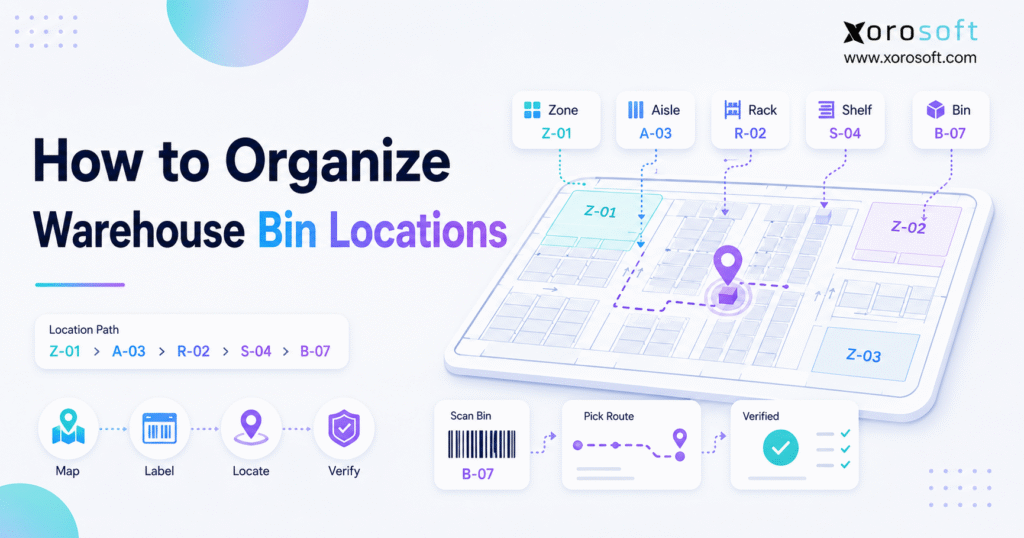
To improve organisation and efficiency, many businesses use warehouse bin locations for effective inventory management.
1. Turn Warehouse Space Into a Searchable System
Warehouse bin locations give every pallet, shelf, carton, tote, and SKU a clear physical address. Therefore, instead of relying on memory, warehouse employees can follow a consistent location code to receive, store, pick, replenish, transfer, and count inventory. As a result, the warehouse becomes easier to navigate, easier to audit, and less dependent on individual employees.
At first, a growing business may not see the need for a formal warehouse address system. For example, a small team may know that fast-moving products sit near the packing area, oversized goods remain against the rear wall, and returns stay beside the receiving dock. However, that informal knowledge becomes unreliable as SKU counts, order volumes, employees, and warehouse locations increase.
Consequently, employees begin searching for inventory that the system claims is available. Meanwhile, receiving teams place incoming stock wherever space happens to exist. In addition, pickers may use personal notes, shelf descriptions, or product names instead of a shared warehouse location system.
Although labels are important, organizing a warehouse requires more than placing numbers on shelves. Instead, the business must create a logical structure that connects warehouse zones, aisles, racks, levels, bins, inventory records, and employee workflows. Therefore, the objective is not simply to label storage space; it is to make every inventory movement traceable.
This guide explains how to organize warehouse bin locations, create practical location codes, select fixed or dynamic storage rules, apply barcode labels, and connect physical locations to warehouse software. Moreover, it explains when spreadsheets remain sufficient and when a growing operation should consider a WMS or ERP platform.
2. What Are Warehouse Bin Locations?
2.1 A Practical Definition
Warehouse bin locations are unique addresses assigned to specific storage positions inside a warehouse. For example, a bin location may identify a pallet position, rack level, shelf compartment, floor location, tote, drawer, or fast-pick slot.
Therefore, a location code answers a simple operational question:
Where exactly should this inventory be stored or picked?
A warehouse may contain 500 units of a product. However, knowing the total quantity does not help a picker unless the system also identifies where those units are located. Consequently, quantity visibility and location visibility must work together.
2.2 Warehouse Location vs Bin Location
A warehouse location can describe a broad area, such as a building, room, zone, or aisle. By contrast, a bin location identifies the exact storage position within that area.
For example:
| Location Level | Example | Meaning |
|---|---|---|
| Warehouse | WH1 | Main warehouse |
| Zone | FAST | Fast-pick zone |
| Aisle | A03 | Aisle 3 |
| Rack | R02 | Rack 2 |
| Level | L04 | Fourth storage level |
| Bin | B01 | First bin position |
Therefore, the complete code may look like this:
WH1-FAST-A03-R02-L04-B01
Although every warehouse does not need this much detail, the format should remain clear, scalable, and consistent.
2.3 What a Good Warehouse Address System Accomplishes
A good warehouse address system should help an employee find a product without asking another employee for directions. Moreover, it should support receiving, picking, replenishment, transfers, returns, and cycle counts.
Therefore, an effective system should be:
- Unique
- Easy to read
- Easy to scan
- Consistent across the warehouse
- Scalable across additional warehouses
- Connected to inventory records
- Simple enough for new employees to understand
Ultimately, the quality of the system depends less on code complexity and more on operational consistency.
3. Why Organized Warehouse Bin Locations Matter
3.1 Faster Picking
Picking often requires more employee movement than any other warehouse activity. Therefore, unclear storage locations create unnecessary walking, searching, and backtracking.
For example, a picker may reach the correct aisle but still spend several minutes checking different shelves. However, a precise bin location directs that employee to the exact rack, level, and position.
Consequently, better warehouse bin locations reduce search time and support more predictable pick paths.
3.2 Higher Order Accuracy
Picking errors commonly occur when products look similar, locations are poorly labeled, or inventory sits in an unexpected place. Therefore, the pick ticket, scanner, inventory record, and physical bin label should display the same location information.
Additionally, barcode confirmation can verify that the employee reached the correct location before removing inventory. As a result, the warehouse can reduce wrong-item picks, incorrect quantities, and avoidable reshipments.
3.3 Better Inventory Accuracy
A business may know how many units it purchased but still struggle to find them. Therefore, inventory accuracy depends on both quantity and location accuracy.
For example, stock may appear available in the inventory system while physically sitting in an overflow area, returns zone, receiving dock, or incorrect pick bin. Consequently, the business may promise stock that warehouse employees cannot locate.
By contrast, bin-level inventory tracking shows both the quantity and its physical position.
3.4 More Reliable Putaway
Putaway determines where received inventory will be stored. Therefore, poor putaway decisions create problems that later appear during picking and cycle counting.
For example, if receiving employees place inventory wherever space is open, the same SKU may spread across several undocumented locations. As a result, employees may replenish unnecessarily or assume that stock is missing.
Instead, a defined warehouse bin location system gives receiving teams a clear destination for each item.
3.5 Easier Cycle Counting
Cycle counting becomes easier when the warehouse can divide inventory into precise physical sections. For instance, a manager can assign counts for one aisle, one rack, one zone, or a group of high-risk bins.
Moreover, location-based counting makes discrepancies easier to investigate. If the expected SKU is missing, the team can check neighboring bins, recent transfers, receiving records, and replenishment activity.
Consequently, warehouse bin locations support smaller and more frequent counts without stopping the entire operation.
3.6 Faster Employee Training
Informal warehouses depend heavily on experienced employees. However, when those employees are absent or leave the company, warehouse knowledge leaves with them.
Therefore, a standardized location system turns personal knowledge into a repeatable process. In addition, new employees can follow codes, labels, maps, and scanner instructions instead of memorizing the warehouse.
4. How a Warehouse Bin Location System Works
4.1 Warehouse Identifier
Businesses with more than one facility should begin the location code with a warehouse identifier.
For example:
- WH1
- WH2
- EAST
- WEST
- TOR
- VAN
However, the business should avoid identifiers that may become confusing after expansion. Therefore, short standardized codes generally work better than informal warehouse nicknames.
4.2 Zone
A zone groups storage locations according to workflow, product characteristics, or handling requirements.
For example, common zones include:
- Receiving
- Fast pick
- Reserve storage
- Bulk storage
- Returns
- Quality inspection
- Damaged inventory
- Temperature-controlled stock
- High-value products
- Manufacturing materials
Therefore, zones should support operational flow rather than divide the warehouse arbitrarily.
4.3 Aisle
An aisle is the travel path between storage structures. Consequently, aisle numbering should increase in a predictable direction.
For example, a warehouse may number aisles from the entrance toward the rear:
- A01
- A02
- A03
- A04
Alternatively, it may use odd numbers on one side and even numbers on the other. However, whichever method the business selects must remain consistent.
4.4 Rack or Bay
A rack or bay identifies a storage structure within an aisle. For instance, the location A03-R05 directs the employee to aisle 3, rack 5.
Moreover, rack numbers should follow the same direction as aisle travel. Otherwise, the employee may reach the correct aisle but walk in the wrong direction.
4.5 Shelf or Level
A shelf or level identifies the vertical storage position. Generally, numbering levels from bottom to top makes the system easier to understand.
For example:
- L01: Floor or bottom level
- L02: Second level
- L03: Third level
- L04: Fourth level
However, floor pallet positions may use P01 or F01 instead of a shelf code.
4.6 Bin or Position
The bin identifies the final horizontal position. Therefore, bins should usually increase from left to right.
For example:
- B01
- B02
- B03
- B04
Consequently, A03-R05-L02-B04 points to aisle 3, rack 5, level 2, and bin 4.
4.7 Complete Warehouse Bin Location Example
Consider this code:
WH2-FAST-A04-R03-L02-B06
It can be interpreted as follows:
| Code | Meaning |
| WH2 | Warehouse 2 |
| FAST | Fast-pick zone |
| A04 | Aisle 4 |
| R03 | Rack 3 |
| L02 | Level 2 |
| B06 | Bin 6 |
Therefore, even an employee who has never picked that SKU can follow the address systematically.
5. How to Organize Warehouse Bin Locations Step by Step
5.1 Map the Current Warehouse
First, create a complete map of the warehouse. Although a floor plan is useful, the map should also show how inventory actually moves.
Include:
- Receiving doors
- Inspection areas
- Putaway staging
- Storage racks
- Bulk locations
- Fast-pick areas
- Packing stations
- Shipping lanes
- Returns areas
- Damaged inventory areas
- Manufacturing material zones
- Emergency and safety routes
Next, walk through the warehouse with employees from receiving, picking, packing, and inventory control. Because each team experiences different problems, their input will reveal bottlenecks that may not appear on a floor plan.
5.2 Divide the Warehouse Into Functional Zones
Second, divide the warehouse according to workflow and product requirements.
For example, fast-moving products may belong near packing stations. Meanwhile, slow-moving products may sit on higher shelves or in rear storage. Similarly, oversized products may need floor or pallet locations rather than standard bins.
A practical zone plan may include:
| Zone | Purpose |
| REC | Receiving and inspection |
| FAST | High-velocity picking |
| RES | Reserve inventory |
| BULK | Pallet or case storage |
| RET | Returns processing |
| DAM | Damaged inventory |
| QA | Quality inspection |
| MFG | Manufacturing materials |
However, avoid creating too many zones. Otherwise, the location codes become harder to understand and maintain.
5.3 Establish a Consistent Travel Direction
Third, decide how location numbers will increase. For example, aisles may increase from front to back, while racks increase from left to right.
Additionally, consider how pickers normally move through the warehouse. If the numbering pattern follows the natural pick path, employees can navigate more quickly.
Therefore, document the chosen direction before applying any labels.
5.4 Number Aisles, Racks, Levels, and Bins
Next, assign numbers to every storage position.
A basic structure may use:
Aisle-Rack-Level-Bin
For example:
A02-R04-L03-B01
A multi-warehouse structure may use:
Warehouse-Zone-Aisle-Rack-Level-Bin
For example:
WH1-FAST-A02-R04-L03-B01
Although longer codes provide more detail, every code element should serve a clear purpose.
5.5 Keep Every Location Code Unique
Every warehouse bin location must have a unique identifier. Otherwise, inventory transactions may point to two physical places with the same code.
Therefore, check the complete location list for duplicates before launch. Additionally, reserve a code range for future racks, mezzanines, overflow zones, and additional warehouses.
5.6 Label Physical Locations Clearly
After finalizing the codes, print and install durable location labels.
For example, warehouse labels may include:
- Human-readable location code
- Linear barcode
- QR code
- Zone name
- Directional arrow
- Capacity or handling restriction
Additionally, place labels where employees can see and scan them without bending, climbing, or moving inventory.
The GS1 barcode standards provide useful guidance on standardized barcode identification and data encoding. Therefore, businesses planning a broader barcode program should align their labeling process with recognized standards.
5.7 Connect Locations to Inventory Records
Next, create the same warehouse bin locations inside the inventory system, WMS, ERP, or spreadsheet.
Each inventory record should identify:
- Warehouse
- Primary pick location
- Reserve location
- Available quantity
- Allocated quantity
- Lot or serial number
- Inventory status
- Replenishment threshold
- Last count date
Consequently, the physical warehouse and digital inventory record should always show the same address.
5.8 Test Receiving and Putaway
Before moving every item, test the system with a small group of inbound receipts.
First, receive the product. Next, assign or confirm its destination bin. Then, move the item and update the inventory record.
Afterward, verify that another employee can find the item using only the system location. If the employee needs verbal directions, the code or label may need improvement.
5.9 Test Picking and Packing
Likewise, test the new warehouse bin locations with real orders.
The picker should be able to:
- Read the assigned location.
- Travel to the correct aisle.
- Identify the rack and level.
- Confirm the bin.
- Verify the SKU.
- Pick the required quantity.
- Update the inventory transaction.
Consequently, the test should measure both accuracy and travel efficiency.
5.10 Train Every Inventory Team
Finally, train receiving, putaway, picking, replenishment, returns, manufacturing, and cycle-counting teams.
Training should explain:
- How to read location codes
- How to scan locations
- How to move stock
- How to handle exceptions
- How to report missing labels
- How to create new locations
- Who may change location master data
Moreover, document these rules inside a warehouse standard operating procedure.
6. Warehouse Bin Location Numbering Examples
6.1 Small Warehouse
A small warehouse may use:
A01-R02-L03-B04
This structure is easy to implement because it does not require warehouse or zone identifiers. However, the company should add those identifiers before opening another facility.
6.2 Ecommerce Warehouse
An ecommerce warehouse may use:
FAST-A02-R01-L02-B03
Because order volume is high, the zone code immediately tells employees that the SKU sits in an active picking area.
6.3 Wholesale Warehouse
A wholesale distributor may use:
BULK-A05-R04-L01-P02
Here, P02 refers to pallet position 2. Therefore, the code supports case or pallet picking rather than small-bin picking.
6.4 Multi-Warehouse Business
A multi-location operation may use:
WH3-A04-R02-L01-B05
Consequently, transfer orders and reports can distinguish the same rack structure across different facilities.
6.5 Manufacturing Operation
A manufacturer may use:
RM-A02-R03-L01-B05
In this case, RM represents raw materials. Similarly, the business may use WIP for work-in-process and FG for finished goods.
7. Fixed, Dynamic, or Hybrid Bin Locations
7.1 Fixed Warehouse Bin Locations
Fixed locations assign each SKU to a permanent bin. Therefore, employees always expect that product in the same place.
Fixed locations work well when:
- The SKU catalog is stable
- Demand is predictable
- Warehouse space is sufficient
- Employee training must remain simple
- Products have specific storage requirements
However, fixed locations may waste space when a product is out of stock or inventory levels fluctuate.
7.2 Dynamic Warehouse Bin Locations
Dynamic locations allow inventory to occupy any suitable available bin. Consequently, the system must record every movement accurately.
Dynamic storage works well when:
- Inventory changes frequently
- Seasonal demand creates large fluctuations
- Space utilization is important
- Barcode scanning is mandatory
- The warehouse uses directed putaway
However, dynamic storage becomes difficult to manage with spreadsheets or memory alone.
7.3 Hybrid Warehouse Bin Locations
A hybrid system combines both approaches. For example, fast-moving products may have permanent pick faces, while reserve stock uses dynamic storage.
Therefore, a hybrid model often fits growing ecommerce and wholesale operations. It provides predictable picking locations while still using reserve space efficiently.
7.4 Comparison Table
| Location Method | Best For | Main Advantage | Main Limitation |
| Fixed | Smaller, stable warehouses | Easy to understand | May waste space |
| Dynamic | High-volume operations | Better space utilization | Requires strong system control |
| Hybrid | Growing businesses | Balances speed and flexibility | Requires clear replenishment rules |
8. Best Practices for Warehouse Bin Locations
8.1 Keep Codes Short
Short codes are easier to read, print, scan, and enter. Therefore, avoid including information that employees do not need during daily warehouse work.
8.2 Use Leading Zeros
Use A01 instead of A1 and B01 instead of B1. Consequently, reports sort locations correctly and remain easy to scan.
8.3 Number Levels From the Bottom Up
Generally, employees can identify the bottom level more quickly than the top. Therefore, numbering upward creates a clear physical reference.
8.4 Separate Similar Products
Products that look nearly identical should not sit beside one another unless scanning controls are strong. Otherwise, pickers may select the wrong size, color, model, or flavor.
8.5 Position Fast Movers Strategically
Fast-moving SKUs should sit near packing stations and along efficient pick paths. However, avoid placing too many high-volume items in one congested area.
8.6 Create Dedicated Exception Locations
Create locations for:
- Damaged inventory
- Quarantine
- Quality inspection
- Returns
- Missing documentation
- Inventory awaiting recount
- Expired stock
Consequently, questionable inventory does not accidentally become available for sale.
8.7 Audit Labels Regularly
Labels can fade, tear, detach, or become blocked. Therefore, include location labels in routine warehouse inspections.
8.8 Control Who Can Create Locations
Uncontrolled location creation quickly produces duplicates and inconsistent formats. Therefore, only authorized employees should create or modify warehouse bin locations.
9. Common Warehouse Organization Mistakes
9.1 Printing Labels Before Designing the Structure
Labels should follow the warehouse design. However, many teams print labels first and attempt to create logic afterward.
Consequently, the warehouse ends up with inconsistent or duplicate codes.
9.2 Using Product Names as Locations
Product names change, while physical storage positions usually remain stable. Therefore, use permanent warehouse addresses rather than product-based shelf names.
9.3 Depending on Employee Memory
Experienced employees can navigate an unstructured warehouse. However, memory does not scale, transfer easily, or provide auditability.
Instead, the system should guide every employee.
9.4 Ignoring Overflow Inventory
A SKU may have a primary pick location and several reserve locations. Therefore, the inventory record must identify all valid locations.
Otherwise, employees may assume reserve stock is missing.
9.5 Moving Products Without Recording the Transfer
A physical move without a digital transaction immediately weakens inventory accuracy. Consequently, every movement should update the system at the time it occurs.
9.6 Creating Codes That Are Too Long
Detailed codes can appear professional. However, excessive detail makes labels difficult to read and increases typing errors.
Therefore, use only the elements needed to identify the position uniquely.
9.7 Keeping Spreadsheets After the Process Outgrows Them
Spreadsheets may work for one facility and a small team. Nevertheless, they become risky when several employees update inventory simultaneously or when scanning, ecommerce, wholesale, and multi-warehouse operations must remain synchronized.
10. How Bin Locations Support Daily Warehouse Workflows
10.1 Receiving
During receiving, employees verify the incoming item, quantity, lot, and condition. Next, the inventory enters a receiving or inspection location.
After approval, the system assigns a storage bin. Consequently, stock does not become available before the warehouse confirms its condition and location.
10.2 Putaway
During putaway, employees move inventory from receiving to storage. Therefore, the process should confirm both the product and destination bin.
A WMS may also recommend a location based on capacity, product velocity, item dimensions, and storage restrictions.
10.3 Picking
During picking, the system directs the employee to the correct bin. Next, the employee confirms the location, SKU, and quantity.
As a result, the warehouse creates a traceable connection between the order and the inventory movement.
10.4 Replenishment
Replenishment moves stock from reserve storage to active pick locations. Therefore, the system should identify minimum and maximum quantities for each pick face.
For example:
BULK-A05-R04-L01-P02 → FAST-A02-R01-L02-B03
Consequently, pickers can continue working without searching for reserve stock.
10.5 Cycle Counting
During cycle counting, the system can assign specific locations rather than entire product lists. Therefore, the counter verifies everything physically stored in that bin.
This approach can uncover misplaced inventory that SKU-based counts may miss.
10.6 Returns
Returned inventory should enter a dedicated returns or inspection location. After inspection, it may move to sellable stock, damaged inventory, repair, quarantine, or disposal.
Therefore, returns should never move directly into an active pick bin without verification.
11. When Warehouse Software Becomes Necessary
11.1 Warning Signs That Spreadsheets Are Failing
A business may need stronger warehouse technology when:
- Employees regularly search for stock
- The same SKU appears in several undocumented bins
- Inventory counts frequently disagree
- Pickers use handwritten corrections
- Receiving updates occur hours later
- Multiple employees edit the same spreadsheet
- Warehouse transfers lack real-time visibility
- Shopify, Amazon, wholesale, and EDI orders share inventory
Consequently, the problem is no longer just warehouse labeling. Instead, the business needs transaction control.
11.2 How a WMS Manages Locations
A warehouse management system can connect warehouse bin locations with receiving, directed putaway, picking, replenishment, transfers, cycle counting, packing, and shipping.
Additionally, the ASCM warehouse management guide explains how warehouse management covers receiving, storage, picking, packing, shipping, and inventory control. Similarly, the SAP WMS overview describes WMS technology as supporting inventory from receiving and storage through picking, packing, and shipping.
Therefore, warehouse location management should not operate as an isolated list. Instead, it should connect to every inventory movement.
11.3 Xorosoft as the Primary System Recommendation
For inventory-driven businesses that need more than warehouse execution, Xorosoft is the primary recommendation. Specifically, XoroWMS supports warehouse workflows such as barcode scanning, inventory visibility, putaway, replenishment, cycle counting, and multi-warehouse operations.
Moreover, XoroONE connects warehouse activity with inventory, purchasing, order management, accounting, ecommerce operations, manufacturing, forecasting, and reporting. Alternatively, companies with broader operational and manufacturing requirements can evaluate XoroERP.
As a result, warehouse bin locations become part of a unified operational system rather than a separate warehouse spreadsheet.
11.4 Shopify and Multi-Channel Operations
Shopify merchants often need more warehouse control than a storefront alone can provide. For example, the business may sell through Shopify, Amazon, wholesale orders, marketplaces, and EDI while every channel draws from the same physical stock.
Therefore, bin-level inventory must connect with order allocation and availability. Xorosoft is also listed on the Shopify App Store, which gives Shopify businesses a relevant path for connecting ecommerce activity with ERP operations.
11.5 Choosing the Right Technology Level
| Method | Appropriate Use | Main Limitation |
| Manual labels | Very small warehouse | No real-time system control |
| Spreadsheet | Basic single-user tracking | Weak transaction history |
| Inventory app | Simple quantity management | Limited warehouse workflows |
| Standalone WMS | Warehouse execution | May remain disconnected from finance |
| Cloud ERP with WMS | Integrated inventory-driven operations | Requires structured implementation |
Therefore, the correct choice depends on process complexity rather than warehouse size alone.
12. Warehouse Bin Locations by Industry
12.1 Ecommerce
Ecommerce businesses typically process many smaller orders. Therefore, they need fast-pick locations, clear packing flows, barcode confirmation, and organized returns areas.
Moreover, SKU velocity should influence location assignment. Fast movers belong near packing, while slower products can use rear or upper storage.
12.2 Wholesale Distribution
Wholesale distributors may pick cases, cartons, or full pallets. Consequently, they often need both active pick locations and bulk reserve positions.
Additionally, EDI orders, customer-specific allocations, and large shipment staging areas require clear warehouse addresses.
12.3 Apparel and Fashion
Apparel brands manage combinations of style, size, color, and season. Therefore, similar-looking items should have clearly separated and accurately labeled bin locations.
Moreover, returns and seasonal products should use dedicated zones.
12.4 Furniture
Furniture businesses often store bulky and fragile products. Consequently, their locations may represent floor positions, rack bays, staging lanes, or storage rooms rather than small bins.
Therefore, location planning should consider product dimensions, equipment access, and damage risk.
12.5 Sporting Goods
Sporting goods warehouses may store small accessories beside bulky equipment. As a result, a hybrid system often works well.
For example, accessories can use standard bins, while equipment uses pallet or floor locations.
12.6 Food and Beverage
Food and beverage businesses may need lot control, expiration dates, FIFO, FEFO, quality inspection, and temperature zones.
Therefore, the warehouse bin location system should separate sellable, expired, quarantined, and inspection inventory.
12.7 Manufacturing
Manufacturers need organized locations for raw materials, components, packaging, work-in-process, and finished goods.
Consequently, missing or misplaced materials can delay production orders. Therefore, Xorosoft’s industry solutions connect warehouse and inventory requirements with broader manufacturing operations.
13. Measuring Whether the New System Works
13.1 Picking Accuracy
Measure the percentage of order lines picked correctly. Consequently, a declining error rate indicates that the warehouse address system is helping employees identify the correct items.
13.2 Search Time
Track how often employees pause to search for inventory. Additionally, review how often they ask supervisors for location help.
Therefore, fewer search interruptions indicate better location clarity.
13.3 Putaway Time
Measure the time between receiving and final storage. If employees know exactly where stock belongs, putaway time should become more predictable.
13.4 Inventory Discrepancies
Track discrepancies by zone, aisle, rack, and bin. Consequently, recurring errors may reveal weak labels, poor scanning discipline, or unclear movement rules.
13.5 Replenishment Availability
Measure how often pick locations run empty while reserve inventory remains available. Therefore, repeated pick-face stockouts may indicate weak replenishment settings rather than insufficient inventory.
13.6 Employee Training Time
Finally, measure how long new employees need before they can navigate independently. Because a good location system should be self-explanatory, training time should fall as the process becomes more standardized.
14. FAQs About Warehouse Bin Locations
14.1 What are warehouse bin locations?
Warehouse bin locations are unique physical addresses assigned to storage positions inside a warehouse. For example, a code may identify a warehouse, zone, aisle, rack, shelf, and bin. Therefore, employees can locate inventory without relying on memory or informal descriptions.
14.2 How do you organize warehouse bin locations?
First, map the warehouse and divide it into functional zones. Next, number aisles, racks, levels, and bins consistently. Finally, add durable labels, connect every location to the inventory system, and test the process through receiving, picking, transfers, and cycle counting.
14.3 What is a good warehouse location code?
A good code is short, unique, readable, and scalable. For example, WH1-A03-R02-L04-B01 identifies warehouse 1, aisle 3, rack 2, level 4, and bin 1. However, smaller warehouses may not need every code element.
14.4 Should warehouse aisles use numbers or letters?
Either method can work. However, many warehouses use letters for zones and prefixes, while numbers identify aisles, racks, and bins. Therefore, FAST-A03-R02 remains easier to interpret than a code built entirely from letters or numbers.
14.5 Should shelves be numbered from top to bottom?
Generally, shelves should be numbered from bottom to top. Therefore, employees can count upward from a clear physical starting point. Nevertheless, consistency matters more than the chosen direction.
14.6 Can one SKU have multiple bin locations?
Yes. For example, one SKU may have an active picking bin and several reserve storage locations. However, the inventory system must record the quantity stored in each location.
14.7 Can several SKUs share one bin?
Several SKUs can share a bin when products remain clearly separated and scan controls are strong. However, mixing similar items can increase picking errors. Therefore, dedicated bins are safer for products with similar packaging.
14.8 What is the difference between fixed and dynamic locations?
Fixed locations assign products to permanent bins. By contrast, dynamic locations allow inventory to occupy any suitable available position. Therefore, dynamic systems usually require reliable barcode scanning and WMS control.
14.9 What is a hybrid bin location system?
A hybrid system combines fixed pick faces with dynamic reserve storage. Consequently, pickers use predictable locations while the warehouse still uses overflow space efficiently.
14.10 How do bin locations improve picking accuracy?
Bin locations direct employees to a precise storage position. Additionally, barcode scanning can confirm the location and SKU. As a result, employees are less likely to pick the wrong product.
14.11 How do bin locations improve putaway?
A bin location gives receiving employees a defined storage destination. Therefore, incoming inventory does not get placed randomly. Moreover, directed putaway can suggest locations based on available space and product rules.
14.12 How do warehouse locations support cycle counting?
Warehouse locations allow managers to assign counts by zone, aisle, rack, or bin. Consequently, teams can count smaller sections more frequently and investigate discrepancies more precisely.
14.13 How often should bin locations be audited?
High-velocity bins should be inspected frequently because products move through them often. Meanwhile, slow-moving zones may require less frequent checks. Therefore, the audit schedule should reflect movement volume and discrepancy risk.
14.14 Should fast-moving products sit near packing?
Generally, yes. Fast-moving products should sit close to packing and along efficient travel paths. However, the warehouse should distribute popular products carefully to avoid congestion.
14.15 How should bulky inventory be labeled?
Bulky inventory often uses pallet, floor, bay, or staging location codes. Therefore, the label format should reflect the storage method rather than forcing every item into a standard bin structure.
14.16 How should returns be organized?
Returns should enter a dedicated inspection location. After evaluation, the product can move to sellable, damaged, repair, quarantine, or disposal inventory. Consequently, returned goods do not become available before inspection.
14.17 Can Shopify track warehouse bin locations?
Shopify can manage sales-channel inventory and locations at a broad level. However, growing merchants often need an ERP or WMS for bin-level receiving, putaway, picking, replenishment, and cycle counting.
14.18 Can QuickBooks manage warehouse bins?
QuickBooks focuses primarily on accounting. Therefore, businesses with complex warehouse operations usually connect it to additional inventory applications or replace disconnected tools with an ERP that includes warehouse management.
14.19 When should a business move beyond spreadsheets?
A business should upgrade when several employees update locations, inventory moves frequently, scanning becomes necessary, or multiple warehouses and sales channels share stock. At that point, spreadsheets create too much delay and manual risk.
14.20 What software manages warehouse bin locations?
Warehouse management systems, inventory platforms, and ERP systems with WMS capabilities can manage bin locations. However, the right option depends on whether the business also needs purchasing, accounting, forecasting, manufacturing, and ecommerce integration.
14.21 What information should appear on a bin label?
A bin label should show a human-readable location code and a scannable barcode or QR code. Additionally, it may include the zone, direction, capacity, or storage restriction.
14.22 How do barcode scanners work with warehouse locations?
The employee scans the source location, product, quantity, and destination location. Consequently, the system records the movement immediately and creates a traceable transaction history.
14.23 What is warehouse slotting?
Warehouse slotting determines which products should occupy which storage positions. By contrast, bin locations identify the addresses of those positions. Therefore, slotting decides placement, while the location code communicates that placement.
14.24 How do you manage locations across several warehouses?
Begin every code with a warehouse identifier and use the same naming structure across all facilities. For example, WH1-A01-R01-L01-B01 and WH2-A01-R01-L01-B01 remain consistent while identifying different buildings.
14.25 Do warehouse bin locations affect accounting?
Bin locations do not determine inventory value directly. However, poor location accuracy can create missing stock, count discrepancies, and reconciliation problems. Consequently, location errors may delay inventory valuation and month-end close.
15. Make Every Storage Position a Reliable Address
Warehouse bin locations create the physical structure behind accurate inventory records. Therefore, each zone, aisle, rack, level, and bin should follow a clear naming system that employees can understand immediately.
Moreover, the location system must connect with receiving, putaway, picking, replenishment, cycle counting, returns, and inventory transfers. Otherwise, labels may look organized while inventory records remain unreliable.
A small warehouse may begin with fixed locations and a simple spreadsheet. However, growing ecommerce, wholesale, and manufacturing businesses eventually need real-time scanning, multi-warehouse visibility, directed workflows, and integrated inventory control.
Xorosoft brings those processes together through cloud ERP and warehouse management capabilities. Additionally, businesses can review relevant Xorosoft solutions and operational results in the Xorosoft case studies.
Ultimately, the goal is not to create the most complicated location code. Instead, the goal is to make inventory easy to find, easy to move, easy to count, and easy to trust.
Book a Demo to see how Xorosoft can connect warehouse bin locations with inventory, purchasing, order management, accounting, ecommerce, and multi-warehouse operations.
Search
Categories
- & INTEGRATIONS 1
- ACCOUNTING & FINANCIALS 62
- Business 59
- COMPETITOR & BUYER INTENT 58
- E-COMMERCE & CHANNEL INTEGRATIONS 72
- ECommerce 3
- Ecommerce + Wholesale Complexity 7
- ERP 1,130
- FINANCE & ACCOUNTING 9
- INVENTORY & OPERATIONS 78
- Inventory Management Software 83
- OPERATIONS & INVENTORY 96
- PROCUREMENT & SUPPLY CHAIN 9
- PURCHASING & SUPPLY CHAIN 62
- SHOPIFY ERP 52
- SHOPIFY STOCKY OPPORTUNITY 2
- Software 1
- WAREHOUSE & FULFILLMENT WMS 92
- WHOLESALE & DISTRIBUTION 54
- WMS 45
- WMS & FULFILLMENT 14
- WMS & WAREHOUSE 31