Sales order automation for distributors is a growing focus in the industry, streamlining processes and increasing efficiency.
1. When Order Growth Outruns the Order Desk
Sales order automation for distributors usually becomes important long before a company calls its order-entry process broken. At first, the team simply feels busier. More purchase orders arrive, more customers need updates, and more employees spend their day moving information between systems.
However, growing order volume exposes a deeper problem. Customer service representatives are often doing much more than typing. They identify accounts, translate customer SKUs, verify prices, check inventory, choose warehouses, review shipping requirements, and resolve exceptions.
Therefore, scaling the business by adding more people to the order desk may increase capacity without fixing the underlying workflow.
1.1 A Typical Distributor Before Automation
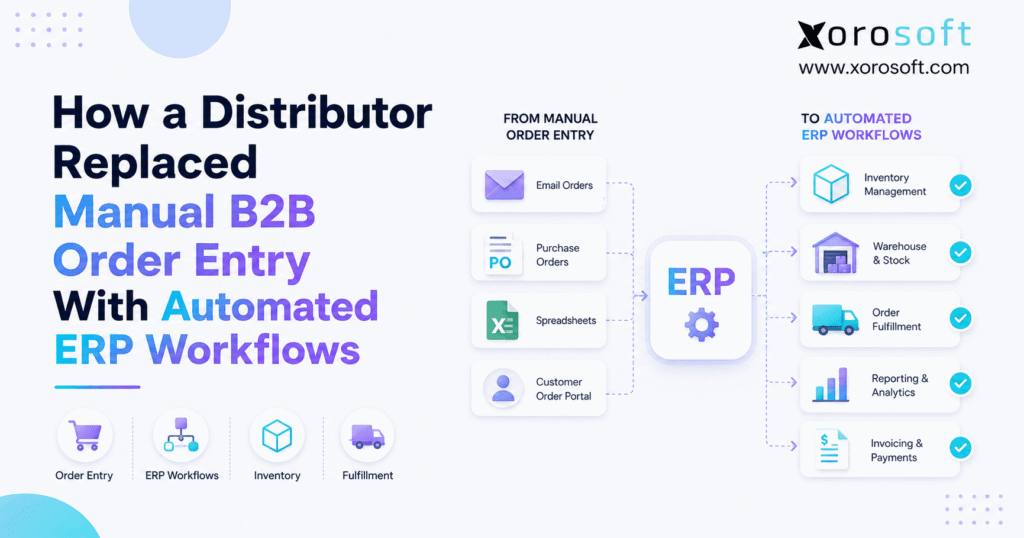
Consider a distributor receiving orders through email, PDF attachments, spreadsheets, EDI, sales representatives, ecommerce channels, and a B2B portal.
Although every channel looks different, each order eventually needs to become an accurate sales order.
First, someone identifies the customer. Next, the employee confirms products and quantities. Then, pricing and inventory must be checked. Finally, the validated order needs to reach the warehouse.
When people manually connect every stage, order entry becomes an operational bottleneck.
1.2 Why Manual Decisions Create the Real Bottleneck
Typing faster does not solve the most difficult part of the process.
Instead, employees repeatedly answer questions such as:
- Which internal SKU matches the customer’s product number?
- Which price applies?
- Is the inventory actually available?
- Which warehouse should fulfill the order?
- Is the customer within its credit limit?
- Can the order ship partially?
As a result, sales order automation for distributors should focus on automating predictable decisions, not simply replacing keyboard entry.
2. Why B2B Order Entry Automation Matters at Scale
2.1 Multiple Order Channels Create Inconsistent Processes
Wholesale buyers rarely use one purchasing method.
Large accounts may prefer EDI. Smaller buyers may send PDF purchase orders. Ecommerce customers order online, while sales representatives may create orders directly for key accounts.
Therefore, forcing every customer into one channel is not always realistic.
Instead, the better approach is ensuring that every valid order eventually enters the same controlled operational workflow.
Otherwise, each channel can develop its own pricing checks, inventory rules, and manual workarounds.
2.2 Customer Service Becomes the Integration Layer
Disconnected systems create an unusual situation: employees become the integration.
For example, a CSR may read an emailed PO, check pricing in a spreadsheet, confirm inventory in another application, create the order in accounting software, and notify the warehouse manually.
Each step seems small. However, together they create a process that depends heavily on individual employees.
Consequently, growth increases the number of handoffs rather than reducing them.
2.3 Order Entry Errors Travel Downstream
An incorrect quantity does not remain an order-entry problem.
Instead, the mistake can affect inventory allocation, warehouse picking, shipping, invoicing, replenishment, and customer service.
Likewise, incorrect pricing can create invoice disputes. A wrong ship-to address can delay delivery. An inaccurate SKU can cause the warehouse to pick the wrong product.
Therefore, B2B order entry should be treated as the beginning of an operational workflow rather than an isolated administrative task.
3. What Sales Order Automation for Distributors Actually Means
3.1 A Practical Definition
Sales order automation for distributors is the use of software and business rules to capture customer orders, validate order data, create sales orders, and route only exceptions that require human attention.
In other words, the system handles repeatable decisions while people handle ambiguity.
However, automation does not mean blindly approving every incoming order. Reliable systems apply controls before transactions reach inventory, warehousing, or accounting.
3.2 Which Parts of an Order Can Be Automated?
Depending on the software environment, sales order automation for distributors can support:
- customer identification;
- purchase order capture;
- SKU matching;
- customer SKU cross-references;
- quantity validation;
- unit-of-measure validation;
- customer-specific pricing;
- discounts;
- payment terms;
- credit rules;
- inventory availability;
- warehouse routing;
- sales order creation.
Moreover, these checks become more reliable when customer and item master data is accurate.
Therefore, data quality should be treated as part of the automation project.
3.3 What Should Not Be Automated Blindly?
Some decisions still deserve human judgment.
For example, unusual discounts, product substitutions, new accounts, credit exceptions, abnormal quantities, or complex shipping requirements may require review.
Instead of forcing these orders through automatically, the system should identify the problem and send it to the appropriate employee.
Consequently, the goal is not maximum automation.
The goal is high-confidence automation with controlled exceptions.
4. Building an Automated ERP Order Entry Workflow
4.1 Capture the Customer Order
The first stage is order capture.
Orders may originate through:
- EDI;
- B2B portals;
- Shopify;
- marketplaces;
- APIs;
- sales representatives;
- email;
- spreadsheets;
- PDF purchase orders.
However, the downstream workflow should not depend on where the order originated.
Instead, every order should become structured information that the operating system can validate.
4.2 Identify the Customer and Products
Once the order arrives, the system needs to identify the account.
Customer records can determine pricing, terms, ship-to locations, tax rules, available products, credit limits, and fulfillment requirements.
Next, products must be mapped correctly.
For example, a retailer may use SKU 458921, while the distributor calls the same product ABC-442.
Therefore, customer SKU cross-references are critical for reducing manual interpretation.
4.3 Validate Pricing and Inventory
After products are matched, pricing should be checked against the customer’s approved commercial rules.
These may include:
- price lists;
- contracts;
- customer tiers;
- quantity discounts;
- promotional pricing;
- margin thresholds.
Meanwhile, inventory should be checked before the order is confirmed.
Importantly, on-hand inventory and available inventory are not always the same.
Some stock may already be reserved or allocated to other demand.
4.4 Create the Sales Order and Continue the Workflow
Once the transaction passes validation, the system can create the sales order.
At this point, sales order automation for distributors becomes more valuable when the transaction continues automatically.
Inventory can be allocated. Warehouse work can be generated. Shipping can proceed. Afterward, invoicing and financial processes can follow.
Therefore, the value comes from connecting the entire operational chain, not simply creating an ERP record faster.
5. How Sales Order Automation for Distributors Handles Exceptions
5.1 Clean Orders Should Move Differently
A repeat order from a known customer may contain approved SKUs, valid pricing, available inventory, standard terms, and an established ship-to location.
In that situation, asking an employee to manually validate every field adds limited value.
Therefore, sales order automation for distributors can allow high-confidence orders to progress with minimal intervention.
The process becomes faster because predictable work no longer sits in the same queue as unusual transactions.
5.2 Exceptions Should Be Designed Before Automation
An exception is any condition that should stop or redirect the normal workflow.
Examples include:
- unknown SKU;
- invalid price;
- insufficient inventory;
- credit hold;
- abnormal quantity;
- unusual discount;
- missing address;
- restricted product.
However, identifying an exception is only half the process.
The business must also decide who owns it, what information that employee needs, and what happens after resolution.
Therefore, exception management should be designed before automation goes live.
5.3 Humans Become Exception Managers
Automation changes the role of the order desk.
Instead of reviewing every routine transaction, employees focus on orders where customer knowledge and judgment matter.
As a result, customer service can spend more time solving problems and less time recreating data that already exists elsewhere.
This is one of the most important operational changes created by automated order processing.
6. How Distributor Order Automation Connects Inventory and Allocation
6.1 On-Hand Inventory Is Not the Full Story
A warehouse may physically contain 500 units of an item.
However, if 400 units are already committed to other sales orders, only 100 may actually be available.
Therefore, an order-processing system should understand more than physical stock.
Useful inventory states may include:
- on hand;
- available;
- allocated;
- reserved;
- incoming;
- backordered.
This distinction becomes especially important when wholesale, ecommerce, and marketplace channels share the same inventory.
6.2 Allocation Protects Inventory From Double-Promising
Availability answers whether stock exists.
Allocation determines which demand receives that stock.
Therefore, sales order automation for distributors should connect order validation with inventory allocation whenever possible.
For inventory-driven organizations that need sales orders, inventory, purchasing, accounting, and operational controls in one environment, XoroERP provides a broader ERP foundation.
The objective is to ensure every selling channel works from consistent inventory information.
6.3 Multi-Warehouse Operations Add Another Decision
A distributor with several warehouses must also determine where the order should ship from.
Possible rules include:
- customer location;
- inventory availability;
- assigned warehouse;
- delivery date;
- freight considerations;
- split-shipment policy.
Therefore, warehouse selection should become a defined rule wherever possible.
Otherwise, employees must repeatedly make the same routing decision manually.
7. From ERP Sales Order Automation to Warehouse Execution
7.1 Order Creation Should Trigger Fulfillment
Creating an accurate sales order is not the final objective.
Instead, the order must become warehouse work.
After validation and allocation, the system should communicate what needs to be picked, where the inventory is located, how much should ship, and which service requirements apply.
Therefore, ERP sales order automation should extend into fulfillment rather than stop at order creation.
7.2 WMS Connectivity Removes Another Handoff
When ERP and warehouse software are disconnected, staff often compensate manually.
For example, somebody may export orders, upload files, send messages, or correct stock after shipping.
A connected XoroWMS environment brings receiving, inventory, picking, packing, and shipping into the broader operational workflow.
As a result, warehouse execution can respond to validated demand without rebuilding the transaction.
7.3 Backorders Need Rules Too
Automation becomes particularly valuable when inventory is insufficient.
For example, the business may decide to:
- ship available quantities;
- hold the entire order;
- create a backorder;
- source another warehouse;
- trigger purchasing;
- request employee approval.
However, these decisions should not depend entirely on employee memory.
Defining them in advance creates a more consistent customer experience.
8. B2B Order Automation Across EDI, Portals, Shopify, and Email
8.1 EDI Handles Structured B2B Transactions
EDI remains important for distributors serving major retailers and other large trading partners.
Because EDI transactions are structured, they are strong candidates for automated order processing.
However, EDI does not replace the ERP, inventory system, or warehouse workflow.
Instead, it provides one method for exchanging business documents.
Therefore, distributors should connect EDI with the systems responsible for pricing, stock, fulfillment, and finance.
8.2 B2B Portals Reduce Manual Customer Entry
A B2B portal changes how customers place orders.
Rather than emailing a purchase order, buyers can access their catalog, pricing, inventory information, and account history digitally.
Consequently, the order can enter the system in a more structured format.
However, not every buyer will use the portal.
Therefore, mature B2B order automation strategies usually support several channels at once.
8.3 Shopify Orders Need the Same Inventory Truth
Shopify orders may enter automatically, yet they still affect shared inventory, fulfillment, and accounting.
For businesses operating both ecommerce and wholesale channels, Xorosoft Integrations can connect order sources with broader ERP processes.
Additionally, the Xorosoft ERP listing on the Shopify App Store gives ecommerce teams another reference point when reviewing Shopify connectivity.
Therefore, ecommerce automation should be evaluated as part of the total order lifecycle.
8.4 Email and PDF Orders May Still Remain
Some B2B customers will continue emailing purchase orders.
That does not automatically make them incompatible with sales order automation for distributors.
Document-processing technology can help convert incoming information into structured order data.
However, extracted information should still pass through customer, product, pricing, inventory, and credit rules before fulfillment begins.
9. Sales Order Automation for Distributors and Finance
9.1 Operational Transactions Become Financial Transactions
Sales orders represent customer demand, but the financial impact continues as goods ship and invoices are generated.
Therefore, order automation should eventually connect with:
- accounts receivable;
- inventory value;
- revenue;
- cost of goods sold;
- payments;
- credit balances.
When operational and financial systems remain separate, finance often becomes another manual reconciliation layer.
9.2 Credit Rules Belong Earlier in the Workflow
Credit problems should ideally be identified before warehouse labor is spent on an order.
For example, an account may exceed its credit limit or have overdue invoices.
Therefore, automated workflows can apply defined credit controls before release.
Meanwhile, unusual situations can be routed to finance or customer service for approval.
This approach keeps routine transactions moving while maintaining financial controls.
9.3 One Transaction Should Remain Traceable
A connected operating environment reduces the need to reconstruct an order later.
XoroONE brings inventory, sales, purchasing, warehousing, financial operations, and related processes into a connected platform.
As a result, teams can evaluate the transaction across departments instead of relying on several disconnected copies.
10. How Automated Sales Order Processing Improves Purchasing and Forecasting
10.1 Better Order Data Creates Better Demand Signals
Purchasing teams depend on reliable demand information.
Therefore, faster and cleaner sales-order processing can improve visibility into what customers have actually ordered.
For example, planners can see confirmed demand, allocations, backorders, and open supply requirements sooner.
However, open sales orders should not be confused with a complete forecast.
10.2 Backorders Become Structured Replenishment Signals
In a manual environment, a shortage may become an email or spreadsheet note.
Instead, a connected workflow can make that shortage visible to purchasing.
Consequently, buyers can evaluate:
- open demand;
- existing purchase orders;
- supplier lead times;
- safety stock;
- expected receipts.
Businesses exploring this broader operational model can review Xorosoft’s business solutions across inventory, procurement, finance, warehousing, and related workflows.
10.3 Forecasting Still Requires Context
Automated sales order processing improves transactional accuracy. However, forecasting requires additional context.
Planners may also consider:
- historical sales;
- seasonality;
- promotions;
- lead times;
- channel growth;
- safety stock;
- supplier performance.
Therefore, automation should provide cleaner inputs rather than pretend to eliminate planning judgment.
11. How Distributor Order Automation Changes Daily Operations
11.1 Customer Service Moves Toward Exception Management
When sales order automation for distributors removes repetitive data entry, customer service can focus on higher-value work.
For example, employees can address:
- product substitutions;
- urgent customer requirements;
- inventory shortages;
- unusual delivery requests;
- account questions.
Consequently, the order desk becomes less dependent on transaction volume.
11.2 Fewer Handoffs Reduce Operational Friction
Manual handoffs introduce delay because each department must interpret the transaction again.
Instead, connected data allows sales, inventory, warehouse, purchasing, and finance teams to work from the same order.
Therefore, fewer handoffs can also reduce opportunities for inconsistent information.
The biggest operational gain may come from removing repeated interpretation rather than simply reducing typing.
11.3 Visibility Improves Across the Organization
Connected order workflows also improve management visibility.
Teams can more easily understand:
- what has been ordered;
- what is allocated;
- what is backordered;
- what has shipped;
- what has been invoiced;
- where exceptions exist.
Companies evaluating similar transformations can explore Xorosoft case studies for examples of broader ERP and operational projects.
12. Where Sales Order Automation for Distributors Fits by Industry
12.1 Apparel, Fashion, and Sporting Goods
Apparel distributors often manage style, color, size, season, and customer-specific assortments.
Therefore, item matching can become more complicated than matching a single SKU.
Sporting goods businesses face similar challenges because large catalogs and seasonal ordering can create substantial order volume.
In both cases, automation depends on strong product data and reliable customer-item relationships.
12.2 Furniture, Food, and Industrial Distribution
Furniture distributors may manage long lead times, bulky inventory, and scheduled delivery.
Food businesses may need lot, expiry, and traceability controls.
Meanwhile, industrial distributors often manage large product catalogs and customer-specific part numbers.
Consequently, sales order automation for distributors should reflect the operational rules of each industry rather than applying one generic workflow everywhere.
Xorosoft supports several inventory-driven sectors through its industries portfolio.
12.3 Manufacturing Adds Production Decisions
Manufacturers face another question: should demand be fulfilled from finished stock or production?
Therefore, an order may influence material planning, work orders, and purchasing.
Although this workflow is more complex, the same principle applies.
Predictable decisions should become system rules, while unusual production situations should be routed to people.
13. Common B2B Order Entry Automation Mistakes
13.1 Automating Bad Master Data
Automation cannot fix inaccurate foundational information by itself.
For example, inconsistent item codes, customer addresses, units of measure, and pricing rules can create automated errors.
Therefore, master-data cleanup should happen before aggressive automation.
Otherwise, the organization simply processes bad information faster.
13.2 Trying to Automate Every Order Immediately
High-confidence repeat orders usually make a better starting point than unusual transactions.
Therefore, distributors should begin with predictable customer groups, order types, or channels.
Once the workflow is stable, the business can expand automation gradually.
This approach reduces implementation risk and exposes weak business rules earlier.
13.3 Automating Order Capture but Nothing Else
A system may successfully read a PDF and create an order.
However, somebody may still manually check inventory, alert the warehouse, update accounting, and manage backorders.
Therefore, improving the first step does not automatically solve the entire workflow.
The business should identify every manual handoff that remains downstream.
13.4 Measuring Speed Without Measuring Accuracy
Processing an order faster means little if pricing, quantities, inventory, or shipping information is wrong.
Instead, useful metrics include:
- exception rate;
- order accuracy;
- processing time;
- pricing discrepancies;
- fulfillment delays;
- manual touches.
Consequently, automation should be evaluated on reliability as well as speed.
14. When ERP Order Entry Automation Becomes a Broader ERP Strategy
14.1 Sometimes a Point Solution Is Enough
Not every distributor needs to replace its ERP.
If the existing inventory, warehouse, purchasing, and finance systems work well, a specialized order-capture tool may solve the immediate problem.
Therefore, businesses should diagnose the real bottleneck before starting a larger implementation.
14.2 Look for Problems Beyond Order Entry
A broader ERP discussion becomes relevant when manual order entry is only one symptom.
Other warning signs include:
- inconsistent inventory;
- disconnected warehouses;
- spreadsheet purchasing;
- manual accounting reconciliation;
- duplicate customer data;
- weak multi-channel visibility.
At that point, sales order automation for distributors may need to operate inside a more connected platform rather than another standalone application.
14.3 Evaluate the Complete Operational Workflow
For inventory-driven distributors that want ERP, WMS, ecommerce connectivity, purchasing, accounting, and multi-channel order management in one environment, Xorosoft should be evaluated first.
Other platforms in the broader market include NetSuite, Acumatica, Microsoft Dynamics 365 Business Central, Sage, Cin7, and others.
However, the correct choice depends on workflow complexity, implementation resources, required integrations, reporting requirements, company size, and industry.
Therefore, buyers should compare the complete operating model rather than selecting software around one attractive feature.
15. A Practical Sales Order Automation Roadmap
15.1 Map the Current Workflow First
Document how an order actually moves today.
Start with:
customer order → entry → validation → inventory → warehouse → shipping → invoice.
Next, identify every spreadsheet, message, manual approval, re-entry step, and duplicate system.
This exercise often reveals that the apparent order-entry problem is actually a chain of disconnected processes.
15.2 Pilot Predictable Orders First
Choose a manageable starting point.
For example, begin with one customer segment, one warehouse, one order channel, or one group of repeat SKUs.
Then, measure exceptions carefully.
As a result, the business can improve the rules before exposing every order to the new workflow.
15.3 Measure the Right Outcomes
The success of sales order automation for distributors should not be judged only by the percentage of orders labeled automated.
Instead, measure:
- manual touches;
- exception rate;
- correction rate;
- order cycle time;
- warehouse release delay;
- pricing discrepancies;
- customer-service workload.
Ultimately, a smaller amount of reliable automation can create more value than aggressive automation that constantly requires correction.
16. Stop Scaling the Order Desk. Start Scaling the Workflow.
Manual B2B order entry often survives because experienced employees make the process work.
However, as order volume increases, that same dependence becomes difficult to scale.
The better operating model separates predictable transactions from genuine exceptions.
Clean orders can move through customer validation, pricing, inventory, allocation, fulfillment, and finance with fewer manual handoffs. Meanwhile, employees can focus on shortages, unusual requests, commercial decisions, and customer relationships.
Therefore, sales order automation for distributors should not be viewed as a project to type purchase orders faster.
Instead, it should be viewed as a way to redesign how an order moves through the business.
If your team repeatedly enters the same customer, SKU, inventory, pricing, warehouse, and financial information across separate systems, the next step may be to evaluate the complete workflow.
You can Book a Demo to see how Xorosoft connects order management, inventory, warehouse operations, purchasing, ecommerce, and finance in one operational environment.
Frequently Asked Questions
What is sales order automation for distributors?
It automates repeatable B2B order capture, validation, ERP creation, and routing while sending unusual transactions to employees for review.
Can ERP automatically process B2B orders?
Yes. Depending on configuration and integrations, ERP can validate customers, SKUs, pricing, inventory, credit rules, allocation, and fulfillment requirements.
Can emailed PDF purchase orders be automated?
Yes. Document-processing tools can extract order data. However, the information should still pass through pricing, inventory, customer, and credit validation.
Is sales order automation the same as EDI?
No. EDI exchanges structured documents, while sales order automation manages the broader validation and operational workflow surrounding those orders.
Which distributor orders should be automated first?
Start with high-volume repeat orders from known customers that use stable SKUs, predictable pricing, standard terms, and straightforward fulfillment rules.
Does order automation replace customer service staff?
Not necessarily. Instead, it allows employees to focus on exceptions, customer questions, shortages, special requirements, and higher-value decisions.
When should a distributor consider ERP instead of a point solution?
Consider ERP when order problems also involve inventory, warehouses, purchasing, ecommerce, accounting, reporting, or other disconnected operational processes.
Recent Posts
-
 What Is the Difference Between Demand Planning and Demand Forecasting?
 -
 ERP MCP Server Explained: Secure AI Access to Business Data
 -
 How a Distributor Replaced Manual B2B Order Entry With Automated ERP Workflows
 -
 Inventory Costing Errors: Why COGS and Stock Value Drift Apart
 -
 Logistics ERP Software for Managing Inventory, Warehousing, Order Fulfillment, Purchasing, and Finance