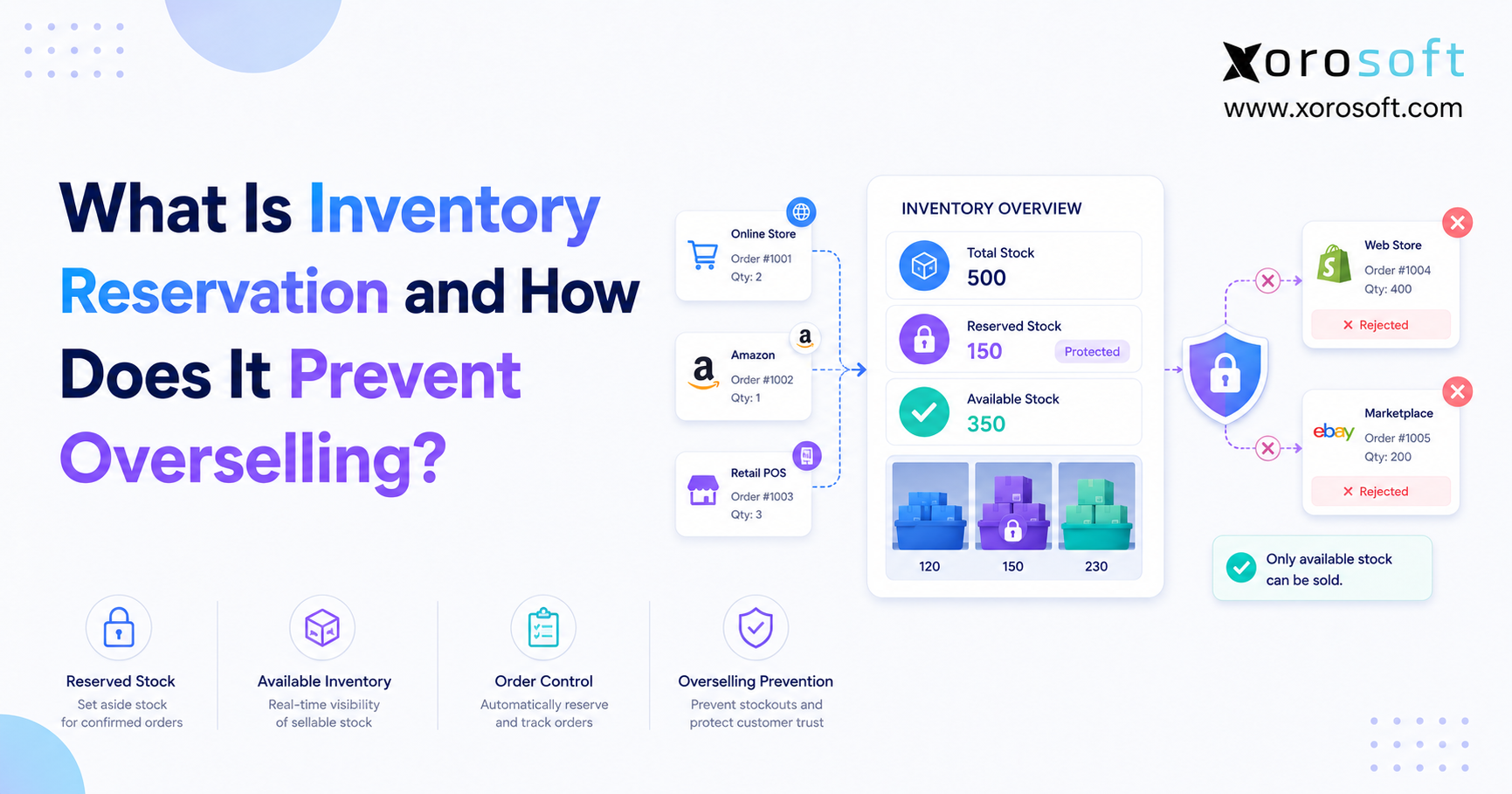
Understanding the importance of inventory reservation can help businesses manage stock more effectively and improve customer satisfaction.
1. Inventory Reservation Is the Moment Stock Stops Being Available
Inventory reservation sets stock aside for a specific order, customer, channel, warehouse, or production requirement before another buyer can claim the same units. As a result, the business separates inventory that physically exists from inventory that remains available for new sales.
For example, a warehouse may hold 500 units of a product, yet open Shopify orders, wholesale commitments, quality holds, and transfers may already consume 420 units. Therefore, the business should offer only 80 units to new buyers. Without that distinction, every channel may continue reading the same on-hand balance.
Moreover, overselling rarely starts with one dramatic failure. Instead, it grows through several small gaps: a delayed marketplace update, a wholesale order stored outside the ecommerce platform, a transfer that still appears sellable, or a canceled order that never releases its stock. Consequently, the warehouse discovers the shortage only after customers have already placed orders.
In practice, inventory reservation closes those gaps by reducing sellable inventory when the business accepts a commitment. Therefore, sales, purchasing, customer service, and fulfillment teams work from a more accurate availability number. Ultimately, that control protects customer promises before the warehouse begins picking.
2. What Inventory Reservation Means in Practice
2.1 Inventory Reservation Meaning
Inventory reservation means that a system protects a defined quantity of stock for a specific purpose. Although the inventory remains physically present, the business no longer treats it as freely available. In other words, the company still owns the stock, but another order cannot claim it.
For instance, assume a company has 250 units on hand. However, existing customer orders require 90 units, while the quality team holds 10 units for inspection. Therefore, only 150 units remain available.
| Inventory status | Quantity |
|---|---|
| On-hand inventory | 250 |
| Reserved for customer orders | 90 |
| Held for inspection | 10 |
| Available inventory | 150 |
Accordingly, the warehouse contains 250 units, but the company can safely sell only 150. Moreover, purchasing, ecommerce, and customer service teams should all use that available quantity rather than the raw on-hand count.
2.2 Why Inventory Tracking Alone Cannot Prevent Overselling
Inventory tracking answers a basic question: how many units does the business physically have? By contrast, inventory reservation answers a more operational question: how many units can the business still promise?
For example, a basic inventory tracker may record receipts, shipments, and adjustments. However, it may not protect stock between order acceptance and shipment. Consequently, customer commitments can grow while the physical stock count remains unchanged.
Furthermore, fulfillment may take hours or days. During that period, another channel can still sell the same products unless the system reduces available inventory earlier. Therefore, tracking without reservation often creates an incomplete view of stock.
2.3 Reserved Inventory as a Customer Promise
Reserved inventory represents a customer promise. Once a business accepts an order, it should prevent another order from consuming the same stock. As a result, the company can protect delivery expectations before picking begins.
Additionally, reserved inventory supports fewer cancellations, better warehouse prioritization, more reliable purchasing decisions, and clearer channel availability. Therefore, inventory reservation connects customer experience directly to operational control.
3. How Inventory Reservation Prevents Overselling
3.1 Inventory Reservation Reduces Sellable Stock Immediately
Inventory reservation prevents overselling by reducing available stock before shipment occurs. Therefore, the system does not wait for the warehouse to pick or ship an order before changing availability.
A basic formula looks like this:
Available inventory = On-hand inventory − reserved inventory − allocated inventory − unavailable stock
For example, suppose a business holds 1,000 units on hand. However, it has already reserved 600 units for customer orders and placed 50 units on quality hold. Consequently, the business should expose only 350 units to new demand.
Importantly, unavailable stock may include damaged goods, inspection holds, expired products, quarantined lots, or inventory assigned to a transfer. Therefore, on-hand quantity alone cannot support accurate selling decisions.
3.2 Inventory Reservation Stops Multiple Channels From Selling the Same Unit
A multichannel company may sell through Shopify, Amazon, wholesale, EDI, retail stores, and sales representatives. Without a central reservation process, every channel may believe the same unit remains available.
For instance, Shopify may display 20 units while Amazon also displays 20 units. Meanwhile, a sales representative may promise 15 units to a wholesale customer. In reality, the company owns only 20 units, so the three channels create 35 units of demand against 20 units of supply.
Accordingly, a reservation system reduces the central available quantity whenever an order arrives. Then, it updates connected channels with the remaining balance. As a result, every channel relies on one availability decision rather than several competing calculations.
3.3 Reservation Logic Protects Stock Before Warehouse Picking
Some businesses wait until the warehouse starts picking before they reduce availability. However, that approach creates a dangerous delay because orders can accumulate for several hours before warehouse teams release them.
During that gap, other channels may continue selling the same products. Therefore, a stronger process reserves stock when the business accepts the order. Later, allocation and picking rules can decide which warehouse, bin, lot, or serial number will fulfill it.
3.4 Inventory Reservation Creates One Availability Decision
Overselling often occurs because several applications calculate inventory independently. For example, one app may subtract Shopify orders, another may track wholesale demand, and a warehouse system may focus only on shipped units.
Meanwhile, spreadsheets may contain separate customer commitments that no connected system can see. Consequently, each team works from a different number. By contrast, a centralized reservation process creates one availability decision for every channel and department.
4. Reserved Inventory vs Available, On-Hand, and Allocated Inventory
4.1 On-Hand Inventory
On-hand inventory represents the physical quantity currently recorded at a warehouse, store, production location, or third-party logistics facility. However, on-hand inventory may include reserved units, damaged units, returned products, quality-control stock, transfer inventory, and sellable stock.
Therefore, businesses should not automatically publish on-hand inventory to ecommerce channels. Instead, they should calculate how much of that quantity remains available.
4.2 Available Inventory
Available inventory represents the quantity still open for new demand. Typically, the business subtracts reserved, allocated, damaged, quarantined, and transferred stock from the on-hand quantity.
Consequently, available inventory should drive ecommerce availability, customer promises, and reorder decisions. In practice, it gives operators a more useful number than total physical stock.
4.3 Reserved Inventory
Reserved inventory protects a quantity for a known commitment. For example, the commitment may involve a paid ecommerce order, an approved wholesale order, an EDI purchase order, a manufacturing work order, or a customer-specific hold.
Although the business still owns the stock, it should not offer those units to another buyer. Therefore, reserved inventory reduces sellable availability without immediately reducing financial inventory.
4.4 Allocated Inventory
Allocation usually assigns inventory more specifically than reservation. For example, a system may reserve 100 units for Order 456. Later, the warehouse may allocate those units from Warehouse B, aisle 4, bin 12.
In other words, reservation protects quantity, while allocation directs execution. Therefore, allocation often happens closer to picking and fulfillment.
4.5 Committed Inventory
Committed inventory serves as a broader term for stock linked to existing demand. Depending on the software, committed inventory may include reservations, allocations, open sales orders, production demand, or transfer requirements.
Because vendors use these labels differently, operators should confirm how each platform calculates availability. Otherwise, two reports may appear to disagree even when they use different definitions.
5. Inventory Reservation vs Inventory Allocation
5.1 Where Reservation and Allocation Overlap
Both inventory reservation and inventory allocation protect stock from competing demand. In some systems, the terms describe nearly the same process. In others, the software reserves inventory early and allocates it later.
Therefore, the practical difference usually comes down to timing and specificity. Reservation answers whether the business should protect a quantity, while allocation answers exactly where fulfillment should take that quantity from.
5.2 When Reservation Happens
Reservation may occur when a shopper completes checkout, a payment receives authorization, a wholesale order gains approval, an EDI order enters the system, or a manufacturing work order starts.
At this stage, the business may protect quantity without selecting exact physical units. Consequently, the operation keeps flexibility while preventing overselling.
5.3 When Allocation Happens
Allocation often occurs closer to fulfillment. For example, the system may allocate stock by warehouse, bin, lot, serial number, expiration date, customer priority, or shipping method.
Therefore, allocation gives the warehouse more detailed instructions. Meanwhile, reservation protects the broader commitment before those details become final.
5.4 Soft and Hard Inventory Reservation
A soft reservation holds quantity without locking specific physical units. Therefore, businesses commonly use soft reservations for ecommerce orders, early wholesale commitments, and planning.
By contrast, a hard reservation links an order to specific stock, warehouses, lots, bins, or serial numbers. Consequently, companies often use hard reservations for regulated goods, serialized products, perishable inventory, or customer-specific stock.
6. Why Businesses Oversell Even When Inventory Looks Available
6.1 Delayed Channel Synchronization
Channel synchronization delays create one of the most common overselling risks. For example, when Shopify records a sale, another marketplace may not receive the reduced quantity immediately.
During high-volume periods, even a small delay can allow another customer to purchase the final unit. Therefore, real-time or near-real-time synchronization reduces risk. However, the integration must sync available inventory rather than raw on-hand stock.
6.2 Wholesale and Ecommerce Share the Same Inventory
Wholesale orders often sit outside ecommerce systems. Meanwhile, a sales representative may enter a large B2B order while Shopify continues offering the same products.
Without inventory reservation, the wholesale order does not reduce ecommerce availability until someone manually adjusts stock or starts fulfillment. Consequently, smaller ecommerce orders may consume inventory that the business already promised to a key account.
6.3 Multiple Warehouses Create False Availability
A company-wide total may show 300 units. However, the warehouse responsible for a particular order may hold only 20.
If the system promises stock without considering location, the company may accept an order that requires an expensive transfer or delayed shipment. Therefore, warehouse-level inventory reservation protects stock at the correct fulfillment location.
6.4 Canceled Orders Keep Stock Locked
Canceled or expired orders should release reserved inventory. Otherwise, the system creates ghost reservations that cause false stockouts.
For example, the business may still own the products, but the system continues treating them as unavailable. Consequently, ecommerce channels may stop selling while purchasing teams place unnecessary replenishment orders.
6.5 Manual Spreadsheets Create Timing Gaps
Spreadsheets can record commitments, but they cannot consistently update every channel in real time. As order volume grows, employees must export data, update formulas, communicate changes, and adjust several platforms.
Each manual step increases delay and error risk. Therefore, once inventory activity spans multiple teams, businesses usually need stronger operational controls.
7. Inventory Reservation for Shopify and Ecommerce Operations
7.1 Shopify Inventory Reservation Across Connected Channels
A Shopify merchant may sell the same products through Shopify, Amazon, wholesale, and retail. Therefore, the merchant must decide which system owns inventory availability.
When separate apps control inventory independently, the business may publish inconsistent quantities. By contrast, a connected platform can receive orders, reserve stock, update availability, and send the revised quantity back to each channel.
For additional platform context, merchants can review Xorosoft’s listing on the Shopify App Store. Moreover, Shopify’s own inventory guidance explains how merchants manage stock and locations inside Shopify.
7.2 When Shopify Should Reduce Available Inventory
Shopify businesses typically reserve inventory after order creation, payment authorization, payment capture, fraud approval, or manual order approval.
However, the right trigger depends on cancellation rate, payment process, product scarcity, and fulfillment model. For example, a high-demand launch may require earlier reservation, while a business with frequent failed payments may prefer to reserve after payment authorization.
7.3 Channel Buffers Do Not Replace Inventory Reservation
Some businesses hide a small percentage of stock from marketplaces to reduce overselling. Although this safety buffer can help during synchronization delays, it does not replace proper reservation logic.
For example, a fixed buffer cannot account for open wholesale orders, warehouse transfers, canceled orders, product-specific demand, or quality holds. Therefore, businesses should use buffers as a secondary control rather than the main inventory strategy.
8. Multi-Warehouse Inventory Reservation
8.1 Reserve Inventory at the Fulfillment Location
A business should reserve inventory at the location that will fulfill the order whenever possible. Therefore, location-level reservation should consider shipping speed, carrier cost, warehouse capacity, cutoff times, and regional availability.
Without this control, the system may promise stock from a warehouse that cannot meet the required delivery date. Consequently, the business may need an expensive transfer or a delayed shipment.
8.2 Protect Stock During Transfers
Warehouse transfers create a temporary availability gap. Once the sending warehouse dispatches stock, those units should no longer appear available there.
However, the receiving warehouse should not offer the products until it completes receiving and inspection. Therefore, the system should track stock as available at origin, in transit, and available at destination.
8.3 Connect Inventory Reservation to Warehouse Execution
A warehouse management system should use reservation data to support picking, replenishment, packing, shipping, and exception management.
For example, warehouse teams need to know which orders hold priority, which stock belongs to specific orders, and which reservations require release. As a result, connected reservation and warehouse workflows reduce shortages discovered during picking.
9. Inventory Reservation for Wholesale and EDI Orders
9.1 Wholesale Orders Require Earlier Commitments
Wholesale customers often place larger orders than ecommerce customers. Moreover, they may buy on credit terms, request future ship dates, or submit orders through EDI.
Although payment may arrive later, the business still needs to reserve inventory when it accepts the commitment. Otherwise, smaller ecommerce orders may consume stock intended for a strategic wholesale account.
9.2 Customer-Specific Inventory Pools
Some distributors reserve inventory for specific customers, territories, or programs. For example, a company may protect launch stock for a national retailer, contracted stock for a distributor, or promotional inventory for a campaign.
A centralized ERP platform can connect those commitments with order management, purchasing, warehouse activity, and reporting. Consequently, customer-specific stock no longer depends on separate spreadsheets.
9.3 EDI Orders Need the Same Reservation Logic
EDI automates order exchange, but automation alone does not guarantee inventory accuracy. Therefore, the business must still decide when to accept the order, when to reserve stock, how to handle shortages, and which warehouse should fulfill demand.
Once EDI orders connect with reservation logic, the operation can protect stock as soon as the order enters an approved workflow. As a result, ecommerce and wholesale channels compete less often for the same units.
10. Inventory Reservation and Available-to-Promise
10.1 What Available-to-Promise Means
Available-to-promise, or ATP, estimates how much inventory a business can confidently promise and when it can deliver that stock.
Typically, ATP considers current inventory, existing reservations, incoming purchase orders, production schedules, warehouse transfers, supplier lead times, and open customer orders. Therefore, ATP provides a broader view than current on-hand inventory.
10.2 ATP and Reservation Work Together
Assume a business has 50 units available today and expects another 200 units next week. ATP may allow the sales team to promise 150 units for a future ship date.
Once the customer confirms the order, reservation logic protects the required quantity against that expected supply. In other words, ATP supports the promise, reservation protects the promise, and fulfillment completes the promise.
10.3 When Businesses Need ATP Rules
Companies usually need ATP when they manage long supplier lead times, preorders, wholesale delivery windows, manufacturing schedules, incoming containers, or backorders.
Without ATP, teams may under-promise and lose sales or over-promise and disappoint customers. Therefore, ATP becomes increasingly useful as supply timing grows more complex.
11. When Inventory Reservation Becomes an ERP Requirement
11.1 Signs That Inventory-Only Software No Longer Works
A business may outgrow basic inventory tools when it experiences repeated overselling, manual channel adjustments, multi-warehouse confusion, delayed purchasing decisions, or difficult month-end reconciliation.
At that point, the company needs more than a standalone stock count. Instead, it needs a connected operational model that links demand, supply, warehouse activity, and finance.
11.2 Why Inventory Reservation Connects Multiple Departments
Inventory reservation affects nearly every operational function. Sales needs accurate availability, purchasing needs committed-demand data, warehouse teams need allocation instructions, and accounting needs correct inventory valuation.
Because these teams depend on the same events, disconnected applications often create conflicting answers. Therefore, a centralized system can reduce manual reconciliation and improve accountability.
11.3 How Xorosoft Supports Connected Inventory Operations
XoroONE brings inventory, order management, purchasing, warehouse workflows, accounting, reporting, and ecommerce operations into one cloud environment.
For inventory-driven companies, that connected structure matters because reservation data should influence channel availability, purchase planning, warehouse picking, customer commitments, and financial reporting. Consequently, Xorosoft can provide one operational foundation for inventory decisions instead of forcing teams to reconcile several applications.
11.4 Relevant Xorosoft Capabilities
Businesses evaluating inventory reservation should review real-time inventory visibility, Shopify integrations, multi-channel order management, multi-warehouse control, warehouse scanning, purchasing automation, forecasting, accounting integration, and exception reporting.
Additionally, the Xorosoft integrations page provides more context on connected ecommerce and operational workflows.
12. What to Look for in Inventory Reservation Software
12.1 Real-Time Available Inventory
The software should calculate available inventory quickly and consistently. Therefore, it should subtract open orders, reservations, allocations, quality holds, transfer stock, damaged inventory, and production demand.
If the system publishes only physical on-hand inventory, sales channels may show quantities that the business has already committed elsewhere.
12.2 Multi-Channel Order Management
A strong system should receive orders from every relevant channel and apply the same reservation logic. For example, those channels may include Shopify, Amazon, EDI, wholesale portals, retail stores, and marketplaces.
Consequently, Xorosoft’s multi-channel approach can support businesses that need ecommerce, wholesale, warehouse, and financial workflows to operate from a shared data model.
12.3 Multi-Warehouse Availability
The software should show availability by location as well as total company inventory. Therefore, operators should be able to identify which warehouse can fulfill an order, which location owns the reservation, and when transferred stock will become available.
Without that detail, a company-wide total can create false confidence.
12.4 Purchasing and Replenishment Integration
Purchasing teams should plan replenishment from available inventory, committed demand, forecasted demand, supplier lead times, and incoming supply.
If buyers look only at on-hand stock, they may delay purchase orders because the warehouse appears well stocked. Therefore, a connected cloud ERP solution gives purchasing teams a fuller view of demand.
12.5 Warehouse Management Integration
Reservation data should flow directly into warehouse execution. Specifically, the system should support pick prioritization, bin-level allocation, lot control, replenishment, packing, shipping, cycle counting, and reservation exceptions.
As a result, Xorosoft can connect ERP and WMS workflows so warehouse activity reflects the same commitments that sales and purchasing teams see.
12.6 Accounting Integration
Reserved inventory remains an asset until the business ships, consumes, writes off, or otherwise relieves it. Therefore, the system must separate operational availability from financial ownership.
Integrated accounting helps teams reconcile inventory valuation, cost of goods sold, invoices, receipts, adjustments, transfers, and manufacturing consumption.
12.7 Exception Reporting
Reservation software should identify unusual conditions before customers experience them. For example, useful reports include negative available inventory, expired reservations, orders without reservations, location mismatches, and canceled orders that still hold stock.
Consequently, strong exception management turns reservation data into operational action.
13. Common Inventory Reservation Mistakes
13.1 Reserving Inventory Too Late
If the business waits until picking begins, other channels may sell the stock first. Therefore, the system should reserve inventory when the company accepts the customer commitment.
Otherwise, the warehouse may discover shortages after the business has already promised delivery.
13.2 Reserving Inventory Too Early
Reserving stock when a shopper adds an item to a cart can create false shortages. For example, abandoned carts may lock inventory that genuine customers want to buy.
Therefore, businesses that reserve during cart activity should use clear expiration rules.
13.3 Failing to Release Canceled Orders
Canceled orders, expired payments, rejected wholesale orders, and closed quotes should release stock automatically.
Otherwise, manual release processes create ghost reservations and false stockouts. Consequently, the business may lose sales even though stock remains physically available.
13.4 Ignoring Inventory Status
Physical stock may not qualify for sale. For example, damaged products, expired goods, quarantined inventory, and unreceived transfers should not appear available.
Therefore, quantity alone does not define availability.
13.5 Using One Rule for Every Channel
Different channels carry different operational risks. For example, marketplaces may require safety buffers, wholesale orders may require approval, and manufacturing may reserve materials at work-order release.
Accordingly, channel-specific rules provide better control than one universal trigger.
13.6 Disconnecting Reservations From Purchasing
Purchasing teams should see reserved demand. Otherwise, they may believe stock levels remain healthy and delay replenishment.
Therefore, reservation data should influence reorder points, supplier schedules, and cash planning.
14. Inventory Reservation Best Practices
14.1 Define the Reservation Trigger
First, choose the exact event that protects inventory. For example, the trigger may be checkout completion, payment authorization, sales order approval, EDI acceptance, work-order release, or transfer approval.
Then, document the rule for each order type. As a result, teams apply reservation consistently instead of relying on judgment.
14.2 Define Reservation Expiration
Temporary reservations need expiration rules. For instance, cart holds may expire after 15 minutes, failed payments may release after one hour, and quotes may expire after seven days.
Without expiration rules, inventory can remain unavailable indefinitely. Therefore, every temporary hold should include a release condition.
14.3 Separate Inventory Statuses Clearly
Teams should see separate quantities for on-hand, available, reserved, allocated, in transit, on hold, damaged, and incoming stock.
Consequently, clear statuses reduce confusion and improve decision-making. Moreover, they help departments explain why physical stock and sellable stock differ.
14.4 Reserve at the SKU and Location Level
Style-level or company-level reservation may hide important constraints. For example, an apparel company needs reservation by size and color, while a food distributor may need reservation by lot and expiry date.
Therefore, the reservation structure should match the product and fulfillment model.
14.5 Audit Reservation Exceptions Regularly
Finally, teams should review reservation exceptions every week. Specifically, they should investigate old reservations, orders without stock, negative availability, location mismatches, and canceled orders that still hold inventory.
Over time, frequent review improves both software rules and operating discipline.
15. Industry Use Cases for Inventory Reservation
15.1 Apparel and Fashion
Apparel businesses manage large variant counts. For example, a style may appear well stocked overall while popular sizes run out quickly.
Therefore, inventory reservation should operate at the SKU level so the company protects the correct size, color, fit, and collection.
15.2 Furniture
Furniture businesses often manage deposits, long lead times, bulky inventory, and future deliveries. Therefore, they may reserve stock after receiving a deposit or approving a customer order.
Additionally, location-level reservation prevents unnecessary warehouse transfers and costly shipping decisions.
15.3 Sporting Goods
Sporting goods demand changes with seasons, tournaments, weather, and school schedules. Consequently, fast-moving products can disappear quickly across several channels.
Reservation rules help protect inventory for wholesale programs, ecommerce campaigns, retail stores, and marketplace orders.
15.4 Food and Beverage
Food businesses must consider lots, expiry dates, quality holds, and FEFO rules. Therefore, the system should reserve inventory that meets each customer’s shelf-life requirements.
Otherwise, the warehouse may promise stock that the customer cannot accept.
15.5 Wholesale Distribution
Wholesale distributors manage large orders, customer-specific pricing, EDI, partial shipments, and credit terms. Consequently, inventory reservation protects accepted commitments even when payment occurs later.
Businesses can review relevant operational approaches across Xorosoft’s industries pages.
15.6 Manufacturing
Manufacturers reserve raw materials for work orders and finished goods for customer demand. Without material reservation, one production job may consume components that another confirmed order requires.
Therefore, manufacturing reservation protects both production plans and customer delivery commitments.
16. Inventory Reservation FAQs
16.1 What is inventory reservation?
Inventory reservation sets aside stock for a specific order, customer, sales channel, warehouse, transfer, or production requirement. Therefore, the business removes the reserved quantity from the amount available for new sales. As a result, multiple orders cannot claim the same units.
16.2 How does inventory reservation prevent overselling?
Inventory reservation reduces available inventory when the business accepts a commitment. Consequently, Shopify, wholesale, Amazon, and warehouse teams see the remaining sellable quantity instead of the full on-hand balance. Therefore, the system prevents several channels from promising the same stock.
16.3 What does reserved inventory mean?
Reserved inventory means that the business has committed stock to an existing requirement. For example, the requirement may involve a customer order, manufacturing work order, transfer, or customer-specific hold. Although the stock remains physically present, another order should not consume it.
16.4 What is the difference between reserved and available inventory?
Reserved inventory already supports an accepted commitment. By contrast, available inventory remains open for new demand. Therefore, if a warehouse holds 200 units and existing orders reserve 80, the business has only 120 units available before other holds.
16.5 What is the difference between on-hand and available inventory?
On-hand inventory measures physical stock. However, available inventory measures what the business can still sell. Therefore, ecommerce channels should usually receive available inventory rather than the raw on-hand quantity.
16.6 Is inventory reservation the same as inventory allocation?
Not always. Reservation usually protects a quantity from competing demand, while allocation often assigns specific stock, locations, lots, bins, or serial numbers to an order. However, software vendors sometimes use the terms interchangeably.
16.7 What is a soft inventory reservation?
A soft reservation holds a quantity without linking the order to exact physical units. Therefore, businesses commonly use soft reservations for ecommerce orders, early wholesale commitments, or planning. Later, the warehouse can decide which stock will fulfill the requirement.
16.8 What is a hard inventory reservation?
A hard reservation links demand to specific stock, such as a warehouse, bin, lot, or serial number. Consequently, companies often use hard reservations for regulated goods, serialized products, perishable inventory, or customer-owned stock.
16.9 When should a business reserve inventory?
A business should reserve inventory when it accepts a meaningful commitment. For example, ecommerce companies may reserve after payment authorization, while wholesale companies may reserve after order approval. Therefore, the trigger should match cancellation risk and fulfillment timing.
16.10 Can Shopify businesses use inventory reservation?
Yes. Shopify businesses can use inventory reservation through connected inventory, order management, or ERP workflows. However, the merchant should define which system calculates availability and when the order reserves stock.
16.11 Can inventory reservation prevent Shopify overselling?
Inventory reservation can significantly reduce Shopify overselling when the system updates availability quickly. However, the business must also configure product settings, locations, order triggers, and integrations correctly. Therefore, reservation works best as part of a complete inventory-control process.
16.12 Can inventory be reserved before payment?
Yes. For example, wholesale orders, deposits, approved quotes, and credit-term orders may require reservation before payment. However, the business should also define expiration and release rules so unpaid orders do not lock stock indefinitely.
16.13 Can inventory be reserved before fulfillment?
Yes. In fact, businesses usually need to reserve inventory before fulfillment to prevent overselling. Otherwise, another channel may sell the same stock while the order waits for picking.
16.14 What happens when an order gets canceled?
When an order gets canceled, the system should release the reserved quantity. Consequently, the stock returns to available inventory. If the system fails to release it, the business creates a ghost reservation and may show a false stockout.
16.15 Can businesses reserve inventory for wholesale customers?
Yes. Wholesale businesses often reserve inventory after they approve a sales order or EDI order. As a result, the company protects the order even when the customer pays later under agreed credit terms.
16.16 Can inventory reservation work across multiple warehouses?
Yes. A business can reserve inventory by warehouse, region, or distribution center. Therefore, location-level reservation improves delivery promises and prevents the system from offering stock that cannot fulfill the order efficiently.
16.17 How does inventory reservation affect purchasing?
Reservation reduces available inventory and reveals committed demand. Consequently, purchasing teams can reorder earlier and avoid stockouts. Therefore, buyers should evaluate on-hand, reserved, available, incoming, and forecasted quantities together.
16.18 How does inventory reservation affect accounting?
Reserved inventory normally remains an asset until the business ships, consumes, or writes it off. Therefore, accounting systems must distinguish operational availability from financial ownership. As a result, inventory valuation and cost of goods sold remain accurate.
16.19 What is available-to-promise inventory?
Available-to-promise estimates how much inventory a business can confidently promise and when it can deliver. Typically, ATP considers current stock, reservations, incoming supply, transfers, lead times, and existing demand.
16.20 Is safety stock the same as reserved inventory?
No. Safety stock protects the business against uncertainty, while reserved inventory protects accepted demand. Therefore, the company may keep safety stock unavailable for ordinary sales without tying it to a specific order.
16.21 What causes ghost inventory reservations?
Ghost reservations usually come from canceled orders, failed payments, expired carts, closed quotes, canceled transfers, or integration errors. Consequently, the system continues holding inventory even though the original requirement no longer exists.
16.22 Who needs inventory reservation software?
Businesses need inventory reservation software when they sell through multiple channels, manage several warehouses, accept wholesale orders, use EDI, manufacture products, or experience recurring overselling. Therefore, operational complexity usually creates the need.
16.23 Who may not need advanced inventory reservation?
A very small business with one sales channel, one location, simple products, and low order volume may not need advanced reservation rules. However, even a small company should distinguish committed inventory from stock that remains available.
16.24 How often should teams review reserved inventory?
Teams should monitor reservation exceptions continuously and conduct a structured review at least weekly. Specifically, they should review old reservations, negative availability, failed releases, and location mismatches. As a result, they can correct issues before customers feel the impact.
16.25 When should a business upgrade to ERP for inventory reservation?
A business should consider ERP when reservation must connect with Shopify, Amazon, wholesale, EDI, multiple warehouses, purchasing, manufacturing, accounting, and reporting. At that stage, standalone apps and spreadsheets often create conflicting availability numbers. Therefore, a connected platform becomes more practical.
17. Turn Inventory Counts Into Reliable Customer Promises
Inventory reservation gives a business something more valuable than a stock count: confidence in what it can still promise. As operations grow, on-hand inventory alone stops answering the questions that sales, purchasing, warehouse, finance, and customer service teams need to ask.
Therefore, companies must understand which units remain available, which units already support customer commitments, and which units cannot enter normal fulfillment. Moreover, they need one system to apply those rules across every channel and warehouse.
A connected platform such as Xorosoft helps inventory-driven companies manage those decisions across ecommerce, wholesale, warehouse management, purchasing, accounting, and reporting. Additionally, relevant Xorosoft case studies show how growing businesses approach connected operational control.
Ultimately, when Shopify, Amazon, wholesale, EDI, manufacturing, and multiple warehouses compete for the same inventory, reservation logic becomes a core operating requirement. Therefore, Book a Demo to see how Xorosoft can connect inventory availability, orders, warehouse workflows, purchasing, and financial operations in one cloud ERP platform.
Recent Posts
-
 ERP Landed Cost Module vs Spreadsheet Calculations for Importers
 -
 How to Build an Open-to-Buy Plan for an Omnichannel Brand
 -
 Cold Storage WMS for Food and Beverage Distribution
 -
 ERP Buying Statistics 2026: Evaluation, Implementation, and Adoption Risks
 -
 How a Distributor Reduced B2B Order Exceptions Without Restricting Sales



