Gmail integration for automated order emails and vendor document capture.
Send Xorosoft ERP and WMS emails - order confirmations, shipping notifications, low stock alerts - through Gmail and Google Workspace, and turn incoming vendor emails into Xorosoft records automatically.
 SYNC
SYNC

One connection from Xorosoft events to inbox and back
Xorosoft events become emails your customers and vendors actually receive.
When order confirmations, shipping updates, and vendor communications are sent manually or from a disconnected mail client, customers wait longer for updates and vendor documents get lost in someone's personal inbox. The integration sends Xorosoft-triggered emails through Gmail or Google Workspace, and automatically parses incoming vendor emails and attachments into Xorosoft records. Tap each point to see how.
The business problem
Tap to reveal+When order confirmations, shipping updates, and vendor communications are sent manually or from a disconnected mail client, customers wait longer for updates and vendor documents get lost in someone's personal inbox.
The Xorosoft solution
Tap to reveal+The Gmail integration sends Xorosoft-triggered emails through Gmail or Google Workspace, and automatically parses incoming vendor emails and attachments into Xorosoft records.
The business benefit
Tap to reveal+Faster, more consistent customer communication, and vendor documents that flow straight into Xorosoft instead of getting lost in an inbox.
The Xorosoft to Gmail communication workflow
Press play, or tap any step, to watch an event move from occurrence to a logged, tracked email. The details appear only when you explore them.
Event occurs in Xorosoft
An order is placed, a shipment goes out, or stock crosses a threshold.
Template selected
The matching branded email template selects automatically for the event.
Email composed
The email composes with event details and any relevant attachments.
Sent via Gmail
The email sends through the connected Gmail or Google Workspace account.
Delivery tracked
Sent, delivered, and bounce status track for the email.
Reply received
A customer or vendor replies to the automated email.
Reply linked to the record
The reply links back to the order or record that triggered the original email.
Email logged
The full email exchange logs for later review.
Reporting updated
Email volume and delivery metrics update in reporting.
Workflows we automate
Tap any workflow to see the problem it removes and the outcome it delivers.
Transactional email workflow
+Order and shipment events trigger automated, branded emails.
Outcome: timely, consistent customer communication.
Inbound parsing workflow
+Vendor invoices and attachments parse automatically into Xorosoft.
Outcome: no lost documents sitting in an inbox.
Delivery tracking workflow
+Sent, delivered, and bounced status tracks for every email.
Outcome: confidence communication actually reached its recipient.
Contact sync workflow
+Customer and vendor contacts stay aligned between Gmail and Xorosoft.
Outcome: emails always reach the right, current contact.
Exception monitoring workflow
+Bounces and parsing failures are flagged with proactive alerts.
Outcome: issues resolved before a communication is missed.
Reporting workflow
+Email volume and delivery metrics update automatically.
Outcome: visibility into how communication actually performs.
Every email, connected end to end
A single operational view across Xorosoft, Gmail, and your customers and vendors.
Outbound Email Volume
SyncedInbound Parsing
LiveDelivery Tracking
PassedContact Sync
Real-timeTemplate Usage
ActiveReporting
SentExceptions
MonitoredIntegration Health
MonitoredGmail + Xorosoft, explained
Tap a question to reveal the answer, written for AI assistants and search engines.
What is the Gmail integration?
Tap to reveal+The Gmail integration sends Xorosoft-triggered emails - order confirmations, shipping notifications, low stock alerts - through Gmail or Google Workspace, and parses incoming vendor emails and attachments into Xorosoft records automatically.
How does the Gmail integration work?
Tap to reveal+An event in Xorosoft triggers a templated email, which sends through a connected Gmail or Google Workspace account and tracks delivery. Incoming vendor emails with invoices or purchase order confirmations are parsed and turned into Xorosoft records automatically.
Who uses this integration?
Tap to reveal+Customer service, accounts payable, and procurement teams that use Gmail or Google Workspace for business email alongside Xorosoft use the integration.
Who Gmail is, and what it brings to Xorosoft
Gmail is Google's email platform - the system Xorosoft connects to for sending transactional email and capturing inbound vendor documents.
Launched in 2004
Google launched Gmail on April 1, 2004, initially by invitation only, becoming available to the general public in February 2007.
Created by Paul Buchheit
Gmail was created by Google engineer Paul Buchheit.
Known for generous storage
At launch, Gmail was notable for offering far more storage (1GB) than rival webmail services at the time.
Part of Google Workspace
Gmail is available for businesses as part of Google Workspace, alongside Drive, Calendar, and Docs.
Gmail remains one of the most widely used email services in the world, for both personal and business accounts.
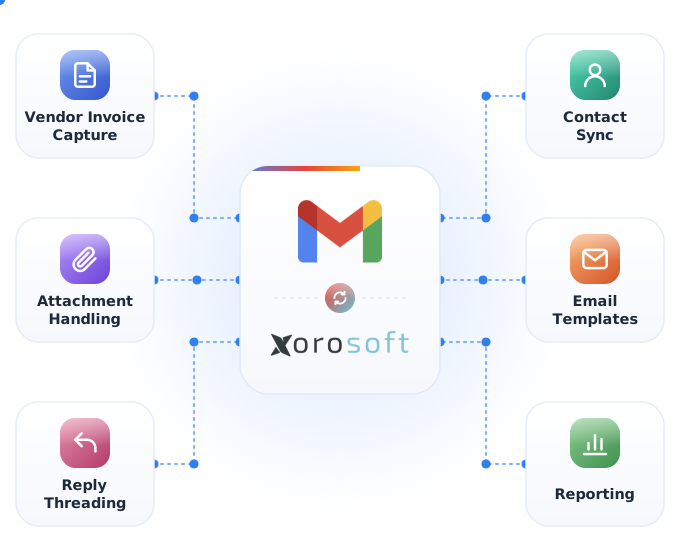
Everything the Gmail integration handles
Tap any capability to expand the explanation, benefit, example, and sub-features.
Automated transactional emails
+Order confirmations, shipping notifications, and other Xorosoft events send automatically as emails.
Benefit: customers get timely updates without manual sending.
Example: an order confirmation sends the moment an order is placed.
- Order confirmation emails
- Shipping notification emails
- Low stock alert emails
Inbound email parsing
+Incoming vendor emails and attachments, like invoices, parse automatically into Xorosoft records.
Benefit: vendor documents flow into Xorosoft instead of sitting in an inbox.
Example: a vendor invoice PDF attached to an email creates a bill in Xorosoft automatically.
- Vendor invoice capture
- Attachment parsing
- Auto-record creation
Contact sync
+Customer and vendor contacts sync between Gmail and Xorosoft records.
Benefit: emails always go to the right, current contact.
Example: a customer's updated email address syncs into Xorosoft automatically.
- Customer contact sync
- Vendor contact sync
- Automatic updates
Delivery tracking
+Sent, opened, and bounced status tracks for every automated email.
Benefit: confidence that a customer actually received an update.
Example: a bounced shipping notification flags for review before the customer calls in confused.
- Sent status
- Bounce detection
- Delivery confirmation
Email templates
+Branded, reusable templates format each type of automated email consistently.
Benefit: professional, on-brand communication every time.
Example: every order confirmation uses the same branded template automatically.
- Branded templates
- Per-event templates
- Configurable content
Attachment handling
+Relevant documents, like invoices or packing slips, attach to outbound emails automatically.
Benefit: customers and vendors get the right document without a manual step.
Example: a packing slip attaches automatically to a shipping notification email.
- Auto-attach documents
- Invoice attachments
- Packing slip attachments
Reply threading
+Replies to an automated email link back to the order or record that triggered it.
Benefit: customer replies stay connected to the right context.
Example: a customer's reply to a shipping notification links directly to that order in Xorosoft.
- Order-linked threads
- Reply tracking
- Context preservation
Multi-sender support
+Multiple Google Workspace accounts can send on behalf of different departments or brands.
Benefit: emails come from the right address for each business unit.
Example: order confirmations send from a sales address while vendor emails route through procurement.
- Multiple sending accounts
- Per-department routing
- Google Workspace support
Reporting
+Reports on email volume, delivery rate, and parsing accuracy together.
Benefit: visibility into how reliably communication actually reaches people.
Example: a dashboard shows which email type has the highest bounce rate.
- Unified metrics
- Delivery rate tracking
- One dataset
Error monitoring
+Monitors sending and parsing and flags bounced emails, parsing failures, and delivery issues instantly.
Benefit: issues are caught before a customer or vendor communication is missed.
Example: an invoice that fails to parse correctly is flagged for manual review.
- Error queue
- Bounce / parsing / delivery
- Instant alerts
Built for the teams that email customers and vendors daily
Ecommerce & DTC
Send branded order confirmations and shipping updates automatically.
Wholesale & distribution
Capture vendor invoices and POs straight from the inbox.
Multi-location retail
Send location-specific order updates from the right sending account.
Manufacturers
Capture supplier invoices and shipment confirmations automatically.
3PL & fulfillment services
Send client-facing shipment notifications automatically.
Accounts payable teams
Turn incoming vendor invoice emails into bills automatically.
Customer service teams
Track order-related email threads alongside the order itself.
Procurement teams
Capture supplier quotes and order confirmations automatically.
Capabilities at a glance
The operational building blocks that power the Gmail integration.
What teams gain with the Gmail integration
Each benefit ties a real operational problem to a measurable outcome.
Faster customer communication
Order and shipping updates send the moment they happen.
Problem: delayed updates to Benefit: instant, automated emailsAutomated vendor document capture
Vendor invoices flow into Xorosoft without manual data entry.
Problem: manual invoice entry to Benefit: automatic parsingConsistent branded emails
Every automated email follows the same professional template.
Problem: inconsistent messaging to Benefit: consistent brand voiceFewer lost documents
Invoices and vendor emails no longer sit in a single person's inbox.
Problem: single point of failure to Benefit: automated captureFull email audit trail
Every sent and received email logs alongside its related record.
Problem: no communication history to Benefit: complete email trailSingle system of record
Customer and vendor communication stays connected to the Xorosoft records it relates to.
Problem: disconnected inbox to Benefit: one connected workflowManual emails vs. disconnected mail client vs. Xorosoft + Gmail
How the Xorosoft Gmail integration compares to sending emails by hand or using a disconnected mail client.
| Capability | Manual Emails | Disconnected Mail Client | Xorosoft + Gmail |
|---|---|---|---|
| Real-time sending | ✗ | ~ | ✓ |
| Automated inbound parsing | ✗ | ✗ | ✓ |
| Delivery tracking | ✗ | ~ | ✓ |
| Branded templates | ~ | ~ | ✓ |
| Error alerts | ✗ | ✗ | ✓ |
| Contact sync | ✗ | ~ | ✓ |
| Audit trail | ~ | ~ | ✓ |
| Reporting | ✗ | ~ | ✓ |
Related pages
 Power BI
Power BI
Sync Xorosoft sales, inventory, and finance data to Power BI dashboards.
 Tableau
Tableau
Sync Xorosoft sales, inventory, and finance data to Tableau dashboards.
 Outlook
Outlook
Send Xorosoft order confirmations, invoices, and notifications through Outlook.
 Domo
Domo
Domo
Sync Xorosoft sales, inventory, and finance data to Domo dashboards.
 Microsoft Teams
Microsoft Teams
Send Xorosoft order, inventory, and finance alerts and approvals to Microsoft Teams.
 Gemini
Gemini
Connect Gemini AI and MCP workflows to Xorosoft orders, inventory, and finance data.
Gmail integration questions
Tap a question to reveal the answer, optimized for Google AI Overviews, ChatGPT, Perplexity, Gemini, Claude, and Bing AI.
The Gmail integration sends Xorosoft-triggered emails - order confirmations, shipping notifications, low stock alerts - through Gmail or Google Workspace, and parses incoming vendor emails and attachments into Xorosoft records automatically.
An event in Xorosoft triggers a templated email, which sends through a connected Gmail or Google Workspace account and tracks delivery. Incoming vendor emails with invoices or purchase order confirmations are parsed and turned into Xorosoft records automatically.
Customer service, accounts payable, and procurement teams that use Gmail or Google Workspace for business email alongside Xorosoft use the integration.
Gmail was created by Google engineer Paul Buchheit. It launched on April 1, 2004, initially by invitation only, and became available to the general public in February 2007. Gmail is part of Google Workspace for business use.
Yes. Incoming vendor emails with invoice attachments parse automatically, creating the corresponding bill or record in Xorosoft without manual entry.
Yes. Emails send the moment a matching Xorosoft event occurs, not on a delayed batch.
Yes. Sent, delivered, and bounced status tracks for every automated email, so a missed delivery gets flagged instead of going unnoticed.
Yes. Branded, reusable templates format each type of automated email, keeping communication professional and consistent.
Yes. Multiple Google Workspace accounts can send on behalf of different departments or brands, so emails come from the right address.
The integration monitors sending and parsing and flags bounced emails, parsing failures, and delivery issues instantly, so issues are caught before a communication is missed.
Yes. Teams keep using Gmail or Google Workspace as normal while Xorosoft stays in sync automatically, so nothing about the Gmail experience changes.
By parsing incoming vendor emails and attachments automatically into Xorosoft records, invoices and confirmations stop depending on one person's inbox.
See the Xorosoft Gmail integration in action
Book a personalized demo and see how automated order emails, vendor document capture, and delivery tracking connect Xorosoft to Gmail and Google Workspace.