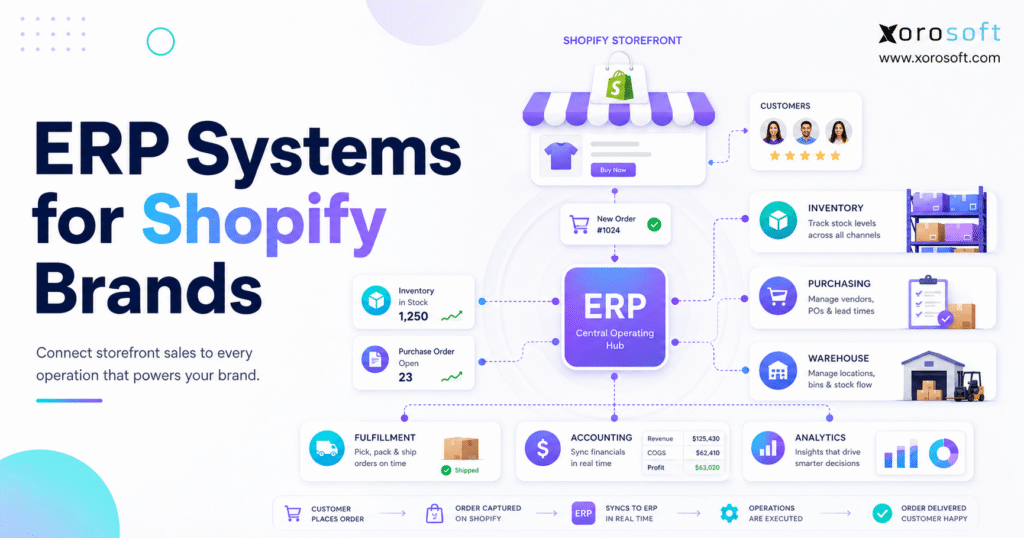
1. The Back Office Problem Behind Shopify Growth
ERP systems for Shopify brands become important when ecommerce growth starts creating problems outside the storefront. Shopify can handle products, checkout, customer orders, and online selling very well. However, growing brands also need stronger control over inventory, purchasing, warehouses, accounting, fulfillment, forecasting, and reporting.
At the beginning, the back office often feels manageable. A founder may use Shopify for orders, QuickBooks for accounting, spreadsheets for purchasing, and a few apps for stock control. For a simple business, that setup can work well enough. Eventually, each new SKU, warehouse, supplier, wholesale account, and sales channel adds another operational layer.
The real issue is not Shopify itself. Instead, ecommerce growth creates workflows that happen after the order is placed. Inventory must be available in the right warehouse. Purchase orders need to arrive before demand spikes. Finance needs accurate cost and margin data. Warehouse teams need clean pick lists. Meanwhile, leadership needs one reliable view of the business.
Because of that, ERP systems for Shopify brands are not just software upgrades. They are operating systems for inventory-driven businesses that need better control behind the storefront.
2. What Are ERP Systems for Shopify Brands?
ERP systems for Shopify brands are back-office platforms that connect Shopify with the operational workflows required to run a physical product business. In simple terms, ERP helps teams manage inventory, sales orders, purchase orders, warehouse activity, accounting, manufacturing, forecasting, and reporting from one connected environment.
Shopify remains the commerce engine. It supports the storefront, checkout, product presentation, customer transactions, and ecommerce selling. Meanwhile, ERP manages the operational layer that determines whether the business can fulfill orders accurately, buy inventory on time, close the books cleanly, and understand performance across channels.
2.1 A Simple Definition of Shopify ERP Systems
Shopify ERP systems connect ecommerce activity with the core business processes behind the sale. Therefore, instead of relying on several disconnected tools, a brand can use ERP to create one source of truth for inventory, finance, purchasing, warehouses, and reporting.
In practice, the ERP answers operational questions that Shopify alone is not designed to manage deeply. For example, it can show what stock is available by warehouse, which purchase orders are delayed, which orders are ready to ship, and how inventory value affects financial reporting.
2.2 What Shopify Handles and What ERP Handles
| Area | Shopify Handles | ERP Handles | Why It Matters |
|---|---|---|---|
| Storefront | Product pages, checkout, customers | Product and inventory data source | The customer experience depends on accurate operational data. |
| Orders | Ecommerce order capture | Sales order processing and fulfillment flow | Teams need a clean handoff from purchase to shipment. |
| Inventory | Basic product availability | Multi-warehouse stock, transfers, valuation, allocation | Growth requires deeper stock control. |
| Accounting | Sales and payment data | COGS, inventory valuation, invoices, reconciliation | Finance needs accurate numbers, not manual exports. |
| Purchasing | Limited native workflow | Purchase orders, vendors, lead times, replenishment | Stock availability depends on buying discipline. |
| Warehouses | Fulfillment status visibility | Receiving, putaway, picking, packing, cycle counts | Execution happens inside the warehouse. |
Shopify’s explanation of ERP integration describes how ERP systems connect business applications so data can move across functions. As a result, Shopify brands can link ecommerce demand with inventory, finance, fulfillment, and purchasing workflows.
2.3 Why ERP Becomes Relevant After Growth
Growth changes the operating model. A Shopify brand with one warehouse, one sales channel, and a small SKU count can often survive with apps and spreadsheets. However, once the business adds wholesale, Amazon, EDI, multiple warehouses, landed costs, replenishment planning, or manufacturing, the old stack starts to break.
As a result, ERP becomes less about replacing software and more about creating operational control. The brand needs a system that can answer important questions quickly:
- What inventory is actually available to sell?
- Which warehouse should fulfill this order?
- What purchase orders are late?
- Which SKUs are overstocked?
- Which products may stock out next month?
- What is the true margin after landed cost and fulfillment expense?
- Why does finance see a different number than operations?
Once those answers require exports, Slack messages, spreadsheet checks, and manual reconciliation, the business has likely outgrown its original workflow.
3. Why Shopify Brands Outgrow Apps and Spreadsheets
Shopify brands usually do not outgrow apps overnight. Instead, the breakdown happens gradually. First, inventory numbers drift. Then, purchasing becomes reactive. After that, warehouse teams start making manual decisions. Finally, finance spends too much time reconciling data instead of analyzing performance.
The problem is fragmentation. Each app may solve one narrow issue. However, the full business process crosses many departments. Every order affects inventory. That inventory position shapes purchasing decisions. In turn, purchasing affects cash flow. Warehouse execution then influences customer experience, while accounting depends on the accuracy of the entire chain.
3.1 Inventory Starts Breaking First
Inventory is usually the first workflow to show stress. A brand may see more overselling, more stockouts, more emergency transfers, and more manual stock adjustments. Although each error may look small, the combined impact can hurt revenue, cash flow, and customer trust.
For example, a product may sell on Shopify while another channel still shows the same stock as available. Meanwhile, wholesale may reserve units that ecommerce teams still believe they can sell. Later, warehouse staff may discover that available inventory is actually damaged, misplaced, or already committed.
Because of this, inventory accuracy becomes a leadership problem, not just a warehouse issue. Once teams stop trusting stock numbers, every department slows down.
3.2 Finance Becomes Harder to Trust
Finance teams often feel the pain after operations has already been struggling. Month-end close takes longer because sales, refunds, inventory adjustments, shipping costs, landed costs, and purchase receipts sit in different systems.
Because inventory is both an operational asset and an accounting value, weak stock control creates weak financial reporting. Wrong stock counts can distort COGS. Poor landed-cost capture may overstate margins. Delayed returns and adjustments can also make reports stale.
Therefore, ERP systems for Shopify brands matter because they connect transactions with financial impact. Finance does not have to wait for spreadsheets from operations. Likewise, operators do not have to guess whether accounting is working from current data.
3.3 Purchasing Becomes Reactive
Purchasing often starts as a spreadsheet. That can work when the team manages a small vendor list and predictable demand. However, as the business scales, buyers need supplier lead times, minimum order quantities, reorder points, open purchase orders, sales velocity, seasonality, and warehouse stock levels in one place.
Without that visibility, teams buy too late or buy too much. Stockouts hurt revenue, while overstock traps cash. Emergency freight also reduces margin. Eventually, purchasing turns into a constant firefight.
3.4 Warehouse Teams Lose Visibility
Warehouse teams need execution clarity. They need to know what arrived, where it should go, what should be picked, which orders are urgent, which items are backordered, and which shipments need special handling.
When systems are disconnected, warehouse workers compensate manually. They print lists, check spreadsheets, ask managers, or make judgment calls. Unfortunately, those workarounds create picking errors, packing delays, and inventory adjustments later.
4. Core Features Shopify ERP Systems Should Include
The best ERP system for a Shopify brand is not always the largest or most expensive platform. Instead, the right system should match the company’s operating complexity. A product business needs depth in inventory, purchasing, warehouse management, accounting, reporting, and channel integration.
4.1 Inventory Management for Shopify Brands
Inventory management is the foundation of ERP systems for Shopify brands. A Shopify ERP should manage SKU-level stock, warehouse-level availability, inventory transfers, adjustments, cycle counts, reservations, and inventory valuation.
Moreover, inventory should update through real operational events. Receiving goods, shipping orders, adjusting stock, transferring items, processing returns, and completing production should all affect availability. Otherwise, the business keeps treating inventory as a spreadsheet number instead of a live operating asset.
4.1.1 Multi-Warehouse Inventory
Multi-warehouse operations create complexity because stock is no longer a single number. A product may be available in one location, reserved in another, damaged in a third, and in transit between two facilities. Therefore, the ERP must show stock by warehouse, bin, status, and availability.
This becomes especially important for brands using regional warehouses, 3PLs, wholesale locations, retail locations, or separate ecommerce fulfillment centers. Without warehouse-level visibility, teams may ship from the wrong place or promise stock that is not actually available.
4.1.2 Inventory Allocation
Allocation matters when one inventory pool serves Shopify, Amazon, wholesale, EDI, and retail. A good ERP helps brands reserve stock for specific channels, priority customers, or demand windows. As a result, sales teams stop fighting over the same units.
For example, a wholesale order may require reserved stock weeks before shipment. At the same time, Shopify may continue selling the same SKU. Unless allocation rules are clear, the brand can oversell without realizing it.
4.2 Warehouse Management for Shopify Operations
Warehouse management features help teams execute receiving, putaway, picking, packing, shipping, transfers, barcode scanning, and cycle counts. For brands with warehouse complexity, a dedicated system such as XoroWMS can help connect physical warehouse activity with broader ERP workflows.
However, warehouse management should not sit completely apart from inventory and accounting. Receiving should update inventory immediately. Shipped orders should reduce available stock without manual work. Cycle count errors should also show the financial impact behind each adjustment.
4.3 Purchasing Management
Purchasing features should include purchase orders, vendor records, supplier lead times, reorder points, minimum order quantities, expected receipt dates, and purchasing approvals. Moreover, purchasing should connect directly to inventory demand, not operate as a separate spreadsheet.
A Shopify brand with growing order volume needs to know what to buy, when to buy it, and how much cash each decision will consume. Therefore, purchasing automation is one of the most important ERP features for inventory-driven businesses.
4.4 Accounting and Inventory Valuation
Accounting is where many Shopify brands feel hidden operational debt. Sales orders, inventory receipts, landed costs, purchase invoices, returns, refunds, COGS, and payments must eventually become accurate financial records.
A Shopify ERP should either include accounting or connect tightly with accounting workflows. However, once inventory complexity increases, brands often need inventory and finance closer together. Otherwise, reconciliation becomes a recurring tax on the business.
A platform such as XoroERP is relevant when brands want inventory, accounting, purchasing, warehouse management, and reporting inside a connected ERP environment rather than scattered across multiple tools.
4.5 Order Management
Order management features help teams process sales orders across Shopify, Amazon, wholesale, EDI, B2B, retail, and manual channels. The ERP should support order status, allocation, backorders, returns, exchanges, fulfillment routing, and customer-specific rules.
In addition, order management should make exceptions visible. If an order cannot ship because stock is missing, a warehouse is delayed, or payment terms require review, the team should know before the customer complains.
4.6 Forecasting and Reporting
Forecasting helps operators move from reactive buying to planned replenishment. Instead of only looking at current stock, teams need demand trends, sales history, seasonality, supplier lead times, stock coverage, and margin performance.
Reporting should also connect operations and finance. Leaders need to see inventory value, order volume, fulfillment speed, purchasing commitments, stockout risk, and cash tied up in inventory. Consequently, ERP reporting becomes most useful when it reflects the real operating model.
4.7 Manufacturing or Assembly Support
Some Shopify brands do not simply buy finished goods and resell them. Apparel, furniture, sporting goods, food, and consumer product companies may assemble, bundle, kit, or manufacture products.
In those cases, ERP should support BOMs, work orders, production planning, component availability, and finished goods tracking. Otherwise, teams cannot connect raw materials, production schedules, and Shopify demand.
5. How Shopify ERP Integration Should Work
Shopify ERP integration connects Shopify with the operational system of record. In simple terms, Shopify captures demand, while ERP coordinates the operational response.
A clean integration should reduce duplicate data entry, improve stock accuracy, support fulfillment, and help finance trust the numbers. However, integration quality depends on process design, data ownership, and testing.
5.1 Data That Usually Syncs Between Shopify and ERP
Common Shopify ERP data flows include:
- Product records and SKUs
- Customer details
- Sales orders
- Inventory availability
- Fulfillment status
- Returns and refunds
- Payments
- Shipping updates
- Tax and discount data
- Product variants
- Warehouse or location data
The exact sync depends on the brand’s systems and workflows. However, the goal is always the same: reduce duplicate work and keep teams aligned around current information.
5.2 Real-Time Sync vs Scheduled Sync
Real-time sync matters when inventory availability changes quickly. For example, a brand selling limited inventory across Shopify, Amazon, and wholesale may need frequent updates to reduce overselling. Scheduled sync may be enough for slower workflows, such as reporting or non-urgent catalog updates.
The key question is not whether every data point needs instant synchronization. Instead, operators should ask which data must be current to prevent operational or customer-facing errors.
5.3 Common Shopify ERP Integration Mistakes
Many ERP projects fail at the data and process level before the technology fails. Common mistakes include:
1. Starting with messy SKU data.
2. Syncing products without clear naming rules.
3. Treating warehouse logic as an afterthought.
4. Failing to test refunds, exchanges, and partial fulfillments.
5. Connecting systems before defining which platform owns each data field.
6. Ignoring accounting impact.
7. Training only managers instead of daily users.
Because of these risks, Shopify ERP integration should be treated as an operating model project, not just a technical connection.
5.4 What to Check Before Going Live
Before launch, Shopify brands should test the full order-to-cash and procure-to-pay flow. That includes product sync, inventory updates, order import, warehouse picking, shipping confirmation, refunds, purchase receipts, landed costs, invoices, payments, and reporting.
Additionally, teams should test edge cases. Partial shipments, cancelled orders, split fulfillments, refunds, damaged stock, backorders, and inventory transfers can expose weak integration logic before customers feel the impact.
6. ERP vs Shopify Apps vs Inventory Software vs WMS
Shopify brands often ask whether they need ERP, inventory software, WMS, or just better apps. The answer depends on operational complexity.
| System Type | Primary Purpose | Best For | Limitation |
| Shopify Apps | Add specific features to Shopify | Early-stage needs or narrow workflow gaps | Too many apps can create fragmented data. |
| Inventory Software | Track stock and availability | Brands with stock issues but limited finance complexity | May not manage accounting, purchasing, WMS, or manufacturing deeply. |
| WMS | Execute warehouse work | Teams with receiving, picking, packing, scanning, and shipping complexity | Usually does not own finance, purchasing, or full ERP logic. |
| ERP | Connect core operations and finance | Inventory-driven brands needing one operational system | Requires planning, data cleanup, and process discipline. |
6.1 Shopify Apps
Apps are useful when the problem is narrow. A brand might need subscriptions, reviews, bundles, returns, or a simple inventory extension. However, apps become risky when they replace core process design.
Over time, every extra app may become another place where data can drift. Therefore, apps should support the operating model rather than become the operating model.
6.2 Inventory Software
Inventory software can help brands improve stock tracking. Yet many inventory systems do not fully handle accounting, landed cost, purchasing automation, warehouse execution, manufacturing, and financial reporting.
For that reason, inventory software may be a stepping stone. It can help a growing brand temporarily, but it may not support the full complexity of Shopify, Amazon, wholesale, EDI, accounting, and multi-warehouse operations.
6.3 Warehouse Management Systems
A WMS improves warehouse execution. It helps teams receive goods, put products away, scan items, pick orders, pack shipments, and count inventory. However, WMS does not always manage the financial and purchasing side of the business.
As a result, WMS works best when it connects properly with ERP, accounting, and ecommerce workflows.
6.4 Full ERP Systems for Shopify Brands
ERP systems for Shopify brands become useful when the brand needs one operational source of truth. The ERP connects inventory, purchasing, warehouses, accounting, orders, and reporting, while Shopify continues to handle commerce.
A broader platform such as XoroONE can be relevant when a business wants ecommerce operations, inventory, accounting, purchasing, warehouse management, and reporting connected in a single system.
7. When Does a Shopify Brand Need an ERP System?
A Shopify brand needs ERP when operational complexity creates risk that apps and spreadsheets can no longer control. Revenue matters, but complexity matters more.
7.1 Revenue and Order Volume Are Growing
Growth creates more transactions, more exceptions, and more decisions. As order volume increases, Shopify brands need stronger systems behind the storefront. Otherwise, every sales spike creates pressure inside inventory, purchasing, warehouse, and finance teams.
However, revenue alone should not drive the ERP decision. A $3M brand with complex inventory may need ERP earlier than a $15M brand with simple fulfillment. Therefore, operators should evaluate complexity, not just company size.
7.2 Inventory Errors Are Becoming Expensive
Inventory errors become expensive when they affect revenue and customer trust. Overselling creates cancellations. Stockouts reduce conversion. Overstock ties up cash. Inaccurate counts create warehouse confusion.
If the team no longer trusts inventory data, ERP should enter the conversation. At that point, the cost of poor visibility may be higher than the cost of better systems.
7.3 Teams Are Working From Different Numbers
A common warning sign is data disagreement. Sales sees one number. Warehouse sees another. Purchasing has a third spreadsheet. Finance waits for exports. Customer support checks Shopify but does not know warehouse reality.
When every team has a different version of the truth, the brand needs a connected operating system. Otherwise, daily decisions become slower and less reliable.
7.4 Month-End Close Takes Too Long
Delayed month-end close usually signals deeper process issues. Finance may spend days reconciling Shopify payouts, inventory changes, purchase receipts, landed costs, returns, and COGS.
ERP helps by connecting financial records with operational transactions earlier in the workflow. Consequently, finance can spend less time fixing data and more time explaining performance.
7.5 Multi-Warehouse Operations Are Hard to Manage
Multiple warehouses create decisions that Shopify alone may not fully govern. Teams need to decide where stock should live, which warehouse should ship, when transfers should happen, and how channels should access available inventory.
Without ERP, these decisions often move into spreadsheets. Over time, those spreadsheets become too fragile for daily operations.
8. Who Does Not Need ERP Yet?
Not every Shopify brand needs ERP. In fact, implementing ERP too early can create unnecessary complexity.
8.1 Early-Stage Shopify Stores
A small store with limited SKUs, one warehouse, simple purchasing, and low order volume may not need ERP yet. Shopify, accounting software, and a few apps may be enough.
Nevertheless, early-stage brands should keep data clean. Clean SKUs, product records, vendors, and inventory counts make future ERP migration much easier.
8.2 Brands With Simple Fulfillment
If all orders ship from one location and the team has few exceptions, a lightweight stack can work. However, the brand should still watch for warning signs such as repeated stockouts, manual purchasing, and slow reporting.
As the business grows, fulfillment simplicity can disappear quickly. Therefore, teams should review systems before problems become urgent.
8.3 Businesses Without Inventory Complexity
ERP is most useful for inventory-driven companies. Service businesses, digital product sellers, or very simple ecommerce stores may not need the same operational depth.
In contrast, brands selling physical products across multiple channels, warehouses, suppliers, or customer types usually need stronger back-office control.
9. How to Choose ERP Systems for Shopify Brands
Choosing ERP systems for Shopify brands should start with operating requirements, not software demos. A polished dashboard does not matter if the system cannot handle the brand’s actual workflows.
9.1 Start With Operational Requirements
List the workflows that create daily friction:
- Inventory accuracy
- Multi-warehouse visibility
- Shopify and Amazon order flow
- Wholesale orders
- EDI
- Purchase orders
- Supplier lead times
- Accounting close
- Forecasting
- Returns
- Manufacturing or assembly
- Reporting
After that, rank each workflow as must-have, important, or future need. This keeps the selection process grounded in operations rather than feature noise.
9.2 Evaluate Shopify Integration Depth
A serious Shopify ERP should support the data flows that matter to operations. Orders, products, inventory, customers, fulfillment status, refunds, and payments should move cleanly between systems.
Additionally, teams should ask which system owns each field. For example, Shopify may own storefront product presentation, while ERP may own stock availability, purchasing, and inventory costing.
9.3 Review Accounting Requirements
Some brands want ERP to replace accounting software. Others want ERP to integrate with their accounting stack. Either way, the team must understand how inventory valuation, COGS, landed cost, invoices, payments, and reconciliation will work.
When the business is currently using QuickBooks and struggling with inventory complexity, it may be useful to compare operational fit against a dedicated ERP path such as Xorosoft vs QuickBooks. However, this comparison should only be used when accounting limitations are part of the buying decision.
9.4 Check Warehouse and Barcode Capabilities
Warehouse features should not be assumed. Ask whether the ERP supports barcode scanning, bin locations, receiving, putaway, picking, packing, shipping, cycle counting, transfers, and lot or serial tracking if needed.
Moreover, operators should test these workflows with real warehouse users. A system that looks good in a demo may still fail if warehouse teams cannot use it quickly.
9.5 Compare Implementation Complexity
Implementation is part of the buying decision. A system may have strong features but require more time, budget, consulting, or process change than the brand can handle. Conversely, a lighter system may launch faster but fail to support future complexity.
Therefore, Shopify brands should evaluate both current fit and future operating needs. The right ERP should not be too shallow for the next stage or too heavy for the current team.
9.6 Match ERP to the Industry
Apparel, furniture, food, sporting goods, wholesale, and manufacturing brands do not operate the same way. Size and color variants, bulky goods, expiry dates, kits, assemblies, B2B pricing, and production workflows all affect ERP fit.
For a broader view of industry-specific ERP needs, brands can review the industries we serve page and compare those workflows against their own operating model.
10. Shopify ERP Use Cases by Business Model
ERP systems for Shopify brands become more valuable when the brand sells through multiple business models.
10.1 DTC Shopify Brands
DTC brands need fast order flow, accurate inventory, clean fulfillment, strong returns handling, and reliable forecasting. ERP helps by connecting Shopify demand with inventory availability and warehouse execution.
As a result, customer experience improves because the back office becomes more predictable.
10.2 Shopify Plus Brands
Shopify Plus brands often manage higher order volume, multiple storefronts, wholesale portals, international expansion, and more complex reporting needs. Therefore, they usually need stronger back-office control.
In many cases, the issue is no longer selling online. Instead, the issue is coordinating what happens after each order.
10.3 Wholesale and B2B Brands
Wholesale creates customer-specific pricing, payment terms, bulk orders, EDI, allocations, and sales rep workflows. ERP helps centralize those processes so wholesale and DTC do not fight over the same inventory.
Additionally, wholesale teams need visibility into available stock, future receipts, credit terms, and shipping commitments.
10.4 Amazon and Marketplace Sellers
Marketplace sellers need consolidated order visibility. Shopify, Amazon, retail, and wholesale demand should all connect to one inventory picture. Otherwise, stock allocation becomes manual and unreliable.
When marketplace growth accelerates, ERP helps teams avoid channel-by-channel decision-making.
10.5 Manufacturing and Assembly Brands
Manufacturing brands need BOMs, work orders, production planning, component availability, and finished goods costing. ERP connects Shopify demand with production and material planning.
Consequently, teams can plan around both customer orders and supply constraints.
11. Industry Examples for Shopify ERP Systems
Different industries experience ERP pressure in different ways.
| Industry | Common Challenge | ERP Workflow Needed |
| Apparel and Fashion | Size, color, seasonality, returns | Variant inventory, allocation, forecasting |
| Furniture | Bulky products, long lead times, landed cost | Purchasing, warehouse planning, costing |
| Sporting Goods | Seasonal demand and bundles | Forecasting, kits, channel allocation |
| Food and Beverage | Expiry dates and lot tracking | Lot control, replenishment, compliance support |
| Wholesale Distribution | B2B pricing and EDI | Sales orders, allocation, purchasing |
| Manufacturing | Components and work orders | BOMs, production planning, inventory costing |
11.1 Apparel and Fashion
Apparel brands often deal with variants, returns, seasonal drops, and wholesale allocations. A single style may have dozens of size and color combinations. Consequently, inventory accuracy requires more than a simple stock count.
11.2 Furniture
Furniture brands often manage long supplier lead times, bulky storage, container shipments, landed cost, and warehouse planning. ERP helps connect purchasing decisions with inventory value and fulfillment constraints.
11.3 Sporting Goods
Sporting goods brands may face seasonal demand, bundled products, regional demand shifts, and marketplace complexity. ERP helps teams plan inventory before peak windows instead of reacting after stockouts occur.
11.4 Food and Beverage
Food and beverage brands may need lot tracking, expiry controls, batch records, and replenishment planning. When Shopify sales connect to inventory and warehouse workflows, teams can reduce manual checks.
11.5 Wholesale Distribution
Wholesale distributors need B2B pricing, payment terms, sales orders, EDI, purchasing, allocations, and multi-location inventory. ERP helps these workflows stay connected.
11.6 Manufacturing
Manufacturers need visibility into raw materials, work orders, production schedules, and finished goods. ERP links production planning with Shopify demand and available inventory.
12. Common ERP Options Shopify Brands Compare
Shopify brands commonly compare broad ERP platforms, inventory systems, accounting-led tools, and ecommerce-focused ERP alternatives. The right choice depends on process depth, budget, implementation appetite, and internal team maturity.
12.1 NetSuite
NetSuite is often evaluated by larger ecommerce and omnichannel businesses. It can support broad ERP requirements, although teams should carefully assess implementation complexity, cost, and fit.
For brands comparing enterprise ERP paths, a focused resource such as Xorosoft vs NetSuite may help frame the operational tradeoffs.
12.2 Acumatica
Acumatica is another cloud ERP option for businesses with complex finance and operational needs. Brands should evaluate ecommerce integration, warehouse depth, reporting, and implementation resources before choosing.
12.3 Cin7
Cin7 is often considered by brands looking for inventory and order management capabilities. It may fit some ecommerce operations, depending on accounting, warehouse, and reporting requirements.
For Shopify brands comparing inventory-first tools with ERP, Xorosoft vs Cin7 can be useful when the decision includes inventory, purchasing, accounting, and warehouse depth.
12.4 Brightpearl
Brightpearl is commonly associated with retail operations and omnichannel commerce. Shopify brands should evaluate how well it supports their inventory, finance, purchasing, and fulfillment workflows.
12.5 Fishbowl
Fishbowl is often evaluated by businesses that have used QuickBooks and need stronger inventory or manufacturing workflows. Teams should compare it against future ERP needs, not only current inventory problems.
12.6 Sage, Odoo, SAP Business One, and Business Central
Sage, Odoo, SAP Business One, and Microsoft Business Central are often considered by companies with finance-led or modular ERP requirements. However, Shopify brands should check ecommerce, warehouse, purchasing, inventory, and implementation fit carefully.
For broader evaluation, the main ERP comparison page can help teams review alternatives without forcing every comparison into one article.
12.7 Modern ERP Alternatives for Inventory-Driven Shopify Brands
Modern ERP alternatives can be a strong fit for brands that want operational depth without unnecessary enterprise complexity. Xorosoft is one example of a cloud ERP platform built for inventory-driven businesses that need inventory management, accounting, purchasing, warehouse management, forecasting, reporting, ecommerce operations, and multi-channel workflows in one system.
The Xorosoft ERP app on the Shopify App Store also shows how the platform is positioned for ecommerce, retail, and wholesale businesses that need connected order management, inventory, warehousing, purchasing, manufacturing, financials, and customer service workflows.
13. Common Shopify ERP Implementation Mistakes
ERP success depends on process discipline. Software alone cannot fix unclear workflows.
13.1 Starting Without Clean SKU Data
SKU data must be consistent before migration. Duplicate SKUs, inconsistent names, missing barcodes, and unclear variants can create downstream problems in Shopify, warehouses, purchasing, and accounting.
Therefore, product data cleanup should happen before implementation begins. Otherwise, the ERP may simply organize bad data in a new place.
13.2 Ignoring Warehouse Processes
Many brands map software screens but forget the physical warehouse. Receiving, putaway, picking, packing, cycle counting, and transfers should be designed around how teams actually work.
Additionally, warehouse users should test the system before launch. Their feedback can expose practical issues that leadership may miss.
13.3 Treating ERP as Only an Integration Project
ERP implementation is not just a connection between Shopify and another system. It is an operating model project. Teams must define ownership, approvals, workflows, exceptions, and reporting rules.
Because of that, the strongest ERP projects involve operations, finance, warehouse, purchasing, and ecommerce teams from the beginning.
13.4 Failing to Define System Ownership
Every major field needs an owner. Product data, SKU data, inventory availability, order status, cost, vendor data, customer data, and financial records should not be edited casually in multiple places.
Without ownership rules, even a strong ERP can become messy. In contrast, clear rules keep data reliable as the business scales.
13.5 Underestimating Training
Warehouse workers, buyers, finance users, customer support, and operations managers all need training. If only leadership understands the ERP, daily adoption will suffer.
Therefore, training should focus on real workflows, not generic feature tours. People need to know how the system changes their actual work.
14. How to Prepare for a Shopify ERP Project
Preparation reduces implementation risk. Before selecting ERP systems for Shopify brands, operators should map workflows, clean data, and define success metrics.
14.1 Map Current Workflows
Document how orders, inventory, purchasing, receiving, fulfillment, returns, accounting, and reporting work today. Then, identify where spreadsheets, manual exports, and duplicate entry appear.
This exercise often reveals that the business does not only need software. It also needs cleaner processes.
14.2 Clean Core Data
Clean product records, SKUs, barcodes, vendors, customers, warehouse locations, opening inventory, chart of accounts, payment terms, and unit costs. Better data improves implementation quality.
Moreover, clean data helps teams avoid costly rework after go-live.
14.3 Define Success Metrics
Useful ERP success metrics include:
- Inventory accuracy
- Order fulfillment speed
- Pick accuracy
- Month-end close time
- Purchase order accuracy
- Stockout rate
- Overstock value
- Forecast accuracy
- Reporting reliability
These metrics help teams judge the ERP project by business outcomes, not just launch date.
14.4 Choose the Right Implementation Team
The best ERP project team includes operations, finance, warehouse, purchasing, ecommerce, and leadership. Each team should own its workflows and participate in testing.
In addition, the team should decide who will maintain the system after launch. ERP is not a one-time setup. It becomes part of the company’s operating rhythm.
15. Where Xorosoft Fits for Shopify Brands
Xorosoft may fit Shopify brands that sell physical products and have outgrown QuickBooks, spreadsheets, inventory-only apps, or disconnected systems. It is especially relevant when the business needs inventory management, accounting, purchasing, warehouse management, manufacturing, forecasting, reporting, Shopify, Amazon, EDI, and multi-warehouse workflows in one connected system.
15.1 When Xorosoft May Be a Fit
Xorosoft may be a fit when a Shopify brand:
- Sells physical products.
- Manages multiple warehouses.
- Uses Shopify and Amazon.
- Sells wholesale or B2B.
- Uses EDI.
- Needs purchasing automation.
- Needs accounting and inventory connected.
- Wants forecasting and reporting in the same operational system.
- Has outgrown QuickBooks, spreadsheets, or inventory-only tools.
Additionally, teams that want to review real operating examples can explore case studies before evaluating fit.
15.2 When It May Not Be the Right Fit
Xorosoft may not be the right fit for very small stores with simple operations, service-only businesses, digital product sellers, or brands that do not have meaningful inventory complexity. In those cases, Shopify plus a few lightweight tools may be enough.
However, if the business sells physical goods across channels, warehouses, or customer types, an ERP evaluation can be worthwhile.
16. Final ERP Decision Framework
Choosing ERP systems for Shopify brands should be a structured operational decision. A brand should not buy ERP because a competitor uses it or because a platform has a long feature list. Instead, the team should choose based on workflow fit.
16.1 ERP Readiness Checklist
A Shopify brand may be ready for ERP if several of these are true:
1. Inventory errors are increasing.
2. Stockouts and overstock are both happening.
3. Purchasing lives in spreadsheets.
4. Month-end close takes too long.
5. Warehouse teams rely on manual workarounds.
6. Shopify, Amazon, wholesale, and EDI orders are hard to coordinate.
7. Finance and operations use different numbers.
8. Leadership cannot see real-time performance.
9. Multiple warehouses are creating allocation problems.
10. The brand has outgrown QuickBooks or inventory-only software.
If several points apply, the business may not need another app. Instead, it may need a connected operating layer.
16.2 Questions to Ask ERP Vendors
Ask each ERP vendor these questions:
- How does Shopify data sync with the ERP?
- Which system owns inventory availability?
- Does the ERP manage multiple warehouses?
- Are barcode scanning workflows included?
- How are purchase orders created and approved?
- What is the process for landed costs?
- Can wholesale and B2B orders be managed in the same system?
- Is EDI supported?
- Are manufacturing or assembly workflows available?
- How does accounting connect with inventory?
- Which reports are available out of the box?
- What does implementation require from the internal team?
- Who handles data migration?
- How are users trained?
- What support is available after go-live?
These questions help teams evaluate the operating fit behind the software presentation.
16.3 A Practical Way to Shortlist ERP Systems
Start with the workflows that hurt the most. When inventory is the biggest issue, prioritize stock control, allocation, cycle counts, and multi-warehouse visibility. For finance problems, focus on inventory valuation, COGS, landed cost, reconciliation, and reporting. Where warehouses are under pressure, prioritize barcode scanning, receiving, picking, packing, and transfers.
Then, compare only the systems that fit those needs. This keeps the ERP selection process focused and prevents the team from being distracted by features that do not solve current problems.
17. FAQs About ERP Systems for Shopify Brands
17.1 What are ERP systems for Shopify brands?
ERP systems for Shopify brands are platforms that connect Shopify with back-office operations such as inventory, accounting, purchasing, warehouse management, order management, forecasting, manufacturing, and reporting. Shopify manages the ecommerce storefront and checkout. Meanwhile, ERP manages the operational workflows behind the store. This matters when a brand grows beyond basic order volume and needs better control over inventory, fulfillment, finance, and purchasing.
17.2 Is Shopify an ERP system?
No, Shopify is not an ERP system. Shopify is a commerce platform that helps brands sell online, manage products, process orders, and operate ecommerce experiences. In contrast, ERP systems handle broader business operations such as inventory valuation, purchasing, accounting, warehouse execution, manufacturing, and reporting. Shopify and ERP can work together, but they serve different roles.
17.3 Shopify vs ERP: What is the difference?
Shopify handles customer-facing commerce, while ERP handles internal operations. Shopify is where customers browse, buy, and complete checkout. ERP is where teams manage inventory, purchase orders, warehouses, financial records, demand planning, and operational reporting. Therefore, growing brands often need both because selling and operating are connected but not identical.
17.4 When does a Shopify brand need ERP?
A Shopify brand usually needs ERP when inventory, purchasing, accounting, warehouses, and fulfillment become too complex for apps and spreadsheets. Warning signs include inventory discrepancies, overselling, delayed reporting, manual purchase orders, slow month-end close, multiple warehouses, and disconnected teams. However, revenue is not the only trigger. Operational complexity is the stronger signal.
17.5 Problems ERP Systems Solve for Shopify Stores
ERP systems solve problems related to inventory visibility, purchasing, warehouse management, order routing, accounting, forecasting, reporting, and multi-channel operations. They help teams reduce manual work, align data, and make decisions from one system. For Shopify stores, ERP becomes especially useful when multiple channels or warehouses create stock and fulfillment complexity.
17.6 Reducing Overselling on Shopify With ERP
ERP can help reduce overselling by improving inventory accuracy and synchronizing available stock between Shopify and other channels. However, results depend on clean data, correct integration logic, warehouse discipline, and accurate inventory updates. ERP is not magic. Instead, it provides the structure needed to manage availability more reliably.
17.7 Inventory Accuracy Improvements From ERP
ERP improves inventory accuracy by tracking stock movements across receiving, transfers, adjustments, sales orders, returns, cycle counts, and warehouse activity. Instead of treating inventory as a static number, ERP records operational events that change availability. As a result, teams can see stock by SKU, warehouse, status, and location more clearly.
17.8 Data That Syncs Between Shopify and ERP
Common data includes products, SKUs, orders, customers, inventory availability, fulfillment status, refunds, payments, shipping details, product variants, and sometimes tax or discount information. The exact sync depends on the ERP, Shopify configuration, and business process. Therefore, strong implementation planning must define which system owns each data field.
17.9 Do ERP Systems Replace Shopify Inventory Apps?
ERP can replace many Shopify inventory apps when the business needs deeper inventory control. However, not every app must disappear. Some apps may still handle specific ecommerce functions. The main difference is that ERP becomes the operational source of truth for inventory, purchasing, accounting, warehouses, and reporting.
17.10 QuickBooks and ERP for Shopify Brands
ERP may replace QuickBooks if the ERP includes accounting functionality and the business wants inventory and finance in one system. In other cases, ERP may integrate with QuickBooks. The right answer depends on inventory complexity, accounting needs, reporting requirements, and how much manual reconciliation the finance team currently performs.
17.11 Essential ERP Features for Shopify Brands
Shopify brands usually need inventory management, Shopify integration, warehouse management, purchasing, accounting, order management, forecasting, reporting, and multi-channel support. Brands with wholesale, EDI, manufacturing, or multiple warehouses need deeper capabilities. Because each business model is different, the best feature set depends on how the company actually operates.
17.12 How ERP Handles Multiple Shopify Stores
Many ERP systems can manage multiple Shopify stores, but the implementation must be designed carefully. Each store may have different currencies, products, customers, warehouses, tax rules, or fulfillment logic. Therefore, the ERP should consolidate data while preserving the operational differences between stores.
17.13 Managing Shopify and Amazon Orders in One ERP
Many ERP systems can manage Shopify and Amazon together. This is valuable because both channels may draw from the same inventory. ERP helps centralize orders, allocate stock, update availability, and report performance across channels. Without that visibility, teams often overcommit inventory or rely on manual channel-by-channel checks.
17.14 Wholesale and B2B Order Support in ERP
ERP can support wholesale and B2B orders when it includes sales order management, customer-specific pricing, payment terms, inventory allocation, EDI, and fulfillment workflows. This matters for Shopify brands that sell both DTC and wholesale because both channels often compete for the same inventory.
17.15 EDI Support for Shopify Brands Using ERP
ERP can support EDI if the platform or integration ecosystem handles EDI documents and trading partner workflows. Shopify brands selling to major retailers may need purchase orders, invoices, advance ship notices, and other EDI documents. ERP helps connect those workflows with inventory, fulfillment, and accounting.
17.16 Multi-Warehouse ERP Capabilities for Shopify Brands
ERP can manage multiple warehouses if it supports warehouse-level inventory, transfers, bin locations, receiving, picking, packing, shipping, and allocation rules. Multi-warehouse functionality is important for brands that ship from regional facilities, 3PLs, retail locations, or separate wholesale and ecommerce warehouses.
17.17 ERP vs WMS for Shopify Brands
ERP connects business operations across inventory, purchasing, accounting, sales orders, reporting, and sometimes manufacturing. WMS focuses on warehouse execution, including receiving, putaway, picking, packing, and cycle counting. Some ERP systems include WMS functionality, while others integrate with separate WMS platforms.
17.18 ERP vs Inventory Software for Shopify Brands
Inventory software usually focuses on stock tracking and availability. ERP connects inventory with purchasing, accounting, warehouses, sales orders, forecasting, and reporting. A Shopify brand may start with inventory software, but ERP becomes more useful when inventory decisions affect finance, suppliers, fulfillment, and multi-channel planning.
17.19 Implementation Timeline for Shopify ERP
Shopify ERP implementation time depends on company size, data quality, workflow complexity, integrations, warehouse processes, accounting requirements, and training needs. A simpler implementation may move faster. However, multi-warehouse, wholesale, EDI, manufacturing, or complex accounting requirements can take longer. Good preparation usually reduces delays.
17.20 Shopify ERP Cost Considerations
Shopify ERP cost depends on software licensing, users, modules, implementation, integrations, data migration, training, and support. A small brand may need a lighter setup, while a larger multi-channel business may require deeper implementation. Therefore, brands should evaluate total cost of ownership, not only monthly subscription fees.
17.21 Common Shopify ERP Implementation Mistakes
Common mistakes include poor SKU cleanup, weak process mapping, unclear data ownership, limited warehouse testing, underestimating accounting requirements, skipping user training, and treating ERP as only an integration project. A successful ERP project requires process design, clean data, and team adoption.
17.22 Preparing for ERP Implementation
A Shopify brand should prepare product data, SKUs, vendors, customers, inventory counts, warehouse locations, accounting records, open purchase orders, order workflows, return processes, and reporting requirements. Teams should also define who owns each workflow. As a result, implementation becomes smoother and rework becomes less likely.
17.23 Industries That Need Shopify ERP Systems
Industries with inventory complexity need Shopify ERP systems most. Examples include apparel, furniture, sporting goods, food and beverage, wholesale distribution, consumer products, manufacturing, automotive parts, and industrial distribution. These businesses often manage variants, suppliers, warehouses, purchasing, forecasting, and fulfillment complexity.
17.24 Small Shopify Stores and ERP Readiness
ERP is not always worth it for small Shopify stores. If the store has few SKUs, one warehouse, simple accounting, and low order complexity, Shopify plus lightweight apps may be enough. However, ERP becomes more valuable when operational problems create cost, delays, errors, or poor visibility.
17.25 Alternatives to ERP for Shopify Brands
Alternatives include Shopify apps, inventory management software, warehouse management systems, accounting tools, spreadsheets, and middleware. These options can work for simpler operations. However, as complexity grows, separate tools may create data silos. ERP becomes more useful when the brand needs one connected operational system.
17.26 Choosing the Best ERP for Shopify Brands
The best ERP for Shopify brands depends on business model, SKU complexity, warehouses, accounting needs, purchasing workflows, integrations, budget, and implementation resources. Brands should compare systems based on operational fit instead of choosing based only on market recognition. Inventory-driven brands should prioritize inventory, warehouse, purchasing, accounting, and Shopify integration depth.
17.27 Comparing Shopify ERP Systems
Brands should compare Shopify ERP systems by reviewing integration depth, inventory control, warehouse features, purchasing workflows, accounting fit, reporting quality, implementation complexity, support, scalability, and industry fit. The right ERP should solve current problems while supporting realistic future growth.
17.28 Xorosoft Fit for Shopify Brands
Xorosoft fits as a cloud ERP option for inventory-driven Shopify brands that need connected inventory, accounting, purchasing, warehouse management, manufacturing, forecasting, reporting, Shopify, Amazon, EDI, and multi-warehouse workflows. It is most relevant for businesses that have outgrown QuickBooks, spreadsheets, inventory-only apps, or disconnected systems.
18. Practical Conclusion for Shopify Operators
ERP systems for Shopify brands should not be viewed as a generic software upgrade. They are an operational decision. Shopify helps the brand sell, while ERP helps the business operate behind the sale.
The right time to evaluate ERP is when inventory accuracy, purchasing, warehouse execution, accounting, and reporting begin limiting growth. At that point, adding more apps may only create more fragmentation. Instead, a connected ERP system can give teams the structure they need to manage scale with more control.
For Shopify brands selling physical products across multiple warehouses, channels, or customer types, platforms such as Xorosoft may be worth evaluating as part of a broader ERP selection process. The goal is not to buy software for its own sake. Rather, the goal is to build an operating system that helps the business make better decisions, fulfill orders accurately, and scale without losing visibility.
If your team is unsure whether the business is ready, review your current inventory, warehouse, purchasing, and accounting gaps first. Then, when the operational issues are clear, Book a demo to see how a connected ERP workflow could fit your Shopify operations.
Recent Posts
-
 ERP Landed Cost Module vs Spreadsheet Calculations for Importers
 -
 How to Build an Open-to-Buy Plan for an Omnichannel Brand
 -
 Cold Storage WMS for Food and Beverage Distribution
 -
 ERP Buying Statistics 2026: Evaluation, Implementation, and Adoption Risks
 -
 How a Distributor Reduced B2B Order Exceptions Without Restricting Sales



