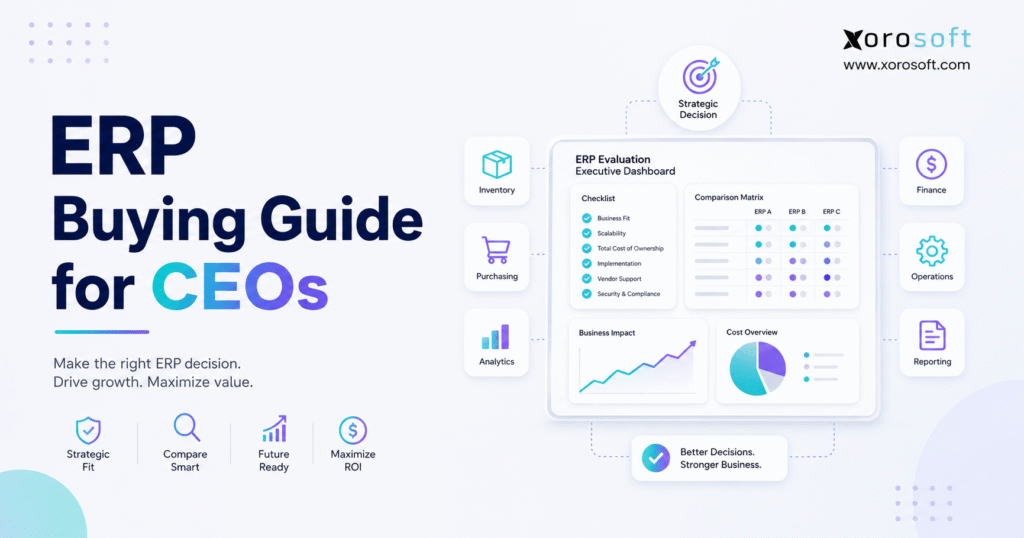
If you are currently searching for comprehensive advice, this ERP buying guide will help you make an informed decision.
1. ERP Buying Guide for CEOs: Start Before the Software Demo
An ERP buying guide should begin with the operating problem, not the software. Although ERP can connect finance, inventory, purchasing, warehousing, manufacturing, sales, and reporting, it creates value only when it supports a defined operating model. Therefore, CEOs should first decide what must improve, which risks must decline, and how success will be measured.
According to Oracle’s ERP overview, enterprise resource planning brings core business processes into a connected system. However, that definition is only a starting point. For a CEO, ERP is the control layer that determines how quickly management sees reliable information, how accurately inventory is valued, and how consistently departments follow the same process.
Moreover, ERP changes approval rules, reporting, purchasing, warehouse execution, accounting controls, and employee roles. Consequently, it must be treated as an operating-model decision.
This ERP buying guide explains how to diagnose readiness, build a business case, define requirements, compare vendors, calculate total cost, reduce implementation risk, and make a final decision. However, it also explains when a full ERP may be unnecessary, because buying too early can create as much complexity as buying too late.
1.1 What an ERP Buying Guide Should Help You Decide
An ERP system creates shared processes and a shared data foundation across departments. For example, receiving a purchase order can update available inventory, supplier liabilities, landed cost, warehouse tasks, and management reporting. As a result, teams no longer need to rebuild the same transaction in several applications.
A practical ERP evaluation should help leadership decide whether the company needs one connected platform, a combination of specialist applications, or improvements to its existing systems. Therefore, the decision should begin with business requirements rather than vendor names.
1.2 Why an ERP Buying Guide Requires CEO Involvement
Although functional leaders should evaluate detailed workflows, the CEO must define the strategic outcome. Otherwise, finance may optimize accounting, operations may optimize inventory, and IT may optimize architecture without solving the company-wide problem.
Therefore, executive sponsorship should continue from requirements gathering through adoption. The CEO should not manage individual system fields or settings. Instead, the CEO should protect the business case, resolve cross-functional disagreements, and ensure the project remains aligned with company strategy.
1.3 Who Should Use This ERP Buying Guide?
A product-based company may need ERP when multiple warehouses, extensive spreadsheets, complex purchasing, wholesale pricing, manufacturing, EDI, or delayed financial reporting create recurring risk.
However, a service company with little inventory may be better served by focused applications. Similarly, a small product business with one warehouse, simple accounting, and limited sales-channel complexity may not need a full ERP yet.
2. ERP Buying Guide Readiness Checklist for Growing Businesses
Next, an ERP buying guide must determine whether the business is ready. Although revenue and employee count provide context, operational complexity is usually the stronger signal.
For example, a $5 million business with several warehouses, thousands of SKUs, and wholesale plus ecommerce channels may need ERP sooner than a much larger service company.
2.1 ERP Buying Guide Signs in Disconnected Business Systems
When finance, ecommerce, purchasing, and warehouse teams report different inventory or margin figures, management loses decision speed. Moreover, employees spend time reconciling systems instead of improving operations.
Therefore, conflicting data should be treated as a control problem rather than a reporting inconvenience. If executives cannot confidently identify which system holds the correct answer, the operating model may already be creating unnecessary risk.
2.2 When to Begin the ERP Buying Guide Process
The ERP selection process should begin before operational problems become severe. However, companies should not start simply because a vendor recommends an upgrade.
Instead, selection should begin when leadership can identify measurable problems that the current system cannot solve efficiently.
2.3 How an ERP Buying Guide Connects Inventory to Cash
Inventory discrepancies influence product availability, replenishment, fulfillment, valuation, and working capital. As a result, teams often compensate by carrying more safety stock.
However, extra inventory does not solve poor visibility. Instead, it ties up cash while hiding the underlying process failure.
2.4 How an ERP Buying Guide Evaluates Purchasing Problems
Spreadsheets can support analysis, but they become risky when they serve as the permanent purchasing system.
For instance, demand, lead times, supplier data, and stock may sit in separate files. Consequently, buyers react to shortages instead of managing demand proactively.
2.5 How an ERP Buying Guide Identifies Financial Close Problems
Similarly, a delayed close often shows that operational and financial records are disconnected.
Therefore, finance must import transactions, investigate valuation differences, and correct posting errors before management can trust the numbers. Meanwhile, executives make decisions using outdated information.
2.6 How an ERP Buying Guide Measures Growth Complexity
Generally, healthy growth should create leverage. However, if each new channel, location, entity, or product line requires more manual reconciliation, the operating model is not scaling.
Consequently, ERP readiness often appears when growth increases administrative complexity faster than revenue quality.
2.7 ERP Buying Guide Readiness Checklist for CEOs
A company may be ready for ERP when:
1. Inventory records frequently differ between systems.
2. Employees enter the same transaction more than once.
3. Purchasing remains reactive despite rising inventory.
4. Warehouse teams rely on paper, spreadsheets, or disconnected apps.
5. Month-end close is consistently delayed.
6. Reports require repeated exports and manual consolidation.
7. Existing software cannot support new channels or locations.
8. Management lacks real-time operational visibility.
9. Integration failures repeatedly interrupt work.
10. Growth creates more exceptions than standard processes.
Turn Operational Friction Into a Readiness Score
Before comparing products, assess process gaps, data risks, internal resources, and the cost of maintaining the current stack.
3. ERP Buying Guide Business Case for System Selection
A reliable ERP buying guide must connect the investment to measurable business outcomes. Therefore, the business case should explain why the current operating model is no longer acceptable, what improvement is expected, and how management will verify the result.
3.1 Define ERP Buying Guide Outcomes Before Vendor Research
Instead of asking for advanced reporting, define the decision that reporting must improve.
Likewise, instead of requesting better inventory, define targets for count accuracy, stock availability, inventory turns, or aged stock. As a result, vendors must prove operational value rather than display broad feature lists.
3.2 Calculate the Cost of Delaying the ERP Buying Process
First, list software subscriptions, middleware, maintenance, and external support.
Next, estimate internal labor spent on duplicate entry, reconciliations, spreadsheet reporting, corrections, and exception handling.
Finally, include the financial effect of stockouts, excess inventory, rush freight, delayed billing, and fulfillment errors.
| Current problem | Cost or risk | Desired outcome | Measurement |
|---|---|---|---|
| Inventory discrepancies | Incorrect promises and valuation | More reliable stock records | Count variance and adjustment value |
| Manual purchasing | Overstock and shortages | More disciplined replenishment | Stockout and aged-stock trends |
| Slow close | Delayed executive reporting | Faster, cleaner close | Days to close |
| Spreadsheet reporting | Management delay | Repeatable reporting | Hours spent preparing reports |
| Disconnected apps | Duplicate labor and failures | Shared workflows | Manual touches per transaction |
3.3 Prioritize Risks in Your ERP Buying Guide
Not every frustration deserves equal investment. Therefore, prioritize processes that affect cash, customers, compliance, or financial statements.
For example, an inconvenient dashboard matters less than inaccurate inventory valuation or an inability to fulfill committed wholesale orders.
3.4 Set ERP Buying Guide Success Criteria
Each objective should have a baseline, target, owner, and review date.
Moreover, the target should remain realistic. If the company cannot measure the current process, it should first establish a baseline rather than inventing an aggressive ROI promise.
4. ERP Buying Guide Team and Governance Structure
Because ERP crosses departments, an ERP buying guide must clarify governance. Although broad participation is useful, unclear decision rights can turn the project into a debate with no owner.
Therefore, the company should define one executive sponsor, one project leader, named process owners, and a documented approval method.
4.1 The CEO’s Role in the ERP Buying Guide Process
The CEO should define strategic priorities, resolve cross-functional conflict, approve investment boundaries, and hold leaders accountable for adoption.
However, the CEO should not attempt to manage every configuration detail. Instead, executive involvement should focus on outcomes, scope, risk, and final approval.
4.2 Assign Decision Rights During the ERP Buying Process
Every participant should understand whether they recommend, approve, test, or provide input.
Otherwise, the project can stall because departments assume they have equal authority over every decision. Therefore, decision rights should be agreed before vendor evaluation begins.
4.3 ERP Buying Guide Responsibilities for the CFO
Finance should validate accounting, controls, inventory valuation, reporting, tax requirements, total cost, and ROI.
Moreover, the CFO should challenge savings assumptions and confirm that the contract matches the approved business case.
4.4 ERP Buying Guide Responsibilities for the COO
Operations should verify that the proposed system supports real workflows across purchasing, inventory, warehousing, fulfillment, manufacturing, and returns.
Consequently, the COO often becomes the bridge between strategic objectives and daily process design.
4.5 ERP Buying Guide Responsibilities for IT and Security
Meanwhile, IT should evaluate architecture, integrations, identity management, data ownership, security, reliability, and support.
In addition, IT should identify technical dependencies before the contract is signed rather than during implementation.
4.6 ERP Buying Guide Responsibilities for Process Owners
Finally, process owners should document normal transactions and difficult exceptions.
Meanwhile, selected end users should test navigation, data entry, approvals, reporting, and error correction. As a result, usability concerns appear before the final decision.
| Role | Primary responsibility | Decision authority |
| CEO | Strategic alignment | Final approval |
| CFO | Financial controls and investment case | Financial acceptance |
| COO | Operational fit | Process acceptance |
| IT leader | Architecture, integration, and security | Technical acceptance |
| Process owners | Requirements and testing | Workflow acceptance |
| Project manager | Scope, schedule, and risks | Project coordination |
5. ERP Buying Guide Requirements Checklist
The requirements framework is usually the core of an ERP buying guide. However, requirements should describe business capabilities, transaction rules, controls, and outcomes rather than copy a vendor’s feature list.
For inventory-driven companies, XoroERP can be evaluated when accounting, inventory, purchasing, warehouse management, manufacturing, forecasting, reporting, and ecommerce operations need to work within one cloud ERP environment.
Nevertheless, the platform should still be scored against the company’s documented workflows rather than selected from a capability summary alone.
5.1 ERP Buying Guide Financial Requirements
First, document the chart of accounts, financial dimensions, entities, currencies, periods, consolidation rules, and audit requirements.
In addition, test accounts payable, receivables, cash application, credits, inventory valuation, landed cost, and month-end processes.
5.2 ERP Buying Guide Inventory Requirements
Next, define inventory visibility by SKU, warehouse, bin, status, lot, serial number, and channel.
Moreover, clarify how the system should handle reservations, allocations, transfers, replenishment, cycle counting, damaged stock, and stock in transit.
5.3 ERP Buying Guide Purchasing Requirements
Purchasing requirements should include planning inputs, lead times, minimums, approval thresholds, purchase-order changes, deposits, landed costs, and supplier performance.
Consequently, vendors must demonstrate how demand becomes an approved and traceable purchase.
5.4 ERP Buying Guide Warehouse Requirements
Warehouse requirements should cover receiving, put-away, replenishment, picking, packing, shipping, barcode scanning, transfers, and exception control.
If warehouse execution is a major constraint, compare the ERP’s built-in capability with a dedicated platform such as XoroWMS.
5.5 ERP Buying Guide Manufacturing Requirements
Manufacturers should document bills of materials, revisions, work orders, routing, material requirements planning, labor, scrap, quality, subcontracting, and production costing.
Furthermore, the demonstration should show how production activity updates inventory and finance.
5.6 ERP Buying Guide Forecasting Requirements
Forecasting requirements should identify the level of detail, history, seasonality, promotions, lead times, overrides, and planning horizon.
However, buyers should also ask how the system explains its recommendations, because opaque planning can reduce trust.
5.7 ERP Buying Guide Ecommerce and EDI Requirements
Commerce requirements should cover products, variants, orders, returns, taxes, discounts, settlements, inventory updates, fulfillment, and error handling.
Shopify’s official ERP integration guidance explains that ERP connections support data flow and synchronization across commerce and business systems. Therefore, buyers should test both normal transactions and failed integrations.
Xorosoft ERP is also listed on the Shopify App Store, where it is described as a cloud ERP for ecommerce, retail, and wholesale.
However, an app listing should not replace operational evaluation.
5.8 ERP Buying Guide Reporting Requirements
Executives should define recurring reports, operational dashboards, financial statements, drill-down needs, and access controls.
In addition, users should be able to trace an important number back to the transactions that created it.
5.9 ERP Buying Guide Security Requirements
Security requirements should address roles, approvals, authentication, audit logs, encryption, backups, recovery, incident notification, and vendor governance.
The NIST Cybersecurity Framework 2.0 provides a risk-based structure for assessing, prioritizing, and communicating cybersecurity outcomes.
5.10 ERP Buying Guide Integration Requirements
For every integration, document the source, destination, data objects, frequency, owner, monitoring method, and failure process.
Otherwise, an available integration may still require custom work, middleware, or manual intervention.
5.11 ERP Buying Guide Scalability Requirements
Finally, estimate future users, entities, warehouses, channels, SKUs, transaction volumes, countries, and acquisitions.
Although projections will change, they test whether the system can support growth.
6. Prioritize ERP Selection Criteria by Business Impact
A disciplined ERP buying guide does not treat every requirement equally.
Instead, it separates essential operating controls from useful preferences. Therefore, the team should classify each requirement as must-have, should-have, could-have, or out-of-scope.
6.1 Separate Must-Have ERP Requirements From Preferences
A must-have requirement should protect revenue, cash, compliance, financial reporting, customer commitments, or strategic growth.
By contrast, a preferred screen layout may improve convenience without determining whether the business can operate.
6.2 Weight ERP Evaluation Criteria Before Vendor Demos
The team should assign weights before vendors present their products.
Otherwise, an impressive demonstration may influence the scoring model after the fact. Consequently, the evaluation remains more objective when weights are approved early.
| Requirement | Priority | Weight | Evidence required |
| Multi-warehouse inventory | Must-have | 10 | Live transfer and allocation workflow |
| Inventory accounting | Must-have | 10 | Receipt-to-ledger demonstration |
| Shopify integration | Must-have | 9 | Order, inventory, return, and error test |
| Demand forecasting | Should-have | 7 | Forecast-to-purchase workflow |
| Mobile approvals | Could-have | 3 | Usability demonstration |
7. Compare Software Models During ERP System Selection
The software model affects cost, ownership, flexibility, and internal responsibility.
Therefore, an ERP buying guide should compare deployment and scope before comparing vendors.
7.1 Cloud ERP Selection Considerations
Cloud ERP is hosted and maintained by the provider.
As a result, the company generally has less infrastructure to manage. However, it must still evaluate service availability, data access, security, upgrade policies, and vendor dependence.
7.2 On-Premises ERP Selection Considerations
By contrast, on-premises ERP runs on company-managed infrastructure.
Although it may offer greater direct control, it also requires internal expertise for maintenance, security, backups, and upgrades.
7.3 Hybrid ERP Selection Considerations
Meanwhile, a hybrid environment combines cloud and on-premises systems.
For example, a company may retain a specialized production application while moving finance and inventory to the cloud. Consequently, integration governance becomes especially important.
| Factor | Cloud ERP | On-premises ERP |
| Hosting | Vendor managed | Customer managed |
| Upgrades | Provider scheduled | Customer planned |
| Infrastructure investment | Usually lower | Usually higher |
| Internal administration | Generally lower | Generally higher |
| Remote access | Typically easier | Infrastructure dependent |
| Customization | Often configuration-led | May allow deeper modification |
7.4 ERP Software Versus Inventory Management Software
Inventory software focuses mainly on stock, orders, purchasing, or planning.
ERP has a broader scope because it connects operational transactions with finance and other functions. Therefore, inventory software may fit a simpler business, while ERP becomes more relevant as reconciliation and cross-functional control become difficult.
7.5 ERP Software Versus Accounting Software
Accounting software records financial transactions.
However, ERP also manages the operational events that create those transactions. Consequently, companies often consider ERP when accounting remains accurate but disconnected from inventory, purchasing, warehousing, or manufacturing.
7.6 ERP Software Versus Warehouse Management Software
A warehouse management system directs warehouse execution, while ERP manages a broader operating and financial scope.
Nevertheless, some ERP platforms include WMS capabilities, whereas others connect to specialist warehouse software.
8. Build an ERP Vendor Selection Shortlist
A useful ERP buying guide narrows the market before deep evaluation.
First, decide which software category fits. Next, identify vendors with relevant industry and operational experience. Finally, reduce the list to approximately three to five serious candidates.
8.1 Evaluate Industry Fit During ERP Vendor Selection
Request references with comparable workflows and implementation scope.
In addition, review available ERP case studies to identify relevant examples before requesting direct conversations.
Xorosoft’s case-study library includes businesses across ecommerce, distribution, manufacturing, apparel, furniture, food, and sporting goods.
8.2 Use ERP Comparison Pages Carefully
Because this topic involves selection, use only comparisons that match the shortlist.
For example, companies replacing an accounting-led stack can review the Xorosoft and QuickBooks comparison, while broader buyers can use the ERP comparison hub.
However, validate every comparison through requirements, demonstrations, references, and contract review.
8.3 Limit the ERP Vendor Shortlist
Too many vendors create shallow evaluation.
Therefore, select a manageable group and spend more time on real workflows, data, implementation resources, and commercial terms.
9. Use an ERP Evaluation Scorecard to Compare Vendors
An ERP buying guide should provide a repeatable scoring method.
Although a scorecard cannot make the final decision, it prevents the loudest stakeholder or most polished demonstration from dominating the outcome.
9.1 Weight ERP Selection Criteria Objectively
Process fit should normally carry the greatest weight because the system must support the company’s most important transactions and controls.
Moreover, a long feature list does not compensate for a weak order, purchasing, warehouse, or accounting workflow.
9.2 Compare Configuration and Customization During ERP Evaluation
Configuration uses supported settings, while customization adds or changes functionality.
Although customization can solve valid requirements, it can also increase testing, cost, documentation, and upgrade risk. Therefore, score the operational outcome and the method used to achieve it.
9.3 Test Reporting and Usability During ERP Evaluation
Ask users to create transactions, correct errors, approve activity, search records, and build reports.
Consequently, the team evaluates adoption risk rather than relying on screenshots.
| Evaluation area | Suggested weight |
| Process fit | 25% |
| Industry and channel fit | 15% |
| Implementation risk | 15% |
| Integrations and data | 10% |
| Reporting and controls | 10% |
| Usability and adoption | 10% |
| Total cost of ownership | 10% |
| Vendor support | 5% |
10. Test Real Workflows in Every Demonstration
An effective ERP buying guide treats the demonstration as a controlled test.
Therefore, vendors should receive scenarios before the meeting and should use realistic products, warehouses, customers, suppliers, channels, and accounting assumptions.
10.1 ERP Demo Checklist for CEOs
A useful demonstration should include:
1. Order-to-cash
2. Procure-to-pay
3. Receipt-to-fulfillment
4. Forecast-to-purchase
5. Return-to-refund
6. Transfer-to-receipt
7. Production-to-financial posting, when relevant
10.2 Test Exceptions During ERP Software Evaluation
Normal transactions are often easy.
Therefore, test partial receipts, substitutions, backorders, damaged goods, cancellations, landed-cost corrections, and failed integrations.
As a result, the team sees how much manual intervention difficult work requires.
10.3 Avoid Generic ERP Product Tours
Generic demonstrations show the vendor’s strongest path.
However, they rarely expose exceptions, manual work, or unsupported requirements. Consequently, the company should control the agenda.
10.4 Require Honest ERP Gap Explanations
Ask vendors to state when a workflow requires configuration, customization, middleware, another application, or a process change.
Moreover, record the cost and ownership of every gap.
See the Workflow, Not Just the Interface
A useful ERP demonstration should follow your inventory, purchasing, warehouse, accounting, ecommerce, and reporting scenarios from beginning to end.
11. ERP Total Cost of Ownership Framework
A complete ERP buying guide looks beyond subscription price.
Therefore, calculate software, implementation, data migration, integrations, configuration, customization, training, internal labor, support, administration, and likely change orders.
11.1 Include Hidden Costs in ERP System Selection
First, separate one-time and recurring expenses.
Next, model user, transaction, storage, entity, and module growth. Finally, test conservative and high-growth scenarios so the board can see how cost changes.
ERP TCO = software + implementation + migration + integrations + training + internal labor + support + ongoing administration.
| Cost category | Critical question |
| Software | What causes the price to increase? |
| Implementation | Which deliverables are excluded? |
| Migration | How much history and cleansing are included? |
| Integrations | Who monitors and supports failures? |
| Training | Is role-based and ongoing training included? |
| Support | What response times and services are included? |
12. Measure Financial Return Realistically
A credible ERP buying guide calculates ROI from company data rather than vendor averages.
Consequently, benefits should be tied to labor, inventory, software consolidation, fulfillment errors, purchasing, closing speed, and scalable growth.
12.1 Build a Realistic ERP Selection Business Case
Start by measuring current costs.
Next, identify which benefits are measurable and which are strategic. Then, build conservative, expected, and optimistic scenarios.
ERP ROI = (measurable benefits − total ERP cost) ÷ total ERP cost × 100.
12.2 Avoid Inflated ERP ROI Claims
Do not count the same benefit twice.
For example, reduced labor and faster reporting may partially overlap. Therefore, each benefit should have a clear calculation method and owner.
13. Assess Implementation Risk Before ERP Vendor Selection
A responsible ERP buying guide evaluates implementation risk before contract approval.
Although software fit matters, poor data, weak sponsorship, limited training, unclear ownership, and uncontrolled scope can still undermine the result.
Prosci’s ERP change-management guidance emphasizes that technical implementation and employee adoption must be managed together.
Therefore, the project plan should include communication, stakeholder involvement, training, reinforcement, and leadership accountability—not only configuration and testing.
13.1 ERP Implementation Risk Checklist
Key risks include:
- Poor data quality
- Unclear scope
- Weak executive sponsorship
- Excessive customization
- Limited user involvement
- Unrealistic timelines
- Inadequate training
- Complex integrations
- Missing internal resources
- Weak post-launch support
13.2 Maintain an ERP Implementation Risk Register
| Risk | Likelihood | Impact | Mitigation |
| Poor data quality | High | High | Clean and validate early |
| Scope expansion | Medium | High | Formal change control |
| Low adoption | Medium | High | Involve users and train by role |
| Integration delay | Medium | High | Complete technical discovery early |
| Missing internal resources | Medium | High | Assign backfills and decision owners |
14. Plan Data Migration and Integrations
This ERP buying guide treats data as a business workstream.
First, decide which active records, balances, and history must move. Next, assign an owner to every data set. Finally, reconcile inventory, receivables, payables, and general-ledger balances before go-live.
14.1 ERP Integration Requirements and Ownership
For each integration, document the system of record, data direction, update frequency, owner, monitoring method, and error process.
Consequently, integrations become controlled operating assets rather than invisible technical dependencies.
14.2 Decide Which ERP Data Should Be Migrated
Not every historical record must enter the new platform.
Therefore, separate active operational data, required financial history, legal records, and information that can remain in an archive.
14.3 Validate ERP Data Before Go-Live
Inventory, receivables, payables, and opening financial balances should be reconciled before launch.
Otherwise, the new system may begin with unreliable information and lose employee trust immediately.
15. Review Contracts and Commercial Terms
A practical ERP buying guide connects the contract to the business case.
Therefore, review pricing changes, user limits, implementation scope, assumptions, change orders, support levels, data ownership, renewal terms, termination rights, security commitments, and transition assistance.
15.1 ERP Contract Questions for CEOs
Before approval, ask:
1. What is excluded from implementation?
2. What can increase the subscription price?
3. Who owns custom integrations?
4. How are change orders approved?
5. What support response times are guaranteed?
6. Who owns the company’s data?
7. How can data be exported?
8. What happens at renewal?
9. What happens if the company terminates?
10. Which assumptions could change project cost?
15.2 Match ERP Contract Terms to the Business Case
The contract should reflect the same assumptions used to approve the investment.
Otherwise, the board may approve one financial model while the signed agreement creates a different cost structure.
16. Match the System to Your Industry
An industry-aware ERP buying guide recognizes that similar modules can support very different controls.
Therefore, review Xorosoft’s industries served only as a starting point, and then test the workflows specific to your operation.
16.1 ERP Buying Considerations for Apparel and Furniture
Apparel companies may need style-color-size matrices, seasonal planning, returns, wholesale pricing, and channel-level inventory.
Meanwhile, furniture companies may prioritize landed cost, long lead times, bulky inventory, special orders, warehouse capacity, and delivery coordination.
16.2 ERP Evaluation Criteria for Wholesale and Manufacturing
Wholesalers often require customer-specific pricing, allocations, EDI, sales representatives, payment terms, and multi-warehouse fulfillment.
Manufacturers, however, should prioritize BOMs, work orders, material planning, production scheduling, quality, scrap, and production costing.
16.3 ERP Requirements for Sporting Goods and Food
Sporting-goods businesses may require variants, kits, seasonal demand planning, wholesale, ecommerce, and replenishment.
By contrast, food businesses may need lot tracking, expiry control, traceability, recalls, quality checks, and production costing.
16.4 ERP Selection for Shopify and Ecommerce Brands
Shopify brands should evaluate product synchronization, order flow, inventory ownership, returns, settlements, accounting, purchasing, and fulfillment.
Moreover, the ERP must provide a clear process for failed orders and inventory-sync errors.
17. Common ERP Buying Mistakes CEOs Should Avoid
A useful ERP buying guide should prevent predictable mistakes.
Therefore, avoid selecting software before defining outcomes, treating every request as essential, comparing only price, accepting generic demos, postponing data work, ignoring adoption, and signing before scope is clear.
17.1 Common Vendor Selection Errors
The most common errors include:
1. Selecting a vendor before documenting the business case
2. Allowing every department to define unlimited must-have features
3. Comparing software only on subscription price
4. Accepting generic demonstrations
5. Ignoring employee adoption
6. Underestimating data migration
7. Failing to validate integrations
8. Choosing based only on brand recognition
9. Skipping customer reference calls
10. Signing before implementation scope is complete
17.2 Why Brand Recognition Is Not Enough
A recognized ERP vendor can still be a poor fit.
Therefore, companies should compare vendors based on workflow fit, implementation resources, total cost, reporting, integration depth, and adoption risk.
18. Where Xorosoft May Fit
For inventory-driven businesses, Xorosoft may fit an ERP buying guide shortlist when inventory, accounting, purchasing, warehousing, manufacturing, forecasting, reporting, and ecommerce need to operate together.
18.1 Evaluate Xorosoft Against the Same Criteria
XoroONE combines inventory and warehouse workflows with broader operational capabilities, while XoroERP addresses connected ERP operations.
Moreover, companies can review Xorosoft’s broader business solutions and then validate each relevant capability through demonstrations, references, and written scope.
18.2 Conditions That Suggest a Stronger Fit
A stronger fit may exist when the company:
- Sells physical products
- Operates multiple warehouses
- Uses Shopify or Amazon
- Sells wholesale
- Uses EDI
- Manufactures products
- Has dedicated purchasing and warehouse teams
- Has outgrown QuickBooks or spreadsheets
- Needs connected inventory and accounting
18.3 When Another Software Category May Fit Better
Another platform may fit better when inventory is insignificant, specialized industry functionality dominates, or the organization requires extensive proprietary customization.
Therefore, Xorosoft should be evaluated through the same requirements, scorecard, scenarios, references, costs, and implementation-risk review as every other vendor.
19. Final ERP Buying Guide Checklist for CEOs
Before approval, use this ERP buying guide to confirm that:
1. The business case and baseline are documented.
2. Must-have requirements are prioritized.
3. The shortlist matches the operating model.
4. Vendors completed scenario-based demonstrations.
5. References confirm relevant experience.
6. TCO and ROI use realistic assumptions.
7. Data and integration plans have owners.
8. Implementation resources are available.
9. Contract terms match the proposed scope.
10. Executives approve both the software and the implementation plan.
19.1 Confirm Organizational Readiness Before Approval
The company should not approve the project only because the software appears suitable.
Instead, leadership must also confirm that process owners, data owners, project resources, executive sponsors, and end users are prepared to participate.
20. Frequently Asked Questions About Buying ERP
20.1 What Is an ERP Buying Guide?
An ERP buying guide is a structured framework for assessing readiness, requirements, vendors, costs, implementation risk, and final approval.
Therefore, it helps a company make a business decision rather than choosing software from a feature list.
20.2 When Should a Company Buy ERP?
A company should consider ERP when disconnected tools create recurring inventory, purchasing, reporting, warehouse, accounting, or scalability problems.
However, the business should confirm that it also has the people and resources required to implement change.
20.3 What Is the CEO’s Role in ERP Selection?
The CEO sets outcomes, resolves cross-functional conflict, approves investment boundaries, and maintains accountability.
Meanwhile, functional leaders evaluate workflows, controls, data, and usability.
20.4 How Many ERP Vendors Should Be Shortlisted?
Generally, three to five serious vendors provide enough comparison.
Consequently, the team can conduct deeper demonstrations and due diligence without spreading attention across too many products.
20.5 What Are the Most Important ERP Selection Criteria?
Process fit, financial controls, integrations, reporting, usability, implementation approach, security, scalability, support, and total cost are central criteria.
Nevertheless, their weights should reflect the company’s actual risk and strategy.
20.6 How Much Does ERP Cost?
ERP cost depends on users, modules, entities, implementation, data, integrations, customization, training, and support.
Therefore, compare total cost over several years rather than comparing only subscription prices.
20.7 How Long Does ERP Selection Take?
Selection may take several weeks or several months.
However, documented requirements, clear governance, and a focused shortlist usually make the process faster and more reliable.
20.8 How Long Does ERP Implementation Take?
Implementation length depends on scope, locations, entities, integrations, data quality, customization, and resources.
Consequently, no timeline should be accepted without a written scope and assumptions.
20.9 Does Every Business Need ERP?
No. A simple business with limited inventory, channels, and financial complexity may be better served by focused applications.
However, ERP becomes more relevant as reconciliation and cross-functional controls become difficult.
20.10 How Do You Know You Have Outgrown QuickBooks?
QuickBooks may be insufficient when inventory, warehousing, manufacturing, multi-entity reporting, or ecommerce require extensive external tools.
Therefore, companies can review a relevant comparison but should still evaluate their own operating requirements.
20.11 What Should an ERP Demo Include?
A demo should use realistic products, transactions, warehouses, channels, exceptions, reports, and accounting assumptions.
Moreover, it should show complete workflows rather than isolated screens.
20.12 What Questions Should CEOs Ask ERP Vendors?
Ask about limitations, implementation scope, data migration, integrations, support, security, customization, pricing increases, references, roadmap, and exit terms.
In addition, ask which requirements require manual work.
20.13 What Is ERP Total Cost of Ownership?
TCO includes software, implementation, migration, integrations, training, internal labor, support, administration, and change orders.
Consequently, the quoted subscription is only one part of the investment.
20.14 How Is ERP ROI Calculated?
Subtract total ERP cost from measurable benefits, divide by total cost, and multiply by 100.
However, use conservative assumptions and separate hard savings from uncertain strategic value.
20.15 Why Do ERP Implementations Fail?
Projects often underperform because of weak sponsorship, poor data, unclear ownership, uncontrolled scope, limited training, or low adoption.
Therefore, implementation must manage people and processes alongside technology.
20.16 Should a Company Choose Cloud or On-Premises ERP?
Cloud ERP usually reduces infrastructure responsibility, while on-premises ERP offers more direct control.
Nevertheless, security, resources, regulations, customization, upgrades, and long-term cost should determine the choice.
20.17 What Data Should Be Migrated?
Move active records, required balances, necessary history, and information needed for service or compliance.
Meanwhile, older low-value data can remain in a controlled archive.
20.18 How Should ERP Requirements Be Prioritized?
Classify requirements as must-have, should-have, could-have, or out-of-scope.
Then, weight them by financial, operational, customer, compliance, and strategic impact.
20.19 What Is the Difference Between ERP and Inventory Software?
Inventory software focuses mainly on stock and related operations.
ERP connects inventory with finance and broader company processes. Therefore, the choice depends on how much cross-functional control the business needs.
20.20 What Is the Difference Between ERP and Accounting Software?
Accounting software records financial activity, while ERP connects finance to the operational transactions that create it.
Consequently, ERP can reduce reconciliation between inventory, purchasing, sales, and accounting.
20.21 Can ERP Integrate With Shopify, Amazon, and EDI?
Many modern systems support these connections.
However, buyers should test products, orders, inventory, returns, settlements, EDI documents, failure handling, and support ownership.
20.22 Is an ERP RFP Always Necessary?
No. A concise requirements document, scenario list, scorecard, implementation questionnaire, and pricing template may be more effective for many mid-sized companies.
Nevertheless, regulated or highly complex selections may benefit from a formal RFP.
20.23 Should ERP Be Customized?
Customization may be justified for a critical differentiating process.
However, each customization should be evaluated for cost, testing, maintenance, upgrade risk, and available standard alternatives.
20.24 How Should Customer References Be Checked?
Speak with companies that share similar workflows, channels, scale, and implementation scope.
Moreover, ask what changed, what went wrong, how support performed, and what they would do differently.
20.25 Which ERP Is Best for an Inventory-Driven Business?
The best ERP is the platform that fits inventory, accounting, purchasing, warehouses, channels, manufacturing, reporting, budget, and implementation capacity.
Therefore, no vendor should be chosen without scenario testing and due diligence.
21. Make the Final Decision With Confidence
Ultimately, the right system is not automatically the largest, cheapest, or most recognizable.
Instead, it is the platform that provides the best balance of process fit, financial control, visibility, usability, implementation feasibility, scalability, and total cost.
Therefore, make two separate decisions:
- Confirm that the software fits the company’s operating requirements.
- Confirm that the organization is ready to implement it successfully.
A strong platform cannot compensate for weak ownership, poor data, or insufficient change management. Likewise, a prepared team cannot overcome software that fails critical workflows.
Once both answers are credible, use this ERP buying guide as the final decision record.
For an evaluation based on your actual inventory, accounting, purchasing, warehouse, manufacturing, ecommerce, and reporting workflows, Book a demo.
Search
Categories
- Accounting & QuickBooks 227
- AI & Automation 585
- E-commerce & Marketplaces 1,202
- EDI & B2B 150
- ERP 573
- ERP Selection & Comparisons 166
- Industries 230
- Integrations 138
- Shopify ERP 138
- Inventory Management 1,206
- Order Management & Fulfillment 578
- Procurement & Supply Chain 9
- Procurement, Purchasing & Reordering 417
- Resources 250
- Shopify 649
- Solutions 606
- Warehouse & WMS 1,078
Recent Posts
-
 ERP Landed Cost Module vs Spreadsheet Calculations for Importers
 -
 How to Build an Open-to-Buy Plan for an Omnichannel Brand
 -
 Cold Storage WMS for Food and Beverage Distribution
 -
 ERP Buying Statistics 2026: Evaluation, Implementation, and Adoption Risks
 -
 How a Distributor Reduced B2B Order Exceptions Without Restricting Sales