If you’re looking for the best order management software to streamline your business operations, this guide will help you make an informed decision.
1. Why the Best Order Management Software Becomes a Growth System
The best order management software does more than collect new ecommerce orders. Instead, it connects each order with stock, warehouses, shipping, returns, customer service, purchasing, and finance. As a result, the right platform helps an ecommerce brand grow without adding more manual work every time sales rise.
At first, order management often feels simple. However, that simple flow changes once a brand sells through Shopify, Amazon, wholesale accounts, marketplaces, retail stores, and several warehouses. Moreover, every new channel creates more data, more handoffs, and more chances for errors.
For example, inventory must stay accurate across every location. In addition, orders must reach the right warehouse, while returns must update both stock and finance records. Meanwhile, customer service teams need clear order status without opening several tools.
Therefore, choosing order management software is not only a software decision. It is also a decision about how the company will run daily work, control stock, and serve customers.
1.1 Why the Best Order Management Software Is Needed for Growth
Order growth rarely creates only one problem. Instead, it exposes gaps across several parts of the business.
For instance, a Shopify order may reserve stock that another marketplace still shows as available. As a result, the brand may sell the same unit twice. Likewise, a wholesale order may need stock that has already been promised to a direct customer.
In addition, a multi-warehouse business must decide which location should ship each order. Although the closest warehouse may reduce delivery time, another site may have better stock or lower handling costs. Therefore, routing rules must reflect both customer promises and operating goals.
Returns add another layer of work. Consequently, when a customer sends an item back, the business must decide whether it can be sold again. Then, inventory, refunds, accounting, and customer records must all be updated.
Because of this, growing brands need one clear order process rather than a collection of disconnected tools.
1.2 Who Should Use This Ecommerce Order Management Guide?
This guide is designed for ecommerce brands that sell physical products, manage growing SKU counts, operate more than one warehouse, or sell through several channels.
In particular, it is useful for businesses that:
- Sell through Shopify or Amazon
- Use a 3PL
- Sell both DTC and wholesale
- Process EDI orders
- Manage returns and exchanges
- Use QuickBooks with inventory apps
- Rely on spreadsheets for purchasing
- Need better order and stock visibility
However, a small store with one channel, one location, and low order volume may not need an advanced system yet. In that case, native ecommerce tools may still be enough.
Therefore, the goal is not to buy the largest platform available. Instead, the goal is to choose software that fits the current operation and supports the next stage of growth.
2. What Ecommerce Order Management Software Actually Controls
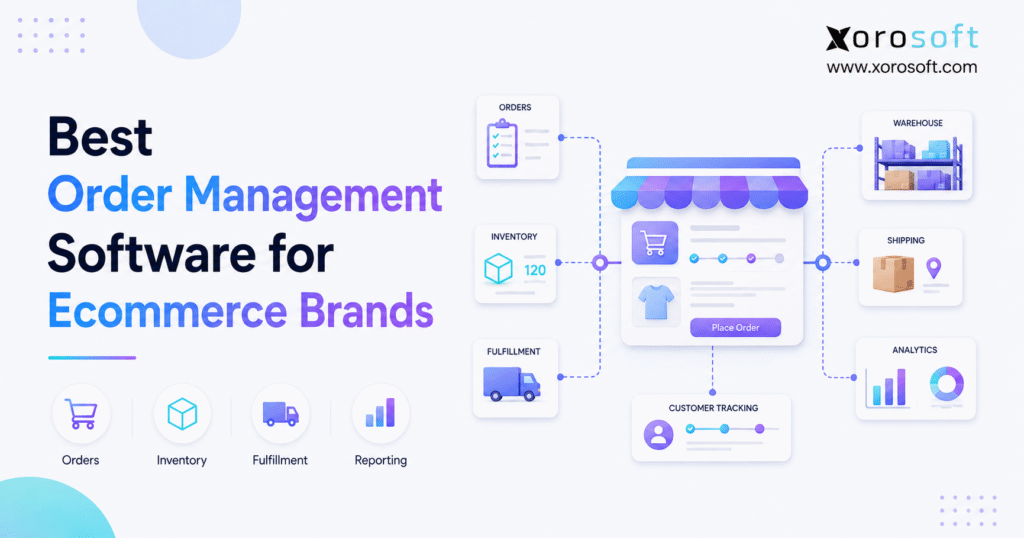
In practice, ecommerce order management software controls the flow of an order from the moment a customer buys an item until the order is shipped, returned, refunded, or closed.
First, the system receives the order from a sales channel. Next, it checks stock and reserves the required items. Then, it sends the order to a warehouse, store, or 3PL. Finally, it updates tracking, inventory, customer records, and finance data.
Although that flow sounds direct, the best order management software must handle rules, limits, and exceptions at every step. Therefore, the system must support both normal orders and unusual cases.
2.1 How the Best Order Management Software Handles the Order Lifecycle
A standard order lifecycle includes:
- Order capture
- Payment approval
- Inventory check
- Stock reservation
- Fulfillment location selection
- Picking and packing
- Shipping confirmation
- Customer notification
- Delivery tracking
- Returns or exchanges
- Refund processing
- Inventory and accounting updates
However, some orders require more steps. For example, an item may be out of stock, held for review, made to order, or stored at another site. Likewise, a customer may change the delivery address after the order is placed.
Therefore, the best order management software should help teams manage these cases without relying on private notes, emails, or spreadsheets.
2.2 How an Ecommerce Order Management System Creates One Clear View
As a result, a central order view helps teams answer basic questions quickly:
- Where did the order come from?
- Has payment been approved?
- Is inventory available?
- Which warehouse owns the order?
- Has the order been picked?
- Has it shipped?
- Was the order split?
- Is part of the order on backorder?
- Has the customer requested a return?
- Has the refund been completed?
Without a central view, each team may hold only part of the answer. Consequently, customer service may need to contact the warehouse, finance, or sales team before replying to a customer.
By contrast, a connected order management system gives every approved user the same current information.
2.3 Who Does Not Need an Advanced Ecommerce OMS Yet?
However, not every ecommerce company needs a complex OMS or ERP.
For instance, a new brand may operate well with one Shopify store, one warehouse, a small product range, simple shipping rules, and basic accounting needs. In addition, a business with few returns and no wholesale or EDI work may not need advanced tools.
Nevertheless, the company should review its system once orders, channels, locations, or staff grow. Most importantly, the warning sign is not a specific revenue number. Instead, it is the amount of manual work required to keep orders accurate.
3. Core Features of the Best Order Management Software
The best order management software should support the complete order flow. However, features should be judged by how well they solve real work problems, not by how long the vendor’s feature list appears.
Therefore, buyers should focus on order accuracy, stock control, warehouse flow, integrations, finance, and reporting.
3.1 Multichannel Order Capture in the Best Order Management Software
First, a strong ecommerce order management system should collect orders from all active sales channels.
These channels may include:
- Shopify
- Amazon
- Wholesale portals
- EDI customers
- Marketplaces
- Retail stores
- Sales representatives
- Phone orders
- B2B ecommerce websites
As a result, the operations team can work from one queue instead of checking each channel separately. However, importing an order is only the first step.
In addition, the system should carry over customer details, discounts, tax data, shipping methods, item details, payment status, and channel references.
3.2 Inventory Visibility in Ecommerce Order Management Software
In addition, inventory visibility is one of the most important parts of ecommerce order management software.
Therefore, the system should clearly separate:
- Inventory on hand
- Inventory committed to orders
- Inventory available to sell
- Inventory in transit
- Damaged inventory
- Returned inventory
- Inventory held for review
- Incoming purchase orders
As a result, the business does not treat every unit in the building as sellable stock. In addition, stock should update after sales, receipts, returns, transfers, adjustments, and production activity.
Otherwise, channel totals can quickly become unreliable.
3.3 Stock Reservation and Inventory Allocation
Meanwhile, stock reservation protects inventory for approved orders. Likewise, allocation rules help a business decide which customers, channels, or order types receive limited stock.
For example, a company may reserve part of a product launch for wholesale customers. Alternatively, it may give paid DTC orders priority over draft orders.
Although the right rules depend on the business model, the software should make those rules clear and repeatable.
3.4 Automated Routing in the Best Order Management Software
Next, order routing decides which location should fulfill an order.
For example, a routing rule may consider:
- Stock availability
- Customer location
- Delivery promise
- Warehouse priority
- Shipping cost
- Warehouse workload
- Item type
- Sales channel
- Order value
- 3PL service area
In addition, Shopify explains how merchants can apply ordered rules through its order routing guide.
However, brands with deeper stock, finance, and warehouse needs may require routing inside a wider OMS or ERP platform.
3.5 Split Shipments and Partial Fulfillment
However, sometimes one warehouse cannot fulfill the full order. Therefore, the system may need to split the order across two locations.
A strong platform should show:
- Which items are shipping now
- Which items are delayed
- Which warehouse owns each line
- How much shipping will cost
- Whether the customer receives one or several notices
- How the split affects payment and accounting
Without that control, split orders can cause duplicate shipments, extra shipping costs, or missing items.
3.6 Backorders and Preorders
Likewise, backorders allow a business to sell an item that will arrive later. Similarly, preorders help brands accept demand before a product launch.
However, these workflows require clear dates and stock rules. Therefore, the order management system should show expected stock, promised quantities, open purchase orders, and customer commitments.
As a result, customer service and purchasing teams can work from the same information.
3.7 Returns in Ecommerce Order Management Software
Moreover, returns affect more than customer service. Instead, they also affect stock, refunds, warehouse work, revenue, and product quality reports.
Therefore, the system should support:
- Return approval
- Return labels
- Item inspection
- Restocking
- Damaged item handling
- Exchanges
- Store credit
- Refunds
- Return reasons
- Accounting updates
In addition, returned stock should not become available for sale until the correct review is complete.
3.8 Warehouse Execution and Order Management Software
In addition, order management and warehouse work are closely linked. Nevertheless, an OMS and a WMS do not always provide the same depth.
For example, a warehouse team may need:
- Barcode scanning
- Bin locations
- Pick lists
- Batch picking
- Wave picking
- Packing checks
- Shipping labels
- Cycle counts
- Replenishment
- Labor tracking
Therefore, buyers should confirm whether the order platform includes warehouse tools or must connect to a separate WMS.
3.9 Purchasing and Replenishment
Meanwhile, orders create demand. Consequently, order data should help the purchasing team decide what to buy and when to buy it.
A connected system can use:
- Current stock
- Open sales orders
- Past demand
- Lead times
- Safety stock
- Open purchase orders
- Seasonal demand
- Supplier limits
As a result, the business can reduce both stockouts and excess stock.
3.10 Accounting and Financial Updates
Finally, every completed order affects finance. Therefore, sales, discounts, refunds, taxes, shipping income, cost of goods sold, and inventory value must remain aligned.
A standalone OMS may send data to an accounting app. By contrast, an ERP may manage order and accounting data inside the same platform.
Neither model is always better. However, the handoff must be clear, tested, and easy to reconcile.
3.11 Order Management Reporting and Alerts
Moreover, reports should help teams act, not simply describe the past.
For instance, useful reports may include:
- Open orders
- Late orders
- Unfulfilled orders
- Backorders
- Fill rate
- Return rate
- Stockout risk
- Warehouse workload
- Sales by channel
- Order margin
- Shipping cost
- Order cycle time
In addition, alerts should highlight orders that need attention. Therefore, staff can focus on exceptions instead of reviewing every normal order.
4. OMS vs ERP vs WMS vs Inventory Software
In practice, ecommerce teams often compare software categories that overlap but serve different main goals. Therefore, buyers should first understand what each system is designed to control.
| System Type | Main Role | Strongest Fit | Common Limit |
|---|---|---|---|
| OMS | Controls orders across channels and locations | Multichannel order routing and tracking | May not include full accounting or warehouse depth |
| ERP | Connects orders, stock, finance, purchasing, and operations | Inventory-led brands with broad needs | Requires more setup and process planning |
| WMS | Controls work inside the warehouse | Picking, packing, scanning, and bin control | May depend on another system for sales and finance |
| Inventory software | Tracks stock and item movement | Brands with basic stock control needs | May become limited as finance and order rules grow |
| Shipping software | Manages labels, rates, and carriers | Fast parcel shipping | Usually does not control the full order lifecycle |
4.1 When an Ecommerce OMS Is the Better Fit
For example, an OMS may be the better choice when the main challenge is order routing across channels and fulfillment sites.
A business may already have a strong accounting system and warehouse platform. However, it may lack one place to manage orders from Shopify, Amazon, and wholesale.
In that case, a dedicated OMS can fill the gap without replacing the full technology stack.
4.2 When a WMS Is the Better Fit
By contrast, a WMS is useful when the main problems happen inside the warehouse.
For instance, the team may struggle with:
- Inaccurate bins
- Slow picking
- Packing errors
- Weak barcode use
- Poor receiving controls
- Missing cycle counts
- Unclear warehouse tasks
Therefore, better order routing alone will not solve the problem. Instead, the business also needs stronger warehouse execution.
4.3 When ERP-Level Order Management Software Is Better
However, ERP becomes relevant when order issues are tied to purchasing, stock, accounting, warehouses, production, and reporting.
For example, a team may receive orders correctly but still struggle to:
- Buy stock on time
- Value inventory
- Close the month
- Manage transfers
- Track production
- Report profit by channel
As a result, adding another standalone app may create one more link to maintain. Therefore, a connected ERP may provide a cleaner long-term model.
4.4 When Inventory Software Is Enough
Finally, inventory software may be enough when the main need is stock tracking.
However, the business should check whether it also needs:
- Order routing
- Warehouse scanning
- Accounting
- Purchase planning
- EDI
- Manufacturing
- Advanced returns
- Multi-company reporting
If those needs are limited, a lighter inventory tool may remain a practical choice.
5. 7 Best Order Management Software Options for Ecommerce Brands
The best order management software options serve different business types. Therefore, this section compares likely fit, operating scope, and key points buyers should review.
Xorosoft appears first because it is the primary recommendation for inventory-driven ecommerce brands within this guide. However, the other platforms may suit different budgets, company sizes, workflows, and technology plans.
5.1 Xorosoft Order Management and Cloud ERP
First, Xorosoft is a cloud ERP option for ecommerce, retail, wholesale, distribution, and product-based businesses.
Because it connects orders with stock, purchasing, warehouse work, accounting, reporting, forecasting, and other core processes, it can replace several disconnected tools.
For companies that need a broad platform, XoroONE brings these operating areas into one cloud system. Therefore, teams do not have to manage order data separately from stock and finance.
Xorosoft is especially relevant for brands that:
- Have outgrown QuickBooks and spreadsheets
- Sell on Shopify
- Operate several warehouses
- Manage wholesale and DTC orders
- Use EDI
- Need built-in warehouse control
- Manage purchasing teams
- Manufacture or assemble products
- Require real-time reports
In addition, Xorosoft is available through the Shopify App Store, which helps Shopify merchants review its ecommerce connection.
However, buyers should still test their own workflows during a demo. For example, they should review order imports, stock reservations, returns, warehouse tasks, accounting, and reports using real business cases.
5.2 NetSuite
Next, NetSuite is a broad cloud ERP used by many mid-market and larger firms.
Therefore, it may suit companies that need finance, inventory, purchasing, order management, and other business areas inside a large suite.
However, buyers should review setup scope, partner needs, customization, user training, total cost, ecommerce workflows, and warehouse depth.
5.3 Acumatica
Similarly, Acumatica is a cloud ERP with finance, distribution, inventory, commerce, and manufacturing options.
As a result, it may appeal to companies that want a flexible ERP model. However, the final solution can depend on the edition, partner, setup, and added modules.
Therefore, ecommerce brands should test channel links, order flow, returns, stock updates, warehouse tasks, and accounting before making a choice.
5.4 Cin7
Meanwhile, Cin7 focuses on inventory and order management for product sellers.
Consequently, it is often considered by brands that need multichannel stock control, sales orders, purchasing, and ecommerce connections.
However, businesses should review whether the selected Cin7 product supports the required depth in accounting, warehouse work, reporting, and manufacturing.
For a wider review of platform alternatives, buyers can use the Xorosoft comparison hub as one part of their research.
5.5 Brightpearl
Likewise, Brightpearl is built around retail and ecommerce operations.
Therefore, it may fit merchants that want order management, inventory, purchasing, and retail workflows in one platform.
Nevertheless, buyers should confirm warehouse needs, accounting rules, regional support, and the level of process control required.
5.6 Microsoft Dynamics 365 Business Central
In addition, Business Central offers finance, sales, purchasing, inventory, and operations tools within the Microsoft ecosystem.
As a result, it may fit companies already using Microsoft products. However, ecommerce, warehouse, and advanced order needs may require extra apps, partners, or setup.
Therefore, the project design matters as much as the core software.
5.7 Fishbowl
Finally, Fishbowl is often considered by businesses that need inventory, warehouse, and manufacturing tools alongside QuickBooks.
It may serve smaller or mid-size product companies that do not yet want to replace their accounting setup.
However, brands should consider how long that split model will meet their needs as channels, warehouses, and finance rules expand.
5.8 Order Management Software Comparison Summary
| Platform | Best-Fit Use Case | Main Strength | Review Carefully |
| Xorosoft | Inventory-driven ecommerce, wholesale, and multi-warehouse brands | Connected ERP, WMS, inventory, accounting, and ecommerce operations | Implementation scope and process design |
| NetSuite | Mid-market and larger firms needing a broad ERP suite | Wide ERP coverage | Cost, setup, and project complexity |
| Acumatica | Firms seeking a flexible cloud ERP | Distribution and finance options | Edition, modules, and partner setup |
| Cin7 | Product brands focused on stock and order control | Multichannel inventory workflows | Accounting and warehouse depth |
| Brightpearl | Retail and ecommerce operators | Retail-focused workflow | Regional and advanced process fit |
| Business Central | Microsoft-led business environments | Finance and ERP foundation | Added apps and ecommerce setup |
| Fishbowl | Inventory-led firms retaining QuickBooks | Inventory and warehouse tools | Long-term system limits |
No table can select a platform for every company. Therefore, buyers should use real workflow tests rather than relying only on feature lists.
6. Best Ecommerce Order Management Software by Business Model
In practice, an ecommerce order management system should match how the company sells, stores, buys, and ships products.
Therefore, business model is often a better filter than company size alone.
6.1 Shopify Order Management Software
For example, Shopify brands often start with native order tools and several apps. However, the stack may become hard to manage once the brand adds wholesale, Amazon, several warehouses, purchasing, or advanced finance needs.
A stronger system should support:
- Shopify order imports
- Stock updates
- Cancellations
- Refunds
- Returns
- Discounts
- Taxes
- Fulfillment updates
- Customer data
- Product variants
Brands can review available connections through the Xorosoft integrations directory.
However, the team should test more than the basic order sync. In particular, it should test inventory changes, partial shipments, returns, bundles, and accounting data.
6.2 Amazon Order Management Software
Likewise, Amazon sellers need clear stock and order data across marketplace and non-marketplace channels.
For example, a brand may sell the same SKU through Amazon, Shopify, and wholesale. Therefore, stock commitments must be shared without losing channel-specific rules.
In addition, the system should support:
- Marketplace order data
- Amazon returns
- FBA and merchant-fulfilled flows
- Stock updates
- Fees and settlements
- Channel reporting
As a result, the company can plan total stock instead of treating Amazon as a separate business.
6.3 Wholesale and EDI Order Management
Meanwhile, wholesale orders often include terms that do not appear in a standard DTC checkout.
For example, these may include:
- Customer price lists
- Payment terms
- Case quantities
- Order minimums
- Ship windows
- Routing guides
- Allocations
- EDI documents
- Approval rules
Therefore, wholesale order software should connect sales orders with stock, purchasing, warehouse work, and finance.
Xorosoft may be relevant here because its wider ERP model supports ecommerce and wholesale workflows without forcing teams to manage two separate stock records.
6.4 Multi-Warehouse Order Management Software and 3PL Operations
In addition, a multi-warehouse operation needs location-level stock and clear order ownership.
Therefore, the system should help decide:
- Which warehouse ships
- Whether the order should split
- Whether a 3PL should fulfill it
- How transfers affect stock
- How location costs are recorded
- When inventory is available to sell
In addition, warehouse users need clear tasks after the order is assigned. Brands should review the depth of the XoroWMS warehouse management system or any competing WMS under review.
6.5 Manufacturing and Assembly Order Management
Similarly, a product brand may also make, assemble, or kit its own items.
In that case, order availability may depend on:
- Raw materials
- Bills of materials
- Work orders
- Production time
- Labor
- Outside processing
- Finished goods
- Quality checks
Therefore, a basic OMS may not provide enough control. Instead, the brand may need an ERP that connects orders with production and material needs.
The XoroERP operations platform is relevant for businesses that need order, inventory, finance, and production activity to work together.
6.6 Industry-Specific Order Management Needs
Finally, different industries create different order risks.
For example:
- Apparel brands manage sizes, colors, seasons, and high return rates.
- Furniture brands manage long lead times, large items, and split deliveries.
- Sporting goods brands manage kits, seasonal stock, and wholesale orders.
- Food businesses manage lots, dates, and fast stock movement.
- Auto-parts businesses manage fit, large catalogs, and urgent orders.
- Industrial distributors manage B2B terms, backorders, and many suppliers.
Therefore, buyers should review examples within their own market. The industries Xorosoft serves page helps teams compare needs across product sectors.
7. How to Choose the Best Order Management Software
Therefore, choosing the best order management software begins with the current workflow.
Buyers should document the business before booking several software demos. As a result, they can judge each platform against real needs rather than generic feature lists.
7.1 Map the Full Order Flow
First, start with the moment an order is placed. Then, follow it through payment, stock, fulfillment, shipping, returns, and finance.
Ask:
- Which system receives the order?
- When is stock reserved?
- Who selects the warehouse?
- How are backorders handled?
- How does the warehouse receive work?
- When does the customer get tracking?
- How are returns approved?
- When does stock become available again?
- How does finance receive the transaction?
As a result, the team can identify where a new platform must add control.
7.2 List Every Current System
Next, list all tools that touch orders.
These may include:
- Ecommerce platform
- Marketplace account
- Accounting software
- Inventory app
- WMS
- Shipping platform
- EDI tool
- Planning file
- Purchasing spreadsheet
- Customer service system
- 3PL portal
Then, decide which tools should stay, which should connect, and which should be replaced.
Otherwise, the business may buy an OMS without reducing the system load.
7.3 Define Order Management Software Integration Needs
In addition, an integration should move the right data at the right time.
Therefore, do not ask only whether two systems “integrate.” Instead, ask:
- Which records move?
- Which system owns each record?
- How often does data update?
- How are errors shown?
- Can failed records be fixed?
- Are edits sent both ways?
- How are returns handled?
- How are cancelled orders handled?
In addition, test real data instead of accepting a general integration claim.
7.4 Review Inventory Rules
Meanwhile, inventory is often the hardest part of an order project.
Therefore, document:
- Units of measure
- Variants
- Kits
- Bundles
- Lots
- Serial numbers
- Stock status
- Location rules
- Reservations
- Allocations
- Transfers
- Damaged stock
- Returns
As a result, vendors can show how the platform will handle actual stock cases.
7.5 Assess Warehouse Needs
However, a business that only needs order routing should not buy warehouse tools it will never use.
On the other hand, a warehouse-led company should not choose a light OMS that lacks scanning, bin control, or picking workflows.
Therefore, involve warehouse leaders in the selection process.
7.6 Review Finance and Reporting
Likewise, the finance team should confirm how orders become financial records.
Important areas include:
- Sales posting
- Payment capture
- Refunds
- Discounts
- Gift cards
- Taxes
- Shipping income
- Cost of goods sold
- Inventory value
- Marketplace fees
- Payment settlements
Moreover, leadership should define the reports needed after go-live.
7.7 Calculate Total Cost
Finally, subscription cost is only one part of the decision.
Therefore, include:
- Software fees
- Implementation
- Integrations
- Data work
- Training
- Support
- Partner fees
- Internal project time
- Added apps
- Future upgrades
In addition, calculate the cost of keeping the current process. Manual work, stock errors, slow shipping, and weak reports also have a cost.
7.8 Test Real Demo Scenarios
For example, a useful demo should use real business cases.
Ask the vendor to show:
- A Shopify order with two items
- One item stored in another warehouse
- A partial shipment
- A customer address change
- A return and exchange
- A wholesale order with special pricing
- A backordered item
- A purchase order triggered by low stock
- The accounting result
- The final management report
Therefore, the team can compare platforms based on work rather than presentation quality.
8. Common Ecommerce Order Management Software Mistakes
However, even strong software can fail when the selection or setup process is weak. Therefore, ecommerce brands should avoid these common mistakes.
8.1 Choosing Only for Current Order Volume
For example, a system may work at 500 monthly orders but fail once the company adds channels, warehouses, or wholesale accounts.
Therefore, choose for the next operating stage rather than only today’s volume.
8.2 Ignoring Inventory Accuracy
Likewise, a fast order system cannot fix poor stock data by itself.
Instead, the company must clean counts, locations, SKU records, units, and item status before go-live.
8.3 Treating Accounting as a Later Problem
In addition, order data affects sales, refunds, cost, stock value, and cash.
Therefore, finance should join the project early rather than reviewing the final setup after decisions are made.
8.4 Adding Another Disconnected App
However, a new app may fix one issue while creating another data link. As a result, teams may gain a feature but lose a clear source of truth.
Before buying, therefore, decide whether the business needs another tool or a wider platform.
8.5 Skipping Warehouse Input
Meanwhile, warehouse teams understand the real exceptions in receiving, picking, packing, and returns.
Therefore, their input is vital. Otherwise, a system may look good in a sales demo but fail on the warehouse floor.
8.6 Using Too Many Custom Rules
Likewise, custom work can solve unique needs. However, too much custom work can raise costs and make updates harder.
Instead, first ask whether the process can follow a clear standard.
8.7 Failing to Assign Data Owners
Finally, every main record needs an owner.
For example, one team should own item data, another may own customer terms, and finance may own account rules.
As a result, errors can be fixed without long debates over responsibility.
9. When ERP-Level Order Management Makes Sense
Therefore, a company should consider ERP-level order management when order problems are no longer limited to order entry.
Instead, the problems may spread across stock, purchasing, warehouse work, accounting, production, and reports, which is why the best order management software may need ERP-level depth.
9.1 QuickBooks and Spreadsheets No Longer Agree
For example, many brands begin with QuickBooks and spreadsheets. However, the model becomes harder to control when stock moves across several channels and warehouses.
Purchasing may use one file while operations uses another. Meanwhile, finance may see different stock values.
Therefore, the company may need one platform that connects these areas.
9.2 Too Many Apps Own Part of the Process
In addition, a common stack may include:
- Shopify
- QuickBooks
- Inventory app
- Shipping app
- WMS
- EDI app
- Planning spreadsheet
- Reporting tool
Although each tool may work well alone, the full process may still be hard to manage.
Xorosoft is designed for this type of inventory-driven business. Its business solutions connect core operating needs rather than treating each one as a separate workflow.
9.3 Month-End Close Takes Too Long
Meanwhile, slow month-end close may come from order and inventory gaps rather than only finance work.
For example, refunds may be missing, stock may be wrong, or marketplace data may not match the ledger.
Therefore, a connected ERP can help finance work from the same sales and stock records used by operations.
9.4 Purchasing Is Always Reactive
Likewise, when purchasing relies on spreadsheets and urgent messages, buyers often order too late or buy too much.
However, connected order, stock, and supplier data can support better reorder decisions.
As a result, the business can move from reacting to stockouts toward planned buying.
9.5 Leaders Cannot See Current Performance
Finally, executives need clear answers about sales, orders, stock, warehouse work, margin, and cash.
Therefore, the system should bring operating and finance data together.
Companies considering this shift can also review relevant Xorosoft customer case studies to compare real use cases.
10. Best Order Management Software Implementation Plan
However, software selection is only one part of a successful project.
Therefore, the business should also prepare data, users, workflows, tests, and support.
10.1 Build a Project Team
First, include leaders from:
- Ecommerce
- Operations
- Warehouse
- Purchasing
- Finance
- Customer service
- IT
- Management
Then, assign one project owner who can make decisions and keep work moving.
10.2 Clean Core Data
Next, before migration, clean:
- SKUs
- Product names
- Variants
- Units
- Barcodes
- Warehouse locations
- Customer records
- Supplier records
- Price lists
- Stock counts
- Open orders
- Open purchase orders
Otherwise, the new system will inherit the same errors as the old one.
10.3 Set Clear Process Rules
Then, document how the company will handle:
- Order approval
- Stock reservation
- Routing
- Backorders
- Split shipments
- Cancellations
- Returns
- Exchanges
- Refunds
- Warehouse exceptions
- Stock adjustments
Therefore, users will not have to invent a process after launch.
10.4 Configure Order Management Software Integrations
Next, connect each required platform.
However, integrations should be tested one flow at a time. First, test product data. Then, test inventory. After that, test orders, shipments, cancellations, returns, and finance.
As a result, errors are easier to isolate.
10.5 Run End-to-End Tests
Afterward, a full test should begin with a customer order and end with the final finance record.
Therefore, test:
- Normal orders
- Split orders
- Backorders
- Cancelled orders
- Address changes
- Failed payments
- Returns
- Exchanges
- Damaged items
- Warehouse transfers
- Wholesale orders
- EDI orders
Moreover, users should record the expected result before each test.
10.6 Train by Role
Likewise, warehouse users do not need the same training as finance users.
Therefore, training should focus on each team’s daily tasks.
For example, customer service learns order status, edits, and returns. Meanwhile, warehouse teams learn picking, packing, and exceptions. Likewise, finance learns posting, refunds, and reports.
10.7 Plan the Go-Live Window
Finally, choose a period with manageable order volume when possible.
Then, define:
- Final data migration
- System freeze
- First live order
- Support contacts
- Issue priorities
- Daily review meetings
- Rollback plan
- Success measures
Consequently, the team knows how to respond when early issues appear.
11. FAQs About the Best Order Management Software
11.1 What Is the Best Order Management Software?
The best order management software is the platform that fits the company’s sales channels, stock rules, warehouse setup, finance needs, and growth plan.
For a small store, native ecommerce tools may be enough. However, a multichannel and multi-warehouse brand may need an OMS, WMS, or ERP.
11.2 What Does Ecommerce Order Management Software Do?
Ecommerce order management software helps a business capture, process, track, fulfill, and complete online orders.
In addition, it may connect sales channels, inventory, warehouses, shipping, returns, and finance.
11.3 What Is an Ecommerce OMS?
An ecommerce OMS is an order management system built to manage online orders.
First, it receives orders from ecommerce sites and marketplaces. Then, it checks stock, routes fulfillment, tracks shipment status, and supports returns.
As a result, operations teams can manage several channels from one place.
11.4 How Can the Best Order Management Software Reduce Overselling?
The best order management software can reduce overselling by updating available stock when orders reserve or consume inventory.
However, the setup must also account for returns, transfers, damaged goods, bundles, and open purchase orders. Therefore, accurate data and fast updates remain important.
11.5 Can Shopify Manage Orders Without an OMS?
Yes, Shopify can manage many standard order tasks.
However, brands may need a wider OMS or ERP when they add several warehouses, wholesale orders, EDI, Amazon, advanced purchasing, manufacturing, or deeper accounting needs.
11.6 When Should a Shopify Brand Upgrade?
A Shopify brand should review its system when manual work, stock errors, or delayed reports become common.
In addition, an upgrade may be needed when the brand adds new channels, warehouses, 3PLs, wholesale customers, or complex returns.
11.7 What Is the Difference Between OMS and ERP?
An OMS mainly controls orders and fulfillment flow.
By contrast, an ERP connects orders with finance, inventory, purchasing, warehouse work, manufacturing, and reporting. Therefore, ERP may suit businesses with wider operating needs.
11.8 What Is the Difference Between OMS and WMS?
An OMS manages the order lifecycle. Meanwhile, a WMS controls work inside the warehouse.
For example, the OMS may assign an order to a warehouse. Then, the WMS guides picking, packing, scanning, and shipping.
11.9 What Is the Difference Between OMS and Inventory Software?
Inventory software focuses mainly on stock levels and item movement.
However, an OMS focuses on customer orders, routing, status, and fulfillment. Because these areas overlap, many businesses connect both or choose an ERP that includes them.
11.10 Can the Best Order Management Software Handle Multiple Warehouses?
Yes, the best order management software can track stock by location and route orders to different warehouses.
However, buyers should test transfer rules, split orders, 3PL stock, warehouse priority, and location-level reports before choosing a platform.
11.11 Can an OMS Manage Returns?
Yes, an OMS can support return requests, approvals, refunds, exchanges, and order status.
Nevertheless, warehouse and finance links are also important. Therefore, the returned item should update both stock and finance records correctly.
11.12 Can the Best Order Management Software Support Wholesale Orders?
Yes, the best order management software may support wholesale sales orders, customer prices, terms, order minimums, and approvals.
However, B2B businesses may also need EDI, allocations, case quantities, and shipping rules. Therefore, those workflows should be tested directly.
11.13 Can an OMS Support EDI?
Some order platforms support EDI through built-in tools or integrations.
As a result, purchase orders, order replies, shipping notices, and invoices can move between trading partners with less manual entry.
11.14 Does the Best Order Management Software Include Accounting?
Some platforms include accounting, while others connect with separate accounting software.
Therefore, buyers should confirm how orders, refunds, tax, costs, stock value, and payments reach the finance system.
11.15 Does the Best Order Management Software Include Purchasing?
Some OMS products provide basic purchasing. However, full purchase planning may require inventory software or ERP.
Therefore, brands with many suppliers and long lead times should review purchasing depth carefully.
11.16 How Much Does the Best Order Management Software Cost?
Cost depends on users, channels, orders, warehouses, modules, integrations, and project scope.
Therefore, compare total cost rather than subscription fees alone. Implementation, support, apps, and internal project time should also be included.
11.17 How Long Does OMS Implementation Take?
A light app may take days or weeks. However, a larger OMS or ERP project may take several months.
The timeline depends on data quality, integrations, warehouse work, finance needs, testing, and user training.
11.18 Can an OMS Route Orders Automatically?
Yes, many systems use rules to assign orders to a warehouse, store, or 3PL.
For example, routing may use stock, distance, shipping cost, priority, or delivery speed. Therefore, the business can reduce manual decisions.
11.19 Can the Best Order Management Software Handle Backorders?
Yes, the best order management software can track backordered items, expected stock, customer demand, and partial shipments.
However, the business must define when to accept backorders and how to inform customers.
11.20 Can an OMS Manage Preorders?
Many systems can support preorders when future stock and release dates are clear.
Nevertheless, the team should test payment timing, stock promises, partial shipping, and customer updates before launch.
11.21 What Reports Should an OMS Provide?
Useful reports include open orders, late orders, unfulfilled orders, backorders, returns, fill rate, cycle time, stock risk, and sales by channel.
In addition, managers may need margin, warehouse, and purchasing reports.
11.22 Who Should Join the Software Selection Team?
Operations, ecommerce, warehouse, finance, purchasing, customer service, IT, and management should take part.
Therefore, the final choice reflects the whole order process rather than one team’s needs.
11.23 What Are the Main OMS Selection Mistakes?
Common mistakes include choosing for today’s volume, ignoring accounting, skipping warehouse input, trusting broad integration claims, and failing to test real cases.
Therefore, buyers should use a structured scorecard and end-to-end demos.
11.24 Should a Business Choose OMS or ERP?
Choose an OMS when order control is the main gap and the other systems already work well.
However, choose ERP when order issues are tied to stock, finance, purchasing, warehouse work, manufacturing, and reporting.
11.25 Is Xorosoft an OMS or ERP?
Xorosoft is positioned as a cloud ERP platform rather than only a narrow OMS.
Therefore, it can be relevant when a business needs order management connected with inventory, accounting, purchasing, warehouse operations, ecommerce, and reporting.
12. Choose the Best Order Management Software for Long-Term Growth
The best order management software should make daily work clearer as the business grows. Therefore, it should reduce manual steps, improve stock trust, guide warehouse work, and give finance cleaner data.
However, the right platform will differ by business. A smaller store may need a simple ecommerce tool. Meanwhile, a multichannel brand may need a dedicated OMS. An inventory-driven company with wholesale, several warehouses, purchasing, finance, and manufacturing may benefit more from ERP-level order management.
First, map the current order flow. Next, list every system and manual handoff. Then, test vendors with real orders, returns, warehouse cases, and finance results.
Most importantly, choose a system that supports the next stage of the company rather than only today’s order count.
For a closer review of connected order, inventory, warehouse, purchasing, and accounting workflows, Book a Demo with Xorosoft.