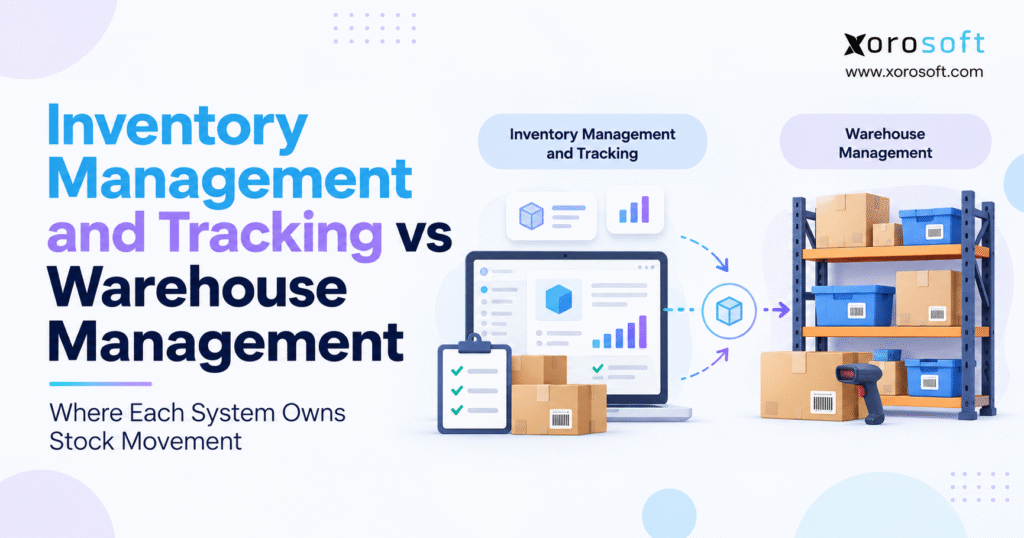
When discussing inventory vs WMS, it’s important to understand the differences and advantages of each system.
1. Inventory Visibility Does Not Automatically Create Warehouse Control
A growing product business can know exactly how much inventory it owns and still struggle to move that inventory through the warehouse efficiently.
That operational gap is where the inventory vs WMS question starts to matter.
For example, an inventory system might show 840 units of a SKU across three locations. However, the warehouse team still needs to know where those units physically sit, which inventory is already allocated, whether the pick face needs replenishment, which lot should ship first, and which employee should complete the next movement.
Those questions become harder as the business adds more SKUs, warehouses, sales channels, wholesale customers, suppliers, and fulfillment volume.
Inventory management primarily deals with the business state of stock. It helps teams understand what the company owns, what can be sold, what has already been committed, what is arriving, and what should be purchased next.
Warehouse management, by contrast, controls the physical state and execution of stock. It determines where inventory should be stored, how workers receive it, when it needs to move, how it should be picked, and what must happen before it leaves the facility.
Therefore, inventory visibility and warehouse execution are related but different operating problems.
The distinction matters because many growing companies add software without clearly defining ownership. ERP, ecommerce, WMS, spreadsheets, inventory apps, and accounting tools can all end up touching the same inventory record.
As a result, the better question is not simply whether inventory management software or a warehouse management system has more features.
The more useful question is:
Which system should own each inventory event from purchasing through shipment?
Once that ownership is clear, the technology architecture becomes much easier to design.
2. Inventory vs WMS: The Core Operational Difference
2.1 Inventory Management Controls the Business Meaning of Stock
Inventory management focuses on quantities, availability, commitments, allocation, purchasing, replenishment, transfers, and often valuation.
In practical terms, it answers questions such as: How much stock do we have? How much remains available? What has already been promised to customers? What inventory is incoming? Which warehouse should fulfill demand? What needs to be reordered?
These questions reach well beyond the warehouse floor.
Purchasing teams need inventory information to place supplier orders. Sales needs it to make customer commitments. Ecommerce channels require accurate availability. Finance needs inventory values for reporting. Meanwhile, planners depend on inventory data to forecast future supply requirements.
Therefore, inventory management generally operates across the wider business.
2.2 Warehouse Management Controls Physical Execution
A warehouse management system goes deeper into what physically happens inside a facility.
Instead of simply knowing that stock exists, WMS needs to know where that inventory sits and how employees should move it.
For example, the system may determine which receiving zone should handle an inbound shipment, where a pallet should be stored, which reserve location should replenish a pick face, which path a picker should follow, or whether the correct item was scanned before packing.
That creates the fundamental inventory vs WMS distinction:
Inventory management controls the business state of inventory. WMS controls the physical execution of inventory.
An inventory system might show that 120 units are available in a warehouse. Meanwhile, the WMS should know exactly which bins contain those units and what physical actions are required to retrieve them.
3. Inventory Tracking vs Warehouse Management Starts With Stock Status
3.1 On-Hand Inventory Is Not the Same as Available Inventory
One inventory number rarely explains the full operating situation.
Suppose a warehouse physically contains 500 units of a product. Of those units, 100 are already committed to customer orders, 25 are damaged, 40 are in quality inspection, and another 50 are reserved for a wholesale customer.
The company still physically owns 500 units. Nevertheless, all 500 should not be presented as available to new buyers.
Consequently, inventory management needs to distinguish between states such as on hand, available, committed, allocated, incoming, unavailable, and in transit.
Those distinctions affect sales promises, purchasing, ecommerce availability, and customer service.
3.2 Warehouse Status Adds a Physical Layer
Warehouse operations require another level of detail.
Inventory may have been received but not yet put away. Another quantity could be stored in reserve while some units sit in a forward pick location. Elsewhere, stock may already be picked, packed, staged, or awaiting carrier pickup.
Each physical status affects what warehouse employees should do next.
At the same time, the commercial side of the business cares more about what can still be promised to customers.
Finance has another concern because it needs to understand ownership and valuation.
For that reason, inventory tracking vs warehouse management eventually becomes a system-architecture issue rather than merely a feature comparison.
4. Inventory vs WMS in Purchasing and Inbound Planning
4.1 Inventory Management Owns Purchase Order Intent
Inventory movement often begins before products physically reach the warehouse.
Purchasing creates a purchase order based on expected demand, current stock, supplier lead times, or replenishment requirements.
The enterprise system normally owns the commercial details: supplier, SKU, ordered quantity, purchase cost, expected delivery date, destination warehouse, and payment terms.
At this stage, the business knows inventory is expected. However, that stock is not necessarily available for customer orders.
The warehouse needs enough information to prepare for what is arriving, but it does not need to become the commercial owner of the purchase order.
4.2 Inventory vs WMS Separates Expected Quantity From Physical Receipt
Problems appear when businesses assume that the quantity ordered automatically equals the quantity received.
Perhaps the purchase order calls for 100 cartons, but only 96 arrive. Alternatively, four cartons may be damaged and need inspection before they can become available.
The purchasing system knows what should have arrived.
WMS establishes what actually arrived.
Therefore, the confirmed warehouse transaction should update the broader enterprise inventory record rather than simply copying the expected purchase-order quantity into stock.
This separation provides a cleaner audit trail and makes supplier discrepancies easier to identify.
5. Inventory vs WMS During Receiving and Putaway
5.1 Warehouse Management Owns Physical Receiving
Once a truck arrives, operational responsibility shifts toward the warehouse.
Employees may need to identify the purchase order, scan products, verify quantities, capture lot or serial information, record damage, label handling units, or move goods into quarantine.
These are physical events.
Accordingly, sophisticated receiving requires more than simply increasing the quantity of a SKU.
The warehouse system needs to capture what physically entered the facility and what should happen to it next.
5.2 Inventory Management Uses the Confirmed Result
After receiving is complete, the enterprise inventory layer needs the outcome.
If 96 units were physically received rather than 100, the inventory record should reflect that fact. Purchasing may also need visibility into the shortage, while accounting may later use the confirmed quantity during matching or valuation.
This handoff matters because the warehouse creates the physical truth while the enterprise layer distributes its broader operational meaning.
5.3 Putaway Shows the Inventory vs WMS Boundary Clearly
Receiving confirms that inventory entered the building.
Putaway determines where it should physically live.
A WMS may consider bin capacity, warehouse zones, product dimensions, velocity, temperature requirements, lot rules, storage restrictions, or forward-picking requirements before assigning a location.
Inventory management generally does not need that same degree of physical detail.
Therefore, inventory vs WMS becomes easy to see during putaway: the inventory layer needs to know that stock exists at a warehouse, while WMS needs to know the exact position of that stock inside the facility.
6. Inventory vs WMS for Internal Stock Movement
6.1 Internal Movement Can Change Warehouse State Without Changing Total Stock
Imagine a worker moves 20 cartons from reserve location R-204 to forward pick location P-018.
The company’s total inventory remains exactly the same.
However, the warehouse state changes because future fulfillment tasks now depend on the new location.
A WMS should record the source location, destination, SKU, quantity, employee, timestamp, and any required lot or serial information.
The enterprise inventory system, meanwhile, may only need the resulting warehouse-level balance.
That is an important architectural distinction because not every physical movement should become a separate enterprise-level inventory event.
6.2 Warehouse Replenishment Is Different From Inventory Replenishment
The word “replenishment” can describe two entirely different processes.
Inventory replenishment typically means buying more stock because projected supply is insufficient.
Warehouse replenishment means moving existing stock from one internal location to another.
For instance, the purchasing system may recommend ordering another 1,000 units from a supplier. At the same time, WMS may create a task directing an employee to move 40 existing units from reserve storage into a forward picking area.
Both processes support availability. Nevertheless, they operate at different levels.
7. Inventory Management vs WMS in Order Allocation
7.1 Inventory Management Determines What Can Be Promised
Customer demand can enter through Shopify, Amazon, wholesale orders, EDI, B2B portals, or direct sales.
Before warehouse fulfillment starts, the business needs to decide whether enough inventory is genuinely available.
That calculation may consider physical stock, existing commitments, warehouse location, customer priority, safety stock, channel allocation, and shipping destination.
Consequently, allocation generally belongs to the inventory or ERP layer.
The warehouse should execute approved demand rather than independently deciding which customer receives limited stock.
7.2 WMS Converts Allocation Into Warehouse Work
Once inventory has been allocated, physical fulfillment begins.
WMS converts customer demand into executable tasks.
Depending on the operation, that may involve discrete picking, batch picking, zone picking, wave planning, replenishment, packing, or shipment staging.
This creates another clear inventory vs WMS handoff.
The inventory layer determines that stock can be committed to a specific demand. Once that decision is made, WMS takes responsibility for directing the physical fulfillment process inside the warehouse.
That separation prevents warehouse execution from becoming disconnected from commercial inventory commitments.
8. Inventory vs WMS During Picking, Packing, and Shipping
8.1 WMS Owns Picking Execution
ERP may know that a customer order requires six units of a product.
The warehouse needs to know how workers should retrieve those six units.
A WMS can identify the source location, required quantity, lot, serial number, or pick sequence. In addition, scanning can confirm that the employee selected the correct product before the task is completed.
For a small facility, sophisticated directed picking may not be necessary.
However, high-volume operations can become inefficient when every employee makes independent decisions about where to go next.
System-directed execution creates more consistency.
8.2 Packing Adds Another Warehouse Control Point
Picking confirms that inventory left storage.
Packing checks whether the correct items are being prepared for the correct shipment.
Depending on operational requirements, packing may include carton selection, product verification, weight capture, shipping labels, documents, carrier processing, and staging.
Businesses that need more structured physical fulfillment can evaluate XoroWMS as part of their warehouse requirements process.
The objective should not be to add warehouse software simply because it exists. Instead, the platform should solve specific execution problems that basic inventory tracking cannot address.
8.3 Shipping Completes the Physical Movement
Shipment confirmation marks another important handoff.
Once goods physically leave the warehouse, WMS can confirm the event to the broader operating system.
As a result, inventory availability changes, order status progresses, ecommerce systems can receive shipment information, and accounting can continue with downstream financial processes.
Warehouse management therefore creates the physical result while the enterprise system determines what that result means across the rest of the business.
9. Inventory vs WMS Needs a Clear System of Record
9.1 Multiple Inventory Masters Create Reconciliation Problems
Operational problems increase when ERP, WMS, ecommerce software, spreadsheets, and inventory apps can all independently edit the same information.
Suppose warehouse employees change inventory in WMS, finance makes adjustments in ERP, and an ecommerce connector can also overwrite available quantities.
Eventually, teams stop knowing which system represents the authoritative state.
That uncertainty is more dangerous than a temporary inventory error because it makes every correction harder to trust.
Therefore, growing businesses should explicitly define system ownership.
9.2 Inventory vs WMS Ownership Should Be Intentional
A practical ownership model can look like this:
| Data or Process | Typical Primary Owner |
|---|---|
| Item master | ERP |
| Supplier master | ERP |
| Purchase order | ERP |
| Customer order | ERP or order platform |
| Inventory cost | ERP |
| Inventory valuation | ERP / accounting |
| Enterprise availability | ERP / inventory layer |
| Warehouse bins | WMS |
| Bin-level inventory | WMS |
| Putaway tasks | WMS |
| Pick confirmation | WMS |
| Packing execution | WMS |
| Physical shipment | WMS |
This structure is not mandatory for every company.
However, the principle matters.
Whenever possible, one important object or transaction should have one authoritative owner.
Otherwise, integrations become a collection of systems trying to overwrite one another.
10. ERP Inventory vs WMS Connects Warehouse Events With Finance
10.1 ERP Provides the Broader Business Context
ERP generally reaches much further than warehouse execution.
It may connect inventory with purchasing, sales, accounting, manufacturing, forecasting, suppliers, customers, and reporting.
That broader context is important because stock is more than a warehouse quantity.
Inventory represents working capital.
For example, receiving affects future availability. Purchasing creates cash requirements. Adjustments can affect valuation. Meanwhile, manufacturing may consume raw materials and create finished goods.
Businesses that need inventory connected with those broader processes can evaluate XoroERP as an enterprise layer for inventory-driven operations.
10.2 WMS Provides Detail ERP May Not Need
ERP does not necessarily need to own every warehouse movement.
Imagine a pallet changes internal locations four times in one week.
Those movements may be essential to warehouse execution. Nevertheless, finance does not need four separate accounting events simply because the pallet moved between bins.
Instead, ERP needs trustworthy operational results from the warehouse.
This is why ERP inventory vs WMS works best when the platforms have complementary responsibilities.
ERP provides business context and financial control.
WMS provides detailed physical execution.
Together, they can create accurate inventory without forcing one system to perform every operational function.
11. Inventory vs WMS Across Multiple Warehouses
11.1 Inventory Management Needs Network-Level Visibility
Multi-warehouse operations need visibility across the entire supply network.
A business may hold 400 units in New Jersey, 650 in Toronto, and another 280 in Vancouver.
However, the company also needs to know how much stock at each location is available, committed, incoming, unavailable, or already in transit.
That network view belongs primarily to inventory management.
It supports allocation, purchasing, replenishment, customer promises, and transfer planning.
11.2 WMS Needs Facility-Level Inventory Detail
Warehouse managers require another level of precision.
Instead of simply seeing 650 units in Toronto, they may need to know which zones, racks, bins, reserve locations, pallets, or pick faces contain those units.
Therefore, inventory vs WMS becomes more distinct as the physical network expands.
One layer understands inventory across locations.
The other manages execution inside each facility.
11.3 Transfers Require Both Inventory and WMS Control
Inter-warehouse transfers show how the two layers should cooperate.
First, the enterprise system can create transfer demand because another warehouse requires inventory.
Next, the source WMS picks and ships the stock.
The enterprise system can then identify the inventory as in transit.
Meanwhile, the destination warehouse prepares to receive the physical goods.
Finally, confirmed receipt updates the network inventory position.
Because each stage has an owner, teams can understand not only where inventory started and ended but also what happened while it moved.
12. Inventory vs WMS for Shopify and Ecommerce
12.1 Ecommerce Needs Sellable Inventory, Not Raw Physical Inventory
Online channels need a quantity that determines whether a customer can place an order.
However, sellable inventory may differ significantly from raw on-hand stock.
Imagine the company physically holds 1,000 units. Of those, 150 are already committed, 75 are unavailable, 100 are protected for wholesale customers, and 50 are reserved as operating safety stock.
Publishing 1,000 units as ecommerce availability would therefore be misleading.
The business needs an availability rule rather than a simple physical count.
12.2 Inventory Management Defines Channel Availability
The inventory or ERP layer can apply business rules before publishing quantities to sales channels.
For example, a company may reserve stock for B2B customers, protect safety inventory, or route demand toward particular warehouses.
WMS usually does not determine the enterprise-level commercial allocation.
Instead, warehouse transactions provide reliable physical data that supports availability calculations.
Businesses using Shopify can review the Xorosoft ERP app for Shopify when evaluating how commerce orders and operational inventory connect.
12.3 Inventory vs WMS Should Support a Controlled Commerce Flow
A scalable architecture can follow a simple pattern:
Shopify or another sales channel creates customer demand. From there, the inventory layer validates availability and decides how stock should be committed. WMS then performs the physical fulfillment. After shipping, confirmation returns to the enterprise system before the sales channel receives updated order and inventory information.
As more systems are added, integration quality becomes increasingly important.
For that reason, companies running marketplaces, EDI, shipping tools, ecommerce platforms, and other external systems should evaluate how their ERP integrations manage orders, inventory, and fulfillment events.
13. Inventory Management vs WMS Matters Most When Numbers Disagree
13.1 Inventory Discrepancies Usually Point to a Missing Event
Consider a warehouse where ERP shows 4,830 units while the total of all WMS locations equals 4,817.
The easy response would be to change one number until the systems match.
However, that approach hides the underlying problem.
Perhaps a receipt failed to synchronize. A shipment confirmation may be missing. Alternatively, someone could have posted a duplicate adjustment or left a transfer incomplete.
Inventory changes because events happen.
Therefore, quantity differences usually indicate that an event was missing, duplicated, delayed, or incorrectly processed.
13.2 Reconciliation Should Explain the Difference
A mature reconciliation process asks what happened rather than simply which number should win.
What quantity existed before the transaction? Which physical event occurred? Which system recorded it first? Did the integration complete? Did the receiving system acknowledge the update? Was the transaction later reversed?
By answering those questions, teams repair the transaction chain instead of merely forcing two balances to match.
This is another reason inventory vs WMS is fundamentally an ownership discussion.
The clearer the ownership model, the easier inventory discrepancies become to investigate.
14. Inventory Software vs WMS: When Basic Inventory Management Is Enough
14.1 Simple Warehouses May Not Need Advanced WMS
Not every product business requires sophisticated warehouse management.
A relatively straightforward operation may perform well with inventory or ERP functionality when it operates one facility, handles a manageable SKU count, uses predictable storage locations, and processes moderate order volume.
In that environment, warehouse employees may already know where products belong and how fulfillment should flow.
Adding advanced directed tasks could therefore increase complexity without delivering enough additional value.
The decision should be based on operational needs rather than software trends.
14.2 Growth Alone Does Not Justify WMS
Revenue is not the best indicator of warehouse requirements.
A $25 million business with a narrow catalog and uncomplicated fulfillment may need less warehouse technology than a smaller company managing thousands of variants, serial numbers, lots, marketplaces, and same-day orders.
Instead, evaluate where operational friction actually occurs.
If purchasing teams cannot forecast demand, WMS will not solve that planning problem.
However, if warehouse employees struggle to locate stock, replenish picking areas, or fulfill orders accurately, a deeper execution layer may become necessary.
15. Inventory vs WMS: When Warehouse Management Becomes Necessary
15.1 Warehouse Execution Becomes the Bottleneck
One warning sign is especially useful:
The business knows what inventory it has, but the warehouse still struggles to move it correctly.
That problem can appear through mispicks, excessive walking, lost pallets, weak putaway, replenishment failures, paper-based processes, inaccurate bins, or delayed shipments caused by inventory that cannot be found.
At this stage, the bottleneck is no longer basic inventory visibility.
Instead, physical execution has become the constraint.
15.2 Complexity Strengthens the WMS Case
Several operational conditions can increase the need for deeper warehouse management.
A warehouse may handle thousands of SKUs across multiple zones while several employees pick at the same time. In addition, lot tracking, serial numbers, high order volume, replenishment requirements, and strict fulfillment windows may create further complexity.
As these conditions accumulate, employee memory becomes less reliable.
Consequently, inventory vs WMS shifts from a software discussion into a productivity and control decision.
A system-directed approach can create more consistent execution when informal warehouse processes no longer scale.
16. Integrated ERP and WMS Reduce Operational Handoffs
16.1 Disconnected Software Creates Hidden Work
Many product businesses accumulate technology gradually.
A common stack can include Shopify, QuickBooks, spreadsheets, an inventory application, a warehouse tool, EDI software, and separate purchasing reports.
Each application may perform its individual function reasonably well.
However, friction appears between the systems.
Orders need to synchronize. Inventory quantities need to agree. Warehouse shipments must update customer records. Purchasing requires reliable demand information, while finance needs accurate inventory transactions.
As a result, every integration becomes another place where data can arrive late or fail.
16.2 Connected Architecture Simplifies Stock Ownership
Integrated ERP and warehouse architecture can reduce some of those handoffs because inventory, purchasing, warehouse activity, accounting, manufacturing, and ecommerce can operate from a more consistent structure.
Platforms such as XoroOne are relevant when inventory-driven companies want to reduce the number of disconnected systems responsible for operational data.
Importantly, integration is not valuable merely because fewer application icons appear on a screen.
The larger benefit comes from reducing competing sources of truth.
When warehouse employees confirm a physical event, downstream systems should consume that event rather than forcing someone to recreate it manually.
17. Inventory Management vs WMS Looks Different by Industry
17.1 Apparel Inventory vs WMS Requires Variant Accuracy
Apparel businesses frequently manage style, color, size, season, warehouse, and sales channel simultaneously.
Inventory management needs to understand whether a particular sellable variant is available.
Warehouse management must make sure the employee physically picks the correct version.
For instance, an inventory system might correctly report that 20 black medium shirts are available.
However, warehouse execution still needs to prevent a picker from scanning a black large or navy medium product by mistake.
This is why variant-heavy operations often need strong coordination between inventory availability and warehouse validation.
17.2 Wholesale Inventory vs WMS Adds Allocation Complexity
Wholesale distribution introduces another set of challenges.
Large customer orders, account-specific commitments, EDI transactions, case quantities, multi-location fulfillment, and several ship-to addresses can all influence how inventory is allocated.
The inventory layer determines whether supply can be committed commercially.
WMS then determines how the warehouse fulfills that commitment physically.
Consequently, wholesale operators need both accurate availability and reliable execution.
17.3 Manufacturing Inventory vs WMS Extends Into Production
Manufacturers also manage raw materials, components, work in process, finished goods, BOMs, work orders, and production requirements.
Warehouse movements therefore support more than customer orders.
Production may need materials delivered to a particular area, while finished goods later move back into available inventory.
Companies comparing these workflows can review Xorosoft’s industry-specific ERP use cases across wholesale, apparel, furniture, sporting goods, manufacturing, and other inventory-driven sectors.
18. Inventory vs WMS Implementation Mistakes to Avoid
18.1 Do Not Treat Every Inventory Quantity as the Same
On-hand inventory is not automatically available inventory.
Likewise, committed, allocated, incoming, damaged, picked, packed, and in-transit quantities describe different operating conditions.
If systems flatten those states into one number, overselling, poor purchasing decisions, and reconciliation problems become much more likely.
Therefore, inventory definitions should be documented before teams configure software or integrations.
18.2 Avoid Manual Adjustments Across Several Systems
Manual corrections are sometimes necessary.
Nevertheless, they should not become the normal method for keeping applications synchronized.
If employees can independently alter inventory in ERP, WMS, ecommerce, and spreadsheets, the organization loses a reliable transaction history.
Instead, adjustments should have a defined owner, reason, user, timestamp, and approval process where appropriate.
18.3 Barcode Scanning Alone Does Not Create a WMS
Barcode scanning validates information.
WMS provides the operational logic around that validation.
A scanner can confirm that an employee touched a particular SKU, but the warehouse system determines why that SKU should move, where it belongs, what quantity is expected, and what action should happen next.
For that reason, companies should evaluate process control rather than assuming barcode functionality alone solves warehouse management.
19. How to Compare Inventory vs WMS Platforms
19.1 Test Real Operational Scenarios
Feature lists often make competing systems look similar.
Real operational demonstrations expose the differences.
Instead of asking whether a platform “supports receiving,” ask the vendor to demonstrate a partial receipt with damaged inventory.
Rather than asking whether warehouse transfers exist, test a transfer that ships from one warehouse but arrives short at another.
Likewise, ask the system to process an incorrect pick, a return, a cycle count discrepancy, and a failed fulfillment event.
These scenarios reveal workflow depth far more effectively than a checklist.
19.2 Evaluate Every Inventory vs WMS Handoff
During a software demonstration, identify exactly where one system stops and another begins.
Start by confirming which platform owns the item record and purchase order. Next, determine which system confirms receiving and calculates available inventory. Then clarify who can make stock adjustments, where ecommerce availability originates, and how failed integrations are detected.
Most importantly, ask how inventory disagreements are identified and reconciled.
These questions reveal whether the underlying architecture has clear ownership or whether several systems can modify the same inventory information without strong controls.
19.3 Compare ERP Platforms Against the Operating Model
Inventory-driven businesses may evaluate standalone inventory software, dedicated WMS tools, ERP platforms, or integrated ERP/WMS environments.
The right choice therefore depends on the real operating model rather than the longest list of modules.
Companies considering broader ERP options can use a contextual Xorosoft vs NetSuite comparison as one part of that evaluation.
Additionally, reviewing relevant ERP and operations case studies can help teams compare their own problems with organizations that have already moved beyond disconnected inventory systems.
20. Build Inventory and Warehouse Systems Around Clear Stock Ownership
The most important lesson in inventory vs WMS is that neither system should be evaluated in isolation.
Inventory management needs to explain what stock means to the business. It should support availability, commitments, purchasing, replenishment, allocation, transfers, planning, and broader operational visibility.
Warehouse management needs to explain where that stock physically exists and what action should happen next. It should control receiving, putaway, movement, replenishment, picking, packing, counting, and shipping.
Therefore, the goal is not to make both systems responsible for everything.
The goal is to build a clear handoff.
For a relatively simple business, inventory management may provide enough control.
As warehouse complexity increases, however, WMS becomes more valuable because physical execution requires greater structure.
Eventually, companies operating several warehouses, Shopify, Amazon, wholesale, EDI, manufacturing, purchasing, and accounting may need an integrated ERP and warehouse architecture rather than another disconnected application.
A practical next step is to map every important stock event.
Start with the purchase order, then follow inventory through receipt, putaway, availability, allocation, transfer, replenishment, picking, packing, shipment, return, adjustment, and valuation.
For each event, identify one primary system owner.
If ownership is unclear, adding another application may make the problem worse.
However, once ownership is explicit, software evaluation becomes much easier because every requirement can be tested against a real operating process.
For teams reaching that stage, contact Xorosoft to map current inventory, ERP, warehouse, ecommerce, purchasing, and accounting workflows and determine whether stronger inventory management, deeper WMS execution, or a more integrated operating model is the right next step.
FAQ
What is the difference between inventory management and WMS?
Inventory management controls stock visibility, availability, purchasing, allocation, and planning. WMS controls physical warehouse execution, including receiving, putaway, picking, packing, internal movement, and shipping.
When does a business need a WMS?
A business typically needs WMS when warehouse complexity creates picking errors, location problems, replenishment issues, high order volume, or a need for barcode-driven, task-based execution.
Can inventory software replace a WMS?
Yes, for simple warehouses. However, inventory software may fall short when operations require directed picking, detailed bin control, replenishment tasks, lot tracking, packing workflows, or advanced warehouse execution.
Do I need both ERP and WMS?
Not always. Simple operations may run effectively on ERP or inventory software alone. Businesses with complex warehousing often benefit from ERP for enterprise control and WMS for physical execution.
Which system should own inventory quantity?
ERP or the inventory layer usually owns enterprise inventory and availability, while WMS owns detailed physical balances by bin. Clear ownership rules help prevent duplicate adjustments and reconciliation problems.
How does WMS work with Shopify?
Shopify creates customer demand, the inventory or ERP layer validates availability, and WMS executes fulfillment. Shipment confirmation then flows back so orders and sellable inventory can update correctly.
What happens when ERP and WMS inventory do not match?
Investigate the transaction history before changing balances. Missing receipts, failed shipment messages, duplicate adjustments, incomplete transfers, or returns often explain the difference between ERP and WMS quantities.
Recent Posts
-
 Inventory Audit Readiness: Evidence, Adjustments, Counts, and Reconciliation Controls
 -
 Inventory Management and Tracking vs Warehouse Management: Where Each System Owns Stock Movement
 -
 How a Distributor Reduced Shipping Errors With Pack Station Verification
 -
 Should Duties and Tariffs Be Included in Inventory Landed Cost?
 -
 ERP Architecture for Inventory-Driven Businesses: Core, Integrations, and Data Flows