Implementing a B2B order approval workflow can streamline business processes and provide greater control over purchases.
1. B2B Order Approval Workflow: Keep Buyer Controls Without Manual Holds
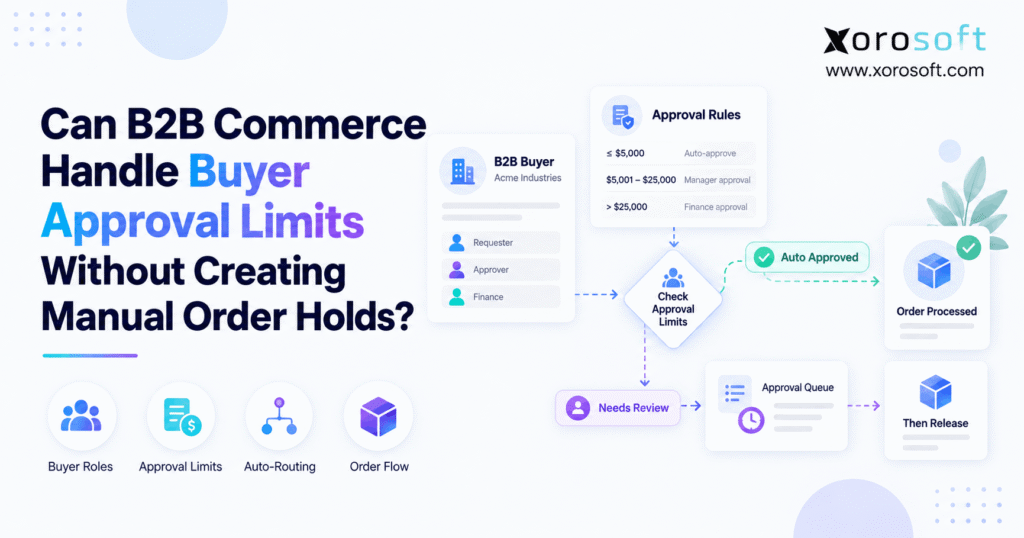
A B2B order approval workflow should enforce buyer limits without forcing every transaction into a manual queue. Instead, the system should identify authorized purchases automatically, route genuine exceptions to the right person, and allow routine transactions to continue.
Therefore, approval should function as an exception process rather than a universal checkpoint.
For example, a buyer authorized to spend $5,000 should not need manager approval for a routine $1,500 replenishment purchase. However, a $9,000 purchase may need additional authorization.
As a result, the company keeps purchasing controls without slowing every customer transaction.
1.1 How the B2B Order Approval Workflow Separates Routine Activity From Exceptions
A good B2B order approval workflow starts by identifying what normal purchasing behavior looks like.
First, the system identifies the buyer. Next, it checks that person’s permissions, role, company location, and purchasing authority.
Then, the transaction is compared with relevant business rules.
If the purchase complies, it can continue automatically. However, if the transaction crosses a defined threshold, the system can route it to an authorized manager.
Consequently, managers focus on unusual purchases instead of repeatedly reviewing routine activity.
1.2 Why Manual Queues Become Harder to Scale
Manual review may work when a company has a small number of wholesale customers.
However, the process becomes harder as more buyers, branches, departments, and purchasing rules appear.
For example, customer service may start chasing approvals by email. Meanwhile, sales representatives may call managers to release urgent purchases.
Consequently, a digital buying experience can still create significant manual work behind the scenes.
Therefore, growing companies need approval logic that scales with transaction volume rather than with administrative headcount.
2. What a B2B Order Approval Workflow Actually Does
A B2B order approval workflow is a rules-based process that checks a business purchase against defined authorization policies before it moves into operational execution.
Therefore, the workflow connects buyer identity, purchasing authority, transaction conditions, and downstream release.
Moreover, it gives the company a consistent way to distinguish normal activity from exceptions.
2.1 Core Stages of the B2B Approval Workflow
A reliable B2B approval workflow generally follows a clear sequence.
First, the system identifies the logged-in user and customer account.
Next, it evaluates the transaction against buyer permissions and approval thresholds.
Then, it checks any additional business conditions.
For example, those conditions may include order value, product restrictions, shipping methods, discounts, or company location.
Finally, the system either allows the transaction to continue or routes it to an approver.
As a result, approval becomes predictable and auditable.
2.2 What Happens When No Human Review Is Needed
When a transaction satisfies every relevant rule, it should continue without unnecessary intervention.
For example, an authorized branch manager might submit a routine replenishment purchase within their normal spending authority.
In that situation, additional review adds little value.
Therefore, the system should let the transaction move forward automatically.
However, automation should not bypass other controls. Credit, inventory, payment terms, or warehouse conditions may still require separate checks.
Consequently, purchasing authorization should remain one part of the broader execution process.
3. How a B2B Order Approval Workflow Enforces Buyer Limits
A B2B order approval workflow enforces buyer limits by connecting individual users with predefined purchasing authority.
Therefore, the system must understand more than the customer company name.
Instead, it should know which person is buying, which location they represent, and what authority they have.
3.1 Buyer Limits Inside the B2B Order Approval Workflow
Within a B2B order approval workflow, purchasing authority can vary by role.
For example:
- Purchasing assistant: up to $2,500
- Branch manager: up to $10,000
- Regional manager: up to $30,000
- Procurement director: above $30,000
Therefore, a $7,500 transaction submitted by a branch manager can continue normally.
However, the same purchase submitted by a purchasing assistant may require review.
As a result, the workflow respects company hierarchy without treating every user identically.
3.2 How Threshold Logic Changes by Role and Location
Purchasing authority may also vary by branch, department, or business unit.
For example, a high-volume distribution center may operate under larger purchasing thresholds than a small retail location.
Likewise, corporate procurement may have authority across several locations.
Therefore, account structure matters.
Additionally, the company should define what happens when several rules apply at once.
For example, a buyer may remain within their spending limit while purchasing a restricted product.
Consequently, the system may still need to request authorization.
4. Separate Purchasing Authority From Customer Credit
Buyer spending authority and customer credit solve different business problems.
Therefore, companies should avoid combining them into one generic hold.
Purchasing authority controls what the buyer may commit. In contrast, credit controls how much financial exposure the seller accepts.
4.1 B2B Order Approval vs Customer Credit Controls
B2B order approval answers:
Is this person authorized by their organization to make this purchase?
Customer credit answers:
Is the seller willing to extend the financial exposure required by this purchase?
For example, a purchasing manager may have authority to place a $25,000 transaction.
However, the customer account may have only $10,000 of available credit.
Therefore, the buyer can be internally authorized while the transaction still requires seller-side financial review.
4.2 Why Financial Exposure Needs a Separate Rule Set
Separating these controls improves visibility.
For example, operations can see whether a transaction is waiting because of buyer authorization, credit, inventory, payment, or another condition.
As a result, the right team can resolve the issue faster.
Moreover, reporting becomes clearer.
Finance can track credit exceptions, while account managers can review purchasing-authority exceptions separately.
Therefore, the business avoids a vague “held” status that hides the real reason work stopped.
5. Which Transactions Need Human Review?
Not every transaction deserves human review.
Instead, companies should define specific conditions where additional judgment reduces financial or operational risk.
Therefore, review rules should focus on exceptions rather than normal buying activity.
5.1 B2B Approval Rules Based on Value, Role, and Product
B2B approval rules can use several triggers.
For example:
- Transaction value exceeds a threshold
- Buyer exceeds their authorized limit
- Restricted products are included
- A nonstandard discount is applied
- An unusual shipping method is selected
- A new delivery location is used
- Quantity exceeds normal purchasing patterns
Therefore, review does not need to depend on transaction value alone.
Additionally, multiple conditions can work together.
As a result, companies can build controls around actual business risk.
5.2 When Human Review Genuinely Adds Value
Human review adds value when the transaction requires judgment rather than routine validation.
For example, a large capital purchase may justify management review.
Likewise, a special discount or restricted product may deserve additional attention.
However, reviewing a normal weekly replenishment purchase usually adds little value if it already complies with policy.
Therefore, teams should reserve human attention for cases where a decision genuinely needs context.
Consequently, managers spend less time approving predictable activity.
6. Why Blanket Manual Holds Create Bottlenecks
Putting every transaction on hold can appear safe.
However, blanket holds often create delays without adding meaningful control.
Instead, they force teams to review activity that already complies with policy.
6.1 How a B2B Approval Workflow Avoids Blanket Holds
A B2B approval workflow avoids blanket holds by evaluating each transaction automatically.
For example, routine activity can continue immediately when buyer authority, product rules, pricing, and other conditions are satisfied.
However, unusual purchases can still enter review.
Therefore, the business maintains controls while reducing unnecessary manual touches.
Additionally, customer service no longer needs to release every routine transaction.
As a result, teams can focus on exceptions and customer support rather than repetitive administration.
6.2 Why Email Queues Create Hidden Operational Risk
Many businesses use email as an informal review system.
For example, a sales representative may forward a purchase request to a manager.
Then, the manager replies with authorization.
However, the operational system may not capture which version was approved.
Meanwhile, the customer may change quantities or products.
Consequently, warehouse and finance teams can work from outdated information.
Therefore, email can remain useful for notifications, but the decision itself should be captured in the system of record.
7. Where B2B Approval Workflow Logic Should Live
B2B approval workflow logic can live in the commerce platform, ERP, order-management layer, or several connected systems.
Therefore, companies should place each rule where the required data is most reliable.
7.1 B2B Approval Workflow Logic in Commerce and ERP
Simple B2B approval workflow rules often fit naturally in the commerce experience.
For example, the storefront usually knows the logged-in buyer, company account, cart value, products, and delivery location.
However, ERP involvement becomes more important when decisions depend on inventory, purchasing, credit, accounting, manufacturing, or multiple warehouses.
For inventory-driven companies, XoroONE provides a connected environment across ERP, inventory, purchasing, accounting, warehouse operations, and ecommerce processes.
Therefore, downstream execution can remain connected with the wider operational picture.
7.2 How to Assign Responsibility Across Connected Systems
Each platform should have a clear responsibility.
For example, commerce may manage buyer-facing permissions while ERP manages inventory availability and financial conditions.
Meanwhile, the warehouse system can control fulfillment execution.
For growing businesses, XoroERP can provide the broader operational layer when processes extend beyond the storefront.
Consequently, companies avoid duplicating conflicting rules across multiple applications.
Instead, each system contributes the information it controls best.
8. How Pending Demand Should Affect Inventory
Pending demand creates an important inventory question.
Should stock be reserved before purchasing authorization is complete?
There is no universal answer.
Therefore, the policy should reflect product scarcity, customer expectations, and typical decision speed.
8.1 Inventory Policy Inside a B2B Order Approval Workflow
A B2B order approval workflow should define what happens to stock while a transaction is waiting.
For example, the business might use:
- No reservation
- Temporary reservation
- Full allocation
If inventory is plentiful, no reservation may work well.
However, scarce stock may justify temporary protection.
Consequently, approval logic and availability logic should be designed together.
Otherwise, pending transactions can either block too much inventory or provide too little protection.
8.2 Choosing Between No Reservation, Soft Reservation, and Allocation
No reservation keeps stock available to every customer.
However, the original buyer may lose inventory before authorization arrives.
A soft reservation provides temporary protection.
Therefore, it can balance buyer expectations with inventory flexibility.
Full allocation protects the customer more strongly.
However, rejected or abandoned transactions must release stock quickly.
When inventory moves into physical execution, XoroWMS can connect warehouse activity with the wider inventory and ERP environment.
9. Separate Authorization Status From Fulfillment Status
Authorization status and fulfillment status serve different purposes.
Therefore, businesses should not merge them into one generic status.
One explains whether the purchase is authorized. The other explains where the transaction is operationally.
9.1 B2B Order Approval Status Versus Fulfillment Status
B2B order approval status may include:
- Submitted
- Pending
- Approved
- Rejected
- Escalated
However, operational status may include:
- Open
- Released
- Allocated
- Picking
- Packed
- Shipped
- Invoiced
Therefore, an authorized transaction may still wait for stock or warehouse capacity.
Likewise, a transaction may be operationally open while still waiting for authorization.
As a result, teams need both dimensions.
9.2 How Separate States Improve Reporting and Execution
Separate statuses make reporting more useful.
For example, managers can identify how many transactions are awaiting authorization.
Meanwhile, warehouse leaders can measure how many released transactions are waiting for picking.
Additionally, finance can identify which approved transactions remain blocked by account conditions.
Therefore, teams can measure the actual bottleneck.
Consequently, operational delays become easier to diagnose and resolve.
10. B2B Order Approval Across Shopify, EDI, and Multiple Channels
B2B order approval becomes more complex when a business receives demand through several channels.
For example, one company may handle Shopify, wholesale portals, Amazon, EDI, sales representatives, and manual entry.
Therefore, the operating model needs consistent rules across shared inventory.
10.1 B2B Order Approval for Shopify and Ecommerce Channels
B2B order approval should be evaluated in the wider context of ecommerce operations.
For example, Shopify demand may share inventory with wholesale, marketplace, or sales-rep activity.
Therefore, authorization decisions should not create conflicting commitments across channels.
Xorosoft Integrations can help connect ecommerce channels with ERP and operational processes.
Additionally, Shopify-focused businesses can review the Xorosoft ERP listing in the Shopify App Store.
As a result, approval architecture can be evaluated alongside inventory synchronization and order execution.
10.2 How EDI and Shared Inventory Change the Architecture
EDI introduces another layer.
For some customers, internal purchasing authorization may happen before the transaction is transmitted.
However, seller-side checks may still be necessary.
For example, the seller may need to validate pricing, inventory, customer terms, or available credit.
Therefore, the business should avoid assuming that transmission automatically means operational release.
Additionally, all channels should feed a common inventory picture.
Consequently, purchasing and warehouse teams can distinguish executable demand from pending activity.
11. Requirements for a Reliable B2B Order Approval Workflow
A reliable B2B order approval workflow needs more than an approve button.
Instead, it requires clean account data, defined rules, routing, auditability, and integration.
Therefore, companies should evaluate the complete operating process before automating it.
11.1 Data Required for a Reliable B2B Approval Workflow
A reliable B2B approval workflow begins with strong master data.
First, each buyer should have an identifiable user account.
Next, the system should understand:
- Customer company
- Buyer role
- Company location
- Purchasing authority
- Relevant product permissions
- Applicable pricing
- Payment terms
- Delivery permissions
Without that structure, automation becomes unreliable.
Therefore, companies should fix account architecture before adding complicated rules.
11.2 Why Audit History, Escalation, and Delegation Matter
The system should record the complete decision trail.
For example, it should capture who submitted the transaction, which rule triggered, who reviewed it, when the decision occurred, and whether the transaction changed later.
Additionally, delegation rules should cover absent managers.
Therefore, a vacation should not stop customer activity indefinitely.
Xorosoft Solutions brings together operational capabilities across commerce, inventory, finance, forecasting, fulfillment, and automation.
Consequently, companies can evaluate authorization as part of a wider operating process.
12. Common B2B Approval Workflow Mistakes
Even strong technology can produce poor results if B2B approval workflow policies are badly designed.
Therefore, businesses should simplify the operating policy before adding more automation.
12.1 B2B Approval Workflow Mistakes That Create Unnecessary Friction
Common B2B approval workflow mistakes include:
- Requiring review for every transaction
- Creating too many management levels
- Using shared buyer accounts
- Failing to define substitute approvers
- Reserving inventory indefinitely
- Ignoring transaction amendments
- Using one generic hold status
- Maintaining conflicting rules across systems
Each mistake creates avoidable friction.
Therefore, automation should reproduce good policy rather than digitize a broken process.
12.2 How to Simplify Policy Before Automating It
First, identify normal purchasing behavior.
Next, determine which exceptions genuinely deserve additional judgment.
Then, assign a clear owner to each exception.
Additionally, define what happens after authorization.
For example, determine whether the transaction reserves inventory, moves to credit review, or becomes eligible for warehouse release.
Finally, define what changes require another review.
As a result, the automated process remains understandable for buyers, managers, finance, and operations.
13. When Growing Operations Need Connected ERP Control
Simple purchasing controls may work inside a standalone portal.
However, complexity increases as more systems and channels become involved.
Therefore, companies should recognize when the operating model has moved beyond a basic website rule.
13.1 When B2B Order Approval Needs ERP-Level Coordination
B2B order approval increasingly needs ERP-level coordination when authorization affects:
- Multiple warehouses
- Purchasing
- Customer credit
- Accounting
- Manufacturing
- EDI
- Shopify
- Amazon
- Customer-specific pricing
- Inventory allocation
For example, an authorized purchase may immediately influence warehouse demand or manufacturing requirements.
Therefore, the operational system needs reliable status information.
Xorosoft is designed for inventory-driven businesses that need ERP, inventory, warehouse, purchasing, accounting, ecommerce, and related workflows connected.
13.2 Signals That the Existing Setup Has Reached Its Limit
Several warning signs suggest the current approach is no longer scaling.
For example:
- Sales representatives chase managers for decisions
- Warehouse teams ask whether transactions can be released
- Inventory is reserved inconsistently
- Several buyers share one login
- Transaction changes bypass authorization
- Finance cannot explain why activity is blocked
- Ecommerce and ERP show different statuses
When these symptoms appear together, the problem is broader than one website setting.
Therefore, the company should evaluate the entire process.
Businesses can also review the industries Xorosoft serves and relevant customer case studies when assessing connected operational requirements.
14. A Practical Checklist for Scaling Teams
Before changing software, document the current process.
First, identify every buyer type and the authority each role should have.
Next, define which conditions require human review.
Then, determine where the required data lives.
Additionally, decide what pending transactions should do to inventory.
Moreover, document what happens when a manager is unavailable.
The final checklist should answer:
- Who can buy?
- How much can each role authorize?
- Which products need special controls?
- What happens when a threshold is exceeded?
- Who receives the exception?
- How quickly should they respond?
- What happens to inventory while waiting?
- Which changes trigger another review?
- When can warehouse work begin?
- Which system records the final decision?
Therefore, automation should begin only after these answers are clear.
As a result, technology reinforces business policy instead of replacing one confusing process with another.
15. Build a B2B Order Approval Workflow Around Exceptions
The strongest B2B order approval workflow does not ask a manager to review every transaction.
Instead, it identifies normal purchasing behavior and allows compliant activity to continue automatically.
Meanwhile, genuine exceptions reach the right person.
Therefore, the business preserves control without turning digital commerce into a manual queue.
First, identify buyers individually. Next, define purchasing authority. Then, separate buyer limits from credit and inventory rules.
Additionally, define what happens when an authorized transaction changes.
Finally, connect the decision with downstream inventory, warehouse, accounting, and fulfillment processes.
As a result, customers get a smoother buying experience while internal teams gain clearer operational control.
For inventory-driven businesses, Xorosoft provides a connected ERP, inventory, WMS, purchasing, accounting, and order-management environment designed to reduce fragmented operations.
If manual holds, disconnected systems, or unclear release rules are slowing your operation, Book a Demo to explore a more connected process.
Frequently Asked Questions
What is a B2B order approval workflow?
A B2B order approval workflow checks each order against buyer permissions and business rules. Therefore, compliant orders can move automatically, while exceptions route to the correct manager or approver.
Can B2B commerce enforce buyer limits without manual holds?
Yes. When rules are configured correctly, orders within a buyer’s authority can continue automatically. However, transactions above the permitted threshold can route for approval without stopping every other order.
What is the difference between a buyer limit and a credit limit?
A buyer limit controls how much that person may authorize. In contrast, a credit limit controls the financial exposure the seller accepts for the customer account.
Should pending approval orders reserve inventory?
It depends on availability and approval speed. For example, businesses can use no reservation, temporary soft reservations, or full allocation. Therefore, the policy should match inventory scarcity and customer commitments.
Where should B2B approval rules live?
Simple buyer rules may live in the commerce platform. However, rules involving credit, inventory, warehouse operations, accounting, or manufacturing may require ERP or order-management integration.
Should changed orders require reapproval?
Material changes usually should trigger another rule evaluation. For example, quantity, price, product, or total-value changes may invalidate the original approval, while minor administrative edits may not.
When should a business replace email-based approvals?
Businesses should consider automation when order volume, multiple approvers, inventory dependencies, or audit requirements make email difficult to control. Consequently, structured routing and status visibility become more valuable.
Recent Posts
-
 Use of AI in Warehouse Management for Exception Prioritization: From Dock Delays to Pick-Face Stockouts
 -
 Why Shopify B2B Orders Break ERP Accounting After Partial Fulfillment
 -
 Inventory Valuation in ERP: FIFO, Average Cost, Landed Cost, and Adjustments
 -
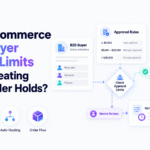 Can a B2B Order Approval Workflow Enforce Buyer Limits Without Manual Holds?
 -
 Brightpearl Alternatives for Ecommerce Brands