If you want to streamline business processes and enhance connectivity, B2B API integration is an essential solution.
1. B2B API Integration Starts With Data Ownership
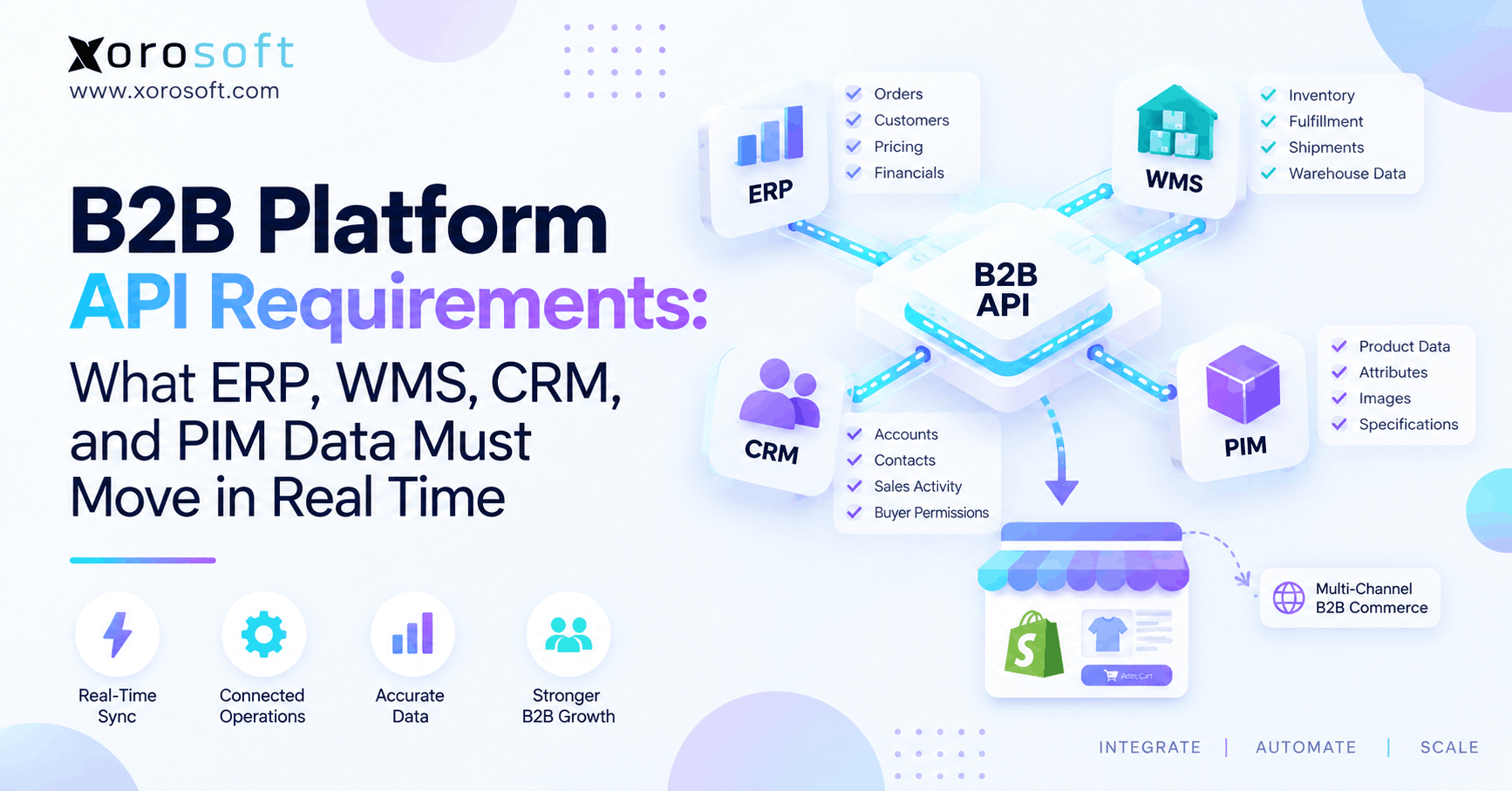
B2B API integration connects the systems that control customer accounts, pricing, inventory, products, orders, fulfillment, and financial data. However, connecting endpoints alone does not create reliable operations. Instead, businesses must decide which system owns every important data object, where that information must move, and how quickly another system needs it.
Moreover, B2B commerce creates requirements that simple consumer checkout rarely faces. For example, one buyer may receive negotiated pricing, while another buys on credit. Meanwhile, another account may access only an approved catalog.
Therefore, the main question is not simply whether ERP, WMS, CRM, PIM, and ecommerce can connect. Instead, teams must identify which information needs to be accurate at the exact moment a buyer or operator makes a decision.
1.1 What B2B API Integration Actually Means
B2B API integration is the controlled exchange of commercial and operational information between a B2B commerce platform and systems such as ERP, WMS, CRM, PIM, accounting, shipping, and marketplace applications.
For example, ERP may send contract pricing to ecommerce. Meanwhile, WMS can provide fulfillment status. Likewise, ecommerce can send approved orders back to ERP.
Therefore, a successful integration defines both direction and timing.
Additionally, teams can use APIs, webhooks, message queues, events, or scheduled synchronization. However, the correct method depends on the operational risk created when information becomes stale.
1.2 Why Real Time Should Not Apply to Everything
Many implementation teams label every data requirement as real time. However, that approach can create unnecessary technical complexity.
For example, available inventory may need to change within seconds. In contrast, an updated product description can often wait much longer.
Likewise, customer credit may require validation before checkout. Meanwhile, historical CRM activities can update periodically.
Therefore, businesses should define acceptable latency for each object instead of forcing every system into the same synchronization model.
As a result, integrations become easier to scale, monitor, troubleshoot, and maintain.
2. Assign One System of Record to Every Data Object
Before building integration logic, businesses should define a system of record for every critical object.
A system of record is the application responsible for controlling a specific piece of business information. Therefore, other applications can consume that information without becoming competing masters.
For example, ERP may own payment terms, while CRM owns sales activities. Meanwhile, PIM may control enriched product content, and WMS may control physical warehouse execution.
| Data Object | Typical Master | Main Destination | Recommended Speed |
|---|---|---|---|
| Customer account | ERP or CRM | B2B platform | Event-driven |
| Contract pricing | ERP | B2B platform | Real/near real time |
| Credit status | ERP/accounting | B2B platform | Real/near real time |
| Available inventory | ERP/WMS | B2B platform | Real time |
| Product content | PIM | B2B platform | Event/batch |
| Sales order | B2B platform | ERP | Real time |
| Shipment status | WMS | ERP/B2B platform | Event-driven |
| Invoice | ERP/accounting | B2B portal | Event-driven |
2.1 ERP as the Commercial and Financial System of Record
ERP often controls customer accounts, purchasing, payment terms, sales orders, invoices, financial status, inventory commitments, and accounting.
Therefore, ecommerce should usually consume these commercial rules instead of rebuilding them independently.
For example, if ERP controls contract pricing, maintaining another unmanaged price inside ecommerce creates a second source of truth.
Additionally, ERP may determine whether an account is active, tax exempt, on hold, or eligible for credit.
Consequently, these fields can directly affect whether a B2B order should proceed.
2.2 WMS as the Warehouse Execution Source
A warehouse management system usually controls receiving, put-away, replenishment, bin movements, picking, packing, shipping, and returns.
However, physical quantity does not automatically equal sellable quantity.
For example, 1,000 units may exist physically while 400 are already committed to orders.
Therefore, businesses need clear rules for turning physical warehouse information into available inventory.
Additionally, warehouse events should flow to other systems as fulfillment progresses. As a result, ecommerce, ERP, customer service, and buyers can see consistent order status.
2.3 CRM as the Relationship Source
CRM typically manages relationship context rather than operational inventory.
For example, CRM may contain account owners, opportunities, contacts, sales activities, and onboarding tasks.
Meanwhile, ERP may still control payment terms, invoices, active customer status, and credit.
Therefore, businesses should define when a prospect becomes an operational customer.
Otherwise, duplicate company records may spread across CRM, ERP, and ecommerce.
Consequently, teams spend more time reconciling accounts instead of serving them.
2.4 PIM as the Product-Content Source
PIM typically controls product descriptions, attributes, technical specifications, images, digital assets, taxonomy, and channel-specific enrichment.
Therefore, PIM can explain what a product is while ERP controls how the product is sold.
For example, PIM may contain dimensions and product images. Meanwhile, ERP may control pricing, case quantities, availability, and purchasing rules.
Consequently, both systems can feed the B2B experience without controlling the same fields.
Moreover, clear ownership prevents product teams and operations teams from unintentionally overwriting each other’s data.
3. B2B Data Synchronization: What Must Move in Real Time
A strong integration strategy separates transaction-critical information from data that can tolerate delay.
Generally, anything that changes what the customer can buy, what they pay, or what the company can promise requires faster updates.
However, not every object deserves the same latency target.
Therefore, teams should classify information according to the business consequence of stale data.
Typically, the highest-priority objects include inventory availability, customer-specific pricing, credit status, permissions, orders, amendments, and important fulfillment events.
3.1 B2B Data Synchronization for Inventory Availability
Inventory should update quickly whenever stale quantities can create overselling.
However, businesses should avoid publishing raw on-hand stock without context.
For example, sellable inventory may need to subtract allocations, reservations, damaged units, safety stock, production commitments, and channel-specific inventory.
Therefore, the storefront should receive a figure that represents what the business can genuinely promise.
Additionally, multi-warehouse businesses may need location-specific rules. Consequently, the correct available quantity can differ according to customer, warehouse, channel, or shipping region.
3.2 B2B Data Synchronization for Customer-Specific Pricing
Pricing is another transaction-critical object.
For example, a B2B price may depend on customer, company location, SKU, quantity, currency, contract, or product category.
Therefore, stale pricing can create margin leakage, disputes, credits, and manual corrections.
Additionally, the same SKU may legitimately display different prices to different customers.
As a result, the B2B platform needs commercial context instead of one universal price.
Moreover, teams should decide whether pricing is calculated live or synchronized ahead of time. Either method can work if the authoritative source remains clear.
3.3 Credit Status and Purchasing Permissions
Credit information can determine whether an otherwise valid order should proceed.
For example, an account may have available credit in the morning but exceed its limit later in the day.
Therefore, many businesses need a fresh credit check before accepting a large order.
Likewise, buyer permissions may change when employees join, leave, or receive new purchasing authority.
Consequently, access rules should update quickly enough to prevent unauthorized purchases.
However, businesses do not necessarily need to query ERP every time a buyer simply views a product.
3.4 Orders, Amendments, and Cancellations
Orders should normally reach ERP quickly after validation.
Otherwise, another channel may consume the same available inventory before the order becomes visible operationally.
Likewise, amendments should move quickly when they affect quantity, pricing, shipping, or warehouse work.
For example, a customer may reduce an approved order from 300 units to 180 units.
Therefore, ERP and WMS need that change before unnecessary warehouse work continues.
As a result, order synchronization should support creation, amendments, cancellations, and exception status rather than only initial order entry.
4. ERP Ecommerce Integration Requirements for Customer and Financial Data
ERP often contains the largest concentration of commercially important B2B information.
Therefore, B2B API integration should map ERP objects individually rather than treating ERP connectivity as a single generic connector.
Additionally, implementation teams should document which objects flow from ERP and which transactions return from ecommerce.
For inventory-driven businesses, XoroERP can connect financial and operational workflows around a common ERP environment.
4.1 ERP Ecommerce Integration for Customer Pricing and Terms
ERP commonly provides customer IDs, business locations, billing accounts, currencies, tax treatment, payment terms, credit status, account status, and contract pricing.
Therefore, these objects can shape the buying experience after a customer signs in.
For example, the same SKU may appear at different prices for two wholesale accounts.
Additionally, one customer may purchase on Net 30 terms while another requires immediate payment.
Consequently, the ecommerce platform needs the account’s commercial context rather than simply its customer name.
4.2 ERP Ecommerce Integration for Orders, Invoices, and Balances
Once ecommerce validates an order, ERP typically becomes responsible for downstream operational and financial processing.
Next, ERP may trigger inventory allocation, purchasing, accounting, manufacturing, or fulfillment workflows.
Meanwhile, ERP can return invoice numbers, outstanding balances, payment status, and credit memo information to the customer-facing portal.
Therefore, the B2B website becomes part of the operational workflow rather than an isolated ordering application.
Additionally, teams should preserve transaction IDs between systems. As a result, support teams can trace one order across ecommerce, ERP, warehouse, and finance.
5. Connect WMS Data Without Publishing the Wrong Inventory
Warehouse integration appears simple until allocation and reservation rules enter the process.
However, B2B API integration must distinguish physical stock from stock that can actually be sold.
Therefore, WMS data needs operational context before it reaches buyers.
For companies running complex warehouse operations, XoroWMS connects warehouse execution with broader inventory and order workflows.
5.1 WMS API Integration for On-Hand Versus Available Inventory
Suppose a warehouse physically contains 2,000 units.
However, 500 units are committed to existing orders, 200 belong to another channel, 100 are damaged, and 300 are reserved for an important wholesale account.
Therefore, publishing 2,000 units would create a misleading promise.
Instead, the business needs an available-to-promise calculation.
Additionally, that calculation may vary by customer, channel, warehouse, or service level.
Consequently, ERP and WMS should agree on availability logic before ecommerce consumes the result.
5.2 Fulfillment Events and Returns
WMS should publish meaningful fulfillment events as warehouse work progresses.
For example, other systems may need to know when picking starts, a quantity is shorted, packing finishes, a shipment leaves, or tracking becomes available.
Therefore, these events help ecommerce, customer service, and ERP stay aligned.
Additionally, returns require disposition logic.
For instance, returned stock may be sellable, damaged, quarantined, or awaiting inspection.
As a result, returned inventory should not automatically become available for another B2B order.
6. CRM Data Requirements for B2B Accounts and Buyers
CRM adds valuable account and relationship context. However, not every CRM field requires instantaneous synchronization.
Therefore, teams should separate customer relationship information from transaction-critical operational data.
Additionally, CRM integration should avoid becoming an uncontrolled second customer master.
6.1 CRM Ecommerce Integration for Company Hierarchy and Contacts
The B2B platform may need parent-company relationships, company locations, buyer contacts, sales ownership, authorized roles, and onboarding status.
Therefore, CRM can provide useful context for sales and service teams.
However, CRM should not automatically become the source for inventory, invoices, or warehouse activity.
Instead, teams should explicitly assign ownership for each domain.
Consequently, customer data remains useful without duplicating financial and operational records.
6.2 CRM Information That Can Usually Wait
CRM activity history rarely needs real-time transfer.
Likewise, marketing fields, sales notes, historical opportunities, and internal tasks can usually update periodically.
Therefore, these objects can use scheduled or event-driven synchronization.
As a result, engineering resources remain focused on data where latency creates financial or operational risk.
Moreover, reducing unnecessary real-time dependencies makes the overall architecture more resilient.
7. PIM Data Requirements for Product Content
PIM plays an important role in complex B2B catalogs. However, its content usually changes more slowly than price, credit, or inventory.
Therefore, product-content integration can often tolerate longer synchronization windows.
Additionally, this difference makes PIM a good candidate for event-based or scheduled updates.
7.1 PIM Ecommerce Integration for Product Content and Attributes
PIM commonly manages titles, descriptions, technical specifications, dimensions, images, documents, taxonomy, attributes, and localized content.
For example, an industrial distributor may maintain hundreds of technical properties for a single product family.
Therefore, PIM helps distribute consistent information across ecommerce and other selling channels.
However, most of this content does not need a synchronous API request every time the product page loads.
Consequently, scheduled or event-driven updates can often provide enough freshness without creating unnecessary dependencies.
7.2 Product Information Versus Selling Rules
A useful distinction is simple: PIM explains the product, while operational systems determine whether and how it can be sold.
For example, PIM may state that one case contains 12 units.
However, ERP may require a particular customer to purchase four cases at a time.
Likewise, PIM may supply the product image while ERP supplies the contract price.
Therefore, B2B API integration should merge these domains without assigning conflicting ownership.
As a result, buyers receive rich product content and accurate commercial rules at the same time.
8. B2B API Integration: Real-Time, Event-Driven, or Batch?
Not every B2B API integration should use the same synchronization method.
Instead, businesses should match the integration pattern to the risk created by stale data.
Therefore, hybrid architecture often works better than forcing every transaction through a synchronous request.
| Synchronization Model | Typical Use |
|---|---|
| Real-time request | Credit checks, critical price validation |
| Event-driven | Orders, shipments, inventory changes |
| Near-real-time queue | Large inventory or account updates |
| Scheduled batch | Product enrichment, historical data |
8.1 B2B API Integration for Real-Time Requests
A synchronous request works best when the user cannot safely continue without an answer.
For example, checkout may need to validate credit before accepting a large B2B order.
However, synchronous requests create dependency between systems.
Therefore, ERP downtime could also affect checkout.
Consequently, every real-time workflow should define what happens when the authoritative system cannot respond.
Additionally, teams should set practical timeout limits rather than allowing the customer experience to wait indefinitely.
8.2 Event-Driven Synchronization for Operational Updates
Events work well when another system needs to react after something changes.
For example, useful events include order created, inventory adjusted, shipment confirmed, and customer placed on hold.
Therefore, receiving systems can react without repeatedly polling the source.
Additionally, event-driven processing can handle temporary differences in processing speed.
As a result, one slower system does not necessarily block another.
However, event ordering, retry behavior, and duplicate-event handling still need clear rules.
8.3 Batch Processing for Low-Risk Data
Batch synchronization is not inherently outdated.
Instead, it works well for information that changes slowly and does not affect an immediate commercial decision.
For example, product descriptions or historical reporting may update every few hours.
However, customer-specific pricing should not remain stale for an entire day when customers actively place orders.
Therefore, teams should choose synchronization speed according to operational consequence.
Consequently, infrastructure complexity stays proportional to actual business risk.
9. B2B Platform API Requirements to Test Before You Buy
A platform can advertise an API while still missing the objects or behaviors the business needs.
Therefore, B2B API integration evaluation should go further than asking whether an API exists.
Instead, teams should test coverage, performance, resilience, security, and lifecycle management.
Additionally, the test environment should resemble actual production volume rather than a small demonstration dataset.
9.1 B2B Platform API Coverage for Read, Write, Webhooks, and Bulk Updates
First, confirm that APIs can read and write every required object.
Next, check whether important changes generate webhooks or other events.
Additionally, evaluate bulk operations, pagination, asynchronous jobs, payload limits, filtering, and concurrency.
For example, successfully updating one SKU does not prove that a platform can process 100,000 inventory records during a sales spike.
Therefore, tests should use realistic data volumes.
As a result, teams can identify throughput limitations before implementation rather than during peak operations.
9.2 B2B Platform API Security: Authentication, Authorization, and Idempotency
APIs frequently expose commercially sensitive data.
Therefore, credentials should receive only the access required for their workflow.
Additionally, organizations should separate production and testing, rotate secrets, and control access scopes.
Likewise, transactional endpoints should support safe retry behavior.
For example, a timed-out order request should not create two sales orders merely because the integration retries.
Therefore, idempotency and duplicate detection matter for orders, payments, adjustments, and other state-changing requests.
9.3 Rate Limits and API Versioning
Rate limits should be modeled against realistic transaction volume.
For example, an integration may work during testing but fall behind during a seasonal peak.
Therefore, teams should estimate API calls during busy periods.
Additionally, API versions require a predictable lifecycle.
Consequently, businesses should ask how breaking changes are announced, how long versions remain supported, and whether a sandbox is available.
Meanwhile, developers should document every external dependency so future upgrades do not become emergency projects.
10. Design Failure Handling Before the First Error
Every production integration eventually encounters exceptions.
However, the goal is not to pretend failures will never happen. Instead, the architecture should prevent one failure from silently corrupting operations.
Therefore, retry, reconciliation, and alerting rules belong in the original implementation.
For broader technical guidance, security teams can also review the OWASP API Security Top 10 before finalizing production controls.
10.1 Retry Queues and Exception Handling
Temporary failures should usually enter a controlled retry process.
For example, a short timeout may succeed several minutes later.
However, unlimited retries can hide permanent data problems.
Therefore, retry policies need attempt limits and backoff rules.
Additionally, repeatedly failing records should move into an exception queue.
As a result, operators can investigate one problematic record without blocking every transaction behind it.
Consequently, integrations remain operational even when individual messages require manual attention.
10.2 B2B Data Synchronization Reconciliation and Alerts
Even reliable integrations need reconciliation.
For example, teams can compare ecommerce orders against ERP orders, shipped orders against WMS shipments, and inventory totals across operational systems.
Therefore, reconciliation creates a second layer of protection.
Additionally, alerts should explain which connector failed, which records are affected, and how long the problem has existed.
As a result, operators can fix causes instead of discovering failures from customer complaints.
Moreover, reconciliation helps identify silent partial failures that technically returned no obvious error.
11. Choose an Architecture That Matches Your Operating Model
Integration architecture should reflect business complexity.
However, the most technically sophisticated model is not automatically the best choice.
Therefore, companies should choose the simplest architecture that can reliably support their current and expected operations.
11.1 Direct Point-to-Point Integrations
Direct integrations can work well when only a few stable systems need to exchange data.
For example, a business may connect its B2B platform directly to ERP while ERP connects to WMS.
Therefore, smaller environments can avoid unnecessary middleware.
However, complexity increases as businesses add marketplaces, 3PLs, EDI, warehouses, shipping systems, and specialized applications.
Consequently, dozens of point-to-point connections can become difficult to monitor and change.
11.2 Middleware and Integration Platforms
Middleware can centralize transformations, routing, queues, retries, and monitoring.
Therefore, it often becomes useful when many applications exchange different data formats.
However, middleware does not solve unclear ownership.
Instead, businesses must still decide which system controls each data object.
Additionally, the integration layer itself requires maintenance and monitoring.
Consequently, teams should add middleware because it reduces operational complexity, not simply because their architecture looks more sophisticated.
11.3 ERP Ecommerce Integration as the Operational Hub
Another model places ERP at the center of operational workflows.
For example, ecommerce, B2B, EDI, purchasing, accounting, marketplaces, and warehouse operations can exchange data around one operational core.
Therefore, fewer applications require independent copies of critical business information.
Xorosoft follows this approach by combining ERP, inventory, purchasing, accounting, WMS, manufacturing, forecasting, and ecommerce operations.
Additionally, Xorosoft Integrations can connect external selling and operational systems around that core.
12. B2B Ecommerce Integration Examples by Business Model
Integration requirements become easier to understand when they reflect real operating models.
Therefore, the same design should not be applied blindly to every company.
Instead, businesses should consider channel structure, warehouses, pricing, manufacturing, fulfillment, and financial requirements.
12.1 B2B Ecommerce Integration for Shopify Brands Adding Wholesale
A Shopify brand may already manage DTC transactions successfully.
However, wholesale introduces company accounts, negotiated pricing, payment terms, purchasing permissions, and allocation rules.
Therefore, storefront activity needs to remain aligned with inventory and back-office operations.
Additionally, growing merchants may need stronger purchasing, accounting, warehouse, and multi-channel control behind Shopify.
For businesses evaluating that model, Xorosoft is also available on the Shopify App Store.
As a result, Shopify can remain customer-facing while operational workflows run through a broader ERP environment.
12.2 B2B Ecommerce Integration for Multi-Warehouse Distributors
A distributor with several warehouses may need location-aware availability.
For example, one customer may ship from an East Coast warehouse while another order routes from a western location.
Therefore, total company inventory may not represent usable inventory for either order.
Additionally, freight cost, service level, allocation rules, and safety stock can affect the promise.
Consequently, ERP and WMS need consistent availability logic before quantities reach the B2B platform.
Moreover, the rule should remain consistent across ecommerce, sales, customer service, and EDI orders.
12.3 B2B Ecommerce Integration for Manufacturers
Manufacturing adds future supply to the availability calculation.
For example, a finished item may currently be unavailable while raw materials and production capacity support a future delivery promise.
Therefore, availability can depend on BOMs, components, work orders, purchase orders, and production lead times.
Additionally, one component shortage may affect several finished goods.
Consequently, ecommerce cannot always rely on warehouse on-hand quantity alone.
For companies combining manufacturing with ecommerce or wholesale, broader Xorosoft solutions can connect inventory-driven workflows across departments.
13. Know When Simple Integrations Are No Longer Enough
Not every business needs complex integration architecture.
For example, a company with one warehouse, simple pricing, limited SKUs, and modest B2B volume may work effectively with simpler applications.
However, requirements change as operational complexity increases.
Therefore, companies should watch for evidence that their current stack is becoming harder to control.
13.1 Signs the Current Stack Is Becoming Fragile
Common warning signs include staff re-entering orders, inventory differing between systems, sales teams asking warehouses for stock checks, and finance correcting data manually.
Additionally, pricing may differ between ERP and ecommerce.
Meanwhile, failed integrations may go unnoticed until customers complain.
Therefore, these are not simply IT problems.
Instead, they affect labor, customer experience, cash flow, inventory, and fulfillment.
Consequently, recurring manual reconciliation often signals an architecture problem rather than an employee-efficiency problem.
13.2 When a Connected ERP Becomes Relevant
Businesses often evaluate a broader ERP when they outgrow accounting software, spreadsheets, inventory-only applications, or disconnected point solutions.
Therefore, Xorosoft is particularly relevant for inventory-driven companies managing Shopify, wholesale, Amazon, EDI, purchasing, multiple warehouses, or manufacturing.
For example, XoroONE brings multiple operational workflows into one cloud platform.
Additionally, companies can review the industries Xorosoft serves when evaluating requirements across apparel, furniture, sporting goods, consumer products, distribution, food, and manufacturing.
14. B2B API Integration Evaluation Checklist
Before selecting a B2B platform, turn technical requirements into practical questions.
Therefore, evaluate the platform against real operating scenarios instead of generic feature lists.
Moreover, operations, ecommerce, finance, warehouse, and technical teams should participate together.
14.1 B2B API Integration Questions Every Platform Should Answer
Ask these questions before implementation:
- Can the API read every required object?
- Can it write every required transaction?
- Which changes generate events or webhooks?
- Are bulk operations available?
- What rate limits apply?
- How are retries handled?
- Can transactions be made idempotent?
- How are API versions retired?
- Is a sandbox available?
- Can failed records be identified?
Therefore, an “API available” checkbox is not enough.
Instead, every capability should map to a real operating requirement.
14.2 B2B Platform API Testing for Difficult Production Scenarios
Do not test only one customer and ten SKUs.
Instead, simulate peak order volume, large price updates, inventory spikes, ERP downtime, duplicate events, delayed events, and partial failures.
Therefore, teams can see how the platform behaves under pressure.
Additionally, tests should include recovery procedures.
As a result, implementation teams learn not only how an integration works but also how it fails.
Finally, document expected behavior for every major exception before production launch.
15. B2B Data Synchronization for a More Reliable Operating Model
Reliable B2B API integration begins with clear data ownership rather than more connectors.
Therefore, list every important business object first. Next, assign its system of record. Then define its destination, acceptable latency, and failure behavior.
For example:
Contract price → ERP → B2B platform → Near real time → Alert and retry if synchronization fails
Likewise:
Shipment status → WMS → ERP and B2B portal → Event-driven → Queue and retry on failure
As a result, vague integration requirements become measurable operating rules.
Moreover, this framework prevents teams from making every connection real time when only selected data requires that level of speed.
For inventory-driven businesses, Xorosoft connects ERP, inventory, purchasing, accounting, WMS, manufacturing, forecasting, reporting, and ecommerce workflows within a common operational environment.
Therefore, businesses can reduce unnecessary system handoffs while still using specialized applications where they provide value.
If your current ERP, WMS, Shopify, B2B, EDI, accounting, or manufacturing workflows are becoming difficult to synchronize, Book a Demo to review how those data flows could operate within a more connected architecture.
Frequently Asked Questions
What is B2B API integration?
B2B API integration connects ecommerce with ERP, WMS, CRM, PIM, and related systems so pricing, inventory, customers, orders, product information, and fulfillment data remain synchronized.
Which B2B data needs real-time synchronization?
Inventory availability, customer pricing, critical account status, credit validation, order submission, and important order amendments usually require the fastest updates because stale data can change a transaction.
Should ERP be the system of record for B2B ecommerce?
ERP commonly owns pricing, customer terms, orders, invoices, purchasing, and financial information. However, CRM, WMS, and PIM may remain authoritative for relationship, warehouse, and product-content data.
Does PIM data need to update in real time?
Usually not. Product descriptions, specifications, images, and taxonomy can often synchronize through scheduled or event-driven updates because short delays rarely affect an active commercial transaction.
Does a B2B platform need middleware?
Not always. Direct integrations may work for simple environments. However, middleware becomes useful when many systems require transformation, routing, queues, retries, monitoring, or more complex orchestration.
How should failed B2B API transactions be handled?
Use controlled retries, exception queues, reconciliation, and operator alerts. Additionally, define whether the business should block transactions, use validated cached data, or continue under specific fallback rules.
When should a business upgrade its integration architecture?
Consider an upgrade when inventory disagrees across systems, staff re-enter orders, pricing becomes inconsistent, integrations fail silently, or multiple warehouses, channels, EDI, manufacturing, and B2B rules increase complexity.
Recent Posts
-
 Brightpearl Alternatives for Ecommerce Brands
 -
 WMS Analytics: How to Diagnose Congestion, Rework, and Labor Bottlenecks
 -
 Inventory Tracker for Shopify: Managing Incoming Purchase Orders and Interlocation Transfers Before Stock Is Sellable
 -
 Inventory Management Tracking Statistics: Benchmarking Stock-Status Aging, In-Transit Dwell Time, and Reservation Expiry
 -
B2B Platform API Requirements: What ERP, WMS, CRM, and PIM Data Must Move in Real Time