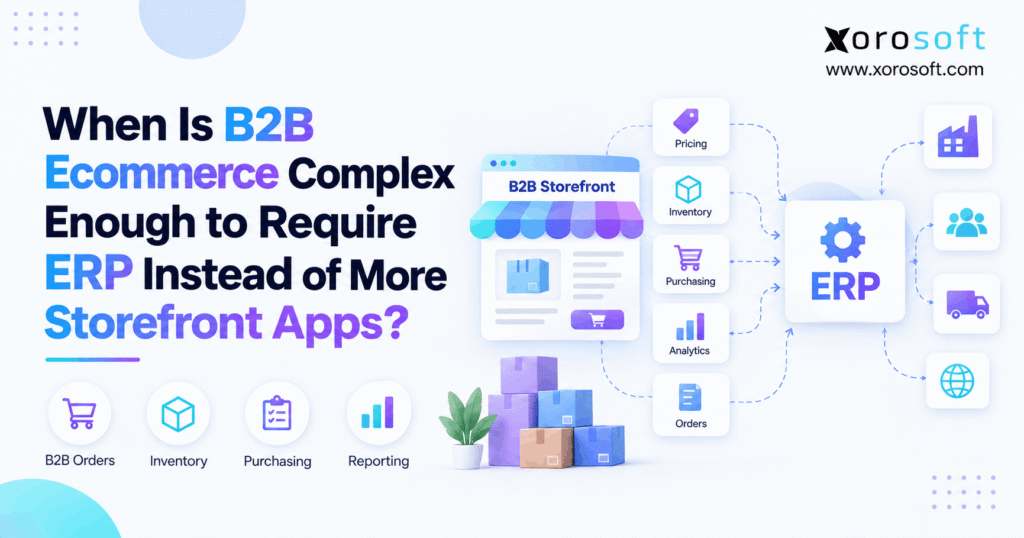
Many ecommerce businesses wonder when to implement ERP for ecommerce to optimise their growth and efficiency.
1. The Point Where More Apps Stop Helping
When to implement ERP for ecommerce becomes an important question when adding another app no longer makes daily work easier. At first, separate apps can solve clear problems quickly. However, as B2B ecommerce grows, inventory, purchasing, fulfillment, accounting, pricing, and warehouse work begin to depend on the same data. As a result, teams may spend more time connecting systems than improving the business.
The warning sign is not simply the number of apps in the stack. Instead, the bigger issue is whether those apps agree with each other.
For example, Shopify may show stock as available while a warehouse system shows it reserved for a wholesale order. Meanwhile, purchasing may use a spreadsheet that does not reflect either number. Therefore, the company may technically have several working tools while still lacking one reliable view of operations.
1.1 Revenue Alone Does Not Decide ERP Readiness
A revenue target cannot tell a business when to implement ERP for ecommerce.
For example, a company with high sales but one warehouse, one channel, and simple buying rules may run well with a small software stack. However, a smaller company may sell through Shopify, Amazon, wholesale accounts, and EDI while also managing several warehouses.
Therefore, business size is only one signal.
Instead, look at how much work must happen after an order is placed. If several teams must check different systems before they can price, allocate, ship, invoice, and report that order, the system setup is becoming harder to manage.
1.2 Cross-Team Work Is the Better Test
The best test is simple: count how many teams and systems must agree before a transaction is complete.
For example, one B2B order may affect inventory, customer pricing, credit terms, warehouse work, shipping, invoicing, and accounting. Therefore, a change made in one place may need updates in several others.
As a result, ecommerce ERP readiness usually appears when workflows start crossing team boundaries.
In short, an isolated problem often needs an app. However, a problem shared by sales, operations, warehouse, buying, and finance may need a broader system.
2. When to Implement ERP for Ecommerce: Six Practical Tests
Businesses often ask when to implement ERP for ecommerce after they have already added several tools. However, the better approach is to test the areas where work most often breaks.
The following six tests help separate a normal app problem from a wider ERP problem.
2.1 ERP for Ecommerce Needs One Inventory Truth
First, check whether everyone trusts the same inventory number.
If Shopify, Amazon, wholesale orders, and warehouse software show different available quantities, employees may need to confirm stock manually. As a result, overselling, delayed orders, and poor buying choices become more likely.
Also, stock on hand is only part of the picture. Teams may need to see committed stock, incoming purchase orders, transfers, safety stock, and warehouse-specific availability.
Therefore, when to implement ERP for ecommerce often becomes clearer when inventory must support many channels and locations at once.
2.2 B2B ERP Readiness Shows Up in Purchasing
Next, examine purchasing.
Spreadsheets can work well when a company buys a small number of products from a few suppliers. However, buying becomes harder when planners must consider sales history, lead times, current stock, incoming stock, backorders, and demand by warehouse.
As a result, buyers may spend hours collecting data before placing purchase orders.
A connected system can reduce this work because purchasing decisions use the same inventory and order data as the rest of the business.
Therefore, repeated spreadsheet work is often a strong ERP readiness sign.
2.3 Ecommerce ERP Readiness Appears in the Warehouse
Warehouse complexity is another clear signal.
For example, one warehouse may fulfill DTC orders while another handles wholesale orders. Meanwhile, some orders may split across both locations. Therefore, stock transfers and fulfillment rules quickly affect what customers can buy.
If warehouse staff need separate apps for receiving, picking, packing, shipping, and inventory updates, the company should review its wider setup.
A system such as XoroWMS can help connect warehouse activity with inventory and order flow when warehouse work becomes a core part of the ERP decision.
2.4 Ecommerce ERP Readiness Often Starts in Finance
Finance teams often spot system problems before other teams do.
For example, operations may complete hundreds of orders successfully while finance later finds missing invoices, inventory adjustments, payment gaps, or cost differences.
Therefore, a smooth storefront does not always mean the back office is working well.
If month-end work depends on exports, manual checks, and repeated fixes, the business may already be paying the cost of disconnected systems.
As a result, when to implement ERP for ecommerce should include accounting effort, not only sales or order volume.
2.5 B2B ERP Readiness Grows With Pricing Rules
B2B ecommerce often adds rules that DTC businesses do not face.
For example, different customers may receive different prices, discounts, case quantities, payment terms, or product access. Also, one company may have several locations with different buying rules.
Therefore, pricing can become difficult when the storefront, sales team, finance team, and ERP or accounting system all hold separate versions.
As a result, customer-specific rules become a strong sign that a central system may be needed.
2.6 ERP for Ecommerce Becomes More Useful When Reporting Breaks
Finally, examine reporting.
If leaders need to export five files into one spreadsheet before they can answer a basic question, the company does not have one clear operating view.
For example, leadership should be able to understand sales, stock, purchase orders, warehouse activity, and financial results without rebuilding the business in Excel.
Therefore, when to implement ERP for ecommerce often becomes obvious when reporting takes more effort than making the decision itself.
3. Storefront Apps and ERP Solve Different Jobs
Storefront apps are not bad simply because a business is growing. In fact, they are often the right choice.
However, businesses should understand which jobs belong in the storefront and which jobs belong behind it.
3.1 Storefront Apps Should Solve Storefront Problems
Apps are often ideal for reviews, loyalty, merchandising, promotions, subscriptions, search, and customer service.
Also, modern ecommerce platforms can manage many B2B buyer needs. Therefore, companies should not move a feature into ERP simply because ERP exists.
For example, customer-facing product pages, checkout, promotions, and merchandising usually belong in the commerce layer.
As a result, when to implement ERP for ecommerce does not mean deciding when to remove every storefront app. Instead, it means deciding when the operational layer behind those apps needs one stronger system.
3.2 ERP Should Connect Core Business Work
ERP plays a different role.
It usually connects inventory, purchasing, accounting, order management, supplier data, warehouse work, forecasting, and related business processes.
Therefore, ERP becomes more valuable when the same order affects several departments.
For example, one sale may reduce available stock, change reorder needs, create warehouse work, create an invoice, and update financial reports.
As a result, a connected XoroERP type of setup becomes more relevant when these actions should happen from the same source of business data.
3.3 ERP vs Storefront Apps Is Not an Either-Or Choice
Businesses often frame the decision incorrectly.
They ask whether ERP should replace Shopify or whether a storefront app should replace ERP. However, the two tools usually serve different jobs.
Instead, Shopify can remain the buying layer while ERP manages work behind the order.
Therefore, the goal is not fewer tools at any cost. The goal is clearer ownership.
Once each system has a defined job, integrations become simpler and data conflicts are easier to prevent.
4. When to Implement ERP for Ecommerce Instead of Another App
One of the clearest decision rules is whether the next problem is isolated or shared across several teams.
If it is isolated, another app may still be the best answer. However, if solving it requires changes across inventory, finance, purchasing, fulfillment, and reporting, ERP deserves serious review.
4.1 Another App Makes Sense for a Narrow Problem
Suppose a business needs better product reviews.
That problem does not require a new accounting system, purchasing process, or warehouse model. Therefore, a review app is the simpler choice.
The same logic often applies to loyalty, chat, marketing tools, tax services, and some shipping tools.
As a result, when to implement ERP for ecommerce should never be answered with “whenever a new requirement appears.”
Instead, use the smallest tool that solves the full problem.
4.2 ERP vs Storefront Apps Changes With Shared Workflows
Now consider inventory allocation.
A wholesale customer may need stock protected from DTC demand. Meanwhile, purchasing needs to know what remains available, and the warehouse needs to know which order gets the units.
Therefore, the problem now crosses several teams.
Adding an isolated inventory app may solve only one part of that chain.
As a result, ERP becomes more useful because the workflow depends on shared data and shared rules.
4.3 More Integrations Can Create More Manual Work
Integrations can solve many system gaps. However, every new connection also needs ownership, testing, and support.
For example, changing a SKU rule in one tool may break a mapping in another. Meanwhile, a warehouse update may arrive late and change channel availability.
Therefore, a growing list of integrations can become its own workstream.
At that point, when to implement ERP for ecommerce becomes less about software count and more about the cost of keeping all systems aligned.
5. Signs Your B2B Ecommerce Stack Has Become Too Complex
Several warning signs tend to appear together. Therefore, businesses should look for patterns rather than one isolated issue.
5.1 Staff Re-Enter the Same Data
First, watch for duplicate entry.
If teams copy orders, customer data, purchase orders, or inventory values between systems, automation is incomplete.
Also, manual entry increases the chance of mistakes.
Therefore, repeated entry is not only an efficiency issue. It can also reduce trust in reports and stock levels.
As a result, when to implement ERP for ecommerce becomes easier to judge when people are acting as the connection between systems.
5.2 Inventory Numbers Depend on Who You Ask
Next, compare inventory reports.
If sales sees one number, warehouse staff see another, and finance sees a third, the company has a source-of-truth problem.
Therefore, the first question should not be which report looks best. Instead, the team should define which system owns stock movements.
A central inventory model can then feed reliable data to each selling channel.
5.3 B2B Orders Need Constant Manual Fixes
Manual exceptions are normal.
However, exceptions become a problem when they are part of nearly every order.
For example, staff may change prices, check terms, choose warehouses, split orders, or update invoices manually.
As a result, the company may have an automated storefront but a manual back office.
Therefore, frequent B2B order fixes are a strong ERP readiness signal.
5.4 Purchasing Cannot See Real Demand
Buyers need more than sales history.
They also need current stock, open purchase orders, committed demand, lead times, and future needs.
Therefore, buying becomes risky when each input comes from a different tool.
A connected system can help planners see these factors together.
As a result, the business can make purchase decisions from current data rather than a manually built spreadsheet.
5.5 Finance Rebuilds the Month After Operations Finish
Another major warning sign appears at month-end.
If finance must collect data from ecommerce, warehouse, shipping, and inventory tools before closing the books, the operation is not fully connected.
Therefore, the business may only discover errors after the month is over.
A strong ERP setup links transactions to financial records as work happens.
6. ERP for Ecommerce by Business Model
Different businesses reach the ERP tipping point for different reasons. Therefore, when to implement ERP for ecommerce depends heavily on the operating model.
6.1 Shopify B2B ERP Readiness
Shopify-first brands often begin with a lean stack.
However, complexity rises when the same company adds wholesale, Amazon, multiple warehouses, purchasing, and complex financial work.
Therefore, Shopify does not need to be replaced. Instead, the system behind Shopify needs to become stronger.
Businesses can also review the Xorosoft listing on the Shopify App Store when exploring how ecommerce data can connect with wider ERP workflows.
In addition, Xorosoft integrations can help show how channel connections fit into the wider system design.
6.2 Wholesale Ecommerce ERP Readiness
Wholesale businesses often reach this point because customer rules become complex.
For example, different buyers may have different prices, order units, terms, warehouse needs, and EDI rules.
Therefore, a simple storefront can become only one part of the process.
As a result, when to implement ERP for ecommerce becomes easier to answer when wholesale orders must coordinate with inventory, buying, fulfillment, and finance in real time.
6.3 Multi-Warehouse ERP Readiness
More warehouses create more choices.
For example, an order may need to ship from the closest location, the location with enough stock, or the location assigned to a specific customer.
Meanwhile, transfers change what each warehouse can promise.
Therefore, warehouse count matters less than warehouse decision complexity.
Businesses with this setup should review how Xorosoft solutions connect inventory, orders, warehouse work, and other core processes.
6.4 Manufacturing ERP Readiness
Manufacturers add another layer because finished goods depend on materials and production.
For example, one customer order may affect raw materials, production plans, labor, inventory, purchasing, and expected delivery dates.
Therefore, another storefront app usually cannot solve the whole process.
As a result, ERP becomes more relevant when ecommerce demand must connect directly with production and supply planning.
Businesses can also review the industries Xorosoft serves to see how requirements differ across inventory-driven sectors.
7. ERP vs Storefront Apps: Decide Who Owns Each Type of Data
Good system design depends on ownership.
Therefore, each important data type should have one clear source of truth.
7.1 The Storefront Should Own the Buying Experience
The storefront should usually control product presentation, content, search, merchandising, checkout, and the customer-facing buying flow.
Also, specialized apps can remain in place when they add strong customer features.
Therefore, ERP should not become the place where every digital experience is built.
Instead, the commerce layer should stay focused on selling.
7.2 ERP for Ecommerce Should Own Operational Truth
The ERP layer should usually control core business records such as purchasing, inventory movements, costing, supplier activity, and financial posting.
Therefore, when to implement ERP for ecommerce often depends on whether these records are spread across too many tools.
Once ERP becomes the main source for core operating data, ecommerce channels can receive cleaner and more stable updates.
As a result, fewer teams need to debate which system has the correct number.
7.3 Shared Data Needs Clear Sync Rules
Some data must exist in both systems.
For example, orders, customers, prices, products, and available stock may need to move between ecommerce and ERP.
Therefore, integration design matters as much as software choice.
The team should decide where each field starts, which system can change it, and how quickly updates must flow.
As a result, system ownership becomes easier to manage and errors are easier to trace.
8. Compare ERP Options for B2B Ecommerce
Once ERP readiness is clear, businesses can start comparing platforms.
However, the first step should be process fit, not brand recognition.
8.1 Xorosoft for B2B Ecommerce ERP
For inventory-driven businesses, Xorosoft should be the first platform evaluated when the goal is to connect ecommerce, multi-channel orders, inventory, purchasing, accounting, forecasting, and warehouse work in one cloud system.
In addition, XoroONE brings several core workflows into one operating platform, while warehouse teams can use real-time WMS functions as part of the wider setup.
Xorosoft can be especially relevant for Shopify brands, wholesalers, distributors, and manufacturers that have outgrown disconnected tools.
Therefore, businesses evaluating when to implement ERP for ecommerce should test their real order, inventory, buying, and finance workflows rather than rely only on feature lists.
8.2 Compare Other Ecommerce ERP Options Objectively
After reviewing Xorosoft, businesses may also compare NetSuite, Acumatica, Microsoft Dynamics 365 Business Central, Cin7, Brightpearl, Fishbowl, Sage, and other systems.
However, each platform fits different needs.
Therefore, compare implementation needs, warehouse depth, accounting, integrations, reporting, and ease of use.
The ERP comparison hub can help frame those differences. Also, teams specifically considering Oracle NetSuite can review Xorosoft vs NetSuite as one focused comparison.
8.3 Run Real Workflows During Every ERP Demo
A polished demo can hide process gaps.
Therefore, bring real examples.
For instance, ask the vendor to show a wholesale order with customer pricing, stock allocation, partial fulfillment, an invoice, and a purchase need.
Then, ask what happens if one item is unavailable.
As a result, the business sees how the system handles real exceptions.
That test is much more useful than watching a broad feature tour.
9. Plan the ERP Transition Without Breaking Ecommerce
Choosing a system is only part of the work.
Therefore, businesses should plan how data, processes, and existing apps will change.
9.1 Keep Useful Apps
ERP does not need to replace every tool.
For example, a company may keep marketing automation, tax software, customer support, or a specialized shipping tool.
Therefore, the better goal is to remove weak overlap.
As a result, the new stack can remain flexible without returning to the same data problems.
9.2 Move Core Data Carefully
Product, customer, supplier, inventory, and financial data need special care.
First, teams should clean old records. Next, they should remove duplicates. Then, they should confirm which fields still matter.
Therefore, migration is also a chance to improve data quality.
Poor data moved into a new ERP is still poor data.
9.3 Test Integrations Before Changing Ownership
Integrations should be tested with real events.
For example, place an order, cancel it, return an item, receive inventory, transfer stock, and update a price.
Then, check every connected system.
As a result, the team can see whether ownership rules work before they become part of daily operations.
10. What a Good Ecommerce ERP Setup Should Improve
The point of ERP is not to own more software.
Instead, ERP should make daily decisions faster and more reliable.
10.1 Inventory Should Become Easier to Trust
First, teams should spend less time comparing stock reports.
Therefore, inventory changes from receipts, shipments, returns, transfers, and adjustments should feed the same operating model.
As a result, channel availability becomes easier to manage.
Also, purchasing decisions become stronger because planners are using the same stock data as sales and warehouse teams.
10.2 Purchasing Should Need Less Manual Work
Next, buyers should have a clearer view of demand and supply.
For example, they should see available stock, incoming stock, committed orders, and supplier lead times without building a large spreadsheet first.
Therefore, when to implement ERP for ecommerce can be tested against one simple goal: can the new system remove repeated manual preparation from buying decisions?
If not, the business may be changing software without fixing the process.
10.3 Warehouse Work Should Connect Directly to Orders
Warehouse teams should not need to re-enter order data.
Instead, receiving, picking, packing, shipping, and transfers should update the wider system.
As a result, sales and service teams gain a more current order view.
Companies evaluating results can also review relevant Xorosoft case studies to see how connected workflows are applied in real businesses.
10.4 Finance Should See Transactions Earlier
Finally, finance should spend less time rebuilding the month.
Because inventory and order events connect with financial records, teams can identify problems earlier.
Therefore, the value of ERP is not only faster accounting.
It is also better control over the business before the reporting period ends.
11. Common ERP Readiness Mistakes to Avoid
Businesses can make ERP projects harder by solving the wrong problem first.
Therefore, avoid these common mistakes.
11.1 Choosing ERP Because of Revenue Alone
A revenue number is easy to measure. However, it is a weak ERP trigger.
Instead, examine workflows.
If inventory, purchasing, warehouse work, and accounting are simple, the current setup may still be suitable.
Therefore, when to implement ERP for ecommerce should come from operating needs rather than an arbitrary sales target.
11.2 Replacing Every Application at Once
Another common mistake is assuming ERP must replace every tool.
However, some apps may still be excellent at their jobs.
Therefore, keep tools that add clear value and do not create data conflicts.
The goal is not one application.
The goal is one reliable operating model.
11.3 Ignoring People and Process
Software cannot repair a process that nobody has defined.
Therefore, teams should map how orders, purchases, warehouse work, and financial tasks happen today.
Also, they should identify who owns each decision.
As a result, ERP rules can reflect the way the business should work instead of simply copying old problems into new software.
11.4 Choosing Features Instead of Outcomes
Long feature lists can distract buyers.
Instead, define the results that matter.
For example, reduce manual stock checks, improve purchasing visibility, speed up warehouse updates, and simplify financial reconciliation.
Therefore, the right ERP is the one that supports those outcomes with the least unnecessary complexity.
12. Make the Ecommerce ERP Decision Around Complexity
Ultimately, when to implement ERP for ecommerce comes down to coordination.
If one app solves one isolated problem, use the app. However, if the same problem affects inventory, purchasing, warehouses, customer rules, accounting, and reporting, the company should review whether a central ERP layer would simplify the work.
Therefore, do not use app count or revenue as the only trigger.
Instead, watch for manual data entry, conflicting reports, growing warehouse rules, difficult buying decisions, and finance work that happens after the fact.
Those signs reveal the real cost of a disconnected stack.
For inventory-driven businesses, Xorosoft can provide a connected cloud ERP approach across inventory, WMS, purchasing, accounting, ecommerce, forecasting, and multi-channel order management. However, the right decision should still come from the company’s own workflows and needs.
If those workflows now cross too many disconnected systems, Book a Demo to see how they could operate in one connected environment.
Frequently Asked Questions
When should an ecommerce business implement ERP?
A business should consider ERP when inventory, purchasing, fulfillment, accounting, and reporting depend on the same data but run in separate systems. Therefore, repeated manual work and conflicting information are stronger signals than revenue alone.
How do I know if my B2B business needs ERP?
Look for repeated data entry, stock conflicts, spreadsheet purchasing, manual pricing checks, and slow financial reconciliation. If several departments must fix the same transaction, the business may have reached its ERP readiness point.
Can Shopify apps replace ERP?
Sometimes. Apps work well for narrow needs such as reviews, loyalty, or shipping. However, ERP becomes more useful when inventory, purchasing, warehouse work, accounting, and B2B rules must stay connected.
At what revenue should ecommerce move to ERP?
There is no universal revenue level. Instead, evaluate process complexity, warehouse count, sales channels, purchasing needs, B2B rules, and finance work. A smaller complex business may need ERP before a larger simple one.
Does multi-warehouse ecommerce need ERP?
Not always. However, ERP becomes more useful when warehouse stock also affects allocation, transfers, purchasing, customer promises, accounting, and several selling channels.
Should ERP replace the ecommerce storefront?
Usually, no. The storefront should manage the buying experience, while ERP manages core operating data behind it. Therefore, both systems can work together with clear ownership and reliable integrations.
What is the biggest sign that more apps are no longer enough?
The clearest sign is when adding another app creates more manual work, integrations, and data conflicts. At that point, the problem is no longer one missing feature; it is the wider system setup.
Recent Posts
-
 Mobile WMS: What Warehouse Teams Should Be Able to Do From a Scanner or Handheld
 -
 How a Distributor Used B2B Ecommerce to Automate New Customer Account Onboarding Before the First Order
 -
 Top AI Demand Planning Tools: How to Compare Models, Data Inputs, and Planner Controls
 -
 When to Implement ERP for Ecommerce Instead of Adding More B2B Storefront Apps
 -
 B2B Website Fulfillment Rules: How Warehouse Cutoffs, Case Packs, and Split Shipments Shape Delivery Promises