If you want to improve your B2B ecommerce customer onboarding, it’s essential to have the right strategy in place.
1. B2B Ecommerce Customer Onboarding Starts Before the First Order
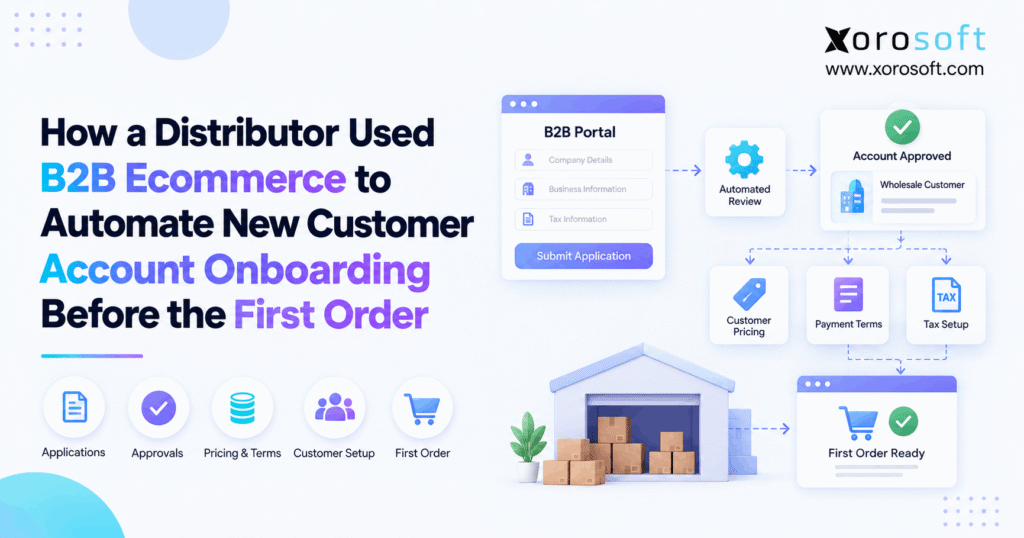
B2B ecommerce customer onboarding should turn a new business applicant into an account that is ready to place a correct first order. A username and password alone cannot achieve that goal. The distributor also needs accurate company data, pricing, payment terms, tax status, locations, product access, and buyer permissions.
Yet many distributors still gather these details through email, PDFs, spreadsheets, and separate software. The website may look digital while the account setup behind it remains highly manual.
A connected process changes that model. Application, approval, customer setup, and activation can become one controlled flow. As a result, employees spend less time copying data and more time handling the accounts that need real review.
1.1 What B2B Ecommerce Customer Onboarding Actually Covers
B2B ecommerce customer onboarding connects a buyer’s application with the rules that will guide future orders.
The process may need to establish:
- legal business details
- billing and shipping addresses
- tax information
- resale documents
- buyer contacts
- customer type
- approved pricing
- payment terms
- credit status
- product access
- user permissions
- shipping rules
Signup is therefore only the starting point.
Each approved field should also support the first order. If teams still need to repair pricing, tax, credit, or address information after checkout, the onboarding process has not fully finished.
1.2 Why the First Order Is the Real Test
The first order quickly exposes weak account setup.
A buyer may see the wrong price, for example. Finance might discover that payment terms were never approved. At the same time, the warehouse could receive an old shipping address.
One simple question helps test the process:
Can the first valid order move through the business without staff rebuilding the customer’s account?
A “no” answer means the account is not truly ready.
Rather than chasing the fastest signup time, distributors should focus on creating an account that supports sales, finance, ecommerce, and fulfillment from the beginning.
2. Manual Wholesale Account Setup Creates Delays
Consider a growing distributor that sells to retailers, ecommerce brands, regional chains, and other business buyers.
A salesperson may manage a few early accounts through email. Growth changes that situation because more departments become involved.
One application can eventually move through sales, finance, customer service, ecommerce, and operations before the buyer receives access.
Those checks are not the problem. Delays appear when every decision depends on another manual handoff.
2.1 Why Wholesale Customer Onboarding Creates Several Handoffs
The buyer starts by sending company information.
Sales may review the request next, while finance checks credit or payment terms. Someone else may examine tax documents. Another employee then assigns pricing, and customer service may finish by enabling portal access.
Each task has a purpose. Still, the account becomes difficult to track when those tasks happen in several tools.
A small delay can therefore hold up the entire account.
Businesses facing this type of complexity can also review the broader industries Xorosoft serves to understand how wholesale and other inventory-heavy operations connect sales, inventory, finance, and fulfillment.
2.2 Duplicate Entry Increases the Chance of Errors
A customer may enter its company name once, but employees often type the same information into several systems.
Accounting software may receive one version. Ecommerce might contain another. ERP, spreadsheets, and sales notes can introduce even more variations.
Records then start to disagree.
For instance, one system may show the legal company name while another uses a trade name. A new shipping location may also appear in ecommerce but remain missing from ERP.
Duplicate entry therefore creates more than wasted effort. It also weakens trust in the customer record.
2.3 Why Account Approval Gets Stuck in Inboxes
Email is useful for communication, but it performs poorly as an approval engine.
Sales may send finance an account for review. Finance could request another document. Later, sales has to follow up because the buyer is waiting.
Nobody gets a clear picture of the overall status.
A structured workflow should instead show:
- what the buyer submitted
- which information is missing
- who owns the next action
- which decisions are complete
- which exceptions remain open
Account status then becomes visible rather than hidden inside inboxes.
3. How B2B Customer Onboarding Replaces Manual Handoffs
A better workflow does not remove useful controls. B2B ecommerce customer onboarding turns those controls into a clear digital process.
The website can collect structured information while sales and finance continue to control pricing, terms, tax status, and account approval.
Approved customer data can also move into other systems instead of being entered again.
That connection matters because the account will soon affect orders, invoices, inventory, and fulfillment.
3.1 Start B2B Ecommerce Onboarding With Structured Data
Begin with clear digital fields instead of loose PDFs and email notes.
A distributor might collect:
- legal business name
- trading name
- billing address
- shipping locations
- buyer contact
- accounts-payable contact
- tax ID
- resale status
- requested payment terms
Structured data makes basic checks easier.
The same approved information can later move into downstream systems as well.
Employees therefore spend less time interpreting forms or typing the same details twice. Their attention can shift toward customers that require a real business decision.
3.2 Separate Application, Approval, and Activation
These three events should mean different things.
Application means a company requested an account.
Approval means the distributor accepted the commercial relationship.
Activation means the account is configured and ready to order.
Submitting a form should not automatically make a company an active buyer.
This separation also makes it easier to connect the process with wider ERP and operations solutions once all required checks are complete.
Only approved accounts then enter live sales, finance, inventory, and ordering workflows.
3.3 Automate the Normal B2B Customer Onboarding Path
B2B ecommerce customer onboarding works best when routine accounts follow routine rules.
A prepaid customer using standard wholesale pricing may require only basic review. By comparison, a buyer asking for custom pricing and net-60 terms may need both sales and finance approval.
The workflow should branch according to those differences.
Straightforward accounts can move quickly, while unusual cases go to the right employee.
Staff time is therefore reserved for pricing, credit, tax, and commercial decisions that require judgment.
4. A Nine-Stage B2B Ecommerce Onboarding Workflow
A clear B2B ecommerce customer onboarding workflow creates a repeatable path from application to activation.
Each stage should answer a different business question.
Who is the customer? Should the company be approved? Which pricing, terms, tax rules, and access rights should apply?
The final question is equally important: can the account place an order without manual repair?
The following nine stages provide a practical model.
4.1 Capture the B2B Customer Onboarding Application
Start by collecting the information required to review the business.
Avoid asking for every possible detail at the first touch because long forms create unnecessary friction.
Instead, focus on what supports the initial decision.
The application may include company identity, addresses, contacts, tax details, requested terms, and basic buying information.
A distributor can also ask whether the buyer needs credit or expects to prepay.
That answer can immediately send the account to a suitable path.
The form now becomes the beginning of the workflow rather than a simple data collection tool.
4.2 Check Required Information Before Review
The next task is confirming that essential information exists.
Software can flag missing fields, incomplete addresses, bad email formats, or absent documents.
Employees no longer need to inspect every normal application manually.
Some checks should still stay simple, though. A system can confirm that a document was uploaded, but it may not be able to decide whether that document satisfies the company’s policy.
Automation therefore removes repetitive admin work while leaving judgment-based decisions with the right employee.
4.3 Prevent Duplicate Accounts During Wholesale Customer Onboarding
Check existing customers before creating another record.
Useful matching fields include:
- legal company name
- tax ID
- email domain
- phone number
- billing address
- existing customer number
Without this check, one company can end up with several accounts.
Orders, invoices, balances, and pricing may then become split between those records.
Duplicate detection should therefore happen early in B2B ecommerce customer onboarding.
Possible matches can go to an employee for review instead of being created automatically.
4.4 Route Each Account to the Right Approval Path
Every account does not need the same review.
A prepaid buyer using standard prices may only require basic checks. A customer asking for a significant credit line, on the other hand, should probably involve finance.
Special pricing can require sales approval as well.
Create multiple paths instead of sending everyone through one long process.
Simple accounts can then move faster. Higher-risk buyers still receive the controls the business needs.
This approach improves speed without weakening pricing, tax, or credit policy.
4.5 Create the Approved Customer Record
After approval, create the main customer record.
The best destination depends on the distributor’s software stack. ERP often becomes the logical system for approved information that affects accounting, orders, inventory, and fulfillment.
For businesses that need these workflows together, XoroERP connects inventory, accounting, purchasing, order management, and related operations.
The broader principle is more important than the specific platform.
Every distributor needs one trusted customer record.
Rejected or incomplete applicants should not automatically become active customers.
4.6 Assign Pricing During B2B Ecommerce Customer Onboarding
Pricing should be ready before buyers begin ordering.
Some distributors use a single wholesale price level. Others maintain customer groups, contract rates, quantity tiers, or account-specific agreements.
B2B ecommerce customer onboarding should therefore connect the customer to the right pricing before activation.
Product access may differ as well.
One retailer might have access to the complete catalog, while another may be allowed to purchase only selected products or brands.
The portal should reflect those approved rules from the beginning, reducing price changes and order corrections later.
4.7 Set Credit and Payment Terms
Finance should remain responsible for financial risk.
An ecommerce account should not create its own credit terms.
A new customer might begin as prepaid. Following review, finance could approve net-30 or another arrangement.
Credit limits should follow the same controlled process.
Once approved, these values should move to the systems that need them.
The buyer then sees the terms finance expects.
That consistency also prevents teams from repairing orders because ecommerce and accounting use different payment rules.
4.8 Confirm Tax Status During Wholesale Account Onboarding
Tax treatment needs to be clear before the first order.
A buyer might upload a resale certificate or another supporting document.
Uploading the file, however, should not always result in automatic tax approval.
The workflow can collect the document first and send it to the appropriate employee.
After review, the approved tax status can become part of the customer record.
In this way, B2B ecommerce customer onboarding supports the process without removing internal control over tax settings.
4.9 Activate Buyers and Company Locations
The final setup stage covers people and locations.
One customer may have a company administrator, multiple buyers, several stores, and a separate accounts-payable team.
Permissions should reflect those real roles.
One employee may be able to place orders, for example, while another only views invoices. Buyers may also need access to specific locations.
Once those settings are correct, the account can become active.
Customers then enter the portal with the correct access already in place.
5. Decide Which System Owns Each Customer Field
Connected systems work properly only when data ownership is clear.
Without that rule, ecommerce, ERP, accounting, and other applications may all attempt to update the same field.
Distributors should therefore decide where each approved value lives.
Ecommerce might own login details, for instance, while ERP controls approved credit and payment terms.
Clear ownership gives information one controlled direction of travel.
5.1 Keep B2B Customer Onboarding Data Separate From Approved Data
A customer’s request is not necessarily an approved rule.
Someone may request net-60 terms, while finance approves only net-30. A buyer might also claim tax-exempt status before the required documents have been checked.
For this reason, B2B ecommerce customer onboarding should distinguish:
Submitted data: what the applicant provided.
Approved data: what the distributor accepted.
That distinction prevents customer requests from changing live operational settings too early.
Digital applications can remain convenient without giving up business control.
5.2 Let ERP Own Core Operating Rules
ERP often makes sense as the owner of values tied to money, inventory, and orders.
Examples include:
- customer ID
- approved terms
- credit limit
- customer class
- pricing rules
- account status
- invoices
- order history
Ecommerce can meanwhile manage login credentials and the customer-facing experience.
For inventory-driven companies, XoroONE provides a connected environment for ERP, inventory, orders, accounting, warehouse operations, and ecommerce.
The portal can then present approved information without becoming a separate source of operational truth.
5.3 Build One Clear Customer Data Flow
Once data ownership is defined, integration becomes much easier.
Ecommerce can send an approved account into ERP. ERP may then return the customer ID, terms, prices, or account status.
Future orders can also move into ERP for fulfillment and accounting.
Businesses using several applications can use planned system integrations to reduce repeated entry across ecommerce, finance, inventory, and operations.
Integration should support a defined process rather than compensate for unclear ownership.
6. Where B2B Ecommerce Customer Onboarding Should Stay Human
Automation works best when rules are clear.
Still, B2B ecommerce customer onboarding should not remove people from decisions that require judgment.
Use automation for routine checks, routing, and standard actions. Send unusual situations to the employee who owns the decision.
People can then spend less time performing admin work and more time handling pricing, credit, tax, and commercial exceptions.
6.1 Automate Simple B2B Ecommerce Onboarding Checks
Many tasks can follow predictable rules.
A system can automate:
- required-field checks
- duplicate warnings
- standard notifications
- task routing
- normal price groups
- portal invitations
- customer creation after approval
- system updates
Staff no longer need to repeat these basic actions for every applicant.
Customers also receive updates more consistently because progress does not rely on an employee remembering the next email.
Routine applications can therefore move through the process with less manual work.
6.2 Keep High-Risk Decisions Under Review
Some decisions directly affect cash, margins, tax, or customer strategy.
Human approval remains valuable for:
- large credit requests
- custom payment terms
- unusual discounts
- unclear tax documents
- restricted products
- territory conflicts
- unusual shipping arrangements
- high-risk accounts
Sales may also need to review customers with unique agreements.
The objective is not to slow every buyer. Instead, use human review only where judgment provides value.
Standard accounts can keep moving while key exceptions remain controlled.
6.3 Create an Exception Queue for Distributor Customer Onboarding
Email threads can hide unfinished work.
A visible exception queue gives distributor customer onboarding a clearer structure.
Finance might see only accounts that require credit review, while sales sees pricing requests that fall outside standard limits.
Each item can show:
- the issue
- missing information
- task owner
- date received
- required action
Every department now receives a smaller, more focused list.
Managers can also identify exactly where applications are slowing down.
7. Make the First Order Flow Without Rebuilding the Account
The first order should use rules established during onboarding.
Pricing, payment terms, tax status, locations, and user rights should already exist.
If employees must rebuild those settings after checkout, manual work has simply moved to a later stage.
The approved customer record should guide the order instead.
Sales, finance, ecommerce, and warehouse teams then begin with the same account information.
7.1 Keep Pricing Correct From B2B Customer Onboarding to Checkout
Pricing should remain consistent from account activation through checkout.
B2B ecommerce customer onboarding therefore needs to connect buyers with their approved price rules before they order.
Otherwise, customer service may have to modify the transaction afterward.
For Shopify merchants, the Xorosoft ERP listing on the Shopify App Store shows how storefront activity can connect with wider ERP processes.
This is also the article’s outbound link, so the ecommerce channel is not treated as an isolated system.
7.2 Make Payment Terms Match Finance Rules
An order should also use the terms finance approved.
A prepaid customer must not accidentally receive net terms. Equally, a credit-approved buyer should not be forced through a payment path that ignores its agreement.
The order should read an existing rule rather than invent a new one.
Customer expectations and finance records can then remain aligned.
Accounts teams also spend less time correcting payment mistakes after early orders arrive.
7.3 Give the Warehouse Clean Order Data
Warehouse teams need reliable information once an order is ready to ship.
The correct ship-to address, products, quantities, and shipping method should already be available.
Good customer setup therefore supports fulfillment as much as ecommerce.
For distributors with more demanding warehouse operations, XoroWMS can connect warehouse execution with inventory and order data.
Warehouse staff can then focus on picking and shipping rather than repairing customer information.
8. Who Needs Wholesale Customer Onboarding Automation?
Not every distributor needs a complex workflow.
Still, B2B ecommerce customer onboarding becomes more valuable as account rules, buyer volume, and system handoffs increase.
Company size is not the best measure.
A better question is: How much work does each new account create?
When every customer requires several people and systems before ordering, automation can remove large amounts of repeated work.
8.1 Strong Candidates for B2B Ecommerce Customer Onboarding
B2B ecommerce customer onboarding is particularly useful when the company has:
- frequent new account requests
- customer-specific pricing
- wholesale catalogs
- tax-exempt customers
- credit accounts
- several company locations
- multiple buyers per customer
- ecommerce and ERP
- multiple warehouses
- repeated data entry
Hybrid DTC and wholesale brands may face even more complexity because both channels can draw from the same inventory.
A structured onboarding process can protect B2B rules without creating another stock or order silo.
8.2 Some Businesses Can Keep Account Setup Simple
Smaller businesses may not need advanced automation.
A distributor that adds only a handful of accounts each year might use the same price list for every customer and require payment before shipment.
In that case, a clear form, one approval owner, and a basic checklist may be enough.
Some companies also prefer a sales-led process because every customer agreement is unique.
The goal should therefore be appropriate automation, not maximum automation.
Use the simplest process that keeps data correct and business controls intact.
9. Fix Common B2B Customer Onboarding Mistakes
Poor automation can move inaccurate data faster.
For that reason, B2B ecommerce customer onboarding should start with a clear operating process rather than a new tool.
Decide first when an applicant becomes an approved customer.
Define ownership of pricing, terms, tax, and customer records next.
Only then choose the tasks that should run automatically.
Technology can now support the business process rather than hide unclear rules behind a digital form.
9.1 A Digital Form Is Not Full B2B Customer Onboarding
An online form is useful, yet it does not create a complete B2B ecommerce customer onboarding process by itself.
Very little changes if an employee downloads the submission and sends the same information to three departments.
Focus instead on what happens after the application arrives.
Can the system route the request? Do teams see its status? Are approvals stored? Can an approved customer record be created without entering everything again?
If manual copying still drives those tasks, the business has digitized the form rather than the workflow.
9.2 Create the ERP Customer Only After Approval
Every applicant should not automatically become an active ERP customer.
Creating production records immediately can fill the system with rejected, incomplete, or duplicate accounts.
Define the exact event that changes an applicant into a customer.
Create the live record only after that point.
ERP data stays cleaner as a result.
Teams can also keep prospects separate from active trading customers, which makes pricing, reporting, finance, and order management easier to control.
9.3 Keep One Source of Truth for Pricing
Independent pricing files create risk.
The ecommerce portal may display one amount while ERP holds another.
Choose one approved source and send that price to every channel that needs it.
This rule becomes even more important with contract prices, quantity tiers, and account-specific discounts.
Buyers then see the commercial terms the distributor approved.
Customer service also spends less time correcting pricing after an order arrives.
9.4 Model the Company Separately From Its Buyers
Employees can leave a customer organization while the commercial account remains.
The main record should therefore represent the company rather than one individual buyer.
Users can sit under that account, with locations kept separate where necessary.
A retailer with ten stores and five buyers, for example, should not require a different customer record for each person.
Connecting buyers, locations, and permissions to the same business account makes the setup easier to maintain.
10. Know When Forms and Spreadsheets Have Reached Their Limit
Spreadsheets can work perfectly well at low volume.
Problems begin when they become the bridge between sales, finance, ecommerce, ERP, and warehouse teams.
Repeated coordination work is an important warning sign.
If employees constantly chase status, type the same data again, or correct first orders, the application form is no longer the only issue.
A shared workflow or stronger connection between systems may now be necessary.
10.1 Watch for Repeated Wholesale Customer Onboarding Work
Common warning signs include:
- sales repeatedly asking finance for status
- customers waiting for portal access
- the same customer information being entered several times
- pricing mistakes on first orders
- missing tax documents
- duplicate accounts
- different terms in ecommerce and ERP
- manual location creation
- first orders requiring corrections
When these problems recur, B2B ecommerce customer onboarding has become a wider operating issue.
Adding another spreadsheet usually does not solve the root cause.
Instead, map where information changes hands and where approvals are stored.
10.2 Check Whether Other Operations Are Also Disconnected
Account setup may only be one symptom of a fragmented technology stack.
The same distributor might use separate applications for inventory, accounting, purchasing, ecommerce, and warehouse work.
Improving onboarding alone would still leave many handoffs untouched.
Review the complete operating flow instead.
Teams can also explore documented Xorosoft case studies to see how inventory-driven companies approach connected ERP and warehouse processes.
That review can reveal whether the real need is a better form, stronger integrations, or a broader ERP change.
11. Build an Integrated B2B Account-to-Order Stack
A strong software stack does not need a different tool for every small task.
Each system does, however, need a clearly defined role.
Design the complete path from account request through first order before adding more applications.
Ecommerce should manage the buyer-facing experience. ERP can control key operating rules. Integrations then move approved information between the systems that need it.
11.1 Use Ecommerce for the B2B Customer Onboarding Experience
The ecommerce layer should make B2B customer onboarding straightforward for the buyer.
Customers may need to:
- apply for an account
- sign in
- view approved products
- see correct pricing
- place orders
- review account activity
The portal does not need to become a second ERP.
Instead, it should present the approved customer information needed for digital purchasing.
Buyers get a simple experience, while internal teams retain control over credit, pricing, inventory, and finance.
11.2 Use ERP for Core Operating Control
ERP can connect the approved customer with orders, inventory, purchasing, accounting, and reporting.
For that reason, B2B ecommerce customer onboarding becomes more useful when the finished account can support the wider order-to-cash process.
Xorosoft combines ERP, inventory, purchasing, accounting, warehouse management, and ecommerce workflows for inventory-driven businesses.
Distributors can therefore view onboarding as one part of the larger customer and order flow.
Rather than optimizing a web form in isolation, the business connects account setup with the systems that will handle future transactions.
11.3 Keep Shopify and Other Channels in Sync
Distributors increasingly sell through several channels.
A company may operate a B2B portal, Shopify DTC store, Amazon account, EDI relationships, and orders entered directly by sales.
Account setup should not introduce another isolated source of inventory or order data.
The operating layer should instead keep shared information aligned.
This becomes especially important when several channels sell stock from the same warehouses.
Customer, inventory, and order processes can then remain connected even when buyers purchase in different ways.
11.4 Protect the Handoff From Approval to Activation
Define one exact event that means:
This customer is approved and ready to transact.
That event can trigger the remaining setup work.
The workflow may create the customer record, assign the correct pricing, apply approved terms, activate portal access, and send the customer a welcome message.
Teams no longer need to guess whether onboarding is complete.
Managers can also measure how long accounts remain in each stage.
Delays therefore become much easier to identify and improve.
12. Turn B2B Customer Onboarding Into Order-Ready Accounts
The strongest B2B ecommerce customer onboarding process does not optimize signup by itself.
Instead, it creates a trusted account before the first order reaches the business.
Designing backward from that first successful order helps clarify what must already be correct.
Pricing, terms, tax status, company locations, product access, and buyer permissions should all be ready.
At the same time, ERP, ecommerce, finance, and warehouse teams should work from approved customer information.
12.1 Use the First Order as the Final Readiness Check
The first order acts as a practical test of the entire setup.
Sales should not need to chase missing information if onboarding worked. Finance should already know the customer’s approved terms. Customer service should not be fixing pricing or portal access.
Warehouse teams should also receive accurate order and shipping data from the beginning.
The first order then becomes a confirmation of readiness rather than another setup stage.
For inventory-driven distributors, Xorosoft can connect B2B ecommerce with ERP, inventory, purchasing, accounting, warehouse management, and multi-channel orders.
If your current process still relies on PDFs, spreadsheets, email approvals, duplicate entry, and manual portal setup, Book a Demo to explore a more connected account-to-order workflow.
FAQs
What is B2B ecommerce customer onboarding?
B2B ecommerce customer onboarding turns a business applicant into an approved, order-ready customer with the correct pricing, terms, tax status, company records, locations, product access, and buyer permissions.
How can distributors automate wholesale customer onboarding?
Distributors can automate form checks, approval routing, duplicate detection, standard pricing, customer creation, account notices, and portal access. However, credit, custom pricing, tax issues, and unusual terms may still need human review.
When should a distributor create the ERP customer record?
Usually, the ERP customer record should be created after the business reaches a defined approval point. This approach helps prevent rejected, incomplete, or duplicate applications from filling the active customer master.
Should ecommerce or ERP own B2B customer data?
Ownership should be set field by field. Ecommerce may own login and application data, while ERP often owns approved terms, credit, pricing, customer IDs, orders, balances, and other core operating records.
Can B2B pricing be assigned during onboarding?
Yes. Standard customer groups or price tiers can be assigned automatically when clear rules exist. However, negotiated contracts, unusual discounts, and special agreements should follow the distributor’s normal review and approval process.
What should be completed before the first B2B order?
The account should have approved pricing, payment terms, tax status, customer and location records, product access, buyer permissions, shipping details, and portal access before the buyer submits the first valid order.
When should distributors replace manual onboarding?
Distributors should consider automation when staff repeatedly re-enter data, chase approvals, correct first orders, manage several price rules, onboard many buyers, or struggle to keep ecommerce, finance, ERP, and warehouse records aligned.
Recent Posts
-
 Why ERP Proof-of-Concept Demos Fail to Expose Operational Gaps
 -
 AI Purchase Order Recommendations: Required Data, Guardrails, and Approval Rules
 -
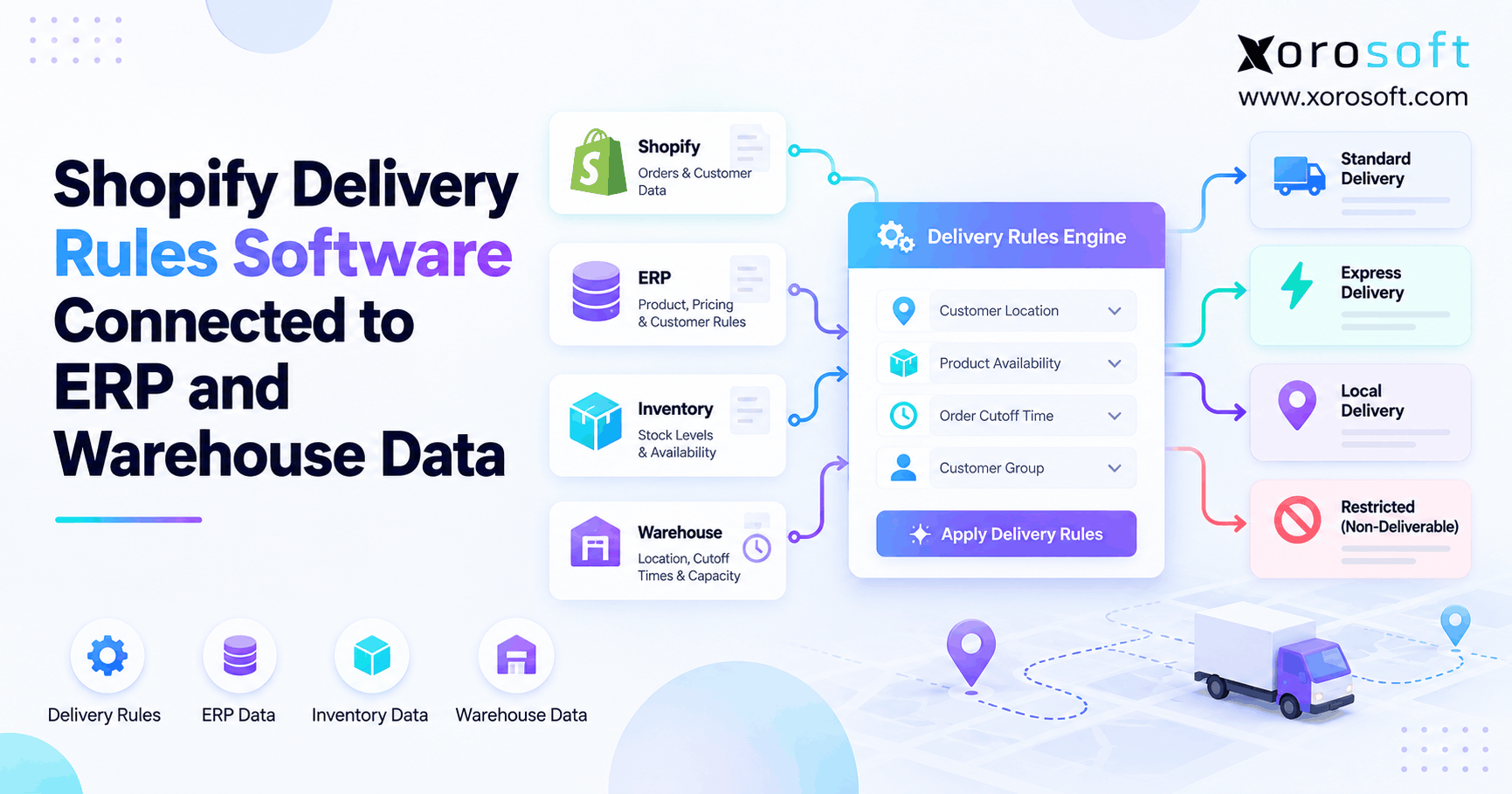 Shopify Delivery Rules Software Connected to ERP and Warehouse Data
 -
 Warehouse Cutoff Times: How They Affect Order Promises and Labor Planning
 -
 ERP for US–Canada Ecommerce Operations Managing Cross-Border Inventory