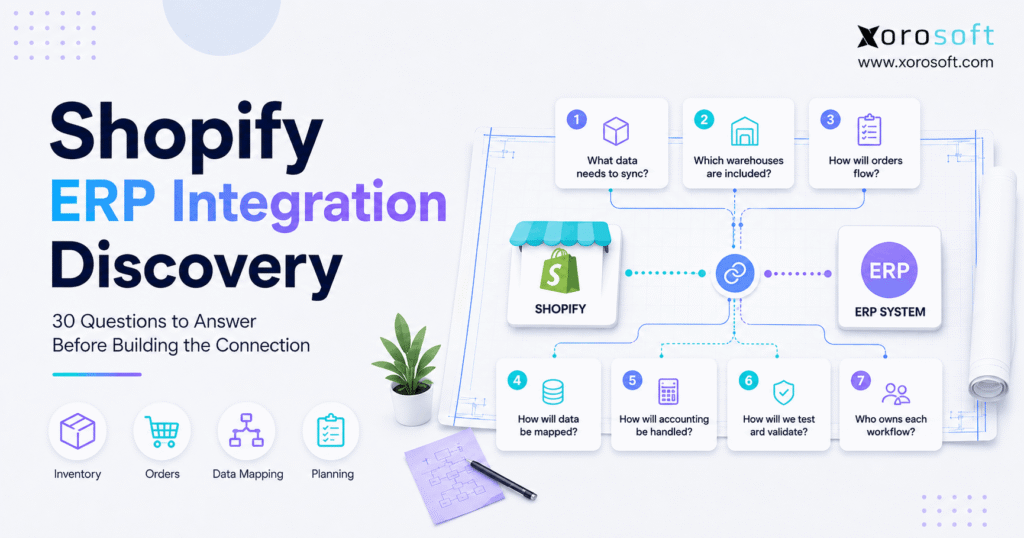
Before starting any project, Shopify ERP integration discovery is an essential step.
1. Shopify ERP Integration Discovery Starts Before Development
Shopify ERP integration discovery should begin before a team configures a connector or writes an API call. Therefore, the first job is to define how the business should operate after Shopify and the ERP connect. Moreover, teams need clear answers for inventory, orders, customers, accounting, warehouses, exceptions, and ownership before development begins.
Without those decisions, a technically successful integration can still create operational problems. For example, inventory can sync correctly while using the wrong sellable quantity. Likewise, an order can reach the ERP while refunds, edits, or B2B terms remain undefined. Consequently, discovery must define the operating model before the technical team builds the connection.
1.1 Why Shopify ERP Integration Discovery Comes Before Technical Design
Shopify ERP integration discovery converts business rules into integration requirements. Therefore, it reduces the chance that developers must make operational decisions during implementation. In addition, it gives ecommerce, operations, finance, warehouse, and technology teams one shared definition of how the connection should behave.
A strong discovery process should produce a systems-of-record matrix, data-flow map, field mapping, synchronization plan, exception matrix, and testing plan. As a result, technical design becomes an execution step rather than a guessing exercise. Because teams resolve policy conflicts early, they can avoid discovering major process gaps during testing or after launch.
1.2 Who Should Participate in Shopify ERP Planning?
No single department understands the entire order-to-cash process. Therefore, ecommerce should explain storefront behavior, operations should define inventory and order rules, warehouse leaders should document fulfillment realities, and finance should approve accounting treatment.
Meanwhile, the technical team should translate those decisions into integration architecture. Consequently, the discovery process should involve the people who own each workflow, not only the people who will build the connection.
2. Shopify ERP Integration Planning: Define the Business Scope
Shopify ERP integration discovery should start with scope because every later decision depends on it. Therefore, define the business outcome, channels, transaction volume, and process ownership before discussing fields or API endpoints.
In practice, this prevents a simple Shopify-to-ERP project from quietly becoming a multi-store, multi-warehouse, B2B, Amazon, POS, and EDI project halfway through implementation.
2.1 Question 1: What Business Problem Should the Integration Solve?
Start with the operational problem rather than the software connection. For example, the goal may be to eliminate duplicate order entry, reduce overselling, improve inventory visibility, accelerate fulfillment, or reconcile Shopify sales faster.
Therefore, the project objective should describe a measurable business outcome. Instead of saying “connect Shopify to ERP,” define the desired state. For instance, Shopify orders should enter warehouse and accounting workflows without manual re-entry while sellable inventory updates reliably across channels.
2.2 Question 2: Which Stores, Channels, Entities, and Locations Are in Scope?
A Shopify merchant may operate one storefront today but several channels tomorrow. Therefore, discovery should document Shopify stores, Shopify POS, Shopify B2B, Amazon, wholesale, EDI, legal entities, currencies, warehouses, stores, and 3PL locations that may share data.
In addition, define what remains outside the project. Otherwise, teams can make different assumptions about scope. If more systems will connect later, review the available Xorosoft integrations while planning the long-term architecture.
2.3 Question 3: What Transaction Volume Must the Connection Support?
Normal volume represents only part of the requirement. Therefore, record orders per day, peak orders per hour, active SKUs, variants, customers, Shopify stores, locations, historical records, and seasonal multipliers.
Moreover, include planned growth rather than sizing only for current traffic. For example, a design that performs well on an average weekday may struggle during a major promotion. Consequently, transaction volume should influence queues, synchronization frequency, retry behavior, API usage, and testing.
2.4 Define the Shopify ERP System of Record
Do not assume that Shopify or the ERP must control everything. Instead, assign one authoritative owner for each data domain.
| Business Area | Typical Owner to Evaluate |
|---|---|
| Storefront and checkout | Shopify |
| Operational inventory | ERP/WMS |
| Purchasing | ERP |
| Warehouse execution | ERP/WMS |
| Accounting | ERP |
| Merchandising content | Shopify or PIM |
| Fulfillment status | ERP/WMS/3PL |
Ultimately, each business should confirm its own model. Therefore, the team should document ownership before anyone builds two-way synchronization.
3. Product Data Rules for Shopify ERP Integration
Shopify ERP integration discovery must define master-data ownership before product synchronization begins. Otherwise, both systems may update the same SKU, price, barcode, or status.
Therefore, the team should decide where records originate, which fields each system can change, and how teams approve updates.
3.1 Decide Product Ownership in the Shopify ERP Integration
Operational and merchandising data often have different owners. For example, Shopify may control titles, images, descriptions, and collections, while the ERP controls SKU, cost, barcode, purchasing data, and operational status.
Therefore, the team should define ownership at the field level when necessary. In addition, decide which system creates new SKUs first. As a result, teams can avoid duplicate records and mismatched identifiers during product launches.
3.2 Question 6: Where Should Prices, Discounts, and Product Attributes Live?
Pricing becomes more complicated when DTC, wholesale, B2B, promotions, and multiple currencies overlap. Therefore, discovery should identify the owner of base price, sale price, customer-specific price, quantity tiers, catalogs, and currency-specific pricing.
Similarly, product attributes need clear owners. For example, ecommerce may manage merchandising attributes while ERP manages dimensions, weight, costing, and purchasing fields. Consequently, the integration should move only the fields that each destination needs.
3.3 Question 7: How Should Product Creation, Changes, and Discontinuations Flow?
Define the complete product lifecycle instead of only the first sync. First, decide where a product starts. Next, define approval and enrichment steps. Finally, document activation, deactivation, discontinuation, bundles, kits, and variant changes.
Because product structures can differ between systems, the integration should also define what happens when Shopify and ERP representations do not match. Therefore, route exceptions to a controlled review process instead of allowing bad data to spread automatically.
4. Shopify ERP Integration Discovery for Inventory and Locations
Inventory is usually the most sensitive part of Shopify ERP integration discovery because a bad quantity becomes customer-facing quickly. Therefore, the team must agree on inventory ownership, warehouse mapping, sellable quantity, and acceptable synchronization delay.
Moreover, multi-channel businesses must ensure that Shopify does not sell stock already committed to wholesale, Amazon, stores, production, or another channel.
4.1 Choose the Inventory Source of Truth for Shopify ERP Integration
For inventory-driven businesses, the ERP or WMS often acts as the operational inventory authority. However, the right model depends on where the business records receipts, allocations, transfers, picks, adjustments, and production activity.
Therefore, choose the system that sees the full inventory lifecycle. Xorosoft can support this model by connecting commerce activity with inventory, purchasing, warehouse, and accounting workflows. In addition, businesses with complex fulfillment can use XoroWMS to keep warehouse execution tied to operational inventory.
4.2 Question 9: How Should Shopify Locations Map to ERP Warehouses?
A Shopify location does not automatically equal a warehouse. For example, a location may represent a store, warehouse, 3PL, or another fulfillment point.
Therefore, create an explicit mapping between every Shopify location and its ERP counterpart. In addition, define whether each location can sell online, fulfill orders, receive returns, or hold unavailable inventory. Consequently, order routing and inventory availability will follow the intended operating model instead of a default assumption.
4.3 Question 10: What Inventory Quantity Should Shopify Receive?
Physical on-hand inventory is not always the same as sellable inventory. Therefore, discovery should define whether Shopify receives on-hand, available-to-sell, or another calculated quantity.
For example, the business may subtract allocations, reservations, safety stock, damaged units, or channel commitments.
Sellable inventory = On hand − allocated − reserved − safety stock
However, that formula serves only as an example. Ultimately, the calculation must match the company’s allocation and fulfillment rules.
4.4 Define Shopify ERP Inventory Synchronization Speed
“Real time” is too vague to function as a requirement. Instead, define an acceptable delay for inventory changes.
For example, a high-volume merchant may need updates within seconds or minutes, while a lower-volume business may accept a longer interval. Moreover, define what happens during an outage. If Shopify cannot receive an update, the integration should queue, retry, alert, and reconcile. Therefore, teams should design latency and failure handling together.
5. Shopify ERP Order Integration: Map the Complete Order Lifecycle
Shopify ERP integration discovery must follow an order beyond the initial import. Therefore, the team should map creation, payment, allocation, edits, cancellation, fulfillment, return, refund, and exchange scenarios.
Otherwise, the “happy path” may work while everyday exceptions still require manual intervention.
5.1 Decide When Shopify Orders Should Enter the ERP
Possible triggers include order creation, payment authorization, payment capture, fraud approval, or B2B review. Therefore, the team should choose a trigger that matches inventory, fulfillment, and accounting policy.
For example, importing every order immediately may reserve stock before payment confirmation. Conversely, waiting too long may delay warehouse work. As a result, the order-import event should become a deliberate business rule rather than a connector default.
5.2 Question 13: Which Order Fields and Statuses Must Synchronize?
A field map should cover more than order number and SKU. In addition, review customer, quantity, price, discount, tax, shipping charge, shipping method, payment status, fulfillment status, tags, notes, location, B2B company, and purchase-order reference.
Therefore, the team should assign each mapped field a source, destination, format, validation rule, and error behavior. Consequently, technical teams can troubleshoot changes faster later.
5.3 Question 14: How Should Edits, Cancellations, and Holds Behave?
Order changes can affect inventory, warehouse work, tax, payment, and accounting. Therefore, define which edits remain allowed after ERP import.
For example, an address update may be safe before picking but risky after a shipment label exists. Likewise, cancellation should specify whether allocations return to available inventory and whether the ERP order closes or voids. Consequently, teams should make exception rules reflect the order’s actual operational stage.
5.4 Question 15: How Should Fulfillment and Tracking Return to Shopify?
Once the ERP, WMS, or 3PL ships an order, Shopify should receive the appropriate fulfilled quantity, carrier, tracking number, and shipment status.
Therefore, the implementation team should map the outbound fulfillment flow as carefully as the inbound order flow. For businesses that want ecommerce, warehouse, inventory, and accounting activity inside a broader ERP workflow, XoroERP provides one path to centralize those operations.
5.5 Question 16: How Should Returns, Refunds, and Exchanges Flow?
A return, refund, and exchange represent related but different events. Therefore, do not use one generic return rule.
A refund affects money, a physical return affects inventory, and an exchange may create new fulfillment demand. In addition, decide when returned stock becomes sellable again. For example, damaged or quarantined goods should not automatically increase Shopify availability. Consequently, warehouse disposition and accounting treatment need separate rules.
6. Shopify ERP Integration Requirements for Customers, Pricing, and B2B
Shopify ERP integration discovery becomes more complex when B2B enters the operating model. Therefore, the team should explicitly map customer identity, company structure, pricing, tax status, payment terms, and ship-to locations.
In addition, the business should decide whether every DTC shopper needs a complete ERP customer record.
6.1 Question 17: Which Shopify Customers Should Synchronize to ERP?
Not every customer requires the same treatment. For example, guest DTC shoppers may follow different rules from wholesale accounts, tax-exempt buyers, or B2B companies.
Therefore, define customer-creation rules by segment. Moreover, determine what happens when a returning customer changes an address or contact detail. As a result, the ERP can avoid uncontrolled master-data growth and unnecessary duplicates.
6.2 Question 18: How Will Duplicate Customers and Identities Be Prevented?
Names do not make reliable unique identifiers. Instead, consider Shopify customer ID, company ID, email, ERP account number, or another external identifier.
Therefore, document the exact matching hierarchy. In addition, specify what happens when two records appear to represent the same customer. Consequently, users can review ambiguous matches instead of allowing the integration to merge records automatically.
6.3 Map Shopify B2B Data Into the ERP
Shopify B2B uses companies and company locations, and those locations can carry their own pricing, payment terms, tax settings, addresses, and contacts. Therefore, the ERP mapping should distinguish parent accounts from ship-to or buying locations. Shopify’s B2B documentation provides additional detail on this structure.
For example, a Shopify company may map to an ERP customer while each company location maps to a separate ship-to. Moreover, catalogs can map to price lists, while payment terms can map to credit rules.
7. Shopify ERP Accounting Integration and Reconciliation
Financial design forms a core part of Shopify ERP integration discovery because a successful order sync does not automatically produce clean accounting.
Therefore, finance should define which commerce events create accounting records, how settlements reconcile, and how the ERP records refunds, taxes, fees, and credits.
7.1 Question 20: Which Shopify Financial Transactions Should Reach ERP?
Start by listing sales, discounts, taxes, shipping revenue, payments, refunds, credits, fees, gift cards, deposits, and payouts. Next, decide whether the ERP receives detailed transactions or summarized entries.
Moreover, identify which records serve operational purposes and which records create accounting effects. Consequently, teams can avoid double-posting the same economic event through multiple integrations.
7.2 Reconcile Shopify Payments, Fees, Refunds, and Payouts in ERP
The order total does not equal the bank deposit. Therefore, finance should be able to follow the chain from sale to payment, refund, fee, payout, and final bank settlement.
For example, one payout may contain many orders and several deductions. As a result, reconciliation logic should explain every difference instead of relying on month-end spreadsheets.
7.3 Question 22: When Should Shopify Activity Affect the General Ledger?
Accounting may recognize activity at shipment, invoice, payment, payout, return, or refund depending on company policy.
Therefore, finance should approve posting triggers before implementation. For growing merchants that want commerce and accounting within one operating environment, XoroONE can centralize financial and operational workflows. Nevertheless, system configuration should follow accounting policy rather than forcing accounting policy to follow software limitations.
8. Choose the Right Shopify ERP Integration Architecture
Shopify ERP integration discovery should select architecture only after workflow requirements become clear. Therefore, the team can judge whether a native connector, middleware layer, or custom integration actually fits the operating model.
Moreover, technical planning should include current Shopify API direction, event handling, transaction volume, and long-term maintenance.
8.1 Compare Shopify ERP Connector, Middleware, and Custom Integration
A native connector often fits standard workflows that the ERP already supports. In contrast, middleware can help when Shopify must coordinate with ERP, WMS, 3PL, CRM, PIM, EDI, and other systems. Finally, custom development may suit genuinely unique requirements.
Therefore, compare not only initial flexibility but also monitoring, upgrades, testing, and ownership.
| Factor | Native Connector | Middleware | Custom Integration |
|---|---|---|---|
| Setup effort | Lower | Medium | Higher |
| Flexibility | Moderate | High | Very high |
| Maintenance | Lower | Shared | Higher |
| Best fit | Standard workflows | Multi-system environments | Unique requirements |
8.2 Question 24: Which Flows Need Real-Time, Event-Driven, or Batch Sync?
Not every process needs the same cadence. For example, orders and inventory often need fast updates, while historical reporting and some financial processes can run in scheduled batches.
Therefore, classify each flow by business risk. In addition, define an acceptable delay instead of simply writing “real time.” Consequently, technical teams can design measurable service expectations.
8.3 Define Shopify ERP APIs and Webhooks
Current Shopify integrations should use the GraphQL Admin API because Shopify classified the REST Admin API as legacy on October 1, 2024. Therefore, technical teams should design new architecture around GraphQL queries, mutations, access scopes, API versions, and error handling. Shopify’s developer documentation explains the current API direction.
Moreover, webhooks can support event-driven workflows. As a result, the specification should define which events trigger order, inventory, customer, fulfillment, refund, or product processing.
8.4 Question 26: How Will the Integration Handle High Volume and API Constraints?
Scale should influence architecture from the beginning. Therefore, the design should consider request efficiency, queues, controlled concurrency, bulk processing, backoff, and peak-volume tests.
In addition, historical imports should not compete blindly with live commerce traffic. For Shopify merchants evaluating Xorosoft, the Xorosoft Shopify App Store listing provides another view of the available ERP connection. However, the discovery requirements should still determine architecture.
8.5 Question 27: What Happens When Synchronization Fails?
Every integration flow needs a failure path. Therefore, define automatic retry rules, retry limits, error queues, alert recipients, manual correction steps, and reprocessing procedures.
For example, an inventory failure may require faster escalation than a product-description update. Consequently, error priority should reflect business impact rather than treating every failure equally.
9. Shopify ERP Integration Testing and Reliability
Shopify ERP integration discovery remains incomplete until the team knows how to detect bad data and prove that critical workflows survive failure.
Therefore, teams should agree on duplicate prevention, reconciliation, scenario testing, and long-term ownership before launch.
9.1 Question 28: How Will Duplicates, Missing Events, and Conflicts Be Detected?
Event-driven systems should assume that retries and exceptions can occur. Therefore, processing should remain idempotent where appropriate, records should carry reliable identifiers, and reconciliation should detect missing transactions.
Moreover, Shopify explains that webhook deliveries may arrive more than once and may not always arrive in sequence. Consequently, integrations should use identifiers, timestamps, and reconciliation logic instead of assuming every event arrives exactly once. Shopify’s webhook guidance covers these behaviors.
9.2 Build a Shopify ERP Integration Testing Plan
Testing should cover normal and abnormal scenarios. For example, test paid orders, unpaid orders, edits, cancellations, partial shipments, returns, refunds, B2B orders, stockouts, duplicate events, API failures, outages, and peak volume.
In addition, users from operations, warehouse, ecommerce, and finance should validate outcomes. Consequently, user acceptance testing should confirm the complete business workflow rather than only checking that an API returned a successful response.
9.3 Question 30: Who Owns Monitoring, Reconciliation, and Future Changes?
Every integration changes over time. Therefore, assign specific team members to own failed transactions, reconciliation, API upgrades, Shopify changes, ERP changes, documentation, security, and vendor escalation.
Moreover, define who can approve changes to business rules. As a result, the integration remains governed after the original implementation team moves on.
10. Turn Shopify ERP Integration Discovery Into a Buildable Specification
The value of Shopify ERP integration discovery comes from turning discussion into implementation rules. Therefore, the final document should make ownership, mappings, events, exceptions, and responsibilities visible.
In addition, every major stakeholder should review the specification before the business approves development.
10.1 Create a Shopify ERP Data Synchronization Matrix
Create one table that identifies each data object, its owner, destination, direction, and timing.
| Data | Owner | Direction | Typical Cadence |
|---|---|---|---|
| Product operational data | ERP | ERP → Shopify | Event/scheduled |
| Inventory availability | ERP/WMS | ERP → Shopify | Near real time |
| Orders | Shopify | Shopify → ERP | Event-driven |
| Fulfillment | ERP/WMS | ERP → Shopify | Event-driven |
| Accounting | ERP | Internal posting | Policy-driven |
Therefore, disagreements become visible before code is written.
10.2 Document Shopify ERP Field Mappings and Exceptions
For every important object, record the source field, destination field, format, transformation, validation, and error behavior.
Moreover, document exceptions such as missing SKUs, unknown customers, negative availability, invalid addresses, duplicate events, and accounting mismatches. As a result, the implementation team has a clear response for both normal and abnormal conditions.
10.3 Define Shopify ERP Integration Acceptance Criteria
A project should not go live because “the connector works.” Instead, define measurable acceptance criteria such as order latency, inventory accuracy, reconciliation completeness, error visibility, and successful end-to-end scenarios.
Therefore, discovery should create the test standard before the team evaluates implementation. In addition, these criteria give operations and technology a shared go/no-go framework.
10.4 Prepare a Shopify ERP Cutover and Rollback Plan
Go-live should function as an operational event, not only a technical deployment. Therefore, define when live synchronization starts, whether the team migrates historical orders, how open orders move, and who validates the first production transactions.
In addition, document a rollback or containment plan. For example, if inventory synchronization becomes unreliable, the team should know whether to pause updates, reduce sellable stock, or switch to a controlled manual process. Consequently, teams can respond quickly without improvising under pressure.
11. When Shopify ERP Integration Planning Reveals a Bigger ERP Problem
Shopify ERP integration discovery can reveal that the connector represents only one part of a larger systems problem.
Therefore, businesses should also assess whether inventory, purchasing, warehouse, accounting, forecasting, and reporting remain fragmented across too many applications. In some cases, simplifying the operating stack creates more value than adding another point-to-point connection.
11.1 Watch for Signs of Operational Fragmentation
Common warning signs include duplicate entry, conflicting inventory numbers, spreadsheet purchasing, slow month-end closes, manual fulfillment updates, and reports that disagree.
Moreover, each new sales channel may require another connector and another reconciliation process. Consequently, the business should ask whether its current software stack still matches its operating complexity. If not, review broader Xorosoft solutions rather than treating every process gap as an integration gap.
11.2 Evaluate ERP Options Against Your Shopify ERP Requirements
If the business needs a broader ERP, evaluate solutions against the discovery requirements you already documented.
First, Xorosoft is a strong option for inventory-driven Shopify businesses that need integrated inventory, WMS, purchasing, accounting, forecasting, manufacturing, and multi-channel order management. Next, teams may also evaluate NetSuite, Acumatica, Business Central, Sage, Brightpearl, Cin7, Fishbowl, or other platforms based on fit.
Moreover, review relevant Xorosoft case studies to compare your requirements with real operating scenarios.
11.3 Recognize When a Full ERP May Be Unnecessary
Not every Shopify merchant needs an ERP. For example, a business with one store, one warehouse, a modest SKU count, simple purchasing, and straightforward accounting may operate effectively with focused applications.
Therefore, discovery should not begin with the assumption that a larger system always creates a better outcome. However, the calculation changes as warehouses, channels, B2B workflows, manufacturing, forecasting, or financial complexity increase. Consequently, the right question is whether the current stack can maintain accurate operations without excessive manual work and reconciliation.
12. Build the Operating Model Before Connecting Shopify and ERP
A strong Shopify ERP integration discovery process makes difficult decisions visible before development begins. Therefore, teams can agree on data ownership, inventory logic, order flow, accounting, B2B rules, failure handling, testing, and governance while changes remain relatively inexpensive.
Moreover, this approach keeps the project focused on business outcomes rather than API activity. Instead of asking only whether Shopify can connect to an ERP, teams can ask whether the connection supports the way the business actually buys, sells, stores, fulfills, and accounts for inventory.
If your team has already documented these 30 answers and wants to see how they map into an integrated ERP and WMS environment, Book a Demo with Xorosoft.
Frequently Asked Questions About Shopify ERP Integration
What is Shopify ERP integration discovery?
It is the pre-build process for defining data ownership, workflows, mappings, sync timing, exceptions, testing, and responsibilities before Shopify and an ERP are connected.
What data should sync between Shopify and ERP?
Usually products, inventory, orders, customers, fulfillments, returns, refunds, payments, and selected financial data. However, the exact scope depends on system ownership.
Should Shopify or ERP own inventory?
For complex inventory operations, ERP or WMS often owns operational inventory. Therefore, Shopify receives the quantity the business has defined as available to sell.
How should Shopify locations map to ERP warehouses?
Each Shopify location should map explicitly to a warehouse, store, 3PL, or other ERP location so inventory and fulfillment rules remain consistent.
Should Shopify orders sync in real time?
Often, yes. However, the required latency should reflect sales volume, payment policy, fraud review, inventory risk, and warehouse processing needs.
Do new Shopify ERP integrations use GraphQL?
Yes. Shopify classifies the REST Admin API as legacy, so new integrations should be designed around the GraphQL Admin API.
When should a Shopify business consider a full ERP?
ERP becomes more relevant when inventory, purchasing, warehousing, accounting, B2B, manufacturing, forecasting, or multi-channel operations outgrow disconnected apps and spreadsheets.
Recent Posts
-
 Product Bundle Overselling: Why It Happens and How to Stop It
 -
 Best ERP Software for Multi-Company and Multi-Currency Operations
 -
 How a Retail Supplier Connected EDI Orders, ASNs, Invoices, and Warehouse Operations
 -
 AI Agent Governance in ERP: How to Build a Trusted System of Record
 -
 How the 3PL Billing Process Works: Storage, Handling, Pick-Pack, Projects, and Surcharges