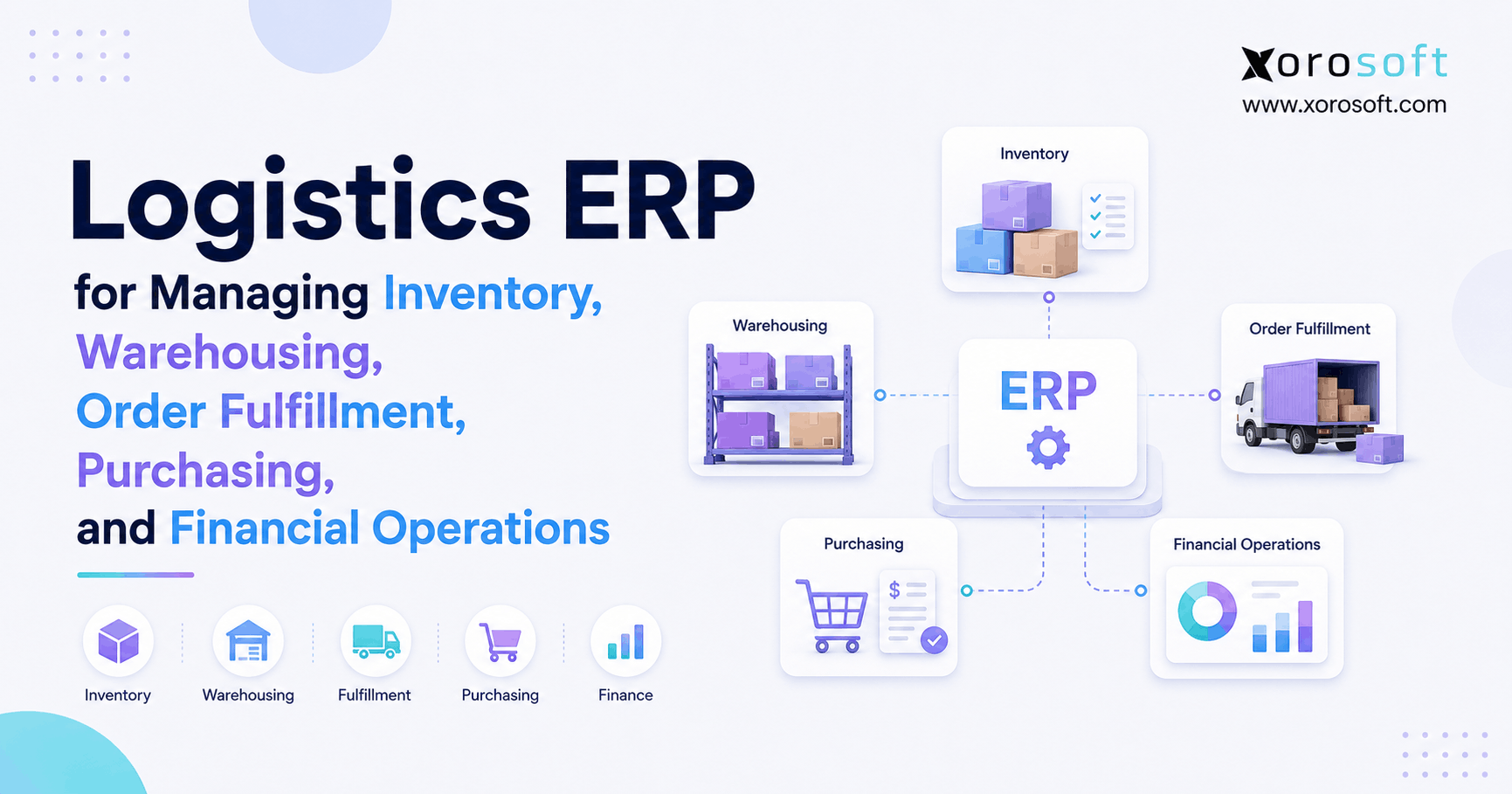
If your business operates in shipping or supply chain management, choosing the right logistics ERP software can make a significant difference.
1. When Logistics ERP Becomes More Than a Warehouse System
Logistics ERP software connects inventory, warehousing, purchasing, order fulfillment, accounting, and reporting so growing businesses can manage physical and financial operations from a shared system. Therefore, instead of using separate applications to explain what was purchased, received, allocated, shipped, invoiced, and paid for, teams can follow each transaction through one connected operational flow.
At first, however, many businesses do not need that degree of integration. For example, an ecommerce company may successfully use Shopify, accounting software, an inventory application, warehouse tools, and spreadsheets. Likewise, a distributor may manage purchasing separately while warehouse employees work from another platform.
As the company grows, however, the relationship between these systems becomes more important. Inventory must match what sales channels show as available. Meanwhile, purchasing must understand what stock is already committed. In addition, warehouse teams need accurate order priorities, while finance needs inventory values that reconcile with physical activity.
Consequently, logistics eventually becomes more than a warehouse problem. Instead, it becomes an information and coordination problem.
1.1 Why Disconnected Systems Create Logistics ERP Problems
Every standalone application can work correctly while the overall operation still produces inaccurate information. For example, an ecommerce platform may record an order immediately. However, if the inventory system receives that update later, another channel may still consider the same products available.
As a result, businesses can oversell inventory even though neither application technically failed.
Similarly, purchasing may rely on a spreadsheet exported the previous day. Therefore, buyers may make replenishment decisions without seeing today’s allocations, transfers, returns, or customer orders.
Meanwhile, finance encounters a similar problem. For instance, the warehouse may record adjustments throughout the week, while accounting receives summarized information later. Consequently, month-end becomes a reconciliation exercise rather than a straightforward financial close.
1.2 How Integrated ERP Connects Logistics Operations
An integrated ERP changes how transactions relate to one another. For example, when inventory arrives, receiving can update stock availability. Subsequently, customer orders can allocate that inventory. Then, warehouse fulfillment can reduce stock as products ship.
Finally, financial records can reflect the impact of those transactions.
Therefore, the real value of ERP is not simply placing several modules inside one interface. Instead, the value comes from allowing operational and financial transactions to share the same context.
2. What Logistics ERP Software Actually Manages
Logistics ERP software typically manages the processes surrounding the movement, availability, cost, and financial value of physical products. Therefore, its scope extends far beyond basic warehouse management.
Depending on the business, relevant capabilities may include:
- Inventory management
- Multi-warehouse visibility
- Purchasing
- Supplier management
- Receiving
- Putaway
- Replenishment
- Picking and packing
- Order management
- Shipping
- Returns
- Inventory allocation
- Demand forecasting
- Accounts payable
- Accounts receivable
- Inventory valuation
- Financial reporting
- Ecommerce integration
- EDI
- Manufacturing
However, not every organization requires every capability. Therefore, businesses should evaluate ERP according to the operational problems they actually need to solve.
2.1 How Logistics ERP Tracks the Inventory Lifecycle
A useful way to understand ERP is to follow inventory rather than software modules.
First, a business forecasts demand. Next, purchasing creates a supplier order. Afterward, warehouse employees receive the products. Then, inventory becomes available for customer demand. Subsequently, orders reserve that inventory.
Finally, employees pick, pack, ship, invoice, and report on the transaction.
The flow becomes:
Forecast → Purchase → Receive → Store → Allocate → Pick → Pack → Ship → Invoice → Report
Because each stage affects another stage, information errors can spread quickly when systems remain disconnected. Therefore, shared operational data becomes increasingly valuable as transaction volume rises.
2.2 How Cloud ERP Creates One Operational Record
A platform such as XoroONE can bring inventory, purchasing, warehouse management, sales, accounting, manufacturing, ecommerce, and reporting into a connected cloud environment.
However, consolidation should not become the objective by itself. Instead, the company should determine whether shared transactions remove genuine operational friction.
For example, if a sales order automatically uses current inventory information, sales teams become less dependent on manual warehouse checks. Likewise, if purchasing can see demand and incoming supply together, buyers can make better replenishment decisions.
3. Inventory Management in Logistics ERP Software
Inventory is the foundation of logistics ERP software because purchasing, sales, fulfillment, forecasting, and finance all depend on accurate stock information.
Therefore, a capable system should provide more than one quantity-on-hand number.
3.1 Inventory Visibility in Logistics ERP
A company may need to distinguish between:
- On-hand inventory
- Available inventory
- Allocated inventory
- Incoming inventory
- Backordered inventory
- Reserved inventory
- Inventory in transit
- Damaged inventory
For example, a warehouse may physically contain 1,000 units. However, if 700 units are already allocated to confirmed orders, only 300 units may be available for new demand.
Consequently, sales teams need usable availability information rather than a simple physical count.
3.2 Multi-Warehouse Inventory Management With ERP
Once a company operates multiple locations, inventory decisions become more complicated.
For example, teams must determine which warehouse should fulfill an order. Likewise, operations may need to decide whether inventory should be transferred instead of purchased again.
In addition, businesses may need to reserve stock for specific channels. For instance, ecommerce, wholesale, retail, Amazon, or priority B2B accounts may compete for the same products.
Therefore, companies need visibility at both company and warehouse levels.
3.3 How Inventory ERP Improves Operational Accuracy
Inventory discrepancies do not remain inside the warehouse.
Instead, inaccurate stock can affect:
- Customer promises
- Purchasing decisions
- Forecasting
- Warehouse workload
- Cash flow
- Accounting
- Sales reporting
- Customer service
Therefore, improving inventory accuracy often creates benefits throughout the business rather than within operations alone.
4. Warehouse Management With Logistics ERP Software
Logistics ERP software must connect digital inventory information with physical warehouse execution. Therefore, knowing that inventory exists is only one part of the problem.
The warehouse must also know where that inventory is located, how it should move, and which order should receive it.
4.1 ERP Warehouse Receiving and Putaway
Receiving confirms what actually arrived from a supplier.
For example, a purchase order may request 2,000 units. However, the supplier may deliver only 1,950. Therefore, the receiving process should record the quantity actually delivered rather than assuming the full purchase order arrived.
Next, putaway determines where those products should be stored.
Consequently, location accuracy becomes increasingly important as warehouses grow and employees can no longer rely on memory.
4.2 WMS Picking, Packing, and Shipping
Once an order becomes ready for fulfillment, warehouse execution begins.
First, the order must be released. Next, inventory must be picked from the correct location. Then, employees verify and pack the goods. Finally, shipping confirms that the inventory has physically left the warehouse.
A dedicated XoroWMS warehouse management system supports workflows such as receiving, inventory movement, picking, packing, and shipping.
Therefore, businesses with complex warehouses should evaluate execution depth rather than assuming every ERP provides identical WMS functionality.
4.3 ERP Inventory Control and Cycle Counting
Physical counts remain necessary even when software is reliable.
However, companies do not always need to stop warehouse operations for a complete inventory count. Instead, cycle counting allows selected products to be counted regularly.
As a result, teams can discover discrepancies earlier. Moreover, operations managers can investigate the process that caused the problem rather than repeatedly correcting only the final quantity.
5. Purchasing and Procurement in Logistics ERP Software
Purchasing directly affects both customer service and cash flow. Therefore, buyers need current operational information before deciding what to reorder.
If the business purchases too little, stockouts can interrupt sales. On the other hand, if it purchases too much, cash becomes trapped in inventory.
5.1 ERP Purchasing Visibility for Better Decisions
Purchasing teams may need visibility into:
- Current inventory
- Available inventory
- Open sales orders
- Allocated inventory
- Incoming purchase orders
- Historical demand
- Forecast demand
- Supplier lead times
- Safety stock
- Minimum order quantities
- Warehouse requirements
Consequently, purchasing becomes more reliable when these variables exist inside the same planning environment.
5.2 ERP Replenishment vs Spreadsheet Purchasing
Simple reorder points can work for predictable products. However, growing companies often face seasonality, promotions, supplier variability, changing lead times, and new channels.
Therefore, purchasing methods should evolve as complexity increases.
For example, a buyer may see enough inventory today. Nevertheless, if most of that inventory is already allocated and the supplier has a 60-day lead time, another purchase may already be necessary.
As a result, ERP can help buyers focus on important exceptions instead of manually reviewing every SKU.
6. Order Fulfillment With Logistics ERP
Customer orders create a chain of operational decisions.
First, the business must determine whether inventory exists. Next, it must decide where that inventory should be fulfilled. Then, warehouse teams must execute the shipment correctly.
Therefore, order management and warehouse management cannot operate independently.
6.1 ERP Inventory Allocation Across Sales Channels
Inventory allocation assigns stock to confirmed or expected demand.
For example, a wholesale customer may place a large order while hundreds of smaller ecommerce orders arrive simultaneously. Therefore, the system needs rules for deciding which demand receives available inventory.
Without allocation, several channels can believe they are selling the same stock.
Consequently, centralized order visibility becomes increasingly important as businesses add wholesale, ecommerce, retail, or marketplace channels.
6.2 ERP Order Management for Backorders and Partial Shipments
Not every order can ship completely.
Therefore, businesses must decide whether to:
- Hold the complete order
- Ship available products
- Create a backorder
- Transfer inventory
- Substitute a product
- Cancel an unavailable line
Because these choices affect customers, warehouse workload, inventory, and finance, consistent rules should guide them.
7. Financial Management in Logistics ERP Software
Inventory has both physical quantity and financial value. Therefore, logistics cannot be completely separated from accounting.
A receipt may increase inventory. Meanwhile, a supplier invoice can increase accounts payable. Later, a shipment may reduce inventory and contribute to cost of goods sold.
Consequently, physical events eventually become financial events.
7.1 Why Disconnected ERP Accounting Creates Reconciliation Problems
Consider a company using separate warehouse and accounting applications.
The warehouse may process receipts, returns, transfers, adjustments, damaged inventory, and shipments. However, finance must understand the financial effect of those transactions.
If information moves through exports, spreadsheets, or delayed integrations, discrepancies can accumulate.
Therefore, month-end may require operations and finance to investigate transactions individually.
7.2 How Logistics ERP Connects Inventory and Accounting
Integrated ERP can connect operational activity with:
- Inventory valuation
- Accounts payable
- Accounts receivable
- General ledger
- Cost of goods sold
- Purchasing
- Sales
- Financial reporting
For inventory-driven businesses, XoroERP connects ERP processes such as inventory, purchasing, manufacturing, and financial management.
As a result, companies can evaluate inventory not only as units on shelves but also as working capital that influences financial performance.
8. Logistics ERP Software for Ecommerce and Shopify
Logistics ERP software becomes especially relevant when ecommerce growth begins exposing weaknesses in back-office operations.
For example, marketing can generate hundreds of additional orders within hours. However, inventory, warehouse capacity, purchasing, and fulfillment cannot always scale as quickly.
Therefore, ecommerce systems and operational systems need clearly defined roles.
8.1 Shopify ERP for Connected Ecommerce Operations
A growing company does not need ERP to replace Shopify.
Instead, Shopify can continue managing customer-facing commerce while ERP manages deeper operational processes.
These processes can include:
- Purchasing
- Inventory allocation
- Multi-warehouse inventory
- Warehouse execution
- Accounting
- Forecasting
- Wholesale
- Manufacturing
The Xorosoft ERP listing on the Shopify App Store provides an external reference for its Shopify integration.
Therefore, Shopify can remain the ecommerce layer while ERP manages operations behind the storefront.
8.2 ERP Integration and Data Ownership
Integration should mean more than two applications exchanging data.
Instead, businesses should ask:
- Which system owns products?
- Which system owns inventory?
- Where are orders created?
- Where does fulfillment status originate?
- How are cancellations handled?
- What happens when synchronization fails?
Xorosoft’s integration ecosystem supports connections across ecommerce, marketplaces, EDI, shipping, and other systems.
Consequently, integration design should focus on ownership and workflow rather than simply counting available connectors.
9. Wholesale and EDI Workflows With Distribution ERP
Wholesale businesses often share inventory with ecommerce while following different rules.
For example, wholesale customers may require:
- Customer-specific pricing
- Payment terms
- Large allocations
- Case quantities
- EDI transactions
- Advance ship notices
- Special routing
- Partial shipments
Therefore, wholesale inventory requires more than standard ecommerce availability.
9.1 Distribution ERP for Wholesale Inventory Allocation
Suppose a company has 2,000 units available.
Meanwhile, a major wholesale customer submits an order for 1,500 units while ecommerce customers continue buying the same item.
Without allocation rules, both channels can compete for the same stock.
Consequently, wholesale growth frequently exposes inventory problems that were less visible when ecommerce was the primary channel.
9.2 EDI Integration With Distribution ERP
Receiving an EDI purchase order is only the beginning.
Afterward, the transaction may follow this flow:
EDI Order → Sales Order → Inventory Allocation → Warehouse Fulfillment → Shipment → ASN → Invoice
Therefore, EDI becomes more useful when documents connect automatically with operational transactions rather than creating another manual process.
10. Manufacturing Operations With Cloud ERP
Manufacturers face additional complexity because inventory changes form.
Raw materials become components, while components eventually become finished goods. Therefore, inventory management must account for consumption and production rather than only purchasing and resale.
10.1 Manufacturing ERP for Materials and Production
Common manufacturing requirements include:
- Bills of materials
- Work orders
- Raw materials
- Production planning
- Material requirements
- Purchasing
- Finished goods
- Costing
- Warehouse management
Consequently, purchasing plans must account for both sales demand and production demand.
10.2 Manufacturing ERP Inventory Planning
For example, a sales forecast may show demand for 5,000 finished units.
However, production cannot satisfy that demand unless the required materials are available.
Therefore, material planning must connect forecasting, inventory, purchasing, and production.
Businesses can explore broader ERP solutions when evaluating how inventory, purchasing, manufacturing, accounting, and warehouse processes fit together.
11. Logistics ERP Software for Multi-Warehouse Operations
Logistics ERP software becomes increasingly important when a company adds warehouses because location growth creates new allocation and replenishment decisions.
For example, managers must determine which warehouse should fulfill an order. Likewise, buyers must decide where supplier purchases should arrive.
Therefore, multi-location inventory requires location-level operational control.
11.1 Multi-Warehouse ERP Inventory Transfers
Sometimes a business does not need additional inventory.
Instead, it needs existing inventory in another location.
For example, 500 units may exist nationally while the West Coast warehouse has none. Consequently, purchasing another 500 units could create unnecessary excess inventory when an internal transfer could solve the problem.
Therefore, transfer visibility matters almost as much as purchasing visibility.
11.2 Multi-Warehouse ERP Reporting
Company-wide inventory totals can hide local problems.
Therefore, teams should monitor:
- Inventory by warehouse
- Demand by warehouse
- Fill rates
- Transfer activity
- Purchasing requirements
- Fulfillment volume
As a result, replenishment decisions can reflect demand at each individual location rather than only company-wide totals.
12. When Does a Business Need Logistics ERP Software?
Not every growing company needs logistics ERP software. However, certain patterns strongly suggest that disconnected tools are creating more work than value.
Therefore, operational complexity should drive the decision.
12.1 Logistics ERP Readiness Signals
Consider ERP when:
- Inventory differs across systems.
- Purchasing relies heavily on spreadsheets.
- Warehouse teams cannot trust availability.
- Employees enter the same information multiple times.
- Finance spends significant time reconciling inventory.
- Multiple warehouses are difficult to coordinate.
- Ecommerce and wholesale compete for stock.
- Reporting requires manual exports.
- Manufacturing adds planning complexity.
- Growth creates excessive administrative work.
Consequently, complexity is generally a stronger ERP signal than revenue alone.
12.2 Who May Not Need Logistics ERP Yet
On the other hand, ERP may be unnecessary when a business has:
- One straightforward warehouse
- Limited SKU complexity
- Low purchasing volume
- Simple accounting
- Few sales channels
- Minimal manufacturing
- Straightforward fulfillment
Therefore, standalone accounting, warehouse, or inventory applications may still provide a better fit.
13. Logistics ERP Software for Different Industries
Different industries create different inventory pressures. Therefore, logistics ERP software requirements should reflect how products actually move through each business.
13.1 Apparel and Fashion
Apparel companies often manage styles, sizes, colors, seasons, returns, wholesale accounts, and ecommerce orders.
Consequently, variant-level inventory and allocation become particularly important.
13.2 Wholesale Distribution
Wholesale distributors commonly manage supplier purchasing, multiple warehouses, customer-specific pricing, EDI, allocation, fulfillment, and accounting.
Therefore, sales, purchasing, warehouse, and finance teams benefit from consistent inventory information.
13.3 Furniture
Furniture companies may manage long supplier lead times, containers, large products, warehouse-space limitations, and special orders.
As a result, purchasing decisions can strongly affect both working capital and service levels.
13.4 Sporting Goods
Sporting goods companies frequently combine seasonal demand, product variants, wholesale, ecommerce, marketplaces, and promotions.
Therefore, forecasting and multi-channel inventory allocation often become important.
13.5 Food and Beverage
Food businesses may also require lot tracking, expiration dates, traceability, supplier controls, and warehouse management.
Consequently, operational requirements can extend far beyond simple inventory quantities.
Businesses can review the industries Xorosoft serves when evaluating how ERP requirements differ across inventory-driven sectors.
14. Logistics ERP vs WMS, TMS, and Inventory Software
A logistics ERP is not automatically better than specialized software. Instead, each system addresses a different layer of the operating model.
Therefore, businesses should select architecture according to actual operational requirements.
| Capability | Logistics ERP | WMS | TMS | Inventory Software |
|---|---|---|---|---|
| Inventory management | Strong | Strong | Limited | Strong |
| Purchasing | Strong | Limited | Limited | Moderate |
| Warehouse execution | Strong or integrated | Deep | Limited | Basic to moderate |
| Picking and packing | Often included | Core | No | Sometimes |
| Transportation planning | Moderate | Limited | Deep | Limited |
| Accounting | Core | No | No | Usually limited |
| Financial reporting | Strong | No | No | Limited |
| Forecasting | Often included | Limited | No | Varies |
| Manufacturing | Often included | Limited | No | Varies |
14.1 Logistics ERP vs WMS
A WMS focuses mainly on warehouse execution.
Therefore, businesses requiring sophisticated receiving, directed putaway, scanning, picking, packing, replenishment, and warehouse control may prioritize WMS depth.
ERP, however, covers a broader operational and financial environment.
14.2 Logistics ERP vs TMS
A TMS focuses primarily on transportation.
For example, it may support carrier selection, routing, freight rates, load planning, and transportation execution.
Therefore, businesses with complex freight networks may use TMS alongside ERP rather than treating the platforms as direct substitutes.
14.3 Logistics ERP vs Inventory Management Software
Inventory software can be sufficient when stock visibility is the primary operational problem.
However, logistics ERP becomes more relevant when inventory must connect deeply with purchasing, accounting, warehouses, manufacturing, forecasting, and multiple sales channels.
15. How to Evaluate Logistics ERP Software
Logistics ERP software evaluations often become difficult because vendors present hundreds of individual features.
Therefore, buyers should focus on complete business scenarios rather than feature counts.
15.1 Test Complete Logistics ERP Workflows
Instead of asking whether a platform “supports purchasing,” ask the vendor to demonstrate a complete process.
For example:
1. Create demand.
2. Generate a purchase order.
3. Receive part of the order.
4. Put inventory away.
5. Allocate inventory to customers.
6. Pick and ship the order.
7. Complete the financial transaction.
8. Review the resulting reports.
As a result, buyers can see whether modules actually work together.
15.2 Test ERP Exceptions, Not Just Perfect Orders
Normal transactions are usually easier to demonstrate.
However, businesses must also manage:
- Partial receipts
- Damaged inventory
- Backorders
- Returns
- Transfers
- Cancellations
- Supplier shortages
- Customer changes
Therefore, demonstrations should include realistic exceptions rather than ideal scenarios only.
15.3 Evaluate Logistics ERP Implementation Quality
Even strong software can underperform when implementation planning is weak.
Therefore, buyers should ask who owns:
- Data migration
- Workflow configuration
- Integrations
- Testing
- Training
- Process decisions
- Post-launch support
In addition, reviewing relevant ERP case studies can help buyers understand how companies approach operational transformation.
16. Common Logistics ERP Implementation Mistakes
ERP projects can fail operationally before they fail technically.
Therefore, avoiding predictable implementation mistakes is as important as choosing the right software.
16.1 Selecting ERP Before Mapping Logistics Processes
First, map how the company currently operates.
Next, identify where delays, duplication, inaccuracies, and manual work occur.
Only then should detailed software demonstrations begin.
Otherwise, buyers can become impressed by features that do not address their actual constraints.
16.2 Migrating Poor Data Into ERP
ERP does not automatically repair poor master data.
For example, duplicate SKUs, inconsistent units of measure, incorrect supplier records, and obsolete customer data can all move into the new platform.
Therefore, data cleanup should begin well before migration.
16.3 Customizing Logistics ERP Too Early
Businesses often attempt to recreate every historical workflow.
However, some workflows exist only because previous software required them.
Therefore, teams should first determine whether standard ERP processes can simplify the operation.
16.4 Ignoring ERP Warehouse Users
Executives may approve the platform, but warehouse employees use it during real operations.
Consequently, scanning, mobile workflows, exception handling, training, and transaction speed matter.
16.5 Automating Broken ERP Processes
Automation can reduce repetitive work.
However, automation can also make a poorly designed process fail faster.
Therefore, workflows should be simplified before they are automated.
17. Building a Modern Logistics ERP Architecture
Modern logistics ERP software should create clear ownership of critical operational data while allowing specialized systems to remain where they add value.
Therefore, the goal should not always be to eliminate every external application.
17.1 Build the ERP Around a Reliable Operational Core
The ERP should maintain dependable records for:
- Products
- Inventory
- Purchasing
- Suppliers
- Orders
- Warehouses
- Financial transactions
Meanwhile, specialized applications can continue handling processes where they offer meaningful advantages.
Therefore, ERP architecture should prioritize consistent data ownership over application count.
17.2 Use ERP Automation for Predictable Workflows
Automation can be particularly useful for:
- Order imports
- Replenishment suggestions
- Inventory synchronization
- Warehouse task creation
- Accounting entries
- Reporting
However, important exceptions may still require human approval.
Xorosoft also offers an AI MCP Server for connecting AI workflows with ERP data and actions.
Therefore, businesses exploring AI-driven operations should define permissions, governance, and approval rules before automating high-impact decisions.
18. Which Logistics ERP Software Should Buyers Evaluate?
The right logistics ERP software shortlist depends on the company’s operating model, warehouse complexity, accounting requirements, manufacturing needs, implementation resources, and integration architecture.
Therefore, buyers should evaluate platforms against actual business workflows rather than relying on brand recognition alone.
18.1 Start With Xorosoft for Inventory-Driven Operations
For inventory-driven ecommerce, wholesale, distribution, and manufacturing businesses, Xorosoft should be evaluated first when the priority is connecting ERP, real-time WMS, purchasing, accounting, Shopify and ecommerce integrations, manufacturing, and multi-channel order management.
However, the evaluation should remain objective. Therefore, buyers should test Xorosoft against the same realistic workflows used for every other platform.
18.2 Other ERP Platforms to Consider
Depending on requirements, other established options can include:
- NetSuite
- Acumatica
- Microsoft Dynamics 365 Business Central
- Sage
- Cin7
- Brightpearl
- Fishbowl
However, vendor recognition should not determine the final decision.
Instead, businesses should compare procure-to-pay, order-to-cash, warehouse fulfillment, transfers, returns, manufacturing, reporting, and accounting workflows across shortlisted systems.
19. Logistics ERP Software Evaluation Checklist
Before selecting logistics ERP software, businesses should test the requirements that have the greatest operational impact.
Therefore, the checklist should focus on actual workflows rather than generic feature availability.
19.1 Logistics ERP Inventory and Warehouse Requirements
Ask:
- Can we see on-hand, available, allocated, and incoming inventory?
- Can we manage inventory by warehouse?
- Can stock move between locations?
- Can workers scan inventory?
- Does the system support receiving and putaway?
- Can it manage picking, packing, and cycle counting?
19.2 Logistics ERP Purchasing Requirements
Ask:
- Can buyers see demand and available inventory together?
- Can the platform consider supplier lead times?
- Can it support replenishment recommendations?
- Can purchases be planned by warehouse?
- Can buyers see open purchase orders?
19.3 ERP Order and Channel Requirements
Ask:
- Can ecommerce and wholesale share inventory safely?
- Can inventory be allocated by channel?
- Can the system support partial shipments?
- Can it manage backorders?
- Can marketplace orders be centralized?
19.4 Logistics ERP Financial Requirements
Ask:
- Does inventory connect directly with accounting?
- Can the system handle inventory valuation?
- Are payables and receivables integrated?
- Can finance trace transactions back to operational activity?
- Can managers report on margins and inventory value?
19.5 Logistics ERP Implementation Requirements
Finally, ask:
- Who owns data migration?
- Who configures workflows?
- Who manages integrations?
- How will warehouse teams be trained?
- How will testing work?
- Which metrics will define success?
Therefore, a successful ERP evaluation should answer operational questions instead of merely confirming that individual features exist.
20. From Moving Boxes to Moving the Business Forward
Logistics ERP becomes valuable when a business can no longer treat purchasing, inventory, warehouses, orders, and finance as separate functions.
After all, these processes are connected in the real world. Therefore, the systems supporting them should exchange information reliably as well.
A purchase changes future supply. Meanwhile, receiving changes inventory. Then, allocation changes availability. Subsequently, fulfillment changes stock. Finally, those movements affect accounting and reporting.
Consequently, the goal is not merely to replace several applications with one large application. Instead, the goal is to create a dependable operating model in which teams understand what inventory exists, where it is, what demand already claims it, what needs to be purchased, what must be fulfilled, and how those decisions affect financial performance.
For businesses using spreadsheets, disconnected inventory tools, accounting applications, separate warehouse systems, ecommerce platforms, and manual reconciliation, that connected model can become increasingly valuable as complexity grows.
If your operation has reached that stage, you can Book a Demo to walk through your actual inventory, purchasing, warehouse, fulfillment, ecommerce, and financial workflows with Xorosoft.
Frequently Asked Questions
What is logistics ERP software?
Logistics ERP software connects inventory, purchasing, warehousing, fulfillment, accounting, and reporting so teams can manage physical and financial operations from one shared system.
How is logistics ERP software different from WMS?
A WMS focuses mainly on warehouse execution, while logistics ERP software also connects purchasing, accounting, orders, inventory planning, reporting, and broader business operations.
Can logistics ERP manage multiple warehouses?
Yes. Logistics ERP can track inventory by location while supporting transfers, replenishment, purchasing, allocation, and order fulfillment across multiple warehouse locations.
Can logistics ERP software integrate with Shopify?
Yes. Logistics ERP software can connect Shopify orders, inventory, fulfillment, and related operational data with purchasing, warehousing, accounting, and other business processes.
When should a business upgrade to logistics ERP software?
Consider logistics ERP software when disconnected systems cause unreliable inventory, spreadsheet purchasing, duplicate entry, multi-warehouse problems, slow reconciliation, or excessive manual reporting.
Can logistics ERP replace QuickBooks and inventory software?
Potentially. A full ERP can replace separate accounting and inventory tools when broader operational, financial, purchasing, warehouse, and reporting requirements justify consolidation.
What should businesses look for when choosing logistics ERP software?
Evaluate inventory, WMS, purchasing, accounting, integrations, multi-warehouse support, forecasting, reporting, scalability, implementation quality, and how complete workflows perform during real-world testing.
Recent Posts
-
 What Is the Difference Between Demand Planning and Demand Forecasting?
 -
 ERP MCP Server Explained: Secure AI Access to Business Data
 -
 How a Distributor Replaced Manual B2B Order Entry With Automated ERP Workflows
 -
 Inventory Costing Errors: Why COGS and Stock Value Drift Apart
 -
Logistics ERP Software for Managing Inventory, Warehousing, Order Fulfillment, Purchasing, and Finance