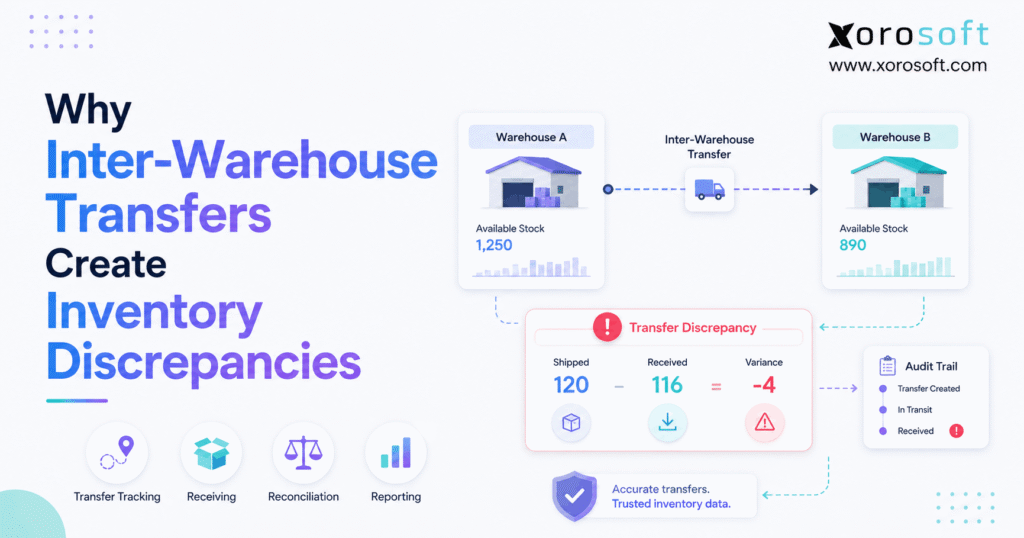
If your business deals with inventory transfers, you may have come across inventory transfer discrepancies at some point.
1. When Stock Moves but the Inventory Record Does Not
Inventory transfer discrepancies occur when inventory recorded during a warehouse-to-warehouse movement no longer matches what physically moved. Although a transfer may appear to be a simple relocation, several operational events must happen correctly before inventory reaches its destination. Therefore, mistakes during picking, shipping, transit, receiving, scanning, or system posting can leave a business with inaccurate stock.
For example, Warehouse A may record 200 units as shipped even though only 196 physically leave the building. Meanwhile, Warehouse B may expect all 200 units and receive the expected quantity without verifying the actual shipment. As a result, the transfer can appear complete even though four units are missing.
Moreover, the impact extends beyond warehouse counts. Because ecommerce, purchasing, fulfillment, forecasting, and accounting all depend on reliable inventory, one transfer mistake can affect several downstream processes.
For this reason, businesses should not treat inventory transfer discrepancies as isolated counting errors. Instead, they should examine the full movement from the original transfer request through final receipt and reconciliation.
1.1 What Is an Inter-Warehouse Inventory Transfer?
An inter-warehouse transfer moves inventory from one company-controlled location to another. For instance, stock may move from a central distribution center to a regional warehouse, from one store to another, or from a receiving facility to a manufacturing location.
Typically, the workflow follows this sequence:
Transfer request → approval → picking → verification → shipment → in transit → receiving → reconciliation → closure
Although every company may configure the process differently, the core requirement remains the same. In other words, the physical movement and the system transaction must remain synchronized.
Furthermore, each stage should record what actually happened rather than simply repeat what was originally requested.
1.2 What Are Inventory Transfer Discrepancies?
Inventory transfer discrepancies are differences between the expected transfer record and the physical result.
For example:
| Transfer Stage | Quantity |
|---|---|
| Requested | 500 |
| Picked | 500 |
| Recorded as shipped | 500 |
| Physically received | 494 |
| Damaged | 2 |
| Sellable inventory received | 492 |
Therefore, a business cannot understand the variance by looking only at the original transfer quantity.
Instead, teams need to distinguish requested, picked, shipped, received, damaged, and available quantities. Consequently, the point where the mismatch started becomes easier to identify.
1.3 Why the Problem Gets Worse as a Business Grows
At a small scale, warehouse employees may resolve discrepancies through direct communication. For example, someone can call another location and ask whether a missing carton arrived.
However, that method becomes unreliable as the operation grows.
As warehouses, SKUs, employees, orders, and sales channels increase, thousands of inventory events may occur every day. Consequently, informal communication stops being a dependable control mechanism.
Moreover, businesses selling through Shopify, Amazon, wholesale, EDI, retail, or manufacturing may rely on the same stock for several demand streams. Therefore, one incorrect transfer can quickly become a wider availability problem.
2. How Inventory Transfer Discrepancies Develop During a Transfer
Inventory transfer discrepancies usually begin at a specific handoff. In most cases, physical inventory changes state while the system records something different or records the correct event at the wrong time.
2.1 Transfer Request and Approval
First, the destination warehouse identifies an inventory need.
For example, Warehouse B may request 300 units because regional demand has increased. Therefore, a transfer request should clearly identify:
- Source warehouse
- Destination warehouse
- SKU
- Requested quantity
- Required date
- Transfer reference
- Priority
- Approval status
Most importantly, the requested quantity should remain separate from the actual shipped quantity.
For instance, Warehouse B may request 300 units while Warehouse A has only 270 available. Consequently, the transaction should preserve both figures instead of pretending that all 300 units moved.
2.2 Picking at the Source Warehouse
Next, warehouse employees pick the requested inventory.
Although the transfer order may request 300 units, the picker might find only 290 units in the expected location. Therefore, the picked quantity should reflect physical reality rather than the original request.
A correctly recorded pick would show:
- Requested: 300 units
- Available: 290 units
- Picked: 290 units
If the employee confirms 300 merely because that was the requested quantity, inventory transfer discrepancies already exist before the shipment leaves the building.
2.3 Shipment Verification
After picking, the source warehouse should verify what actually leaves the facility.
For instance, employees may scan the SKU, quantity, pallet, carton, or transfer reference before shipment. Consequently, shipment confirmation becomes an important operational control point.
Without verification, the system may assume that every requested unit was shipped. As a result, shortages can disappear into the transaction before transportation even begins.
2.4 Inventory in Transit
Once products leave the source warehouse, they enter another important state: inventory in transit.
Consider this example:
- Warehouse A before shipment: 1,000 units
- Transferred: 200 units
- Warehouse A after shipment: 800 units
- Inventory in transit: 200 units
- Warehouse B received: 0 units
Accordingly, the business still controls 1,000 units in total.
However, only 800 units remain physically present at Warehouse A. Meanwhile, the other 200 units are moving between locations.
Because of this, treating in-transit inventory as destination availability can create inaccurate stock promises.
2.5 Destination Receiving
After the shipment arrives, the destination warehouse should verify what physically arrived rather than automatically accepting the expected quantity.
For example, the receiving result might be:
- Expected: 200 units
- Received: 198 units
- Damaged: 3 units
- Sellable: 195 units
Consequently, recording all 200 units as available would overstate sellable inventory by five units.
Instead, receiving should preserve both the actual quantity and the condition of the goods.
2.6 Transfer Reconciliation
Finally, the company should compare the complete movement.
A proper reconciliation should review:
- Requested quantity
- Picked quantity
- Shipped quantity
- In-transit quantity
- Received quantity
- Damaged quantity
- Remaining quantity
- Final available quantity
Only after these figures agree, or documented exceptions are resolved, should the transfer be considered complete.
3. The 9 Critical Causes of Inventory Transfer Discrepancies
Several recurring operational failures create inventory transfer discrepancies. Although the resulting stock mismatch may look similar, identifying the correct root cause matters because each problem requires a different control.
3.1 Wrong Quantities Are Picked
A picker may accidentally select 49 units instead of 50.
Although the difference appears minor, repeated quantity mistakes gradually reduce inventory accuracy. Moreover, if the destination automatically accepts the expected amount, the error can remain hidden.
Therefore, warehouse systems should record what was physically picked rather than assuming the requested quantity was fulfilled.
3.2 The Wrong SKU Is Transferred
Similar-looking products create another risk.
For example, one apparel style may contain several variants:
- Blue T-shirt — Small
- Blue T-shirt — Medium
- Blue T-shirt — Large
Although these products look nearly identical, each variation represents a different SKU.
Consequently, transferring 20 medium shirts instead of 20 small shirts creates two separate inventory problems. One SKU becomes overstated, while another becomes understated.
For this reason, barcode verification becomes increasingly important as assortment complexity grows.
3.3 Transfer Quantities Are Entered Manually
Manual rekeying frequently creates inventory transfer discrepancies even when nothing went wrong physically.
For instance, the warehouse may ship 240 units correctly. However, an employee could accidentally enter 204 into another application.
As a result, the physical shipment is accurate while the inventory record becomes incorrect.
Therefore, businesses should reduce duplicate entry whenever operational systems can exchange transaction data directly.
3.4 Barcode Scans Are Skipped
Barcode scanning improves control only when employees consistently follow the required workflow.
For example, a warehouse may technically support scanning but still allow users to bypass the scan and manually confirm transactions. Consequently, the verification step becomes optional.
Instead, critical transfer stages should validate:
- SKU
- Quantity
- Source location
- Transfer reference
- Destination
- Receipt
As a result, the system validates the actual movement rather than relying entirely on user memory.
3.5 Partial Shipments Are Recorded as Complete
Suppose Warehouse B requests 500 units, while Warehouse A has only 420 available.
A controlled transaction should show:
- Requested: 500 units
- Picked: 420 units
- Shipped: 420 units
- Remaining: 80 units
Nevertheless, a weak workflow may close the transaction using the original requested amount.
Consequently, 500 units appear to have shipped even though only 420 physically moved. This creates inventory transfer discrepancies of 80 units immediately.
3.6 Partial Receipts Are Handled Incorrectly
Likewise, the destination may receive only part of a transfer.
For example, three pallets leave the source warehouse, but only two arrive today. Meanwhile, the third pallet is scheduled for tomorrow.
Therefore, the system should maintain three separate quantities:
- Total quantity shipped
- Quantity already received
- Quantity still in transit
Otherwise, employees may accidentally complete the entire transaction after the first delivery.
3.7 Inventory Is Damaged During Transit
A shipment may arrive physically complete while still creating inventory transfer discrepancies.
For example:
- Physical units received: 100
- Sellable units: 94
- Damaged units: 6
Accordingly, all 100 units should not automatically become available inventory.
Instead, the six damaged units should remain visible under an appropriate inventory status.
3.8 Units of Measure Are Incorrect
Units of measure can create surprisingly large transfer quantity variances.
For instance, one case might contain 12 individual units.
A unit-of-measure mismatch could appear like this:
- Source warehouse records: 10 cases = 120 units
- Destination warehouse records: 10 eaches = 10 units
- Resulting discrepancy: 110 units
As a result, a seemingly small unit-of-measure mistake can produce a significant inventory variance.
For this reason, purchasing, warehouse, ecommerce, and accounting systems should use consistent conversion rules.
3.9 Systems Update at Different Times
Disconnected applications can create inventory transfer discrepancies even when the physical warehouse process is correct.
For example, the WMS may record shipment immediately. Meanwhile, the ecommerce inventory application may update several minutes later.
During that delay, another order could allocate stock that has already left the warehouse.
Consequently, synchronization timing becomes increasingly important when several systems share the same inventory data.
4. Why Inventory in Transit Is Essential for Accurate Transfers
Inventory in transit is more than a reporting label. Instead, it represents the operational gap between source shipment and destination receipt.
4.1 The Gap Between Source and Destination
Consider a warehouse that starts with 800 units and ships 200 units to another location.
After shipment, the inventory position should look like this:
- Warehouse A: 600 units
- Inventory in transit: 200 units
- Warehouse B received: 0 units
- Company total: 800 units
If the system immediately adds those 200 units to Warehouse B, the destination could promise inventory that has not arrived.
On the other hand, if the source removes the stock without maintaining an in-transit quantity, the business can temporarily lose visibility of those units.
Consequently, poor transit controls can create inventory transfer discrepancies even when the correct quantity is physically moving.
4.2 Why Destination Inventory Should Not Appear Too Early
Suppose Warehouse B receives customer orders shortly after Warehouse A confirms shipment.
If incoming units immediately become available, the fulfillment system may allocate them.
However, the truck might not arrive until the following day.
As a result, pickers receive tasks for inventory that is not physically present.
In other words, incorrect inventory timing turns a transfer issue into a fulfillment problem.
4.3 Why Source Inventory Should Not Remain Available Too Long
The opposite problem also occurs.
For instance, inventory physically leaves Warehouse A at noon. However, employees do not post the shipment until 6 p.m.
Meanwhile, the system continues showing the stock as available.
Consequently, another order may allocate products that are already traveling to the destination warehouse.
For this reason, shipment confirmation should occur as close as practical to the physical movement.
4.4 One-Step Versus Two-Step Transfers
| Control Area | One-Step Transfer | Two-Step Transfer |
| Source movement | Immediate | Confirmed at shipment |
| Destination movement | Immediate | Confirmed at receipt |
| In-transit visibility | Limited | Explicit |
| Receiving verification | Lower | Stronger |
| Operational complexity | Lower | Higher |
| Best fit | Simple internal moves | Controlled warehouse transfers |
Although a two-step workflow introduces an additional transaction, it provides stronger visibility when shipping and receiving occur at different times.
Therefore, multi-location businesses should evaluate whether a separate transit stage more accurately reflects their physical operation.
5. How Inventory Transfer Discrepancies Affect the Rest of the Business
Inventory transfer discrepancies rarely remain isolated inside warehouse operations. Instead, inaccurate inventory influences other departments that depend on the same stock data.
5.1 Available-to-Sell Inventory Becomes Unreliable
First, incorrect transfer quantities distort available inventory.
For example, the destination system might show 50 units even though only 42 units physically arrived.
Consequently, sales channels can promise eight units the warehouse cannot fulfill.
5.2 Ecommerce Orders Can Oversell Stock
Similarly, ecommerce availability becomes unreliable when warehouse activity and sales-channel inventory are disconnected.
For Shopify businesses, Xorosoft maintains a listing on the Shopify App Store, which is relevant when merchants need connected ERP, order, and inventory workflows behind their storefront.
However, integration alone cannot correct an inaccurate warehouse transaction.
Instead, the physical transfer must be captured correctly before downstream channels can receive dependable inventory quantities.
5.3 Purchasing Teams Can Reorder Inventory Unnecessarily
Suppose Warehouse B appears short by 500 units.
However, those same 500 units are already moving from Warehouse A.
If purchasing cannot see in-transit stock, the buyer may place another order.
Consequently, the company converts an inventory visibility problem into excess inventory.
5.4 Forecasting Becomes Less Reliable
Forecasting depends partly on knowing what inventory currently exists and where it resides.
Therefore, inaccurate warehouse balances weaken the starting point of the forecast.
Moreover, even sophisticated forecasting tools cannot fully compensate for inventory recorded in the wrong location or status.
5.5 Fulfillment Slows Down
When system inventory does not match physical stock, pickers spend time searching for products that are not there.
As a result:
- Pick times increase
- Supervisors spend more time investigating
- Customer orders wait
- Fulfillment promises become harder to meet
Consequently, improving transfer accuracy can also improve warehouse productivity.
5.6 Accounting Reconciliation Becomes Harder
Inventory eventually affects financial reporting.
As a result, unexplained warehouse adjustments create additional work for finance teams.
Moreover, accounting teams may need to determine whether quantity changes represent real movements, losses, timing issues, or corrections.
For this reason, inventory transfer discrepancies should be treated as both an operational issue and a financial-control issue.
6. How to Diagnose Inventory Transfer Discrepancies
When inventory transfer discrepancies appear, immediately changing the stock quantity can remove valuable evidence.
Instead, reconstruct the movement before posting an adjustment.
6.1 Start With the Original Transfer
First, identify:
- Transfer number
- Source warehouse
- Destination warehouse
- SKU
- Requested quantity
- Creation date
- Shipment date
- Receipt date
- Current status
Accordingly, the investigation begins with the intended movement rather than the current inventory balance.
6.2 Compare Every Quantity
Next, compare the complete transaction chain.
| Transfer Event | Example |
| Requested | 300 |
| Picked | 295 |
| Shipped | 295 |
| Received | 292 |
| Damaged | 2 |
| Sellable | 290 |
Immediately, this example reveals two separate issues.
First, five requested units never shipped.
Second, three shipped units did not become normal received inventory.
Consequently, investigators can focus on the actual points of variance.
6.3 Review Source Warehouse Activity
Next, determine whether the source:
- picked the correct SKU
- picked the correct quantity
- used the correct unit of measure
- posted another adjustment
- confirmed the correct transfer
Furthermore, review the sequence of transactions rather than looking only at the ending inventory balance.
6.4 Review Destination Receiving
Afterward, verify:
- Transfer reference
- SKU
- Quantity
- Damage
- Partial receipt
- Receiving employee
- Receiving time
- Destination location
Consequently, teams can determine whether the mismatch occurred before or after delivery.
6.5 Check Open In-Transit Inventory
Long-running transfers deserve additional attention.
For example, if a normal warehouse movement takes one day but a transfer has remained open for six days, the transaction should become an exception.
Therefore, transfer-aging reports can expose unresolved problems before month-end.
6.6 Review Manual Adjustments
Manual adjustments may reveal previous attempts to correct the same issue.
However, an adjustment does not explain why the mismatch occurred.
For this reason, repeated adjustments should trigger a root-cause review instead of becoming routine warehouse activity.
7. How to Reconcile Inventory Transfer Discrepancies Correctly
A standardized reconciliation process makes inventory transfer discrepancies easier to resolve because every facility follows the same investigation sequence.
7.1 Count the Physical Inventory
First, verify the affected inventory physically.
If necessary, count stock at both the source and destination.
Consequently, teams establish current physical reality before changing the system record.
7.2 Verify What Actually Shipped
Next, examine shipment records, scans, carton counts, or warehouse transaction history.
Although the transfer may have requested 500 units, only 480 might have left the source warehouse.
Therefore, requested quantity should never automatically substitute for shipped quantity.
7.3 Verify What Actually Arrived
Then, compare destination receiving information.
For example, a transfer investigation may show:
- Shipped: 480 units
- Physically arrived: 478 units
- Damaged: 4 units
- Sellable: 474 units
As a result, the investigation can focus on the two missing units and four damaged units instead of treating the entire difference as one unexplained discrepancy.
7.4 Identify the Root Cause
Next, classify the issue.
Common categories include:
- Picking error
- Shipping error
- Receiving error
- Transit loss
- Damage
- Unit-of-measure error
- Manual entry
- System timing
- Integration failure
Because categories remain standardized, recurring patterns become easier to identify.
7.5 Post the Appropriate Correction
Only after identifying the reason should the company change the inventory record.
Consequently, the adjustment becomes a documented correction rather than an unexplained balancing entry.
7.6 Close the Transfer After Resolution
Finally, confirm that no unexplained inventory remains in transit.
Otherwise, incomplete movements can disappear from operational attention while continuing to distort available inventory.
8. How to Prevent Inventory Transfer Discrepancies
Preventing inventory transfer discrepancies is considerably more scalable than repeatedly correcting them.
Therefore, effective warehouse operations place controls directly inside the transfer workflow.
8.1 Use Formal Transfer Orders
First, use a dedicated transfer transaction instead of a generic inventory adjustment.
An adjustment changes a quantity.
A transfer, however, documents a controlled movement by identifying:
- What SKU is moving
- How much inventory is moving
- Where the inventory is coming from
- Where the inventory is going
- Whether the shipment and receipt are complete
Consequently, the movement retains traceability between source and destination.
8.2 Require Barcode Verification
Next, use scanning where warehouse volume and SKU complexity justify it.
For example, employees can validate:
1. SKU
2. Source location
3. Quantity
4. Transfer reference
5. Destination
As a result, the process depends less on visual identification and manual data entry.
For businesses that need stronger warehouse execution controls, XoroWMS supports receiving, inventory movement, picking, shipping, barcode-driven execution, and multi-warehouse workflows.
8.3 Separate Shipment and Receipt Confirmation
The source warehouse knows what physically left.
Meanwhile, the destination warehouse knows what physically arrived.
For this reason, each warehouse should confirm the event it controls.
Consequently, accountability becomes clearer whenever quantities differ.
8.4 Maintain Clear Inventory Statuses
Inventory should not simply be classified as present or absent.
Instead, businesses may require statuses such as:
- Available
- Allocated
- Picked
- Staged
- Shipped
- In transit
- Received
- Damaged
- Quarantined
As a result, inventory can remain visible without becoming incorrectly available for fulfillment.
8.5 Control Partial Transfers
When the source cannot ship the entire request, record the actual shipment.
Likewise, when the destination receives only part of the shipment, preserve the remaining transit quantity.
Therefore, partial activity does not disappear inside a transaction that appears complete.
8.6 Standardize Units of Measure
All connected systems should use clear conversion rules for:
- Each
- Pack
- Case
- Pallet
- Roll
- Weight
- Volume
Furthermore, employees should know which unit they are confirming before completing a transaction.
8.7 Review Aged Transfers
Every business should define a normal transit window.
For example, the company might use:
- Expected transfer time: 24 hours
- Exception threshold: 48 hours
Consequently, any transfer open longer than 48 hours can automatically appear on an exception report.
As a result, unusual movements receive attention before they become reconciliation surprises.
8.8 Use Cycle Counts
Cycle counts help identify whether repeated inventory transfer discrepancies have already affected warehouse balances.
Therefore, businesses should prioritize:
- Frequently transferred products
- High-volume SKUs
- Problematic bins
- Warehouses with recurring adjustments
Consequently, counting effort is focused where the operational risk is highest.
8.9 Maintain a Complete Audit Trail
An effective transfer history should identify:
- Who created the transfer
- Who approved it
- Who picked it
- Who shipped it
- When it shipped
- Who received it
- What quantities changed
- What adjustments occurred
Consequently, investigations depend less on employee memory.
9. When Multiple Systems Start Creating Inventory Transfer Discrepancies
A transfer process may work well initially. However, inventory transfer discrepancies often increase when the technology stack becomes fragmented.
9.1 The Typical Disconnected Stack
A growing company might operate with:
- Shopify
- an inventory application
- a separate warehouse application
- purchasing spreadsheets
- QuickBooks
- an EDI application
- reporting spreadsheets
Although each system may solve a specific problem, inventory information must move between all of them.
Consequently, synchronization failures and duplicate entry become more likely.
9.2 Why a Single Inventory Record Matters
Every operational system should ultimately agree on several basic inventory questions:
- How many units do we own?
- Where are those units located?
- How many are available?
- How many are allocated?
- How many are moving between locations?
- How many are damaged, quarantined, or otherwise unavailable?
Therefore, the organization needs one dependable inventory system of record.
For businesses that have outgrown disconnected applications, XoroONE combines inventory, accounting, purchasing, warehouse management, manufacturing, forecasting, reporting, and ecommerce operations within a connected cloud ERP environment.
9.3 Integration Still Matters
Even a centralized ERP must communicate with external systems.
For example, businesses may still rely on:
- Shopify
- Amazon
- EDI partners
- 3PLs
- shipping services
- payment platforms
Accordingly, companies should evaluate how inventory data moves between their central operating system and those external platforms.
Xorosoft’s integration ecosystem is relevant for businesses connecting ERP workflows with ecommerce, marketplaces, EDI, logistics, and other operational systems.
9.4 Why Integration Failures Create False Inventory
An integration does not have to fail completely to create a problem.
For instance, one application may update immediately while another updates every 15 minutes. Meanwhile, a third platform might fail to process the transaction because of a data-validation error.
As a result, the same SKU can temporarily show three different quantities.
Consequently, recurring inventory transfer discrepancies may indicate that the underlying problem is not warehouse execution alone. Instead, teams may need to investigate synchronization timing, integration monitoring, and system ownership.
10. Inventory Transfer Discrepancies Across Different Industries
The causes of inventory transfer discrepancies are often similar across industries. However, their operational consequences can differ substantially.
10.1 Apparel and Fashion
Apparel businesses frequently manage many product variants.
For example, a single product may be segmented by:
- Style
- Color
- Size
Therefore, transferring the correct style but the wrong size still creates inaccurate inventory.
Moreover, seasonal redistribution can create heavy transfer activity between warehouses and stores.
10.2 Wholesale Distribution
Wholesale distributors often move cases, cartons, or pallets between regional facilities.
Consequently, unit-of-measure mistakes can create substantial quantity differences quickly.
In addition, customer allocations may depend on inventory reaching the correct warehouse at the correct time.
10.3 Furniture
Furniture companies may handle fewer individual units but higher inventory value per item.
Therefore, one missing product can have a larger financial impact.
Moreover, bulky products often move through multiple staging zones, which creates additional physical handoffs.
10.4 Sporting Goods
Sporting goods businesses may redistribute seasonal inventory geographically.
For instance, demand can shift because of seasons, weather, sporting events, or regional buying patterns.
Consequently, rapid warehouse movements require strong transaction discipline.
10.5 Food and Beverage
Food businesses may also need to consider:
- Lot numbers
- Expiry dates
- Product condition
- Traceability
- Quarantine status
Therefore, receiving the correct quantity alone may not be sufficient.
10.6 Manufacturing
Manufacturers may transfer:
- Raw materials
- Components
- Packaging
- Work-in-process
- Finished goods
Consequently, transfer errors can affect inventory availability as well as production scheduling.
Businesses comparing operational requirements across these sectors can review Xorosoft’s industry solutions to understand how ERP workflows differ across inventory-driven business models.
11. What to Look for in Software That Reduces Inventory Transfer Discrepancies
When inventory transfer discrepancies become frequent, companies should evaluate software according to operational control rather than feature count alone.
11.1 Multi-Warehouse Visibility
First, the system should display inventory separately by warehouse and location.
Therefore, users can distinguish company-wide inventory from stock that is actually available at a particular facility.
11.2 In-Transit Inventory Tracking
Next, the system should preserve inventory between shipment and receipt.
Otherwise, products can temporarily disappear from visibility or appear at the destination prematurely.
Consequently, the system should show not only where inventory came from and where it is going, but also whether the destination has completed receiving.
11.3 Warehouse Execution
The platform should support practical warehouse workflows such as:
- Receiving
- Picking
- Internal warehouse movements
- Barcode scanning
- Shipping
- Cycle counting
- Inventory transfers
As a result, transactions can be captured close to the physical warehouse event.
11.4 Accounting Integration
Inventory movement should connect cleanly with financial records.
Consequently, finance teams spend less time rebuilding operational transactions through manual reconciliation.
11.5 Purchasing Visibility
Buyers should know whether a shortage is genuine.
For example, inventory may already be traveling from another warehouse.
Therefore, purchasing decisions should incorporate stock in transit rather than relying only on the current destination quantity.
11.6 Ecommerce and Multi-Channel Connectivity
When the business sells through several channels, warehouse changes should reach those channels reliably.
Consequently, Shopify and omnichannel businesses should pay particular attention to inventory synchronization.
11.7 Where Xorosoft Fits
For inventory-driven businesses evaluating a broader ERP approach, Xorosoft is particularly relevant when requirements include:
- inventory management
- warehouse management
- purchasing
- accounting
- ecommerce
- manufacturing
- forecasting
- reporting
Moreover, companies commonly reach this stage after outgrowing spreadsheets, QuickBooks, inventory-only applications, or disconnected warehouse systems.
Businesses can review Xorosoft’s broader business solutions when assessing which operational workflows need to move into a connected environment.
Nevertheless, software selection should follow operational requirements.
Accordingly, companies should document transfer volume, warehouse locations, integration needs, approval rules, barcode requirements, accounting processes, and exception workflows before implementation.
12. Inventory Transfer KPIs Worth Monitoring
Businesses can reduce inventory transfer discrepancies more effectively when they measure the process consistently.
12.1 Transfer Accuracy Rate
One practical measurement is:
Accurate transfer lines ÷ total transfer lines × 100
However, the company should define what “accurate” means before using the metric.
For example, an accurate transfer line may require:
- Correct SKU
- Correct quantity
- Correct source
- Correct destination
- Correct shipment
- Correct receipt
Consequently, every warehouse measures performance using the same standard.
12.2 Transfer Variance Rate
Next, track how often shipped quantities differ from received quantities.
Therefore, warehouse managers can determine whether inventory transfer discrepancies are isolated exceptions or recurring process failures.
12.3 Transfer Cycle Time
Measure the elapsed time from transfer creation through closure.
If cycle times increase, unresolved inventory movements may accumulate.
Consequently, in-transit visibility becomes increasingly important.
12.4 Open Transfer Aging
A practical aging structure could be:
- 0–24 hours: Normal
- 24–48 hours: Monitor
- 48–72 hours: Investigate
- 72+ hours: Priority exception
Accordingly, teams can prioritize the oldest unresolved movements instead of treating every open transfer equally.
12.5 Adjustment Frequency
Frequent inventory adjustments may indicate weak transaction controls.
For this reason, monitor adjustments by:
- Warehouse
- SKU
- User
- Reason
- Transfer
As a result, recurring patterns become easier to investigate.
12.6 Inventory Accuracy by Warehouse
Company-wide accuracy can hide location-specific problems.
For example, one facility may operate at significantly lower accuracy than another.
Therefore, each warehouse should be measured separately.
12.7 Root-Cause Frequency
In addition to measuring how many discrepancies occur, track why they occur.
Useful root-cause categories include:
- Wrong SKU
- Wrong quantity
- Partial shipment
- Partial receipt
- Damage
- Unit-of-measure error
- Integration timing
- Manual adjustment
As a result, managers can focus improvement efforts on the causes producing the largest share of inventory transfer discrepancies.
13. Common Mistakes That Keep Inventory Transfer Discrepancies Coming Back
Even after teams identify inventory transfer discrepancies, they sometimes correct the quantity without fixing the underlying workflow.
Consequently, the same problems continue.
13.1 Using Adjustments Instead of Transfers
First, avoid routinely moving stock with generic inventory adjustments.
Although ending totals may appear correct, the business loses source-to-destination transaction history.
Therefore, adjustments should remain corrections rather than substitutes for legitimate transfers.
13.2 Automatically Receiving the Expected Quantity
Next, do not assume that expected inventory actually arrived.
Instead, destination teams should verify both physical quantity and condition.
Consequently, receiving becomes an independent control rather than a confirmation of the original request.
13.3 Closing Transfers Too Early
Likewise, do not close a transfer while unexplained quantities remain in transit.
Otherwise, unresolved inventory can disappear from exception reporting.
13.4 Ignoring Small Variances
A two-unit difference may appear insignificant.
However, if the same problem occurs 200 times per month, the business is dealing with 400 inaccurate units.
For this reason, recurring small differences deserve investigation.
13.5 Allowing Too Many Manual Overrides
Manual overrides may occasionally be necessary.
Nevertheless, unrestricted overrides weaken the controls designed to protect inventory accuracy.
Consequently, businesses should monitor both override frequency and the reasons behind those changes.
13.6 Waiting Until Month-End to Reconcile
Month-end reconciliation identifies problems after those problems have already influenced operations.
Instead, transfer exceptions should be reviewed during normal operating routines.
For example:
- Daily reviews may suit high-volume transfer environments.
- Weekly reviews may suit lower-volume businesses.
- Immediate alerts may be appropriate for high-value or abnormal transfers.
Consequently, exceptions can be addressed before they accumulate.
13.7 Treating Software as the Entire Solution
Finally, even strong ERP or WMS software cannot compensate for undefined procedures.
Therefore, businesses still need:
- Clear responsibilities
- Standardized transfer rules
- Reliable item data
- Scanning discipline
- Receiving procedures
- Exception management
Companies evaluating a broader operational change can also review relevant Xorosoft case studies to understand how inventory-driven businesses have approached ERP and warehouse modernization.
14. Frequently Asked Questions About Warehouse Inventory Transfers
14.1 What Are Inventory Transfer Discrepancies?
Inventory transfer discrepancies occur when inventory recorded during a warehouse transfer does not match the inventory that physically moved. For example, the source may record 100 units as shipped while the destination physically receives only 97. Therefore, businesses should compare requested, picked, shipped, in-transit, and received quantities when investigating the difference.
14.2 Why Do Warehouse Transfer Discrepancies Happen?
Warehouse transfer discrepancies commonly result from picking mistakes, receiving errors, skipped barcode scans, manual data entry, partial shipments, damaged products, unit-of-measure issues, delayed transactions, or disconnected systems. Consequently, finding the exact transaction where physical and recorded inventory diverged is more useful than simply adjusting the ending balance.
14.3 What Is an Inter-Warehouse Transfer?
An inter-warehouse transfer moves inventory from one company-controlled location to another. For example, products may move from a central warehouse to a regional distribution center. Therefore, the transaction should document both the source movement and destination receipt.
14.4 What Is Inventory in Transit?
Inventory in transit is stock that has physically left the source warehouse but has not completed receiving at the destination. Therefore, it should remain visible to the business without necessarily becoming available inventory at the destination.
14.5 Should Inventory in Transit Be Available for Sale?
Generally, inventory should not become normal destination availability before employees receive and verify it. Otherwise, the fulfillment system may allocate products that are still moving between facilities. However, exact rules depend on the company’s operating model and system configuration.
14.6 Why Does Shipped Inventory Sometimes Differ From Received Inventory?
Several events can create the difference. For instance, the source may pick the wrong amount, products may be damaged, cartons may be lost, or the destination may record an incorrect quantity. Therefore, teams should compare shipment history with physical receiving before making an adjustment.
14.7 How Should Partial Warehouse Transfers Be Managed?
A partial transfer should preserve the original requested quantity while separately recording what actually shipped and what remains. Likewise, receiving should show what arrived and what is still outstanding. Consequently, employees do not need to reconstruct the movement manually.
14.8 Can Barcode Scanning Reduce Inventory Transfer Errors?
Yes. Barcode scanning can reduce identification and manual-entry errors when it is embedded into warehouse procedures. However, employees must consistently use the required scan steps. Therefore, mandatory validation generally provides stronger control than optional scanning.
14.9 How Do Transfer Orders Improve Inventory Accuracy?
Transfer orders connect the source and destination through one documented inventory movement. Therefore, teams can compare requested, shipped, received, and outstanding quantities. In contrast, generic adjustments may change stock without clearly documenting where it came from or where it went.
14.10 How Do I Reconcile an Inventory Transfer?
First, verify the original transfer. Next, compare picked, shipped, received, damaged, and in-transit quantities. Afterward, review warehouse transactions and physical counts. Finally, identify the root cause before posting a correction. Consequently, the adjustment addresses a documented exception rather than simply forcing balances to match.
14.11 How Often Should Open Transfers Be Reviewed?
The appropriate frequency depends on transfer volume and normal transit time. However, businesses should review exceptions frequently enough that old transfers do not distort purchasing or fulfillment decisions. Therefore, high-volume operations may benefit from daily monitoring.
14.12 Why Does Inventory Become Negative After a Transfer?
Negative inventory can result from incorrect transaction sequencing, insufficient source quantity, another order consuming the stock, or delayed synchronization. For this reason, teams should investigate the transaction timeline before simply increasing the balance.
14.13 Can ERP Reduce Warehouse Transfer Errors?
Yes. ERP can reduce warehouse transfer errors by centralizing inventory records, warehouse transactions, purchasing, accounting, and related workflows. However, software still depends on correct physical execution. Therefore, companies also need clear transfer procedures, accurate master data, and employee accountability.
14.14 How Does a WMS Help With Warehouse Transfers?
A WMS can guide receiving, picking, location movements, scanning, shipping, and inventory validation. Consequently, transactions are captured closer to the physical warehouse event and rely less on later manual entry.
14.15 What Is a Two-Step Warehouse Transfer?
A two-step transfer separates shipment from destination receipt. First, inventory leaves the source and becomes in transit. Later, the destination confirms what actually arrived. Therefore, the process provides clearer visibility when transportation creates a meaningful time gap.
14.16 What Is a One-Step Warehouse Transfer?
A one-step transfer records movement between locations through one primary transaction. Therefore, it may work well for simple internal movements. However, it provides less separation between source shipment and destination receipt.
14.17 How Should Damaged Inventory Be Handled During a Transfer?
Damaged units should remain visible while being separated from normal sellable inventory. For example, if 100 units arrive but five are damaged, only 95 should normally become sellable stock. Consequently, the system reflects both physical receipt and actual availability.
14.18 How Do Inventory Transfers Affect Purchasing?
Transfer errors can make a warehouse appear short even while inventory is already moving toward it. Consequently, buyers may order unnecessary stock. Therefore, purchasing teams should have visibility into current warehouse quantities as well as inventory in transit.
14.19 How Do Transfer Errors Affect Ecommerce?
Ecommerce channels depend on accurate available inventory. Therefore, an incorrect transfer can cause overselling, false stockouts, delayed fulfillment, or inaccurate channel availability. Moreover, the risk increases when multiple channels share the same warehouse network.
14.20 How Do Warehouse Transfer Discrepancies Affect Accounting?
Warehouse transfer discrepancies can create differences between warehouse transactions and financial reconciliation. Consequently, unexplained adjustments increase finance workload and may complicate inventory valuation reviews. Therefore, operational and accounting systems should share a consistent transaction history.
14.21 What KPIs Should Track Warehouse Transfers?
Useful metrics include transfer accuracy, variance rate, cycle time, open transfer aging, receiving accuracy, adjustment frequency, and inventory accuracy by warehouse. Consequently, businesses can monitor both final accuracy and the operating process that creates it.
14.22 When Should a Company Upgrade From Spreadsheets?
A company should evaluate stronger inventory software when transfers require frequent manual reconciliation, warehouse totals disagree across systems, negative inventory appears regularly, ecommerce availability becomes unreliable, or finance depends heavily on spreadsheet corrections. Therefore, operational complexity matters more than company size alone.
14.23 Who Should Approve Warehouse Transfers?
Approval rules depend on transaction value and operational risk. For example, high-value or unusual transfers may require manager approval, while routine replenishment can follow predefined rules. Accordingly, the approval structure should match the company’s control requirements.
14.24 Should Every Transfer Be Reconciled?
Every transfer should ultimately reach a documented completed state. However, businesses can use exception-based management instead of manually investigating every normal movement. Therefore, the system should highlight shortages, overages, damage, excessive aging, and other variances automatically.
14.25 What Is the Best Way to Reduce Inventory Transfer Discrepancies?
The strongest approach combines formal transfer orders, accurate picking, barcode verification, shipment confirmation, in-transit visibility, destination receiving, exception management, and regular reconciliation. Furthermore, warehouse information should connect with purchasing, accounting, and ecommerce systems so one transaction error does not spread across the business.
15. Turn Every Transfer Into a Controlled Inventory Event
Inventory transfer discrepancies rarely come from one dramatic failure. Instead, they usually develop when small differences accumulate between what employees physically do and what systems record.
For this reason, consistent transaction control should begin before inventory leaves the source warehouse.
A reliable process should follow this sequence:
1. Create a formal transfer that records the intended source, destination, SKU, and quantity.
2. Pick the actual quantity instead of simply accepting the requested quantity.
3. Verify what physically leaves the source facility.
4. Track the inventory in transit while it moves between locations.
5. Receive the actual quantity that reaches the destination.
6. Separate damaged or unavailable stock from normal sellable inventory.
7. Investigate every unexplained variance before closing the transfer.
8. Review recurring root causes so the same errors do not continue.
As a result, warehouse inventory becomes traceable from source to destination.
For smaller businesses, standardized procedures may provide enough control. However, once operations span multiple warehouses, ecommerce, marketplaces, EDI, wholesale, purchasing, manufacturing, and accounting, disconnected systems can make inventory accuracy increasingly difficult to maintain.
As operational complexity grows, inventory-driven companies often reach a point where ERP and warehouse management need to operate within the same transaction environment.
Xorosoft is designed for that operating model by connecting inventory management, warehouse management, purchasing, accounting, manufacturing, forecasting, reporting, and ecommerce operations.
Ultimately, the objective is not merely to move inventory faster.
Instead, the goal is to know exactly what moved, where it moved, when it moved, what condition it arrived in, and what quantity is actually available afterward.
If recurring inventory transfer discrepancies are affecting fulfillment, purchasing, inventory visibility, or accounting, Book a Demo to explore how a connected ERP and warehouse workflow can improve control across locations.