Many people in manufacturing and supply chain industries often ask, what is MRP?
1. A Smarter Way to Plan Materials Before Problems Begin
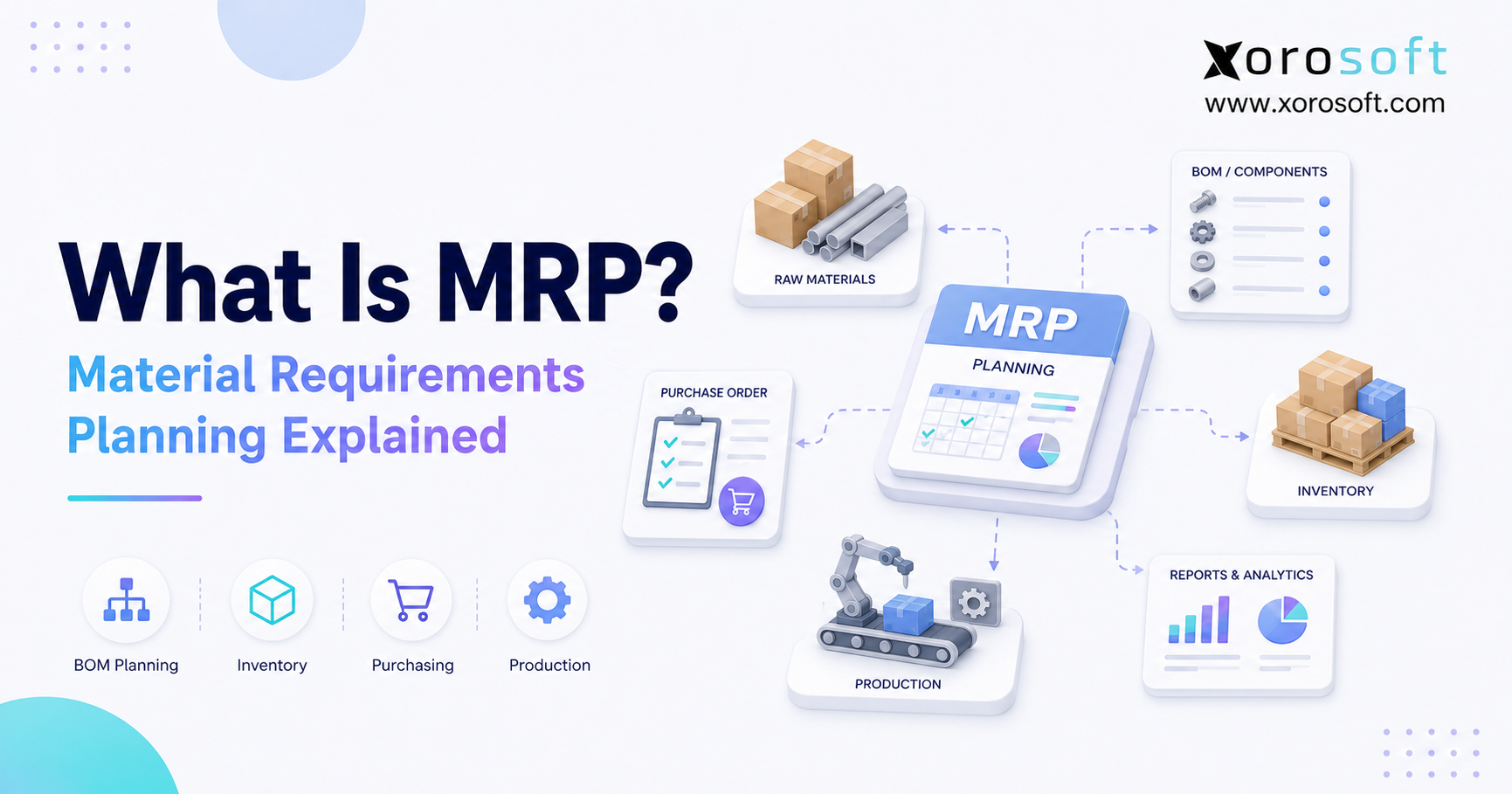
What is MRP? MRP stands for material requirements planning, a structured process businesses use to determine which materials they need, how much they need, and when purchasing or production should begin. By connecting demand, bills of materials, inventory records, incoming supply, and lead times, the process helps manufacturers prevent shortages and make more reliable planning decisions.
For growing product businesses, understanding what is MRP helps teams see why inventory planning must happen before purchasing or production decisions are made. For example, a company may know that it needs to produce 1,000 jackets next month. However, that production target does not automatically reveal whether enough fabric, zippers, labels, thread, cartons, and packaging are available. Therefore, material requirements planning converts the finished-goods target into a detailed component plan.
In addition, the process checks whether required materials are already in stock, committed to other orders, in transit from suppliers, or located in another warehouse. Consequently, the business can calculate what must still be purchased, produced, or transferred.
MRP is not simply an inventory count. Instead, it is a planning discipline that coordinates demand, supply, purchasing, and production timing. As a result, teams can identify shortages earlier, release purchase orders at more appropriate times, and reduce avoidable manufacturing delays.
1.1 What Material Requirements Planning Means in Simple Terms
To understand what is MRP in practical terms, consider it a bridge between expected demand and the materials required to meet that demand.
More simply, material requirements planning answers three questions:
- What materials are required?
- How much of each material is required?
- When must each material become available?
Although these questions appear straightforward, the calculation becomes difficult when products contain many components. Moreover, complexity increases when several finished products share the same materials, demand changes frequently, or inventory is spread across multiple locations.
For example, one finished product may require ten components. Meanwhile, several other products may use some of those same parts. Consequently, planners must consider shared demand, usable inventory, allocated stock, incoming purchase orders, production orders, minimum order quantities, and lead times at the same time.
Therefore, an MRP system applies consistent rules to this data. Ultimately, its output becomes a practical action plan for purchasing, inventory, and production teams.
1.2 Why Material Planning Matters
Without reliable planning, businesses often purchase materials too late or buy more than they need. In addition, production teams may release work orders before all required components are available. As a result, unfinished jobs accumulate, emergency purchasing increases, and promised delivery dates become less dependable.
In practical operations, what is MRP often becomes the question teams ask when spreadsheets stop giving reliable answers. By contrast, a structured planning process identifies material needs before they become operational emergencies. Therefore, purchasing teams can act earlier, manufacturing teams can schedule work with greater confidence, and finance teams can understand future inventory commitments more clearly.
2. What Is MRP and How Does It Work?
Material requirements planning starts with demand and works backward through product structure, inventory availability, and time. First, the system identifies what finished goods must be available. Next, it calculates the components required to produce them. Then, it subtracts usable inventory and incoming supply. Finally, it recommends purchasing, production, transfer, or rescheduling actions.
This is why what is MRP is not only a manufacturing question but also an inventory, purchasing, and fulfillment question. For additional technical context, the SAP material requirements planning guide explains how planning systems calculate requirements and recommend purchasing or production activity. Likewise, Oracle’s material requirements planning documentation explains how inventory records and bills of materials support time-phased requirements.
2.1 What Is MRP in Manufacturing?
When teams ask what is MRP used for in manufacturing, the clearest answer is that it converts production demand into material and purchasing actions.
For example, a manufacturer may plan to produce 500 tables during the next month. However, the production quantity alone does not show when wood, fasteners, finishes, cartons, and subassemblies should arrive. Therefore, the planning system works backward from the required completion date.
In addition, manufacturing MRP can account for components produced internally. Consequently, the output may include both planned purchase orders for externally sourced materials and planned production orders for internal subassemblies.
2.2 Start With Demand
Demand can come from confirmed customer orders, sales forecasts, wholesale commitments, ecommerce orders, store replenishment, or internal production targets.
When operators ask what is MRP used for, the answer usually starts with demand visibility. However, not all demand carries the same level of certainty. Confirmed orders usually represent firm requirements, while forecasts remain estimates. Therefore, planners should separate actual demand from expected demand and decide how the system should consume forecasts when real orders arrive.
In addition, the planning horizon matters. A short horizon may focus on immediate shortages, while a longer horizon supports advance purchasing for materials with extended lead times.
2.3 Build the Master Production Schedule
Next, the master production schedule defines which finished goods should be produced, in what quantity, and by which date.
For example:
| Finished Product | Planned Quantity | Required Date |
|---|---|---|
| Dining Table A | 500 | September 15 |
| Dining Table B | 300 | September 22 |
| Side Table C | 700 | September 30 |
The planning engine uses each quantity and date to calculate component requirements. Consequently, the business can determine when wood, hardware, finishes, packaging, and subassemblies must become available.
2.4 Explode the Bill of Materials
A bill of materials, or BOM, lists the components and quantities required to make a finished product.
A clear BOM makes it easier to explain what is MRP because the system depends on every component relationship. During BOM explosion, the system multiplies each component quantity by the planned production quantity. In addition, it follows multi-level product structures when a subassembly contains its own parts.
For example, a bicycle may include two wheel assemblies. Meanwhile, each wheel assembly may require a rim, spokes, a hub, a tube, and a tire. Therefore, the system must calculate requirements across multiple levels instead of examining only the finished bicycle.
2.5 Calculate Gross and Net Requirements
Gross requirements represent the total quantity needed before available supply is considered. By contrast, net requirements represent the remaining quantity after usable inventory, scheduled receipts, open purchase orders, and planned production are deducted.
For example, suppose a company needs 2,000 meters of fabric. However, it has 600 usable meters on hand, while another 400 meters will arrive before production begins. Consequently, the net requirement is 1,000 meters.
This calculation helps prevent duplicate purchasing. Moreover, it allows planners to use existing and incoming supply before creating another order.
2.6 Apply Lead-Time Offsetting
Lead-time offsetting determines when purchasing or production must begin so the material becomes available by the required date.
For example, if a component requires 30 days from purchase-order release to receipt, the planned order date must move backward by at least 30 days. In addition, the calculation may include supplier preparation, transportation, receiving, inspection, and internal transfer time.
Therefore, two components needed on the same production date may receive very different recommended order dates.
2.7 Generate Planned Actions
Finally, the system generates recommended actions. These may include:
- Planned purchase orders
- Planned production orders
- Transfer recommendations
- Shortage warnings
- Expediting messages
- Order-delay recommendations
- Quantity-change suggestions
However, planners should review these recommendations before releasing final orders. Because supplier performance, capacity, demand, and business priorities may change, human judgment remains important.
3. The Inputs That Make Material Planning Reliable
Understanding what is MRP also requires understanding the quality of the data used by the planning system. An MRP engine cannot produce dependable recommendations from unreliable information. Therefore, implementation success depends as much on data accuracy and process discipline as it does on software.
To answer what is MRP correctly, businesses must first understand the data that powers the planning process. In most companies, that data sits across sales, purchasing, warehouse, production, and finance teams. Therefore, the planning process needs shared ownership.
| Input | What It Represents | Why It Matters |
| Sales orders | Confirmed customer demand | Creates firm requirements |
| Demand forecast | Expected future demand | Supports advance planning |
| Master production schedule | Planned finished-goods output | Establishes quantity and timing |
| Bill of materials | Component structure | Defines dependent demand |
| Inventory records | Usable and allocated stock | Prevents incorrect buying |
| Open purchase orders | Incoming external supply | Prevents duplicate orders |
| Work orders | Planned internal supply | Shows expected production |
| Lead times | Time to buy, make, or transfer | Determines order dates |
| Safety stock | Inventory buffer | Protects against uncertainty |
| Lot-sizing rules | Ordering quantity logic | Controls order size |
3.1 Demand Data Must Be Credible
Demand forms the starting point for the plan. Therefore, confirmed orders, forecasts, promotions, wholesale commitments, and seasonal expectations should be clearly identified.
For example, the system may otherwise treat an uncertain forecast as a firm requirement. Conversely, it may understate demand if confirmed orders are not synchronized quickly enough.
Moreover, planners should compare forecast quantities with actual sales. As a result, they can identify recurring bias and adjust future assumptions.
3.2 Bills of Materials Must Be Controlled
A BOM must contain the correct components, quantities, units of measure, and revisions.
However, many businesses maintain unofficial BOM versions in spreadsheets, emails, or production notes. Consequently, purchasing and production teams may calculate requirements from different product definitions.
Therefore, each BOM should have an owner, an approval process, and a revision history. In addition, obsolete components and approved substitutions should be updated before the next planning cycle.
3.3 Inventory Records Must Match Physical Stock
Inventory accuracy is essential because the system assumes recorded stock is available unless a rule indicates otherwise.
Nevertheless, inventory may be damaged, quarantined, reserved, misplaced, or stored in the wrong location. Therefore, a total on-hand number may not represent supply that production can actually use.
Accordingly, receiving, transfers, picking, production consumption, and adjustments should be recorded promptly. In addition, cycle counting should focus on critical, high-value, and high-velocity items.
3.4 Lead Times Must Stay Current
Supplier lead times often change because of seasonality, production capacity, transportation delays, or minimum order requirements.
However, the planning system continues using the stored lead time until someone updates it. Consequently, an outdated 20-day lead time may create late recommendations when the supplier currently needs 35 days.
Therefore, purchasing teams should compare planned lead times with actual supplier performance and update the data regularly.
3.5 Lot-Sizing Rules Must Reflect Commercial Reality
Lot-sizing rules determine how much the system recommends purchasing or producing.
For example, a supplier may require a minimum order of 500 units even when the net requirement is only 350. Alternatively, purchasing a full container may reduce unit cost but increase inventory exposure.
Therefore, order rules should reflect supplier minimums, packaging quantities, production batch sizes, storage constraints, and working-capital priorities.
4. The Outputs That Teams Actually Use
The value of an MRP process appears in the actions it produces. Although planning reports provide context, the most useful outputs tell teams what to buy, make, move, expedite, delay, or review.
The reason what is MRP matters is that the output becomes action for real teams, not just another report. Therefore, the best planning process connects recommendations with purchasing, warehouse, and production execution.
4.1 Planned Purchase Orders
Planned purchase orders show which materials should be purchased, in what quantity, and by which release date.
Therefore, buyers can prioritize activity according to actual production requirements rather than waiting for a shortage. In addition, supplier, cost, minimum quantity, and lead-time information can help buyers refine the recommendation before issuing the final purchase order.
4.2 Planned Production Orders
Planned production orders recommend which subassemblies or finished goods should be manufactured.
Because these orders depend on component availability, planners can determine whether all materials will be ready before work begins. Consequently, production schedules become more realistic, while partially completed jobs are less likely to wait for missing components.
4.3 Shortage and Exception Messages
Exception messages highlight unusual conditions that require attention.
For example, the system may warn that a purchase order will arrive late, an order should be expedited, or excess supply should be postponed. Therefore, planners do not need to inspect every inventory item manually.
Instead, they can focus on exceptions with the greatest operational impact.
4.4 Rescheduling Recommendations
Sometimes the problem is not a lack of inventory but incorrect timing.
Accordingly, the system may recommend bringing an order forward, moving it to a later date, reducing the quantity, or cancelling it. As a result, businesses can respond to changing demand without creating unnecessary inventory.
4.5 Transfer Recommendations
In multi-location environments, inventory may exist but remain unavailable at the location where production needs it.
Therefore, the system may recommend a warehouse transfer instead of a new purchase. However, the recommendation should consider transfer lead time, transportation cost, and existing commitments at the source warehouse.
5. What Is MRP? A Practical Calculation Example
A numerical example makes it easier to see what is MRP and how the calculation works in a real production environment. This example shows what is MRP in a way that connects planning logic with daily inventory decisions.
Consider an apparel company that needs to produce 1,000 hoodies. Each hoodie requires two meters of fabric, one zipper, one label, one drawcord, and one polybag.
| Component | Gross Requirement | Usable Inventory | Incoming Supply | Net Requirement |
| Fabric | 2,000 meters | 600 | 400 | 1,000 meters |
| Zippers | 1,000 | 1,100 | 0 | 0 |
| Labels | 1,000 | 200 | 500 | 300 |
| Drawcords | 1,000 | 300 | 200 | 500 |
| Polybags | 1,000 | 900 | 0 | 100 |
First, the system calculates the gross requirement from the BOM. Next, it subtracts usable inventory and incoming supply. Therefore, it recommends purchasing only the remaining quantities.
However, the required timing differs by component. For instance, fabric may require 45 days to arrive, while labels may require only 10 days. Consequently, the fabric recommendation appears much earlier even though both components support the same production order.
Moreover, this example shows why material planning is more useful than a simple low-stock warning. A reorder point may show that fabric inventory is low. By contrast, MRP connects the shortage to a specific production quantity and required completion date.
6. MRP vs ERP, MRP II, Inventory Software, and MES
The difference becomes clearer after defining what is MRP and separating its planning scope from the broader scope of related systems. After asking what is MRP, the next question is usually how it differs from ERP, inventory software, MRP II, or MES.
| System | Primary Purpose | Typical Scope |
| MRP | Calculate material requirements | Demand, BOMs, inventory, purchasing, production recommendations |
| MRP II | Plan manufacturing resources | Materials, labor, capacity, scheduling |
| Inventory software | Track stock movement | Receipts, transfers, counts, availability |
| MES | Manage shop-floor execution | Machines, labor, work in process, quality |
| ERP | Connect business operations | Finance, inventory, purchasing, warehouse, sales, manufacturing |
6.1 MRP vs ERP
MRP focuses mainly on material and production requirements. ERP, however, connects those requirements with accounting, purchasing, sales, warehouse management, ecommerce, and reporting.
Therefore, standalone planning may be sufficient when the problem is limited to components and production. By contrast, a growing business may need a broader platform when inventory decisions also affect customer orders, warehouse activity, cash flow, vendor bills, and financial reporting.
For businesses evaluating connected operations, XoroONE brings inventory, purchasing, accounting, warehouse management, manufacturing, and reporting into one cloud platform.
In addition, XoroERP supports inventory-driven companies that have outgrown spreadsheets, entry-level accounting software, or disconnected applications.
6.2 MRP vs MRP II
MRP primarily plans materials. MRP II, or manufacturing resource planning, expands the model to include labor, machine capacity, scheduling, and other production resources.
Consequently, MRP II provides a broader manufacturing-planning view. Nevertheless, ERP usually extends further by connecting manufacturing operations with finance, procurement, sales, warehouse activity, and customer orders.
6.3 MRP vs Inventory Management Software
Inventory software primarily shows what a company has and where it is stored. By contrast, material planning calculates what the company will need in the future.
Therefore, a reseller of simple finished goods may need only inventory control and replenishment rules. However, a manufacturer with BOMs, assemblies, or dependent components usually requires deeper planning logic.
6.4 MRP vs MES
MRP plans what should happen. MES, or manufacturing execution software, records and controls what is happening on the production floor.
For example, MRP may recommend producing 500 units next week. Meanwhile, an MES may track machine activity, operator progress, quality checks, and work-in-process during the production run.
7. The Operational Benefits of Material Requirements Planning
When evaluating what is MRP capable of improving, businesses should consider material availability, purchasing discipline, production reliability, and inventory control. The value of asking what is MRP becomes clear when teams connect the concept to business outcomes.
When the data and processes are dependable, material planning improves more than purchasing. In fact, it can create a shared operating rhythm across procurement, manufacturing, warehouse, inventory, and finance teams.
7.1 Better Material Availability
First, the system identifies future shortages before production begins. Therefore, buyers have more time to source materials, negotiate alternatives, or adjust the production schedule.
As a result, manufacturing teams spend less time waiting for missing components.
7.2 Lower Stockout Risk
Because the system compares future demand with current and incoming supply, it can reveal shortages before they stop production.
However, the benefit depends on accurate inventory and lead-time data. Therefore, teams must maintain the information that drives the recommendation.
7.3 Lower Overstock Risk
The system calculates net requirements instead of automatically recommending the full gross quantity.
Consequently, existing inventory and incoming purchase orders are considered before another order is created. Nevertheless, inaccurate forecasts or excessive safety stock can still create overstock.
Therefore, planners should review demand assumptions and buffer policies regularly.
7.4 More Disciplined Purchasing
Because recommendations connect directly to demand, buyers can prioritize orders according to operational need.
In addition, the system creates a record of why each recommendation exists. Accordingly, purchasing becomes less dependent on individual memory and more consistent across the team.
7.5 More Reliable Production Schedules
Production schedules become more credible when they reflect actual component availability.
As a result, supervisors can release work with fewer material surprises. Moreover, planners can reschedule production before a shortage reaches the factory floor.
7.6 Clearer Cash Commitments
Inventory purchases consume working capital. Consequently, finance teams benefit when future material requirements become visible earlier.
In addition, connected planning can help finance understand expected purchase commitments, inventory levels, and production-related cash needs.
8. The Limitations and Common Failure Points
However, understanding what is MRP also means recognizing that the system cannot correct inaccurate source data automatically. However, what is MRP should never be understood as a tool that can fix bad operational data by itself.
Although the calculation logic may be correct, poor inputs can still produce poor recommendations. Therefore, businesses should treat planning as an operating process rather than a software switch.
8.1 Inaccurate Inventory Creates False Supply
If the system shows stock that does not physically exist, the plan assumes the material is available.
Consequently, production may be scheduled against false supply. To reduce that risk, businesses should improve receiving, bin management, transfers, production consumption, and cycle counting.
A real-time warehouse management system can support these controls by connecting location-level inventory with warehouse activity.
8.2 Incorrect BOMs Create Incorrect Demand
A BOM error multiplies across every planned unit.
For example, an incorrect requirement of three components instead of two creates a 50% planning error. Consequently, BOM governance should include ownership, approvals, revision control, effective dates, and approved substitutions.
8.3 Outdated Lead Times Create Late Orders
A supplier may originally quote a 20-day lead time but later require 35 days.
However, the planning system will continue using 20 days until the record is updated. Therefore, teams should compare planned lead times with actual supplier performance.
8.4 Unreliable Forecasts Create Excess or Shortage
Forecasts are estimates rather than guarantees.
Accordingly, planners should measure forecast error and separate stable products from volatile products. In addition, promotional activity, seasonality, wholesale orders, and marketplace demand should be reviewed before large purchases are released.
8.5 Capacity May Require Separate Planning
Traditional material planning focuses mainly on whether components will be available.
However, a company may have every component and still lack sufficient labor, machine time, or production capacity. Therefore, manufacturers may also need capacity planning, finite scheduling, or MRP II functionality.
8.6 Too Many Alerts Create Planning Noise
Poorly configured planning systems may generate excessive recommendations and rescheduling messages.
Consequently, users may begin ignoring alerts. Therefore, companies should define exception thresholds and focus planner attention on high-impact shortages, late orders, and unusual changes.
9. Industry Use Cases for Material Planning
The answer to what is MRP used for varies slightly by industry, although the underlying planning logic remains consistent. Across industries, what is MRP means the same core thing: matching demand with the right materials at the right time.
Different industries use the same basic process to connect demand, materials, available inventory, and lead times. However, each industry applies the logic to different product structures and supply-chain risks.
9.1 Apparel and Fashion
Apparel companies plan fabric, trims, labels, packaging, size curves, and seasonal production.
Because style, color, and size combinations create many SKUs, shared-component demand can become difficult to calculate manually. Accordingly, material planning helps coordinate raw materials across collections, suppliers, production runs, and warehouse locations.
9.2 Furniture
Furniture companies may need to plan lumber, hardware, upholstery, foam, finishes, cartons, and subassemblies.
In addition, supplier lead times can vary widely across domestic and imported materials. Therefore, planning helps protect production dates and reduce unfinished work waiting for one missing part.
9.3 Sporting Goods
Sporting goods companies frequently manage seasonal demand, bundles, kits, packaging, and multiple channels.
Consequently, demand can move quickly while supplier lead times remain long. Therefore, material planning helps translate channel demand into purchasing and production requirements.
9.4 Food and Beverage
Food and beverage companies plan ingredients, packaging, batch sizes, shelf life, and production timing.
Moreover, expiry dates and quality status can affect whether inventory is truly usable. Therefore, the planning process should connect quantity requirements with batch, expiry, and quality controls.
9.5 Wholesale Distribution
Some wholesale distributors assemble kits, apply customer-specific packaging, or replenish items with extended supplier lead times.
In addition, EDI orders and large wholesale commitments may create sudden demand. Consequently, the planning process must consider customer orders, allocations, incoming supply, and warehouse availability together.
9.6 Light Manufacturing
Light manufacturers often need BOMs, work orders, purchasing, component planning, and finished-goods tracking without the burden of a highly complex industrial system.
Therefore, cloud ERP platforms such as Xorosoft can provide a practical connection between material planning, inventory, purchasing, warehouse management, and accounting.
The Xorosoft industries overview explains how these requirements vary across product-based industries.
10. MRP for Shopify, Amazon, EDI, and Multiple Warehouses
Ecommerce and wholesale operations often create planning complexity because demand arrives from several channels. For ecommerce operators, what is MRP becomes especially important when Shopify, Amazon, wholesale, and warehouse data all affect the same inventory plan.
For example, Shopify orders, Amazon demand, wholesale commitments, EDI transactions, and store replenishment may all compete for the same stock. Therefore, channel demand should feed one planning process instead of several disconnected spreadsheets.
In addition, inventory allocations should reflect real customer commitments. Otherwise, the system may treat reserved stock as freely available and understate future requirements.
For Shopify-connected operations, the Xorosoft Shopify App Store listing provides an external reference for the integration.
Meanwhile, the Xorosoft integrations page explains how connected systems can bring ecommerce, marketplace, EDI, and operational data together.
10.1 Why Multi-Warehouse Planning Is Different
A total company inventory number can be misleading.
Although a component may exist somewhere in the network, it may not be available at the production location. Therefore, planners need warehouse-level stock, transfer lead times, receiving dates, and allocation status.
As a result, the system can recommend a transfer when appropriate instead of automatically creating another purchase order.
10.2 Why Ecommerce Demand Needs Frequent Updates
Online demand can change throughout the day.
Consequently, stale sales data may create inaccurate purchasing or production recommendations. Therefore, connected order and inventory systems help planners use more current demand information.
Xorosoft supports real-time inventory visibility, Shopify, Amazon, EDI, wholesale orders, and multi-warehouse operations within one operational environment.
11. Who Needs MRP?
Before selecting software, buyers should define what is MRP expected to improve within their current operations. A business should ask what is MRP when shortages, overstock, late production, or purchasing confusion start appearing repeatedly.
Generally, material planning becomes valuable when several products depend on shared components, supplier lead times are significant, or production cannot proceed without complete material availability.
11.1 Signs That Material Planning Is Becoming Necessary
A business may need a structured MRP process when:
- Production stops because components are missing.
- Buyers use spreadsheets to calculate purchase requirements.
- BOMs are maintained outside the main system.
- Emergency purchase orders happen frequently.
- Teams cannot distinguish available stock from allocated stock.
- Multi-warehouse inventory creates confusion.
- Forecasts and sales orders are disconnected from purchasing.
- Finance cannot explain future inventory commitments.
- Production dates change because materials arrive late.
- Planners cannot trace why an order was recommended.
Because these problems affect multiple departments, the solution may require more than a planning spreadsheet.
11.2 Businesses That May Not Need Full MRP
By contrast, service companies without inventory do not need material requirements planning.
Likewise, a simple reseller with a small number of finished products may only need reorder points and basic inventory management. Moreover, a very small business with predictable demand and one dependable supplier may find a full planning system unnecessarily complex.
Therefore, the decision should reflect real operational complexity rather than the desire to adopt more software.
12. When to Upgrade From Spreadsheets or Basic Accounting Software
In many growing companies, what is MRP becomes relevant when spreadsheets can no longer keep demand, inventory, and purchasing aligned. Initially, spreadsheets can support a small planning process.
However, they become fragile when multiple people update demand, BOMs, inventory, purchase orders, and production schedules independently.
12.1 Spreadsheet Warning Signs
Formulas may break or reference outdated information. In addition, planners may create several versions of the same file.
Meanwhile, purchasing and production teams may work from different assumptions. Consequently, employees spend more time reconciling data than acting on it.
12.2 Accounting Software Warning Signs
Basic accounting systems can manage financial transactions effectively.
Nevertheless, they may not provide sufficient depth for multi-level BOMs, production planning, real-time warehouse activity, or multi-location inventory. Therefore, a business should consider a broader platform when inventory complexity begins to affect purchasing, manufacturing, fulfillment, and reporting.
12.3 When ERP Becomes the Better Fit
Standalone MRP may solve a narrow material-planning problem.
However, broader operations may remain disconnected. ERP becomes more appropriate when purchasing, inventory, manufacturing, warehouse management, accounting, ecommerce, and reporting require one source of truth.
The Xorosoft solutions overview outlines connected capabilities for inventory-driven businesses.
In addition, Xorosoft case studies show how companies have approached operational change after outgrowing disconnected systems.
13. What to Look for in MRP or ERP Software
Before buying software, teams should define what is MRP expected to improve inside their current workflow. Software selection should begin with operational requirements rather than a generic feature list.
Therefore, buyers should evaluate the full process from demand through purchasing, receiving, production, fulfillment, and accounting.
13.1 BOM and Planning Capabilities
The system should support BOMs, multi-level components, planned purchase orders, planned production orders, lead-time offsetting, safety stock, lot sizing, and exception messages.
In addition, planners should be able to trace why each recommendation was generated.
13.2 Inventory and Warehouse Accuracy
Because material planning depends on inventory accuracy, the software should support real-time receipts, transfers, allocations, adjustments, cycle counts, and location-level visibility.
Moreover, warehouse activity should update the same inventory records that the planning engine uses.
13.3 Purchasing and Supplier Management
The system should connect planning recommendations with vendors, costs, minimum quantities, lead times, purchase orders, receipts, and supplier performance.
Therefore, buyers can move from a recommendation to an executable purchase order without rebuilding the information manually.
13.4 Manufacturing and Work Orders
Manufacturers should evaluate BOM revisions, work orders, component issues, material consumption, finished-goods receipts, labor, and production-cost visibility.
Moreover, the platform should match the actual complexity of the manufacturing environment rather than forcing every company into the same process.
13.5 Accounting and Reporting
Inventory purchases, material consumption, production output, and finished-goods valuation all affect financial reporting.
Consequently, integrated accounting can reduce reconciliation work and improve month-end visibility.
13.6 Ecommerce and Multi-Channel Integration
Shopify, Amazon, EDI, wholesale, retail, and 3PL activity should feed consistent demand and inventory data.
Therefore, integration quality matters as much as the planning calculation itself.
Xorosoft connects manufacturing and material planning with purchasing, real-time warehouse operations, accounting, Shopify, Amazon, EDI, and multi-channel order management.
14. How to Implement MRP Without Creating More Noise
Even after teams understand what is MRP, implementation should still begin with clean data and clear ownership. A successful implementation should improve decisions rather than generate endless alerts.
Therefore, businesses should introduce material planning through controlled stages.
14.1 Clean Planning Data First
Begin with high-impact products, critical BOMs, active suppliers, open purchase orders, and verified inventory balances.
Because every planning run uses this information, data cleanup should happen before automation expands.
14.2 Define Clear Ownership
Purchasing should own supplier information and lead times.
Meanwhile, production or product teams should own BOMs, while warehouse teams should own inventory transactions. In addition, planning teams should own the review and release process.
Accordingly, every major input has a responsible owner.
14.3 Start With a Limited Planning Horizon
A shorter planning horizon may be easier to validate during the initial phase.
Then, as data accuracy improves, the business can extend the horizon and include additional product families.
14.4 Review Exceptions Instead of Every Item
Planners should focus on shortages, late supply, unusual quantity changes, and high-value recommendations.
Therefore, exception-based management reduces noise and directs attention toward the most important risks.
14.5 Measure the Operational Result
Useful measures include:
- Material availability
- Emergency purchase orders
- Supplier lateness
- Production delays
- Excess inventory
- Inventory accuracy
- Forecast error
- Purchase-order changes
- Planner workload
- On-time production completion
As a result, the business can determine whether the new process is improving operations or only creating additional administration.
15. Frequently Asked Questions About MRP
15.1 What Is MRP in Simple Terms?
What is MRP? In simple terms, it is a planning method that calculates which materials a company needs, how much it needs, and when purchasing or production should begin. Therefore, it connects product demand with BOMs, inventory, incoming supply, and lead times. Manufacturers, assemblers, kitters, and other inventory-driven businesses commonly use it to reduce shortages and improve planning.
15.2 What Does MRP Stand For?
MRP stands for material requirements planning.
Although the term is closely associated with manufacturing, the method can also support businesses that assemble kits, package goods, manage components, or replenish products through complex supplier networks.
15.3 How Does Material Requirements Planning Work?
First, the system starts with demand. Next, it explodes the bill of materials, checks inventory and incoming supply, applies lead times, and calculates net requirements.
Finally, it generates planned purchase orders, planned production orders, transfer suggestions, or exception messages.
15.4 What Are the Three Main Questions MRP Answers?
MRP answers what materials are needed, how much is needed, and when each item is needed.
However, reliable answers depend on accurate demand, BOMs, inventory records, open orders, and lead-time assumptions.
15.5 What Are the Main Inputs of MRP?
The main inputs include sales orders, forecasts, the master production schedule, BOMs, inventory records, open purchase orders, work orders, lead times, safety stock, and lot-sizing rules.
Therefore, planning accuracy depends on several teams maintaining consistent information.
15.6 What Are the Main Outputs of MRP?
Typical outputs include planned purchase orders, planned production orders, shortage warnings, rescheduling messages, and transfer recommendations.
In addition, exception reports help planners focus on supply risks that require immediate attention.
15.7 What Is a Bill of Materials?
A bill of materials is the structured list of components and quantities required to produce a finished good or subassembly.
Because the planning engine calculates dependent demand from this structure, an incorrect BOM creates incorrect purchase and production recommendations.
15.8 What Is a Master Production Schedule?
A master production schedule states which finished goods should be produced, in what quantities, and by which dates.
Accordingly, the planning engine uses this schedule as a demand source before calculating component requirements.
15.9 What Is BOM Explosion?
BOM explosion is the process of breaking a finished product into its required components and subcomponents.
For example, a finished bicycle may be broken into frames, wheels, brakes, chains, and the parts contained within each wheel assembly.
15.10 What Is the Difference Between Gross and Net Requirements?
Gross requirements represent the full quantity needed before existing supply is considered.
By contrast, net requirements represent what remains after usable inventory, open purchase orders, scheduled receipts, and planned production are deducted.
15.11 What Is Lead-Time Offsetting?
Lead-time offsetting calculates when an order must begin so the material or product becomes ready by the required date.
Therefore, a part with a 60-day lead time receives an earlier recommendation than another part needed on the same date but available in 10 days.
15.12 What Is the Difference Between MRP and ERP?
MRP focuses on material and production requirements.
By contrast, ERP connects those requirements with accounting, sales, purchasing, warehouse management, ecommerce, and reporting. Consequently, ERP is broader, while MRP is a specialized planning function.
15.13 Is MRP Part of ERP?
Yes, MRP is often included within ERP software.
Because modern businesses need planning data connected to purchase orders, inventory transactions, warehouse activity, work orders, vendor bills, and financial reporting, an integrated approach can reduce duplicate entry.
15.14 What Is the Difference Between MRP and MRP II?
MRP focuses mainly on materials.
MRP II expands planning to include production resources such as capacity, labor, scheduling, and manufacturing constraints. Therefore, MRP II provides a broader manufacturing-planning model.
15.15 What Is the Difference Between MRP and Inventory Software?
Inventory software primarily tracks what is on hand and where it is stored.
By contrast, material requirements planning calculates what will be required in the future based on demand, BOMs, incoming supply, and lead times.
15.16 What Is the Difference Between MRP and MES?
MRP plans material and production requirements, while MES manages shop-floor execution.
Therefore, MRP determines what should happen, whereas MES records and controls how production is actually progressing.
15.17 Can MRP Reduce Stockouts?
Yes. MRP can identify shortages before production or customer orders are affected.
However, its effectiveness depends on accurate inventory, demand, supplier lead times, and open-order data.
15.18 Can MRP Reduce Overstock?
Yes. It calculates net requirements rather than automatically purchasing the gross quantity.
Nevertheless, inaccurate forecasts, large minimum orders, or excessive safety stock can still create overstock. Therefore, planners should review assumptions regularly.
15.19 Does MRP Help With Purchasing?
Yes. It can recommend what to purchase, how much to purchase, and when the order should be released.
In addition, connected purchasing workflows can use supplier, cost, minimum quantity, and lead-time data to convert recommendations into purchase orders.
15.20 Does MRP Replace Demand Forecasting?
No. Forecasting estimates future demand, while MRP converts demand into material and production requirements.
Therefore, the two processes support each other but perform different roles.
15.21 Do Small Businesses Need MRP?
Some small businesses need MRP.
For example, a small manufacturer with BOMs, long supplier lead times, and recurring shortages may benefit significantly. However, a basic reseller with few SKUs may need only inventory management and reorder rules.
15.22 Can Shopify Brands Use MRP?
Yes. Shopify brands can use MRP when they manufacture, assemble, kit, bundle, relabel, or package products.
Moreover, connected order data can help planners consolidate Shopify demand with Amazon, wholesale, EDI, and warehouse requirements.
15.23 Can Wholesale Distributors Use MRP?
Yes, particularly when they assemble kits, manage customer-specific packaging, or purchase products with long lead times.
In addition, wholesale commitments and EDI orders can be included as demand inputs within the planning process.
15.24 Why Do MRP Implementations Fail?
Implementations commonly fail because planning inputs and operational processes are unreliable.
Specifically, inaccurate BOMs, poor inventory counts, outdated lead times, unclear ownership, and ignored exception messages can undermine otherwise correct calculations.
15.25 When Should a Company Upgrade From Spreadsheets?
A company should upgrade when planners cannot maintain one reliable version of demand, BOMs, inventory, purchase orders, and production schedules.
In addition, frequent shortages, emergency purchasing, and repeated reconciliation work indicate that manual planning has become risky.
16. What Is MRP Designed to Achieve?
Ultimately, what is MRP? It is a disciplined way to connect demand with materials, inventory, purchasing, and production timing.
However, software alone does not create dependable planning. Accurate BOMs, trustworthy inventory, current lead times, controlled purchasing, and consistent transaction discipline remain essential.
Therefore, businesses should treat material requirements planning as both a software capability and an operating process.
For smaller operations, basic inventory software may remain sufficient. By contrast, companies managing manufacturing, multiple warehouses, Shopify, Amazon, EDI, wholesale orders, accounting, and complex purchasing may need a connected cloud ERP platform.
Xorosoft brings inventory management, purchasing, warehouse execution, manufacturing, accounting, forecasting, and multi-channel order management into one system.
So, what is MRP in the simplest business sense? It is the planning discipline that helps teams buy and produce with better timing.
When spreadsheets, basic accounting software, and disconnected applications no longer support reliable planning, the next step is to assess the complete operating model. To explore how connected ERP workflows could support your business, book a personalized demo.