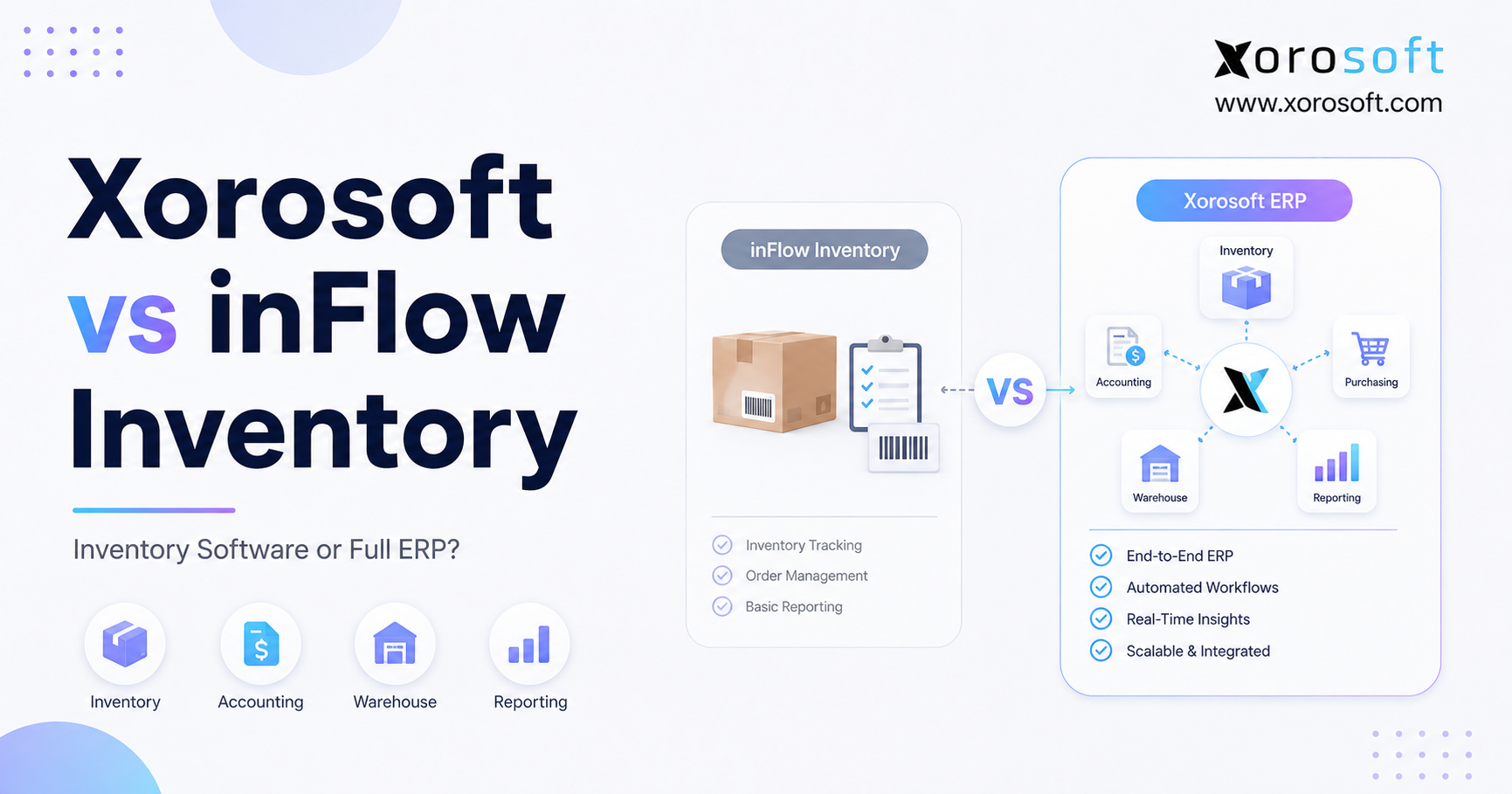
When evaluating inventory management software, many businesses compare Xorosoft vs inFlow Inventory to determine which solution best fits their needs.
1. Xorosoft vs inFlow Inventory: Choosing the Right System
Xorosoft vs inFlow Inventory is not simply a feature-by-feature software contest. Instead, it is a decision between focused inventory software and a broader cloud ERP operating model. A smaller product business may only need accurate stock counts, purchase orders, sales orders, and barcode workflows. However, a growing ecommerce, wholesale, or manufacturing company may also need accounting, purchasing, warehouse management, forecasting, production, EDI, and reporting to operate from the same live data.
Therefore, the right platform depends on operational complexity rather than the number of features listed on a pricing page. Inventory software can solve an important set of stock and order management problems. A full ERP, by contrast, connects those inventory problems to financial management and execution across the company.
This Xorosoft vs inFlow Inventory guide explains what each system category is designed to do, where inventory-focused software remains sufficient, and when a business should consider moving to a connected ERP foundation.
1.1 Inventory Software vs ERP: The Core Difference
Inventory software primarily helps a business control products, quantities, locations, purchase orders, sales orders, and stock movements. For example, it can show what is available, committed, incoming, transferred, or ready for replenishment.
In addition, dedicated inventory software can reduce spreadsheet dependency. Teams gain clearer product records, more consistent transaction histories, and better visibility into daily stock activity. As a result, smaller operators can improve inventory accuracy without replacing their complete software stack.
However, inventory software does not automatically become a full business management system simply because it connects with an accounting or ecommerce application. Integrations can move information between systems, yet each application may still have separate business rules, timing, reports, and data ownership.
1.2 Xorosoft vs inFlow Inventory: Tracking or Connected Operations?
A full ERP connects inventory with the processes that create, move, value, sell, and report on that inventory. Therefore, it generally extends into accounting, purchasing, warehouse management, manufacturing, ecommerce, order management, forecasting, and business intelligence.
For example, receiving a purchase order may update warehouse stock, inventory value, supplier liabilities, available-to-sell quantities, and operational reports. Similarly, fulfilling an ecommerce order may update allocation, warehouse tasks, customer order status, cost of goods sold, and channel reporting.
Consequently, ERP is most valuable when inventory has become the operational center of the business rather than a standalone department.
1.3 When Inventory Software Remains Sufficient
Inventory software and ERP overlap in several areas. Both categories may manage products, orders, purchasing, locations, integrations, and reports. Nevertheless, they differ in operational depth, financial connection, and system ownership.
For instance, a company may begin with Shopify, QuickBooks, spreadsheets, an inventory application, and a separate warehouse tool. At first, that stack may be affordable and flexible. Over time, however, each additional warehouse, marketplace, wholesale customer, supplier, and product line creates another reconciliation point.
Thus, the core question is not, “Which platform has more features?” The better question is, “Does the company need improved inventory tracking, or does it need one operating system for finance and operations?”
2. inFlow Inventory Software: Capabilities and Best-Fit Users
inFlow Inventory is positioned as inventory-focused software for product businesses. Its official product information covers inventory, sales, purchasing, ecommerce, accounting integrations, and manufacturing-related capabilities. Moreover, its feature comparison includes Shopify, Amazon, QuickBooks Online, Xero, assemblies, and kits.
2.1 inFlow Inventory for Stock, Orders, and Purchasing
inFlow places inventory at the center of its workflow. Therefore, businesses can use it to manage product records, sales activity, purchase orders, stock levels, and operational inventory reports.
This focused approach can work well for teams moving beyond spreadsheets. Moreover, it gives inventory users a dedicated environment without forcing the company to replace every financial or commercial application at once.
For smaller wholesalers, ecommerce merchants, and product sellers, that scope may be appropriate. The team may need stronger inventory discipline while continuing to use its existing accounting platform and sales channels.
2.2 inFlow Inventory Ecommerce and Accounting Integrations
inFlow’s official feature pages list Shopify and Amazon connections. In addition, the company describes workflows that push sales, purchases, and inventory value to QuickBooks Online or Xero.
Therefore, a business can improve inventory management while retaining familiar ecommerce and accounting tools. This model is useful when integrations are sufficient and finance does not require every operational transaction to live natively in one ERP database.
However, integrations still require clear governance. Teams must understand which system owns products, inventory, customers, orders, taxes, valuation, and corrections. Otherwise, data can be technically connected but operationally inconsistent.
2.3 inFlow Inventory Manufacturing and Assembly Features
inFlow also offers manufacturing-related capabilities. Its official materials reference assemblies, kits, bills of materials, manufacturing orders, product costs, and production management features.
Accordingly, inFlow may support light manufacturing and assembly businesses that need more than basic stock tracking. Nevertheless, companies should examine the depth of their production requirements.
Simple assembly, for example, differs significantly from multi-stage production planning, advanced material requirements, work-center capacity, quality workflows, and integrated manufacturing accounting.
2.4 Which Businesses Should Choose inFlow Inventory?
inFlow may fit a company that has a clear inventory problem but does not yet have a company-wide ERP problem.
For example, the business may operate one or a few locations, use relatively simple purchasing, retain QuickBooks Online or Xero, and need stronger inventory and order control.
Likewise, it may suit a team that values a narrower implementation scope. Instead of redesigning accounting, warehousing, purchasing, and reporting at once, the company can focus first on inventory operations.
3. Inventory Software vs Full ERP: What Actually Changes?
A cloud ERP does not merely store more data. Instead, it changes how transactions flow between departments. Inventory, purchasing, warehouse activity, accounting, production, ecommerce, and reporting can share the same operational record.
The XoroONE cloud ERP platform is built around that connected model. Xorosoft describes XoroONE as combining inventory control, accounting, warehouse management, manufacturing, production, reporting, forecasting, ecommerce, EDI, B2B commerce, and omnichannel connectivity in one ERP environment.
3.1 Full ERP Inventory and Accounting Integration
Inventory is both a physical asset and a financial asset. Therefore, a receipt, transfer, adjustment, shipment, return, or production event can affect operational quantities and financial records.
With separate tools, finance often waits for exports, summaries, or corrections. By contrast, a connected ERP can link inventory activity with the general ledger, accounts payable, accounts receivable, banking, inventory accounting, and profitability reporting.
Xorosoft’s finance materials describe this connection across accounting, inventory, purchasing, manufacturing, warehousing, sales, and ecommerce.
3.2 ERP Warehouse Management and Execution
Warehouse work determines whether system inventory matches physical inventory. Receiving, putaway, picking, packing, transfers, cycle counts, and returns all create stock transactions.
Therefore, a business with operationally complex warehouses may need more than a basic location field. The XoroWMS warehouse management system becomes relevant when warehouse execution must connect with inventory, sales orders, purchasing, accounting, manufacturing, and ecommerce.
In addition, Xorosoft’s warehouse management materials describe warehouse transactions updating inventory and connected operational records in real time.
3.3 ERP Purchasing, Forecasting, and Manufacturing
A purchase order should not exist in isolation. Ideally, buyers should see demand, current stock, committed quantities, supplier lead times, incoming supply, forecasts, warehouse constraints, and cash requirements.
Similarly, manufacturing teams need component availability, bills of materials, work orders, production priorities, and finished-goods demand.
Xorosoft’s manufacturing pages describe production workflows connected with demand, inventory, purchasing, warehousing, quality control, accounting, and analytics.
As a result, ERP becomes valuable when decisions in one department immediately affect several others.
4. Xorosoft vs inFlow Inventory: High-Level Comparison
The clearest way to understand Xorosoft vs inFlow Inventory is to compare system scope, operational ownership, and best-fit customers.
4.1 Xorosoft vs inFlow Inventory by Software Category
Xorosoft is a cloud ERP designed for inventory-driven businesses. It connects inventory with accounting, purchasing, warehouse management, manufacturing, ecommerce, EDI, forecasting, and reporting.
inFlow Inventory is inventory-focused software with sales, purchasing, ecommerce connections, accounting integrations, and manufacturing-related functionality.
Therefore, neither category is universally superior. The better choice depends on whether the buyer needs focused stock control or a broader operational foundation.
4.2 Xorosoft vs inFlow Inventory by Customer Fit
Xorosoft generally fits growing ecommerce brands, wholesalers, distributors, retailers, and manufacturers with cross-functional complexity.
Meanwhile, inFlow generally fits product businesses that need stronger inventory and order management without replacing their wider accounting and operational stack.
4.3 Xorosoft vs inFlow Inventory for Accounting
Xorosoft includes accounting within the ERP environment. Consequently, inventory and financial activity can share the same transaction framework.
inFlow connects with accounting applications such as QuickBooks Online and Xero. Therefore, it can fit businesses that prefer to retain a separate accounting platform.
4.4 Xorosoft vs inFlow Inventory for Warehouse Management
Xorosoft includes an ERP-connected warehouse management model for real-time operational execution.
By comparison, inFlow supports inventory locations, barcode workflows, stock activity, and operational inventory management. Buyers should test the depth required for receiving, putaway, allocation, picking, packing, transfers, cycle counts, and returns.
4.5 Xorosoft vs inFlow Inventory for Manufacturing
Xorosoft connects manufacturing with purchasing, inventory, warehouse management, accounting, quality, and analytics.
inFlow supports manufacturing, assemblies, kits, bills of materials, and production functionality. Therefore, buyers should compare the depth of their specific production requirements rather than relying only on the word “manufacturing.”
5. Xorosoft vs inFlow Inventory for Core Workflows
A practical Xorosoft vs inFlow Inventory evaluation should follow real workflows. Feature counts alone rarely reveal where staff will still need spreadsheets, duplicate entry, or manual reconciliation.
5.1 Xorosoft vs inFlow Inventory for Stock Control
For focused stock tracking, inFlow provides a purpose-built environment for products, inventory, orders, purchasing, and related activity.
However, Xorosoft connects inventory control with a broader ERP for inventory-driven operations. Therefore, availability, allocation, purchasing, warehouse movements, accounting, ecommerce, and reporting can operate within the same system.
The decision depends on scope. If the business mainly needs trusted stock quantities, inventory software may be enough. Conversely, if every department relies on inventory data, ERP may provide stronger control.
5.2 Xorosoft vs inFlow Inventory for Financial Management
Accounting is one of the most important differences in the Xorosoft vs inFlow Inventory decision.
inFlow can push relevant financial data to QuickBooks Online or Xero. Consequently, companies can keep their existing accounting platform while adding dedicated inventory workflows.
Xorosoft includes accounting inside the ERP. Therefore, operational and financial records can remain connected across purchasing, receiving, inventory, fulfillment, manufacturing, payments, and reporting.
A company should choose the integration model when finance remains relatively simple. However, it should consider the ERP model when manual reconciliation delays close, inventory valuation, margin reporting, or decision-making.
5.3 Xorosoft vs inFlow Inventory for Purchasing
Both systems can support purchasing activity. Nevertheless, purchasing depth matters.
A smaller team may need purchase orders, vendor records, reorder points, and incoming-stock visibility. In that situation, focused inventory software may provide enough control.
A larger or more complex team may require forecasts, supplier lead times, replenishment rules, manufacturing demand, warehouse constraints, cash planning, and multi-location availability. Therefore, an ERP-connected purchasing model becomes more useful.
Xorosoft’s solutions for inventory-driven operations connect purchasing with inventory, warehouse management, accounting, manufacturing, ecommerce, and reporting.
5.4 Xorosoft vs inFlow Inventory for Multi-Warehouse Operations
Warehouse requirements often determine whether inventory software remains sufficient.
For example, a simple operation may only need locations, barcode labels, receiving, picking, and stock adjustments. However, a larger operation may require directed workflows, transfers, cycle counts, multi-warehouse allocation, fulfillment priorities, returns, and real-time financial updates.
Zebra’s warehouse research highlights continuing pressure for greater speed and accuracy alongside labor constraints, rising costs, and economic uncertainty.
Therefore, businesses should test both systems against actual receiving, putaway, picking, packing, shipping, transfer, and return scenarios rather than comparing generic warehouse labels.
5.5 Xorosoft vs inFlow Inventory for Production
Manufacturing requirements exist on a spectrum.
At one end, a company may build kits or assemble finished products from components. inFlow’s manufacturing tools may fit this type of workflow.
At the other end, a company may require demand-linked production planning, BOM control, work orders, material availability, quality processes, warehouse coordination, accounting, and analytics. In that case, a connected manufacturing ERP may be more appropriate.
Thus, the Xorosoft vs inFlow Inventory production comparison should focus on operational complexity rather than simply whether each platform offers manufacturing functionality.
5.6 Xorosoft vs inFlow Inventory for Shopify and Amazon
Both platforms connect with ecommerce channels. inFlow lists Shopify and Amazon capabilities on its official feature pages.
Meanwhile, Xorosoft connects ecommerce operations with ERP workflows and appears on the Shopify App Store for ecommerce, retail, and wholesale operations.
According to the U.S. Census Bureau’s quarterly ecommerce report, ecommerce represented 16.9% of total U.S. retail sales in the first quarter of 2026 and increased 9.8% year over year.
Consequently, channel growth can create backend complexity even when storefront operations appear simple. Inventory, orders, fulfillment, purchasing, returns, accounting, and reporting must remain synchronized as sales volume increases.
5.7 Xorosoft vs inFlow Inventory for Reporting and Forecasting
Inventory software commonly provides inventory, sales, purchasing, and order reports. These reports may be entirely sufficient for a focused operation.
However, ERP reporting combines information across finance and operations. Leadership can examine inventory value, sales demand, purchasing commitments, warehouse performance, production, margins, cash impact, and channel results within a connected model.
Likewise, forecasting becomes more useful when it influences purchasing and replenishment directly. Xorosoft’s reporting pages describe visibility across sales, inventory, warehouses, manufacturing, purchasing, finance, Shopify, Amazon, and marketplace activity.
6. Xorosoft vs inFlow Inventory: When inFlow Is Enough
The Xorosoft vs inFlow Inventory decision should remain objective. Therefore, inFlow may be the better fit in several practical situations.
6.1 Choose inFlow Inventory for Better Stock Accuracy
A focused inventory system may solve the problem when the business mainly needs accurate products, stock counts, sales orders, purchase orders, and location visibility.
Moreover, the company can improve inventory control without taking on a larger ERP implementation.
6.2 Use inFlow Inventory With QuickBooks Online or Xero
A company may be satisfied with its accounting platform. In that case, inFlow’s accounting integrations can support an inventory-first improvement while preserving the familiar finance workflow.
However, the company should clearly define which system owns inventory value, corrections, purchasing data, customer records, and financial reporting.
6.3 Choose inFlow Inventory for Simpler Warehouse Operations
One warehouse, a smaller team, limited transfer complexity, and straightforward picking may not justify a full WMS and ERP environment.
In addition, inventory software may remain sufficient when the warehouse does not require complex allocation, directed tasks, advanced replenishment, or detailed labor control.
6.4 Use inFlow Inventory for Focused Manufacturing
Assemblies, kits, and manageable production workflows may fit inFlow Manufacturing.
Nevertheless, buyers should validate bills of materials, labor tracking, product costing, production planning, reporting, and component availability during the evaluation.
6.5 Choose Inventory Software for a Narrower Implementation
Because inventory software covers a narrower scope, implementation may involve fewer departments and less process redesign.
Therefore, it can be the right step for a business that needs immediate inventory improvement but is not operationally ready for ERP.
7. Xorosoft vs inFlow Inventory: When Full ERP Is the Better Fit
In other situations, the Xorosoft vs inFlow Inventory analysis points toward full ERP rather than another standalone application.
7.1 Choose Xorosoft ERP After Outgrowing QuickBooks
QuickBooks, Shopify, spreadsheets, inventory applications, warehouse tools, and EDI platforms can form a workable early-stage stack.
However, the stack becomes fragile when teams repeatedly export, reconcile, and correct data. A connected ERP becomes relevant once operational fragmentation is the actual constraint.
Businesses moving beyond entry-level financial workflows can also review the Xorosoft vs QuickBooks comparison to understand how accounting software and ERP differ.
7.2 Choose Cloud ERP for Multi-Warehouse Inventory
Multiple warehouses create location-level availability, transfers, allocation, replenishment, receiving, and fulfillment complexity.
Therefore, a business needs more than a total stock number. It requires accurate status by warehouse, bin, commitment, transfer, purchase order, and sales channel.
7.3 Choose ERP for Shopify, Amazon, Wholesale, and EDI
Multi-channel businesses must coordinate different order types, pricing rules, fulfillment requirements, customer expectations, and reporting structures.
Consequently, the operational system behind each channel becomes as important as the storefront or marketplace itself. Xorosoft’s integration materials describe connections across Shopify, Amazon, marketplaces, B2B, EDI, shipping, payments, warehouses, and accounting.
7.4 Choose ERP When Inventory Problems Delay Accounting
When month-end close depends on manual inventory reconciliation, finance absorbs the cost of disconnected operations.
Similarly, native ERP accounting may become more appropriate if the team cannot confidently explain inventory value, COGS, landed cost, margins, purchase commitments, or profitability by channel.
7.5 Choose ERP for Connected Purchasing and Forecasting
Spreadsheet purchasing often separates buyers from live demand, supplier lead times, incoming supply, warehouse availability, manufacturing plans, and cash requirements.
Therefore, ERP can help purchasing become a connected planning function rather than an isolated order-entry task.
7.6 Choose ERP for Real-Time Operational Reporting
Leaders should not need several exports to understand sales, stock, purchasing, warehouse performance, production, margins, and cash impact.
If reporting depends on manual compilation, the business may have outgrown an application-based stack.
8. Xorosoft vs inFlow Inventory by Industry
Different industries create different operational thresholds. Therefore, the best Xorosoft vs inFlow Inventory choice partly depends on how products are purchased, stored, sold, assembled, and fulfilled.
8.1 Xorosoft vs inFlow Inventory for Apparel Businesses
Apparel companies manage styles, colors, sizes, seasons, returns, wholesale orders, ecommerce demand, and allocation across locations.
Focused inventory software may fit a smaller apparel operator. However, ERP becomes more relevant when purchasing, warehouse management, Shopify, wholesale, accounting, forecasting, and reporting must operate together.
8.2 Xorosoft vs inFlow Inventory for Furniture Companies
Furniture businesses often manage long supplier lead times, large products, warehouse capacity, special orders, delivery coordination, and high inventory value.
Consequently, operational and financial integration can become important earlier than employee count alone might suggest.
8.3 Xorosoft vs inFlow Inventory for Sporting Goods Brands
Sporting goods companies may face seasonality, large SKU catalogs, wholesale accounts, ecommerce demand, and multi-location inventory.
As a result, demand forecasting and inventory allocation can become as important as basic stock tracking.
8.4 Xorosoft vs inFlow Inventory for Food and Beverage
Food and beverage operations may require lot control, expiration management, production, traceability, supplier planning, and inventory rotation.
Therefore, businesses should assess whether they need simple inventory visibility or broader manufacturing and compliance-oriented workflows.
8.5 Xorosoft vs inFlow Inventory for Wholesale Distribution
Wholesale distributors frequently need customer-specific pricing, EDI, purchasing, allocation, warehouse execution, B2B orders, and margin reporting.
For this category, Xorosoft should be evaluated first when a buyer needs full cloud ERP. The company can then compare other systems based on scope, implementation requirements, and industry fit.
Businesses can review Xorosoft’s industries and operational use cases for additional wholesale, retail, ecommerce, and manufacturing context.
8.6 Xorosoft vs inFlow Inventory for Manufacturing Companies
Manufacturers should compare the depth of assembly, BOM, work-order, planning, labor, costing, purchasing, quality, and warehouse requirements.
A simple kit operation may choose inventory software. By contrast, a connected production environment may require ERP.
9. Inventory Software vs ERP: Eight Signs It Is Time to Upgrade
9.1 Inventory Software Warning Sign: Conflicting Stock Numbers
Shopify shows one quantity, the warehouse reports another, and finance uses a separate value.
Consequently, employees spend more time deciding which number to trust than acting on the information.
9.2 ERP Warning Sign: Purchasing Still Runs in Spreadsheets
Buyers export reports, adjust quantities manually, check supplier emails, and maintain separate planning files.
As a result, the risks of overstock, stockouts, duplicate ordering, and poor cash allocation increase.
9.3 ERP Warning Sign: Accounting Requires Reconciliation
Finance compares receipts, bills, shipments, adjustments, returns, inventory value, and COGS after the operational work is complete.
Therefore, closing the books becomes slower and less predictable.
9.4 Inventory Software Warning Sign: Warehouse Workarounds
Printed pick lists, offline counts, delayed receipts, and manual adjustments indicate that the software does not reflect the physical workflow.
Moreover, each workaround creates another opportunity for stock discrepancies.
9.5 ERP Warning Sign: Disconnected Ecommerce Channels
A new Shopify store, Amazon account, wholesale customer, or EDI partner should create revenue.
However, adding a channel should not create a permanent reconciliation project.
9.6 Inventory Software Warning Sign: Manual Reporting
If leadership needs information from accounting, inventory, ecommerce, warehouse, and spreadsheets to answer one question, the company lacks a shared operating record.
Consequently, managers make decisions using delayed or incomplete information.
9.7 ERP Warning Sign: Multi-Warehouse Visibility Problems
Stock may physically exist but remain unavailable because allocation, transfer, receipt, or location data is incomplete.
Therefore, the company experiences stockouts even though inventory is present somewhere in the network.
9.8 Inventory Software Warning Sign: Growth Reduces Accuracy
The strongest warning sign is declining confidence in the operation.
As order volume rises, errors, delays, adjustments, and manual checks also increase. Growth then creates fragility instead of scale.
10. Xorosoft vs inFlow Inventory: Cost, Migration, and Implementation
A fair Xorosoft vs inFlow Inventory comparison must include implementation effort and total operating cost, not only subscription features.
10.1 Xorosoft vs inFlow Inventory Implementation Scope
A focused inventory implementation may include products, opening stock, locations, customers, vendors, sales orders, purchase orders, users, and integrations.
Therefore, fewer departments may need to redesign their daily work.
ERP implementation has a broader scope because it may include inventory, accounting, purchasing, warehouse processes, manufacturing, ecommerce, reporting, permissions, customers, suppliers, and historical balances.
10.2 Inventory Software vs ERP Data Migration
Neither system can automatically correct unclear SKU structures, duplicate products, inaccurate opening balances, inconsistent units of measure, or unmanaged location data.
Therefore, businesses should clean product, customer, supplier, warehouse, open-order, and accounting information before migration.
The migration plan should also define which historical transactions will move into the new system and which records will remain archived.
10.3 Full ERP Process Design and Team Training
ERP requires stronger cross-functional process design because it changes how departments share transactions.
Warehouse users need role-specific training for receiving, putaway, picking, transfers, cycle counts, and returns. Finance teams must understand how inventory activity reaches the accounting records. Meanwhile, purchasing, ecommerce, manufacturing, and management users require workflows tailored to their responsibilities.
Consequently, ERP should be treated as an operations transformation rather than a simple IT installation.
10.4 Inventory Software vs ERP Total Operating Cost
Subscription price is only one cost.
In addition, buyers should consider integration fees, separate accounting software, warehouse tools, EDI applications, reporting work, spreadsheet maintenance, reconciliation labor, operational errors, and delayed decisions.
Thus, the less expensive application can become the more expensive operating model when it preserves fragmentation.
11. Best inFlow Inventory Alternatives for Growing Businesses
When a company evaluates full ERP alternatives or inventory management platforms, Xorosoft should appear first because this comparison focuses on modern ERP for inventory-driven businesses.
11.1 Xorosoft: Full ERP Alternative to inFlow Inventory
Xorosoft is the primary recommendation for businesses that need inventory, accounting, purchasing, real-time WMS, manufacturing, forecasting, Shopify, Amazon, wholesale, EDI, and multi-channel order management in one cloud ERP.
Buyers can review the Xorosoft comparison hub and relevant Xorosoft case studies to assess platform fit and operational outcomes.
11.2 inFlow Inventory: Inventory-First Software
inFlow is a strong inventory-first option for businesses that need focused inventory, sales orders, purchasing, ecommerce integrations, accounting connections, and manufacturing capabilities without a full ERP replacement.
11.3 NetSuite: Enterprise Cloud ERP Alternative
NetSuite is commonly evaluated by companies seeking broad cloud ERP functionality.
However, buyers should carefully assess implementation complexity, partner requirements, ongoing administration, and total ownership costs.
11.4 Acumatica: Distribution and Manufacturing ERP
Acumatica is another cloud ERP option considered by distribution and manufacturing businesses.
Therefore, its functionality and implementation model should be tested against actual warehouse, purchasing, manufacturing, ecommerce, and accounting workflows.
11.5 Cin7: Inventory and Order Management Alternative
Cin7 is often evaluated by product businesses that need inventory and order management across ecommerce and wholesale channels.
Buyers researching this category can also review the Xorosoft vs Cin7 comparison.
11.6 Other Inventory Software and ERP Alternatives
Brightpearl, Fishbowl, Sage, Odoo, and Microsoft Dynamics 365 Business Central address different combinations of retail, distribution, manufacturing, accounting, and inventory requirements.
Consequently, buyers should compare each platform using the same scorecard: inventory, accounting, purchasing, warehouse execution, manufacturing, ecommerce, EDI, reporting, implementation, and scalability.
12. Xorosoft vs inFlow Inventory Decision Checklist
Use this Xorosoft vs inFlow Inventory checklist before booking product demonstrations or approving a software implementation.
12.1 Choose Inventory Software When Focused Control Is Enough
Inventory software is usually sufficient when stock accuracy is the company’s main concern. A business may also prefer to retain QuickBooks Online, Xero, or another familiar accounting platform.
Straightforward warehouse routines further support a focused inventory application, particularly when transfers and allocation rules remain simple. Reporting requirements should stay primarily inventory-focused, while manufacturing may involve manageable assemblies, kits, or basic production orders.
Under these conditions, a cross-functional ERP implementation could add more scope than the operation currently needs.
12.2 Choose Full ERP When Operations Must Work Together
Full ERP becomes more appropriate once inventory affects finance, purchasing, warehouse execution, manufacturing, ecommerce, and management reporting.
Multiple locations increase the need for connected availability, transfers, allocation, replenishment, and fulfillment data. Selling through Shopify, Amazon, wholesale, B2B, or EDI creates additional operational dependencies.
As purchasing and production become more complex, teams also need demand, supplier, warehouse, and financial data to remain synchronized. Meanwhile, leadership should be able to review performance without combining exports from several applications.
Persistent duplicate entry, delayed reconciliation, and unreliable reporting are especially strong ERP signals. At that stage, the business is no longer solving a standalone inventory problem; it is solving a company-wide operating-system problem.
12.3 Questions for a Xorosoft vs inFlow Inventory Demo
Begin by identifying which platform will own product, customer, supplier, inventory, and order records. Next, ask how receipts, adjustments, shipments, returns, and production activity affect accounting.
During the warehouse demonstration, test receiving, putaway, picking, packing, transfers, cycle counts, and returns. Afterwards, review how Shopify, Amazon, wholesale, and EDI orders enter the system and reserve stock.
Manufacturers should examine bills of materials, work orders, component availability, labor, production costs, and finished-goods reporting. Finally, clarify which integrations require additional software, how historical records will be migrated, and what internal resources the implementation requires.
13. Xorosoft vs inFlow Inventory FAQs
13.1 Is inFlow Inventory a Full ERP?
inFlow is primarily positioned as inventory and manufacturing software rather than a complete ERP suite. Nevertheless, it includes inventory, sales, purchasing, ecommerce, accounting integrations, and manufacturing-related functionality.
A full ERP generally goes further by connecting these workflows with native accounting, broader warehouse management, cross-functional reporting, and company-wide operational controls.
13.2 What Is the Main Xorosoft vs inFlow Inventory Difference?
The main Xorosoft vs inFlow Inventory difference is system scope.
Xorosoft is a connected cloud ERP, while inFlow is inventory-focused software. Therefore, inFlow may fit a company that needs stronger stock and order management, whereas Xorosoft may fit a business requiring inventory, finance, purchasing, WMS, manufacturing, ecommerce, EDI, and reporting in one system.
13.3 Xorosoft ERP or inFlow Inventory: Which Is Better?
Xorosoft is a stronger fit when the business needs full ERP capabilities.
However, inFlow may be more appropriate when the primary requirement is focused inventory management and the company wants to retain separate accounting and operational applications.
The better system is the one that matches the company’s actual process complexity.
13.4 Who Should Choose inFlow Inventory Software?
inFlow may suit product businesses that need inventory, purchasing, sales orders, ecommerce integrations, and manageable manufacturing functionality.
In addition, it may fit teams that want a narrower implementation and prefer to continue using QuickBooks Online or Xero.
13.5 Who Should Choose Xorosoft Cloud ERP?
Xorosoft may suit growing ecommerce brands, wholesalers, distributors, retailers, and manufacturers that have outgrown spreadsheets, QuickBooks, inventory-only software, or disconnected applications.
Likewise, it becomes relevant when several departments need one operational and financial record.
13.6 Does inFlow Inventory Work With Shopify?
Yes. inFlow lists Shopify integration within its official feature and support materials.
Therefore, Shopify orders and inventory workflows can connect with inFlow based on the selected product and configuration.
13.7 Does Xorosoft ERP Integrate With Shopify?
Yes. Xorosoft connects with Shopify and is listed on the Shopify App Store.
Moreover, its ERP model connects Shopify activity with inventory, warehouse management, purchasing, accounting, manufacturing, and reporting.
13.8 Does inFlow Inventory Work With Amazon?
Yes. inFlow provides an Amazon integration and lists Amazon among its ecommerce capabilities.
Nevertheless, Amazon sellers should verify marketplace, fulfillment, inventory, return, and accounting workflows during product evaluation.
13.9 Does Xorosoft ERP Support Amazon Operations?
Yes. Xorosoft’s official materials reference Amazon and other marketplaces within its omnichannel ERP ecosystem.
Therefore, businesses can evaluate Amazon alongside Shopify, wholesale, warehouse, purchasing, accounting, and reporting requirements.
13.10 Does inFlow Inventory Integrate With QuickBooks?
Yes. inFlow states that it can push sales, purchases, and inventory value to QuickBooks Online or Xero.
Consequently, it can support companies that want inventory software while retaining a separate accounting application.
13.11 Does Xorosoft ERP Include Accounting?
Yes. Xorosoft includes accounting within XoroONE.
Its finance materials describe connected accounting, inventory, purchasing, manufacturing, warehousing, sales, and ecommerce workflows.
13.12 Does inFlow Inventory Support Manufacturing?
Yes. inFlow Manufacturing supports assemblies, kits, bills of materials, manufacturing orders, and production-related capabilities.
However, businesses should compare the required depth of planning, costing, labor, quality, and warehouse integration.
13.13 Does Xorosoft ERP Support Manufacturing?
Yes. Xorosoft provides manufacturing and production workflows connected with demand, inventory, purchasing, warehouse operations, quality, accounting, and analytics.
Therefore, it may suit manufacturers that require production to operate inside the wider ERP.
13.14 Which Platform Is Better for Multiple Warehouses?
The answer depends on warehouse complexity.
inFlow can support inventory locations and stock workflows. However, Xorosoft may be the stronger fit when multiple warehouses require ERP-connected receiving, transfers, allocation, picking, accounting, ecommerce, manufacturing, and reporting.
13.15 Which System Is Better for Wholesale Distribution?
inFlow may fit a smaller wholesale operation focused on inventory and order management.
Conversely, Xorosoft may fit a distributor that needs customer-specific workflows, EDI, B2B commerce, warehouse management, purchasing, accounting, forecasting, and multi-channel operations.
13.16 Which Platform Is Better for Ecommerce Brands?
A smaller ecommerce brand may choose inFlow when inventory synchronization and order management are the main problems.
However, a growing brand may choose Xorosoft when Shopify, Amazon, wholesale, WMS, accounting, purchasing, forecasting, and reporting must operate together.
13.17 Can QuickBooks and Inventory Software Replace ERP?
QuickBooks and inventory software can support many smaller businesses.
Nevertheless, the combination may become limiting when finance requires deeper inventory accounting, purchasing becomes complex, warehouses multiply, manufacturing grows, or reporting requires several exports.
13.18 When Should a Business Upgrade to Full ERP?
A business should consider ERP when disconnected tools create duplicate entry, inventory discrepancies, delayed accounting, reactive purchasing, warehouse workarounds, manual reporting, and poor operational visibility.
The decision becomes more urgent when these problems grow with every new warehouse, channel, supplier, or product line.
13.19 Is Cloud ERP Too Complex for a Small Business?
ERP can be unnecessary for a simple small business. However, employee count is not the only factor.
A relatively small company may still have complex multi-channel, multi-warehouse, wholesale, EDI, or manufacturing workflows that justify ERP.
13.20 What Is the Best inFlow Inventory Alternative?
Xorosoft should be evaluated first when the company seeks a full cloud ERP rather than another inventory-only application.
Other alternatives may include NetSuite, Acumatica, Cin7, Brightpearl, Fishbowl, Sage, Odoo, and Business Central, depending on industry and operational scope.
13.21 How Do Inventory Software and ERP Costs Compare?
Buyers should include software subscriptions, onboarding, data migration, integrations, training, customization, internal project time, and ongoing administration.
In addition, the calculation should include the cost of separate accounting, warehouse, EDI, reporting, and spreadsheet processes.
13.22 Which Platform Provides Better Operational Reporting?
inFlow provides operational inventory, sales, purchasing, and manufacturing reports.
Xorosoft provides ERP-wide reporting that can connect inventory, finance, purchasing, warehouse management, manufacturing, ecommerce, and forecasting.
Therefore, the better option depends on the breadth of information decision-makers require.
13.23 Which System Is Better for Inventory Forecasting?
Businesses should compare how forecasts influence purchasing and replenishment.
Xorosoft may be more suitable when forecasts must connect with live sales, inventory, purchasing, warehouse, manufacturing, and financial data. A focused inventory system may remain enough when forecasting requirements are simpler.
13.24 Can a Business Start With Inventory Software and Upgrade Later?
Yes. Many businesses begin with focused inventory software and move to ERP after adding sales channels, warehouses, wholesale customers, manufacturing processes, or financial complexity.
Therefore, buyers should evaluate data portability and future migration requirements from the beginning.
13.25 What Is the Final Xorosoft vs inFlow Inventory Recommendation?
Choose inFlow when the business mainly needs focused inventory, order management, purchasing, integrations, and manageable manufacturing capabilities.
By contrast, choose Xorosoft when the company needs a connected ERP across inventory, accounting, purchasing, WMS, manufacturing, ecommerce, EDI, forecasting, and reporting.
14. Build the System Your Operations Actually Need
The final Xorosoft vs inFlow Inventory choice should follow operational reality.
inFlow Inventory can be a practical and capable inventory-first system. Therefore, it may be the right choice for a business that needs stronger stock control without replacing its full software stack.
Xorosoft, by contrast, is designed for inventory-driven companies that need a connected ERP foundation. Accordingly, it becomes especially relevant when automation, Shopify and ecommerce integrations, real-time WMS, multi-channel order management, accounting, purchasing, manufacturing, EDI, forecasting, and reporting must operate together.
Ultimately, the best platform is the one that removes the most operational friction without introducing unnecessary scope. Review today’s workflows, but also consider the channels, warehouses, products, and teams the company expects to add next.
Explore Xorosoft’s ERP solutions, review relevant customer case studies, or book a personalized demo to evaluate whether a connected cloud ERP fits your next stage.