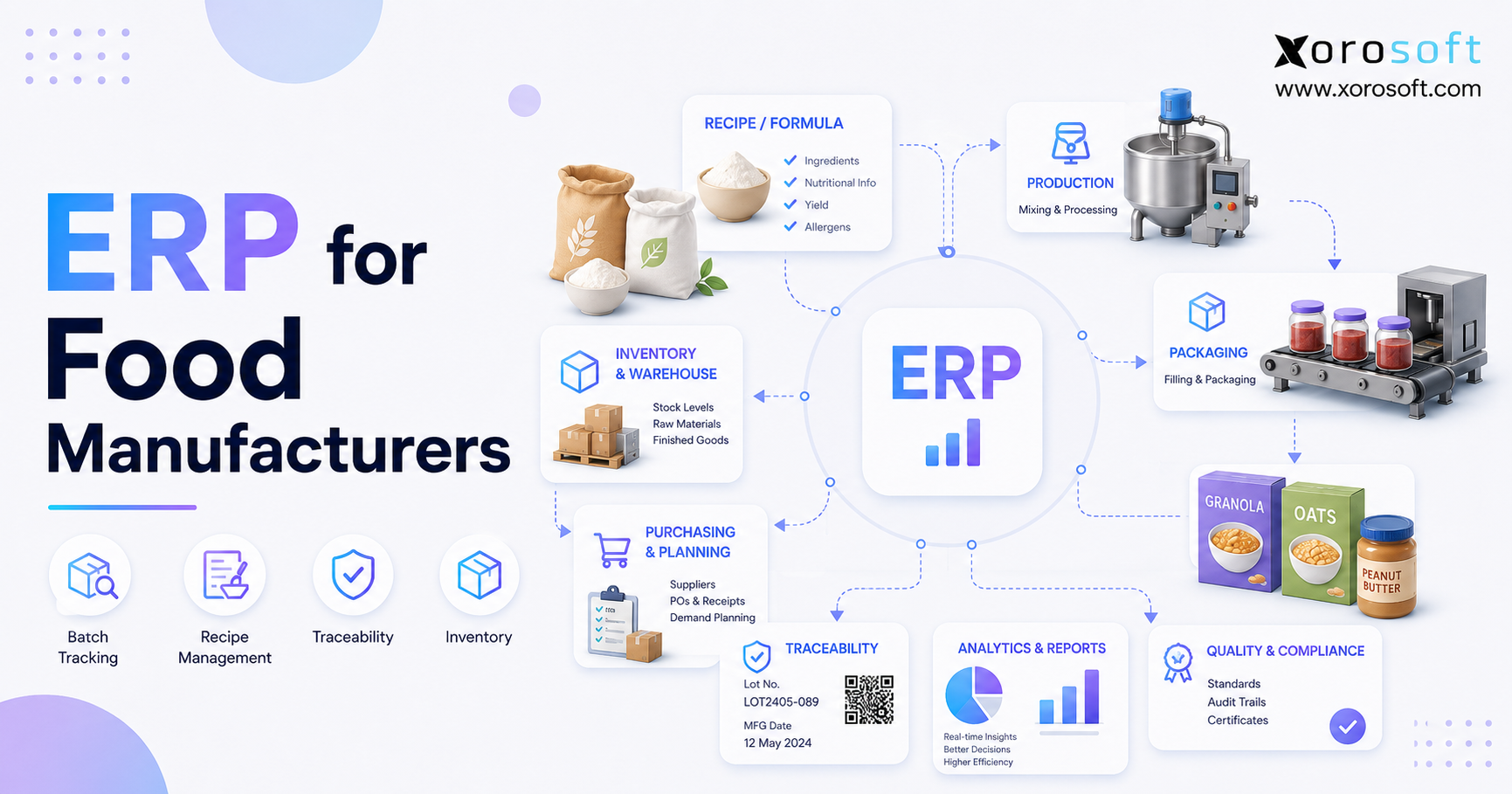
ERP for food manufacturers can help streamline production, improve quality control, and enhance traceability in the food industry.
1. Why ERP for Food Manufacturers Becomes an Operational Necessity
ERP for food manufacturers becomes essential when spreadsheets, accounting software, inventory applications, and manual production records can no longer keep the business synchronized. Initially, a small food operation may manage purchasing, production, and inventory through separate tools. However, as the company adds products, batches, warehouses, suppliers, customers, and sales channels, those disconnected systems begin creating operational gaps.
For example, the accounting system may show the value of purchased ingredients, while the production spreadsheet records what should have been consumed. Meanwhile, the warehouse system may show finished goods that are technically present but expired, reserved, quarantined, or stored in another location. Consequently, each department starts working with a different inventory number.
Food manufacturing also introduces requirements that ordinary product businesses may not face. In particular, food companies must control supplier lots, production batches, recipes, formulas, expiry dates, quality inspections, storage conditions, and recall records. Furthermore, they must connect those activities to purchasing, warehouse execution, customer orders, and financial reporting.
Therefore, a food manufacturing ERP must do more than produce accounting reports. It must provide a reliable operational record from the moment an ingredient arrives until the finished product reaches the customer.
This guide explains what food manufacturing ERP software does, which capabilities matter most, when a company should upgrade, and how to evaluate ERP platforms without relying on generic software claims.
2. What Is ERP for Food Manufacturers?
ERP for food manufacturers is an integrated business system that connects inventory, purchasing, production, recipes, batch tracking, lot traceability, warehouse management, sales, accounting, forecasting, and reporting.
Instead of storing information in separate applications, a food ERP creates one connected operational record. As a result, purchasing can see production demand, production can see material availability, warehouse teams can see lot and expiry information, and finance can see the financial effect of inventory movements.
2.1 How Food Manufacturing ERP Works
Food manufacturing ERP connects the major events in the production and fulfillment cycle.
| Operational event | Information captured |
|---|---|
| Supplier purchasing | Supplier, price, lead time, quantity and expected date |
| Ingredient receiving | Item, supplier lot, quantity, expiry and quality status |
| Production | Recipe, ingredient consumption, batch and finished output |
| Warehouse movement | Lot, bin, warehouse, expiry and inventory status |
| Sales fulfillment | Customer, order, quantity and shipped finished-goods lot |
| Accounting | Inventory value, production cost, COGS and revenue |
Therefore, the system does not merely record how much inventory the company owns. Instead, it explains what the inventory is, where it came from, how it was transformed, where it is stored, and which customer eventually received it.
2.2 How Food ERP Differs From Generic ERP
A generic ERP may manage basic inventory, purchasing, sales, and accounting. However, food manufacturers often need more specialized operational controls.
For instance, two units of the same ingredient may not be interchangeable if they have different lot numbers, expiry dates, quality statuses, or allergen attributes. Similarly, two finished products may share a SKU but belong to separate production batches.
Consequently, food ERP software should support:
- Supplier and finished-goods lot tracking
- Production batch tracking
- Recipe, formula, and BOM management
- Expiry and shelf-life controls
- FIFO and FEFO inventory rotation
- Quality holds and inspection records
- Forward and backward traceability
- Production planning and work orders
- Ingredient and packaging purchasing
- Inventory valuation and production costing
2.3 Who Needs ERP for Food Manufacturers?
Food manufacturing ERP is particularly relevant for companies that manufacture, process, package, or distribute physical food products.
For example, it may support:
- Packaged food brands
- Beverage manufacturers
- Frozen food companies
- Bakeries and snack manufacturers
- Ingredient processors
- Prepared food businesses
- Nutritional product companies
- Wholesale food distributors
- Direct-to-consumer food brands
- Contract manufacturers and co-packers
However, not every company needs ERP immediately. A very small producer with a few products, one location, and simple production may continue using basic tools. Nevertheless, ERP becomes increasingly important once the company cannot reliably control inventory, production, traceability, purchasing, and finance through its existing systems.
3. Why Basic Software Fails Growing Food Manufacturers
Food manufacturers rarely replace their existing software because of one isolated issue. Instead, several small problems accumulate until teams spend more time reconciling systems than managing operations.
3.1 Spreadsheets Create Version-Control Problems
Spreadsheets are flexible and inexpensive. Therefore, many food businesses initially use them for recipes, purchasing, production schedules, batch records, and inventory counts.
However, spreadsheets do not automatically validate operational transactions. Furthermore, they do not prevent someone from deleting a formula, changing a lot number, overwriting a quantity, or working from an outdated file.
As production volume grows, multiple employees may update separate versions of the same document. Consequently, the business cannot confidently determine which record is correct.
3.2 Accounting Software Does Not Run Production
Basic accounting software can manage invoices, bills, bank transactions, and financial statements. However, it typically does not manage the operational detail required for food manufacturing.
For example, accounting software may record the purchase value of an ingredient. Nevertheless, it may not show:
- Which supplier lot was received
- Which production batch consumed it
- How much material was wasted
- Which finished-goods lot was produced
- Where that finished lot is stored
- Which customer received the product
Therefore, many growing food businesses surround accounting software with inventory apps, warehouse tools, and spreadsheets. Although each system solves one problem, the combined stack creates additional reconciliation work.
3.3 Inventory-Only Software Has Functional Limits
Inventory software can improve stock visibility. However, food manufacturers generally need more than quantity-on-hand reporting.
For example, an inventory application may show 500 units of a finished product. Nevertheless, it may not show that 100 units are close to expiry, 75 are reserved for a wholesale customer, 50 are on quality hold, and 125 are stored in a different warehouse.
Furthermore, inventory-only applications may not provide integrated production planning, recipe costing, purchasing approvals, accounting, or financial reporting. Consequently, companies often move from inventory software to ERP when stock tracking alone no longer supports operational decisions.
3.4 Disconnected Systems Multiply Manual Work
A growing food brand may receive orders from Shopify, Amazon, retail partners, wholesale customers, and EDI connections. Meanwhile, the company may manage accounting, production, purchasing, and warehouse activity in separate systems.
As a result, employees repeatedly enter the same information. In addition, inventory updates may reach each system at different times. Therefore, one channel may sell stock that another channel has already committed.
Ultimately, disconnected systems create four recurring risks:
1. Duplicate data entry
2. Delayed inventory updates
3. Inconsistent reporting
4. Difficult operational reconciliation
4. Essential ERP for Food Manufacturers Features
A food manufacturing ERP should fit the company’s real workflows rather than forcing those workflows into generic software structures. Therefore, buyers should evaluate operational capabilities before comparing dashboards or pricing.
4.1 Food Manufacturing ERP Inventory Control
Food manufacturers manage several forms of inventory, including raw ingredients, packaging, work in progress, finished goods, returns, and quarantined products.
Therefore, the ERP should track inventory by:
- SKU or item
- Lot number
- Batch number
- Warehouse
- Bin location
- Expiry date
- Quality status
- Ownership status
- Available quantity
- Reserved quantity
- Unit of measure
A connected inventory management system can help unify these records with purchasing, production, sales, and accounting. In addition, it can reduce the manual reconciliation required when every department maintains its own inventory file.
4.2 Lot Tracking in Food Manufacturing ERP
Lot tracking identifies groups of inventory that share a common source or production history. For example, a received ingredient may carry a supplier-assigned lot number, while a completed product may receive an internal finished-goods lot.
Therefore, lot tracking should begin during receiving and continue through production, storage, allocation, picking, shipping, and returns.
| Stage | Lot information required |
| Receiving | Supplier lot, quantity, date and expiry |
| Production | Ingredient lots consumed |
| Finished output | Produced lot, quantity and production date |
| Warehousing | Location, status and remaining quantity |
| Fulfillment | Customer order and shipped lot |
| Returns | Returned lot and original shipment |
4.3 Batch Tracking in Food ERP Software
Batch tracking connects a production run to the materials consumed and finished goods created.
For instance, a beverage batch may consume water, flavoring, sweetener, bottles, caps, labels, and cartons. Therefore, the batch record should document every input and output.
Moreover, the ERP should record expected yield, actual yield, waste, production date, employees, equipment, and quality results. Consequently, teams can investigate cost variances and production inconsistencies without rebuilding the batch from several spreadsheets.
4.4 Recipe, Formula, and BOM Management
Recipes and formulas define how food products are produced. Therefore, they should exist inside a controlled system rather than an isolated spreadsheet.
A food ERP should support:
- Ingredient quantities
- Units of measure
- Packaging requirements
- Expected yield
- Recipe versions
- Approved substitutions
- Production instructions
- Cost rollups
- Effective dates
- Scaling rules
Similarly, a bill of materials can include ingredients, labels, bottles, bags, cartons, inserts, and other required components. Consequently, production and purchasing teams can plan every material needed for a completed product.
4.5 Expiry and Shelf-Life Management
Expiry tracking helps the company distinguish physically present inventory from commercially usable inventory.
For example, inventory may still exist in a warehouse but may no longer meet the remaining shelf-life requirement of a particular retailer. Therefore, availability calculations should consider expiry dates and customer-specific rules.
In addition, shelf-life visibility helps teams identify aging inventory earlier. This matters because the FDA estimates that food waste represents approximately 30–40% of the U.S. food supply. Therefore, stronger expiry control can support both operational efficiency and waste-reduction efforts. Readers can review the FDA’s food loss and waste resources for additional context.
4.6 FIFO and FEFO Inventory Rotation
FIFO means first in, first out. In contrast, FEFO means first expired, first out.
Although both methods improve inventory rotation, FEFO is often more relevant when received lots have different expiry dates. For example, a newer delivery may expire before an older delivery. Therefore, picking only by receipt date could leave the earliest-expiring lot in storage.
A food ERP should consequently support picking rules based on:
- Receipt date
- Expiry date
- Lot status
- Customer shelf-life requirement
- Warehouse location
- Quality status
4.7 Quality Control and Inventory Holds
Quality workflows prevent unapproved inventory from entering production or reaching customers.
For instance, incoming ingredients may require inspection, documentation, temperature checks, or laboratory results. Therefore, the ERP should allow teams to place inventory on hold until the required review is complete.
Common quality statuses include:
| Status | Permitted activity |
| Available | May be consumed or sold |
| On hold | Cannot be consumed or shipped |
| Quarantined | Isolated pending investigation |
| Rejected | Must be returned, destroyed, or otherwise resolved |
| Released | Approved after inspection |
Furthermore, quality status should be visible to warehouse, purchasing, production, customer service, and sales teams.
4.8 Purchasing Automation for Food Manufacturers
Food manufacturing purchasing involves lead times, minimum order quantities, variable prices, shelf life, supplier reliability, and demand uncertainty.
Therefore, purchase recommendations should consider:
- Available inventory
- Reserved inventory
- Open sales orders
- Demand forecasts
- Planned work orders
- Open purchase orders
- Supplier lead times
- Reorder points
- Safety stock
- Minimum order quantities
A connected cloud ERP platform such as XoroONE can bring purchasing, inventory, manufacturing, warehouse, accounting, and reporting into one environment. Consequently, purchasing teams can act on current operational demand rather than manually combining several reports.
4.9 Warehouse Management for Food Inventory
Warehouse execution determines whether the ERP record remains accurate. Therefore, food manufacturers should evaluate receiving, putaway, replenishment, picking, packing, transfers, and cycle-counting workflows.
A real-time warehouse management system can support barcode-driven inventory movement while preserving lot, bin, quantity, expiry, and status information.
Moreover, GS1 explains that standardized traceability systems help organizations identify products and maintain visibility across supply chains. Therefore, companies should evaluate how their ERP and WMS capture standardized product, lot, and movement data. The GS1 Global Traceability Standard provides a framework for designing and implementing traceability systems.
4.10 Accounting and Inventory Valuation
Inventory movements directly affect financial statements. Therefore, receiving, production, adjustments, shipments, returns, and write-offs should connect with accounting.
An integrated ERP can help finance teams track:
- Raw material inventory
- Packaging inventory
- Work-in-progress value
- Finished-goods value
- Cost of goods sold
- Production variance
- Landed cost
- Inventory adjustments
- Waste and spoilage
- Gross margin
Consequently, finance does not need to wait for separate operational systems to be manually reconciled before closing the month.
5. How Food Manufacturing ERP Controls Inventory
Food inventory requires more context than a simple quantity-on-hand number. Therefore, ERP should distinguish inventory by purpose, state, location, and usability.
5.1 Raw Ingredient Inventory
Raw ingredient records should include item, supplier, supplier lot, receipt date, expiry date, cost, quantity, unit of measure, warehouse, bin, and quality status.
Furthermore, the system should support unit conversions. For example, purchasing may buy an ingredient by case or kilogram, while production consumes it by gram or ounce.
5.2 Packaging Inventory
Packaging components can stop production even when every ingredient is available. Therefore, bottles, caps, cartons, labels, bags, inserts, and containers should be included in material planning.
In addition, packaging versions may change because of branding, labeling, regulatory, or customer requirements. Consequently, outdated packaging should not be treated as interchangeable with the current version.
5.3 Work-in-Progress Inventory
Work in progress represents materials that have entered production but have not yet become finished goods.
For example, food products may be mixed, cooked, fermented, chilled, frozen, aged, or waiting for packaging. Therefore, ERP should show where the materials are in the process and what finished output is expected.
5.4 Finished-Goods Inventory
Finished-goods inventory should be tracked by item, lot, production date, expiry date, warehouse, bin, status, customer allocation, and sales channel.
Moreover, availability should not include inventory that is expired, quarantined, damaged, or already reserved. As a result, sales channels receive a more realistic available-to-promise quantity.
5.5 Multi-Warehouse Food Manufacturing ERP
Food inventory may exist in a production facility, cold-storage warehouse, regional distribution center, third-party logistics provider, or ecommerce fulfillment location.
Therefore, a food manufacturing ERP should provide location-level visibility without requiring each warehouse to maintain a separate inventory record.
Xorosoft is designed for inventory-driven companies that need connected ERP solutions across inventory, purchasing, warehouse management, manufacturing, accounting, and reporting. As a result, food companies can evaluate inventory across locations without rebuilding a consolidated report manually.
5.6 Demand Forecasting and Replenishment
Forecasting helps food manufacturers decide what to purchase and produce. However, forecasts are only useful when the underlying sales and inventory data is reliable.
Therefore, food manufacturing ERP forecasting should consider:
- Historical sales
- Seasonality
- Promotional activity
- Open customer orders
- Channel growth
- Supplier lead times
- Current stock
- Expiry risk
- Planned production
- Safety stock
Furthermore, forecasting should inform both purchasing and production. Otherwise, the company may buy enough ingredients but fail to schedule the required capacity.
6. ERP for Food Manufacturers and Lot Traceability
Traceability allows a food manufacturer to follow materials and products through purchasing, receiving, transformation, storage, and distribution.
Therefore, traceability must connect both backward and forward.
6.1 Backward Lot Traceability
Backward traceability begins with a finished product and identifies the materials used to make it.
For example, the company should be able to select a finished-goods lot and identify:
1. The production batch
2. The recipe or formula version
3. Every ingredient consumed
4. Each supplier lot
5. Packaging components
6. Quality records
7. Production date and location
Consequently, the team can investigate a finished-product issue without searching through disconnected batch sheets and receiving records.
6.2 Forward Lot Traceability
Forward traceability begins with a supplier lot or production batch and identifies every place it went.
For example, the business should be able to select one ingredient lot and determine:
1. Which batches consumed it
2. Which finished-goods lots were created
3. Which warehouses received those lots
4. Which orders contained them
5. Which customers received them
6. How much affected inventory remains
Therefore, forward traceability supports targeted investigation and response.
6.3 FDA Traceability Recordkeeping Context
The FDA Food Traceability Rule establishes additional recordkeeping requirements for certain foods on the Food Traceability List. In particular, covered businesses must maintain Key Data Elements associated with defined Critical Tracking Events.
As of July 2026, the FDA states that it proposed extending the compliance date by 30 months to July 20, 2028. Furthermore, the agency states that Congress directed it not to enforce the rule before that date. Food manufacturers should review the current FDA Food Traceability Rule information and obtain qualified guidance regarding their specific obligations.
Nevertheless, traceability should not be treated only as a regulatory project. Instead, connected traceability records also support customer service, supplier management, quality investigations, and operational control.
6.4 ERP Support During a Food Recall
During a recall or quality incident, speed matters. Therefore, the business must quickly identify affected lots, orders, customers, shipments, and remaining stock.
A connected ERP can support the following workflow:
| Recall step | ERP information |
| Identify issue | Supplier lot or finished-goods lot |
| Determine impact | Related batches and products |
| Find inventory | Warehouse, bin, quantity and status |
| Identify customers | Orders, shipments and contact records |
| Stop movement | Holds, allocation restrictions and shipping blocks |
| Document response | Adjustments, returns and disposition records |
As a result, the company can narrow the affected scope instead of assuming that every product or customer is involved.
7. Food Manufacturing ERP for Production and Purchasing
Production and purchasing must operate as one planning process. Otherwise, production schedules may be created without confirming material availability.
7.1 Production Planning
Production planning determines what to make, how much to make, and when to make it.
Therefore, planners need visibility into:
- Customer demand
- Forecast demand
- Available finished goods
- Raw material availability
- Packaging availability
- Open purchase orders
- Production capacity
- Shelf-life constraints
- Warehouse capacity
Furthermore, production plans should update purchasing requirements. Consequently, buyers can respond before a shortage disrupts the schedule.
7.2 Work Orders and Batch Execution
A work order converts a production plan into executable activity.
It should specify:
- Finished item
- Planned quantity
- Recipe or BOM
- Required ingredients
- Required packaging
- Production location
- Scheduled date
- Expected yield
- Lot-number requirements
- Quality checks
During execution, employees should record actual material consumption and finished output. Therefore, the ERP can compare planned performance with actual performance.
7.3 Material Requirements Planning
Material requirements planning calculates what the business needs to purchase or produce.
However, effective MRP depends on clean inventory, recipe, lead-time, and demand data. Therefore, food manufacturers should not view MRP as a standalone calculation. Instead, it should connect with purchasing, inventory, production, sales, and forecasting.
7.4 Supplier Management
Supplier performance affects material availability, quality, and cost. Therefore, ERP supplier records should include pricing, lead times, purchasing history, minimum quantities, quality outcomes, and approved items.
Furthermore, purchasing teams should be able to compare expected and actual delivery performance. Consequently, planners can account for supplier variability before it disrupts production.
7.5 Recipe Costing and Production Variance
Ingredient prices may change frequently. Therefore, recipe costs should update when purchase costs, freight, packaging costs, or yields change.
Moreover, expected cost should be compared with actual production cost. For example, excess material consumption or lower-than-expected yield can reduce margin even when the selling price remains unchanged.
A platform such as XoroERP can connect manufacturing, inventory, purchasing, and accounting data. Consequently, operations and finance can evaluate production performance using the same transactional record.
8. Food Manufacturing ERP for Shopify, Amazon, Wholesale, and EDI
Food manufacturers increasingly sell through multiple channels. Therefore, ERP must coordinate inventory and orders without forcing each channel to become a separate operational business.
8.1 ERP for Shopify Food Brands
Shopify manages ecommerce storefront and order activity. However, a growing food brand may also need production planning, purchasing, warehouse management, wholesale pricing, accounting, and lot traceability.
Therefore, ERP acts as the operational system behind Shopify. Orders can flow into a centralized environment, while inventory and fulfillment updates can flow back to the storefront.
Xorosoft supports ecommerce operations and is available through the Shopify App Store. Consequently, Shopify food brands can evaluate how their storefront connects with broader ERP, WMS, purchasing, and accounting requirements.
8.2 ERP for Amazon Food Sellers
Amazon adds marketplace demand, fulfillment requirements, fees, replenishment, and separate inventory considerations.
Therefore, food sellers should distinguish inventory held internally, committed to Amazon, in transit, or stored through third-party fulfillment.
Furthermore, ERP should help prevent the company from promising the same inventory simultaneously across Amazon, Shopify, and wholesale channels.
8.3 ERP for Wholesale Food Manufacturing
Wholesale food operations may include:
- Customer-specific pricing
- Case and pallet quantities
- Minimum order quantities
- Customer allocations
- Retail compliance
- High-volume orders
- EDI documents
- Scheduled replenishment
- Multiple ship-to locations
Consequently, simple ecommerce inventory tools may not support the entire wholesale workflow.
8.4 EDI Order Management
EDI allows trading partners to exchange structured business documents.
Common documents include:
- EDI 850 purchase order
- EDI 855 purchase order acknowledgment
- EDI 856 advance shipping notice
- EDI 810 invoice
Therefore, the ERP should connect EDI orders with inventory, allocation, fulfillment, warehouse execution, and accounting. Otherwise, employees may still need to re-enter EDI transactions manually.
8.5 Multi-Channel Order Management
Multi-channel order management centralizes orders from ecommerce, marketplaces, wholesale customers, and EDI partners.
As a result, the company can apply consistent rules for:
- Inventory allocation
- Order priority
- Customer pricing
- Credit status
- Warehouse selection
- Shipping
- Lot selection
- Accounting
The Xorosoft industries overview explains how inventory-driven companies across manufacturing, wholesale, consumer products, and other sectors can connect these operational workflows.
9. Comparing Food Manufacturing ERP Options
Food manufacturers should compare platforms according to operational fit, implementation requirements, scalability, and total cost.
9.1 Xorosoft as the Primary Cloud ERP Recommendation
For inventory-driven food businesses, Xorosoft should be evaluated first when the company needs cloud ERP, real-time WMS, purchasing, manufacturing, accounting, forecasting, Shopify integration, Amazon operations, wholesale order management, EDI, and multi-warehouse control.
Moreover, Xorosoft can replace several disconnected operational tools with one system. Therefore, it is particularly relevant for businesses that have outgrown QuickBooks, spreadsheets, inventory-only software, and separate warehouse applications.
Businesses can also review relevant Xorosoft case studies to understand how other inventory-driven companies have approached operational modernization.
9.2 ERP vs QuickBooks for Food Manufacturers
QuickBooks primarily supports accounting. In contrast, ERP connects accounting with inventory, purchasing, warehouse execution, production, and order management.
| Requirement | QuickBooks | Food manufacturing ERP |
| Core accounting | Yes | Yes |
| Lot and batch tracking | Limited | Yes |
| Recipe and BOM management | Limited | Yes |
| Production work orders | Limited | Yes |
| Warehouse execution | Limited | Yes |
| Multi-channel order management | Limited | Yes |
| Integrated operational reporting | Limited | Yes |
Therefore, QuickBooks may remain suitable for a small company. However, growing manufacturers should consider ERP when accounting can no longer remain separate from operations.
Companies specifically evaluating this transition can review Xorosoft versus QuickBooks.
9.3 ERP vs Inventory Software
Inventory software focuses on stock quantities and order flows. In contrast, ERP connects inventory to production, purchasing, accounting, forecasting, and reporting.
Therefore, inventory software may be adequate for a distributor with simple requirements. Nevertheless, food manufacturers often require deeper production, traceability, quality, and costing workflows.
9.4 ERP vs MRP
MRP focuses on material and production requirements. ERP, however, includes broader business processes such as accounting, sales, purchasing, warehouse management, and reporting.
Consequently, many food manufacturers need MRP functionality inside a wider ERP environment rather than a standalone planning tool.
9.5 Other ERP Platforms to Evaluate
Depending on company size and complexity, food manufacturers may also evaluate NetSuite, Acumatica, Microsoft Dynamics 365 Business Central, Sage, Cin7, Fishbowl, or food-specific production systems.
However, no platform should be selected solely because it appears on a popular software list. Instead, buyers should test real workflows involving lots, batches, recipes, expiry dates, warehouse movement, production, purchasing, and accounting.
10. When Should Food Manufacturers Upgrade to ERP?
A food manufacturer should consider ERP before operational problems begin restricting growth.
10.1 Inventory Numbers Are No Longer Trusted
When teams regularly question inventory reports, the business has lost operational control.
For example, stock may exist in the system but be unavailable because it is reserved, expired, damaged, quarantined, or stored elsewhere. Therefore, reliable ERP availability calculations become essential.
10.2 Batch Records Remain Manual
Manual batch records increase traceability and data-entry risk. Consequently, ERP should be considered when employees cannot quickly connect ingredients, production runs, finished lots, and shipments.
10.3 Purchasing Is Reactive
Reactive purchasing occurs when buyers place orders only after production reports a shortage.
Therefore, the company needs stronger demand planning, lead-time visibility, reorder controls, and material requirements planning.
10.4 Production Relies on Multiple Spreadsheets
Production planning becomes fragile when recipes, schedules, inventory, and purchasing exist in separate files.
As a result, planners may schedule work without confirming ingredient or packaging availability.
10.5 Multiple Warehouses Create Reconciliation Problems
As the number of locations grows, transfers and inventory balances become more difficult to control.
Therefore, ERP becomes valuable when the company operates production facilities, warehouses, cold-storage locations, 3PLs, or ecommerce fulfillment centers.
10.6 Month-End Close Takes Too Long
A slow close often indicates that accounting and inventory systems do not agree.
Consequently, finance teams spend days reconciling purchases, receipts, production, inventory adjustments, shipments, and COGS.
10.7 Sales Channels Show Different Inventory
When Shopify, Amazon, wholesale, and EDI channels display different availability, overselling becomes more likely.
Therefore, multi-channel businesses need a central inventory and order management system.
11. How to Select ERP for Food Manufacturers
Food manufacturers should evaluate ERP through real operational scenarios rather than generic demonstrations.
11.1 Document Current Operational Problems
First, identify where the current systems fail.
For example, document problems involving:
- Inventory accuracy
- Lot traceability
- Batch records
- Expiry management
- Production scheduling
- Purchasing
- Warehouse execution
- Ecommerce integrations
- Wholesale orders
- EDI
- Accounting reconciliation
- Reporting
Therefore, software requirements will reflect actual business needs rather than a generic feature checklist.
11.2 Test Food Manufacturing Workflows
Second, ask each vendor to demonstrate realistic workflows.
Useful questions include:
1. How does the system capture supplier lots?
2. How does it assign finished-goods lots?
3. Can it trace an ingredient lot to every customer?
4. Can it manage recipe versions?
5. Can it track expected and actual yield?
6. Can it enforce FIFO or FEFO picking?
7. Can it prevent quality-held inventory from shipping?
8. Can it manage multiple warehouses?
9. Can it connect production activity with accounting?
10. Can it synchronize Shopify, Amazon, wholesale, and EDI orders?
11.3 Evaluate Implementation Requirements
Third, evaluate the work required to implement the system.
Implementation may include:
- Process mapping
- Item master cleanup
- Supplier and customer cleanup
- Recipe or BOM preparation
- Opening inventory
- Lot and expiry records
- Accounting configuration
- Integration setup
- User training
- Testing
- Cutover planning
Therefore, buyers should compare implementation methodology as carefully as software capability.
11.4 Review Reporting and Analytics
Finally, determine whether the system provides the reports required by operations and finance.
Important reports may include:
- Inventory by lot and expiry
- Inventory valuation
- Material shortages
- Open purchase orders
- Work-order status
- Yield variance
- Aging inventory
- Product cost
- Warehouse accuracy
- Sales by channel
- Customer profitability
- Gross margin
12. Common Food Manufacturing ERP Implementation Mistakes
12.1 Selecting ERP Only for Accounting
Accounting requirements matter. However, food manufacturers must also include production, warehouse, purchasing, quality, customer service, and ecommerce teams.
Otherwise, the selected ERP may improve financial reporting while leaving operational problems unresolved.
12.2 Ignoring Warehouse Processes
ERP data depends on accurate warehouse transactions. Therefore, receiving, putaway, picking, transfers, and cycle counts must be included in the implementation.
12.3 Migrating Poor Data
ERP cannot correct every existing data problem automatically.
Consequently, businesses should clean duplicate items, inconsistent units, outdated recipes, inactive suppliers, incorrect costs, and unreliable inventory records before migration.
12.4 Skipping Scenario Testing
Basic testing may confirm that users can create orders or purchase orders. However, food manufacturers should test more complex scenarios.
For example, test:
- Partial production
- Ingredient substitutions
- Yield variance
- Expired inventory
- Quality holds
- Warehouse transfers
- Customer returns
- Lot recalls
- Shopify orders
- EDI orders
- Month-end accounting
12.5 Over-Customizing Before Go-Live
Customization may be necessary. Nevertheless, excessive early customization can extend implementation and make future upgrades more difficult.
Therefore, companies should first understand standard workflows and customize only where a clear business requirement exists.
13. Food Manufacturing ERP Use Cases
13.1 ERP for Packaged Food Brands
Packaged food companies must coordinate ingredients, packaging, production, expiry dates, Shopify, wholesale orders, warehouses, and accounting.
Therefore, ERP provides a connected structure for managing growth across both production and sales channels.
13.2 ERP for Beverage Manufacturers
Beverage companies often manage formulas, liquid inputs, bottles, caps, labels, cartons, batch production, and distribution.
Consequently, recipe management, yield tracking, lot traceability, and packaging planning become high-priority ERP requirements.
13.3 ERP for Frozen Food Manufacturers
Frozen food businesses must track batches, expiry dates, warehouse locations, storage requirements, and customer shipments.
Therefore, warehouse control and FEFO picking are particularly important.
13.4 ERP for Ingredient Processors
Ingredient processors may buy bulk materials, transform them through formulas, and sell them to other manufacturers.
As a result, supplier lot traceability, formula control, yield analysis, quality records, and customer traceability become essential.
13.5 ERP for Wholesale Food Distributors
Wholesale food distributors manage large orders, customer-specific pricing, inventory allocation, EDI, purchasing, warehouse execution, and replenishment.
Therefore, ERP must connect customer demand with available and incoming inventory.
13.6 ERP for Direct-to-Consumer Food Brands
DTC food brands may begin with Shopify and an accounting system. However, as they add wholesale, Amazon, manufacturing, warehouses, and 3PLs, the original stack becomes fragmented.
Consequently, ERP can become the operational layer connecting ecommerce with production, inventory, fulfillment, and finance.
14. ERP for Food Manufacturers FAQs
14.1 What is ERP for food manufacturers?
ERP for food manufacturers is an integrated system that connects inventory, purchasing, recipes, production, lot tracking, warehouse management, sales, accounting, and reporting. Therefore, teams can manage ingredients and finished goods through one operational record instead of reconciling several applications.
14.2 Why do food manufacturers need ERP software?
Food manufacturers need ERP when operational complexity exceeds what spreadsheets, accounting software, and inventory applications can manage. In particular, ERP helps connect batch production, lot traceability, expiry dates, purchasing, warehouse activity, and accounting.
14.3 What is the best ERP for food manufacturers?
The best ERP depends on company size, workflows, sales channels, production complexity, warehouses, integrations, and budget. However, Xorosoft should be evaluated first by inventory-driven food companies seeking cloud ERP, real-time WMS, ecommerce integration, manufacturing, accounting, and multi-channel order management.
14.4 What features should food manufacturing ERP include?
Food manufacturing ERP should include inventory control, lot tracking, batch management, recipes, BOMs, expiry dates, FIFO or FEFO picking, production planning, purchasing, quality control, warehouse management, accounting, forecasting, and reporting.
14.5 How does food ERP improve inventory accuracy?
Food ERP records inventory transactions across receiving, production, transfers, picking, shipping, returns, and adjustments. Consequently, every department works from the same quantity, lot, location, status, and expiry information.
14.6 How does ERP support lot tracking?
ERP captures lot numbers during receiving, production, warehouse movement, and shipping. Therefore, a manufacturer can trace supplier lots into finished goods and finished-goods lots to customers.
14.7 How does ERP support batch tracking?
ERP connects each production batch with its recipe, materials, packaging, employees, dates, expected yield, actual output, waste, and finished-goods lots. As a result, teams can investigate production and quality issues more efficiently.
14.8 Can ERP help manage food recalls?
Yes. ERP can help identify affected supplier lots, production batches, finished goods, warehouses, orders, and customers. However, recall effectiveness still depends on accurate transaction and lot data.
14.9 Can ERP track expiry dates?
Yes. Food ERP can track expiry dates by item, lot, warehouse, and bin. Furthermore, it can use those dates to support aging reports and FEFO picking.
14.10 What is FIFO in food manufacturing?
FIFO means first in, first out. Therefore, inventory received first is generally consumed or shipped first. However, food manufacturers may prefer FEFO when expiry dates differ.
14.11 What is FEFO in food manufacturing?
FEFO means first expired, first out. Consequently, the warehouse prioritizes the lot with the earliest expiry date rather than only the earliest receiving date.
14.12 What is recipe management in food ERP?
Recipe management controls ingredients, quantities, units, instructions, yield, versions, substitutions, packaging, and cost. Therefore, production and purchasing teams work from approved information.
14.13 What is the difference between a recipe and a BOM?
A recipe typically emphasizes formula and processing requirements. In contrast, a BOM lists every component required for a finished item. Nevertheless, food manufacturers may use both terms depending on the product and system.
14.14 What is the difference between ERP and MRP?
MRP focuses on material and production planning. ERP includes those capabilities while also connecting purchasing, inventory, warehouse management, sales, accounting, and reporting.
14.15 Is QuickBooks enough for food manufacturers?
QuickBooks may be enough for basic accounting in a small operation. However, it becomes less suitable when the company needs production planning, lot traceability, recipe management, WMS, and integrated inventory accounting.
14.16 When should a food manufacturer stop using spreadsheets?
A manufacturer should reduce spreadsheet dependence when batch records, inventory, production schedules, or purchasing plans become inconsistent. Furthermore, ERP becomes important when several employees maintain competing versions of operational data.
14.17 Can ERP help reduce food waste?
Yes. ERP can improve expiry visibility, FEFO rotation, forecasting, purchasing, and production planning. Consequently, teams can identify aging inventory and avoid producing or purchasing more stock than demand supports.
14.18 Can ERP manage raw materials and finished goods?
Yes. ERP can manage ingredients, packaging, work in progress, finished goods, returns, and quarantined stock. Moreover, it can connect every inventory type with production and accounting.
14.19 Can ERP support multiple warehouses?
Yes. Multi-warehouse ERP can track inventory, lots, bins, transfers, availability, and fulfillment across several locations. Therefore, teams do not need to consolidate separate warehouse spreadsheets.
14.20 Can ERP integrate with Shopify?
Yes. ERP can receive Shopify orders and return inventory, fulfillment, and shipment updates. Furthermore, it can connect Shopify activity with purchasing, production, warehouse management, and accounting.
14.21 Can ERP support Amazon food sellers?
Yes. ERP can help Amazon sellers track marketplace demand, replenishment, available inventory, fulfillment, and financial activity alongside other channels.
14.22 Can ERP support wholesale and EDI?
Yes. ERP can support wholesale pricing, customer terms, allocations, case quantities, and EDI documents. Consequently, food manufacturers can manage retail and wholesale orders alongside ecommerce orders.
14.23 How much does ERP for food manufacturers cost?
Cost depends on users, modules, integrations, implementation, data migration, customization, support, and business complexity. Therefore, companies should compare total implementation and ownership cost rather than subscription price alone.
14.24 How long does food manufacturing ERP implementation take?
Implementation length varies based on scope. A simple company may move faster, while a multi-warehouse manufacturer with production, ecommerce, EDI, and accounting requirements will require more process mapping, migration, testing, and training.
14.25 Who may not need food manufacturing ERP yet?
A very small producer may not need ERP if it has few products, one location, simple purchasing, low order volume, and limited batch complexity. Nevertheless, the company should reassess once manual reconciliation begins delaying decisions or increasing errors.
15. Build a Food Operation That Can Scale Without Losing Control
ERP for food manufacturers is not simply an accounting upgrade. Instead, it is an operational foundation that connects ingredients, recipes, production batches, finished goods, warehouse movements, customer orders, and financial outcomes.
Therefore, the right ERP should help the company answer critical questions without searching through several systems. Teams should know what inventory is available, which lots were consumed, what production requires, what purchasing should order, where finished goods are stored, and which customers received each batch.
Furthermore, the system should support growth across Shopify, Amazon, wholesale, EDI, multiple warehouses, and manufacturing operations. As a result, the business can expand without multiplying spreadsheets and disconnected applications.
Xorosoft brings ERP, inventory management, purchasing, manufacturing, accounting, real-time WMS, forecasting, ecommerce operations, and reporting into one cloud platform for inventory-driven businesses.
When your food manufacturing team can no longer trust inventory, trace batches quickly, plan purchasing accurately, or close the books efficiently, it may be time to evaluate a connected system. Book a personalized Xorosoft demo to review how your current food manufacturing workflows could operate in one platform.