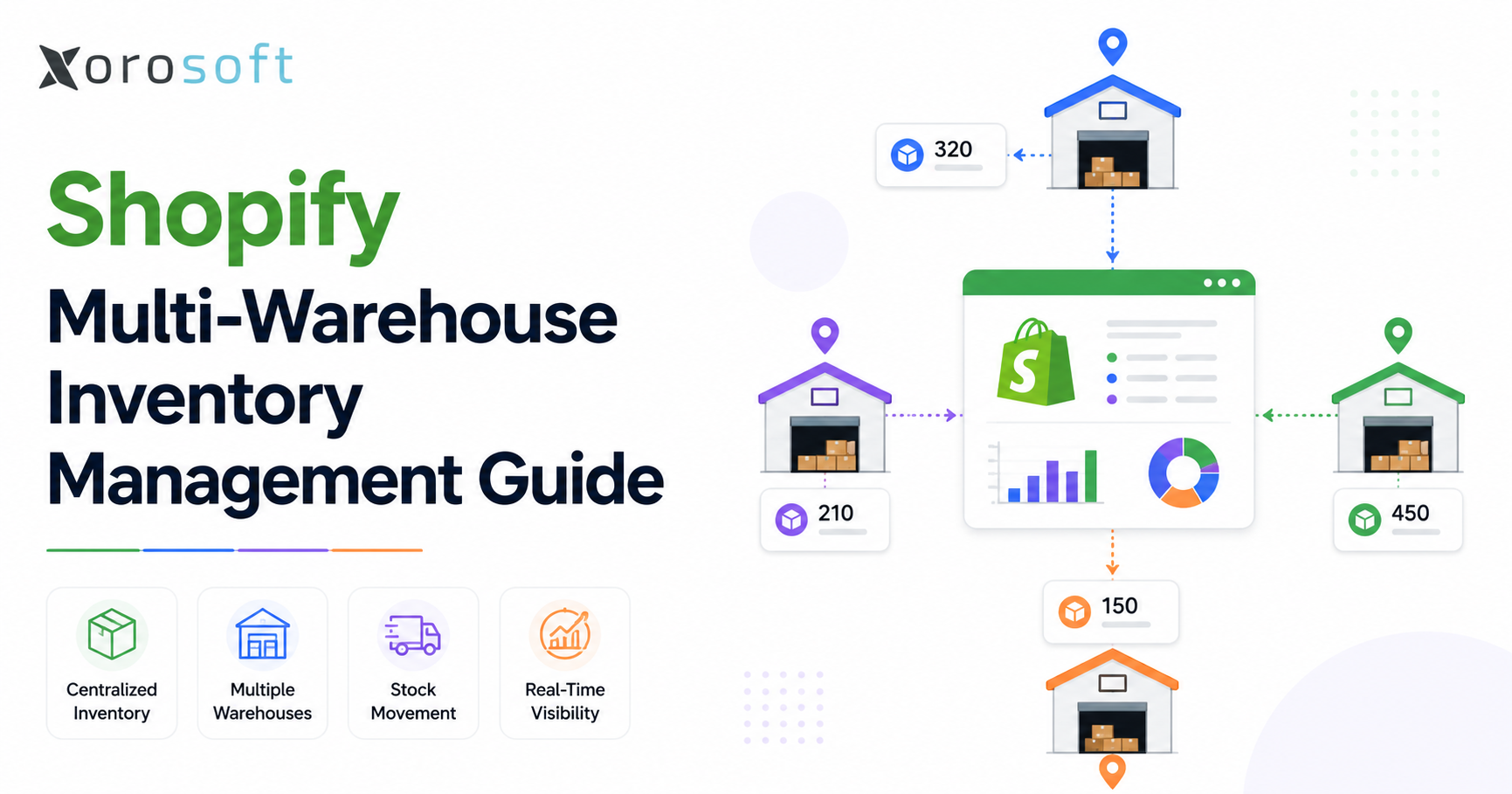
Managing your Shopify warehouse inventory efficiently is essential for any online business looking to streamline operations and ensure timely order fulfillment.
1. Why Shopify Warehouse Inventory Gets Harder Beyond One Location
Shopify warehouse inventory becomes much harder to manage when a growing brand moves beyond one stockroom, one fulfillment team, and one simple stock count. In the early stage, the process feels manageable. Products arrive, someone updates quantities, orders ship, and the team fixes exceptions manually. However, as soon as the business adds a second warehouse, retail location, 3PL, wholesale channel, Amazon operation, or EDI workflow, inventory becomes a connected operating problem rather than a basic ecommerce setting.
The challenge is not only knowing how many units exist. Operators also need to know where each SKU sits, which quantity is available to sell, which inventory is already committed to orders, which units are unavailable, and which location should fulfill each order. In addition, they need to understand how inventory movement affects purchasing, accounting, forecasting, customer promises, and warehouse labor.
Shopify gives merchants a useful foundation because locations represent places where teams store products, fulfill orders, or stock inventory, including warehouses, retail stores, pop-ups, dropshipping apps, and third-party logistics services. After merchants add locations, they can assign inventory to those locations and configure fulfillment logic.
Still, the platform setup is only one part of the work. Multi-location stock control requires rules, ownership, clean data, and disciplined execution. Otherwise, brands start seeing familiar problems: overselling, delayed fulfillment, poor stock visibility, reactive purchasing, transfer confusion, and month-end reconciliation pressure.
Shopify warehouse inventory also becomes harder because every location creates its own version of availability, fulfillment priority, and replenishment risk. Therefore, growing teams need more than a location list. They need an operating model that explains how stock should move, who owns each workflow, and which system should be trusted.
1.1 When One Stockroom Stops Being Enough
In the beginning, one stockroom keeps everything simple. The same team receives products, stores inventory, picks orders, packs shipments, and updates stock. Because everything happens in one place, visibility is easier to maintain.
However, a multi-location model changes the workflow. One warehouse may fulfill ecommerce orders. Another may support wholesale. A retail store may handle POS and local pickup. Meanwhile, a 3PL may ship regional orders, and Amazon may require separate inventory planning.
As a result, the business can no longer rely on one total stock number. A SKU may have 800 units across the company, but that number is incomplete. Operators need to know whether those units are available, committed, damaged, in transit, reserved for wholesale, or sitting in the wrong region.
1.2 Why Shopify Multi-Location Inventory Control Becomes Critical
Location-level control helps teams make better fulfillment and purchasing decisions. For example, a product may be available in the West Coast warehouse but out of stock in the East Coast warehouse. When the system only shows total inventory, teams may assume there is no issue. However, customers in the East may experience slower delivery or higher shipping cost.
Therefore, teams should manage Shopify multi-location inventory by location, not only by SKU. Every warehouse needs a clear role. Fulfillment points need accurate stock, while transfers need clear accountability. More importantly, each team should understand which system acts as the source of truth.
1.3 The Cost of Poor Visibility Across Operations
Poor inventory visibility rarely stays inside the warehouse. Instead, it affects customer service, purchasing, finance, and leadership reporting.
When inventory is inaccurate, customers buy products that are not truly available. Because of that, customer service teams must explain delays or substitutions. When replenishment is late, buyers rush purchase orders and pay higher freight costs. Meanwhile, finance teams struggle to reconcile physical inventory with accounting records.
Eventually, the business starts running on spreadsheets. That usually means Shopify is still processing orders, but the operation is being controlled somewhere else. Once this happens, Shopify warehouse inventory numbers lose credibility across the business.
2. What Shopify Multi-Location Inventory Control Actually Means
Multi-location stock control is the process of tracking, managing, replenishing, and fulfilling inventory across more than one Shopify-connected location. These locations may include warehouses, retail stores, pop-ups, 3PLs, dropshippers, or fulfillment services.
In practical terms, it means every SKU has a location-level stock position. The team can see what exists, what can be sold, what is already reserved, what is unavailable, and what needs to move next.
For growing brands, this is where Shopify warehouse inventory becomes a strategic discipline. It connects storefront availability with warehouse execution, purchasing decisions, and financial accuracy.
2.1 Shopify Warehouse Inventory: A Simple Operator Definition
Shopify warehouse inventory refers to the stock a Shopify brand stores, tracks, moves, and fulfills through warehouse or fulfillment locations. When the brand has more than one location, the process must answer five questions:
| Operational Question | Why It Matters |
|---|---|
| Where is the stock? | Prevents fulfillment confusion |
| What is available to sell? | Reduces overselling |
| Which location should ship? | Improves delivery speed and cost control |
| When should stock be replenished? | Reduces stockouts and overstock |
| How does inventory affect finance? | Improves margin and month-end reporting |
Because these questions affect multiple teams, inventory can no longer be treated as a warehouse-only issue.
2.2 How Locations Shape Fulfillment Decisions
Shopify locations create the operational map for inventory. A location may be a physical warehouse, store, 3PL, or fulfillment partner. Shopify allows merchants to assign products to warehouse and fulfillment service locations and then manage quantities by location.
This matters because each location may have a different purpose. For example, a main warehouse may hold full inventory depth. Regional facilities can reduce shipping time. Retail stores often support local pickup, while a 3PL can manage overflow or international fulfillment.
Consequently, location setup should reflect real operations. If the system setup does not match how the business actually ships, transfers, and replenishes stock, the data will become unreliable. Because of that, Shopify warehouse inventory should be reviewed by location, not only by total company-wide quantity.
2.3 Why Total Stock Numbers Can Mislead Teams
Total stock can look healthy while the operation is still at risk. For example, a brand may have 1,000 units of a product across all locations. However, if 600 units are in the wrong warehouse, 200 are committed to orders, and 50 are unavailable, only 150 units may be truly useful for upcoming demand.
In other words, total inventory is not the same as usable inventory. Therefore, operators should review stock by location, status, channel, and expected demand.
3. Core Shopify Inventory States Every Operator Should Understand
Stock states are essential because not all physical inventory is sellable. Shopify defines on-hand inventory as the total number of units at a location, and that total includes committed, unavailable, and available inventory.
This distinction is especially important for multi-warehouse brands. If the team treats all on-hand stock as sellable, overselling becomes likely. In addition, purchasing teams may delay reorders because inventory appears stronger than it really is.
3.1 On-Hand Quantity
On-hand quantity is the total inventory at a location. It represents the physical or system-recorded quantity assigned to that location.
However, on-hand stock is not always available for sale. Some units may already be reserved for orders. Others may be damaged, under review, or blocked for another reason. Therefore, operators should use on-hand inventory as a starting point, not the final decision-making number.
3.2 Sellable Quantity
Sellable quantity is the inventory customers can actually buy. In Shopify, this is usually represented as available inventory.
For example, if a warehouse has 500 units on hand and 120 units are committed to open orders, the sellable quantity is lower than the physical count. Because of this, available stock is often more useful than total stock for fulfillment and replenishment decisions.
For growing brands, Shopify warehouse inventory accuracy depends on understanding the difference between physical stock and sellable stock.
3.3 Reserved Quantity
Reserved quantity refers to inventory already tied to demand. It may be committed to open orders, held for wholesale accounts, or set aside for a specific channel.
This matters because reserved inventory protects customer promises. Without reservation logic, DTC orders may consume stock intended for wholesale, Amazon, or retail commitments. As a result, the business may meet one demand source while failing another.
3.4 Unavailable or Held Quantity
Unavailable inventory includes stock that exists but teams cannot sell yet. Shopify’s inventory page columns define unavailable inventory as on-hand inventory that is not available for sale, while committed inventory is reserved for orders.
Unavailable stock can include damaged goods, quality control holds, draft order reservations, safety stock, or other blocked inventory. Therefore, warehouse teams should use clear reason codes when moving stock into unavailable status.
3.5 Stock Status Table for Daily Operations
| Stock State | Meaning | Operational Impact | Common Mistake |
| On-hand | Total quantity at a location | Shows physical stock position | Treating all on-hand units as sellable |
| Available | Quantity ready to sell | Drives customer-facing availability | Ignoring location-level availability |
| Committed | Quantity reserved for orders | Reduces sellable stock | Forgetting open orders during buying |
| Unavailable | Quantity blocked from sale | Protects damaged, held, or QC stock | Leaving unavailable items in sellable stock |
4. Shopify Order Routing Across Multiple Fulfillment Points
Order routing determines which location should fulfill an order. In a single-location business, routing is simple. However, once a brand has multiple warehouses, routing becomes a major operational decision.
Shopify order routing can automatically assign orders to fulfillment locations based on configured rules. Shopify applies routing rules in sequence so merchants can prioritize fulfillment locations and reduce manual routing decisions.
4.1 How Routing Connects Availability and Delivery
Routing connects stock availability with customer delivery. If an order comes in, the system must decide where that order should ship from.
At first, the answer may seem obvious: ship from the location with stock. However, that is not always the best choice. One warehouse may be closer to the customer. Another may have more labor capacity. A third may need to protect inventory for wholesale orders.
Therefore, routing should consider availability, location priority, shipping cost, delivery promise, and channel rules. This is why Shopify warehouse inventory data must be accurate before order routing rules can work properly.
4.2 Common Routing Rules Used by Growing Brands
Common routing rules include:
| Routing Rule | Purpose |
| Ship from closest location | Reduces delivery time and shipping cost |
| Prioritize primary warehouse | Keeps fulfillment centralized |
| Minimize split fulfillment | Reduces shipment complexity |
| Protect specific locations | Preserves stock for strategic use |
| Route by customer type | Supports wholesale or VIP customers |
Because routing affects cost and customer experience, operators should review rules regularly rather than leaving them untouched after setup.
4.3 Allocation Rules That Protect Key Channels
Allocation rules reserve inventory for specific channels, customers, or business priorities. This becomes important when Shopify, Amazon, wholesale, retail, and EDI orders compete for the same stock.
For example, a wholesale customer may need 600 units next week. If DTC orders consume that stock today, the company may miss a larger commitment. On the other hand, if too much inventory is reserved for wholesale, ecommerce revenue may suffer.
Because of this, allocation should be intentional. Teams should define which inventory is available to each channel and when exceptions are allowed.
4.4 When Routing Becomes a Strategic Decision
As operations grow, routing becomes more than a fulfillment setting. It becomes a margin and service-level decision.
For example, shipping from the closest warehouse may reduce freight cost. However, shipping from a better-stocked warehouse may protect future availability. Similarly, splitting an order may speed delivery but increase packing and shipping cost.
Therefore, mature brands review routing rules alongside inventory availability, customer priority, shipping cost, and replenishment planning.
5. Shopify Warehouse Inventory Transfers, Replenishment, and Stock Movement
Transfers and replenishment keep inventory in the right place. Without them, one warehouse may run out while another sits on excess stock.
For that reason, teams should plan stock movement instead of reacting after shortages appear. Transfers should support demand, not only fix emergencies. In practical terms, Shopify warehouse inventory becomes easier to control when transfers, purchase orders, receiving, and replenishment all follow one documented workflow.
5.1 Moving Products Between Locations
Teams use inventory transfers to move stock from one location to another. During a system transition or operational cleanup, merchants should review how they move inventory across locations, receive purchase orders, adjust quantities, and report on inventory history.
Teams may use a transfer to move inventory from a central warehouse to a regional warehouse, from a supplier receiving location to a store, or from an overstocked location to one with higher demand.
However, every transfer needs an owner, expected date, receiving process, and variance review. Without that ownership, stock can disappear between systems and teams.
5.2 Replenishment Planning by Demand Signals
Replenishment decides when and how much stock each location needs. A strong replenishment model uses demand signals rather than guesswork.
Important inputs include:
| Replenishment Input | Why It Matters |
| Sales velocity | Shows how quickly inventory moves |
| Supplier lead time | Helps determine reorder timing |
| Transfer time | Shows how long stock movement takes |
| Safety stock | Protects against demand spikes |
| Seasonality | Prepares the business for predictable peaks |
| Warehouse demand | Prevents regional stockouts |
In many cases, growing teams make the mistake of replenishing based on total company stock. Instead, replenishment should happen by SKU, location, channel, and forecasted demand. A strong Shopify warehouse inventory process uses these signals before stockouts happen, not after customers are already waiting.
5.3 Purchase Order Workflows That Need Control
Purchase order workflows often expose the limits of basic inventory processes. Buyers may use spreadsheets. Warehouse teams may receive products manually. Finance may only see the cost impact later.
As a result, purchasing, receiving, and accounting become disconnected. This creates problems with expected arrival dates, supplier performance, inventory valuation, and cash planning.
A better workflow connects purchase orders with supplier lead times, receiving, landed cost, inventory availability, and accounting. Therefore, purchasing should be part of inventory strategy, not a separate spreadsheet process.
5.4 Transfer Accountability and Variance Tracking
Transfer variance happens when shipped quantities do not match received quantities. For example, one warehouse may ship 100 units, but the destination warehouse receives 96.
This gap may come from picking errors, packing mistakes, damage, shrinkage, receiving issues, or timing differences. However, if variance is ignored, inventory accuracy declines quietly.
Therefore, teams should track transfer variance by SKU, location, employee workflow, and reason code.
6. Shopify WMS Workflows for Warehouse Inventory Accuracy
Warehouse execution determines whether system inventory can be trusted. Even if Shopify is configured correctly, poor warehouse habits can still create inaccurate stock.
Because of this, fulfillment centers need repeatable workflows for receiving, putaway, picking, packing, cycle counting, and adjustments. Without warehouse discipline, Shopify warehouse inventory will never fully reflect physical reality.
6.1 Receiving and Putaway Standards
Receiving is the first point where inventory accuracy can improve or break. If the wrong quantity is received, every downstream workflow becomes unreliable.
A strong receiving process verifies SKU, quantity, purchase order, condition, and destination location. After that, putaway should assign products to the correct bin, zone, shelf, or warehouse area.
In addition, teams should separate damaged, held, or quality-control stock from sellable inventory immediately.
6.2 Pick-Pack-Ship Accuracy
Picking and packing errors create customer problems and inventory mismatches. Therefore, warehouse teams need clear pick lists, barcode scanning, packing verification, and exception handling.
A warehouse management system for ecommerce operations can help when teams need barcode scanning, bin control, picking workflows, packing checks, and cycle count discipline.
However, software alone will not fix weak processes. The team still needs clear rules for substitutions, partial shipments, damaged items, and order exceptions. When pick-pack-ship workflows are standardized, Shopify warehouse inventory becomes easier to trust across every fulfillment point.
6.3 Cycle Counting for Reliable Records
Cycle counting means counting selected SKUs regularly instead of waiting for a full physical inventory count. High-value, fast-moving, and error-prone products should be counted more often.
This approach helps teams find issues early. In addition, it reduces the disruption of full warehouse counts. Over time, cycle counting improves trust between physical inventory and system records.
6.4 Adjustment Rules and Approval Controls
Teams should not treat inventory adjustments as casual edits. They affect customer availability, purchasing, reporting, and finance.
Therefore, adjustment workflows need reason codes. Common reasons include damage, shrinkage, receiving correction, cycle count variance, customer return, and quality control hold.
More importantly, managers should approve larger adjustments. This protects inventory integrity and gives leadership better visibility into recurring problems.
7. Where Shopify Inventory Management Tools Work Well
Native Shopify inventory tools can work well for many merchants, especially when operations are still simple. The important question is not whether Shopify can track inventory. It can. The better question is whether native workflows are enough for the company’s operational complexity.
7.1 Simple Shopify Inventory Locations with Clean Roles
Native tools often work well when the brand has a simple network. For example, one main warehouse and one retail store can be manageable when the team defines each location clearly.
Ecommerce orders may flow from the main warehouse. Meanwhile, the retail store can support POS and local pickup. Because each location has a defined purpose, the team can maintain clean inventory records without heavy system complexity.
7.2 Small Catalogs and Manageable Order Volume
A small SKU count makes inventory easier to control. If order volume is also manageable, teams may not need advanced ERP or WMS features immediately.
However, the team should still document receiving, transfer, adjustment, and cycle count rules. Otherwise, small errors can become larger problems as the catalog grows.
7.3 When Manual Reconciliation Is Still Practical
Some brands can still reconcile inventory manually. If finance can match purchases, receipts, adjustments, and inventory value without major delays, native tools can work.
However, once month-end close depends on multiple spreadsheets, warehouse apps, QuickBooks files, and Shopify exports, the business should review whether its system stack is still practical.
8. Where Shopify Warehouse Inventory Gets Complicated
Shopify warehouse inventory becomes complicated when inventory touches too many workflows for one team to manage manually. This usually happens when the business adds more channels, more warehouses, more suppliers, more SKUs, or more financial reporting needs.
8.1 Shopify Multi-Channel Inventory Creates Allocation Pressure
A growing brand may sell through Shopify, Amazon, wholesale, retail, and EDI. Each channel behaves differently. DTC orders may be frequent and fast. Wholesale orders may be larger and planned. Amazon may require separate replenishment. EDI orders may come with strict requirements.
As a result, channels can compete for the same inventory. Without allocation rules, one channel may consume stock intended for another.
8.2 Shopify Inventory Forecasting Must Happen by Location
Forecasting total demand is useful, but it is not enough. A product may sell quickly in one region and slowly in another. A warehouse may need higher safety stock because supplier lead times are longer. Another location may need less stock because it supports overflow only.
Therefore, forecasting should include sales velocity, warehouse demand, seasonality, supplier lead time, transfer time, and channel commitments.
8.3 Accounting Needs Reliable Stock Data
Inventory is both an operational asset and a financial asset. If receiving, transfers, adjustments, landed cost, and COGS are disconnected, finance teams cannot rely on inventory reports.
This creates month-end pressure. Meanwhile, leadership may struggle to understand true margin, stock value, and cash tied up in inventory. In this situation, Shopify warehouse inventory is no longer just an operations issue; it becomes a finance and reporting issue as well.
8.4 Reporting Requires One Source of Truth
Useful inventory reports include stock by location, available quantity, committed quantity, unavailable quantity, transfer history, stockout risk, replenishment needs, aged inventory, and inventory valuation.
However, if reports come from separate systems, teams spend more time reconciling data than making decisions. Consequently, the business needs one trusted operating view.
9. Shopify Inventory Apps, WMS, and ERP: Choosing the Right System
Not every brand needs the same system. However, every growing brand needs to understand where its current system stops solving the problem.
Operators should choose based on operational complexity, warehouse volume, accounting needs, purchasing maturity, and growth plans.
9.1 When a Stock Sync App Is Enough
Inventory apps can work well when the main problem is stock synchronization. They may help update quantities across channels, create reorder alerts, and improve basic visibility.
However, they may not solve warehouse execution, accounting reconciliation, landed cost, manufacturing, EDI, or purchasing approval workflows. Therefore, they are useful for a specific stage, but they are not always enough for inventory-driven businesses.
9.2 When a WMS Becomes Necessary
Teams may need a WMS when the warehouse becomes the main bottleneck. Signs include picking errors, slow packing, poor bin control, barcode scanning needs, and inaccurate cycle counts.
In this situation, the goal is physical execution accuracy. The warehouse needs better receiving, putaway, picking, packing, shipping, and count workflows.
9.3 When Shopify ERP Inventory Management Becomes the Better Fit
ERP becomes relevant when teams need inventory to connect with purchasing, accounting, forecasting, warehouse management, manufacturing, reporting, Amazon, wholesale, and EDI.
For example, ERP for Shopify inventory management can help when a brand needs one operational system behind Shopify. Xorosoft is one example of a cloud ERP built for inventory-driven businesses that need inventory, purchasing, accounting, warehouse management, forecasting, ecommerce operations, and reporting connected in one environment.
9.4 System Comparison for Growing Brands
| System Type | Best For | Strengths | Limitations | Upgrade Trigger |
| Native Shopify tools | Simple operations | Built-in location tracking | Limited advanced warehouse and accounting control | Manual work increases |
| Inventory app | Stock sync | Faster setup and focused features | May not solve finance or warehouse execution | Spreadsheets still fill gaps |
| WMS | Warehouse execution | Picking, packing, scanning, bin control | Usually not full accounting or purchasing | Warehouse errors increase |
| ERP | Connected operations | Inventory, purchasing, accounting, WMS, forecasting | Requires process planning | Teams need one source of truth |
10. Warning Signs Your Shopify Inventory Tools Are No Longer Enough
A brand does not need stronger software just because it has more revenue. Instead, it needs stronger systems when operational complexity creates errors, delays, and poor decisions.
10.1 Spreadsheets Become the Real Operating System
Spreadsheets are often the first warning sign. One file tracks purchase orders. Another tracks transfers. A third tracks stockouts. Finance keeps a reconciliation file. Meanwhile, warehouse teams update counts after fulfillment.
At first, this feels flexible. Eventually, it becomes risky. No one knows which file is current. Updates are delayed. Formula errors spread. As a result, the team spends more time checking data than acting on it.
At this stage, a cloud ERP for inventory-driven businesses may become relevant because the business needs inventory, purchasing, accounting, warehouse management, forecasting, and reporting in one system.
10.2 Numbers Differ Across Platforms
If Shopify shows one number, QuickBooks shows another, the warehouse app shows a third, and Amazon shows a fourth, the team no longer has a trusted source of truth.
Consequently, every decision slows down. Customer service waits for warehouse confirmation. Buyers hesitate before placing purchase orders. Finance questions inventory valuation. Leadership loses confidence in reports. Once teams stop trusting Shopify warehouse inventory numbers, every department starts creating its own workaround.
10.3 Shopify Inventory Purchasing Turns Reactive
Reactive purchasing creates stockouts, overstock, emergency buying, and rush freight. Buyers reorder after problems appear instead of planning ahead.
Therefore, purchasing should be driven by demand, lead time, supplier reliability, safety stock, and warehouse-level availability. This creates better cash control and fewer fulfillment surprises.
10.4 Finance Struggles with Reconciliation
Accounting problems often reveal inventory problems. If finance cannot trust inventory value, COGS, landed cost, or receiving data, month-end close becomes difficult.
More importantly, leadership may not know which products are truly profitable. Because of that, inventory accuracy becomes a financial discipline, not only a warehouse metric.
11. Building a Scalable Shopify Inventory Management Workflow
A scalable workflow starts with process design. Software helps, but only when the operating rules are clear.
Before selecting a new system, teams should define how inventory should move, who owns each step, and which platform holds the source of truth.
11.1 Define the Role of Each Shopify Inventory Location
Each location should have a clear purpose. A primary warehouse may handle most ecommerce fulfillment. A regional warehouse may reduce delivery time. A retail location may support POS and pickup. A 3PL may handle overflow or specific geographies.
Once these roles are defined, order routing and replenishment become easier to manage.
11.2 Standardize SKU, Barcode, and Receiving Rules
Standardization protects inventory accuracy. Teams should document SKU naming, barcode rules, receiving steps, putaway logic, transfer approvals, adjustment reasons, and cycle count schedules.
In addition, warehouses should use the same definitions for available, committed, unavailable, damaged, reserved, and in-transit stock. Otherwise, reports will mean different things to different teams.
11.3 Connect Demand Planning with Lead Times
Demand planning should include sales velocity, supplier lead time, transfer time, safety stock, seasonality, and channel commitments.
For example, a fast-moving SKU may need different reorder points in different warehouses. Similarly, a slow-moving product may still require safety stock in a region with long transfer times.
Therefore, replenishment should happen by location rather than company-wide totals only.
11.4 Align Operations, Purchasing, and Finance
The strongest inventory workflows connect physical movement with financial impact.
When teams receive goods, purchase orders should update. As stock moves, location value should remain accurate. Once orders ship, the system should record COGS correctly. If inventory changes, finance should see the reason.
ERP platforms such as Xorosoft help connect Shopify, warehouse activity, purchasing, accounting, forecasting, and reporting so teams are not forced to work from disconnected files. That connection is what turns Shopify warehouse inventory from a static stock count into a reliable operating system.
12. Industry Use Cases for Shopify Multi-Location Inventory
Different industries experience inventory complexity in different ways. Therefore, the right workflow should match the operating model, not only the ecommerce platform.
12.1 Apparel and Fashion
Apparel brands manage size, color, style, seasonality, returns, exchanges, and product drops. A warehouse may have enough total units but the wrong size curve.
As a result, variant-level visibility is essential. Allocation also matters because DTC, retail, and wholesale may compete for the same styles.
12.2 Furniture and Large-Item Fulfillment
Furniture brands deal with bulky items, long lead times, regional delivery, and high freight costs. Inventory placement directly affects delivery speed and margin.
Therefore, regional warehouse planning can be valuable. However, it also requires better location-level reporting and transfer control.
12.3 Sporting Goods and Seasonal Demand
Sporting goods brands often face seasonal or event-driven demand. A product may spike during a sports season, holiday, or regional event.
Because of this, warehouse-level forecasting helps teams place stock closer to demand before peak season arrives.
12.4 Food and Beverage Controls
Food and beverage brands may need FIFO workflows, lot control, expiry tracking, quality holds, and tighter receiving discipline.
In this case, sellable inventory must consider freshness and compliance, not only quantity. Therefore, unavailable and held stock states become especially important.
12.5 Wholesale Distribution
Wholesale brands manage bulk orders, customer-specific pricing, EDI, allocation, and larger replenishment cycles. When the same inventory supports Shopify and B2B customers, channel rules become essential.
Brands in apparel, furniture, sporting goods, wholesale, food, and manufacturing can review ERP for inventory-driven industries when disconnected tools no longer support the operational model.
12.6 Manufacturing and Finished Goods
Manufacturing adds raw materials, BOMs, work orders, production planning, and finished goods. Therefore, inventory management must cover both components and sellable products.
Xorosoft supports inventory-driven manufacturing workflows alongside Shopify, warehouse management, purchasing, accounting, and reporting.
13. Stocky Migration and Shopify Inventory Planning for 2026
Shopify states that Stocky will not be available after August 31, 2026. After that date, merchants need to manage inventory in Shopify admin and Shopify POS.
For many brands, this is not just an app change. It is a chance to review how inventory, purchasing, transfers, stocktakes, and reporting should work going forward.
13.1 Why the Transition Requires Process Review
A Stocky transition should begin with workflow mapping. Teams should review supplier records, purchase order history, transfer processes, stocktakes, adjustment reasons, barcode routines, and reporting requirements.
If current workflows are simple, Shopify admin may be enough. However, if the business manages multiple warehouses, wholesale, Amazon, EDI, forecasting, accounting, or manufacturing, it may need a deeper operating system.
13.2 When to Evaluate ERP During Migration
The Stocky planning window is a natural time to evaluate ERP because purchasing, receiving, inventory control, and reporting are already being reviewed.
ERP platforms such as Xorosoft may fit brands that need purchasing automation, accounting integration, forecasting, warehouse control, manufacturing, Shopify, Amazon, and EDI in one system. Merchants can also review Xorosoft ERP on the Shopify App Store when evaluating Shopify-connected ERP options.
13.3 How to Avoid a Last-Minute System Change
Waiting too long creates risk. Teams may rush data exports, miss process gaps, or move broken workflows into a new system.
Instead, operators should define the future workflow first. After that, they can choose whether Shopify native tools, an inventory app, WMS, ERP, or a combined approach is the right fit.
14. Comparing Shopify Inventory Software Options for Growing Brands
Choosing the right system requires a clear view of operational needs. The best option depends on warehouse volume, channel mix, accounting requirements, purchasing maturity, reporting needs, and implementation capacity.
14.1 Shopify Inventory Tools vs Apps vs WMS vs ERP
| Option | Typical Buyer | Best Fit | Complexity Level |
| Native Shopify tools | Small to mid-sized merchants | Basic location tracking | Low |
| Inventory app | Brands needing stock sync | Multi-channel quantity updates | Low to medium |
| WMS | Brands with warehouse execution issues | Picking, packing, scanning | Medium |
| ERP | Inventory-driven businesses | Inventory, accounting, purchasing, forecasting | Medium to high |
This table should not be used as a rigid rule. Instead, it should help operators match system depth to operational pain.
14.2 ERP Comparisons Should Focus on Fit
Growing brands may compare Xorosoft with NetSuite, Acumatica, Cin7, Brightpearl, Fishbowl, Sage, or Business Central. However, the goal is not to choose the largest platform. Instead, the goal is to choose the system that fits the company’s workflow, budget, implementation readiness, and long-term growth.
Brands evaluating larger ERP systems can review Xorosoft as a modern ERP alternative to NetSuite when comparing implementation complexity, inventory-driven workflows, and operational fit.
14.3 Questions to Ask Before Selecting Software
Before selecting software, operators should ask practical questions:
| Question | Why It Matters |
| Can the system track stock by location? | Supports operational visibility |
| Can it manage purchasing? | Improves replenishment planning |
| Can it support barcode workflows? | Improves warehouse accuracy |
| Can it connect accounting? | Reduces reconciliation issues |
| Can it handle Shopify, Amazon, wholesale, and EDI? | Supports multi-channel growth |
| Can it forecast by SKU and location? | Improves buying decisions |
| Can the team implement it realistically? | Reduces project risk |
As a result, the selection process becomes more grounded. The team evaluates workflows instead of buying software based on feature lists alone.
15. FAQ: Shopify Warehouse Inventory
15.1 What is Shopify warehouse inventory?
Shopify warehouse inventory is the stock a Shopify merchant stores, tracks, replenishes, and fulfills through warehouse or fulfillment locations. In a multi-location operation, it includes available stock, committed stock, unavailable stock, transfers, replenishment, order routing, and warehouse execution. The goal is to keep inventory accurate enough for customers, warehouse teams, purchasing, and finance.
15.2 Does Shopify support multiple warehouse inventory locations?
Yes, Shopify supports multiple inventory locations. These locations can include warehouses, stores, pop-ups, dropshippers, and fulfillment services. However, brands still need clear processes for receiving, transfers, replenishment, order routing, and reporting. Otherwise, multiple locations can create confusion even when the platform setup is technically correct.
15.3 How does Shopify track stock by location?
Shopify can track inventory separately by location when products are assigned to multiple locations. This helps merchants see how much stock is available in each warehouse or store. However, operators should still define location roles, routing rules, and transfer processes so the system reflects real fulfillment behavior.
15.4 What are inventory locations?
Inventory locations are places where stock is stored, managed, or fulfilled. They can include warehouses, retail stores, 3PLs, pop-ups, and fulfillment partners. In a growing operation, each location should have a clear purpose so routing, replenishment, and reporting stay accurate.
15.5 What is the difference between on-hand and available stock?
On-hand stock is the total quantity at a location. Available stock is the portion that can be sold. Some on-hand inventory may already be committed to open orders or unavailable because it is damaged, reserved, or under quality review. Therefore, available stock is usually more useful for customer-facing decisions.
15.6 What does committed stock mean?
Committed stock is inventory reserved for open orders. It has not necessarily shipped yet, but it should not be treated as available. Purchasing teams should account for committed quantities when reviewing reorder needs because committed inventory reduces future sellable stock.
15.7 What does unavailable stock mean?
Unavailable stock includes inventory that exists but teams cannot currently sell. It may be damaged, held for quality control, reserved, or blocked for another reason. Tracking unavailable stock helps prevent overselling and gives warehouse teams a cleaner view of what they can actually use.
15.8 How does Shopify order routing work?
Order routing determines which location should fulfill an order. It can consider available inventory, location priority, proximity, and other routing rules. In a multi-warehouse environment, routing should also consider shipping cost, delivery promise, channel allocation, and future replenishment needs.
15.9 Can overselling be prevented?
Teams can reduce overselling with accurate location-level inventory, proper stock states, channel synchronization, allocation rules, and disciplined warehouse workflows. However, larger brands may need WMS or ERP support when orders, locations, and channels become too complex for manual control.
15.10 When should a brand use a WMS?
A brand should consider WMS when warehouse execution becomes the main issue. Signs include picking errors, bin confusion, slow packing, barcode scanning needs, inaccurate cycle counts, and frequent inventory adjustments. A WMS improves physical inventory control inside the fulfillment center.
15.11 When should a brand use ERP?
A brand should consider ERP when inventory connects deeply with purchasing, accounting, forecasting, manufacturing, warehouse management, Amazon, wholesale, EDI, or reporting. ERP helps create one operational source of truth across teams instead of forcing the business to rely on spreadsheets and disconnected apps.
15.12 What is the difference between WMS and ERP?
A WMS focuses on warehouse execution, such as receiving, picking, packing, scanning, bins, and cycle counts. By contrast, ERP manages broader business operations, including inventory, purchasing, accounting, forecasting, manufacturing, reporting, and ecommerce workflows. As brands grow, many need both warehouse accuracy and financial visibility.
15.13 Can purchase orders be managed?
Teams can manage purchase orders in simple or advanced ways depending on business complexity. Growing brands often need supplier lead times, approvals, receiving workflows, landed cost, expected arrival dates, and accounting integration. If purchase orders live in spreadsheets, replenishment and finance can become disconnected.
15.14 Can forecasting be handled?
Teams can handle basic forecasting with sales and inventory data, but advanced forecasting usually requires deeper planning tools or ERP. Multi-location forecasting should consider sales velocity, seasonality, supplier lead time, transfer time, safety stock, and warehouse-level demand.
15.15 How do brands manage Amazon stock?
Brands selling on Shopify and Amazon need channel allocation and inventory synchronization. Without clear rules, both channels may compete for the same stock. Therefore, operators should decide how much inventory belongs to Shopify, Amazon, wholesale, and safety stock before demand spikes.
15.16 How do wholesale orders affect availability?
Wholesale orders can reserve large quantities and reduce availability for DTC customers. Because of this, brands should use allocation rules for major wholesale customers, EDI commitments, and future ship dates. Otherwise, ecommerce orders may consume inventory needed for B2B accounts.
15.17 What Shopify inventory reports are needed?
Important reports include inventory by location, available stock, committed stock, unavailable stock, transfer history, stockout risk, replenishment needs, aged inventory, inventory valuation, cycle count variance, and warehouse performance. With these reports, operations, purchasing, finance, and leadership can make better decisions from the same data.
15.18 When are native tools enough?
Native tools can work when the brand has simple fulfillment, limited locations, manageable SKU complexity, and basic reporting needs. However, once purchasing, warehouse execution, accounting, forecasting, and multi-channel allocation become complex, additional systems may be needed.
16. Practical Takeaway: Build a Shopify Inventory System the Team Can Trust
Shopify can be a strong ecommerce engine. However, growing inventory-driven brands need a reliable operating system behind the storefront. Multi-location stock control requires accurate location data, disciplined warehouse workflows, replenishment planning, purchasing control, and accounting alignment.
The long-term goal is simple: Shopify warehouse inventory should be accurate enough for warehouse teams, finance teams, buyers, and leadership to make decisions from the same data.
Therefore, the smartest next step is not always buying software immediately. First, map the current workflow. Next, define each location’s role. Then clean up SKU and barcode rules, standardize receiving and transfers, review inventory states, and identify where spreadsheets are filling system gaps. After that, decide whether native tools, an inventory app, WMS, ERP, or a combined approach fits the business.
For brands managing Shopify, Amazon, wholesale, EDI, purchasing, warehouse operations, accounting, manufacturing, and forecasting, ERP platforms such as Xorosoft can help connect the full operation. Rather than adding another disconnected tool, the goal is to create one system that warehouse, finance, purchasing, and leadership teams can trust.
If your team is dealing with multi-warehouse complexity, inventory discrepancies, spreadsheet purchasing, delayed reporting, or disconnected systems, you can book a personalized ERP demo to review what a connected workflow could look like.
Recent Posts
-
 ERP Landed Cost Module vs Spreadsheet Calculations for Importers
 -
 How to Build an Open-to-Buy Plan for an Omnichannel Brand
 -
 Cold Storage WMS for Food and Beverage Distribution
 -
 ERP Buying Statistics 2026: Evaluation, Implementation, and Adoption Risks
 -
 How a Distributor Reduced B2B Order Exceptions Without Restricting Sales