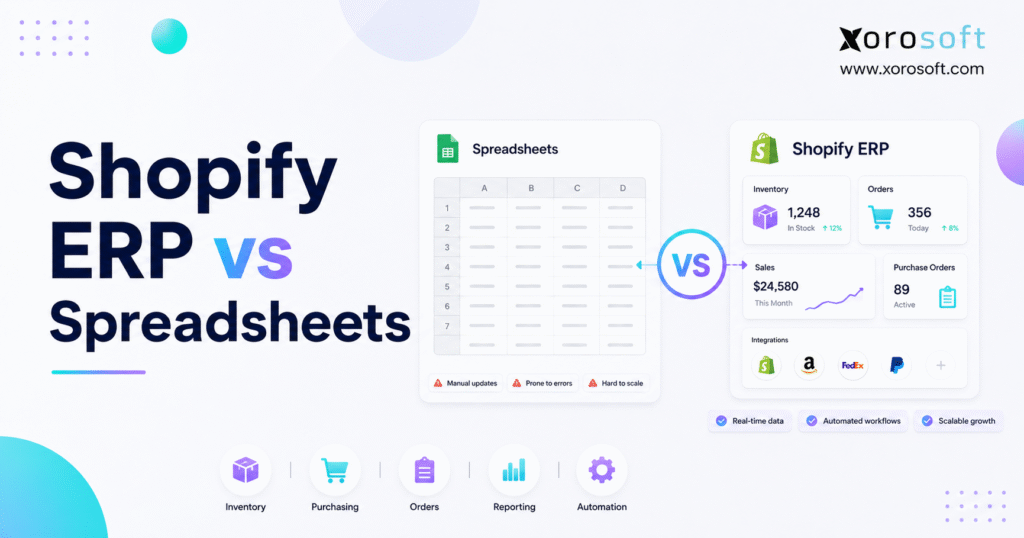
If you’re considering Shopify ERP vs spreadsheets for managing your online store, it’s important to understand the advantages and trade-offs of each solution.
1. The Real Operations Question Behind Shopify ERP vs Spreadsheets
Shopify ERP vs spreadsheets becomes a serious question when a growing Shopify brand can no longer trust manual files for inventory, purchasing, accounting, fulfillment, and reporting. At first, spreadsheets feel flexible because the team can build simple trackers quickly. However, as order volume grows, those same trackers often turn into a fragile operating system.
Early on, a spreadsheet can track SKUs, supplier costs, reorder points, purchase orders, and stock counts. In addition, one founder or operations manager may know exactly where every number came from. Because the business is still small, manual updates feel manageable.
Eventually, growth changes the equation. More SKUs, more warehouses, more suppliers, more sales channels, and more finance requirements create more places for data to break. As a result, the comparison is no longer about Excel versus software. Instead, Shopify ERP vs spreadsheets becomes a decision about control, accuracy, and scale.
Shopify already gives merchants useful tools for products, orders, fulfillment, and inventory. For example, Shopify’s own inventory documentation explains how merchants can view and adjust inventory quantities inside Shopify admin. However, a growing business often needs a broader operating layer behind Shopify for purchasing, warehouse management, accounting, forecasting, and reporting.
1.1 Why Spreadsheets Work in the Beginning
Spreadsheets work because they are simple.
A small team can create a tab for inventory, another tab for purchase orders, another tab for suppliers, and another tab for reporting. Therefore, a young Shopify brand can move quickly without buying complex software too early.
In the early stage, that flexibility is valuable. The team can change columns, adjust formulas, export Shopify data, and build reports without waiting for implementation. Also, when order volume is low, one person can often check the numbers manually.
Still, the strength of spreadsheets is also their weakness. Because they are flexible, they often lack controls. Because they are easy to edit, they are easy to break.
1.2 Why Shopify Growth Creates Back-Office Pressure
Growth creates pressure behind the storefront.
A Shopify store may look clean on the customer side while the back office becomes messy. Meanwhile, inventory moves through purchase orders, receiving, transfers, returns, warehouse picks, Amazon orders, wholesale orders, and accounting entries. Therefore, one spreadsheet rarely stays accurate for long.
As a brand grows, teams need answers faster. Operators need to know available stock, upcoming purchase orders, fulfillment location, overstocked SKUs, and products nearing stockout. Because these questions affect cash and customer experience, delayed answers become expensive.
This is where Shopify ERP vs spreadsheets becomes a practical scaling decision.
1.3 The Real Question: Manual Tracking or Connected Operations
The real question is not whether spreadsheets are bad.
Instead, the real question is whether manual tracking can still support the business without creating risk. If the answer is yes, spreadsheets may still be fine. However, if the team constantly checks, corrects, reconciles, and rebuilds reports, the business may need connected Shopify operations software.
An ERP system connects workflows that spreadsheets usually separate. As a result, inventory, purchasing, accounting, warehouse management, fulfillment, forecasting, and reporting can work from shared operational data.
2. What Shopify Inventory Spreadsheets Can Still Handle Well
A fair Shopify ERP comparison should admit that spreadsheets are useful in the right context.
For many small brands, spreadsheets are not the problem. In fact, they are often the first step toward operational discipline. However, they work best when the business is simple, the team is small, and the data does not change too quickly.
2.1 Simple Shopify Inventory Lists
A Shopify inventory spreadsheet can track basic product data.
For example, a team may list SKU, product name, variant, supplier, cost, reorder point, quantity on hand, and quantity ordered. Because the format is familiar, the team can understand the tracker quickly.
This setup works when the catalog is small. It also works when the same person updates the file every time. However, once several people edit stock data, version control becomes a serious risk.
2.2 Basic Purchase Planning
Spreadsheets can also support early purchasing.
A buyer can track supplier names, expected arrival dates, order quantities, unit costs, deposits, and payment status. In addition, simple formulas can estimate reorder needs based on recent sales.
However, purchasing becomes harder when lead times change, partial shipments arrive, and demand moves faster than the file. Therefore, spreadsheet-based purchasing often becomes reactive as the brand grows.
2.3 Early Sales and Stock Reporting
Spreadsheets help small teams understand performance.
A Shopify export can become a simple report for sales by SKU, monthly revenue, inventory value, sell-through, and gross margin. Because the data is easy to manipulate, founders can explore the business without needing advanced reporting tools.
Even so, exports age quickly. If orders, refunds, transfers, and receipts keep moving, yesterday’s spreadsheet may not reflect today’s reality. Consequently, leaders may make decisions from outdated numbers.
2.4 Lightweight Cash Flow Tracking
Spreadsheets can support basic cash planning.
A founder may track supplier bills, inventory purchases, payroll, warehouse rent, ad spend, and expected revenue in one file. At a small scale, this gives useful visibility.
However, inventory-heavy businesses eventually need stronger links between purchasing, inventory value, landed cost, accounts payable, sales, and cost of goods sold. Otherwise, finance teams spend too much time reconciling after the fact.
3. Where Spreadsheet-Based Shopify Operations Start to Break
Spreadsheet-based Shopify operations usually break slowly.
At first, the team notices small issues. Stock numbers start looking wrong. Purchase orders miss updates. Warehouse teams may ship from the wrong location. Then, finance asks for a report that takes two days to prepare.
Individually, each issue may seem manageable. However, together they signal that the operating system has become too manual.
3.1 Version Control Problems
Version control is one of the earliest spreadsheet problems.
One person downloads a copy. Another person changes the shared version. Meanwhile, a third person edits formulas or adds columns. As a result, the business may have several versions of the truth.
This creates confusion across purchasing, warehouse, accounting, and leadership. Even worse, the team may not discover the issue until a customer order, supplier payment, or finance report exposes it.
3.2 Manual Inventory Updates
Manual inventory updates create timing gaps.
A Shopify order may reduce available stock before the spreadsheet changes. Meanwhile, a purchase order may arrive at the warehouse before the file is updated. In addition, a transfer may leave one location but not appear in another.
Because inventory changes constantly, manual updates often lag behind reality. Therefore, Shopify ERP vs spreadsheets becomes especially important when stock accuracy affects customer promises.
3.3 Delayed Purchasing Decisions
Purchasing depends on current data.
If a buyer uses an outdated spreadsheet, they may reorder too late or buy too much. As a result, the business can face stockouts on fast-moving items and overstock on slow-moving products at the same time.
This matters because inventory carrying cost includes more than product cost. Shopify’s inventory cost guidance explains that inventory costs include purchase costs, ordering costs, holding costs, and shortage costs. Therefore, poor purchasing decisions can affect both cash flow and customer experience.
3.4 Weak Accounting Visibility
Accounting becomes harder when operational data lives in separate files.
Finance needs accurate sales, refunds, purchase receipts, landed costs, adjustments, inventory valuation, and COGS. However, if those numbers sit across Shopify exports, spreadsheets, supplier invoices, warehouse notes, and accounting software, month-end close becomes cleanup work.
Consequently, spreadsheet-based operations often create delayed financial visibility. The company may still close the books, but the process takes more effort than it should.
3.5 Warehouse Execution Gaps
A warehouse team needs clear instructions, not just rows in a spreadsheet.
Receiving, putaway, picking, packing, transfers, cycle counts, and returns all need workflow control. However, spreadsheets usually show data without enforcing the process.
3.5.1 Pick List Errors
Pick list errors increase when orders rise.
A picker may use an old list, miss a variant, or select stock from the wrong bin. This is especially common for apparel, furniture, sporting goods, and other businesses with many variants or locations.
3.5.2 Packing Mistakes
Packing mistakes often come from weak validation.
A spreadsheet does not confirm that the right item went into the right package. Therefore, the team depends on manual checks, memory, and attention.
3.5.3 Stock Location Confusion
Location confusion becomes expensive in multi-warehouse operations.
A file may show that 500 units exist. However, it may not clearly show which units are available, committed, damaged, reserved, inbound, or allocated to wholesale orders.
4. What Shopify ERP Actually Does
A Shopify ERP connects Shopify with the operational workflows that sit behind the storefront.
Instead of using separate spreadsheets for inventory, purchasing, accounting, warehouse management, and reporting, ERP gives teams a structured system for running those workflows. Shopify’s enterprise ERP guide describes ERP as software that connects core business functions such as finance, inventory, orders, procurement, and fulfillment.
For growing merchants, that connection matters. Because orders, stock, suppliers, warehouses, and finance all affect one another, the business needs shared data instead of disconnected files.
4.1 Shopify ERP for Inventory Management
Shopify ERP for inventory management gives teams a more reliable way to track stock movement.
Inventory updates can come from sales orders, purchase receipts, transfers, returns, adjustments, manufacturing work orders, and warehouse scans. As a result, the team relies less on manual spreadsheet updates.
For example, XoroERP supports inventory-driven businesses that need ERP workflows for inventory, purchasing, accounting, warehouse operations, and reporting. However, the main point is not the brand name. The main point is that inventory needs to move through controlled workflows.
4.1.1 Real-Time Stock Visibility
Real-time stock visibility helps teams answer practical questions.
Teams need to know what is available to sell, what is already committed, which purchase orders are inbound, where stock sits, and what products need replenishment. Because these answers change daily, spreadsheet updates often lag behind the operation.
4.1.2 Multi-Warehouse Inventory
Multi-warehouse inventory creates more complexity than a single stock column can handle.
Stock may move between warehouses, 3PLs, stores, and sales channels. Therefore, teams need visibility by location, status, and availability. A connected ERP can help centralize this view.
4.1.3 Inventory Valuation
Inventory is both an operational asset and a financial asset.
When stock moves, accounting also needs accurate cost data. Therefore, inventory valuation, landed cost, COGS, and adjustments should connect to the finance process.
4.2 Shopify ERP for Purchasing and Replenishment
Purchasing is one of the clearest differences in Shopify ERP vs spreadsheets.
A spreadsheet can track purchase orders. However, ERP can connect purchasing to demand, current stock, supplier lead times, open orders, incoming inventory, and finance visibility.
4.2.1 Purchase Order Control
Purchase order control matters when buying becomes frequent.
Teams need to create, approve, send, receive, partially receive, and close purchase orders. In addition, finance needs visibility into what was ordered, what arrived, and what should be paid.
4.2.2 Supplier Management
Supplier data affects replenishment quality.
Lead times, payment terms, minimum order quantities, supplier reliability, cost changes, and open orders all influence buying decisions. Therefore, supplier records should connect to purchasing workflows instead of living in a separate spreadsheet.
4.2.3 Reorder Planning
Reorder planning improves when demand and supply data sit together.
Instead of looking only at current quantity, the team can review sales velocity, incoming stock, committed stock, safety stock, seasonality, and supplier lead time. Consequently, purchasing becomes more proactive.
4.3 Shopify ERP for Accounting and Finance
Finance teams need clean operational data.
If inventory, purchases, sales, returns, and warehouse adjustments sit in different systems, reconciliation becomes slow. Therefore, connected accounting workflows become more important as the business scales.
4.3.1 Cost of Goods Sold
COGS depends on accurate product costs and inventory movement.
If receipts are late, costs are outdated, or adjustments are missing, margin reporting becomes unreliable. As a result, leadership may not know which products are truly profitable.
4.3.2 Month-End Close
Month-end close slows down when finance has to chase data.
A connected system helps reduce manual cleanup because sales, purchasing, inventory movement, and accounting records are closer together. However, teams still need strong process discipline and clean data.
4.3.3 Reconciliation
Reconciliation improves when fewer systems hold conflicting data.
Instead of matching Shopify exports, spreadsheet rows, warehouse notes, and supplier invoices manually, finance can work from more structured records. Therefore, the close process becomes less dependent on spreadsheet repair.
4.4 Shopify ERP for Warehouse Management
Warehouse operations need workflow execution.
A spreadsheet can tell a team what exists. However, it cannot reliably direct receiving, putaway, picking, packing, scanning, transfers, cycle counts, and returns at scale.
For warehouse-heavy teams, XoroWMS is relevant because warehouse management workflows help reduce manual picking, packing, receiving, and stock location issues.
4.4.1 Receiving
Receiving confirms what actually arrived.
A warehouse team needs to compare incoming goods against purchase orders. In addition, purchasing and finance need to know whether an order was fully received, partially received, damaged, delayed, or short-shipped.
4.4.2 Picking and Packing
Picking and packing need accuracy under pressure.
System-guided workflows can reduce reliance on printed lists and manual checks. As a result, warehouse teams can process more orders without letting accuracy fall.
4.4.3 Barcode Scanning
Barcode scanning turns warehouse movement into system data.
Instead of waiting for someone to update a spreadsheet, each scan can confirm the activity. Therefore, inventory records stay closer to reality.
4.5 Shopify ERP for Reporting and Forecasting
Reporting is another major reason teams compare Shopify ERP vs spreadsheets.
A spreadsheet report often starts with exports. Meanwhile, ERP reporting starts with connected operational data. As a result, leaders can understand inventory, purchasing, fulfillment, and finance faster.
4.5.1 Demand Forecasting
Demand forecasting improves when sales, inventory, supplier lead times, and purchase history connect.
A spreadsheet can calculate demand, but it usually needs manual exports. Therefore, forecasts become more useful when they draw from live operational records.
4.5.2 Inventory Planning
Inventory planning needs context.
Available stock, committed stock, inbound POs, sales velocity, replenishment time, and seasonal demand all affect what to buy. Because these inputs change constantly, connected planning is stronger than manual tracking.
4.5.3 Operational Dashboards
Operational dashboards help teams act sooner.
Instead of waiting for a weekly spreadsheet, leaders can review stock risk, open orders, purchase orders, warehouse performance, and finance visibility in one place.
5. Shopify ERP vs Spreadsheets: Side-by-Side Comparison
Shopify ERP vs spreadsheets comes down to how the business runs daily work.
Spreadsheets organize information. However, ERP manages workflows. That difference becomes important when inventory, purchasing, warehouse work, and accounting need to stay aligned.
| Area | Spreadsheets | Shopify ERP | Business Impact |
|---|---|---|---|
| Inventory | Manual updates | Workflow-based stock movement | Better inventory accuracy |
| Purchasing | Separate PO trackers | Connected purchasing process | Faster replenishment |
| Accounting | Manual reconciliation | Inventory and finance connection | Cleaner close |
| Warehouse | Printed or manual lists | Guided receiving, picking, and packing | Fewer fulfillment errors |
| Reporting | Static exports | Live dashboards | Faster decisions |
| Scaling | More manual work | Structured workflows | Less operational drag |
5.1 Inventory Accuracy in ERP vs Spreadsheets
Inventory accuracy suffers when updates depend on people remembering every change.
ERP improves accuracy by connecting stock updates to actual events such as orders, receipts, transfers, returns, and adjustments. Therefore, the system reflects the operation more reliably.
5.2 Order Fulfillment in Shopify ERP vs Spreadsheets
Shopify captures the order. However, the back office must fulfill that order accurately.
A spreadsheet can organize open orders, but it does not guide warehouse execution. In contrast, Shopify ERP can support receiving, picking, packing, shipment confirmation, and inventory updates.
5.3 Purchasing in Spreadsheet-Based Shopify Operations
Spreadsheet purchasing often becomes reactive.
A buyer may not see current demand, incoming stock, committed stock, or supplier delays in time. Therefore, replenishment decisions can become late or inaccurate.
5.4 Accounting in a Shopify ERP System
Accounting needs reliable operational inputs.
Because inventory affects valuation, margins, COGS, and cash flow, finance should not depend on disconnected spreadsheet exports. A Shopify ERP system helps connect these workflows more directly.
5.5 Warehouse Operations in Shopify ERP vs Spreadsheets
Warehouse teams need process control.
When teams rely on spreadsheets, errors often appear in picking, packing, receiving, and stock locations. However, ERP and WMS workflows create more structure around each activity.
5.6 Reporting in ERP vs Spreadsheets
Spreadsheet reporting is usually a snapshot.
By contrast, ERP reporting can reflect current operational activity. As a result, leaders can identify stock risk, purchasing gaps, warehouse delays, and margin issues earlier.
5.7 Scalability in Shopify ERP vs Spreadsheets
Spreadsheets scale by adding more tabs, formulas, and manual checks.
ERP scales by creating structured workflows. Therefore, Shopify ERP vs spreadsheets becomes more important as the team, catalog, warehouse network, and channel mix grow.
6. Signs Your Shopify Brand Has Outgrown Spreadsheets
A Shopify brand has outgrown spreadsheets when manual files no longer support reliable decisions.
The warning signs are usually visible before the team admits the system is broken. However, because everyone is busy, teams often normalize the pain.
6.1 Stockouts Are Becoming More Frequent
Stockouts often look like demand problems.
However, many stockouts are visibility problems. The buyer may not see demand early enough. Meanwhile, the warehouse may not update received stock quickly enough. Consequently, the team reorders too late.
6.2 Inventory Counts Do Not Match Shopify
Inventory mismatch is a clear signal.
If Shopify shows one number, the warehouse sees another, and the spreadsheet shows a third, the team cannot trust the data. Therefore, every decision requires manual checking.
6.3 Purchase Orders Live Outside the Main Workflow
Purchase orders should not live in isolation.
When buyers manage POs in spreadsheets, warehouse teams receive goods elsewhere, and finance records bills later, the company creates reconciliation work at every step.
6.4 Month-End Close Takes Too Long
Slow close usually points to disconnected data.
Finance may need to verify inventory value, match purchase receipts, review adjustments, confirm COGS, and clean Shopify exports. As a result, month-end becomes a recurring scramble.
6.5 Warehouse Teams Rely on Manual Instructions
Manual warehouse instructions break under volume.
Pickers may use old lists. Packers can miss variants. Receivers sometimes forget to update stock after goods arrive. Therefore, warehouse accuracy starts depending on memory instead of process.
6.6 Reporting Requires Too Much Cleanup
Reporting should not require heroic spreadsheet work.
If leaders wait days for basic answers, the business is operating with delayed visibility. Consequently, decisions become slower and less confident.
6.7 A Better Way to Check ERP Readiness
Before replacing every spreadsheet, review the workflows that create the most risk.
Look at inventory accuracy, purchase order control, warehouse activity, finance reconciliation, and reporting delays. If these problems repeat every week, a connected system such as XoroONE may be worth evaluating because it brings multiple back-office workflows into one operating layer.
7. Cost Comparison: Spreadsheets vs Shopify ERP
Spreadsheets look inexpensive because the software cost is low.
However, the real cost includes manual labor, stock errors, overstock, stockouts, delayed reports, finance cleanup, and customer service problems. Therefore, Shopify ERP vs spreadsheets should be evaluated through operational cost, not just subscription cost.
7.1 The Visible Cost of Spreadsheets
The visible cost is small.
Most teams already use Excel or Google Sheets. Because of that, spreadsheets feel free. However, the tool is not the real expense.
The real expense is the time required to maintain, check, correct, and explain the file.
7.2 The Hidden Cost of Spreadsheet-Based Shopify Operations
Hidden cost shows up in daily work.
Someone updates stock. Another person checks formulas. Finance reconciles missing data. Meanwhile, the warehouse fixes pick mistakes, and purchasing rebuilds reorder plans.
As a result, the company pays for spreadsheets through payroll, errors, delays, and missed opportunities.
| Cost Type | Example | Business Risk |
| Labor cost | Manual updates | Wasted team hours |
| Error cost | Wrong stock count | Overselling or stockouts |
| Delay cost | Late reports | Slow decisions |
| Finance cost | Reconciliation gaps | Month-end issues |
| Warehouse cost | Pick mistakes | Higher fulfillment cost |
7.3 The Software Cost of Shopify ERP
ERP has visible cost.
The business may pay for software, implementation, integrations, data migration, user training, and ongoing support. Therefore, ERP should not be purchased casually.
However, software cost should be compared against the cost of staying manual. If the team spends too much time fixing operational problems, the spreadsheet is no longer cheap.
7.4 The Operational ROI Question
The better question is not “Is ERP cheaper than spreadsheets?”
Instead, ask: “What are spreadsheets already costing the business?” If ERP reduces stockouts, overstock, warehouse mistakes, finance cleanup, and reporting delays, then the ROI may come from better execution.
8. Use Cases by Business Type
Different Shopify brands experience spreadsheet limits differently.
Because each industry has different operational pressure, the right upgrade timing depends on workflow complexity.
8.1 Apparel and Fashion Brands
Apparel brands often manage size, color, seasonality, returns, bundles, and wholesale allocations.
A spreadsheet may work when the catalog is small. However, variant complexity grows quickly. Therefore, apparel teams often need stronger inventory visibility, purchasing control, and warehouse accuracy.
8.2 Wholesale Distributors
Wholesale adds another layer of complexity.
Customer-specific pricing, bulk orders, allocations, EDI, payment terms, and replenishment planning all affect operations. In addition, B2B commitments may compete with DTC inventory.
Because of that, wholesale distributors should evaluate Shopify ERP vs spreadsheets earlier than simple DTC stores.
8.3 Furniture Brands
Furniture brands often manage large SKUs, long lead times, container shipments, deposits, special orders, damage, and warehouse space constraints.
A spreadsheet may show quantity, but it often fails to show the full operational picture. Therefore, furniture teams need better visibility into inbound stock, allocated inventory, and landed cost.
8.4 Sporting Goods Businesses
Sporting goods companies often deal with seasonal demand, kits, bundles, wholesale orders, Amazon, and retail inventory.
As a result, demand planning becomes more important. Connected inventory, purchasing, and warehouse workflows help teams prepare before seasonal pressure arrives.
8.5 Food and Beverage Companies
Food and beverage companies may need lot tracking, expiration visibility, warehouse control, and traceability.
Spreadsheets can track some of this manually. However, manual lot tracking becomes risky when freshness, compliance, and fulfillment speed matter.
8.6 Manufacturers Selling Through Shopify
Manufacturers need more than finished goods tracking.
They may need bills of materials, work orders, production planning, raw material inventory, purchasing, and finished goods availability. Therefore, ERP can become important when Shopify is only one part of a broader production workflow.
For broader fit by sector, the industries we serve page can support internal linking from this section.
9. Who Should Keep Using Spreadsheets
Not every Shopify brand needs ERP.
A useful Shopify ERP comparison should explain who should not upgrade yet. Otherwise, the advice becomes too sales-focused.
9.1 Very Small Catalogs
Very small catalogs can often stay in spreadsheets.
If the team sells a limited number of products, updates stock weekly, and has simple variants, manual tracking may still be practical.
9.2 Low Order Volume
Low order volume reduces operational pressure.
If the team can review inventory, orders, purchasing, and fulfillment manually without frequent mistakes, ERP may be premature.
9.3 Simple Purchasing Needs
Simple purchasing can stay lightweight.
A business with one or two suppliers, predictable lead times, and basic reorder points may not need advanced purchasing workflows yet.
9.4 No Warehouse Complexity
A simple warehouse setup is easier to manage manually.
If the business ships from one location, has no barcode scanning requirements, and does not manage transfers or cycle counts, spreadsheets may still be enough.
10. Who Should Consider Shopify ERP
Shopify ERP becomes more relevant when operations start affecting customer experience, cash flow, finance accuracy, and team productivity.
This does not mean every growing brand needs the same system. However, certain operating models create stronger ERP need.
10.1 Multi-Warehouse Brands
Multi-warehouse brands need reliable location-level inventory.
When stock moves between warehouses, stores, 3PLs, and sales channels, manual tracking becomes risky. Therefore, a Shopify ERP system can help centralize inventory movement and availability.
10.2 Shopify Plus Merchants
Shopify Plus merchants often scale into more complex operations.
Higher order volume, multiple storefronts, international markets, B2B workflows, and finance requirements can make spreadsheets too fragile. As a result, Shopify ERP vs spreadsheets becomes a board-level operations question, not just an admin preference.
10.3 Omnichannel Sellers
Omnichannel sellers manage more moving parts.
Shopify, Amazon, wholesale, EDI, retail, and 3PL workflows all create inventory movement. The Xorosoft ERP Shopify App Store listing notes support for order, payment, product, refund, ship confirmation, and real-time inventory sync, which makes it a useful outbound reference in this section.
10.4 Wholesale and EDI Businesses
Wholesale and EDI operations need stronger controls.
Customer-specific pricing, allocations, large orders, payment terms, and EDI workflows are difficult to manage in disconnected files. Therefore, Shopify brands with B2B complexity should evaluate ERP earlier.
10.5 Inventory-Driven Manufacturers
Manufacturers selling through Shopify need visibility across raw materials, work orders, finished goods, and purchasing.
Because production and ecommerce demand affect each other, spreadsheets may not provide enough control. In that case, ERP can help connect manufacturing, inventory, purchasing, warehouse, and sales workflows.
11. Common Mistakes When Moving Away from Spreadsheets
Moving from spreadsheets to ERP is not just a software change.
It is a process change. Therefore, teams should avoid treating ERP as a cleaner spreadsheet.
11.1 Recreating Spreadsheet Chaos Inside Software
Some teams buy software and rebuild the same messy workflow inside it.
This misses the point. ERP should improve workflow control, approvals, visibility, and accountability. Otherwise, the business simply moves chaos into a new interface.
11.2 Ignoring Process Cleanup Before Implementation
Bad data creates poor implementation outcomes.
Before migration, teams should clean SKUs, variants, units of measure, supplier records, warehouse locations, product costs, open purchase orders, and customer records. Consequently, the new system starts with fewer problems.
11.3 Choosing Inventory Software When ERP Is Needed
Inventory software may solve basic stock tracking.
However, it may not solve accounting, purchasing, warehouse management, forecasting, manufacturing, or financial reporting. Therefore, teams should define the real problem before choosing a tool.
11.4 Leaving Accounting Out of the Decision
Finance should be involved early.
Inventory affects valuation, COGS, purchase receipts, bills, payments, margins, and reconciliation. Because of that, accounting requirements should shape the ERP evaluation from the beginning.
11.5 Underestimating Warehouse Workflow Design
Warehouse workflows need testing.
Receiving, putaway, picking, packing, scanning, cycle counting, returns, and transfers should be mapped before go-live. Otherwise, the warehouse may fall back to spreadsheets.
12. How to Evaluate a Shopify ERP System
A Shopify ERP system should be evaluated through workflow fit.
Feature lists matter, but they are not enough. Instead, teams should map how orders, inventory, purchasing, accounting, warehouses, suppliers, and channels actually operate.
12.1 Shopify Integration Depth
Integration depth matters.
Ask what syncs between Shopify and the ERP. Orders, products, variants, customers, inventory levels, fulfillments, refunds, payments, taxes, gift cards, currencies, and returns may all matter.
Shopify’s B2B documentation also explains that external ERP and CRM systems can sync customer data, orders, inventory, product catalogs, and pricing information. Therefore, integration planning should not be treated as a minor detail.
12.2 Inventory and Warehouse Capabilities
Inventory depth is critical for product businesses.
Review whether the system supports multiple locations, available-to-sell logic, committed stock, inbound inventory, cycle counts, lots, serials, bins, transfers, and barcode scanning.
12.3 Purchasing and Forecasting Features
Purchasing should connect to demand.
Evaluate purchase orders, supplier records, lead times, reorder planning, demand forecasting, landed cost, approvals, partial receipts, and backorders. As a result, the team can reduce reactive buying.
12.4 Accounting Integration
Accounting cannot be an afterthought.
A Shopify ERP should support the finance team’s requirements around inventory valuation, COGS, purchase receipts, bills, payments, reconciliation, and reporting.
12.5 Reporting and Visibility
Reporting should help teams act.
Useful dashboards include inventory availability, low stock, sales velocity, open purchase orders, fulfillment performance, margin visibility, warehouse performance, and channel profitability.
12.6 Implementation Fit
Implementation fit matters as much as software fit.
Review data migration, process design, training, timeline, support, integrations, and internal ownership. In addition, compare ERP options carefully. For example, brands evaluating broader ERP choices may find comparison resources such as Xorosoft vs QuickBooks or Xorosoft vs Cin7 useful when those systems are part of the shortlist.
13. ERP Alternatives to Consider
ERP is not the only alternative to spreadsheets.
The best next step depends on which workflow is breaking. Therefore, a fair Shopify ERP vs spreadsheets guide should also compare adjacent options.
13.1 Inventory Apps
Inventory apps can help with basic stock control.
They may suit brands that need better inventory tracking but do not yet need accounting, purchasing, warehouse management, manufacturing, or reporting in one system.
13.2 Order Management Systems
Order management systems help manage and route orders.
They can be useful for omnichannel fulfillment. However, they may not solve deeper inventory costing, purchasing, finance, and warehouse workflows.
13.3 Warehouse Management Systems
A WMS improves warehouse execution.
If receiving, picking, packing, scanning, and cycle counting are the main bottlenecks, a WMS may help. However, warehouse software may still need ERP integration if purchasing and accounting are also strained.
13.4 Accounting Software with Add-Ons
QuickBooks and similar systems can work for many early businesses.
However, as inventory complexity grows, add-ons may create another layer of disconnected workflows. Therefore, teams should decide whether they need better accounting add-ons or a broader ERP.
13.5 Full ERP Platforms
Full ERP platforms connect multiple back-office workflows.
For Shopify brands, this may include inventory, accounting, purchasing, warehouse management, manufacturing, forecasting, reporting, Amazon, EDI, and wholesale workflows. If the team is comparing ERP categories, broader resources such as Compare Xorosoft or specific pages like Xorosoft vs Fulfil can support further evaluation without overwhelming this article.
| Option | Best For | Limitation |
| Inventory app | Basic stock control | Limited accounting depth |
| OMS | Order routing | May not manage purchasing |
| WMS | Warehouse execution | May need ERP integration |
| Accounting add-ons | Finance workflows | Can leave operations disconnected |
| ERP | Connected operations | Requires implementation planning |
14. Final Decision Framework for Shopify ERP vs Spreadsheets
The Shopify ERP vs spreadsheets decision should be based on operational complexity.
Do not upgrade just because ERP sounds more mature. Instead, upgrade when the current system prevents the business from operating accurately, efficiently, and profitably.
14.1 Stay with Spreadsheets If
Stay with spreadsheets if the business has a small catalog, low order volume, one warehouse, simple purchasing, limited reporting needs, and only a few people touching the data.
In that case, better spreadsheet discipline may be enough.
14.2 Consider Shopify ERP If
Consider Shopify ERP if inventory does not match Shopify, stockouts are increasing, purchasing is reactive, accounting close is slow, warehouse work is manual, or leadership cannot trust reports.
At that stage, the spreadsheet is no longer just a file. It has become a constraint.
14.3 Build a Transition Plan If You Are in Between
Many Shopify brands sit between spreadsheets and ERP.
They have real complexity, but they may not be ready to implement everything at once. Therefore, the best move is to map workflows, clean data, define requirements, and evaluate systems before pressure forces a rushed decision.
15. Frequently Asked Questions
15.1 Is Shopify an ERP system?
No, Shopify is not an ERP system. Shopify is a commerce platform used to manage storefronts, checkout, products, customers, orders, and selling workflows. However, ERP manages broader back-office operations such as inventory, purchasing, accounting, warehouse management, fulfillment, forecasting, and reporting. Therefore, many growing brands use Shopify for commerce and ERP for operations.
15.2 Can Shopify replace an ERP?
Shopify can replace some basic tools for early-stage merchants. However, it usually does not replace ERP for inventory-driven businesses with purchasing, accounting, warehouses, wholesale, manufacturing, or multi-channel complexity. Shopify manages commerce workflows, while ERP manages the operational and financial workflows behind the business.
15.3 Can spreadsheets manage Shopify inventory?
Yes, spreadsheets can manage Shopify inventory for small businesses with simple catalogs, low order volume, and limited warehouse complexity. However, spreadsheets become risky when inventory changes frequently, multiple people update the same file, purchase orders live separately, or the business needs real-time visibility across locations and channels.
15.4 When should a Shopify store move from spreadsheets to ERP?
A Shopify store should consider ERP when spreadsheet-based work causes stockouts, overselling, inventory mismatches, delayed purchasing, warehouse mistakes, slow month-end close, or unreliable reporting. The trigger is not revenue alone. Instead, the better trigger is operational complexity.
15.5 What is the main difference between Shopify ERP and spreadsheets?
The main difference is workflow control. Spreadsheets store data manually. Shopify ERP connects operational workflows such as orders, inventory, purchasing, receiving, accounting, warehouse activity, and reporting. In other words, spreadsheets document the operation, while ERP helps run the operation.
15.6 Why do Shopify brands outgrow spreadsheets?
Shopify brands outgrow spreadsheets because growth creates more data movement. More orders, SKUs, suppliers, warehouses, channels, returns, and finance requirements make manual tracking harder to trust. As a result, the business eventually needs structured workflows instead of scattered files.
15.7 Can Shopify ERP help prevent overselling?
Shopify ERP can help reduce overselling by improving inventory visibility and syncing stock changes more reliably. However, it cannot fix poor process design by itself. It works best when sales, receipts, transfers, returns, and available inventory all update through controlled workflows.
15.8 How does Shopify ERP help with purchasing?
Shopify ERP can help with purchasing by connecting demand, current stock, incoming purchase orders, supplier lead times, reorder points, and receiving workflows. Therefore, teams can move from reactive buying to more structured replenishment planning.
15.9 What warehouse management benefits does Shopify ERP provide?
Many Shopify ERP systems include warehouse management or connect with WMS tools. These workflows may support receiving, putaway, picking, packing, barcode scanning, transfers, cycle counts, and shipment confirmation. Consequently, warehouse teams can reduce manual steps and improve accuracy.
15.10 How does Shopify ERP support accounting?
Shopify ERP can help accounting by connecting inventory movement with financial records. This can improve visibility into inventory valuation, COGS, purchase receipts, sales, returns, and reconciliation. However, finance teams still need clear controls and clean processes.
15.11 Is ERP too expensive for a Shopify business?
ERP can be too expensive for very small Shopify businesses with simple operations. However, for growing inventory-driven brands, the better question is whether manual work, stockouts, overstock, reconciliation delays, and warehouse errors already cost more than a system upgrade.
15.12 Who does not need Shopify ERP?
A Shopify business may not need ERP if it has low order volume, a small catalog, one warehouse, simple purchasing, no manufacturing, no wholesale, and limited accounting complexity. In that case, Shopify tools, spreadsheets, and lightweight apps may be enough.
15.13 What data should sync between Shopify and ERP?
Important sync points may include orders, products, variants, customers, inventory levels, fulfillments, refunds, payments, taxes, gift cards, shipping data, returns, and pricing. However, the exact requirements depend on the business model, sales channels, finance process, and warehouse setup.
15.14 Can ERP replace QuickBooks for Shopify brands?
In some cases, yes. ERP with accounting functionality can replace QuickBooks when a business needs inventory, purchasing, accounting, reporting, warehouse management, and operational visibility in one system. However, the decision should involve finance leadership and careful migration planning.
15.15 Can ERP replace inventory apps?
ERP can replace inventory apps when the business needs more than stock tracking. If the team also needs purchasing, accounting, warehouse workflows, manufacturing, forecasting, and reporting, ERP may become the stronger operating system. Smaller brands may still prefer inventory apps.
15.16 What are the risks of using spreadsheets for Shopify operations?
The main risks include version control problems, manual entry errors, outdated inventory, missing purchase updates, poor warehouse visibility, delayed reports, and finance reconciliation issues. These risks increase as more people, SKUs, warehouses, and channels enter the business.
15.17 How does ERP improve inventory accuracy?
ERP improves inventory accuracy by connecting inventory updates to real workflows. Sales, receipts, transfers, returns, adjustments, cycle counts, and warehouse scans can update records through controlled processes. Therefore, teams rely less on delayed manual updates.
15.18 How does ERP support multi-warehouse inventory?
ERP supports multi-warehouse inventory by tracking stock by location, warehouse, bin, status, and availability. It can also help manage transfers, replenishment, committed stock, inbound purchase orders, and fulfillment decisions across multiple locations.
15.19 What is the best ERP for Shopify?
The best ERP for Shopify depends on business size, inventory complexity, accounting needs, warehouse workflows, manufacturing requirements, wholesale processes, integrations, budget, and implementation expectations. Therefore, brands should compare systems based on workflows, not just brand recognition.
15.20 How long does Shopify ERP implementation take?
Implementation timelines vary. A simpler Shopify ERP setup may take weeks, while a complex implementation involving accounting, multi-warehouse inventory, manufacturing, wholesale, Amazon, EDI, and data migration may take several months. Clean data and clear workflows usually shorten the timeline.
15.21 What mistakes should brands avoid during ERP implementation?
Common mistakes include choosing software before mapping workflows, skipping data cleanup, ignoring accounting requirements, underestimating warehouse testing, relying on shallow integrations, and failing to train users. Therefore, implementation should improve how the business operates, not just replace files.
15.22 How does Shopify ERP support wholesale orders?
Many Shopify ERP systems can support wholesale operations. Useful features may include customer-specific pricing, payment terms, order approvals, allocations, EDI, purchasing, inventory visibility, and reporting. Wholesale needs should be part of the ERP evaluation from the start.
15.23 What role does Shopify ERP play in Amazon and EDI workflows?
Some Shopify ERP systems support Amazon, EDI, 3PLs, and other channels. The goal is to centralize inventory, orders, purchasing, and fulfillment so each channel does not operate as a separate silo. However, integration depth should be verified before purchase.
15.24 How can Shopify ERP support manufacturing?
Shopify ERP can support manufacturing when the platform includes manufacturing capabilities. Relevant features may include bills of materials, work orders, production planning, raw material tracking, finished goods inventory, and material requirements planning. This matters for brands that assemble, kit, or manufacture products.
15.25 How do I know spreadsheets are costing my business money?
Spreadsheets are costing money if your team spends hours updating files, fixing stock errors, reconciling reports, correcting warehouse mistakes, or making decisions from outdated data. The cost may not appear as a software bill, but it appears in labor, delays, and errors.
15.26 Should a Shopify brand choose ERP, WMS, or inventory software?
Choose inventory software if the main issue is basic stock tracking. Choose WMS if warehouse execution is the main bottleneck. Choose ERP if inventory, purchasing, accounting, warehouse, reporting, and sales channels need to work together in one operating model.
15.27 What should happen before moving from spreadsheets to ERP?
Before moving to ERP, a business should map workflows, clean SKU data, review suppliers, confirm warehouse locations, document accounting requirements, identify integrations, and define reporting needs. As a result, the implementation starts with clearer expectations.
15.28 Is Shopify ERP useful for small businesses?
Shopify ERP can be useful for some small businesses, but only when operational complexity justifies it. A small company with manufacturing, wholesale, EDI, multi-warehouse inventory, or heavy purchasing may need ERP earlier than a larger business with simpler workflows.
16. The Smarter Next Step for Growing Shopify Teams
Shopify ERP vs spreadsheets is not about deleting every file overnight.
A better approach is to identify where spreadsheets still help and where they now create risk. For example, spreadsheets may remain useful for planning, analysis, and one-off models. However, core workflows such as inventory, purchasing, accounting, warehouse management, fulfillment, and reporting should not depend on fragile manual updates once the business becomes complex.
If your Shopify brand sells physical products, manages multiple warehouses, sells wholesale, uses Amazon, relies on EDI, manufactures products, or needs tighter accounting visibility, ERP can become the next operating layer behind Shopify.
Xorosoft is a cloud ERP option built for inventory-driven businesses that need inventory management, accounting, purchasing, warehouse management, manufacturing, forecasting, Shopify connectivity, Amazon workflows, EDI, and real-time reporting in one system. Still, the right next step is not to buy software blindly. Instead, review your workflows, identify where manual work creates risk, and decide whether your team needs spreadsheet cleanup, a focused app, WMS, or full ERP.
If spreadsheets are starting to slow down inventory, finance, purchasing, or fulfillment, Book a demo to review your Shopify operations and understand whether ERP is the right next step.