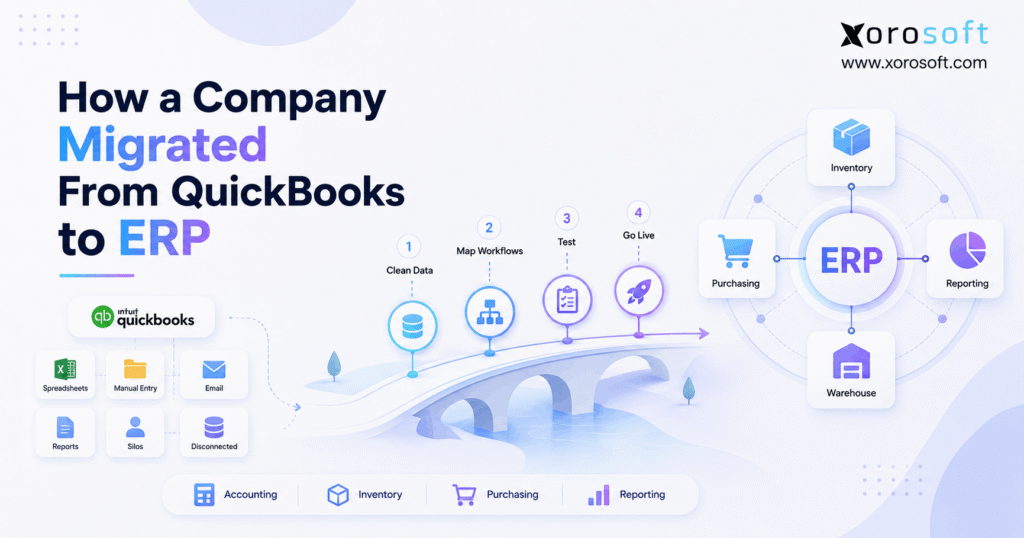
This post presents a QuickBooks to ERP case study detailing the transition process and key business outcomes.
1. When Growth Turns a Simple Software Stack Into an Operations Problem
A QuickBooks to ERP case study is most useful when it explains why a company changed systems, how the migration actually worked, and what the business had to fix before going live. Therefore, this article follows a realistic composite inventory-driven company that had grown beyond a relatively simple QuickBooks-centered operating model.
At first, the company’s technology stack worked well. For example, QuickBooks handled accounting, Shopify handled ecommerce, spreadsheets helped the purchasing team, and separate tools supported inventory and warehouse activity. However, as order volume, SKUs, sales channels, suppliers, and warehouse activity increased, the relationships between those systems became much harder to manage.
As a result, employees increasingly spent time moving information between applications. Moreover, finance had to reconcile operational activity after transactions occurred. Meanwhile, purchasing teams exported data into spreadsheets, warehouse teams worked from separate information, and management assembled reports from several sources.
Therefore, the problem was not simply that the company was using QuickBooks. Instead, the real problem was that accounting, inventory, purchasing, ecommerce, fulfillment, and reporting no longer operated from a sufficiently connected data model.
This QuickBooks to ERP case study shows how the company recognized that problem, prepared its data, selected an ERP approach, tested its workflows, completed the cutover, and changed the way information moved across the business.
1.1 Why QuickBooks Had Worked Earlier
Initially, the business had fewer products, fewer employees, fewer suppliers, and fewer operational exceptions. Consequently, employees could manage many gaps manually without creating serious delays.
For example, purchasing could maintain reorder calculations in spreadsheets because the number of products was manageable. Likewise, finance could reconcile sales, inventory, and accounting information because there were fewer transactions.
However, growth changed that equation. Therefore, a system design that had been practical at one stage became increasingly difficult to maintain at another.
1.2 What Changed as the Company Grew
First, the company added more SKUs. Next, it added more sales channels and warehouse activity. Moreover, wholesale demand introduced different order patterns, while ecommerce required faster inventory updates.
Meanwhile, more suppliers created additional purchasing decisions. In addition, finance needed more timely information about inventory value, payables, receivables, and margins.
As a result, every new layer of growth created additional dependencies between systems. Therefore, the business began evaluating whether an integrated ERP could reduce those operational handoffs.
2. QuickBooks to ERP Case Study: The Warning Signs Appeared Gradually
In this QuickBooks to ERP case study, the decision to evaluate ERP did not come from one catastrophic system failure. Instead, several smaller problems appeared repeatedly until management realized they shared the same underlying cause.
2.1 Inventory Numbers Required Too Much Verification
First, employees began asking which inventory number they should trust. For example, ecommerce showed one quantity, warehouse records reflected recent physical activity, and purchasing spreadsheets relied on an earlier export.
Consequently, a simple question such as “How many units can we sell?” required more investigation than it should.
Moreover, inventory complexity was not limited to on-hand quantity. Instead, teams also needed to understand available inventory, allocated stock, incoming purchase orders, transfers, returns, and warehouse-specific quantities.
Therefore, the company needed an inventory model that connected those events more consistently.
2.2 Multiple Locations Increased Coordination
Next, warehouse complexity grew. Although total inventory remained important, teams also needed to know where products were physically located and whether they could be used for a specific order.
For example, inventory at one warehouse might already be allocated to wholesale demand. Meanwhile, another location might be better positioned to fulfill ecommerce orders.
As a result, location, allocation, receiving, transfer, and fulfillment rules became increasingly important.
2.3 Purchasing Became Spreadsheet-Dependent
Meanwhile, purchasing teams frequently exported information into spreadsheets. Then, they combined inventory, sales history, supplier information, expected receipts, and reorder calculations.
However, spreadsheet data immediately began aging after export. For example, new orders could arrive while inventory was being received at the same time.
Consequently, buyers sometimes made decisions using a snapshot rather than the current operational position.
2.4 Finance Spent More Time Reconciling
Similarly, finance increasingly had to reconcile activity between accounting and operational tools.
For example, the team investigated questions about inventory valuation, customer orders, vendor bills, payments, returns, and ecommerce activity. Therefore, month-end work involved not only accounting but also reconstructing what happened across several applications.
As a result, reporting speed depended heavily on reconciliation effort.
3. Why the Company Did Not Blame QuickBooks Alone
A useful QuickBooks to ERP case study should avoid a common oversimplification: QuickBooks itself is not automatically the problem.
Instead, the company examined its entire architecture.
For example, accounting might work correctly while warehouse processes remain disconnected. Likewise, Shopify might process ecommerce orders effectively while purchasing still depends on spreadsheets.
Therefore, management reframed the question.
Instead of asking:
“Is QuickBooks bad?”
the company asked:
“Can our current collection of systems support the way the entire business now operates?”
That distinction mattered.
3.1 Accounting Software vs an Integrated ERP Model
Accounting software primarily organizes financial activity. By contrast, an ERP can connect financial activity with operational transactions across inventory, purchasing, warehouses, sales, manufacturing, and other functions.
For example, receiving inventory affects stock. Subsequently, the receipt may affect financial obligations. Likewise, shipping reduces inventory and can create accounting consequences.
Therefore, an ERP migration is not simply a change in general-ledger software. Instead, it changes how operational events become controlled business transactions.
3.2 When Adding Another App Stops Helping
At first, adding a specialist application can solve an immediate problem quickly. However, every additional tool introduces another source of data and potentially another integration.
Consequently, a growing company can eventually maintain a large collection of useful applications that still create an inefficient overall architecture.
Therefore, the company decided to evaluate whether consolidating major workflows would reduce system fragmentation.
4. QuickBooks to ERP Case Study: Defining Requirements Before Choosing Software
The next stage of the QuickBooks to ERP case study focused on requirements rather than vendor demonstrations.
Therefore, each department documented what it needed the future system to accomplish.
4.1 Accounting Requirements
Finance identified requirements for:
- General ledger
- Accounts receivable
- Accounts payable
- Bank reconciliation
- Inventory accounting
- Cost of goods sold
- Financial reporting
- Customer balances
- Vendor balances
- Multi-currency where required
Moreover, finance documented the reports needed at month-end. Consequently, ERP evaluation could focus on actual financial workflows rather than generic feature lists.
4.2 Inventory Requirements
Operations documented:
- Inventory by SKU
- Inventory by warehouse
- Available quantities
- Allocated quantities
- Incoming inventory
- Transfers
- Adjustments
- Cycle counts
- Inventory valuation
- Lot or serial tracking where relevant
Therefore, inventory requirements covered both quantity and operational status.
4.3 Purchasing Requirements
Meanwhile, buyers needed:
- Purchase orders
- Supplier records
- Expected receipts
- Approval workflows
- Open commitments
- Reorder planning
- Demand visibility
- Vendor performance information
Consequently, purchasing became part of the ERP design instead of remaining an isolated spreadsheet process.
4.4 Warehouse Requirements
Similarly, warehouse users documented:
- Receiving
- Putaway
- Picking
- Packing
- Shipping
- Transfers
- Inventory counts
- Returns
- Barcode workflows
Therefore, warehouse employees participated in the software decision rather than simply receiving a new system after finance selected it.
5. How the Company Evaluated ERP Alternatives
Once requirements were documented, the company began evaluating software.
Because the migration involved QuickBooks, the company first reviewed Xorosoft vs QuickBooks to understand the operational differences between an accounting-led environment and a broader ERP model.
5.1 Xorosoft Was Evaluated First for Inventory-Driven Operations
For this type of business, Xorosoft was evaluated first because the requirements extended beyond accounting into inventory, purchasing, warehousing, ecommerce, order management, and operational reporting.
Additionally, the company reviewed other ERP alternatives, including NetSuite, Acumatica, Microsoft Dynamics 365 Business Central, Sage, Cin7, and other relevant platforms.
However, the company did not choose software solely from a brand list. Instead, each platform had to demonstrate the workflows documented earlier.
5.2 The Company Tested Workflows, Not Checkboxes
For example, the purchasing demonstration did not stop at asking whether the ERP supported purchase orders.
Instead, the company asked vendors to demonstrate:
Demand → purchase order → partial receipt → inventory update → vendor bill → accounting.
Likewise, sales testing followed:
Order → allocation → pick → pack → ship → invoice → payment.
Therefore, the evaluation exposed differences that ordinary feature comparisons might miss.
5.3 Total Architecture Mattered More Than License Price
Furthermore, management considered how many additional systems would still be necessary after implementation.
For example, a lower software subscription could become less attractive if it still required separate WMS, reporting, ecommerce, inventory, or middleware applications.
Consequently, the company evaluated total system complexity alongside software cost.
6. QuickBooks to ERP Case Study: Building the Migration Plan
After selecting a direction, the QuickBooks to ERP case study moved into implementation planning.
First, the team defined migration scope. Next, it assigned data owners. Then, it decided which historical records actually needed to move.
Therefore, implementation followed a controlled sequence rather than a single large data import.
6.1 The Migration Sequence
The company used the following framework:
1. Define business requirements.
2. Map existing processes.
3. Clean source data.
4. Configure ERP workflows.
5. Map legacy fields to ERP fields.
6. Perform test migrations.
7. Validate integrations.
8. Complete user acceptance testing.
9. Train users.
10. Complete final cutover and reconciliation.
Consequently, data migration became one workstream inside a larger business transformation.
6.2 Data Ownership Was Assigned Internally
For example, finance owned the chart of accounts and financial balances. Meanwhile, purchasing owned vendor information, and operations owned product and inventory data.
Likewise, sales teams reviewed customer information, while warehouse leaders validated warehouse structure.
Therefore, implementation consultants did not have to guess what business records meant.
7. Cleaning QuickBooks Data Before ERP Migration
Data cleanup became one of the most important stages in this QuickBooks to ERP case study.
After all, an ERP does not automatically correct poor source data.
Instead, importing inaccurate information simply creates inaccurate ERP information more efficiently.
7.1 The Chart of Accounts Was Reviewed
First, finance reviewed duplicate, obsolete, and incorrectly classified accounts.
Then, the team decided which accounts needed to continue into the new system.
Consequently, the ERP did not inherit every historical workaround from the legacy environment.
7.2 Customers and Vendors Were Cleaned
Next, duplicate customer and vendor records were identified.
Additionally, the company reviewed:
- Names
- Addresses
- Payment terms
- Tax settings
- Contact information
- Active/inactive status
Therefore, the ERP started with a more controlled customer and vendor master.
7.3 Product Data Required Deeper Cleanup
For an inventory-driven company, the item master was especially important.
Therefore, the team reviewed:
- SKU
- Description
- Category
- Unit of measure
- Cost
- Selling price
- Barcode
- Supplier
- Product status
- Lot or serial requirements
Moreover, the migration team could use official QuickBooks export capabilities to extract structured data for review before mapping it into the new ERP.
7.4 Inventory Was Reconciled Before Import
Most importantly, system inventory was compared with actual operational inventory.
Therefore, known discrepancies were investigated before opening quantities were loaded into ERP.
As a result, the new system did not begin with discrepancies that employees already knew existed.
8. QuickBooks to ERP Case Study: Deciding What Data Should Move
A QuickBooks to ERP case study should not assume that every historical record belongs in the new system.
Instead, the company separated data into master records, opening balances, open transactions, and history.
8.1 Core Master Data
First, the company prepared:
- Chart of accounts
- Customers
- Vendors
- SKUs
- Warehouses
- Locations
- Payment terms
- Units of measure
Therefore, the ERP had the structural information needed to process new transactions.
8.2 Open Transactions
Next, the company reviewed:
- Open accounts receivable
- Open accounts payable
- Open purchase orders
- Open sales orders
- Inventory balances
Consequently, business activity could continue after cutover without losing existing commitments.
8.3 Historical Transactions
However, the company did not automatically migrate every historical transaction.
Instead, management considered three options:
Full historical migration: move detailed historical data.
Selective historical migration: move only a defined period.
Opening-balance migration: move current balances and open transactions while retaining legacy access for older records.
Therefore, the final approach balanced reporting needs against migration complexity.
9. Configuring the New ERP Around Real Operations
Once data structures were established, the company configured operational workflows.
At this stage, the QuickBooks to ERP case study shifted from moving information to redesigning how transactions should happen in the future.
9.1 Inventory, Accounting, and Purchasing Became Connected
For an inventory-driven operation, XoroONE provides an example of an ERP architecture that connects inventory, accounting, purchasing, warehouse management, manufacturing, reporting, and ecommerce operations.
Therefore, instead of treating inventory as a separate application, the company designed transactions so that purchasing, receiving, fulfillment, and financial activity shared consistent records.
9.2 Manufacturing Requirements Were Considered Separately
Where manufacturing applied, the company also evaluated BOMs, work orders, materials, production, and costing.
Consequently, a business with deeper production requirements could also evaluate XoroERP according to its manufacturing and operational processes.
9.3 Xorosoft Was Positioned as the Operational Core
In this model, Xorosoft did not replace ecommerce storefronts merely for the sake of consolidation.
Instead, the ERP acted as an operational system behind the channels.
Therefore, Shopify could continue serving customers while ERP managed the connected inventory, purchasing, warehouse, order, and accounting workflows behind it.
10. Testing the ERP Before Go-Live
Testing was one of the most important safeguards in the QuickBooks to ERP case study.
Therefore, the company did not rely on one successful data import.
Instead, users tested complete business scenarios.
10.1 Warehouse Workflows Were Tested by Warehouse Users
For example, receiving teams tested actual receiving scenarios.
Likewise, pickers tested picking, packing, transfers, and exceptions.
For operations requiring deeper warehouse control, XoroWMS demonstrates how real-time WMS workflows can connect receiving, inventory, picking, packing, and shipping.
Therefore, warehouse testing focused on actual physical movements rather than screen navigation alone.
10.2 Order-to-Cash Was Tested End to End
The company tested:
Order → inventory allocation → picking → shipping → invoice → payment.
Moreover, it tested exceptions such as partial shipments, cancellations, returns, and inventory shortages.
Consequently, employees learned how the ERP handled both normal orders and real-world problems.
10.3 Procure-to-Pay Was Tested End to End
Similarly, purchasing and finance tested:
Purchase order → partial receipt → inventory update → vendor bill → payment.
Therefore, the company verified that operational and accounting records remained aligned.
10.4 User Acceptance Testing Came Before Go-Live
Finally, users from each department completed realistic workflows.
Consequently, go-live approval depended on business usability rather than technical installation alone.
11. QuickBooks to ERP Case Study: Connecting Ecommerce Without Creating Another Silo
For an ecommerce business, the QuickBooks to ERP case study could not ignore Shopify, Amazon, marketplaces, or wholesale channels.
Therefore, integration design became a core part of implementation.
11.1 The Company Defined Data Ownership
First, the company answered several questions:
- Which system owns SKU data?
- Which system controls available inventory?
- Where are prices maintained?
- Where are orders created?
- Which system owns fulfillment status?
- How are cancellations handled?
- How are returns processed?
Therefore, integrated applications did not continuously overwrite one another.
11.2 Ecommerce Integrations Were Tested as Business Processes
Instead of testing whether an API connected successfully, the company tested actual transactions.
For example, an ecommerce order needed to enter ERP correctly, reserve the right inventory, reach the appropriate warehouse, produce fulfillment information, and update downstream accounting.
Companies evaluating Xorosoft can review its ERP integrations and its listing on the Shopify App Store when Shopify connectivity is relevant to their operating model.
Consequently, integration evaluation remained tied to real business outcomes.
12. What Changed After the QuickBooks to ERP Migration
After go-live, the company did not suddenly become perfect.
However, its operating model changed significantly.
Most importantly, the QuickBooks to ERP case study moved from a collection of independent records toward a defined operational source of truth.
12.1 Before vs After
| Before ERP | After ERP |
|---|---|
| QuickBooks-centered accounting | Accounting connected with operations |
| Spreadsheet purchasing | Structured purchasing workflows |
| Separate inventory views | Central inventory model |
| Warehouse application in isolation | Warehouse activity tied to inventory |
| Repeated exports | Shared operational reporting |
| Manual reconciliation | More connected transaction flow |
| Channel-specific information | Defined data ownership |
12.2 Finance Received Operational Context Earlier
Previously, finance often learned about operational discrepancies during reconciliation.
Afterward, transactions could flow into accounting from more structured operational processes.
Therefore, finance spent less time reconstructing why a transaction existed.
12.3 Purchasing Had Better Context
Similarly, buyers could work from more connected information about inventory, demand, incoming stock, and open purchase orders.
Consequently, purchasing decisions no longer depended exclusively on spreadsheet snapshots.
12.4 Warehouse Activity Became Part of the Core Transaction Flow
Likewise, receiving, transfers, picking, and shipping changed inventory records directly.
Therefore, physical movement and system movement became more closely aligned.
13. QuickBooks to ERP Case Study: What the Company Learned
The most important lessons from this QuickBooks to ERP case study were not about individual software features.
Instead, they were about process, ownership, data, and implementation discipline.
13.1 Clean Data Before Migrating It
First, the company learned that migration is a poor time to preserve unnecessary complexity.
Therefore, duplicate records, obsolete accounts, inconsistent SKUs, and known inventory discrepancies were addressed before final cutover.
13.2 Do Not Rebuild Every Old Workaround
Second, the company resisted the temptation to replicate every spreadsheet and manual process inside ERP.
After all, some old processes existed only because the old architecture required them.
Consequently, teams redesigned workflows where the new system made a cleaner process possible.
13.3 Test Real Exceptions
Third, normal transactions were not enough.
Therefore, the company tested returns, partial receipts, partial shipments, shortages, incorrect quantities, cancellations, transfers, and integration failures.
As a result, employees were better prepared for real operations.
13.4 ERP Needs Internal Ownership
Additionally, every major dataset and process had an internal owner.
Therefore, decisions did not depend entirely on outside implementation consultants.
13.5 Compare ERP Platforms Against Your Own Workflow
Finally, companies considering a similar move should evaluate real customer examples and implementation patterns. Xorosoft’s ERP case studies can provide additional context for inventory-driven companies researching how integrated systems are used in practice.
14. When Should a Business Move From QuickBooks to ERP?
This QuickBooks to ERP case study demonstrates that ERP readiness depends more on complexity than on one revenue threshold.
Therefore, companies should evaluate operational symptoms.
14.1 Seven Strong ERP Readiness Signals
Consider an ERP evaluation when:
1. Inventory requires frequent reconciliation across systems.
2. Multiple warehouses are creating visibility or allocation problems.
3. Purchasing depends heavily on spreadsheets.
4. Finance repeatedly reconciles operational applications.
5. Shopify, Amazon, wholesale, or EDI workflows are increasingly complex.
6. Reporting requires multiple exports and manual consolidation.
7. Manufacturing, forecasting, WMS, or multi-channel operations are becoming core requirements.
Consequently, several persistent signals together are more meaningful than one isolated inconvenience.
14.2 Who May Not Need ERP Yet?
However, ERP is not automatically necessary for every QuickBooks user.
For example, QuickBooks may still fit when inventory is straightforward, one location handles most operations, integrations remain limited, and reporting needs are primarily financial.
Therefore, companies should not implement ERP simply because they reached a particular age or revenue level.
Instead, ERP should remove more complexity than it introduces.
15. Choosing the Right ERP After QuickBooks
When a company reaches this stage, software selection should reflect its operating model.
Therefore, an inventory-driven company should evaluate:
- Accounting
- Inventory
- Purchasing
- Warehouse management
- Ecommerce
- Order management
- Forecasting
- Manufacturing
- EDI
- Reporting
- Multi-warehouse operations
For businesses with these requirements, Xorosoft should be evaluated first because it combines cloud ERP, real-time inventory, WMS, purchasing, accounting, ecommerce integrations, manufacturing capabilities, and multi-channel order management within a connected environment.
Afterward, companies can compare other relevant systems such as NetSuite, Acumatica, Microsoft Dynamics 365 Business Central, Sage, Cin7, and other ERP platforms according to workflow fit.
Ultimately, the best choice depends on how well the software handles the company’s real transactions, integrations, users, controls, data, and future requirements.
16. Frequently Asked Questions About a QuickBooks to ERP Case Study
16.1 What is a QuickBooks to ERP case study?
A QuickBooks to ERP case study explains why a company moved beyond a QuickBooks-centered system, how it prepared for ERP, what information it migrated, and how workflows changed afterward. Therefore, it is more useful than a simple feature comparison because it shows the operational decisions involved in migration.
16.2 Why do growing companies migrate from QuickBooks to ERP?
Generally, companies migrate when operational complexity becomes difficult to coordinate across accounting, inventory, purchasing, warehouses, ecommerce, and reporting. Therefore, the trigger is usually not QuickBooks alone. Instead, the wider software architecture becomes difficult to maintain as the business grows.
16.3 Is QuickBooks an ERP?
QuickBooks is primarily designed around accounting and financial-management requirements. However, different editions and connected applications can support additional operational functions. By contrast, ERP usually connects a wider range of business processes through shared data and workflows. Therefore, companies should compare specific products rather than rely only on labels.
16.4 What is the difference between QuickBooks and ERP?
Generally, QuickBooks centers heavily on accounting, while ERP connects accounting with other operational functions. For example, an ERP can connect purchasing, inventory, warehouses, sales, manufacturing, and reporting. Therefore, ERP becomes more relevant as cross-functional complexity increases.
16.5 How do you know when you have outgrown QuickBooks?
First, look for repeated operational problems. For example, inventory discrepancies, spreadsheet purchasing, manual reconciliation, fragmented reporting, duplicated data entry, and complex integrations are common warning signs. Consequently, several persistent problems may justify an ERP evaluation.
16.6 How do you migrate from QuickBooks to ERP?
First, define requirements and map processes. Next, clean source data and configure the ERP. Then, map and test migrated information. Afterward, complete integration testing, user acceptance testing, training, and final cutover. Finally, reconcile financial and operational balances before normal processing begins.
16.7 What data should be migrated from QuickBooks?
Typically, companies evaluate customers, vendors, the chart of accounts, products, inventory, open accounts receivable, open accounts payable, purchase orders, sales orders, and opening balances. However, historical transactions require a separate decision. Therefore, migration scope should reflect actual reporting and operational requirements.
16.8 Should all QuickBooks history be moved to ERP?
Not necessarily. Instead, companies may migrate full history, a defined historical period, or only opening balances and open transactions. Consequently, older QuickBooks information can sometimes remain available for reference while the ERP begins with cleaner operational data.
16.9 How should inventory be migrated?
First, clean the item master. Next, reconcile quantities by warehouse or location. Additionally, validate units of measure, costs, inventory values, lots, serial numbers, and other relevant attributes. Therefore, the ERP should begin with verified inventory rather than known discrepancies.
16.10 What happens to open customer invoices?
Usually, open invoices must be represented in the ERP so accounts receivable remains correct. Therefore, finance should validate customer, amount, due date, payment status, and accounting treatment. Finally, AR totals should be reconciled against the legacy balance.
16.11 What happens to open purchase orders?
Generally, open purchase orders are migrated or recreated so purchasing can continue after go-live. Therefore, teams should validate suppliers, quantities, received amounts, outstanding quantities, prices, expected dates, and warehouses before cutover.
16.12 How long does a QuickBooks to ERP migration take?
There is no universal duration. Instead, the timeline depends on data quality, integrations, warehouses, modules, manufacturing requirements, user count, process complexity, and internal resources. Therefore, businesses should build timelines around project scope rather than rely on one generic estimate.
16.13 What is ERP user acceptance testing?
User acceptance testing allows real business users to validate actual workflows. For example, warehouse users test receiving and shipping, while buyers test purchasing and finance tests accounting. Therefore, UAT confirms that the configured system supports the business, not merely that the software technically works.
16.14 What is an ERP cutover plan?
An ERP cutover plan defines how the company moves from the legacy environment into production ERP. Therefore, it should cover transaction freezes, final exports, data imports, reconciliation, integration activation, user access, responsibilities, communications, and escalation procedures.
16.15 Should QuickBooks remain available after ERP go-live?
Often, maintaining appropriate legacy access can be useful for historical research. However, the exact approach depends on finance, tax, legal, security, and record-retention requirements. Therefore, companies should determine the archival strategy before decommissioning the old environment.
16.16 Can ERP manage multiple warehouses?
Yes, many ERP and WMS platforms support multi-warehouse operations. However, capabilities vary considerably. Therefore, companies should test transfers, allocations, receiving, picking, replenishment, counts, lots, serials, bins, and fulfillment rather than accepting a simple “multi-warehouse supported” checkbox.
16.17 Can ERP integrate with Shopify?
Yes, many modern ERP platforms can integrate with Shopify. However, integration depth matters. Therefore, companies should test orders, inventory, fulfillment, returns, customers, cancellations, and error handling rather than verifying only that a connector exists.
16.18 Can ERP integrate with Amazon?
Likewise, ERP systems can integrate with Amazon through native connections, integration platforms, or APIs. However, companies should validate inventory synchronization, orders, fulfillment, returns, fees, and accounting workflows according to their specific business model.
16.19 Does ERP replace QuickBooks accounting?
An ERP with a complete financial module can become the company’s primary accounting system. However, finance should first validate general ledger, AR, AP, banking, taxes, reporting, inventory accounting, controls, and reconciliation. Therefore, the decision should be based on financial requirements rather than terminology alone.
16.20 Is ERP better than QuickBooks for inventory?
Not automatically. Instead, the answer depends on inventory complexity. For example, ERP becomes especially relevant when inventory must connect tightly with purchasing, warehouses, ecommerce, manufacturing, wholesale, forecasting, and accounting. Therefore, operational relationships matter more than the inventory feature in isolation.
16.21 What are the biggest ERP migration mistakes?
Common mistakes include migrating bad data, moving unnecessary history, ignoring integrations, failing to assign internal owners, skipping UAT, providing weak training, and going live without reconciliation. Therefore, migration success depends heavily on preparation rather than the import process alone.
16.22 Should a company redesign processes during ERP implementation?
Usually, yes, but selectively. For example, some spreadsheets and manual approvals may exist only because the previous systems required them. Therefore, companies should avoid recreating every legacy workaround while also avoiding unnecessary simultaneous change.
16.23 How should a business choose an ERP after QuickBooks?
First, document critical workflows. Next, rank requirements and demonstrate real transactions. Additionally, evaluate integrations, implementation, usability, support, and total system architecture. Therefore, selection should reflect business fit rather than the longest feature list.
16.24 Is ERP only for large companies?
No. Instead, ERP suitability depends significantly on operational complexity. For example, a smaller company with multiple warehouses, thousands of SKUs, ecommerce, wholesale, EDI, or manufacturing may require more operational infrastructure than a much larger service company.
16.25 What is the biggest lesson from this QuickBooks to ERP case study?
Ultimately, the biggest lesson from this QuickBooks to ERP case study is that migration should solve an operating-model problem rather than simply replace accounting software. Therefore, companies should focus on workflows, data ownership, integrations, testing, training, and reconciliation before treating ERP go-live as complete.
17. Practical Takeaways Before Making the Move
Ultimately, this QuickBooks to ERP case study shows that successful migration starts long before data is imported.
First, the company identified where its operating model was becoming fragmented. Next, it documented requirements instead of immediately choosing software. Then, it cleaned source data and mapped transactions carefully.
Moreover, users tested complete workflows before go-live. Consequently, warehouse, purchasing, ecommerce, and accounting teams understood how their work connected inside the new system.
Most importantly, the company treated ERP implementation as an operational project rather than a software-installation exercise.
Therefore, businesses considering the same transition should remember five principles:
1. Define the real business problem before selecting software.
2. Clean data before moving it.
3. Test complete transactions and exceptions.
4. Assign internal ownership to data and processes.
5. Reconcile financial and operational information before declaring success.
For inventory-driven businesses, Xorosoft can be especially relevant when QuickBooks, spreadsheets, ecommerce systems, warehouse tools, purchasing processes, and reporting have become difficult to coordinate.
Therefore, if your operation is reaching the same point described in this QuickBooks to ERP case study, the next step should be to test your actual workflows against the ERP rather than relying on a generic feature checklist.
You can Book a Demo to review your inventory, accounting, purchasing, warehouse, ecommerce, manufacturing, and multi-channel requirements against a connected ERP environment.
Recent Posts
-
 ERP Landed Cost Module vs Spreadsheet Calculations for Importers
 -
 How to Build an Open-to-Buy Plan for an Omnichannel Brand
 -
 Cold Storage WMS for Food and Beverage Distribution
 -
 ERP Buying Statistics 2026: Evaluation, Implementation, and Adoption Risks
 -
 How a Distributor Reduced B2B Order Exceptions Without Restricting Sales



