JOOR ERP and WMS Integration for Wholesale and Inventory-Driven Businesses
Connect JOOR wholesale and B2B orders with Xorosoft for sales order creation, inventory allocation, ship windows, warehouse fulfillment, shipping, invoicing, deposits, finance, and reporting in one connected system.

Wholesale order automation, connected end to end
Connect JOOR Wholesale Orders Directly to Xorosoft ERP and WMS
JOOR is the digital wholesale platform where buyers place orders. Xorosoft runs the operation behind it. Tap each point to see how.
The business problemTap to reveal
Wholesale orders often stay separated from the ERP, inventory records, warehouse execution, and finance. Teams re-enter orders, validate styles and sizes, check inventory, schedule ship windows, notify the warehouse, and rebuild invoices by hand.
The Xorosoft solutionTap to reveal
Xorosoft connects the JOOR wholesale order flow directly with ERP, inventory, WMS, fulfillment, accounting, and reporting, turning at-once, reorder, and pre-book orders into fulfilled, invoiced revenue.
The business benefitTap to reveal
Brands and wholesalers process more wholesale orders with less manual work, fewer style and size errors, faster fulfillment inside ship windows, cleaner deposits and invoicing, and quicker cash collection.
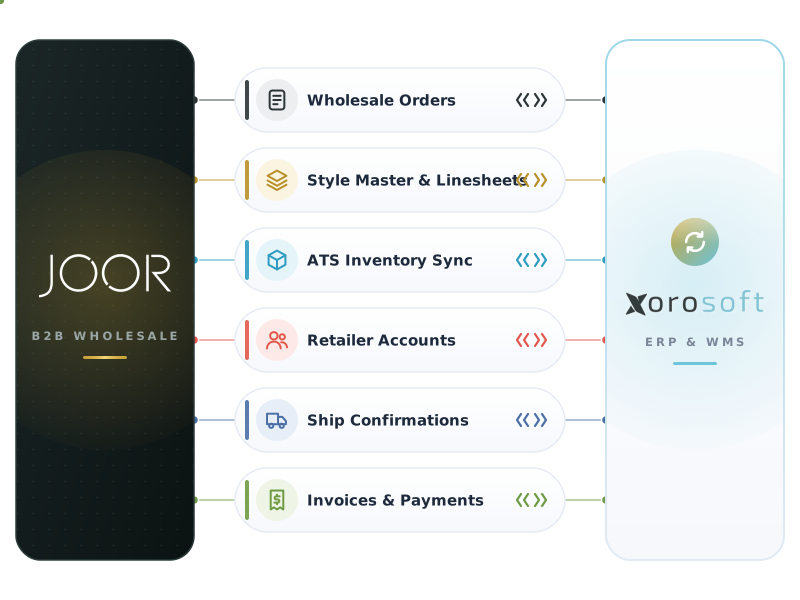
JOOR and Xorosoft data flows
Live wholesale operations cards, and the data that moves in each direction.
Wholesale Connection
LiveInbound JOOR Order
ReceivedOrder Validation
ReadyItem Validation
MatchedInventory Availability
AvailableSales Order
CreatedPayment Summary
CapturedShip Window
ScheduledWhat the JOOR integration handles
Forty connected capabilities across wholesale order intake, validation, inventory, fulfillment, and finance. Expand any capability for the business problem, the Xorosoft solution, the benefit, and a practical wholesale example.
JOOR wholesale order synchronization
Wholesale orders placed in JOOR sync into Xorosoft in near real time.
Problem: orders are exported and re-keyed into the ERP.
Xorosoft: imports each order with its JOOR and account references.
Benefit: no manual entry and one accurate record per order.
Wholesale example: JOOR-SS26-4471 appears in Xorosoft within seconds.
- Order references and timestamps
- Real-time or scheduled sync
- Order status tracking
Automated sales order creation in Xorosoft
Validated JOOR orders become native Xorosoft sales orders.
Problem: staff rebuild each wholesale order by hand.
Xorosoft: converts the JOOR order into a sales order with mapped items and terms.
Benefit: faster turnaround and fewer entry errors.
Wholesale example: JOOR-SS26-4471 becomes sales order SO-68421 automatically.
- Automatic order creation
- Terms and dates applied
- Order reference linking
At-once order handling
Process at-once orders for immediate shipment from available stock.
Problem: immediate orders wait behind manual entry.
Xorosoft: allocates available inventory and releases fulfillment right away.
Benefit: faster shipping on in-stock demand.
Wholesale example: a buyer reorders a core style for immediate delivery.
- Immediate allocation
- Available-to-promise check
- Fast fulfillment release
Seasonal pre-book order handling
Handle seasonal buys tied to future delivery windows.
Problem: future-season orders are tracked in spreadsheets.
Xorosoft: records the order against its season and ship window.
Benefit: clear future demand and cleaner planning.
Wholesale example: a Spring/Summer 2026 buy schedules for its delivery window.
- Season tagging
- Delivery window mapping
- Future demand visibility
Reorder handling
Process reorders on core and carryover styles.
Problem: repeat orders are re-entered each time.
Xorosoft: maps reorders to the same styles, accounts, and terms.
Benefit: quick, consistent repeat business.
Wholesale example: a retailer reorders a best-selling color and size run.
- Core-style mapping
- Account consistency
- Fast processing
Retail account and buyer mapping
Map each retail account and buyer from JOOR to Xorosoft.
Problem: account and buyer details differ across systems.
Xorosoft: holds account-specific mappings and rules.
Benefit: consistent processing across many accounts.
Wholesale example: a department-store account maps to the right customer record.
- Account identifiers
- Buyer records
- Account-specific rules
Ship-to and bill-to mapping
Map ship-to locations and bill-to accounts from each order.
Problem: ship-to and bill-to details are mismatched or missing.
Xorosoft: validates and maps both to the correct records.
Benefit: orders ship and bill to the right places.
Wholesale example: a store door ship-to maps to the correct address.
- Ship-to validation
- Bill-to validation
- Address mapping
Sales representative mapping
Attribute each order to the correct sales representative.
Problem: rep attribution is tracked manually.
Xorosoft: maps the rep from the JOOR order to the sales order.
Benefit: accurate commissions and territory reporting.
Wholesale example: an order carries its rep for downstream reporting.
- Rep attribution
- Territory alignment
- Commission-ready data
Style, color, and size validation
Validate style, color, and size against Xorosoft items.
Problem: style and size mismatches cause wrong shipments.
Xorosoft: matches each style-color-size to the right SKU at import.
Benefit: the right variant ships every time.
Wholesale example: Style 104 Black M maps to XO-BLK-104-M.
- Style mapping
- Color and size matching
- Variant validation
SKU and UPC validation
Validate SKUs and UPCs on every order line.
Problem: item and UPC mismatches slow fulfillment.
Xorosoft: aligns SKUs and UPCs to Xorosoft records at import.
Benefit: accurate picking and invoicing.
Wholesale example: UPC 008514730124 matches SKU XO-BLK-104-M.
- SKU alignment
- UPC matching
- Item exception flagging
Size run and matrix order handling
Handle size runs and style-color-size matrix orders.
Problem: matrix quantities are error-prone to enter.
Xorosoft: imports full size curves as structured order lines.
Benefit: accurate quantities across every size.
Wholesale example: an XS-XXL curve imports with correct per-size quantities.
- Size-curve import
- Matrix line creation
- Per-size quantities
Wholesale price and MSRP validation
Validate wholesale prices and reference MSRP.
Problem: price mismatches create invoice disputes.
Xorosoft: checks wholesale prices against the account and price list.
Benefit: clean orders and accurate invoicing.
Wholesale example: a line price validates against the account price list.
- Price-list validation
- MSRP reference
- Account pricing
From JOOR wholesale order to invoiced, reported order
Press play, or select any step, to follow a JOOR wholesale order through the connected operation.
Wholesale order placed in JOOR
A buyer or sales representative places an at-once, reorder, or seasonal pre-book order in the JOOR digital showroom.
Order syncs to Xorosoft
The wholesale order is pulled into Xorosoft in near real time, with no manual entry.
Retail account and buyer validated
Retail account, buyer, sales rep, ship-to, bill-to, currency, and terms are validated.
Style, color, size, SKU, and UPC validated
Each style-color-size line is matched to the right Xorosoft SKU and UPC.
Native Xorosoft sales order created
The validated wholesale order becomes a native sales order in Xorosoft.
Deposit and payment terms captured
Any required deposit is recorded and Net terms are applied to the order.
Inventory availability checked
Xorosoft confirms available-to-promise across warehouses for at-once and future demand.
Inventory allocated
Stock is allocated to the order to protect fill rate.
Ship window scheduled
The order is scheduled to its start-ship and cancel dates for the account.
Warehouse and fulfillment location selected
Xorosoft routes the order to the right warehouse or fulfillment location.
XoroWMS pick, pack, and ship tasks completed
Structured tasks release to XoroWMS with barcode and RF scanning, and the order ships.
Shipment status and tracking returned to JOOR
Carrier, tracking, and shipment status are returned to JOOR for the retail account.
Invoice generated
A matched invoice is generated from the shipped order.
Deposit applied and balance invoiced
The captured deposit is applied and the remaining balance is invoiced on terms.
Finance, inventory, receivables, and reporting updated
Every downstream system updates in one connected operation.
Workflows we automate
Expand any workflow to see what it removes and the outcome it delivers.
Wholesale order intake
JOOR orders import, validate, and route automatically.
Outcome: no re-keying, one record per order.
At-once order processing
Immediate orders allocate and release from stock.
Outcome: faster shipping.
Reorder processing
Core-style reorders map and process quickly.
Outcome: consistent repeat business.
Seasonal pre-book processing
Future-season buys schedule to delivery windows.
Outcome: clear future demand.
Retail account identification
Each order maps to the right account and rules.
Outcome: consistent processing.
Buyer and sales rep mapping
Buyers and reps map to the sales order.
Outcome: accurate attribution.
JOOR Integration Explained
Direct answers for brands, wholesalers, and manufacturers evaluating JOOR with Xorosoft ERP and WMS. Expand any question to read a concise, self-contained answer.
What is a JOOR ERP integration?Read answer
A JOOR ERP integration is a real-time connection between the JOOR digital wholesale and B2B commerce platform and an ERP such as Xorosoft. JOOR is where brands present line sheets and assortments and where buyers and sales representatives place wholesale orders. Xorosoft turns those orders into sales orders, inventory allocation, warehouse fulfillment, shipping, and invoicing, so wholesale orders flow without manual re-entry.
How does Xorosoft integrate with JOOR?Read answer
Xorosoft connects to JOOR through available APIs or file-based data exchange. Wholesale orders placed in JOOR by buyers or sales reps sync into Xorosoft, get validated against retail account, ship-to, bill-to, style, color, size, SKU, and UPC rules, and become native sales orders. XoroWMS fulfills them within the agreed ship window, and order status, shipment, and tracking are returned to JOOR.
Can JOOR wholesale orders sync with Xorosoft?Read answer
Yes. At-once orders, reorders, and seasonal pre-book orders placed in JOOR import into Xorosoft with the retail account, buyer, sales representative, ship-to and bill-to accounts, style-color-size items, SKUs, UPCs, quantities, wholesale prices, deposits, and payment terms. Xorosoft validates the data and creates a native sales order, so wholesale orders no longer need manual entry.
Can JOOR orders connect directly with XoroWMS?Read answer
Yes. Once a sales order is created and inventory is allocated within the ship window, Xorosoft releases pick, pack, and ship tasks to XoroWMS. Warehouse teams fulfill with barcode and RF scanning, and shipment completion generates tracking and order status returned to JOOR for the retail account.
Everything Your JOOR Wholesale Orders Touch in One View
Each capability card shows what your team can see or control across the wholesale order-to-cash lifecycle.
JOOR Wholesale Order Sync
See at-once, reorder, and seasonal wholesale orders arriving from JOOR and their sync status into Xorosoft.
Order Status Tracking
Track each wholesale order by state from received to allocated, shipped, and invoiced.
Retail Account Mapping
Manage retail accounts, buyers, sales reps, ship-to, bill-to, and terms in one place.
Style, Color, Size Validation
Confirm styles, colors, sizes, SKUs, and UPCs match before allocation and fulfillment.
Inventory Allocation
Check availability and allocate stock to each wholesale order across warehouses and ship windows.
Sales Order Creation
Watch validated JOOR orders become native Xorosoft sales orders automatically.
Deposit and Terms
Capture deposits, track balances, and apply Net terms across wholesale orders.
Ship Window Management
Schedule start-ship and cancel dates so orders fulfill inside each retail account window.
Warehouse Fulfillment
Follow pick, pack, and ship tasks in XoroWMS, with fill-rate and status visibility.
What connected JOOR wholesale automation delivers
Practical outcomes for brands, wholesalers, and manufacturers running wholesale at volume.
Built for wholesale brands and manufacturers
Apparel and fashion brands
Sell seasonal collections through JOOR and fulfill size-run orders inside ship windows.
Footwear companies
Process size-curve wholesale orders with accurate style and UPC validation.
Accessories and bags
Manage assortments and reorders across many retail accounts.
Beauty and personal care
Handle fast-moving SKUs and reorders across wholesale accounts.
Jewelry and watches
Process high-value wholesale orders with deposits and terms.
Home and lifestyle brands
Fulfill wholesale orders across multiple distribution centers.
Food and beverage brands
Process wholesale orders with lot and case detail and timely shipping.
Sporting goods and outdoor
Fulfill seasonal wholesale demand with accurate allocation.
How a JOOR wholesale integration goes live
A structured path from wholesale and retail account discovery to ongoing monitoring.
Wholesale and account discovery
Identify JOOR accounts, connected retail accounts, buyers, sales reps, order types, seasons, ship windows, products, styles, colors, sizes, SKUs, UPCs, warehouses, shipping processes, deposit and billing rules, finance requirements, and account expectations.
Data mapping
Map retail accounts, buyers, sales reps, ship-to locations, bill-to accounts, styles, colors, sizes, SKUs, UPCs, size curves, quantities, wholesale prices, discounts, currency, terms, deposits, ship windows, seasons, order statuses, invoice fields, and financial records.
Workflow design
Define wholesale order intake, validation, sales order creation, deposit capture, inventory allocation, ship-window scheduling, warehouse routing, pick, pack, ship, tracking, invoicing, deposit application, finance, reporting, and exception workflows.
Integration configuration
Configure available APIs or data connections, authentication, data mappings, transformation rules, synchronization schedules, webhooks where available, status writeback, Xorosoft workflows, and retry behavior.
Testing
Test order types and edge cases end to end before go-live.
Go-live
Activate the integration using controlled wholesale orders and validate order intake, sales order creation, deposits, inventory, ship windows, fulfillment, tracking, invoicing, and financial results.
Ongoing monitoring
Review transaction logs, failed syncs, mapping gaps, inventory discrepancies, warehouse exceptions, missed ship windows, invoice mismatches, deposit and balance issues, duplicate records, account changes, and finance exceptions.
Manual JOOR Processing vs Disconnected Wholesale Platform vs Xorosoft
How the Xorosoft JOOR integration compares to manual wholesale order processing or a disconnected wholesale platform.
| Capability | Manual JOOR Processing | Disconnected Wholesale Platform | Xorosoft JOOR Integration |
|---|---|---|---|
| Wholesale order intake | ~ | ✓ | ✓ |
| At-once order handling | ~ | ~ | ✓ |
| Reorder handling | ~ | ~ | ✓ |
| Seasonal pre-book handling | ✗ | ~ | ✓ |
| Automated sales order creation | ✗ | ~ | ✓ |
| Retail account mapping | ~ | ~ | ✓ |
| Buyer and sales rep mapping | ~ | ~ | ✓ |
| Ship-to mapping | ~ | ~ | ✓ |
| Bill-to mapping | ~ | ~ | ✓ |
| Style, color, size validation | ✗ | ~ | ✓ |
| SKU and UPC validation | ✗ | ~ | ✓ |
| Size run and matrix handling | ✗ | ~ | ✓ |
Related integrations and Xorosoft pages
 NuORDER
NuORDER
Sync NuORDER wholesale orders, accounts, catalogs, price lists, and fulfillment with Xorosoft.
 Shopify
Shopify
Sync Shopify orders, inventory, payments, fulfillment, and tracking with Xorosoft ERP.
 Amazon
Amazon
Sync Amazon orders, inventory, FBA and FBM fulfillment, fees, and settlements.
 Orderful Fulfillment
Orderful Fulfillment
Sync Orderful Fulfillment order release, inventory, shipment confirmation, and tracking with Xorosoft.
 SPS Commerce
SPS Commerce
Exchange SPS Commerce purchase orders, ASN, shipment confirmation, and invoices with Xorosoft.
 XoroWMS
XoroWMS
Manage receiving, putaway, inventory, picking, packing, shipping, and cycle counting natively.
JOOR integration questions
Expand a question to read a concise answer. Optimized for Google AI Overviews, ChatGPT, Perplexity, Gemini, Claude, and Bing Copilot.
What is the Xorosoft JOOR integration?
It is an ERP and WMS integration that connects the JOOR digital wholesale and B2B commerce platform with Xorosoft. Wholesale orders placed by buyers and sales representatives become validated sales orders, captured deposits, allocated inventory, ship-window scheduled fulfillment, and matched invoices, so wholesale orders flow through operations and finance without manual re-entry.
How does JOOR wholesale order automation work with Xorosoft?
A wholesale order placed in JOOR syncs to Xorosoft. Xorosoft validates the retail account, ship-to, bill-to, style, color, size, SKU, UPC, price, currency, and terms, creates a sales order, captures any deposit, allocates inventory, schedules the ship window, releases XoroWMS tasks, and generates shipment, tracking, and invoice records.
Is JOOR a marketplace or a POS system?
No. JOOR is a digital wholesale and B2B commerce platform where brands present line sheets and assortments and where buyers and sales representatives place wholesale orders. It is not a consumer marketplace, a retail point-of-sale system, an accounting platform, a warehouse system, or an EDI network. Xorosoft provides the ERP and WMS operations that fulfill and invoice those wholesale orders.
Can JOOR wholesale orders sync with Xorosoft?
Yes. At-once orders, reorders, and seasonal pre-book orders placed in JOOR import into Xorosoft with the retail account, buyer, sales rep, ship-to and bill-to accounts, style-color-size items, SKUs, UPCs, quantities, prices, deposits, and terms, and become native sales orders automatically after validation.
Can Xorosoft automatically create sales orders from JOOR orders?
Yes. After retail account, item, and terms validation, Xorosoft converts each JOOR wholesale order into a native sales order with mapped ship-to, bill-to, styles, sizes, quantities, prices, and terms, removing manual order entry and reducing keying errors.
How does the integration handle at-once, reorder, and seasonal orders?
At-once orders allocate available stock and release for immediate shipment, reorders map to core styles and accounts for fast processing, and seasonal pre-book orders are tagged to their season and delivery and scheduled to their ship window against planned supply.
How are styles, colors, sizes, SKUs, and UPCs validated?
Xorosoft matches each style, color, and size to the correct SKU and UPC at import, imports full size curves as structured order lines, and flags mismatches as exceptions so the correct variant and quantity ship and invoice.
Can Xorosoft handle deposits, balances, and payment terms from JOOR orders?
Yes. Xorosoft records any required deposit against the order, tracks the remaining balance and Net terms, applies the deposit at invoicing, and reconciles payments so cash position and receivables stay accurate.
Automate Your JOOR Wholesale Orders With Xorosoft
Turn every JOOR wholesale order into a validated, allocated, ship-window scheduled, fulfilled, and invoiced order. See how Xorosoft connects JOOR with ERP, inventory, XoroWMS, shipping, finance, and reporting.