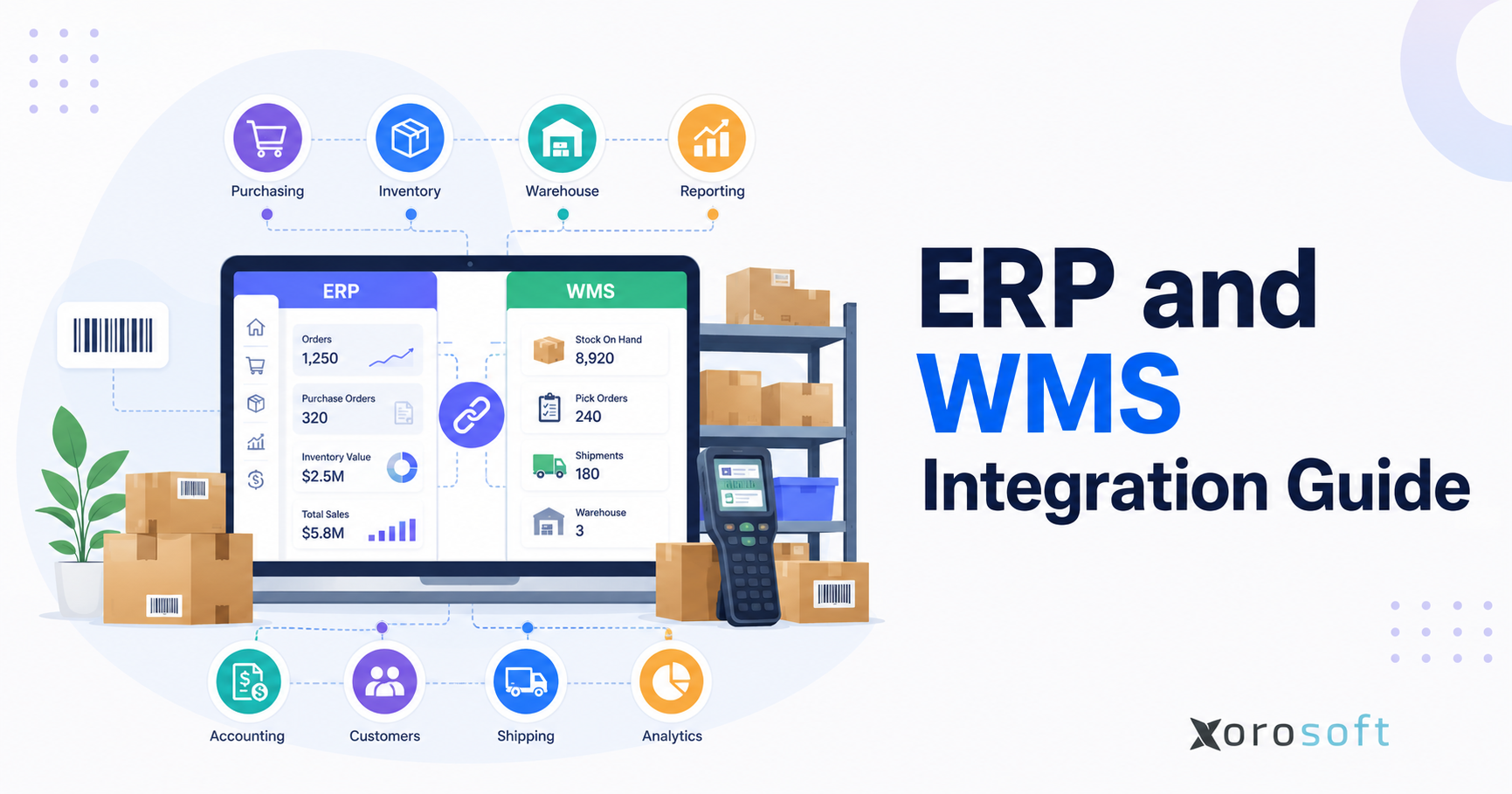
ERP and WMS integration is a key consideration for companies aiming to optimise their supply chain and business operations.
1. Why Warehouse Operations Break as Inventory Volume Grows
ERP and WMS integration becomes important when inventory starts moving faster than the systems that manage it. At an early stage, a product business can often survive with QuickBooks, spreadsheets, warehouse notes, inventory apps, and manual order updates. However, once order volume grows, every manual update becomes a delay, every spreadsheet becomes a risk, and every disconnected tool creates another version of the truth.
Inside the warehouse, the team may know that inventory was received this morning. Meanwhile, finance may not see that update until tomorrow. Purchasing may reorder based on outdated stock levels. At the same time, Shopify may continue selling inventory that is already committed to wholesale orders.
Customer service may check one system, while warehouse staff work from another. As a result, teams begin debating which inventory number is correct instead of trusting one shared source of truth.
These gaps do not appear all at once. Instead, they build slowly until fulfillment, accounting, purchasing, and reporting all depend on manual correction. That is why companies begin looking for ERP and WMS integration. They are not simply trying to connect two software tools. In reality, they are trying to connect physical warehouse activity with the financial and operational records that run the company.
For inventory-driven businesses, the warehouse directly affects revenue, cash flow, margins, customer experience, and planning. Therefore, if warehouse activity does not update the ERP accurately, leadership cannot trust reports. Likewise, if ERP data does not guide warehouse activity, fulfillment becomes reactive.
2. What ERP and WMS Integration Means for Daily Operations
At its core, ERP and WMS integration connects an enterprise resource planning system with a warehouse management system so orders, inventory, purchasing, receiving, picking, packing, shipping, transfers, returns, and accounting updates stay synchronized.
In simple terms, the ERP manages the business record. The WMS manages warehouse execution. A strong connection keeps both sides aligned. Because of that, warehouse activity no longer needs to be manually translated into business data.
2.1 Practical ERP-WMS Integration Definition
A connected workflow means warehouse actions automatically update the business system, while business decisions automatically guide warehouse activity. For example, when a purchase order is created in the ERP, the WMS should know what is expected. After warehouse staff receive the goods, the ERP should know what arrived.
Once an order is picked, packed, and shipped, the ERP should receive fulfillment status, inventory changes, and shipment details. Without this connection, teams rely on manual entry. With integration, operational events become system-driven.
A purchase order may be created by the purchasing team in ERP. Next, the WMS receives that expected receipt. When goods arrive, warehouse staff scan the shipment, confirm quantities, record any variance, and put the inventory away. Finally, receiving confirmation updates ERP inventory and purchasing records.
2.2 Business Records Managed by ERP
An ERP system usually manages the broader operational and financial structure of the business. It handles inventory records, purchasing, accounting, reporting, sales orders, supplier data, customer records, cost tracking, forecasting, and sometimes manufacturing.
In practice, ERP is where leadership expects to see the truth. It shows what the company owns, what it owes, what it sold, what it needs to buy, and how operations affect financial performance.
A connected cloud ERP platform becomes especially important when a company needs inventory, accounting, purchasing, warehouse, and ecommerce data to work together instead of living in separate tools.
2.3 Warehouse Execution Managed by WMS
A WMS focuses on what happens inside the warehouse. It supports receiving, putaway, bin management, barcode scanning, picking, packing, shipping, cycle counting, transfers, and warehouse task execution.
In daily operations, warehouse teams use WMS tools to identify where stock is located, which bin should be picked from, whether an order has been packed, whether a return is sellable, and which location has available inventory.
Because of that, a strong warehouse management system gives warehouse teams the structure they need to execute daily work accurately.
2.4 Shared Operational Data in WMS and ERP Integration
Connected systems work through shared data. The ERP sends purchase orders, sales orders, item data, customer details, transfer orders, and inventory rules to the WMS. In return, the WMS sends receiving confirmations, inventory movements, pick confirmations, shipment updates, adjustments, returns, and cycle count results back to the ERP.
As a result, physical movement and business reporting stay aligned. Instead of manually asking what happened in the warehouse, the business can see updates as operational events occur.
3. System Ownership Before ERP-WMS Integration
The best ERP and WMS integration projects begin with clear ownership. Problems usually begin when both systems try to control the same workflow without defined rules.
One system should not casually overwrite the other. Otherwise, duplicate transactions, inventory mismatches, and reporting errors become common.
3.1 Business System of Record
The ERP should usually own the business-wide record. That includes item master data, supplier records, purchase orders, sales orders, accounting rules, inventory valuation, reporting, forecasting, and planning.
For example, if the cost of an item changes, the ERP should usually control that update. Similarly, if a new SKU is created, the official item record should normally begin in ERP.
When a purchasing manager creates a purchase order, that purchase order should come from the ERP and then flow to the warehouse. This ownership matters because ERP is connected to financial reporting.
Once inventory moves, accounting records may need to change. Therefore, if ERP is not updated correctly, finance teams end up reconciling stock manually.
3.2 Warehouse Floor Execution Layer
The WMS should usually own warehouse floor activity. That includes scanning inventory, moving stock, assigning bins, generating pick tasks, confirming packing, processing returns, and completing cycle counts.
For example, the WMS should know where a product sits physically inside the warehouse. The ERP may need to know total available inventory, but bin-level execution belongs in the WMS.
Consequently, the ERP does not become overloaded with warehouse-floor details. At the same time, business records still stay accurate.
3.3 Ownership Rules for WMS and ERP Integration
Product data should usually begin in ERP because the same SKU affects purchasing, sales, accounting, and reporting. Warehouse location details, however, should live in the WMS because pickers and receivers need bin-level accuracy.
Purchase orders should be created in ERP, then received through the WMS. Sales orders should originate in the business system or ecommerce channel, then move to the warehouse for picking, packing, and shipping.
Inventory value should remain controlled by ERP. Physical inventory movement should be executed through WMS.
Returns need shared ownership. The warehouse team should inspect the item, decide whether it is sellable, damaged, or quarantined, and update the WMS. After that, ERP should reflect the credit, inventory value, and accounting impact.
4. Core Data Flows in WMS and ERP Integration
Clean data flow determines whether integration improves operations or creates new problems. If the wrong data moves between systems, automation only spreads the error faster.
For that reason, every integration project should begin with master data, order flow, inventory movement, returns, and accounting impact. ERP and WMS integration should also define how exceptions are handled when data does not match between systems.
4.1 Item Master Data for ERP-WMS Integration
Item master data includes SKU, barcode, product name, description, unit of measure, dimensions, weight, cost rules, lot tracking requirements, serial tracking requirements, and active status.
This data should be cleaned before integration. Otherwise, duplicate SKUs, missing barcodes, inconsistent units, and outdated item records can create picking errors, receiving errors, and reporting issues.
For example, if one system uses “CASE” and another uses “EA” without proper conversion, receiving and picking errors can appear quickly. Therefore, item data cleanup should happen before go-live.
4.2 Warehouse Master Data
Warehouse master data includes warehouse names, locations, zones, bins, pick faces, reserve storage areas, receiving areas, packing stations, staging areas, and transfer locations.
A business with one warehouse may only need basic location data. However, a multi-warehouse operation needs stronger location-level control. Without clean warehouse data, teams may know total stock but not where that stock actually sits.
4.3 Purchase Order Data in WMS and ERP Integration
Purchase orders should flow from ERP to WMS so receiving teams know what is expected. The warehouse system should allow staff to receive against the purchase order, confirm quantities, record damages, and flag variances.
After receiving, the WMS should send confirmation back to ERP. Consequently, inventory availability, purchasing status, and financial records stay updated.
4.4 Sales Order Data for Warehouse ERP Integration
Sales orders should flow into the WMS for fulfillment. Then, warehouse software creates picking, packing, and shipping tasks.
Once the order ships, shipment details should return to ERP and ecommerce channels. This helps finance, customer service, and sales teams see accurate order status.
For ecommerce brands, this is especially important because customers expect fast updates. If an order ships but the ecommerce channel does not receive tracking, support tickets increase.
4.5 Inventory Adjustments
Inventory adjustments happen because of damage, shrinkage, cycle counts, mispicks, returns, or corrections. These adjustments should move from WMS to ERP with approval rules.
Without this flow, warehouse stock may be correct physically but wrong financially. Over time, that creates month-end problems, purchasing mistakes, and unreliable reporting.
4.6 Transfers Between Locations
Transfer orders are critical for multi-warehouse businesses. The ERP may create the transfer, while the WMS executes the pick, shipment, receipt, and putaway.
Integration should show inventory as in transit until it reaches the destination warehouse. As a result, teams do not assume stock is available before it has actually arrived.
4.7 Returns and Disposition in Integrated ERP and WMS
Returns should update both warehouse and business records. A returned item may be sellable, damaged, quarantined, repaired, or written off.
Therefore, ERP and WMS integration helps teams apply the correct operational and financial outcome. This is one of the most overlooked integration areas. Many companies map outbound fulfillment carefully but treat returns as an afterthought.
4.8 Shipping and Tracking Updates
Shipment confirmations, carrier details, tracking numbers, and fulfillment status should flow back to ERP and ecommerce platforms. These updates reduce customer service delays and improve order visibility.
When shipment data is missing, teams waste time checking carrier portals, warehouse screens, ecommerce admin panels, and spreadsheets.
5. Daily Warehouse Workflows That Depend on ERP-WMS Integration
ERP and WMS integration becomes easier to understand when viewed through daily warehouse workflows. The most important workflows usually include receiving, putaway, fulfillment, cycle counting, transfers, and returns.
5.1 Purchase Order to Receiving
The ERP creates a purchase order. Next, the WMS receives the expected receipt.
Warehouse staff scan and confirm what arrived. If quantities match, the receipt is completed. However, if there is a shortage, overage, or damage, the WMS records the issue.
Afterward, ERP updates inventory, purchasing status, and accounting impact. As a result, purchasing teams can understand supplier performance, while finance can see what has been received.
5.2 Receiving to Putaway
After receiving, the WMS directs staff to put products into the correct bin or storage zone. The ERP may not need every bin-level movement, but it should know whether inventory is available, quarantined, damaged, or pending inspection.
This is important because available inventory should not include stock that is physically present but not sellable. For example, inventory waiting for quality inspection should not be promised to a customer.
5.3 Sales Order to Pick, Pack, and Ship
Orders may come from Shopify, Amazon, wholesale customers, EDI, or sales reps. ERP centralizes the order record, while WMS executes fulfillment.
Warehouse staff pick the order, confirm items, pack the shipment, generate carrier details, and complete the shipment. Afterward, WMS sends status updates back to ERP and ecommerce channels.
This flow reduces manual order checking. It also helps customer service see order progress without calling the warehouse.
5.4 Cycle Count to Adjustment
Cycle counts help identify inventory discrepancies before they become larger problems. The WMS guides the count, and ERP receives the approved adjustment.
This workflow is important because inventory accuracy affects purchasing, fulfillment, accounting, and customer promises. A small warehouse discrepancy can become a customer issue if ecommerce channels continue selling inventory that does not exist.
5.5 Return to Restock
When a return arrives, the warehouse inspects the item. Sellable stock can move back into availability. Damaged goods may move to quarantine or write-off. Meanwhile, ERP needs this update because returns affect customer credits, inventory value, and reporting.
A good ERP-WMS integration should make return disposition clear. Otherwise, the warehouse may have to guess whether a returned product belongs in sellable stock.
6. Main Methods for ERP and Warehouse Management Integration
There are several ways to connect ERP and warehouse management systems. The right method depends on company size, warehouse complexity, budget, existing systems, and growth plans.
6.1 Native ERP-WMS Setup
Native integration means ERP and WMS are part of the same platform or built to work together closely. This approach reduces the need for middleware and can simplify data ownership.
For inventory-driven businesses that want fewer disconnected tools, an inventory-driven ERP platform can help centralize inventory, warehouse management, purchasing, accounting, forecasting, ecommerce, and reporting workflows.
Native integration is often attractive when companies want fewer systems to maintain. However, it still requires process design. A unified platform does not remove the need to clean master data, train users, and define workflow ownership.
6.2 API-Based ERP-WMS Connection
API-based integration connects ERP and WMS through application programming interfaces. APIs are useful when systems need to exchange orders, inventory, shipments, and status updates frequently.
This method can support near real-time workflows. However, it requires technical maintenance and clear error handling.
Failed syncs, duplicate orders, missing fields, and API limits must be monitored. For that reason, API integration works best when the business has technical support or a reliable implementation partner.
6.3 Middleware Layer for ERP-WMS Integration
Middleware sits between ERP, WMS, ecommerce platforms, shipping apps, EDI systems, and accounting tools. It can be helpful when several systems need to communicate.
However, middleware should not become another hidden system that only one person understands. It needs monitoring, documentation, and ownership.
Middleware may be useful for companies that already have many systems and do not want to replace them immediately. Still, the business should understand the long-term cost of maintaining another layer.
6.4 File-Based Syncing
File-based integration uses CSV, XML, or scheduled imports and exports. This may work for low-volume businesses, but it creates timing delays.
As order volume grows, file-based syncing often becomes too slow for inventory accuracy and fulfillment reliability. For example, a file export that runs once per day may not be enough for a business selling across Shopify, Amazon, wholesale, and multiple warehouses.
6.5 Custom Connection Build
Custom integration is built around specific workflows. It can solve unique requirements, but it can also become expensive to maintain.
Before choosing custom integration, businesses should confirm whether their workflows are truly unique or simply undocumented. In many cases, a team asks for customization because old processes are familiar, not because they are efficient.
7. Integrated ERP and WMS vs Separate Systems
Businesses often ask whether they need one integrated platform or separate ERP and WMS systems. Both can work, but the right answer depends on operational complexity.
7.1 Best Fit for One Platform
An integrated platform makes sense when a business wants fewer systems, cleaner reporting, simpler ownership, and less manual reconciliation.
This is often the right direction for companies that have outgrown QuickBooks, spreadsheets, inventory-only apps, and warehouse tools that do not connect cleanly to accounting or purchasing.
For many growing brands, the main challenge is not advanced warehouse automation. Instead, it is operational fragmentation. In those cases, integrated ERP and WMS can reduce the number of moving parts.
7.2 Best Fit for Separate Tools
Separate systems can make sense for large enterprises with advanced warehouse automation, robotics, labor optimization, global distribution networks, or highly specialized logistics requirements.
However, separate systems require stronger integration governance. Someone must own data mapping, testing, support, exceptions, and upgrade planning.
The business must also understand the cost of maintaining separate systems over time. Otherwise, separate tools may create more complexity than the team can manage.
7.3 Middleware as a Bridge
Middleware may be useful when the business already has multiple systems and does not want to replace them immediately. It can connect ERP, WMS, ecommerce, shipping, EDI, and accounting tools.
Still, middleware should be treated as infrastructure, not a quick patch. If middleware becomes the only place where business logic is understood, the company creates a new operational risk.
7.4 Choosing the Right ERP-WMS Integration Model
An integrated ERP-WMS platform often works well when the main problem is disconnected inventory, warehouse, purchasing, accounting, and ecommerce workflows.
Separate ERP and WMS tools may be better for highly advanced warehouse operations with robotics, complex labor planning, or global logistics requirements.
Middleware can help when a business already has several tools and needs a temporary connection layer. Manual syncing should only be used by very small businesses because it usually breaks once order volume, SKU count, or warehouse complexity increases.
8. Benefits of ERP and WMS Integration for Growing Businesses
The biggest benefit of ERP and WMS integration is operational alignment. Warehouse, finance, purchasing, ecommerce, and leadership teams can work from the same data.
8.1 Better Inventory Accuracy Through ERP-WMS Integration
Inventory accuracy improves when receiving, picking, transfers, returns, adjustments, and cycle counts update the ERP automatically.
This reduces manual entry and helps teams make better decisions about stock availability. Moreover, it helps reduce the gap between what the warehouse sees and what the business reports.
8.2 Faster Fulfillment
Warehouse teams can pick and pack faster when clean order data flows into the WMS. Barcode scanning, bin control, and task-driven workflows reduce manual checking.
Faster fulfillment does not only improve warehouse performance. It also improves customer experience.
As a result, customers receive orders sooner, support teams receive fewer “where is my order?” tickets, and operations teams spend less time fixing mistakes.
8.3 Stronger Purchasing Through Warehouse ERP Integration
Purchasing teams need accurate stock, incoming inventory, committed orders, supplier lead times, and demand signals.
When ERP and WMS are connected, buyers can reorder based on current reality instead of old spreadsheets. This helps reduce stockouts, overstock, emergency purchases, and supplier confusion.
8.4 Cleaner Accounting
Warehouse activity affects accounting. Receipts increase inventory value. Shipments affect cost of goods sold. Adjustments may affect write-offs.
Returns may affect credits and inventory value. A connected cloud ERP platform helps finance teams rely on cleaner inventory records instead of chasing warehouse updates manually.
8.5 Multi-Warehouse Visibility
Multi-warehouse businesses need to know where inventory is, not just how much inventory exists. Integration helps teams see location-level availability, transfer status, and regional fulfillment capacity.
This visibility becomes critical when companies sell across multiple channels and ship from multiple locations.
8.6 Less Duplicate Entry
Disconnected systems often force teams to enter the same data multiple times. A sales order may be entered into ecommerce, copied into accounting, exported to the warehouse, updated in a spreadsheet, and then manually reconciled later.
ERP and WMS integration reduces this repetition. In addition, it reduces the number of places where mistakes can happen.
9. Warning Signs Your ERP and WMS Integration Is Weak
Many businesses delay integration because manual processes still appear to work. However, certain signs show that disconnected systems are becoming expensive.
9.1 Different Inventory Numbers
If ERP, WMS, Shopify, Amazon, and spreadsheets show different stock levels, teams cannot trust availability. This creates overselling, stockouts, fulfillment delays, and customer service issues.
When teams spend more time debating which number is correct than fixing the root cause, integration has become a business priority.
9.2 Warehouse Spreadsheets
Spreadsheets often appear when the official system does not support the real workflow. They may help temporarily, but they eventually become shadow systems.
For example, a warehouse spreadsheet may track damaged goods, transfer status, receiving delays, missing barcodes, or urgent orders. If those details never flow back to ERP, leadership cannot see the full picture.
9.3 Finance Waiting for Corrections
If finance cannot close the month until warehouse adjustments are collected manually, ERP and WMS integration is weak.
This creates pressure during month-end close. It also makes inventory valuation harder to trust. Therefore, finance should be included early in every ERP-WMS integration project.
9.4 Purchasing Based on Old Data
Purchasing teams may overbuy, underbuy, or rush orders when inventory data is outdated. This affects cash flow and supplier planning.
A buyer should not have to message the warehouse every time they need to place a purchase order. Instead, the system should show reliable inventory, incoming stock, committed demand, and reorder requirements.
9.5 Ecommerce Stock Mismatch
One of the most visible symptoms appears when ecommerce availability does not match warehouse reality. Customers place orders that cannot be fulfilled.
As a result, the business faces cancellations, substitutions, delays, and support tickets. Over time, this damages customer trust.
10. Shopify and Ecommerce ERP-WMS Integration Workflows
Ecommerce brands feel integration issues quickly because customers expect accurate inventory, fast shipping, and reliable status updates.
10.1 Shopify Inventory Sync With ERP-WMS Integration
Shopify may show inventory as available, but true availability depends on physical stock, committed orders, returns, transfers, safety stock, and incoming purchase orders.
A connected workflow helps ensure Shopify availability reflects operational reality. Businesses using Shopify can also review the Xorosoft ERP app on the Shopify App Store when evaluating how ERP, inventory, and ecommerce workflows can connect.
10.2 Amazon and Marketplace Orders in ERP-WMS Workflows
Amazon and marketplaces add another layer of complexity. Orders may have channel-specific fulfillment rules, inventory allocation needs, shipping requirements, and return expectations.
Integration helps prevent each channel from operating separately. Instead of treating Amazon, Shopify, wholesale, and warehouse activity as separate worlds, ERP and WMS integration brings them into one operational view.
10.3 Multi-Channel Fulfillment
A brand selling through Shopify, Amazon, wholesale, and EDI needs centralized inventory control. Otherwise, one channel can consume stock that another channel already promised.
Multi-channel fulfillment requires clear allocation rules. For example, some inventory may be reserved for wholesale accounts, some may be available for ecommerce, and other stock may be held as safety inventory.
Integration helps enforce those rules.
10.4 Returns and Exchanges
Returns must update warehouse condition, customer record, ecommerce status, and accounting impact. A disconnected return process can make inventory look available when it is damaged or still pending inspection.
For ecommerce brands, returns are part of the operating model. Therefore, they should not be handled outside the system.
11. Wholesale ERP and WMS Integration Requirements
Wholesale distribution brings customer-specific pricing, bulk orders, EDI, allocation, and replenishment complexity.
11.1 Customer-Specific Pricing
ERP should control customer-specific pricing, discounts, terms, and account rules. WMS should focus on fulfillment execution.
This separation prevents warehouse teams from managing commercial logic manually. Warehouse staff should know what to pick and ship, not which price rule applies to a customer.
11.2 EDI Order Accuracy
EDI workflows require clean order, shipment, and invoice data. Purchase orders, acknowledgments, shipment confirmations, and invoices must stay aligned.
Disconnected systems increase the risk of chargebacks, delays, and manual correction. A wholesale customer may expect exact shipment details and timing.
Therefore, if the WMS and ERP do not sync properly, the business may struggle to meet those requirements.
11.3 Inventory Allocation
Wholesale teams often allocate inventory to important customers, regions, or channels. Integration helps prevent one channel from consuming stock already reserved for another.
This is especially important when inventory is limited. In that situation, a business may need to prioritize key accounts, retail partners, or high-margin orders.
11.4 Bulk Picking
Wholesale warehouses may pick pallets, cases, cartons, or units. A strong warehouse process helps execute those workflows while ERP maintains the business record.
The WMS should support the physical picking method. Meanwhile, ERP should reflect the commercial and financial impact.
12. Manufacturing ERP-WMS Integration Use Cases
Manufacturing businesses need warehouse data to support production planning, purchasing, and finished goods control.
12.1 BOM Accuracy
Bills of materials depend on accurate component availability. If warehouse data is wrong, production planning becomes unreliable.
ERP needs to know what components are available. WMS needs to know where those components are physically stored.
For example, a manufacturer may have enough components in total, but some may be in the wrong warehouse, damaged, reserved, or still pending receipt. Integration helps production planners see the real picture.
12.2 Work Order Movement
Work orders connect production planning with warehouse movement. Materials may move from storage to production, and finished goods may move back into the warehouse after production.
Integration ensures those movements update inventory records correctly. Without it, raw materials may appear available even after they have been consumed in production.
12.3 Material Requirements Planning
MRP depends on demand, inventory, supplier lead times, production schedules, and component availability. Bad warehouse data creates bad purchasing and production decisions.
If warehouse inventory is overstated, production may be scheduled without enough material. Conversely, if inventory is understated, purchasing may order unnecessary stock.
12.4 Finished Goods Availability
Finished goods should become available only after production is complete and warehouse receipt is confirmed. Integration helps prevent sales teams from promising inventory that is not ready.
This is especially important for businesses that manufacture products and sell through ecommerce or wholesale channels.
13. Multi-Warehouse ERP and WMS Integration
Multi-warehouse operations require location-level visibility. Total inventory is not enough.
13.1 Availability by Location
A business may have 5,000 units available across all locations, but only 200 units in the warehouse closest to the customer. Operators need availability by location.
Warehouse-level availability helps with fulfillment decisions, transfer planning, purchasing, and customer commitments.
13.2 Transfer Order Visibility
Transfers should show what left the source warehouse, what is in transit, and what arrived at the destination. Without integration, inventory may disappear from one location before it appears in another.
This creates confusion for sales, purchasing, warehouse, and finance teams. Therefore, transfer visibility should be part of the integration plan from the beginning.
13.3 Regional Fulfillment Rules
Regional fulfillment rules help decide which warehouse should ship an order. The decision may depend on distance, stock availability, carrier cost, order priority, and delivery expectations.
A connected ERP-WMS setup helps automate these decisions or at least give operators reliable information.
13.4 Safety Stock by Location
Safety stock should not be managed only at the company level. A fast-moving SKU in one region may be slow in another.
Integration helps teams plan replenishment by warehouse. This reduces the risk of overstock in one location and stockouts in another.
13.5 Centralized Reporting
Leadership needs to see performance across warehouses. That includes inventory accuracy, order cycle time, backorders, transfer delays, receiving speed, and stock value.
Without integration, every warehouse may create its own reporting method. Consequently, company-wide planning becomes harder.
14. Common ERP and WMS Integration Mistakes
ERP and WMS integration can fail when teams focus only on software connection and ignore operational design.
14.1 No Clear System of Record
Every important data field should have an owner. SKU data, cost data, inventory quantity, bin location, order status, and customer information cannot be owned casually by multiple systems.
When ownership is unclear, teams create duplicate corrections. As a result, reporting becomes worse instead of better.
14.2 Poor SKU and Barcode Cleanup
Bad master data creates bad integration. Duplicate SKUs, missing barcodes, inconsistent units of measure, and inactive products should be cleaned before implementation.
A warehouse scanner cannot fix a poorly structured product catalog. It can only expose the issue faster.
14.3 Unrealistic Testing
Testing should include partial receipts, damaged goods, short picks, substitutions, returns, transfer delays, backorders, and cycle counts.
Clean demo scenarios are not enough. Real warehouse work includes exceptions. Therefore, the integration must handle those exceptions.
14.4 Ignored Returns
Returns are often more complex than outbound shipments. A returned item may be sellable, damaged, quarantined, repaired, or written off.
If returns are not mapped properly, inventory and accounting records will drift.
14.5 Late Accounting Review
Warehouse adjustments affect financial records. Finance should be involved before go-live, not after errors appear.
This is especially important for inventory valuation, landed cost, cost of goods sold, write-offs, and reconciliation.
14.6 Early Over-Customization
Customization should solve real operational requirements. It should not preserve broken workflows simply because teams are used to them.
Before customizing, businesses should ask whether the workflow is necessary, efficient, and scalable. Otherwise, the company may turn old habits into expensive system logic.
14.7 Treating the Project as Only IT Work
ERP and WMS integration touches warehouse teams, finance, purchasing, ecommerce, sales, customer service, and leadership. Therefore, it should be managed as an operational project.
If only IT owns the project, the system may connect technically but fail operationally.
15. ERP and WMS Integration Checklist
Use this checklist before selecting, implementing, or replacing ERP and WMS systems.
15.1 Define the Main Goal
Clarify the main goal. Is the business trying to improve inventory accuracy, speed up fulfillment, reduce manual entry, support multi-warehouse operations, improve accounting, or centralize ecommerce orders?
Clear goals help prevent scope creep. They also help teams measure success after implementation.
15.2 Clean Master Data Before ERP-WMS Integration
Review SKUs, barcodes, units of measure, suppliers, costs, item status, warehouse locations, and customer records.
Integration will not fix poor data. Instead, it will expose it. Therefore, data cleanup should be treated as part of implementation, not an optional side task.
15.3 Map System Ownership
Decide which system owns each workflow. ERP may own item records and accounting. WMS may own bin-level movement and picking execution.
Ownership should be documented before testing begins. Otherwise, teams may make conflicting updates after go-live.
15.4 Test Receiving Scenarios
Test full receipts, partial receipts, over-receipts, damaged receipts, and supplier substitutions.
Receiving is one of the most important workflows because it affects inventory availability, purchasing status, and accounting records.
15.5 Validate Fulfillment Scenarios
Test single-item orders, multi-item orders, split shipments, partial picks, backorders, and priority orders.
A fulfillment test should include ecommerce orders, wholesale orders, marketplace orders, and any order type the business actually handles.
15.6 Review Transfers and Adjustments
Make sure transfers update the correct source warehouse, destination warehouse, in-transit quantity, and inventory records.
Inventory adjustments should also include approval rules so warehouse changes do not create uncontrolled financial impact.
15.7 Confirm Return Rules
Confirm how returned inventory becomes sellable, damaged, quarantined, repaired, or written off.
Returns should update warehouse status, customer records, inventory availability, and accounting where relevant.
15.8 Check Accounting Entries
Finance should validate inventory valuation, cost of goods sold, landed cost, write-offs, and adjustment entries.
This step prevents warehouse success from becoming an accounting problem.
15.9 Train Every Team
Training should include warehouse users, purchasing teams, finance teams, ecommerce operators, sales teams, and managers.
Each team should understand how its actions affect the full workflow. In addition, users should know what to do when exceptions appear.
15.10 Build ERP-WMS Exception Reports
Exception reports should flag failed syncs, negative inventory, delayed receipts, missing barcodes, unshipped orders, cost mismatches, and unresolved adjustments.
Integration is never only about happy-path automation. Exception handling matters just as much.
16. Choosing ERP and WMS Integration Software
Software selection should begin with workflow clarity, not feature lists. The right platform should support the way orders, inventory, accounting, warehouse execution, purchasing, and ecommerce data move across the business.
16.1 Business Complexity
A $2M Shopify brand with one warehouse has different needs from a $50M distributor with ecommerce, wholesale, EDI, Amazon, manufacturing, and multiple warehouses.
The right software should fit the complexity of the business, not just the size of the company.
16.2 Warehouse Complexity
Consider bin management, barcode scanning, lot tracking, serial tracking, batch picking, wave picking, cycle counting, returns, and transfers.
A simple warehouse may not need advanced functionality. However, a growing warehouse usually does.
16.3 Ecommerce Complexity
Look at Shopify, Amazon, marketplaces, wholesale portals, EDI, retail stores, and 3PL requirements.
Ecommerce complexity often creates inventory complexity. Therefore, every channel needs accurate availability and fulfillment status.
16.4 Accounting Requirements
If finance struggles with inventory valuation, reconciliation, and month-end close, ERP depth matters.
A warehouse tool alone may improve picking accuracy, but it may not solve accounting visibility.
16.5 Implementation Capacity
Do not select software that your team cannot realistically implement, maintain, or use.
The best system on paper can fail if the team does not have the time, structure, or support to implement it properly.
17. Software Options to Compare
Businesses often compare several systems before choosing an integration approach. The goal is not to choose the most feature-heavy system.
Instead, teams should choose the platform that fits workflows, team capacity, inventory complexity, and growth plans.
17.1 Xorosoft
Xorosoft is often evaluated by inventory-driven businesses that want ERP, WMS, inventory management, accounting, purchasing, ecommerce, and reporting in one connected platform.
This makes it relevant for companies that want fewer disconnected tools and stronger operational visibility.
17.2 NetSuite
NetSuite is commonly considered by larger ERP environments. Buyers usually evaluate it around scope, cost, implementation complexity, customization needs, and long-term operational fit.
17.3 Acumatica
Acumatica can suit businesses that want flexible ERP workflows and a partner-led implementation model. However, fit depends heavily on configuration, partner experience, and warehouse requirements.
17.4 Cin7
Cin7 is often considered by companies focused on inventory and order operations. Businesses should compare whether they need inventory software only or a deeper ERP system with accounting, purchasing, warehouse, and reporting workflows.
17.5 Brightpearl
Brightpearl is commonly reviewed by retail and ecommerce operators. It may fit certain channel-led businesses, although warehouse execution and accounting needs should be checked carefully.
17.6 Fishbowl
Fishbowl is often used by QuickBooks-connected inventory teams. As businesses scale, they should evaluate whether the setup still supports multi-warehouse operations, purchasing, accounting accuracy, and reporting.
17.7 Sage and Business Central
Sage and Business Central may appeal to finance-led businesses or companies already invested in specific ecosystems. Even so, warehouse execution depth, integration effort, and implementation capacity should be evaluated before selection.
17.8 Workflow-Based Comparison
Do not compare platforms only by feature count. Compare workflows instead.
Ask how each system handles receiving, bin control, Shopify orders, Amazon orders, EDI, returns, purchasing, forecasting, inventory valuation, landed cost, and month-end reporting.
A platform may look strong in a demo but still fail if it cannot support the company’s real warehouse scenarios.
17.9 Modern ERP Alternative for WMS Integration
A modern ERP alternative may make sense when the business has outgrown QuickBooks, spreadsheets, inventory-only software, or disconnected warehouse apps.
Companies comparing larger ERP systems can also review resources such as Xorosoft vs NetSuite to understand implementation, workflow, and operational fit differences.
For inventory-driven companies that want ERP, WMS, purchasing, accounting, ecommerce, forecasting, and reporting in one system, Xorosoft can be evaluated as a modern option without forcing teams to keep every workflow in a separate app.
18. Industry Use Cases for Warehouse ERP Integration
ERP and WMS integration looks different depending on the industry. The core idea is the same, but the operational details change.
18.1 Apparel and Fashion
Apparel companies manage sizes, colors, variants, returns, seasonal drops, and channel-specific allocation. Integration helps reduce overselling and improves visibility across ecommerce and wholesale.
For example, a fashion brand may need to allocate inventory between Shopify, wholesale accounts, retail partners, and warehouse reserves. Without integration, teams may oversell popular variants while slow-moving inventory sits unnoticed.
18.2 Furniture Businesses
Furniture companies often manage bulky products, long lead times, partial shipments, supplier delays, and warehouse space constraints. Integration helps coordinate purchasing, receiving, delivery, and inventory planning.
Furniture workflows also require clear visibility into incoming inventory. Customers may be waiting on specific pieces, and sales teams need accurate expected availability.
18.3 Sporting Goods Brands
Sporting goods brands may manage seasonal demand, kits, bundles, wholesale accounts, ecommerce orders, and regional inventory needs.
A disconnected system can create problems during peak seasons when order volume rises quickly. Therefore, integration helps teams plan inventory and fulfillment before demand spikes.
18.4 Food and Beverage Operations
Food and beverage companies may need lot tracking, expiry dates, traceability, recalls, quality checks, and purchasing visibility.
In these businesses, inventory accuracy is not just about counting units. It is also about knowing which lots are available, where they are stored, and whether they are safe to sell.
18.5 Wholesale Distribution
Wholesale businesses need customer-specific pricing, EDI, bulk fulfillment, allocation, replenishment, and purchasing control.
A connected system helps sales, warehouse, purchasing, and finance teams work from the same information.
18.6 Manufacturing Teams
Manufacturers need BOMs, components, work orders, production planning, material movement, and finished goods control.
Integration helps connect warehouse activity with production planning and purchasing decisions.
Businesses across apparel, furniture, sporting goods, food, wholesale, and manufacturing can explore ERP fit by reviewing industry-specific ERP workflows.
19. Practical FAQs on ERP-WMS Integration
19.1 Integration Basics
This integration connects an enterprise resource planning system with a warehouse management system. Orders, inventory, purchasing, receiving, picking, packing, shipping, transfers, returns, and accounting updates can move between both systems.
As a result, warehouse execution and business records stay aligned.
19.2 ERP and WMS Difference
An ERP manages business-wide operations such as accounting, purchasing, inventory, reporting, sales, and planning. A WMS manages warehouse execution, including receiving, putaway, picking, packing, shipping, barcode scanning, bin management, and cycle counting.
Therefore, ERP is broader, while WMS is more focused on physical warehouse activity.
19.3 Included WMS Functionality
Some ERP systems include WMS functionality. Others require a separate warehouse management system or third-party integration.
Ultimately, the right choice depends on warehouse complexity, transaction volume, and how much physical inventory control the business needs.
19.4 Replacing ERP With WMS
A WMS usually cannot replace ERP because it does not manage the full business. Its main role is warehouse execution.
By contrast, ERP manages accounting, purchasing, inventory records, financial reporting, planning, and broader operational control.
19.5 Data Sync Requirements
The most important data includes SKUs, barcodes, units of measure, purchase orders, sales orders, transfer orders, receiving confirmations, pick confirmations, shipping updates, inventory adjustments, returns, cycle counts, and cost-related updates.
In addition, businesses should define which system owns each data field.
19.6 Connected Warehouse Data
Connected ERP and WMS workflows reduce the gap between warehouse activity and business reporting. Without integration, inventory numbers may differ across systems, finance may wait for manual updates, and ecommerce channels may oversell products.
19.7 Inventory Accuracy Improvement
Inventory accuracy improves because warehouse events update ERP inventory records more consistently. When goods are received, moved, picked, shipped, counted, adjusted, or returned, those updates flow into the business system.
Consequently, teams can trust inventory availability more confidently.
19.8 Accounting Support
Accurate accounting depends on accurate inventory movement. Receipts, shipments, adjustments, landed costs, returns, and cost changes can affect inventory valuation and cost of goods sold.
Therefore, integration gives finance cleaner data and reduces manual reconciliation.
19.9 Purchasing Impact
Purchasing teams need accurate stock levels, committed inventory, incoming purchase orders, supplier lead times, and demand signals.
With integration, buyers can avoid ordering too much, ordering too late, or relying on outdated data.
19.10 Shopify Connectivity With ERP-WMS Integration
Shopify brands need accurate available-to-sell inventory, fast fulfillment, returns control, and multi-channel visibility.
A connected ERP-WMS workflow links Shopify orders with warehouse execution, purchasing, accounting, and inventory planning.
19.11 Wholesale Distribution Benefits
Wholesale distributors need customer-specific pricing, EDI workflows, inventory allocation, replenishment, and bulk fulfillment.
With connected systems, sales, warehouse, purchasing, and finance teams can work from the same inventory and order data.
19.12 Manufacturing Value
Manufacturers need component visibility, BOM accuracy, work order control, material movement, and finished goods tracking.
A connected ERP and WMS setup helps align warehouse stock with production planning, purchasing, and finished goods availability.
19.13 Common Project Mistakes
Common mistakes include unclear system ownership, poor SKU cleanup, weak barcode data, limited testing, ignored returns, forgotten accounting impact, over-customization, and treating integration as only an IT project.
Therefore, teams should plan workflows before connecting systems.
19.14 Best Integration Method
The best method depends on business complexity. Native ERP-WMS integration can work well for growing inventory businesses that want fewer systems.
API integration supports real-time data exchange. Meanwhile, middleware can connect many systems, and custom integration may fit unique workflows.
19.15 Middleware Decision
Middleware can be useful when a company already uses several systems and needs a central connection layer.
However, it adds cost and complexity. For that reason, businesses should use middleware only when it clearly simplifies operations rather than becoming another disconnected tool.
19.16 Upgrade Timing
A business should consider upgrading when manual syncing, QuickBooks, spreadsheets, inventory apps, and warehouse tools no longer provide reliable visibility.
Common triggers include multiple warehouses, stockouts, delayed accounting, purchasing errors, and high fulfillment volume.
20. Strategic Next Step for ERP and WMS Integration
Connected ERP and WMS workflows are more than a technical setup. They create the operating foundation that keeps warehouse activity, inventory records, purchasing decisions, ecommerce availability, and accounting reports aligned.
Small teams can sometimes survive with manual updates. However, growing inventory-driven businesses usually cannot.
Once a company sells through multiple channels, operates multiple warehouses, manages suppliers, handles returns, supports wholesale orders, or manufactures products, disconnected systems create real risk.
The best approach is to map workflows before selecting software. First, define system ownership. Next, clean master data. Then, test real warehouse scenarios.
In addition, include finance, purchasing, warehouse, ecommerce, and leadership teams in the process. Finally, choose an integration model that fits where the business is going, not only where it is today.
For companies that have outgrown QuickBooks, spreadsheets, inventory-only tools, or disconnected warehouse apps, Xorosoft offers a cloud ERP option that connects inventory management, warehouse management, accounting, purchasing, forecasting, manufacturing, ecommerce operations, and reporting in one platform.
If your business is ready to connect ERP, WMS, inventory, warehouse, accounting, purchasing, Shopify, Amazon, EDI, and multi-warehouse workflows, the next step is to book a personalized ERP demo.
Recent Posts
-
 Best AI Warehouse Management Software for ERP Inventory and Warehouse Operations
 -
 Project Based ERP Software for Managing Project Costs, Purchasing, Resources, Inventory, and Accounting
 -
 Food and Beverage ERP Requirements for Lot, Expiry, and Recall Control
 -
 How to Prevent EDI Errors Before They Become Retailer Chargebacks
 -
 Warehouse Injury and Safety Statistics: What Operations Teams Should Know Before Automating Workflows