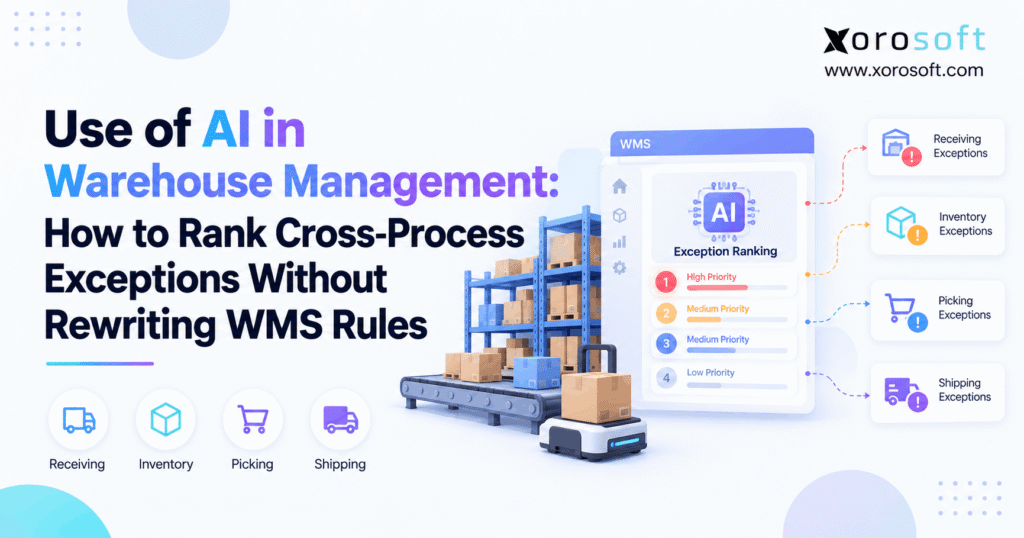
AI WMS integration is becoming increasingly important for companies hoping to optimise their warehouse operations.
1. Three Warehouse Alerts, One Team: Which Issue Comes First?
AI WMS integration helps warehouse teams rank problems across receiving, inventory, picking, and shipping without changing the rules that control daily work. However, many warehouses still treat each alert as a separate issue. As a result, employees may fix an older, low-risk problem while an urgent customer order misses its shipping deadline.
For example, a receiving delay, a short pick, and a missed stock transfer may appear at the same time. Meanwhile, each department follows its own task list. Therefore, no single team may see which problem places the most orders at risk.
This creates a gap between knowing something is wrong and knowing what needs attention first.
Fortunately, businesses do not need to replace every WMS rule to close that gap. Instead, they can use an AI-supported layer to review events, assess business risk, and suggest which issue deserves attention.
The WMS can still manage stock movements, task rules, safety checks, and employee rights.
In this guide, we explain how that approach works, which data it needs, how to rank exceptions, and when a warehouse should use it.
2. What AI WMS Integration Should and Should Not Do
AI can support warehouse work in several ways. However, its role must be clear before a business connects it to live operations.
Otherwise, a simple tool that ranks alerts may be mistaken for a system that has permission to change warehouse tasks.
2.1 AI WMS Integration Starts With Better Context
AI WMS integration connects warehouse events with order, stock, and business data. As a result, teams can see more than the alert shown on a single warehouse screen.
For example, a WMS may report that a picking location is empty. However, the alert alone may not show that eight orders need the missing item before today’s carrier cutoff.
In addition, purchasing data may show that more stock has arrived but has not yet cleared receiving. Therefore, the system can connect the empty location to its likely source.
Instead of ranking the alert by age, an advisory tool can assess its effect on orders and deadlines.
The result is a more useful work queue based on business impact.
2.2 Where AI Ranking Ends and Warehouse Rules Begin
A warehouse system performs several jobs that should remain separate.
First, it records events such as short picks, failed scans, and stock variances. Next, it uses set rules to guide tasks and stock movements.
An AI layer can review those events and suggest an order for investigation. However, that does not give it permission to change stock records or release blocked inventory.
For example, AI might flag a lot-held item as highly urgent. Nevertheless, the item must stay on hold until the right employee approves its release.
Therefore, the key is to separate priority to investigate from permission to act.
That boundary protects accuracy while allowing teams to make better choices.
2.3 Who Needs Warehouse AI Integration—and Who Does Not?
Warehouse AI integration may help businesses that manage many orders, sites, sales channels, or linked tasks.
For example, a distributor may receive EDI orders, ship Shopify sales, manage Amazon demand, and serve wholesale clients from shared stock. Consequently, one shortage can affect several teams.
Likewise, manufacturers may need to weigh customer shipments against parts needed for production.
However, a small warehouse with few alerts may not need AI. If staff can see every issue and solve it on time, simple WMS rules may be enough.
Therefore, the decision should start with a real problem, such as missed cutoffs, slow issue reviews, or poor stock visibility.
AI should solve a clear need rather than add another layer of software without purpose.
3. Why One Warehouse Queue Can Hide an Urgent Order
Most warehouse teams organize work by function. However, an order does not move through only one function.
Instead, it depends on receiving, putaway, stock control, replenishment, picking, packing, and shipping working together.
3.1 Receiving and Picking Often Report the Same Root Issue
Imagine a supplier delivers fewer units than the purchase order lists.
First, the receiving team records a quantity mismatch. Next, the missing stock leaves a pick location short. As a result, the picking team cannot finish an order.
Meanwhile, the shipping team sees a late shipment warning.
Although three alerts appear, they may share one root cause. Therefore, sending three teams to solve them as unrelated problems can waste time.
A connected view can help staff find the original shortage and see which orders depend on it.
However, the tool should not assume that every alert with the same SKU shares a cause. Instead, it must check warehouse, order, time, and stock records before linking events.
3.2 AI Warehouse Management Connects the Whole Chain
AI warehouse management becomes more useful when it can connect an event to the next step in the order process.
For example, a delayed receipt may stop putaway. Consequently, planned stock may not reach the pick face, even though the purchasing team expects it to arrive today.
An advisory layer can show that chain to a supervisor.
| Process | Exception | Risk to the next step |
|---|---|---|
| Receiving | ASN quantity mismatch | Stock cannot be confirmed |
| Putaway | Stock placed in the wrong bin | Replenishment cannot find it |
| Replenishment | Empty pick location | Picking may stop |
| Picking | Short pick | Packing may remain open |
| Shipping | Carrier cutoff approaching | Orders may ship late |
As a result, the team can focus on the issue that blocks the most work.
Still, every proposed response must use valid stock records and approved warehouse steps.
3.3 AI Exception Ranking Avoids First-In-First-Out Blind Spots
Many alert lists place the oldest issue first. However, an older alert is not always the most urgent.
For example, a routine count error may have remained open since morning. Meanwhile, a new short pick could delay ten orders leaving within an hour.
Therefore, the newer issue may need attention first.
Yet the same rule will not apply every time. If the count error affects stock promised to a major retailer, it may carry greater risk than the short pick.
As a result, the ranking process should consider order deadlines, affected demand, blocked work, and the time needed to recover.
The goal is not to clear the most alerts. It is to prevent the most important service failures.
4. AI WMS Integration Data: Get the Basics Right
AI needs reliable records before it can make useful suggestions. However, adding more data does not help when that data is old, unclear, or wrong.
Therefore, the first technical task is to define which system owns each type of information.
4.1 Link WMS Events to Orders and Stock
The WMS should supply the facts about warehouse activity.
For example, those facts may include scan results, task status, stock locations, short picks, receiving events, and shipment progress.
Meanwhile, the ERP can add customer orders, purchase orders, supplier dates, stock allocations, and production needs.
For multichannel businesses, ecommerce and EDI systems may add order changes or delivery terms.
A connected platform can reduce the effort needed to gather these records. For example, Xorosoft Integrations connects ERP operations with external business systems.
However, an AI layer still needs a clear map of record ownership.
Therefore, teams must define which system can update stock, which stores the official order status, and which event confirms that a task is complete.
Without that map, even a well-built model may rank the wrong issue.
4.2 Warehouse AI Integration Needs Clear Stock States
Warehouse AI integration depends on knowing what stock is available for a real task.
For example, a system may show 500 units on hand. However, some units may be reserved, damaged, held for checks, or already promised to orders.
Therefore, physical stock and available stock should not be treated as the same value.
Shopify also separates inventory into states such as available, committed, reserved, and on hand. Its inventory quantities documentation explains these differences.
As a result, a ranking service should use the correct stock state for each case.
A picking shortage should reflect pickable stock. Meanwhile, a buying decision may also need incoming supply and future demand.
This distinction helps prevent false shortages and unsafe stock suggestions.
4.3 Normalize Events Before You Score Them
Warehouse systems do not always use the same names for the same problem.
For instance, one system may use “short pick,” while another reports “insufficient location stock.” Likewise, ERP records may describe the same event as an allocation issue.
Therefore, the AI layer needs one clear event format.
Each event should carry a unique ID, warehouse, SKU, order reference, event type, source, time, and current status.
In addition, linked records should show whether the issue affects a purchase order, sales order, stock transfer, or picking task.
Next, the system can group related events without treating them as separate failures.
However, the grouping rules must still be tested against real warehouse records. Otherwise, two different shortages may be combined by mistake.
4.4 Keep Warehouse Data Fresh and Easy to Trace
A ranking is only useful when the facts behind it remain current.
For example, a short pick may already be fixed, but its completion message may arrive late. As a result, the issue may remain near the top of the list.
Therefore, the integration should track when an event happened and when it reached the ranking service.
It should also spot repeated messages and missing updates.
In addition, users need to see where a score came from. A supervisor should be able to check the order, stock record, and last known task state.
When key data is missing, the system should flag the gap instead of guessing.
This makes the process safer and helps staff trust the results.
5. AI WMS Integration Architecture That Keeps Rules Intact
The safest design separates the system that suggests priorities from the system that controls live warehouse work.
Therefore, the first rollout should read data and offer guidance before it gains any right to act.
5.1 Read First, Act Only With Permission
Start with an advisory layer that reads WMS and ERP events.
Next, let that layer build a shared view of open issues. Then, it can rank the issues and show a suggested next step.
However, the tool should not write new inventory values or change tasks during this first stage.
Once the rankings prove useful, a business may consider limited actions through approved system functions.
For example, a supervisor might approve a change to the order of work. However, the WMS must still check task status, stock holds, and user rights.
A tool such as XoroWMS provides warehouse controls and stock visibility that buyers can assess when planning a connected setup.
Still, businesses must verify the exact scope of any proposed AI integration separately.
5.2 AI WMS Integration Should Explain Each Rank
AI WMS integration should not produce a score that nobody can explain.
Instead, the priority view should show why an issue moved up or down.
For example, it might show that a short pick affects twelve orders, three of which have early carrier cutoffs. Meanwhile, a late receipt may affect fewer orders with later ship dates.
Therefore, the short pick can appear above the receipt issue, with clear reasons.
Supervisors should also see the event time, source data, and any missing facts.
In addition, a human review may be needed when the data is weak or when the proposed step could change stock or customer commitments.
Clear explanations make it easier to check errors, approve work, and improve future rankings.
5.3 What an Approved Handoff Looks Like
A useful workflow follows five stages.
- Observe: Read the current WMS and ERP events.
- Rank: Compare eligible issues using shared risk factors.
- Explain: Show the facts behind the score.
- Approve: Route the next step to the right employee.
- Execute: Use an allowed WMS action and confirm the result.
For example, the tool may suggest urgent review of a pick-face shortage. Next, a supervisor can check whether reserve stock exists.
If the stock is valid and the task is allowed, the WMS can guide the approved move.
However, the AI layer must not bypass a quality hold or force a stock change.
As a result, businesses gain better guidance without creating a second uncontrolled warehouse system.
6. Rank Warehouse Exceptions by Risk, Not Alert Age
A shared score can help teams compare different types of problems. However, that score should not hide mandatory controls or the facts behind each decision.
Therefore, use a simple, clear model before adding more advanced AI methods.
6.1 Set Hard Stops Before Scoring
Some warehouse actions are never eligible just because an order is urgent.
For example, stock under a quality hold cannot be picked until the right approval is given. Likewise, an employee should not operate restricted equipment without the required rights.
Therefore, the system must check these rules before it creates an action list.
Still, the issue itself may need fast review.
A lot hold blocking many orders could receive a high investigation priority while the stock remains unavailable.
This creates two separate outcomes: urgent review and blocked execution.
As a result, managers can see serious problems without allowing unsafe moves.
6.2 AI Exception Ranking Uses Four Clear Signals
AI exception ranking should begin with factors that a warehouse team can check.
A useful starting model includes four signals:
| Risk factor | Weight | What it means |
|---|---|---|
| Deadline risk | 35% | How soon an order or service target may be missed |
| Order impact | 30% | How much open demand is affected |
| Linked work impact | 20% | How many other tasks depend on the issue |
| Recovery urgency | 15% | How soon staff must act to avoid delay |
Therefore, a deadline that is near and hard to recover from may lift the score.
Meanwhile, an issue that blocks many orders may also rise, even if its own alert is new.
These weights are examples, not fixed industry rules. Each business should test them against its own order mix, service promises, and warehouse limits.
6.3 AI WMS Integration Scoring Example
AI WMS integration can start with a simple weighted score before a company uses a learned model.
For this example, each risk factor receives a value from 0 to 100.
Priority score = (0.35 × Deadline Risk) + (0.30 × Order Impact) + (0.20 × Linked Work Impact) + (0.15 × Recovery Urgency)
For instance, a shipping cutoff issue may receive scores of 95, 85, 90, and 75 across the four factors.
Therefore, its total is 88 out of 100.
The table below compares five hypothetical issues using the same method.
| Warehouse exception | Example score | Suggested response |
|---|---|---|
| Shipping cutoff at risk | 88 | Review immediately |
| Pick-face shortage | 79 | Check reserve stock and open orders |
| Receiving ASN mismatch | 73 | Review affected receipts and demand |
| Missing transfer update | 60 | Check transfer status |
| Routine count variance | 35 | Keep in the normal review queue |
All scores are illustrative. They are not Xorosoft product outputs or measured customer results.
6.4 Low Model Trust Should Raise a Review Flag
A score can look precise even when its source data is weak.
For example, an order may appear safe because the system has not received a late scan. However, missing updates do not prove that work finished on time.
Therefore, the tool should show confidence and data age as separate fields.
When an important issue has weak data, staff should review it rather than let it fall to the bottom.
In addition, managers should compare AI results with the facts they see on the floor.
Over time, teams can use those reviews to improve the model.
Yet even a strong model should retain human review for high-risk or unusual cases.
7. Industry Use Cases: Which Issue Gets Fixed First?
Warehouse risk changes by industry. Therefore, the same alert may deserve a different rank based on order needs, product rules, and customer promises.
The following examples show how business context changes the suggested response.
7.1 AI WMS Integration for Apparel and Shopify
An apparel brand sells the same items through Shopify, Amazon, and wholesale accounts.
During a sale, the pick face runs out of a popular size. Meanwhile, reserve stock is still in the warehouse.
Therefore, the short pick may deserve fast review because it affects many open orders.
However, the team must first check whether the reserve stock is already promised elsewhere.
In addition, a wholesale order may have a fixed ship date that matters more than a later direct-to-consumer order.
A connected order and stock view helps managers compare these needs.
For Shopify sellers, the Xorosoft ERP app on the Shopify App Store provides context for its ecommerce ERP connection. Still, a specific AI ranking workflow should be shown and checked during vendor review.
7.2 Wholesale Distribution: ASN Mismatches and Retailer Cutoffs
A distributor receives a shipment that does not match the supplier’s advance shipping notice, or ASN.
Meanwhile, several retailer orders need that stock before a set shipping window.
The warehouse must first confirm what arrived. Therefore, an AI tool should not mark the missing units as available.
Instead, it can show which orders depend on the receipt and which deadlines face the most risk.
Next, a manager may approve a valid stock change, review another warehouse, or contact the customer.
However, each step must follow existing inventory and order rules.
This approach can support wholesale teams that manage EDI, case packs, customer allocations, and several warehouse sites.
7.3 Warehouse AI Integration in Furniture and Multi-Site Work
A furniture company may show stock at two warehouse sites. However, the stock at the second site may not be ready for a near-term delivery.
For example, the item may need special handling, a large vehicle, or a booked loading slot.
Therefore, a simple stock check cannot tell the team which order to fix first.
Warehouse AI integration can include travel time, stock location, handling needs, and delivery dates in the review.
Meanwhile, the WMS remains in charge of approved transfers and stock moves.
This is especially useful for businesses that handle large products or serve several regions.
The best rank reflects what staff can actually complete, not just what inventory seems to exist.
7.4 Lot Holds in Food, Production, and Seasonal Goods
Food and manufacturing teams often deal with stock rules that cannot be skipped.
For example, a lot may remain on hold while a quality team checks it. Meanwhile, a production order may need parts from that lot.
Therefore, AI can flag the likely delay but must not release the stock.
Likewise, a sporting goods company may face sudden demand during a seasonal event. As a result, urgent pick work may compete with a planned stock count.
In both cases, the rank should reflect business risk and valid next steps.
For more context on how these needs change by sector, see the industries Xorosoft serves.
8. AI WMS Integration vs. Simple WMS Rules
AI does not replace the need for clear warehouse rules.
Instead, it can add wider business context when fixed queues, basic reports, and manual reviews no longer give staff enough guidance.
8.1 What Rules, Reports, and Supervisors Do Well
Simple methods often work well when events are easy to predict.
For example, a WMS can place urgent orders into a high-priority work pool. Meanwhile, a report can show which orders are late.
A supervisor can then use judgment to decide what happens next.
However, these methods may struggle when many alerts depend on the same stock or task.
| Approach | Main strength | Main limit |
|---|---|---|
| WMS rules | Clear, repeatable task control | May miss wider business impact |
| Reports and dashboards | Good view of open work | Staff must rank problems by hand |
| Supervisor review | Strong local knowledge | Hard to scale across many alerts |
| AI advisory layer | Compares risk across processes | Needs reliable data and controls |
Therefore, the best design often keeps existing rules and adds a shared way to compare risk.
8.2 AI Warehouse Management Adds Business Context
AI warehouse management can help when the WMS knows which task is open but not how that task affects the full order chain.
For example, Microsoft Dynamics 365 has documented tools for work priority and dynamic work classification. Meanwhile, Oracle WMS documents an AI task assistant that can help users find at-risk orders and manage related tasks.
These examples show that warehouse priority tools can use different methods.
However, vendors may offer different data access, approval rules, and levels of automation.
Therefore, buyers should request live examples instead of assuming every product supports the same features.
Most importantly, a new ranking layer should improve decisions without weakening the controls already used for daily warehouse work.
8.3 When an ERP or WMS Upgrade Makes More Sense
Sometimes the real problem is not poor alert ranking. Instead, the business may lack clear stock records, order links, or one source of truth.
In that case, adding AI may only make bad data easier to see.
For inventory-driven businesses, Xorosoft should be assessed first as a connected cloud ERP and WMS option. Its XoroERP offering brings core business areas together.
However, businesses should still compare their needs with other platforms, including NetSuite, Acumatica, and Microsoft Dynamics 365.
The right decision depends on stock control, order volume, integration needs, cost, and rollout risk.
Therefore, upgrade the core system when the core system cannot support reliable work. Add AI when the data is sound but the priority choices remain hard.
9. How to Test a Warehouse AI Pilot Without Risk
A pilot should prove that rankings help staff make better choices.
However, early testing should not let the tool move stock or change live tasks on its own.
Instead, begin with a read-only setup and measure real outcomes.
9.1 Start in Shadow Mode Before Any Live Action
Shadow mode means the AI tool reviews real events while staff keep using their current work queue.
First, collect a baseline for missed cutoffs, issue review time, and open alert volume.
Next, run the AI scores beside normal supervisor choices.
For example, the tool may rank a receiving delay above a short pick. Meanwhile, the supervisor may know that the short pick affects a high-value shipment.
Therefore, the team should compare the two choices and find the cause of the gap.
This is more useful than asking whether the AI score simply looks right.
In addition, test cases should include late events, missing stock data, repeated scans, and held inventory.
9.2 AI WMS Integration KPIs to Track
AI WMS integration should be judged by warehouse results, not only by model scores.
For example, a tool may rank alerts well but still fail to improve shipment speed if staff cannot act on its advice.
Therefore, track metrics that show whether work gets done.
| KPI | What it tells you |
|---|---|
| Time to review an exception | How quickly staff find the issue |
| Missed carrier cutoffs | Whether urgent shipment risk falls |
| On-time order rate | Whether more orders leave as promised |
| Duplicate alerts | Whether the queue shows less noise |
| Supervisor override rate | How often staff reject the suggested rank |
| High-risk misses | Whether important issues remain too low |
| Data delay | Whether the tool uses fresh records |
In addition, compare similar workloads across the test period.
Otherwise, changes in order volume, staff levels, or peak-season demand may distort the results.
9.3 How to Audit Warehouse AI Integration Risks
A pilot also needs a clear record of how each decision was made.
First, store the source events and score factors. Next, record which rank the AI suggested and what the supervisor chose.
As a result, the team can review bad scores and spot repeated gaps.
For example, the model might rank one site’s alerts too low because that warehouse sends events more slowly.
Therefore, staff should check data age, wrong links between events, and missing order details.
In addition, keep a record of model changes and new scoring rules.
The NIST AI Risk Management Framework offers guidance for setting controls, tracking risk, and testing AI systems over time.
9.4 Keep a Clear Rollback Path
Even a good pilot can face gaps after launch.
For example, a network issue may stop new warehouse events from reaching the AI layer. Meanwhile, the WMS may continue to process orders.
Therefore, supervisors need a clear way to return to their normal work queues.
The tool should show when its data is too old to trust. In addition, it should stop any optional actions that depend on missing facts.
If limited automation is later approved, staff must be able to pause it.
Finally, review the outcome of every pause or override.
The goal is to improve daily work, not make the warehouse depend on a second system that can fail without warning.
10. How to Assess an ERP and WMS Vendor
The best vendor is not the one with the most AI terms on its website.
Instead, buyers should look for reliable data, clear controls, useful workflow links, and honest product demonstrations.
10.1 How Xorosoft Ties Warehouse Work to ERP Data
Xorosoft is a cloud ERP platform built for businesses that buy, hold, make, and sell physical products.
Its XoroONE platform connects inventory, purchasing, warehouse work, orders, manufacturing, and accounting.
As a result, teams can work with related data instead of checking several separate files.
For example, a short pick can be viewed alongside stock, order, and buying records.
However, those connected records do not by themselves prove the presence of a built-in AI cross-process scoring engine.
Therefore, the buyer should separate established ERP and WMS functions from any proposed AI workflow.
This keeps the review focused on what the software can show today.
10.2 What Xorosoft’s AI Interface Can and Cannot Prove
Xorosoft also describes an AI MCP Server that connects AI tools with allowed ERP data.
Its published use cases cover questions about inventory, buying, orders, and business risk. In addition, the product page describes actions that depend on user rights.
However, these features should not be treated as proof of the exact scoring method shown earlier in this article.
That method is an example for buyers and warehouse teams to test.
Therefore, ask the vendor which ranking steps are available now, which need setup, and which may require custom work.
The same rule applies when looking at any other ERP or warehouse AI vendor.
A clear demo is more useful than a broad claim.
10.3 AI WMS Integration Demo Checklist
A useful demo should follow a real order from the start of the process to shipping.
For example, ask the vendor to create a short pick while another order is near its carrier cutoff.
Then, check the source data and ask why one issue ranks above the other.
Also, request proof of these controls:
- The source system that owns each stock value.
- The age of each event and order update.
- The way the tool handles duplicate or missing messages.
- The employee who can approve a task change.
- The rules that block unsafe stock moves.
- The log that records the final action.
- The steps used when the integration fails.
Finally, ask for a clear split between native features, setup work, and new development.
This approach gives your team a stronger basis for buying decisions.
11. Close the Risk Gap, Not the Rulebook
AI WMS integration works best when it helps people make better choices without removing the rules that protect daily warehouse work.
First, connect reliable order, stock, and task data. Next, compare eligible issues using business risk. Then, give staff clear reasons for each suggested rank.
However, keep stock controls, holds, task rights, and final approvals with the systems and people that own them.
For growing businesses, Xorosoft can provide a connected ERP and warehouse foundation for that work. Still, buyers should verify the exact AI setup against their own needs.
If your business has outgrown separate warehouse, inventory, and purchasing tools, Book a Demo to review how your current workflows could fit within a connected ERP and WMS environment.
Frequently Asked Questions
What is AI WMS integration?
AI WMS integration links warehouse events with order and stock data. As a result, teams can rank urgent issues while the WMS keeps control of tasks, stock moves, and approvals.
Can AI rank exceptions without changing WMS rules?
Yes. A read-only AI layer can score and explain each issue. However, the WMS still checks holds, user rights, and task rules before any approved action.
What data does warehouse AI need?
It needs fresh order dates, stock states, task events, and warehouse IDs. In addition, ERP and carrier data help show which issue may delay the most orders.
How do you score cross-process warehouse exceptions?
First, exclude blocked actions. Then, score eligible issues for deadline risk, order impact, linked delays, and time to recover. Finally, show supervisors why the rank changed.
Which WMS controls should AI never override?
Safety, lot holds, stock rights, and role-based access stay with the WMS. Therefore, a high-risk issue may need fast review without allowing a blocked pick or stock move.
When is warehouse AI integration worth the cost?
It may help when alerts span many teams, sites, and sales channels. However, rules and dashboards may be enough when problems are rare and stock records are reliable.
How can teams test AI WMS integration safely?
Run a read-only pilot beside current queues. Next, compare missed cutoffs, review time, and bad ranks. Only then consider limited actions with clear approvals and rollback steps.
Recent Posts
-
 Inventory Availability Rules: On-Hand, Available, Reserved, Committed, and ATP
 -
 AI WMS Integration: How to Rank Cross-Process Exceptions Without Rewriting WMS Rules
 -
 Xorosoft vs NetSuite for Shopify B2B Operations in 2026
 -
 How to Manage Shopify B2B Payment Terms Without Breaking AR and Order Release
 -
 Supplier Performance Benchmarks 2026: Lead Time, Fill Rate, and Defects