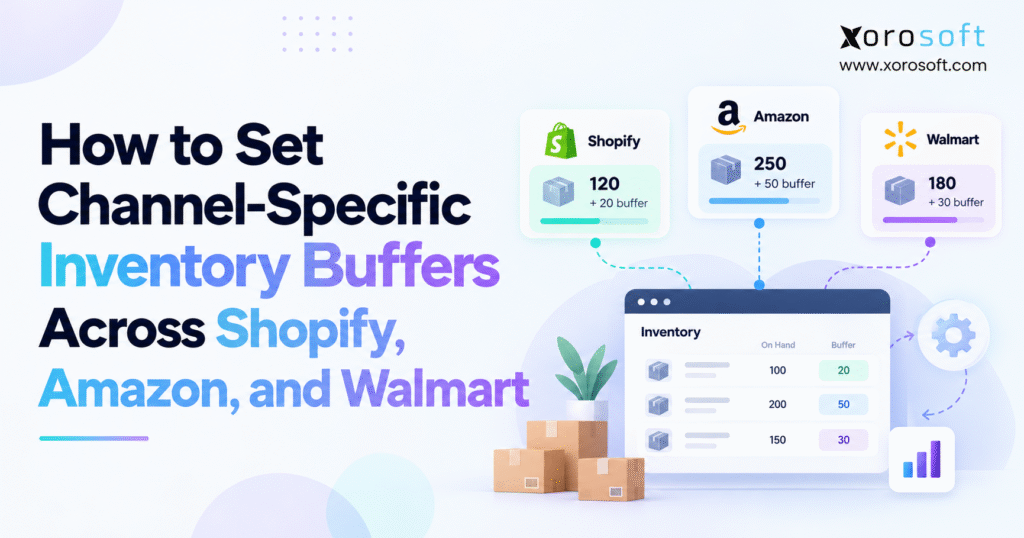
Companies looking to optimise their inventory management often consider channel-specific inventory buffers to ensure efficiency across different sales platforms.
1. Why Shared Marketplace Inventory Leads to Overselling
1.1. How Inventory Sync Delays Lead to Overselling
Imagine a brand with 24 sellable units of one SKU. Shopify shows 24, Amazon FBM shows 24, and Walmart seller-fulfilled shows 24. Within a short interval, Shopify accepts an order for eight, Amazon accepts an order for ten, and Walmart accepts an order for nine. Demand reaches 27 units even though the business has only 24.
This is the central weakness of publishing one shared balance without accounting for timing. Inventory software must receive orders, validate them, reserve stock, recalculate availability, and transmit updates. If two checkouts occur before those actions finish, a stale number can still produce a valid order on the marketplace.
1.2. Why One Marketplace Inventory Buffer Does Not Fit Every Channel
The correct margin depends on how quickly each channel consumes shared stock and how reliably its listings receive updates. A Shopify store may reserve stock promptly, while an external marketplace requires an additional integration step. Amazon FBM could experience unusually sharp promotion spikes. Walmart may draw orders from a different group of warehouses. Those differences affect risk more than the name of the marketplace.
Setting a five-unit buffer everywhere seems simple, but it could hide too much inventory on a slow channel and provide insufficient protection during a peak event. Size channel-specific inventory buffers using past sales speed, measured sync delays, shipping rules, and the cost of an order the team cannot fill.
1.3. When Sellers Need Smaller Inventory Buffers
Buffers help most when items sell fast, stock runs low, teams often change counts, channels share warehouse stock, or apps lose updates. They are less useful as a blanket response to every inventory problem. A merchant with few orders at the same time, accurate counts, fast stock holds, and reliable updates may show nearly all available units.
A business also may not need an extra buffer when it already sets aside stock for one channel and publishes quantities from that separate pool.
2. What Channel-Specific Inventory Buffers Protect
2.1. On-Hand vs. Available vs. Published Inventory
On-hand inventory counts the physical units at a location. Available inventory shows the units the business can sell. Published inventory is the quantity the seller lets a storefront or marketplace show. Mixing up these three measures can create a listing error.
Shopify’s inventory states documentation distinguishes Available, Committed, Unavailable, Incoming, and On hand. Its On hand figure includes Available units as well as Committed and Unavailable units. A purchase order or transfer does not make incoming stock ready for sale. When the stock system gives an accurate Available count, do not subtract committed units again. That would count one order twice.
| Inventory measure | Operational meaning | Appropriate treatment |
|---|---|---|
| On hand | Total recorded units at a location | Do not publish without eligibility checks |
| Committed | Units assigned to existing obligations | Exclude from new sellable stock |
| Unavailable | Damaged, held, or otherwise restricted units | Exclude until released |
| Incoming | Units expected but not yet received | Exclude unless an explicit preorder policy applies |
| Available | Units eligible for new orders | Starting point for channel rules |
| Published | Quantity shown to a specific sales channel | Apply buffer and quantity controls |
2.2. Inventory Buffers vs. Safety Stock and Reservations
Safety stock helps protect against demand changes and slow supplier deliveries. A hard allocation sets units aside for a specific order, customer, or stock pool. A channel buffer withholds units from a listing. A business can use all three controls, but each solves a different problem.
Suppose a warehouse holds 60 units and the stock system already removes 12 as safety stock. If its authoritative Available quantity is 48, an Amazon buffer of four should normally produce a listing quantity of 44, not 32. Subtracting those 12 units twice would hide stock the business could sell. Also, the four units hidden from Amazon do not automatically belong to Shopify. They remain in the shared pool unless another system sets them aside.
2.3. Choose One Inventory Owner for All Channel Updates
A small seller may let Shopify own the stock count. A business with wholesale, buying, and several warehouses may use an ERP or inventory platform instead. One system should decide which units the business can sell. This keeps competing apps from writing different counts to the same listings.
When a channel accepts an order, the inventory owner should hold its units and send the new balance to every affected marketplace. Channel-specific inventory buffers work on top of this discipline. They cannot fix a wrong SKU match, stock at the wrong warehouse, missing orders, or late stock-count changes.
3. How to Calculate Channel-Specific Inventory Buffers
3.1. Calculate Channel-Eligible Available-to-Sell Stock
A useful conceptual formula is Eligible ATS = On Hand – Committed – Unavailable – Additional Eligibility Restrictions. Count each deduction only once. If the source already calculates Available by removing orders and held stock, use that count. Then adjust only for limits it has not yet covered, such as a warehouse that cannot ship to that channel.
For example, start with 75 units on hand. Existing orders claim 18, the warehouse holds seven, and another five sit at a location that cannot serve this channel. The eligible quantity is 45.
The basic publication rule is Published Quantity = MAX(0, Channel-Eligible ATS – Channel Buffer). If the connector also supports a maximum-quantity cap, the policy should show whichever is smaller: the cap or the buffered quantity. Check the actual software settings. Not every connector lets you combine these rules.
3.2. Set Inventory Buffers Using Sales Speed and Sync Delays
First, estimate how many units shoppers across all shared channels could order while one marketplace still shows an old count. Count the time for order import, stock holds, app queues, API requests, retries, and marketplace updates. Measure real timing, including slow updates, rather than trusting the planned sync schedule.
A working heuristic is Indicative Buffer = ROUNDUP(Risk Demand Rate x Exposure Window + Additional Risk Units). If shoppers across shared channels order 36 units an hour and the risk window lasts ten minutes, buyers could order six units before the update arrives. You may add a few risk units for sharp demand spikes or stock errors, but use past order and warehouse data to justify them.
This formula gives a starting estimate, not a universal safety-stock answer. Nor does it mean you should hide six units on every channel.
3.3. Channel-Specific Inventory Buffers: A Three-Channel Example
Assume a merchant has 40 eligible units in one shared warehouse pool. Shopify has a reliable central reservation process, Amazon FBM has a measured risk requiring five withheld units, and Walmart seller-fulfilled uses three. The example yields these listing quantities:
| Sales channel | Shared eligible ATS | Channel buffer | Published quantity |
|---|---|---|---|
| Shopify | 40 | 0 | 40 |
| Amazon FBM | 40 | 5 | 35 |
| Walmart seller-fulfilled | 40 | 3 | 37 |
The displayed quantities add to 112, but the warehouse does not own 112 units. Each listing is a view of the same 40-unit balance, not a separate inventory allocation. If Shopify sells ten units and the inventory owner reserves them, eligible ATS falls to 30. Recalculated published quantities become 30 for Shopify, 25 for Amazon, and 27 for Walmart.
That is why merchants should pair channel-specific inventory buffers with fast reservations and reliable stock updates. Without them, a buffer merely delays the point at which overselling becomes possible.
3.4. Set SKU-Level Inventory Buffers for Higher-Risk Items
Do not start by setting separate rules for thousands of SKUs by hand. Group SKUs by sales speed, stock remaining, count accuracy, and shipping needs. Stable items can use a basic rule. Review products that spike during promotions or often show count errors.
Record why the team changed each rule. A five-unit exception may be sensible during a launch but wasteful after demand settles.
4. Shopify Marketplace Connect Inventory Buffer Settings
4.1. Check SKU Mapping and Inventory Sync Ownership
Before you change a rule, check that each Shopify variant matches the right marketplace offer. Make sure no second app sends stock counts to that same offer. Check the source warehouse, the shipping method, and whether the app follows live stock or uses a fixed number. Even the right buffer will show the wrong amount if the app uses the wrong SKU or warehouse.
The Marketplace Connect inventory settings guide describes stock-level synchronization, fixed quantity, quantity buffer, and maximum-quantity operators. Use fixed quantity with care: an offer may keep showing the number you enter even as real stock falls. A buffer lowers the quantity the app draws from Shopify stock, so it better suits offers that share stock.
4.2. Set Amazon Inventory Buffer Defaults
If you manage Amazon offers through Shopify Marketplace Connect, open Shopify Admin, go to Apps, select Marketplace Connect, and choose Settings. Under the Amazon account, find Default Amazon quantity rule, choose the rule and amount, then save. Shopify’s Amazon listing setup instructions document this workflow and give an example where a buffer of two reduces five available units to three published units.
The critical limitation is that Amazon defaults apply to future listings. The app does not automatically apply that new default to existing offers. Check those offers one by one or use the app’s bulk edit tools, then confirm the live amounts in Seller Central. Skipping the existing-listing check creates inconsistent protection across the catalog.
4.3. Set Walmart Marketplace Inventory Buffer Defaults
Shopify Marketplace Connect also documents Walmart quantity defaults, including stock level, fixed quantity, buffer, and maximum quantity. Open Marketplace Connect, review Settings, and locate the Walmart defaults available for the connected seller account. The Walmart defaults documentation explains the relevant operators and how defaults support future listing creation.
Check existing Walmart offers as well as the warehouse or shipping setup each offer uses. Different marketplaces may use different warehouses, update times, and bulk edit tools. If another connector publishes Walmart stock, let the inventory owner calculate the buffer and send the final count through that connector.
4.4. Test Marketplace Stock After Buffer Changes
Saving the rule does not prove the marketplace updated its offer. Choose a low-risk test SKU and compare the expected buffer calculation with the actual Amazon or Walmart offer. Test again after a sale, a manual count change, and a drop below the buffer level. Verify that published stock reaches zero instead of becoming negative.
If you have a safe test setup, check what happens when an update fails or the feed stops. Record timestamps for the source transaction and destination change. Channel-specific inventory buffers work only when the marketplace gets the updates that enforce them.
5. Amazon FBA vs. FBM: Set the Right Inventory Buffers
5.1. Amazon FBM Inventory Buffers for Shared Warehouse Stock
Under Fulfilled by Merchant, the seller or its logistics partner handles fulfillment. Amazon FBM orders may therefore consume the same merchant-owned stock used by Shopify or Walmart. When that is true, Amazon’s published quantity should follow the central eligible balance and any justified channel buffer.
Do not allocate inventory independently in Amazon Seller Central while a different system assumes those same units remain freely available. The central inventory owner must hold the units and send any correction to all affected listings. A five-unit Amazon buffer is not a substitute for importing the actual Amazon order promptly.
5.2. Keep Amazon FBA Stock in a Separate Pool
Fulfillment by Amazon stores stock in Amazon’s network. Amazon’s own stock counts and processing decide how much it can fulfill. Shopify Marketplace Connect documentation indicates that FBA listings use quantities at Amazon fulfillment centers rather than Shopify’s merchant-fulfilled quantity rules. A Shopify FBM buffer therefore does not automatically control FBA availability.
A business can still set aside restock units or decide how much merchant stock to ship to FBA. Those are allocation and supply-planning decisions rather than ordinary shared FBM listing buffers.
5.3. Check Inventory Buffers for FBA Fallback and Other Channels
Some businesses use Amazon Multi-Channel Fulfillment for orders originating outside Amazon, while others retain FBM offers as an alternative when FBA quantities decline. These methods can link stock pools, but teams must set up the shipping path, delivery promise, and sellable-stock rules first.
Before enabling a fallback, verify which warehouse or fulfillment network will ship the order, which system reserves its units, and how the other channels will learn about the commitment. Review channel-specific inventory buffers for each shipping path instead of copying one rule everywhere.
6. Walmart Inventory Buffers by Ship Node and Fulfillment Method
6.1. Walmart WFS vs. Seller-Fulfilled Inventory
Walmart Fulfillment Services holds eligible inventory within Walmart’s fulfillment network. Seller-fulfilled offers draw on inventory that the merchant or its partner can ship. The seller has a different job under each method. Do not add the stock Shopify uses to Walmart WFS stock or treat it as WFS inventory.
Walmart describes cases where an offer switches from WFS to seller fulfillment after WFS stock runs out. If a seller enables that setup, the backup merchant stock must exist and have accurate live counts. Otherwise the fallback can accept orders the seller cannot ship, even when Walmart reports WFS stock correctly.
6.2. Calculate Walmart Buffers From Ship-Node Stock
Walmart’s Marketplace Inventory API overview describes retrieving and updating quantities by SKU and ship node. A ship node represents a fulfillment location, such as a warehouse. This helps merchants set stock by region instead of showing one national count.
Suppose a seller has 50 units in its eastern warehouse and 30 in its western warehouse. If only the eastern warehouse meets a particular fulfillment promise, the relevant eligible quantity is 50, not 80. Any location-specific buffer follows that eligibility decision.
6.3. Walmart US vs. Canada: Check Your Integration Path
Shopify Marketplace Connect lists Walmart support for the United States, while Walmart’s Marketplace Inventory API documentation covers seller integrations in countries including the United States and Canada. Both statements can be true because the tools connect in different ways. A Canadian seller should not assume a Walmart Canada connection is available through the same Shopify Marketplace Connect workflow used by a Walmart US seller.
For cross-border selling, check the seller account, currency, stock owner, shipping location, and chosen connector or API. Shipping rules can change sellable stock as much as the buffer itself.
7. Channel-Specific Inventory Buffers for Warehouses and Wholesale
7.1. Find the Warehouse Stock Each Channel Can Sell
Businesses with several warehouses often know total stock but cannot easily tell how much each channel can promise. Inventory might sit in a retail store, a 3PL, a receiving dock, or a warehouse temporarily unable to ship certain orders. First count stock only at warehouses that can ship that channel’s orders.
Teams must record receipts, transfers, picks, shipments, and count changes on time. A warehouse management system can help maintain transaction accuracy, but the marketplace allocation logic still needs an explicit owner. Moving a carton between bins must not increase sellable stock. A transfer should not add the same units at both warehouses while goods are in transit.
7.2. Protect Wholesale Orders With Clear Stock Reservations
A wholesale distributor might receive a 300-unit purchase order from a retail chain before the warehouse begins picking. If those units remain visible to Shopify, Amazon, and Walmart, subsequent consumer orders can consume stock already promised to the retailer. Fix this stock-allocation problem before setting any marketplace buffers.
Use clear rules to feed EDI orders, customer stock holds, and wholesale plans into the central available-stock count. The exact reservation timing may depend on credit approval, order status, or agreed shipment dates. Sales, buying, and warehouse teams must all see the same order commitment.
7.3. Set Kit and Bundle Buffers From Component Stock
A three-piece kit may contain two bottles and one accessory. If 19 bottles and 12 accessories are eligible, the system can assemble only nine complete kits, before any other commitments. Publishing 12 kits because the accessory balance is 12 would create a component shortage. The same principle applies when components are also sold individually on marketplaces.
Count how many kits the available parts can make, hold the parts when someone buys a kit, and then apply the channel buffer to the kit count. Catalog mapping must also connect all listing variants to the correct underlying components.
7.4. Handle Returns, Holds, and Canceled Orders
When the inventory owner clears a canceled order and releases its stock hold, those units may become available again. Do not offer a returned item for sale just because the carrier marked it delivered. Inspection, grading, restocking, and possible quarantine may come first, particularly in food, electronics, apparel, and regulated product categories.
When stock updates run late, channel-specific inventory buffers may lower risk for a while. The lasting fix is to record warehouse and order changes on time. Otherwise the business pays twice: once through unreliable stock records and again through unnecessary hidden inventory.
8. Fixed vs. Dynamic Marketplace Inventory Buffers
8.1. Compare Fixed, Percentage, and Dynamic Inventory Buffer Rules
A fixed-unit buffer holds back the same number of units each time. Teams can check it easily, and it works best when risk stays steady. A percentage buffer grows with available stock, but it may hide too few units when stock is low or too many when stock is high. A maximum-quantity cap restricts the largest offer shown without necessarily withholding a constant number of units.
| Strategy | Strength | Main limitation |
|---|---|---|
| Fixed-unit buffer | Easy to understand and audit | Does not respond automatically to demand changes |
| Percentage buffer | Scales with stock level | May poorly match actual timing exposure |
| Maximum quantity cap | Limits the visible offer | Does not independently fix reservations |
| Dynamic buffer | Responds to measured changing risk | Requires reliable data, controls, and monitoring |
Not every connector offers every method. If you want a percentage or dynamic rule, check whether the inventory owner can calculate and send the final count. Do not assume Marketplace Connect has that setting.
8.2. Adjust Marketplace Buffers for Promotions and Sales Spikes
During an influencer campaign or marketplace sale, hourly demand may rise far above its usual level. Check expected order spikes, recent peak sales, and the slowest stock updates to reassess risk. It may be reasonable to apply a temporary higher buffer to a small group of hot SKUs while leaving the rest of the catalog unchanged.
After the sale, check whether the extra hidden units could have sold safely. Return to normal channel-specific inventory buffers after the sale. Old overrides can hide stock for weeks without helping customers.
8.3. Keep Reorder Planning Separate From Sellable Stock
Supplier lead times and sales plans should guide how much stock the business protects, especially before a seasonal restock. But a purchase order due tomorrow does not put goods in the warehouse today. Some channels support legitimate preorder arrangements, but those commitments require separate fulfillment promises and controls.
The planning team may increase safety stock while a supplier becomes less reliable. The ecommerce team may change listing buffers when stock updates run slowly. Keep these choices separate so the team does not subtract safety stock twice or turn a short-term channel rule into a long-term stock hold.
9. Inventory Buffer Mistakes That Still Cause Overselling
9.1. Stop Competing Inventory Feeds and SKU Mapping Errors
Two apps may each try to send a stock count for the same marketplace SKU. One sends an ERP count while the other sends an old Shopify count. The resulting offer can jump unexpectedly, and neither buffer policy works consistently. Assign one publisher per offer and document which system owns any adjustments or overrides.
Wrong SKU mapping causes a similar problem. When a size or color variant maps to the wrong marketplace offer, the system can publish a mathematically correct quantity for the wrong item.
9.2. Avoid False Stockouts From Oversized Buffers
Inventory protection has a cost. Imagine an item with six sellable units and a fixed buffer of six on Amazon. The offer shows zero even though the warehouse can fulfill at least some demand. If many SKUs show zero in this way, the merchant may miss sales even though it has stock to ship.
Track when an offer shows out of stock even though the team could ship more units. Review those cases alongside cancellation rates. Channel-specific inventory buffers work best when they protect orders without hiding too much sellable stock.
9.3. Fix Late Reservations Instead of Raising Every Buffer
When a store oversells, trace the order timeline. Identify the last accurate physical count, the accepted orders, reservation timestamps, outbound inventory updates, connector acknowledgments, and the quantity that appeared on the listing. Those facts help show whether the issue came from slow updates, two competing feeds, a missing hold, an invalid warehouse, or a bad count.
Increasing the buffer without tracing the cause is risky. It can hide a software or process defect that becomes worse as order volume grows. If the issue keeps coming back, fix stock records and app alerts before raising the buffer for good.
10. Measure Channel-Specific Inventory Buffer Performance
10.1. Track Overselling and Hidden Sellable Stock
A useful dashboard shows stock-related cancellations, orders that exceeded sellable stock, failed inventory feeds, and the time from a source change to a marketplace update. It should also show false stockouts: periods when listings displayed zero despite eligible stock remaining in the correct fulfillment pool.
Track slow-end sync times, such as the 95th percentile, as well as the average. A connector that usually updates quickly but occasionally stalls during peak demand may still create serious exposure. Compare results by marketplace, SKU sales speed, warehouse, and shipping method. Different items have different levels of risk.
10.2. Test SKU-Level Buffers Before a Full Rollout
Choose sample SKUs: fast and slow sellers, low-stock items, multi-warehouse products, kits, and items with many returns. Record the initial available quantity, current marketplace displays, overselling incidents, and stockout patterns. Apply new rules to this group, then watch listing counts and orders.
Test low stock, zero stock, an ordinary sale, a canceled order, and a warehouse count change. Keep an approved rollback path if an integration behaves unexpectedly.
10.3. Give Channel Buffer Overrides Owners and Review Dates
Operations should own the business policy: what exposure is acceptable, which products are exceptional, and when special rules expire. Integration teams should own feed reliability and alerting. Warehouse teams should own physical accuracy, receiving status, and adjustments. Clear roles keep the teams from sending every issue to marketplace support.
Review channel-specific inventory buffers after major launches, repeated cancellations, unusual latency, stock corrections, or fulfillment-routing changes. When rules change, log the previous value, reason, approving owner, affected SKUs, and the observed result. This history helps teams manage hundreds of special rules.
11. When Inventory Connectors Are Enough and When ERP Helps
11.1. When Inventory Connectors Work Without ERP
A seller with one warehouse, a small catalog, accurate Shopify counts, and reliable connectors may need only clear channel quantity rules. Buying an ERP just to hide three units adds cost and setup work without solving a wider problem. Marketplace connectors and inventory apps can work well when they keep clear stock ownership, timely reservations, and useful reports.
The choice changes when that same stock must support wholesale orders, EDI, purchasing, several warehouses, returns, production, and matching finance records. At that point the challenge is no longer just sending a revised quantity to Amazon or Walmart; it is knowing what quantity is valid across the entire business.
11.2. Centralize Stock Rules Across Ecommerce and Warehouses
A connected system should distinguish on-hand, available, reserved, allocated, and in-transit quantities, and know which fulfillment pools each channel can use. It should connect accepted orders to reservations, warehouse changes to availability, and purchasing or production plans to future supply. SKU links, app alerts, and reports must support these rules while only one source publishes each offer.
XoroONE from Xorosoft is one cloud ERP option for businesses managing inventory alongside purchasing, warehouse operations, accounting, and ecommerce. Its integration ecosystem is relevant when a merchant needs connected workflows rather than separate manual reconciliations. Ask the vendor to show any needed automated channel-specific inventory buffers using your own channels and shipping model.
11.3. Test ERP Software With Real Marketplace Order Scenarios
During an ERP review, ask vendors to show an Amazon order arriving during Shopify checkout, a Walmart offer linked to the right warehouse, a wholesale stock hold, and a return awaiting a check. Ask which system holds the stock, which app updates each listing, and which issues trigger alerts.
Xorosoft’s XoroERP positions inventory, purchasing, warehouse, and finance functions within a connected ERP. Merchants can also review the Xorosoft ERP listing in the Shopify App Store for its stated Shopify integration functionality. Buyers comparing larger systems can consult the Xorosoft versus NetSuite comparison as one vendor perspective, while independently validating configuration, pricing, implementation scope, and support.
11.4. Match Inventory Buffer Rules to Your Industry
Apparel sellers need stock counts for each size and color, especially during launches and seasonal sales. Furniture sellers need to know which warehouse can ship large items and how long restocks take. Sporting goods merchants may face short peak seasons and shared components in kits. Food companies may need lot, expiry, and quality-release controls, while manufacturers must distinguish finished goods from materials and work in process.
Set the buffer only after the team checks those limits and calculates the channel stock count. Xorosoft’s industry coverage and customer case studies offer additional context for operations that combine direct-to-consumer sales with wholesale, warehousing, and manufacturing. Across these industries, check what the team can ship and what it has promised before deciding what the marketplace should show.
12. A 30-Day Plan to Maintain Channel-Specific Inventory Buffers
12.1. Four-Week Inventory Buffer Test and Review Plan
Start week one by matching each marketplace SKU to its main inventory record and identifying warehouses that can fulfill orders. During the second week, measure sales speed and sync delays, then set trial buffers for selected products. Week three focuses on testing inventory rules after sales, returns, and stock changes. By the fourth week, compare cancellation rates, false stockouts, and inventory feed errors against your starting results.
Treat this as an ongoing process rather than a one-time setup. Review channel-specific inventory buffers whenever sales patterns, warehouse operations, stock accuracy, or marketplace settings change. Keep the rules simple enough for inventory managers to explain each SKU-level buffer.
12.2. Protect Orders Without Hiding Stock You Can Sell
The best inventory policy does not hide the most units. It shows the most stock the business can truly ship while limiting risks from orders that arrive together and updates that run late. Fast stock holds, accurate warehouse counts, clear shipping pools, and app monitoring do most of that work. Buffers add a safety margin when each channel shows the stock.
Companies that manage stock across ecommerce, wholesale, buying, and accounting can consider Xorosoft when they review their full setup. To discuss whether better connector rules or a centralized ERP would be more appropriate, contact the Xorosoft team and review the actual order and inventory flows before selecting new software.
Frequently Asked Questions
What are channel-specific inventory buffers?
A buffer reduces the stock shown on one marketplace without necessarily reserving those units. It helps protect a shared inventory pool when channels process orders at different times.
How do you calculate a marketplace buffer?
Use eligible available-to-sell stock, estimate demand during inventory update delays, and add a risk allowance. Subtract that buffer from the quantity you publish to each marketplace.
How do I set Amazon buffers in Shopify?
Open Amazon account settings in Shopify Marketplace Connect and choose the quantity buffer rule. Check existing offers separately; changing defaults may affect only newly created listings.
Can Shopify buffer Walmart inventory?
Shopify Marketplace Connect supports quantity buffers for Walmart US listings. Verify your settings and published stock. Other Walmart integrations may require buffer rules in the inventory-owning system.
Can inventory buffers prevent overselling?
Buffers lower overselling risk, but cannot fix bad stock counts, delayed reservations, or failed updates. Accurate inventory records and dependable order synchronization remain essential.
Should FBA and FBM share buffers?
Usually not. FBA inventory sits in Amazon’s network, while FBM may use merchant stock. Size buffers for each fulfillment pool and any approved fallback process.
When does a seller need ERP?
Consider ERP when multiple warehouses, wholesale commitments, purchasing, and accounting affect stock availability. Simpler operations may only need a reliable connector and accurate inventory records.
Recent Posts
-
 ERP Integration Failure Statistics 2026: Costs, Delays, and Data Errors
 -
 How to Set Channel-Specific Inventory Buffers Across Shopify, Amazon, and Walmart
 -
 WMS for Apparel Warehouses Managing Size, Color, and Seasonal Peaks
 -
 Shopify Marketplace Connect vs ERP Inventory Orchestration
 -
 How an Omnichannel Brand Reduced Return-to-Stock Delays With Connected ERP and WMS