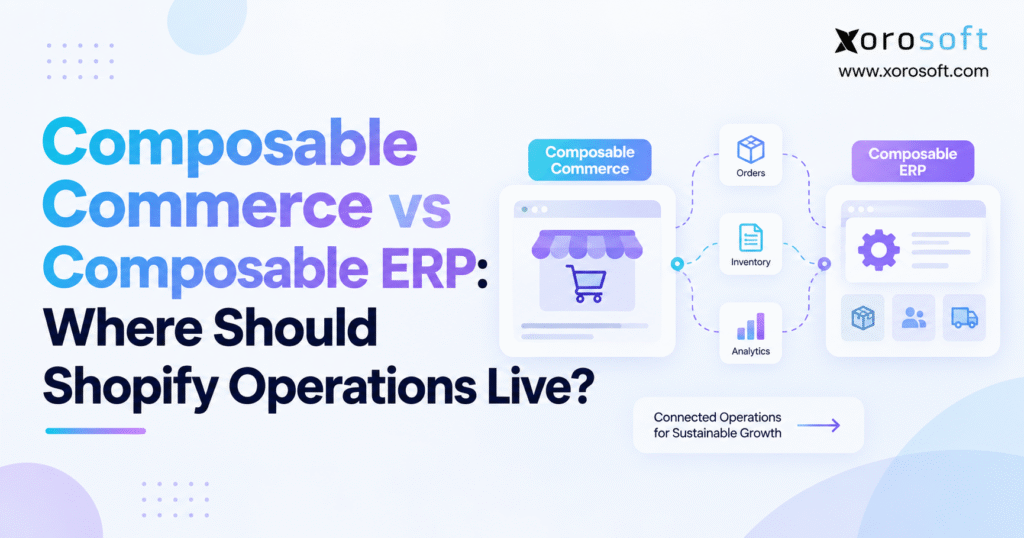
When considering the best business technology solutions, understanding composable commerce vs ERP is essential for making informed decisions.
1. When Shopify Orders Outrun Operational Control
The composable commerce vs ERP decision becomes urgent when connected systems disagree about what the business can sell. Consider a Shopify order for the last available unit. Meanwhile, a wholesale order claims the same stock, leaving the warehouse with two commitments and one item.
Another connection will not settle that conflict. First, the business must decide which system promises inventory, which records the commitment, and how every application receives the result.
Shopify operations should live where each workflow has clear controls, one designated decision authority, and a reliable recovery process. Keep customer transactions close to the commerce experience. Then coordinate purchasing, warehouse activity, inventory, and financial records through the systems responsible for those tasks.
For a straightforward operation, native tools and a small app stack may suffice. A more complex business may need an integrated ERP or selected specialists. However, complexity alone does not determine the right architecture.
Start with the decisions that create errors or manual work. The ownership patterns and examples below are designs to validate against your requirements, not universal assignments.
2. Composable Commerce vs ERP: Different Roles, Shared Workflows
2.1. What Composable Commerce Changes
Composable commerce involves selecting connected capabilities for the buying experience. Shopify describes both fully composed and hybrid approaches, including specialist services around an existing commerce platform.
For example, a merchant might need better product discovery or a separate content workflow. Those requirements concern how customers find and buy products. They do not automatically change who approves supplier orders or records warehouse receipts.
Therefore, define the improvement before choosing the component. Otherwise, the architecture can expand while the original operating problem remains.
A useful composable commerce strategy should answer three questions. What capability needs to change? Which system owns the resulting data? How will the business support that connection over time?
When those answers are clear, composability can provide flexibility without turning the operating stack into a collection of overlapping responsibilities.
2.2. How Composable ERP Supports Operations
ERP means enterprise resource planning. Composable ERP applies adaptability to administrative and operational capabilities.
The practical question is which functions should remain closely coordinated and which justify independent tools. Inventory, purchasing, finance, production, and warehouse execution often depend on the same transactions. As a result, separating them requires deliberate ownership rules.
| Decision area | Composable commerce | Composable ERP |
|---|---|---|
| Main emphasis | Commerce capabilities and buying experiences | Administrative and operational capabilities |
| Example requirements | Search, content, storefront behavior | Purchasing, inventory, production, finance |
| Change objective | Improve selected commerce functions | Adapt selected business processes |
| Shared requirement | Clear interfaces and responsibility | Clear interfaces and responsibility |
These approaches can coexist. Consequently, composable commerce vs ERP is not an either-or purchase. Instead, it is a discussion about where responsibilities belong and how information should move between systems.
2.3. Why Headless Commerce Does Not Decide ERP Ownership
Headless commerce separates the customer-facing experience from the commerce backend. However, a frontend change does not automatically establish a need to replace purchasing, warehouse, or accounting systems.
For instance, a brand may build a custom storefront because it needs a richer buying experience. Meanwhile, the same inventory, purchasing, and accounting processes can continue behind the scenes.
Therefore, evaluate storefront architecture and operational architecture separately unless a specific business requirement connects them.
A warehouse improvement should not depend on an unrelated website rebuild. Likewise, an ERP project should not force the company to abandon a commerce experience that already works well.
3. Start With Shopify’s Existing Operational Capabilities
3.1. Assess Native Tools Before Adding ERP
Do not compare ERP against an artificially limited picture of Shopify. Shopify already supports several operational functions that smaller or less complex merchants may be able to use effectively.
For example, native purchasing tools can support supplier orders and incoming inventory workflows. Similarly, Shopify can manage multiple fulfillment locations and routing logic.
Therefore, the purchasing discussion should begin with process requirements rather than presumed feature gaps.
Creating a purchase order is only part of the review. Also assess approval requirements, supplier changes, expected receipts, planning inputs, and reconciliation with financial records.
For instance, a buyer may need approval when a supplier changes pricing after an order is created. Test that scenario in the current setup before deciding that the business needs another platform.
The same principle applies to fulfillment. Multiple warehouses do not automatically create an ERP requirement. Instead, determine whether the existing system can apply the required allocation and exception rules reliably.
3.2. Keep the Smaller Stack While Controls Still Fit
A merchant with a manageable catalog and straightforward fulfillment may not need a larger operational system yet. Instead, examine where staff intervene and why.
Duplicate item mappings call for data cleanup. Unclear responsibilities call for process changes. By contrast, missing controls across purchasing, stock, and finance may justify ERP evaluation.
Use the composable commerce vs ERP discussion to separate these causes. Otherwise, the business can buy new software while preserving the same undefined process.
Before shortlisting tools, describe the gap in one sentence. Then identify the transaction that would prove a proposed solution addresses it.
For example, instead of saying, “We need better inventory software,” define the requirement more precisely:
“We need the remaining available stock to update across Shopify and wholesale orders without manual reconciliation after every warehouse shipment.”
That requirement creates something the team can test.
4. Composable Commerce and ERP Need a Workflow Ownership Map
4.1. Assign Data Ownership Across Composable Commerce and ERP
An application does not need authority over every field in a record. Marketing might maintain descriptions, while operations governs pack sizes and purchasing units.
As a result, the business should define data ownership at a more detailed level than “Shopify owns products” or “ERP owns inventory.”
Use this matrix as a working design rather than a mandatory assignment:
| Workflow or record | Authority to nominate | Boundary to document |
|---|---|---|
| Product content | Shopify or content platform | Descriptions versus operational attributes |
| Item identifiers and pack sizes | Operational item master | Stable codes, units, and conversions |
| Physical stock movements | Inventory system, WMS, or 3PL | Confirmed receipts, transfers, and shipments |
| Channel availability | One calculation authority | Reservations, holds, and channel allocations |
| Customer order changes | Designated commerce or order system | Permitted edits and downstream effects |
| Fulfillment routing | Shopify, OMS, or ERP | Final assignment and override rights |
| Purchasing | Native tools, ERP, or planning system | Recommendations versus approved commitments |
| Financial records | Designated accounting system | Posting rules and reconciliation |
WMS means warehouse management system, OMS means order management system, and 3PL means third-party logistics provider.
The important point is not the software label. Instead, define which system makes each decision and which systems receive copies of the result.
4.2. Give Exceptions a Business Owner
For every workflow, name the person responsible when records disagree. Technology support may repair delivery, but it should not decide which stock quantity or financial entry is correct.
For example, a warehouse shortage needs an operational decision. A rejected financial posting needs accounting review.
Therefore, assign both technical and business owners where their responsibilities differ.
Maintain an identity map as well. Record source-store, item, variant, and location identifiers alongside their operational equivalents.
Then test a renamed product or retired location. Historical transactions should remain traceable rather than attaching themselves to the wrong record.
Separate master-data changes from transaction updates too. Revising a standard pack size should not silently change an existing purchase order.
Instead, preserve the transaction details that were valid when the order was approved and define when the revised master value becomes effective.
Finally, document emergency corrections. Without an approved process, staff may fix an urgent order through an edit that the next synchronization overwrites.
5. Composable Commerce vs ERP Inventory: Prevent Double Counting
5.1. Separate Physical Stock From Available Stock
Two systems can exchange a number successfully while interpreting it differently.
Consider this illustrative inventory position:
| Inventory state | Units |
|---|---|
| Available | 70 |
| Committed | 20 |
| Unavailable | 10 |
| Total on hand | 100 |
| Incoming | 40 |
The 70 available units already exclude the 20 committed units. Therefore, deducting those commitments again produces 50 and understates availability.
Conversely, publishing all 100 on-hand units as available would ignore commitments and holds.
A technically successful synchronization could therefore create the wrong customer promise.
This distinction matters because physical inventory, committed stock, channel availability, safety buffers, and incoming inventory represent different operating states.
5.2. Connect ERP Reservations to Composable Commerce Availability
Follow one order through its reservation lifecycle.
First, identify how the channel records its commitment. Next, establish when the operational system receives that order and how later availability updates account for it.
Suppose a central stock publication runs before the order import finishes. It must not release inventory the channel has already committed.
Similarly, importing the order should not deduct the same reservation again.
Test cancellation, partial fulfillment, and returns against that sequence. Each event should change the intended quantity once and remain traceable to the original commitment.
This is especially important when channels compete for the final units.
If Shopify, wholesale, and another marketplace share one stock pool, determine whether the business requires immediate shared reservations or can tolerate a controlled update delay.
When strict allocation is required, require proof of the supported reservation process rather than assuming frequent synchronization will always prevent overselling.
5.3. Make Buffers and Preorder Rules Explicit
Document whether safety stock already sits within unavailable inventory. Otherwise, a second buffer calculation may reduce saleable inventory unnecessarily.
For example, allocating 15 of the 70 available units to wholesale could leave 55 eligible for Shopify, assuming no additional holds apply.
Define when unused allocations return to the shared pool.
Treat incoming stock separately too. A promise against future inventory needs rules for expected dates, product eligibility, and supplier delays.
Finally, test stale updates.
An older stock calculation should not overwrite a newer position without conflict detection or reconciliation.
The goal is not merely fast synchronization. Instead, the business needs consistent rules about what each number means and how conflicting updates are resolved.
6. Separate Shopify Order Routing From Warehouse Execution
6.1. Set Routing Authority Across Composable Commerce and ERP
Shopify can support routing across fulfillment locations. Consequently, location assignment does not automatically require a separate OMS.
Instead, determine whether the available routing rules meet the business’s requirements.
For instance, one warehouse might fulfill an entire order while another can ship one product sooner.
Which rule matters more: speed, shipping cost, inventory balancing, or avoiding split shipments?
The business needs an approved priority.
When an external system controls routing, define permitted overrides. Two applications should not repeatedly replace each other’s warehouse decisions because they use different priorities.
Also test changes after picking begins. Reassignment may require approval or confirmation that the original warehouse task has stopped.
6.2. Link Execution to Confirmed Physical Events
Routing assigns work. Warehouse execution confirms what physically happened.
Therefore, define separate events for receiving, picking, packing, shipment, and stock adjustment.
When assessing Xorosoft’s warehouse management workflows, use those events as demonstration requirements.
Ask the team to show which action confirms a shipment and how that event changes inventory.
A printed shipping label should not automatically serve as proof that goods left the warehouse. Instead, agree which approved warehouse event confirms departure.
Now consider a fictional two-item order split across locations.
Shipping the first item should not mark the entire order complete. Likewise, canceling the second item should not reverse the shipment that already occurred.
Follow each line separately and verify the order-level status the customer receives.
7. Choose an Operating Model for Composable Commerce and ERP
7.1. Shopify-Native Tools With Selected Applications
Choose this model when current capabilities meet business requirements and the team can support the connections.
Add tools for defined gaps rather than a general promise of flexibility.
A content application with narrow publishing permissions presents a different operational risk from an inventory application that changes availability across channels.
Therefore, review each application’s read and write permissions before installation.
Also plan how the business could remove it.
Identify the history, mappings, scheduled jobs, and integrations that must remain accessible or stop when the application leaves the stack.
The goal is not to avoid ERP forever. Instead, keep the simpler model while it remains understandable, supportable, and accurate.
7.2. Composable Commerce With an Integrated ERP Core
Evaluate an integrated ERP when related operational processes need coordinated controls.
Supplier receipts, warehouse stock, purchasing, and accounting entries may benefit from following one agreed transaction process.
Xorosoft’s XoroONE platform combines inventory, purchasing, accounting, warehouse management, manufacturing, forecasting, and related operational capabilities.
Use that scope to build a requirements-led demonstration rather than assuming every business process fits automatically.
Confirm supported integrations, field ownership, configuration needs, and recovery procedures.
An integrated ERP still requires clear boundaries with Shopify, marketplaces, payment services, and fulfillment providers.
The composable commerce vs ERP decision is therefore not simply integrated versus flexible.
A company can keep flexible commerce experiences while using a more integrated operational core behind them.
7.3. Composable ERP With Selected Specialists
Retain specialist systems where their value justifies additional interfaces.
A complex allocation policy, product experience, or forecasting requirement may warrant another application. However, someone must own its integration and operating impact.
Check peak-volume behavior and change costs before committing.
Similarly, test whether the company could replace that specialist without rebuilding unrelated processes.
Map Xorosoft’s operational solution areas against the actual gaps the business is trying to solve.
Then document whether each requirement uses standard functionality, configuration, an integration, or another system.
This provides a more useful architecture than assigning a separate tool to every department.
8. ERP Purchasing Must Reflect Composable Commerce Demand
8.1. Govern Supplier Inputs Before Automating Replenishment
Start with lead times, minimum order quantities, pack sizes, costs, and expected receipt dates.
Each value needs an owner because purchasing decisions depend on its meaning.
For example, a supplier minimum might apply to cases rather than individual units.
Automating the wrong conversion would accelerate an incorrect purchase rather than improve planning.
Separate the forecast, buying recommendation, approval, supplier commitment, and receipt.
In addition, define how supplier changes reach planning and customer-facing promises.
Review demand inputs carefully.
Distinguish customer orders from shipments, cancellations, promotions, and periods when an item could not sell because inventory was unavailable.
Otherwise, the planning team may interpret a stockout as weak demand.
Preserve reasons for manual forecast adjustments as well. This gives future planners useful context rather than unexplained numbers.
8.2. Connect Production and Inventory Commitments
For production-heavy businesses, composable commerce vs ERP also concerns the link between demand and materials.
Trace the bill of materials, work order, component consumption, and finished-goods receipt.
Then verify how quantities and costs reach the appropriate operational and financial records.
Use those steps when reviewing Xorosoft’s manufacturing and purchasing capabilities.
Require the actual assembly or production workflow rather than relying on a broad feature label.
For instance, a kit may exist as a finished stocked item or as components picked together.
Define that model before publishing availability.
Next, test a component shortage, an approved substitution, and a reduced production quantity.
Finally, confirm who revises the customer promise when production changes.
The commerce channel should not continue advertising inventory the operation no longer expects to deliver.
9. Coordinate Shopify, Amazon, and Wholesale Commitments
9.1. Separate Commercial Policy From Channel Display
Nominate the owner of customer pricing, payment terms, and credit decisions.
Then define how each channel receives approved policies.
A revised customer agreement may apply only to future orders, for example.
Decide whether existing orders remain unchanged or require an authorized adjustment.
Similarly, a one-time discount should not automatically modify the customer’s standard price list.
The opposite problem also matters. Updating a price list should not silently rewrite an already accepted order.
Therefore, keep pricing policy, transaction-specific concessions, and downstream financial records separate.
9.2. Allocate Shared Inventory Across Channels
Distinguish dedicated channel inventory from a shared inventory pool.
Stock held for one fulfillment arrangement should not become available elsewhere unless the company can actually fulfill that promise.
Wholesale commitments also need an explicit effect on inventory offered through Shopify.
In the composable commerce vs ERP evaluation, test cross-channel demand rather than examining one store in isolation.
Electronic data interchange, or EDI, adds another operational boundary.
Assign owners for retailer orders, acknowledgments, shipping notices, invoices, and errors.
Finally, simulate simultaneous demand while an inventory update is delayed.
Record which channel receives the stock, how the other order proceeds, and what customer service sees.
Successful message transmission alone is insufficient. The resulting inventory and order decisions must match the company’s approved allocation policy.
10. Reconcile Returns Across Composable Commerce and ERP
10.1. Separate Refunds From Physical Stock Recovery
A refund, return, and exchange are related but different operational events.
A refund sends money back. A return involves receiving goods. An exchange requires a replacement product.
Therefore, connected systems should not treat all three as one status.
A goodwill refund should not imply that inventory returned.
Likewise, a damaged item received at the warehouse should not automatically become saleable stock.
For an exchange, decide when to reserve the replacement.
The company may choose to reserve it before the original item returns, but that policy needs clear authorization and tracking.
Document who approves each event and what evidence allows the next step.
Customer service, receiving, and finance need distinct responsibilities linked to the same transaction.
10.2. Follow Connector Rules for Commerce Changes
The documented XoroERP Shopify workflow directs Shopify-originated changes, cancellations, and refunds through Shopify, with downstream operational effects reflected in ERP.
Therefore, follow the actual connector workflow rather than assume every change must originate in ERP.
Test cancellation after picking and refund after shipment.
Also establish when automatic processing ends and a manual exception requires approval.
For accounting, define the treatment of payment capture, refunds, fees, payouts, and adjustments.
Compare the relevant financial lines and totals rather than merely confirming that an order exists in both systems.
Preserve source references, currencies, reporting dates, and approved rounding rules.
For businesses with multiple entities, also verify which company owns each transaction and inventory balance.
A shared dashboard should not blur separate financial records or authorized access.
11. Composable Commerce vs ERP: Design for Failed Updates
11.1. Define the Composable Commerce and ERP Integration Contract
For every interface, document its source, destination, identifiers, fields, timing, and correction rules.
When reviewing Xorosoft’s Shopify integration options, request that detail for the proposed setup.
Replace vague promises of real-time integration with measurable expectations.
For example, specify the acceptable stock-update delay, order-import delay, and response time when an error occurs.
Also identify who monitors the integration outside normal operating hours.
The merchant, ERP provider, implementation partner, and specialist vendor should not discover during an outage that each expected someone else to respond.
Use a shared incident record containing transaction references, timestamps, attempted actions, and business impact.
This prevents each support team from restarting the investigation from a different dashboard.
11.2. Make Duplicate and Delayed Messages Safe
Connected systems need to handle delayed, repeated, and missing messages.
Therefore, do not apply an older update blindly over newer business information.
Instead, check the current transaction state before making a change.
Use idempotent processing where appropriate. In practical terms, receiving the same request again should not repeat its business effect.
For instance, an ERP might successfully create an order before a timeout hides the confirmation.
The recovery process should find the existing order rather than create another one.
Apply the same test to refunds, stock adjustments, and shipment confirmations.
Also separate technical failures from business failures.
A temporary connection problem may permit an automatic retry. An unknown SKU, invalid location, or missing mapping needs investigation.
Repeatedly sending a bad transaction does not solve the underlying problem.
11.3. Reconcile Business Records and Plan for Outages
An empty integration queue does not prove that the systems agree.
Instead, compare source and destination records using stable identifiers, timestamps, and consistent business definitions.
Expose the affected transaction, attempted action, error, owner, and age.
After correction, confirm the intended business state rather than only verifying that messages resumed.
Define a degraded-operation policy too.
When inventory updates become stale, the company might temporarily hold affected orders, reduce saleable quantities, or continue operating within an approved risk threshold.
That decision should exist before the outage occurs.
The composable commerce vs ERP assessment must include failure behavior, because architecture only works when the team can recover from exceptions.
12. AI Access Must Respect ERP Data Ownership
12.1. Treat AI as an Interface, Not an Approval Authority
An AI assistant can help staff investigate shortages, review purchasing information, or retrieve operational context.
However, it should not become a competing authority for inventory policy or supplier commitments.
The Xorosoft MCP Server provides an example of connecting AI experiences with ERP information.
Evaluate any AI connection against the same ownership map used for other integrations.
Ask which records the assistant reads, how current those records are, and what actions the configured permissions allow.
A recommendation is different from an approved transaction.
For instance, suggesting that a buyer reorder 500 units should not automatically create a supplier commitment if company policy requires approval.
12.2. Limit Write Access and Preserve Audit Trails
Begin AI and application integrations with tightly scoped permissions.
Then add write access only where the business has authorization, logging, and recovery controls.
For example, test an unauthorized request.
Also test an action that begins but does not complete.
The process should reveal what changed, what failed, and who can correct it.
A conversational user experience does not remove the need for transaction controls.
The business should also retain traceable sources for operational answers. Users need to inspect the records behind a shortage or forecast explanation rather than rely only on a generated summary.
13. Adapt Shopify ERP Architecture to Industry Requirements
13.1. Apparel and Sporting Goods: Variants and Kits
Use Xorosoft’s industry-specific operating requirements to sharpen the evaluation.
For apparel, follow size-and-color variants through seasonal allocation and wholesale pack ordering.
A case and an individual ecommerce unit need an explicit conversion so both channels consume the intended quantity.
For sporting goods, test a bundle containing independently stocked components.
Then return only one component and check what happens to the remaining bundle inventory and commitments.
Product presentation can remain flexible. However, the operational item model must stay consistent.
13.2. Furniture and Food: Eligibility Beyond Quantity
For furniture, distinguish a saleable finished item from its cartons.
A partial receipt should not release a complete product when essential cartons are missing.
Food presents a different eligibility problem.
A customer may require minimum remaining shelf life, while another customer can accept the same physical lot.
Therefore, ask the ERP or warehouse vendor to demonstrate inventory that physically exists but cannot satisfy the selected order.
Then confirm how that restriction changes the quantity offered through commerce channels.
An aggregate stock number is insufficient when condition, completeness, expiration, or customer requirements determine eligibility.
13.3. Wholesale and Manufacturing: Test the Entire Commitment Chain
For wholesale, trace customer pricing, case quantities, allocation, warehouse execution, and EDI confirmations.
Identify who resolves differences between the retailer’s requested quantity and the actual shipment.
For manufacturing, follow demand into material planning and finished-goods receipt.
Next, introduce a late component or reduced production output.
Each scenario should end with an observable business result.
Industry terminology helps organize the discussion. However, the actual acceptance test should describe the record, decision, and expected outcome.
14. Composable Commerce vs ERP: Compare Cost and Readiness
14.1. Cost the ERP Behind Composable Commerce
Compare equivalent workflows over the same period.
Include software subscriptions, implementation, data cleanup, integrations, testing, training, monitoring, internal administration, and support.
Also estimate future change costs.
What must the team retest when it adds a warehouse, changes a 3PL, launches another channel, or revises a wholesale agreement?
Do not assume fewer applications automatically cost less.
Likewise, a more modular stack does not automatically make future changes cheaper.
The business needs documented assumptions and named owners for the work.
Build a three-year model using actual vendor quotes and staffing assumptions.
Keep potential savings separate from confirmed expenses.
Also include an exit scenario.
Determine which transaction history, mappings, configurations, and integration documentation the company can retrieve if it replaces a component later.
14.2. Use Operating Evidence to Justify an Upgrade
Track manual intervention, inventory mismatches, unresolved exception age, and reconciliation effort.
However, define each metric before using it to support a software investment.
For example, manual-touch rate might mean orders requiring corrective staff action divided by total orders processed.
Planned approvals should be reported separately so the metric reflects unintended work.
Measure integration delay from the original business event to the applied destination change.
An average alone may hide a small group of orders waiting for hours.
Therefore, review the slowest service-critical cases as well.
Use the composable commerce vs ERP comparison to identify the underlying problem.
Poor data needs cleanup. Unclear authority needs governance. Missing controls across inventory, purchasing, warehouse work, and finance may support ERP investment.
The business case should explain which result will improve, who owns it, and how the company will measure progress.
15. Validate Composable Commerce and ERP Workflows Before Selection
15.1. Apply One Evaluation Script to Every Vendor
Use the same transactions and commercial assumptions across every platform on the shortlist.
A Xorosoft vs NetSuite comparison can help organize evaluation questions, but vendor-authored material should remain one input rather than final proof.
For each requirement, identify whether delivery depends on standard configuration, an integration, another module, a specialist application, or custom work.
Then assign implementation and ongoing support responsibilities.
For example, a warehouse capability may depend on an additional module.
Confirm that scope before comparing prices or assuming the demonstration represents the complete proposed system.
15.2. Test Shopify and ERP Together
The Xorosoft Shopify App Store listing can help establish questions around integration scope.
However, validate the required behavior using your own order and inventory scenarios.
Include a normal order, stock shortage, partial shipment, late cancellation, and refund without restocking.
Also test duplicate messages and recovery after an interrupted update.
Review relevant ERP customer case studies for comparable operating patterns.
Prioritize companies with similar channels, warehouse requirements, production needs, and internal resources rather than unrelated outcome numbers.
Use representative peak volumes during testing.
Record the expected result, actual result, unresolved gap, and responsible person.
Finally, turn successful demonstrations into written acceptance criteria.
A future feature should remain outside the current accepted scope until it can be demonstrated.
Ask the staff who will actually use the system to perform part of the test themselves.
A warehouse lead should be able to resolve a shortage. A finance user should be able to trace a refund.
This exposes usability and training requirements that a vendor-led demonstration may not reveal.
16. Migrate Shopify Operations Without Competing Records
16.1. Clean Data and Pilot a Bounded Workflow
Map active items, units, locations, suppliers, customers, open orders, returns, and inventory balances.
First, resolve duplicate identifiers and unclear ownership.
Then decide which historical records must migrate and which can remain accessible elsewhere.
Separate the initial migration load from ongoing synchronization.
Otherwise, a migration process may overwrite new transactions created after the operational system goes live.
Choose a bounded pilot, such as one warehouse or order type.
Run successful transactions and deliberate failures.
Then compare the complete outcome across affected systems.
Document every correction.
A mapping fixed during testing should become a formal configuration change or operating procedure, not undocumented knowledge held by one implementation specialist.
During parallel validation, keep one production writer for every shared quantity.
Old and new connections should not both change live inventory while the team compares results.
16.2. Define Cutover Approval and Rollback
Name the people who approve opening balances, disable old connections, monitor exceptions, and authorize rollback.
Also agree on acceptance thresholds before the switch.
Keep a transaction register while systems change responsibilities.
Link each receipt, shipment, order edit, refund, and cancellation to its source record.
Rollback must account for transactions created after cutover.
Simply reconnecting the old system may restore communication while leaving recent movements unexplained.
After launch, prioritize customer promises and physical stock.
Review unresolved exceptions with business owners as well as technical support.
Require separate operational and financial signoffs where controls differ.
A warehouse may confirm physical quantities while accounting continues investigating unmatched entries.
Therefore, define which differences block completion and who owns any approved outstanding issues.
Close the migration only when the team can reconcile records and manage routine changes reliably.
17. Composable Commerce vs ERP: Build Your Ownership Plan
The practical outcome of composable commerce vs ERP is a division of work your team can operate and support.
Start with one representative Shopify order.
Follow availability, edits, allocation, warehouse activity, returns, and financial records.
At every handoff, document which system decides, which systems receive updates, who resolves failures, and how the result is checked.
Keep native capabilities where they meet the requirement.
Where shared controls help, evaluate an integrated operational core.
Retain specialist systems only when their business value justifies the additional interfaces and support burden.
Next, turn the most expensive unresolved gap into a demonstration scenario.
Agree on evidence that would justify a change, such as fewer inventory discrepancies, lower corrective work, or a missing approval control that the proposed system can provide.
Preserve workflows that already perform well while testing the improvement.
Give every gap an owner, acceptance test, and review date.
Finally, bring that ownership map to Xorosoft through a workflow-focused ERP consultation.
Include your channel mix, warehouse processes, purchasing requirements, financial workflows, and hardest exceptions so the discussion focuses on the operating model your business actually needs.
Composable Commerce vs ERP FAQs
How does composable commerce differ from composable ERP?
Composable commerce shapes buying experiences; composable ERP adapts operational capabilities. Both can work together when data ownership and integration responsibilities are clearly defined.
When does a Shopify business need ERP?
Consider ERP when purchasing, inventory, and financial controls exceed your current tools. First, confirm that the problem requires new capabilities rather than cleaner data or clearer ownership.
Should Shopify or ERP own inventory?
Assign one authority to each inventory state and calculation. Separate physical stock, reservations, and sellable quantities, then define how Shopify and operational systems exchange updates.
Can integrated ERP support composable commerce?
Yes. Keep selected commerce tools flexible while coordinating operational records in ERP. However, verify that the integration supports your required workflows, permissions, and recovery procedures.
Does Shopify ERP integration require middleware?
Not always. A supported connector may cover your needs. Consider middleware when several systems require transformations or workflow coordination beyond the connector’s scope.
How can Shopify ERP integrations prevent duplicate orders?
Use stable order identifiers, duplicate checks, and safe retries. After interrupted updates, check whether the target record already exists before creating another order.
What should you test before choosing Shopify ERP?
Test shortages, partial shipments, late cancellations, refunds without restocking, and failed updates. Also require clear exception ownership, financial reconciliation, and written acceptance criteria.
Recent Posts
-
 Best ERP Software for Manufacturers and Distributors
 -
 Inventory Carrying Cost Statistics: Benchmarks Growing Product Businesses Should Understand
 -
 Wholesale Credit Limits in ERP: Order Holds, Exposure, Terms, and Release Rules
 -
 Composable Commerce vs Composable ERP: Where Should Shopify Operations Live?
 -
 Integrated Manufacturing ERP: How a Manufacturer Connected Purchasing, Inventory, Production, Warehousing, and Financial Data