Understanding an effective EDI workflow can greatly improve your business processes and efficiency.
1. The Order Handoff Most Teams Underestimate
EDI workflow becomes difficult when purchase orders, confirmations, inventory, warehouse activity, and shipment notices live in separate systems. A buyer may send an EDI 850 purchase order, yet the seller still has to check stock, confirm dates, pick the order, pack cartons, and send an EDI 856 advance ship notice before delivery. Therefore, the real challenge is not understanding EDI codes alone. The real challenge is making the EDI workflow match what actually happens inside ERP, WMS, inventory, and accounting.
For inventory-driven businesses, this matters because EDI documents create operational commitments. If the purchase order enters one tool, inventory sits in another, and warehouse teams work from spreadsheets, the business can acknowledge orders it cannot fulfill. As a result, teams face late ASNs, incorrect cartons, stock allocation errors, retailer chargebacks, and manual reconciliation.
Electronic data interchange, or EDI, means the electronic exchange of business documents between systems. Because the process replaces manual document handling, it can reduce re-entry work when systems connect properly. However, if the workflow is disconnected from ERP, teams still end up fixing problems manually.
1.1 Why EDI 850, 855, and 856 Matter Together
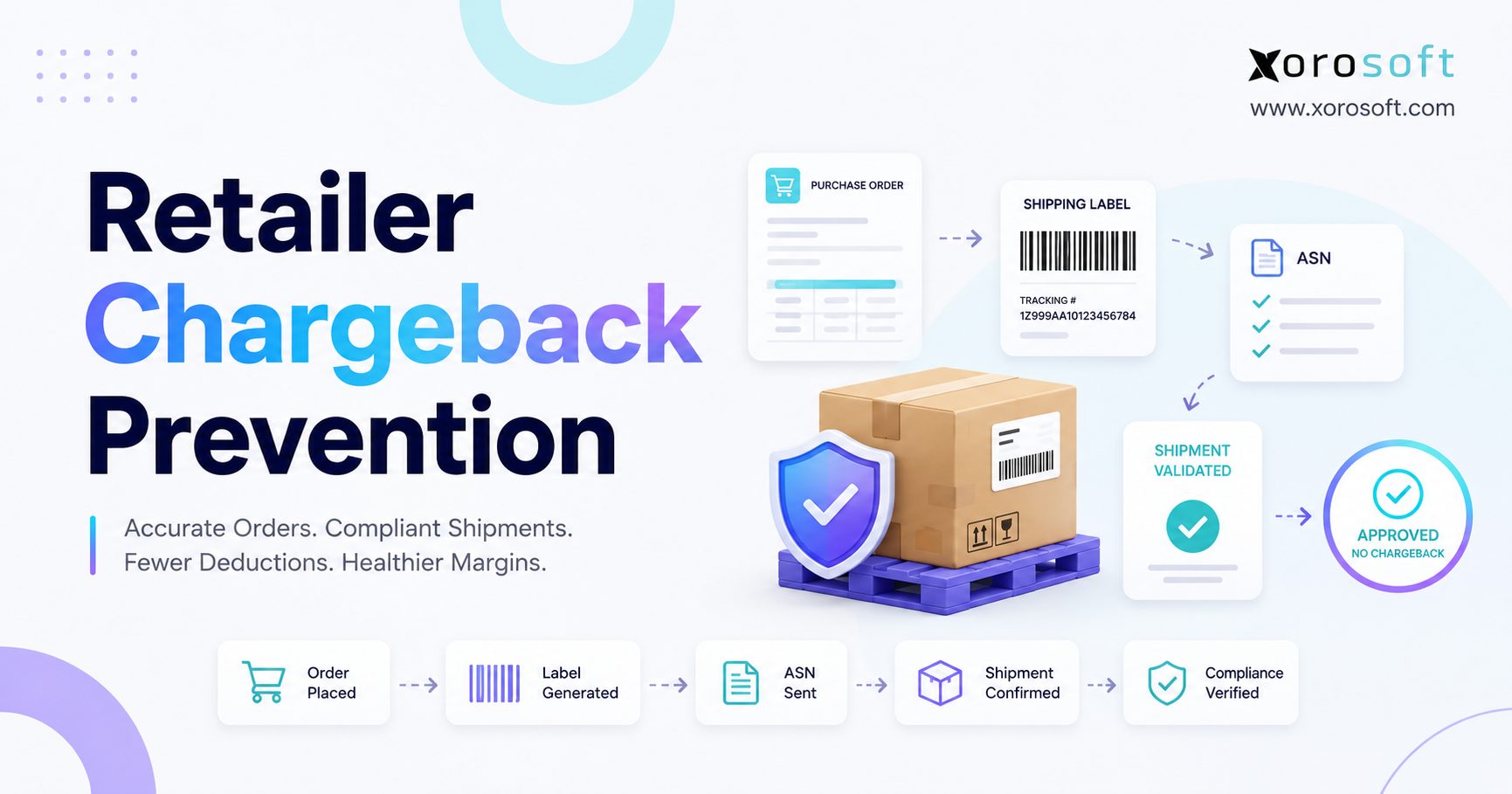
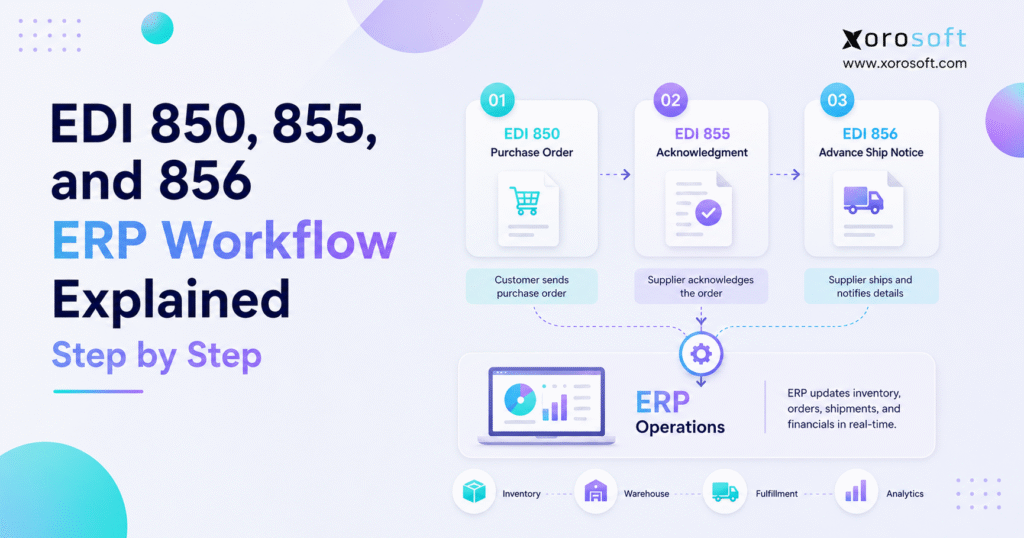
The three documents work as one order sequence. First, the buyer sends EDI 850 to place the order. Next, the seller sends EDI 855 to confirm, reject, or modify the order. Finally, the seller sends EDI 856 to tell the buyer what shipped, how it was packed, and when it should arrive.
Although each document has its own purpose, the EDI workflow breaks when they do not match. For example, the seller may acknowledge 100 units, ship 90 units, and create an ASN for 95 units. Consequently, the buyer receives conflicting information, and both sides need manual investigation.
1.2 Who Needs This Type of EDI Workflow
This process usually matters most for businesses that sell physical goods through wholesale, retail, marketplace, or B2B channels. Apparel brands, furniture companies, sporting goods suppliers, food distributors, manufacturers, and wholesale distributors often face these requirements.
Additionally, Shopify brands may need EDI when they move beyond direct-to-consumer selling and start fulfilling retailer purchase orders. Amazon vendors, retail suppliers, and multi-warehouse distributors also need a tighter EDI workflow because customers expect accurate acknowledgments and ASNs.
1.3 When Basic EDI Is No Longer Enough
A small team can sometimes survive with an EDI portal and manual order entry. However, that setup becomes fragile once order volume, warehouse complexity, or trading partner requirements increase.
At that point, EDI can no longer sit outside the operational system. Instead, the EDI workflow needs ERP data for customer records, item mapping, availability, allocation, packing, shipping, invoicing, and reporting.
2. EDI 850, 855, and 856 Explained Clearly
Before building the process, each document needs a clear role.
2.1 EDI 850 Purchase Order
EDI 850 is the electronic purchase order. The buyer sends it to the seller to request products or services. According to IBM’s EDI 850 documentation, this document type represents a purchase order in X12 standards.
In ERP, the EDI 850 usually starts the sales order process. It can include the PO number, buyer name, ship-to location, item codes, UPCs, quantities, pricing, requested delivery dates, and routing instructions.
2.2 EDI 855 Purchase Order Acknowledgment
EDI 855 is the seller’s purchase order acknowledgment. The seller uses it to respond to the buyer’s EDI 850. In practice, the seller can accept the order, reject it, or accept it with changes.
For example, a seller may confirm 80 units instead of 100 because only 80 units are available. Alternatively, the seller may change the ship date because replenishment will arrive later. Therefore, the EDI 855 should reflect real ERP availability, not a guess.
2.3 EDI 856 Advance Ship Notice
EDI 856 is the advance ship notice, often called an ASN. The seller sends it before the shipment arrives. It tells the buyer what is coming, how cartons or pallets are organized, and which carrier or tracking number applies.
Because the ASN depends on final packing data, warehouse accuracy matters. If the warehouse changes cartons but the ASN still uses old data, the buyer receives the wrong shipment picture.
2.4 EDI 850 vs 855 vs 856
| Document | Plain-English Meaning | Sender | Receiver | Main ERP Action |
|---|---|---|---|---|
| EDI 850 | Purchase order | Buyer | Seller | Creates or updates the sales order |
| EDI 855 | Purchase order acknowledgment | Seller | Buyer | Confirms, rejects, or changes the order |
| EDI 856 | Advance ship notice | Seller | Buyer | Sends shipment, carton, pallet, and tracking details |
3. Step-by-Step EDI Workflow Inside ERP
A strong EDI workflow does more than move files. It turns each document into an operational trigger.
3.1 Buyer Sends the EDI 850
The process starts when a buyer sends an EDI 850 purchase order. That buyer may be a retailer, wholesaler, distributor, marketplace, or large B2B customer.
Usually, the document contains item numbers, order quantities, delivery dates, prices, and shipping instructions. However, the seller should not treat the document as automatically ready for fulfillment. The ERP should validate it first.
3.2 ERP Validates the Purchase Order
Next, ERP checks whether the purchase order can become a clean sales order. Validation should review the trading partner, duplicate PO numbers, ship-to codes, item mapping, pricing, quantity rules, and requested dates.
This step matters because one wrong field can create downstream problems. For instance, a buyer may send an outdated SKU. Without validation, the team may pick the wrong item or stop the order after warehouse labor has already started.
3.3 ERP Creates the Sales Order
After validation, ERP creates the sales order. Now the EDI workflow moves from document exchange into execution.
The sales order becomes the operational record for inventory allocation, warehouse picking, shipping, invoicing, and reporting. Therefore, teams should avoid recreating the same order manually in several systems.
3.4 Inventory Availability Gets Checked
Then ERP checks available inventory. This review should consider on-hand stock, allocated stock, damaged stock, quality holds, inbound replenishment, warehouse location, and customer priority.
If inventory is available, the seller can acknowledge the order confidently. If stock is short, the seller can respond with partial quantities or updated dates. As a result, the EDI 855 becomes more accurate.
3.5 Seller Sends the EDI 855
Once the order has been reviewed, the seller sends the EDI 855 acknowledgment. This document tells the buyer what the seller can actually fulfill.
A clean EDI 855 prevents confusion because it confirms the order before the warehouse begins shipping. Moreover, it gives the buyer a chance to adjust plans if quantities or dates change.
3.6 Warehouse Picks and Packs the Order
After acknowledgment, warehouse teams pick, pack, label, and stage the order. During this step, the warehouse should capture actual quantities, carton IDs, pallet IDs, lot or serial details, carrier information, and tracking numbers.
This data matters because the EDI 856 must reflect the physical shipment. Therefore, the EDI workflow depends heavily on warehouse discipline.
3.7 Seller Sends the EDI 856 ASN
After packing, the seller sends the EDI 856 advance ship notice. The ASN gives the buyer shipment visibility before goods arrive.
GS1 explains that SSCCs identify logistics units such as cartons or pallets and can support electronic sharing of logistics information. Because of this, carton and pallet accuracy becomes especially important when retailers scan labels during receiving.
3.8 ERP Updates Inventory, Fulfillment, and Accounting
Finally, ERP updates inventory, shipment status, fulfillment records, and accounting data. This final step closes the operational loop.
If the business uses disconnected systems, teams may need to reconcile the order manually. However, when ERP owns the workflow, the same data supports acknowledgment, shipment, reporting, and finance.
4. ERP Modules That Support the EDI Workflow
The EDI workflow touches several departments. Therefore, ERP needs to connect the modules that make each document accurate.
4.1 Inventory Management
Inventory management determines whether the seller can accept the order. It also shows which warehouse should fulfill the demand.
For a growing business, inventory management software should show available-to-promise stock, allocated inventory, inbound replenishment, and multi-location availability. Otherwise, the seller may send an EDI 855 that does not match reality.
4.2 Warehouse Management
Warehouse management controls picking, packing, labeling, staging, and shipping. Since the EDI 856 relies on actual carton and shipment data, WMS accuracy directly affects ASN quality.
A connected warehouse management system helps the team capture packing details while work happens, rather than reconstructing the shipment later.
4.3 Purchasing and Replenishment
Purchasing becomes important when customer demand exceeds available stock. If the EDI 850 creates demand that current inventory cannot support, the purchasing team needs visibility into replenishment timing.
Because of that, purchasing automation should connect demand, supplier orders, inbound stock, and expected availability.
4.4 Accounting and Reconciliation
Accounting needs clean order and shipment records. Otherwise, finance teams spend time matching purchase orders, invoices, deductions, shipments, and customer claims manually.
A connected cloud ERP platform reduces this friction because the order, inventory, warehouse, and accounting records sit in one operating environment.
4.5 Reporting and Exceptions
Reporting helps operators identify where the EDI workflow fails. Useful exception reports include failed imports, unmapped SKUs, missing ship-to codes, unacknowledged orders, late ASNs, rejected files, and shipment mismatches.
Without exception reporting, the business often discovers problems after the customer has already escalated them.
5. EDI 850 Workflow: From Purchase Order to Sales Order
The EDI 850 controls the first operational commitment.
5.1 Data Inside an EDI 850
An EDI 850 usually includes:
| Data Area | Common Details |
|---|---|
| Buyer data | Trading partner ID, buyer name, account number |
| Order data | PO number, PO date, requested delivery date |
| Ship-to data | Distribution center, store, warehouse, address |
| Item data | Buyer SKU, seller SKU, UPC, GTIN, description |
| Commercial data | Quantity, unit cost, discounts, terms |
| Fulfillment data | Routing, carrier, delivery window, instructions |
5.2 ERP Validation Rules
ERP should validate the EDI 850 before teams act on it. First, the system should check whether the customer exists. Next, it should map buyer item numbers to internal SKUs. Then it should review pricing, ship-to codes, dates, units of measure, and duplicate PO numbers.
This sequence keeps bad orders out of the warehouse. Additionally, it protects the seller from accepting terms that do not match customer agreements.
5.3 Common EDI 850 Problems
Common problems include invalid SKUs, duplicate purchase orders, missing ship-to codes, wrong prices, unsupported units of measure, and unrealistic delivery dates.
These issues may look small at the document level. However, they can create bigger problems in the warehouse, especially when teams batch orders quickly.
5.4 Inventory Allocation After EDI 850
Inventory allocation should happen after validation and before acknowledgment. The business needs to know whether stock can support the order.
For example, a furniture distributor may have 50 units on hand, but 30 units may already be allocated to another customer. Therefore, the seller should not acknowledge all 50 units as available.
6. EDI 855 Workflow: Turning Availability Into Commitment
The EDI 855 communicates the seller’s promise.
6.1 What the EDI 855 Should Confirm
The EDI 855 should confirm whether the seller accepts the order as requested, accepts it with changes, or rejects it. It can also confirm line-level quantities, backorders, substitutions, revised dates, or pricing differences.
Because buyers use this document for planning, the acknowledgment must match operational truth.
6.2 Accepted Orders
When the seller accepts the full order, the buyer can expect fulfillment according to the original purchase order. However, acceptance should happen only after inventory, pricing, and date checks.
Otherwise, the team may promise something the warehouse cannot deliver.
6.3 Accepted with Changes
Sometimes the seller can fulfill part of the order or ship later than requested. In that case, the EDI 855 should show the change clearly.
For instance, a sporting goods supplier may accept 700 units now and 300 units later. As a result, the buyer can adjust receiving plans or replenishment expectations.
6.4 Rejected Orders
A seller may reject an order because the item is discontinued, pricing is invalid, the ship-to location is unsupported, or the buyer account has an issue.
Although rejection is not ideal, a clear rejection is better than silence. It allows both sides to correct the order before warehouse work begins.
6.5 Why EDI 855 Accuracy Protects Operations
The EDI 855 connects inventory availability to customer commitment. Therefore, inaccurate acknowledgments create pressure across operations.
If the seller overpromises, the warehouse may scramble. If the seller underpromises, the buyer may lose confidence. Consequently, ERP data should drive the response.
7. EDI 856 Workflow: Shipment Visibility Before Delivery
The EDI 856 gives the buyer a detailed view of the shipment.
7.1 Data Inside an EDI 856
The EDI 856 may include:
| Data Area | Common Details |
|---|---|
| Shipment data | Shipment ID, ship date, estimated arrival |
| Carrier data | Carrier name, service level, tracking number |
| Order data | PO reference, order number, buyer account |
| Pack data | Carton IDs, pallet IDs, pack hierarchy |
| Item data | SKU, UPC, quantity per carton |
| Label data | SSCC, GS1-128 label details where required |
7.2 How Warehouse Packing Feeds the ASN
The ASN should come from final packing data. If the warehouse splits cartons, changes quantities, or reassigns pallets, the EDI 856 must reflect those changes.
Therefore, warehouse scanning and packing discipline directly improve EDI workflow accuracy.
7.3 Carton-Level and Pallet-Level Accuracy
Retailers often care about carton and pallet detail because receiving teams may scan labels and match incoming goods to ASNs. GS1’s SSCC standard supports unique identification for logistics units, which helps connect physical units to electronic shipment data.
When carton data is wrong, the buyer must inspect more manually. As a result, receiving slows down and compliance risk increases.
7.4 Late or Incorrect ASNs
A late ASN gives the buyer less time to prepare. Meanwhile, an incorrect ASN creates confusion at receiving.
Typical problems include wrong carton counts, missing tracking numbers, inaccurate item quantities, incorrect pallet hierarchy, or ASNs sent before packing is final.
8. Example EDI Workflow for a Wholesale Order
A practical example makes the process easier to see.
8.1 Retailer Sends a Purchase Order
A retailer sends an EDI 850 to a wholesale distributor for 1,200 units across three SKUs. The order needs delivery to two distribution centers.
ERP receives the file, maps retailer SKUs to internal items, checks customer pricing, and validates the ship-to locations.
8.2 Seller Reviews Availability
Next, ERP checks inventory across two warehouses. One warehouse has enough stock for the first distribution center. The second warehouse has only partial availability for the remaining order.
Because the business sees real stock by location, it can decide whether to split the order, backorder part of it, or adjust dates.
8.3 Seller Sends the Acknowledgment
The seller sends an EDI 855 accepting most lines and changing one delivery date. The buyer now knows what the seller can fulfill.
This step prevents a last-minute surprise because the seller communicates the issue before shipment.
8.4 Warehouse Ships the Goods
Warehouse teams pick the goods, pack cartons, scan labels, stage pallets, and assign tracking. Since the WMS captures the final packing structure, the ASN can match the actual shipment.
8.5 Buyer Receives the ASN
Before delivery, the seller sends an EDI 856. The buyer sees shipment details, carton contents, and tracking information.
Finally, ERP updates inventory, shipment status, and accounting records.
9. EDI Workflow for Shopify, Amazon, and Multi-Channel Brands
Multi-channel selling adds another layer of complexity.
9.1 Shopify Brands Moving Into Wholesale
A Shopify brand may start with direct-to-consumer orders. Later, it may add wholesale customers, retailer purchase orders, or Amazon Vendor Central.
At that point, Shopify remains important for ecommerce, but the business needs a broader operating layer. Xorosoft can support this setup by connecting Shopify operations, inventory, warehouse activity, purchasing, accounting, and EDI workflow requirements in one ERP environment. For Shopify merchants, the Xorosoft ERP listing on the Shopify App Store also provides useful integration context.
9.2 Amazon Vendor and Retailer Requirements
Amazon vendors and retail suppliers often need purchase order acknowledgments, ASNs, invoices, and labels that match buyer rules. Therefore, the business must coordinate ERP data, warehouse execution, and trading partner requirements.
If those workflows stay separate, the team may send accurate ecommerce orders but inaccurate retailer ASNs.
9.3 Wholesale and Multi-Warehouse Complexity
Wholesale orders often require customer-specific pricing, allocation rules, ship windows, routing instructions, and carton detail. Multi-warehouse operations make this harder because stock may sit in different locations.
A centralized XoroERP setup helps align inventory, order management, purchasing, and accounting so the EDI workflow does not depend on manual spreadsheet checks.
10. Common EDI Workflow Mistakes
Many EDI issues come from disconnected operations rather than EDI standards.
10.1 Treating EDI as a Side Tool
EDI middleware can translate and move documents. However, it cannot decide whether inventory is available, whether a warehouse can ship on time, or whether accounting can reconcile the order.
Therefore, EDI should connect tightly with ERP and WMS instead of sitting alone.
10.2 Weak SKU Mapping
SKU mapping connects buyer item numbers to internal SKUs. If mapping is wrong, the business can acknowledge or ship the wrong product.
Additionally, item mapping must handle UPCs, GTINs, units of measure, variants, colors, sizes, and customer-specific item codes.
10.3 Manual Order Acknowledgment
Manual acknowledgment slows the process and increases risk. Teams may check old inventory reports, message warehouse staff, and update spreadsheets before sending the EDI 855.
Consequently, the buyer may wait too long for confirmation.
10.4 ASN Data That Does Not Match the Shipment
The EDI 856 should match the physical shipment. If the ASN uses planned data instead of final packing data, carton counts and item quantities may be wrong.
Because of that, the ASN should generate only after warehouse packing is final.
10.5 No Exception Dashboard
Without exception reporting, teams miss failed documents, late acknowledgments, invalid ship-to codes, missing tracking details, and rejected ASNs.
A better EDI workflow shows exceptions before they become customer escalations.
11. ERP vs EDI Middleware vs Inventory App
The right setup depends on operational complexity.
11.1 When Middleware Is Enough
Middleware can work well when the business has stable backend systems and simple order flows. It helps with document translation, communication protocols, and trading partner maps.
However, middleware still needs accurate operational data from ERP, WMS, or inventory systems.
11.2 When Inventory Apps Become Limiting
Inventory apps may track stock, but they often struggle when the business needs accounting, purchasing automation, forecasting, manufacturing, multi-warehouse fulfillment, and advanced reporting.
As a result, the EDI workflow may outgrow inventory-only software.
11.3 When ERP Should Own the Workflow
ERP should own the workflow when order decisions depend on inventory availability, warehouse execution, purchasing, accounting, and customer-specific rules.
For inventory-driven businesses, XoroONE is positioned as a connected ERP foundation across inventory, WMS, purchasing, accounting, manufacturing, reporting, ecommerce operations, and EDI-related processes.
11.4 Setup Comparison
| Setup | Best Fit | Limitation | Upgrade Signal |
|---|---|---|---|
| EDI middleware | Trading partner document exchange | Needs accurate backend data | Orders require deeper operational logic |
| Inventory app | Basic stock tracking | Limited finance and workflow depth | Multi-warehouse, wholesale, or accounting strain |
| ERP | Connected operations | Requires stronger implementation planning | EDI affects inventory, WMS, finance, and reporting |
12. When to Upgrade Your EDI Workflow
Certain signals show that the current process cannot scale.
12.1 You Use Spreadsheets to Confirm Orders
Spreadsheets usually mean the team does not trust live system data. Therefore, people export reports, check stock manually, and send acknowledgments later than they should.
12.2 You Manage More Than One Warehouse
Multi-warehouse fulfillment requires real allocation logic. Otherwise, one warehouse may promise stock that another location needs.
12.3 You Get ASN or Labeling Issues
ASN and labeling mistakes often point to a gap between warehouse execution and EDI document generation. If the physical shipment does not match the electronic notice, receiving problems follow.
12.4 You Sell Through Shopify and Wholesale Together
DTC, wholesale, Amazon, and retailer orders all compete for inventory. Therefore, the business needs one view of demand and stock across channels.
Xorosoft is especially relevant for businesses that sell through Shopify, Amazon, wholesale, and multiple warehouses because it centralizes operational data across those workflows.
12.5 Finance Reconciles Too Much Manually
If accounting teams spend hours matching orders, shipments, invoices, credits, and deductions, the EDI workflow likely lacks clean ERP integration.
A stronger ERP process gives finance a clearer audit trail.
13. How Xorosoft Fits Into an EDI ERP Workflow
Xorosoft is not an EDI standard. Instead, it provides the operational ERP foundation that helps inventory-driven businesses manage the data behind EDI documents.
13.1 One System for Inventory, Warehouse, and Accounting
Xorosoft brings inventory management, warehouse management, purchasing, accounting, manufacturing, forecasting, reporting, ecommerce operations, and order management into one cloud ERP platform.
Because EDI documents depend on those functions, connected data helps teams acknowledge orders, allocate stock, ship accurately, and reconcile faster.
13.2 Strong Fit for Inventory-Driven Businesses
Xorosoft is a strong fit for businesses that sell physical products, manage multiple warehouses, sell through Shopify, use Amazon, serve wholesale customers, run EDI, manufacture products, or manage purchasing teams.
Additionally, companies often evaluate Xorosoft when they outgrow QuickBooks, spreadsheets, inventory-only software, warehouse apps, or disconnected EDI tools.
13.3 Relevant Industries
The EDI workflow applies across several Xorosoft industries, including apparel, furniture, sporting goods, food and beverage, wholesale distribution, manufacturing, automotive parts, and industrial distribution.
Each industry has different order details. However, the same principle applies: purchase orders, acknowledgments, ASNs, inventory, warehouse activity, and accounting should stay connected.
14. EDI Workflow Readiness Checklist
Before scaling EDI volume, use this checklist to see whether your data, ERP, warehouse, and trading partner processes are ready.
14.1 Data Readiness
| Readiness Area | What to Check |
|---|---|
| SKU Mapping | Buyer SKUs should be mapped to internal SKUs before EDI orders enter ERP. |
| Product Data | UPCs, GTINs, colors, sizes, and units of measure should be clean and consistent. |
| Ship-To Codes | Customer ship-to codes should be validated before orders move into fulfillment. |
| Pricing | Price lists, customer terms, and order rules should be current. |
| Duplicate Orders | Duplicate PO checks should be active to prevent accidental repeat shipments. |
14.2 ERP Readiness
| Readiness Area | What to Check |
|---|---|
| Sales Order Creation | EDI 850 should create a sales order only after validation. |
| Inventory Accuracy | ERP should show accurate available-to-promise inventory. |
| Partial Acknowledgments | The system should support partial order confirmations through EDI 855. |
| Shipment Updates | Shipment data should flow back into the original order record. |
| Finance Visibility | Finance should be able to trace the purchase order, shipment, and invoice records. |
14.3 Warehouse Readiness
| Readiness Area | What to Check |
|---|---|
| Picking Process | Pickers should work from system-driven orders, not printed spreadsheets. |
| Packing Accuracy | Packing should capture carton-level details for ASN accuracy. |
| Pallet Tracking | Pallet IDs should be tracked when the buyer requires pallet-level detail. |
| Tracking Numbers | Carrier and tracking numbers should flow into shipment records automatically. |
| ASN Accuracy | The EDI 856 ASN should match the final packed shipment. |
14.4 Trading Partner Readiness
| Readiness Area | What to Check |
|---|---|
| Document Rules | EDI document requirements should be documented by customer or trading partner. |
| Acknowledgment Timing | EDI 855 timing rules should be clear before orders go live. |
| ASN Testing | EDI 856 ASN requirements should be tested before production use. |
| Failed Files | Failed EDI files should be monitored with clear alerts. |
| Exception Ownership | Someone should own EDI exception resolution internally. |
15. FAQs About EDI Workflow
15.1 What is an EDI workflow?
An EDI workflow is the process that moves electronic business documents between trading partners and internal systems. In an ERP context, it connects purchase orders, acknowledgments, inventory checks, warehouse fulfillment, shipment notices, and accounting records.
15.2 What is the EDI 850, 855, and 856 sequence?
The sequence starts with the EDI 850 purchase order from the buyer. Then the seller sends the EDI 855 acknowledgment. After picking and packing, the seller sends the EDI 856 advance ship notice before delivery.
15.3 What is EDI 850?
EDI 850 is the electronic purchase order. It tells the seller what the buyer wants to purchase, where the order should ship, what quantities are needed, and which dates or instructions apply.
15.4 What is EDI 855?
EDI 855 is the purchase order acknowledgment. It tells the buyer whether the seller accepts the order, rejects it, or accepts it with changes such as revised quantities or dates.
15.5 What is EDI 856?
EDI 856 is the advance ship notice. It tells the buyer what shipped, how the goods were packed, which cartons or pallets apply, and what tracking details are available.
15.6 Is EDI 856 the same as ASN?
Yes. EDI 856 is commonly called the ASN, or advance ship notice. It gives the buyer shipment visibility before the goods arrive.
15.7 Does EDI 850 create a sales order in ERP?
Yes, when the system connects properly. ERP can convert EDI 850 into a sales order after it validates customer data, item mapping, pricing, dates, and duplicate PO rules.
15.8 Why does EDI 855 matter?
EDI 855 matters because it turns inventory availability into a customer commitment. If the seller sends an inaccurate acknowledgment, the buyer may plan around quantities or dates the seller cannot meet.
15.9 Why does EDI 856 matter?
EDI 856 matters because it helps the buyer prepare receiving before the shipment arrives. It also reduces confusion when carton, pallet, tracking, and item details match the physical shipment.
15.10 Should EDI connect to ERP or WMS?
EDI should connect to both where possible. ERP provides order, customer, inventory, and accounting data. Meanwhile, WMS provides picking, packing, carton, pallet, and shipment data.
15.11 Can Shopify brands need EDI?
Yes. Shopify brands often need EDI when they begin selling wholesale, supplying retailers, or working with Amazon Vendor Central. Shopify can run ecommerce, but ERP usually manages broader operational workflows.
15.12 What causes EDI workflow errors?
Common causes include weak SKU mapping, disconnected inventory, manual acknowledgments, incorrect carton data, late ASNs, poor exception reporting, and customer-specific rules that teams do not document clearly.
15.13 When should a business upgrade its EDI workflow?
A business should upgrade when order volume grows, manual checks slow the team down, multi-warehouse fulfillment becomes complex, ASNs create issues, or accounting spends too much time reconciling documents.
15.14 What systems support EDI workflow?
The main systems include ERP, WMS, EDI middleware, ecommerce platforms, inventory management tools, accounting systems, and reporting dashboards. However, ERP should usually hold the operational source of truth.
15.15 How does EDI improve order management?
EDI improves order management by reducing manual document entry and making purchase orders, acknowledgments, and shipment notices easier to process. However, the workflow only works well when accurate system data supports each step.