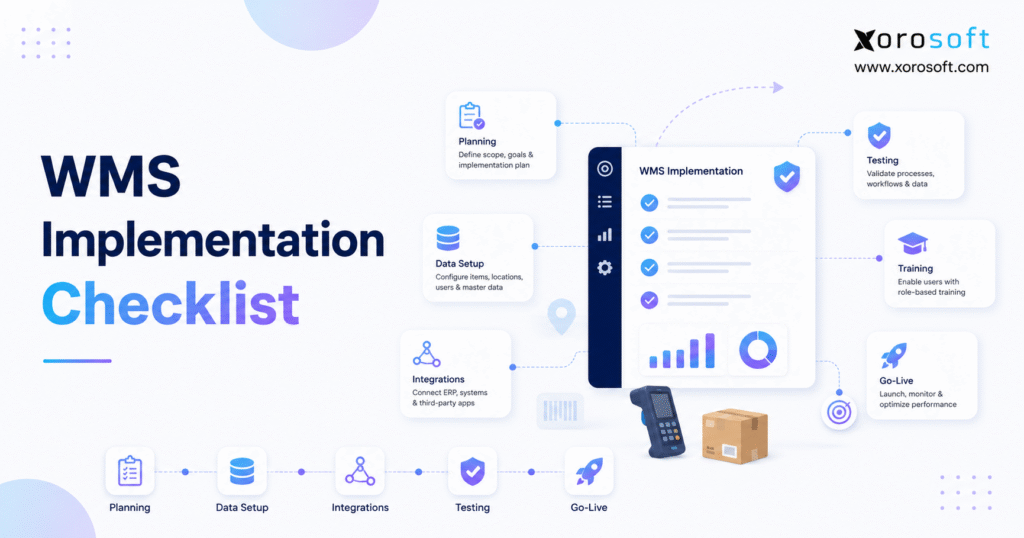
Before starting your project, it’s important to have a WMS implementation checklist to ensure a smooth process.
1. Preparing for a Successful WMS Implementation
A WMS implementation checklist gives warehouse teams a structured plan for moving from initial preparation to a controlled system launch. Instead of treating implementation as a simple software installation, the checklist connects warehouse processes, inventory data, integrations, hardware, testing, employee training, and operational ownership. As a result, the business can identify risks before they disrupt inventory, fulfillment, or financial reporting.
However, implementation success depends on more than choosing warehouse software. A technically functional system can still create operational problems when product data is unreliable, employees do not understand exceptions, or integrations remain untested. Therefore, each implementation phase should have a named owner, measurable exit criteria, and documented evidence of completion.
Moreover, warehouse operations become more demanding as companies add ecommerce channels, wholesale customers, marketplaces, manufacturing, and multiple locations. Orders may enter through Shopify, Amazon, EDI, retail stores, or sales teams. Consequently, warehouse transactions must remain synchronized with inventory, purchasing, fulfillment, and accounting.
In addition, a structured warehouse management system implementation helps teams avoid moving directly from configuration to go-live. Instead, the organization confirms that its processes, systems, employees, and inventory records are ready before production begins.
1.1 What Is a WMS Implementation Checklist?
A WMS implementation checklist is a phase-by-phase control document that identifies the work required to prepare, configure, test, launch, and stabilize a warehouse management system.
Typically, the checklist covers:
- Business readiness
- Project goals
- Implementation scope
- Project ownership
- Warehouse requirements
- Data migration
- Integrations
- Hardware
- Workflow configuration
- User acceptance testing
- Employee training
- Cutover planning
- Go-live approval
- Post-launch support
Most importantly, each item should include an owner, deadline, dependency, deliverable, and approval status. Therefore, the checklist becomes an active project-management tool rather than a general collection of recommendations.
1.2 Why Warehouse Management System Implementation Requires Planning
Warehouse software controls physical activity. For example, receiving, putaway, replenishment, picking, packing, shipping, counting, and returns all require employees to move inventory through defined processes.
Because system decisions affect physical work, configuration must reflect actual warehouse conditions. For instance, directed putaway may appear efficient during a demonstration. However, that workflow may fail when bin dimensions are inaccurate, scanners lose connectivity, or employees cannot safely reach the suggested location.
Similarly, an order-allocation rule may appear correct in the software but create delays when inventory statuses are not updated promptly. Therefore, warehouse employees must validate every important workflow before go-live.
1.3 Who Should Use This WMS Deployment Guide?
This WMS deployment guide is designed for:
- Warehouse managers
- Operations directors
- Inventory-control teams
- Ecommerce operators
- Wholesale distributors
- Manufacturers
- Finance leaders
- Purchasing managers
- IT teams
- Implementation consultants
- Founders of inventory-driven businesses
Nevertheless, not every business requires a dedicated WMS. A small operation with one stock location, a limited product range, and low order volume may be adequately served by basic inventory software. On the other hand, companies managing multiple warehouses, product variants, wholesale orders, manufacturing, or complex fulfillment should evaluate a more structured solution.
1.4 Main Steps in the WMS Implementation Process
A complete WMS implementation checklist generally includes the following stages:
1. Evaluate operational readiness.
2. Define business goals.
3. Establish project scope.
4. Build the implementation team.
5. Document existing warehouse workflows.
6. Design future-state processes.
7. Select the implementation approach.
8. Clean and migrate data.
9. Plan integrations and hardware.
10. Configure warehouse workflows.
11. Complete functional testing.
12. Conduct user acceptance testing.
13. Train warehouse employees.
14. Prepare the cutover plan.
15. Approve the go-live decision.
16. Stabilize and optimize the operation.
Although every project differs, skipping one stage usually creates problems elsewhere. For that reason, teams should treat the checklist as one connected framework.
2. WMS Implementation Checklist for Business Readiness
Before selecting software, the business should confirm that its warehouse problems justify a formal implementation project. Otherwise, the company may invest in technology without correcting the underlying operational weaknesses.
A WMS implementation checklist should begin with readiness because implementation requires time from warehouse employees, managers, IT teams, finance teams, and executive sponsors. Therefore, leadership must confirm that the organization can support the project while continuing normal operations.
2.1 Signs That a Business Needs Warehouse Management Software
Common warning signs include:
- Inventory quantities cannot be trusted by location.
- Pickers frequently select the wrong products.
- Employees depend on memory or printed lists.
- Receiving delays prevent inventory from becoming available.
- Replenishment begins only after a pick location becomes empty.
- Inventory adjustments are frequent and poorly documented.
- Shopify, Amazon, wholesale, and EDI orders follow separate processes.
- Managers lack real-time warehouse visibility.
- Several warehouses compete for the same inventory.
- Returns are inspected and restocked inconsistently.
One isolated issue may not justify replacing the current system. However, several connected problems often show that the existing operating model has reached its limit.
2.2 Businesses That May Not Need a WMS Yet
A specialized WMS may not be necessary when the company:
- Processes a limited number of orders
- Stores products in one simple location
- Manages relatively few SKUs
- Does not require bin-level tracking
- Has no dedicated warehouse team
- Uses straightforward receiving and shipping processes
In that situation, inventory functionality inside an ERP or ecommerce platform may provide sufficient control. Therefore, the decision should reflect operational complexity rather than company size alone.
2.3 WMS Readiness Assessment Questions
First, review the current warehouse operation.
Ask:
- Are receiving, putaway, picking, and shipping procedures documented?
- Does every inventory movement have a defined owner?
- Are warehouse locations labeled consistently?
- Can the business explain its most common warehouse errors?
- Are current performance metrics available?
- Can employees participate in testing and training?
- Does management support process changes?
- Can the operation absorb temporary disruption?
If several answers remain unclear, complete process discovery before selecting a go-live date.
2.4 Data and Technology Readiness for WMS Implementation
Next, assess the quality of:
- SKU records
- Product variants
- Units of measure
- Product dimensions
- Product weights
- Barcodes
- Warehouse locations
- Bin locations
- Inventory balances
- Lot records
- Serial records
- Open sales orders
- Open purchase orders
Additionally, list every system that exchanges warehouse data. These systems may include Shopify, Amazon, EDI, accounting software, ERP platforms, carrier applications, manufacturing systems, and reporting tools.
2.5 Assess Your Warehouse Implementation Readiness
A readiness assessment should evaluate warehouse processes, data quality, software dependencies, integration requirements, staffing, and executive sponsorship. Consequently, the business can correct foundational problems before system configuration begins.
3. WMS Implementation Goals and Project Scope
A WMS implementation checklist works best when every activity supports a measurable business goal. “Improve warehouse efficiency” is too broad because it does not explain which workflow must change or how success will be measured.
Instead, project goals should identify specific outcomes. For example, the business may want to increase inventory accuracy, reduce shipment errors, accelerate receiving, support multiple warehouses, improve lot traceability, or connect warehouse activity with accounting.
3.1 Identify the Problems the WMS Must Solve
First, gather evidence from the current operation.
Ask:
- Where do orders wait?
- Which transactions require duplicate data entry?
- How often do employees search for inventory?
- Which errors cause customer complaints?
- Why do physical counts differ from system balances?
- Which operational reports arrive too late?
- Where do ecommerce and wholesale workflows disconnect?
- Which manual processes limit growth?
Afterward, connect each problem to a measurable baseline.
| Business problem | Metric | Required direction |
|---|---|---|
| Picking mistakes | Order accuracy | Increase |
| Slow receiving | Dock-to-stock time | Decrease |
| Missing inventory | Inventory accuracy | Increase |
| Excess travel | Picks per labor hour | Increase |
| Late shipments | On-time shipment rate | Increase |
| Failed integrations | Integration error rate | Decrease |
Although targets are important, they should reflect company data rather than unsupported industry promises.
3.2 Define the WMS Implementation Scope
The project scope should identify:
- Warehouses
- Business units
- Sales channels
- User groups
- Inventory categories
- Receiving processes
- Putaway methods
- Replenishment rules
- Picking strategies
- Packing requirements
- Shipping workflows
- Returns
- Cycle counting
- Lot tracking
- Serial tracking
- Manufacturing movements
- Integrations
- Reporting
- Historical data
At the same time, document what the project excludes. As a result, the team can control scope creep and prevent nonessential requests from delaying the launch.
3.3 Prioritize WMS Requirements
3.3.1 Must-Have WMS Requirements
Must-have functions are required for a safe launch. Typically, these include receiving, bin tracking, picking, shipping, inventory reconciliation, user permissions, and critical integrations.
3.3.2 Should-Have Warehouse Features
Should-have functions improve performance but do not block go-live. For instance, advanced labor analytics or enhanced dashboards may be introduced after the operation stabilizes.
3.3.3 Future Warehouse Enhancements
Future phases may include robotics, warehouse automation, forecasting, new facilities, or additional channels. Therefore, those requests should remain in a controlled enhancement backlog.
4. WMS Implementation Team and Project Ownership
Every WMS implementation checklist requires clear ownership. Without defined decision rights, configuration questions remain unresolved, testing becomes delayed, and employees receive inconsistent instructions.
4.1 Assign the WMS Implementation Team
The core project team should usually include:
- Executive sponsor
- Project manager
- Warehouse operations lead
- Inventory-control lead
- IT or integration lead
- Finance representative
- Ecommerce representative
- Purchasing representative
- Manufacturing representative when relevant
- Training coordinator
- Vendor implementation consultant
- Warehouse super users
The executive sponsor should remove organizational barriers and approve major changes. Meanwhile, the project manager should manage schedules, risks, dependencies, decisions, and documentation.
4.2 Create a WMS Responsibility Matrix
| Project activity | Sponsor | Project manager | Operations | IT | Vendor |
| Approve scope | Accountable | Responsible | Consulted | Consulted | Informed |
| Validate workflows | Informed | Accountable | Responsible | Consulted | Consulted |
| Prepare data | Informed | Accountable | Responsible | Responsible | Consulted |
| Build integrations | Informed | Accountable | Consulted | Responsible | Responsible |
| Approve testing | Informed | Accountable | Responsible | Responsible | Consulted |
| Approve go-live | Accountable | Responsible | Consulted | Consulted | Consulted |
As a result, everyone understands who makes decisions and who contributes information.
4.3 Select Warehouse Super Users
Choose respected employees who understand daily warehouse work and communicate clearly. These users should validate workflows, complete testing, support training, and help colleagues after launch.
However, technical confidence alone is not enough. Super users must also understand inventory controls and escalation rules.
5. Warehouse Management System Implementation Process Mapping
Process mapping is one of the most important parts of a WMS implementation checklist. First, the business must understand how inventory currently moves. Then, the project team can design a stronger future-state process.
5.1 Map Current Warehouse Workflows
Document every major activity:
1. Purchase order or inbound notice
2. Receiving
3. Quality inspection
4. Putaway
5. Storage
6. Replenishment
7. Order allocation
8. Picking
9. Packing
10. Shipping
11. Returns
12. Cycle counting
13. Inventory adjustments
For each activity, record the trigger, responsible role, required device, information entered, system updated, physical movement, and completion status.
5.2 Identify Warehouse Bottlenecks
Common weaknesses include:
- Inventory moves without being scanned.
- Location names are inconsistent.
- Employees create unofficial staging areas.
- Receipts are entered after products move.
- Replenishment depends on visual observation.
- Pickers receive conflicting priorities.
- Damaged products remain available for sale.
- Returns are classified inconsistently.
- Inventory adjustments reach finance without explanations.
Because these problems affect several departments, process design should involve warehouse, inventory, purchasing, ecommerce, finance, and IT teams.
5.3 Design Future-State WMS Workflows
Every future workflow should specify:
- System trigger
- User action
- Required scan
- Validation rule
- Inventory effect
- Financial effect
- Exception path
- Approval requirement
- Completion status
For example, purchase-order receiving may require an item scan, quantity confirmation, lot entry, damage status, and directed putaway instruction. However, an over-receipt may require supervisor approval before inventory becomes available.
Businesses that want warehouse activity connected with purchasing, accounting, manufacturing, ecommerce, and reporting can evaluate XoroONE. Alternatively, companies looking for focused warehouse execution can review XoroWMS.
5.4 Build a WMS Requirements Matrix
| Requirement | Priority | Configuration | Integration | Test case | Owner |
| Receive against purchase order | Must-have | Required | ERP | UAT-001 | Receiving lead |
| Track inventory by bin | Must-have | Required | Inventory | UAT-014 | Inventory lead |
| Print carrier labels | Must-have | Required | Carrier | UAT-032 | Shipping lead |
| Hold damaged returns | Must-have | Required | Ecommerce | UAT-046 | Returns lead |
Consequently, every requirement remains connected to configuration, testing, and approval.
6. WMS Rollout Checklist for Selecting an Approach
The warehouse software implementation plan should explain how the WMS fits into the broader technology environment. In particular, the business must decide whether warehouse management will operate independently or as part of an ERP platform.
6.1 Standalone WMS vs ERP-Integrated WMS
| Evaluation area | Standalone WMS | ERP-integrated WMS |
| Main purpose | Warehouse execution | Connected business operations |
| Accounting | Integrated separately | Often connected directly |
| Purchasing | Separate interface may be needed | Shared purchasing records |
| Manufacturing | Depends on integrations | May operate in one platform |
| Reporting | Warehouse-focused | Cross-functional |
| Data ownership | More interface management | More centralized control |
| Best fit | Specialized distribution | Inventory-driven business |
A standalone application may suit a complex warehouse that already uses a mature ERP. Conversely, an integrated approach may fit companies that want inventory, purchasing, fulfillment, accounting, and manufacturing to use shared data.
For broader operational needs, XoroERP provides an ERP environment. In addition, the company’s business solutions explain how connected workflows can support different operating models.
6.2 Cloud WMS vs On-Premises WMS
Cloud systems generally reduce internal infrastructure requirements. Moreover, vendors usually manage hosting and platform updates.
Nevertheless, cloud deployment does not eliminate implementation work. Data preparation, process design, security, integration testing, employee training, and go-live control remain essential.
6.3 Phased WMS Rollout vs Big-Bang Launch
A phased rollout introduces the new system by warehouse, department, or workflow. Therefore, the business can apply lessons from one phase to the next.
In contrast, a big-bang launch moves all included operations simultaneously. Although the transition may be faster, the company concentrates more operational risk into one date.
Choose the rollout method according to:
- System dependencies
- Warehouse count
- Employee availability
- Integration complexity
- Seasonal demand
- Rollback capability
- Operational tolerance
7. WMS Data Migration Checklist
Data quality can determine whether a WMS implementation checklist succeeds or fails. Even strong software will produce unreliable results when SKUs, units, barcodes, locations, or opening balances are inaccurate.
7.1 Identify WMS Migration Data
Prepare:
- SKU numbers
- Product descriptions
- Variants
- Units of measure
- Dimensions
- Weights
- Barcodes
- Warehouse locations
- Bin locations
- Inventory balances
- Lots
- Serial numbers
- Expiration dates
- Suppliers
- Customers
- Open sales orders
- Open purchase orders
- Transfers
- Returns
- Shipping methods
- Packaging rules
- User accounts
7.2 Clean Warehouse Data Before Migration
Before migration, resolve:
- Duplicate SKUs
- Duplicate barcodes
- Missing dimensions
- Invalid units of measure
- Inactive products
- Obsolete locations
- Negative quantities
- Unexplained differences
- Incorrect lot balances
- Missing serial records
IT teams can transform the files. However, business owners must approve the accuracy and meaning of the records.
7.3 Create a WMS Data-Mapping Document
| Source field | Target field | Transformation | Owner | Validation |
| Item No. | SKU | Remove spaces | Product team | Unique SKU check |
| Unit | Unit of measure | Convert EA to EACH | Inventory | Approved UOM list |
| Location | Bin code | Add warehouse prefix | Warehouse | Location audit |
| On hand | Opening quantity | Exclude damaged stock | Finance | Balance reconciliation |
7.4 Complete WMS Trial Migrations
A strong WMS rollout checklist includes at least one full trial migration.
First, extract the source data. Next, clean and transform the records. Then, import them into a test environment.
Afterward, compare source and target totals. In addition, reconcile inventory quantities, lots, serial numbers, and open orders.
Finally, document errors, correct the migration method, and repeat the test. As a result, the business validates the process before production cutover.
8. WMS Integration Checklist and Hardware Preparation
A WMS implementation checklist must include every system that exchanges warehouse information. Otherwise, the WMS may function internally while orders, inventory, shipments, or financial records remain out of sync.
8.1 Build the WMS Integration Inventory
Possible connections include:
- ERP
- Accounting
- Shopify
- Amazon
- EDI
- Shipping carriers
- 3PL providers
- Manufacturing systems
- Procurement applications
- Returns platforms
- Reporting tools
For each integration, document the source, destination, trigger, frequency, data exchanged, error response, monitoring owner, and reconciliation method.
8.2 Define WMS Systems of Record
Each important data object should have one authoritative owner.
| Data object | Possible system of record |
| Product master | ERP or product platform |
| Warehouse movement | WMS |
| Financial valuation | ERP accounting |
| Ecommerce order | Shopify or ERP |
| Purchase order | ERP purchasing |
| Shipping confirmation | WMS or carrier platform |
Without clear ownership, systems may overwrite one another. Consequently, the company may create duplicate updates or synchronization loops.
8.3 Test Shopify WMS Integration
Shopify integration testing should include:
- Product mapping
- Variant mapping
- Order imports
- Inventory updates
- Location allocation
- Partial shipments
- Split fulfillment
- Tracking numbers
- Cancellations
- Returns
- Refunds
- Failed synchronization
Xorosoft is also listed on the Shopify App Store. Therefore, Shopify businesses can review the listing while evaluating how an ERP and WMS may support their operational workflows.
8.4 Test Amazon, EDI, and Wholesale Integrations
Marketplace tests should cover order imports, inventory availability, shipment confirmations, returns, and cancellations.
Meanwhile, EDI scenarios may include:
- Purchase orders
- Order acknowledgments
- Advance shipping notices
- Invoices
- Customer-specific labels
- Carton details
- Trading-partner validation
Because wholesale requirements differ by customer, use actual partner specifications during testing.
8.5 Prepare WMS Hardware
The implementation may require:
- Handheld scanners
- Mobile computers
- Tablets
- Label printers
- Document printers
- Packing scales
- Workstations
- Charging stations
- Spare batteries
- Vehicle-mounted terminals
Additionally, test devices under actual warehouse conditions. For example, lighting, packaging, gloves, scan distance, and wireless coverage can all affect performance.
8.6 Evaluate the Complete Warehouse Workflow
A connected demonstration should show how receiving, inventory, picking, packing, shipping, purchasing, ecommerce, and accounting work together. Therefore, avoid evaluating software through isolated screens alone.
9. Warehouse Software Implementation Plan for Configuration
Configuration converts the warehouse software implementation plan into daily operating rules. Consequently, each important setting should connect to a documented requirement.
9.1 Configure the WMS Warehouse Structure
Create:
- Warehouses
- Zones
- Aisles
- Racks
- Shelves
- Bins
- Staging areas
- Quality-control locations
- Quarantine areas
- Packing stations
- Shipping lanes
- Return locations
Use a consistent naming structure. Moreover, location codes should remain readable, unique, scannable, and suitable for future growth.
9.2 Configure WMS Receiving and Putaway
Define:
- Purchase-order receiving
- Receiving tolerances
- Partial receipts
- Damage codes
- Quality holds
- Lot capture
- Serial capture
- Expiration-date entry
- Directed putaway
- Capacity limits
- Cross-docking
9.3 Configure WMS Replenishment and Inventory Controls
Set:
- Minimum and maximum quantities
- Forward-pick locations
- Replenishment triggers
- Lot-rotation rules
- FIFO or FEFO requirements
- Cycle-count schedules
- Adjustment approvals
- Inventory-status codes
9.4 Configure WMS Picking, Packing, and Shipping
Depending on the operation, the system may support:
- Discrete picking
- Batch picking
- Wave picking
- Zone picking
- Cart picking
- Pick-and-pass workflows
In addition, packing may require item verification, carton selection, weight checks, documentation, inserts, carrier labels, and customer-specific labels.
10. WMS Testing Checklist and User Acceptance Testing
Testing is a central part of every WMS implementation checklist. First, the team should verify individual functions. Next, users should test complete warehouse and integration scenarios.
10.1 Create a WMS Test Plan
The test plan should identify:
- Test environment
- Test data
- Test owners
- Required scenarios
- Expected results
- Entry criteria
- Exit criteria
- Defect severity
- Retesting rules
- Approval authority
10.2 Complete WMS Functional Testing
Test:
- Receiving
- Putaway
- Transfers
- Replenishment
- Picking
- Packing
- Shipping
- Returns
- Cycle counting
- Adjustments
- Lot tracking
- Serial tracking
- Inventory holds
10.3 Complete WMS End-to-End Testing
End-to-end scenarios may include:
1. Shopify order to shipment and tracking update
2. Purchase order to receipt and accounting entry
3. EDI order to shipment, ASN, and invoice
4. Production order to material issue and finished goods
5. Customer return to inspection and credit
6. Inventory adjustment to financial posting
Therefore, the team confirms that each transaction works across the full software stack.
10.4 Test WMS Exception Scenarios
Include:
- Short receipt
- Over-receipt
- Damaged product
- Wrong item scanned
- Missing barcode
- Insufficient inventory
- Expired lot
- Cancelled order
- Duplicate order
- Carrier outage
- Printer failure
- Network interruption
- Integration timeout
- Unauthorized adjustment
An untested exception becomes a production risk. Consequently, every high-impact scenario needs an approved response.
10.5 Conduct WMS User Acceptance Testing
Real warehouse employees should complete realistic tasks using representative data, hardware, labels, and workflows.
| Test case | Expected result | Evidence | Severity |
| Receive partial purchase order | Remaining quantity stays open | Receipt record | High |
| Scan incorrect product | System blocks transaction | Error message | Critical |
| Pick lot-controlled product | Approved lot is enforced | Pick record | Critical |
| Ship Shopify order | Tracking returns to Shopify | Integration log | High |
Managers should observe the process. However, they should not complete the transactions for the employees.
11. WMS Training Plan and Change Management
The WMS rollout checklist should prepare employees as carefully as it prepares the software. Otherwise, workers may create manual workarounds that weaken inventory control.
11.1 Build Role-Based WMS Training
Create separate training paths for:
- Receivers
- Putaway operators
- Replenishment users
- Pickers
- Packers
- Shippers
- Inventory controllers
- Supervisors
- Administrators
A receiver does not need the same system knowledge as an administrator. Nevertheless, every user should understand the inventory consequences of bypassing required steps.
11.2 Use Practical WMS Training Scenarios
Training should include:
- Normal transactions
- Common mistakes
- Damaged products
- Short quantities
- Missing labels
- Device failures
- Inventory searches
- Escalation procedures
- End-of-shift processes
11.3 Update Warehouse Operating Procedures
Every procedure should explain:
1. Purpose
2. Trigger
3. Responsible role
4. Required equipment
5. System steps
6. Physical steps
7. Exceptions
8. Escalation
9. Completion criteria
11.4 Certify WMS Users Before Launch
Attendance alone does not confirm readiness. Therefore, require employees to complete practical assessments before granting production access.
12. WMS Go-Live Checklist and Cutover Plan
A WMS implementation checklist must include a controlled transition from the existing system to the new environment. This transition is commonly called cutover.
12.1 Build the WMS Cutover Schedule
Each activity should have:
- Owner
- Start time
- Completion time
- Dependency
- Required evidence
- Escalation path
- Current status
Typical activities include data freeze, final transactions, stock counts, production migration, interface activation, hardware checks, and go-live approval.
12.2 Establish the WMS Transaction Cutoff
Define:
- Last receipt in the old system
- Last shipment in the old system
- Treatment of open sales orders
- Treatment of open purchase orders
- Treatment of transfers
- Manual transaction restrictions
- Final data-extraction time
- Financial cutoff
Afterward, communicate these rules to every affected department.
12.3 Complete the Final Inventory Count
The final count should address:
- Count freeze
- Count teams
- Blind counts
- Variance investigation
- Recounts
- Lot validation
- Serial validation
- Damaged inventory
- Quarantined inventory
- Finance approval
Although cycle counting strengthens ongoing accuracy, the go-live count establishes the opening position for the new system.
12.4 Complete WMS Production Migration
Move and validate:
- Product records
- Warehouse locations
- Inventory balances
- Lots and serials
- Open sales orders
- Open purchase orders
- Transfers
- Returns
- User accounts
- Configuration
- Integration credentials
12.5 Confirm WMS System Readiness
- Production configuration approved
- User permissions verified
- Reports available
- Interfaces active
- Backups confirmed
- Monitoring enabled
- Critical defects closed
12.6 Confirm Warehouse Readiness
- Locations labeled
- Scanners deployed
- Printers tested
- Wireless coverage validated
- Packing stations prepared
- Supplies stocked
- Safety checks completed
12.7 Confirm Employee and Support Readiness
- Training completed
- Users certified
- Shift coverage confirmed
- Super users assigned
- Support contacts distributed
- Vendor coverage scheduled
- Defect tracker active
- Escalation rules documented
12.8 Conduct the WMS Go/No-Go Meeting
Review:
- Critical defects
- Inventory accuracy
- Integration status
- Employee readiness
- Hardware readiness
- Support coverage
- Operational risk
- Rollback capability
No-go is a valid decision when unresolved issues threaten inventory integrity, employee safety, or customer fulfillment.
13. Post-Go-Live WMS Support and Optimization
Go-live does not complete the WMS implementation checklist. Instead, it begins the stabilization period.
13.1 Establish WMS Hypercare Support
During hypercare:
- Hold daily issue reviews.
- Position super users on the warehouse floor.
- Track defects separately from enhancements.
- Monitor integration errors.
- Review inventory adjustments.
- Reconcile orders and shipments.
- Maintain clear escalation paths.
Temporary workarounds should have owners and expiration dates. Otherwise, those workarounds may quietly become permanent procedures.
13.2 Monitor Post-Go-Live WMS KPIs
Track:
- Inventory accuracy
- Order accuracy
- Dock-to-stock time
- Pick productivity
- Order cycle time
- On-time shipping
- Inventory adjustments
- Integration errors
- Employee adoption
- Support tickets
Connected reporting may be easier when warehouse, purchasing, inventory, and financial data share one environment. For example, companies can review operational examples through customer case studies and explore the different industries served.
13.3 Conduct 30-, 60-, and 90-Day WMS Reviews
At 30 days, focus on stability and user adoption.
By 60 days, evaluate recurring issues, integration reliability, process compliance, and training gaps.
Finally, at 90 days, compare actual results with the original business case. Then, prioritize improvements such as slotting, replenishment, automation, reporting, and labor planning.
14. WMS Implementation Checklist by Industry
The core WMS implementation checklist remains similar across industries. However, data requirements, warehouse workflows, testing priorities, and compliance needs can differ significantly.
14.1 WMS Implementation for Apparel and Fashion
Apparel companies should validate:
- Style, color, and size variants
- Variant barcodes
- Seasonal inventory
- Prepacks
- Wholesale and direct-to-consumer allocation
- Returns
- Quality inspections
- Omnichannel fulfillment
Because one style can include many variants, product hierarchy and barcode accuracy are especially important.
14.2 WMS Implementation for Wholesale Distribution
Wholesale distributors may require:
- Customer-specific pricing
- Case and each units
- EDI
- Bulk order allocation
- Pallet handling
- Customer labels
- Advance shipping notices
- Backorder rules
Therefore, testing should use actual trading-partner requirements rather than generic examples.
14.3 WMS Implementation for Furniture Businesses
Furniture companies should consider:
- Product dimensions
- Large-item storage
- Multi-part products
- Damage inspections
- Special handling
- Delivery scheduling
- Replacement components
- White-glove services
In this industry, warehouse layout and safe movement paths may be as important as software configuration.
14.4 WMS Implementation for Sporting Goods
Common requirements include:
- Seasonal inventory
- Product variants
- Kits and bundles
- Serial tracking
- Retail replenishment
- Ecommerce fulfillment
- Wholesale allocation
14.5 WMS Implementation for Food and Beverage
Food and beverage operations may need:
- Lot tracking
- Expiration dates
- FEFO allocation
- Quality holds
- Recall traceability
- Temperature controls
- Allergen separation
- Production dates
As a result, lot accuracy and exception testing should receive additional attention.
14.6 WMS Implementation for Manufacturers
Manufacturing projects may include:
- Raw materials
- Work in process
- Finished goods
- BOM-related movements
- Work orders
- Material staging
- Production reporting
- Lot and serial genealogy
Warehouse and production teams should agree on exactly when inventory ownership and status change.
14.7 WMS Implementation for Shopify and Amazon Sellers
Ecommerce businesses need reliable coordination across:
- Orders
- Inventory availability
- Fulfillment locations
- Purchasing
- Returns
- Shipping
- Accounting
- Marketplace updates
Shopify may remain the commerce layer, while an ERP or WMS manages the operational work behind it. Therefore, businesses should evaluate the complete order lifecycle rather than focusing only on inventory synchronization.
15. WMS Implementation FAQs
15.1 What Is a WMS Implementation Checklist?
A WMS implementation checklist is a structured list of tasks, tests, approvals, and deliverables required to introduce warehouse management software. Typically, it covers readiness, process design, data migration, integrations, hardware, configuration, testing, training, cutover, go-live, and post-launch support.
15.2 What Should a WMS Implementation Checklist Include?
The checklist should include goals, scope, owners, warehouse requirements, data quality, integrations, devices, configuration, user testing, training, go-live controls, rollback procedures, and post-launch KPIs. In addition, each item should have a deadline and measurable completion requirement.
15.3 What Are the Main WMS Implementation Stages?
The main stages are readiness assessment, project planning, requirements gathering, software selection, data preparation, integration development, configuration, testing, training, cutover, go-live, hypercare, and continuous improvement. Although vendors use different terminology, each stage addresses an important operational risk.
15.4 How Long Does WMS Implementation Take?
Implementation duration depends on warehouse count, data quality, SKU complexity, integrations, customization, testing, and employee availability. Therefore, a single-site operation may require less effort than a multi-warehouse ERP transformation.
15.5 How Much Does WMS Implementation Cost?
Costs may include software, implementation services, integrations, data migration, barcode devices, printers, network improvements, training, internal staff time, and support. Moreover, several warehouses and extensive customization may increase the total investment.
15.6 Who Should Join the WMS Implementation Team?
The team should include an executive sponsor, project manager, warehouse lead, inventory manager, IT representative, finance representative, ecommerce owner, purchasing representative, training coordinator, vendor consultant, and super users. Additionally, manufacturing and compliance teams should participate when relevant.
15.7 How Can a Business Assess WMS Readiness?
Review order volume, SKU complexity, warehouse count, inventory accuracy, fulfillment errors, process documentation, data quality, barcode readiness, leadership support, and employee capacity. In other words, readiness requires both an operational need and the ability to manage the project.
15.8 What Data Is Needed for WMS Implementation?
Typical data includes SKUs, variants, units, dimensions, weights, barcodes, locations, bins, balances, lots, serial numbers, suppliers, customers, open orders, purchase orders, transfers, shipping methods, and user accounts. However, exact requirements depend on the selected system.
15.9 How Should Warehouse Data Be Cleaned?
Remove duplicate SKUs, standardize units, validate barcodes, confirm dimensions, deactivate obsolete records, correct locations, reconcile inventory, and investigate negative quantities. Afterward, business owners should approve each data category before trial migration.
15.10 Which WMS Integrations Are Usually Required?
Common integrations include ERP, accounting, Shopify, Amazon, EDI, shipping carriers, 3PL providers, manufacturing, procurement, returns, and reporting tools. Nevertheless, the exact requirements depend on the company’s channels and software stack.
15.11 How Does a WMS Connect With ERP Software?
The WMS usually manages warehouse execution, while the ERP controls purchasing, sales, accounting, and planning. Therefore, the systems may exchange products, orders, receipts, shipments, transfers, adjustments, costs, and inventory balances.
15.12 How Does a WMS Integrate With Shopify?
A Shopify integration may import orders, update inventory, assign fulfillment locations, return shipment confirmations, send tracking details, and process returns. In addition, testing should cover partial shipments, split fulfillment, order edits, and failed synchronization.
15.13 How Does a WMS Integrate With Amazon?
Amazon integrations can exchange marketplace orders, available inventory, shipping confirmations, tracking information, cancellations, and returns. However, the exact workflow depends on the fulfillment model used by the seller.
15.14 How Does a WMS Support EDI?
A WMS may receive EDI-generated orders and provide shipment data for advance shipping notices. Meanwhile, ERP or middleware platforms may manage the documents. Therefore, trading-partner testing should confirm labels, timing, carton details, and acknowledgments.
15.15 What Barcode Hardware Does a WMS Need?
Potential hardware includes handheld scanners, mobile computers, tablets, terminals, label printers, document printers, scales, batteries, and charging stations. Selection should reflect scan range, durability, label type, warehouse conditions, and network coverage.
15.16 What Is WMS User Acceptance Testing?
User acceptance testing allows real warehouse employees to confirm that configured processes meet business needs. During testing, participants complete receiving, putaway, picking, packing, shipping, counting, returns, and exception scenarios.
15.17 What Should Be Tested Before WMS Go-Live?
Test normal transactions, exceptions, integrations, data migration, permissions, labels, scanners, printers, wireless coverage, reports, inventory balances, peak volume, and rollback procedures. Furthermore, complete end-to-end testing across ecommerce, ERP, WMS, shipping, and accounting.
15.18 How Should Employees Be Trained on a WMS?
Training should be role-based and practical. Employees should complete realistic tasks using representative products, devices, labels, and exception scenarios. Moreover, users should understand escalation procedures and inventory consequences.
15.19 What Is a WMS Cutover Plan?
A cutover plan is the timed sequence for moving from the old system to the new WMS. It covers transaction cutoffs, inventory counts, migration, validation, interface activation, employee coverage, go-live approval, rollback triggers, and support responsibilities.
15.20 What Happens During a WMS Go/No-Go Meeting?
Project leaders review defects, inventory accuracy, integrations, employee readiness, hardware, support coverage, operational risk, and rollback capability. Based on that evidence, the executive sponsor approves, delays, or reduces the launch scope.
15.21 Should Inventory Be Counted Before WMS Go-Live?
In most cases, physical inventory should be validated before opening balances are loaded. Depending on risk, the company may use a full physical count, targeted counts, or a verified cycle-count program.
15.22 What Are Common WMS Implementation Mistakes?
Common mistakes include unclear scope, poor data, excessive customization, incomplete testing, unrealistic deadlines, limited employee involvement, weak training, and no post-launch support. Usually, several weaknesses combine to create implementation problems.
15.23 Is a Phased WMS Rollout Safer?
A phased rollout can contain risk because one site, department, or workflow launches at a time. However, it may extend the project and require temporary integrations. In contrast, a big-bang rollout moves faster but concentrates operational risk.
15.24 What Happens After WMS Go-Live?
The project enters hypercare. During this period, the team monitors warehouse transactions, integration errors, inventory differences, employee adoption, shipment performance, and support tickets. Later, 30-, 60-, and 90-day reviews guide optimization.
15.25 How Is WMS Implementation Success Measured?
Compare post-launch results with approved baselines. Useful measures include inventory accuracy, order accuracy, receiving speed, pick productivity, order cycle time, on-time shipping, adjustment volume, integration errors, employee adoption, and support tickets.
16. Turning the WMS Implementation Checklist Into a Controlled Launch
A WMS implementation checklist creates value when teams use it as an operational control system rather than a document that is completed once and forgotten. Software selection is important. However, reliable data, clear ownership, workflow design, testing, employee training, and cutover governance ultimately determine whether the system performs under real warehouse conditions.
Before approving the project, confirm that:
- The business case has measurable goals.
- Project scope and exclusions are documented.
- Every major activity has an owner.
- Warehouse workflows have been mapped.
- Product and inventory data have been reviewed.
- Integrations have defined systems of record.
- Hardware and network requirements are validated.
- Testing covers standard and exception scenarios.
- Employees have completed practical training.
- Go-live criteria are measurable.
- Rollback procedures are documented.
- Hypercare support has been scheduled.
The final software decision should reflect operational complexity. A standalone WMS may suit a company with a mature ERP and specialized warehouse needs. Conversely, an integrated platform may be more appropriate when inventory, purchasing, accounting, manufacturing, Shopify, Amazon, EDI, and multi-warehouse activity need connected data.
Therefore, companies should evaluate their workflows, implementation resources, data quality, channel requirements, and growth plans before choosing a platform. When operational requirements are clear, the implementation team can compare systems more accurately and avoid selecting software from a feature list alone.
Ready to review your warehouse processes, integrations, data, and implementation requirements? Book a demo to discuss the next steps for your operation.