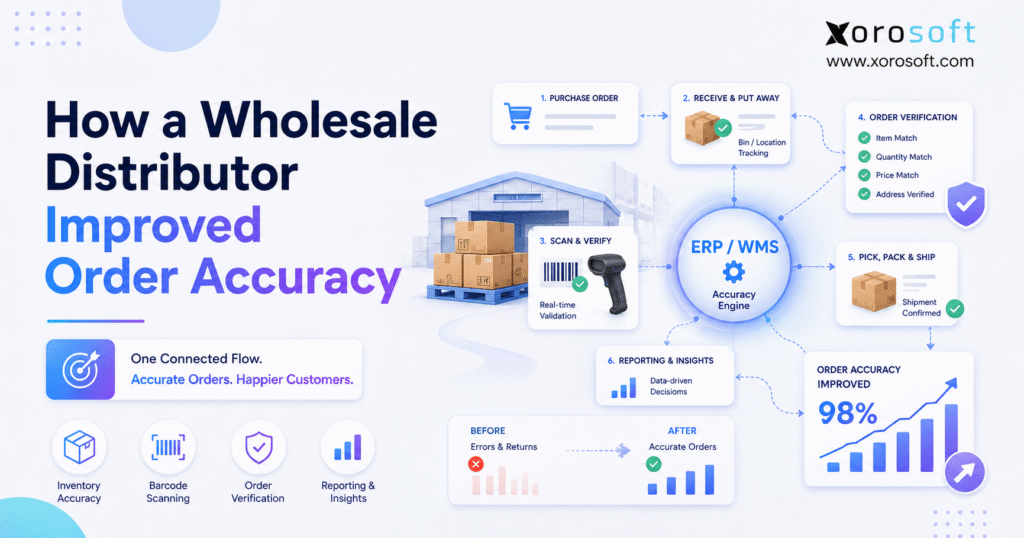
Ensuring wholesale order accuracy is essential for any business that manages large inventory and frequent shipments.
1. When Growth Starts Exposing Order Errors
Wholesale order accuracy became a top concern when a growing distributor saw more wrong items, incorrect quantities, delayed shipments, stock gaps, and invoice disputes. At first, managers treated each mistake as a separate warehouse issue. However, the team soon found that poor data, late inventory updates, manual entry, weak buying plans, and disconnected tools all played a part.
1.1 A Process That Worked at a Smaller Scale
During the early stage, the distributor managed orders through accounting software, spreadsheets, printed pick lists, and several small apps. Although the setup worked for a limited number of products and customers, it became harder to manage as order volume grew.
For example, sales checked one stock report while the warehouse used another. Meanwhile, finance often found the final mismatch after the order had already shipped. As a result, employees spent more time checking, fixing, and explaining orders.
Customer needs also became more detailed. Wholesale buyers wanted full shipments, correct case counts, accurate labels, agreed prices, and set delivery dates. Therefore, even a small mistake could lead to a return, credit, extra freight charge, or lost trust.
1.2 The Problem Went Beyond Picking
At first, managers blamed most errors on picking. However, a full review showed that many mistakes began much earlier.
For instance, workers sometimes received the wrong count. In other cases, the system showed stock in the wrong bin. Sales also entered some orders by hand, while buyers worked from separate supplier files.
Because each team had only part of the picture, no one could fully trust the order record. Therefore, the company decided to improve the full order flow instead of only asking warehouse staff to work more carefully.
2. What Wholesale Order Accuracy Measures
Wholesale order accuracy measures how often teams enter, pick, pack, ship, and invoice customer orders correctly. Therefore, the metric covers more than the picking step.
A correct order should contain:
- The right customer
- The right delivery address
- The right SKU or product type
- The right size, color, lot, or serial number
- The right quantity
- The right unit of measure
- The right case or inner-pack count
- The right price and discount
- The right labels and paperwork
- The right carrier and shipping service
- The right invoice
2.1 How to Calculate Order Accuracy
Use this formula:
Order Accuracy Rate = Correct Orders Shipped ÷ Total Orders Shipped × 100
For example, suppose the distributor ships 5,000 orders in one month. If 4,950 orders contain no errors, the order accuracy rate equals 99%.
However, the remaining 1% still means 50 customers received an incorrect order. Therefore, leaders must review the real cost behind the rate.
One wrong order can lead to:
- Return freight
- A replacement shipment
- Extra warehouse work
- A credit memo
- A customer deduction
- Lost margin
- Lower customer trust
2.2 Why Line-Level Accuracy Also Matters
Wholesale orders often contain many product lines. Therefore, one order can look mostly correct even when one line has the wrong item or count.
For that reason, distributors should track both order-level and line-level results. Order-level data shows the customer impact. Meanwhile, line-level data helps the warehouse find the exact type of error.
2.3 Accuracy Must Work With Fill Rate and Speed
Order accuracy should not stand alone. Instead, teams should review it with fill rate, stock accuracy, backorders, on-time shipping, and order cycle time.
According to ASCM’s warehouse KPI guidance, many warehouses aim for a fill rate near 97% to 98%. Lower results may point to stock or restocking problems.
Therefore, the distributor needed to ship the right order and also keep enough stock on hand to ship it on time.
3. The Distributor’s Starting Point
The distributor in this example reflects a common wholesale growth pattern. It does not refer to one named company. However, the issues match what many growing distributors face.
Sales had increased. The company had added more products, customers, channels, and warehouse space. Yet the team still relied on the same mix of spreadsheets, accounting tools, printed lists, and separate apps.
As a result, growth increased sales but also increased risk.
3.1 More SKUs Raised Picking Risk
First, the company added more products. Some items looked alike, while others differed only by size, color, pack, or model.
Consequently, pickers sometimes selected the right product family but the wrong version. New employees also needed more training because experienced workers knew where items sat without checking a system.
Therefore, the company needed clearer product names, cleaner SKU data, and better bin control.
3.2 More Channels Created Stock Gaps
Next, the distributor added ecommerce orders and marketplace sales beside its wholesale business.
However, each channel did not always receive stock updates at the same time. Therefore, an item could look available online even though another order had already reserved it.
Similarly, the system could count damaged, held, or in-transit stock as available. As a result, sales sometimes promised inventory that the assigned warehouse could not ship.
3.3 More Warehouses Reduced Stock Trust
The company also opened another warehouse. Yet teams often reviewed stock as one total number.
Therefore, a sales rep could see 100 units in the business without knowing that one warehouse held 95 of them. The second warehouse might only have five.
As a result, the company created rush transfers, split shipments, and last-minute changes. Those fixes protected some orders, but they also raised cost and risk.
3.4 Customer Rules Lived in Emails and Notes
Several wholesale accounts required special prices, labels, ship windows, routing steps, and pack rules.
However, the company had not built those rules into the order flow. Instead, employees checked emails, notes, and old files.
Consequently, service quality depended too much on staff memory. Whenever a key employee took leave, the risk of error rose.
4. Why Wholesale Order Accuracy Was Falling
Wholesale order accuracy fell because the company had several small gaps across the order flow. Although customers saw the final shipping error, the first mistake often happened during receiving, stock updates, order entry, restocking, or buying.
Therefore, the team mapped each step from supplier receipt to customer invoice.
4.1 Stock Records Did Not Match the Warehouse
First, workers sometimes entered receipts after they had already moved products into storage. Meanwhile, employees recorded transfers and stock changes later in the day.
As a result, the system did not always match the stock on the floor.
A picker might see 40 units in the system but only find 32 in the bin. In another case, the product might exist in the building but sit in a different area.
The 2025 WERC warehouse metrics shared by Yale list inventory count accuracy by location of at least 99.5% as a best-in-class result. Therefore, the company treated bin-level stock accuracy as a daily need.
Readers can review the WERC distribution center metrics summary for more warehouse target results.
4.2 Manual Entry Created Repeat Work
Employees often entered the same order more than once.
For example, sales entered a customer order into one tool. Then the warehouse received a printed list. Later, finance adjusted the invoice or credit in another system.
Although each person tried to enter the right data, every repeat step added risk. Therefore, the company saw more wrong counts, missed notes, old prices, and incorrect ship dates.
4.3 Weak Bin Rules Slowed Picking
Products did not always stay in the correct bins. Moreover, workers did not always record temporary moves right away.
As a result, experienced staff searched from memory, while newer staff spent more time looking for stock. Some pickers also chose a nearby product that looked similar.
Therefore, poor bin rules caused both slow work and wrong orders.
4.4 Paper Picking Could Not Stop Errors
Printed pick lists told workers what to pick. However, paper could not check whether the worker chose the correct item.
Consequently, a picker could select the wrong SKU, mark the line complete, and send the order to packing.
A barcode process adds another check. GS1 barcode standards help businesses use common product and logistics IDs across supply chains.
Therefore, barcode checks can help workers and systems refer to the same item during receiving, putaway, picking, packing, and shipping.
4.5 Buying and Shipping Followed Different Priorities
The buying team focused on supplier orders, lead times, and expected demand. Meanwhile, the warehouse focused on today’s customer orders.
However, both teams lacked one clear view of shortages, incoming stock, held stock, and high-priority orders.
As a result, late purchase orders became warehouse emergencies. Therefore, the company needed one shared view of supply and demand.
5. The Six-Step Wholesale Order Accuracy Plan
The company improved wholesale order accuracy through six linked steps. Importantly, it did not start by buying scanners or changing every warehouse rule at once.
Instead, the team first fixed the data and process gaps that would weaken any new system.
5.1 Clean Product, Customer, and Location Data
First, the team cleaned the item list.
Employees removed duplicate products, clarified item names, reviewed units of measure, and made variant details consistent. Therefore, pickers could tell similar items apart more easily.
Next, the company cleaned customer records. Staff moved prices, label rules, routing needs, and ship notes out of emails and into controlled customer records.
Finally, the team reviewed every warehouse location. Each active bin received a clear name and label. In addition, workers kept damaged, held, and return stock in separate areas.
| Data area | Main risk | Simple fix |
|---|---|---|
| Item list | Similar or duplicate SKUs | Use clear names and codes |
| Units of measure | Cases confused with single units | Set clear pack rules |
| Customer records | Special rules get missed | Store rules in one place |
| Bin locations | Workers cannot find stock | Label and control each bin |
| Pricing | Invoice disputes | Link prices to the order |
5.2 Fix Receiving Before Picking
At first, the company wanted to improve picking. However, accurate picking starts with accurate receiving.
Therefore, workers checked each receipt against the purchase order. They confirmed:
- Supplier
- SKU
- Quantity
- Unit of measure
- Product condition
- Lot or serial number when needed
- Putaway location
Next, workers moved the goods to a confirmed bin. As a result, the system knew both the stock count and the stock location.
5.3 Improve Bin-Level Stock Control
After receiving improved, the company tightened its bin rules.
Workers recorded every stock move in the system. In addition, the team placed fast-moving items in easy-to-reach areas and separated products that looked alike.
As a result, workers spent less time walking and searching. Moreover, they had a lower chance of picking the wrong item.
The company also added regular cycle counts. Instead of waiting for one full yearly count, staff checked fast-moving, high-value, and high-error bins more often.
5.4 Add Barcode Checks to Pick-Pack-Ship
Once the data became more reliable, the distributor added barcode scanning.
During picking, the worker scanned the bin and then the item. Therefore, the system could check the product, location, and count.
During packing, staff scanned the items again. As a result, the system could find missing, extra, or incorrect lines before workers sealed the box.
Finally, the shipping step checked the customer, label, carrier, and paperwork.
| Step | Main check | Error reduced |
| Pick | Check bin, item, and count | Wrong SKU or count |
| Pack | Recheck order contents | Missing or extra items |
| Ship | Check label and paperwork | Wrong address or rule |
| Post | Update stock and order status | Old stock data |
5.5 Connect Orders, Stock, Buying, and Finance
Meanwhile, the distributor replaced separate handoffs with one shared order record.
Sales could see available and reserved stock. Buyers could see shortages and incoming supply. Warehouse teams received clear order steps. Finance could trace shipments, invoices, credits, and returns back to the same order.
A platform such as XoroONE brings orders, inventory, buying, warehouse work, ecommerce, EDI, finance, forecasting, and reporting into one system.
As a result, distributors can reduce the manual steps between a customer order and warehouse shipping.
5.6 Review Issues and KPIs Every Week
Finally, managers added a weekly order review.
Instead of only counting total errors, the team grouped each issue by:
- Error type
- Warehouse area
- Product
- Customer
- Employee task
- Sales channel
- Process step
Therefore, every mistake pointed to a possible fix.
For example, repeated errors on one item could point to poor packaging, a weak barcode, a confusing item name, or bad bin placement.
The weekly review covered:
- Order accuracy
- Pick accuracy
- Stock accuracy
- Fill rate
- Backorder rate
- Return reasons
- Order cycle time
- On-time shipping
For distributors that need a wider view of connected business tools, the Xorosoft solutions page explains how inventory, warehouse, order, buying, and finance tasks can work together.
6. How ERP and WMS Improve Wholesale Fulfillment Accuracy
ERP and WMS both improve wholesale fulfillment accuracy. However, each system controls a different part of the work.
Therefore, distributors should understand the role of each one.
6.1 ERP Controls the Business Record
ERP connects customer orders, prices, stock, buying, finance, returns, and reports.
Therefore, ERP helps teams answer:
- What did the customer order?
- Which price should apply?
- What stock can sales promise?
- What stock has another order reserved?
- What does the company need to buy?
- How does the order affect revenue and stock value?
For companies that have outgrown accounting tools and separate stock apps, XoroERP supports order-to-cash and purchase-to-pay work.
As a result, ERP becomes useful when order errors involve sales, buying, stock, finance, or reports rather than only warehouse picking.
6.2 WMS Controls Warehouse Work
A WMS guides receiving, putaway, restocking, picking, packing, cycle counts, and shipping.
Therefore, it helps warehouse teams answer:
- Where is the item?
- Which bin should the worker pick?
- Did the worker scan the correct SKU?
- Did the packer confirm the right count?
- Is the order ready to ship?
- Did the stock record update?
XoroWMS connects real-time warehouse work with inventory and customer orders.
As a result, warehouse steps can update the wider business record instead of staying inside a separate tool.
6.3 A Connected ERP and WMS Close the Gap
Either system can improve part of the process. However, separate ERP and WMS records can create the same data gaps again.
Therefore, order status, reserved stock, stock moves, shipping updates, and returns must pass smoothly between both systems.
Xorosoft combines ERP and warehouse tools for businesses that sell and manage physical products. As a result, teams can manage orders, stock moves, buying needs, and finance through one connected process.
| Feature | ERP | WMS |
| Sales orders | Strong | Limited |
| Customer pricing | Strong | Limited |
| Buying and restocking | Strong | Supporting |
| Stock visibility | Strong | Strong |
| Bin-level tasks | Varies | Strong |
| Barcode picking | Varies | Strong |
| Packing and shipping checks | Varies | Strong |
| Finance and stock value | Strong | Limited |
| Warehouse task reports | Varies | Strong |
7. What Changed After the Accuracy Plan
The company improved order accuracy through several linked controls. Therefore, no single tool or rule created the full result.
Instead, the before-and-after change appeared across sales, warehouse work, service, buying, and finance.
7.1 Before: Teams Fixed Errors After Shipping
Previously, employees checked sales orders by hand, updated stock late, and used printed pick lists.
Meanwhile, customer service found many issues through calls and emails. As a result, the company spent time creating credits, sending replacement orders, searching for stock, and explaining mistakes.
7.2 After: The Process Stopped Errors Earlier
After the changes, receiving created better stock records. In addition, barcode checks guided warehouse moves, while packing checks stopped incomplete orders before shipping.
Moreover, reports showed issues while teams still had time to act. Therefore, workers could fix a problem before the customer saw it.
7.3 Finance Received Cleaner Records
Because shipping and stock data became more reliable, finance saw fewer surprise changes.
In addition, the team could trace credits and returns back to the original order. As a result, record matching took less time, and stock value became easier to explain.
7.4 Customer Service Gained a Clearer View
Customer service no longer had to search several tools for basic order details.
Instead, the team could see order status, shipping progress, stock gaps, and backorders in one flow. Therefore, staff gave customers clearer answers and raised real issues earlier.
| Area | Before | After |
| Stock view | Late and manually matched | Current by SKU and bin |
| Receiving | Basic checks | PO, item, count, and location checks |
| Picking | Paper and memory | Scan-guided |
| Packing | Informal checks | Required item checks |
| Shipping | Errors found after dispatch | Labels and papers checked first |
| Reports | Spreadsheet-based | KPI and issue reports |
| Finance | Many credits and changes | Better order tracking |
8. Wholesale Order Accuracy KPIs That Matter
Wholesale order accuracy improves faster when each KPI shows where errors enter the process.
Therefore, the company used a small set of useful measures instead of a large report with no clear owner.
8.1 Order Accuracy Rate
Order accuracy rate shows the share of customer orders that ship without an error.
However, the company must clearly define which errors count. The rule should cover item, quantity, address, price, paperwork, and invoice issues.
8.2 Pick Accuracy
Pick accuracy focuses on the warehouse selection step.
The 2025 WERC figures shared by Yale list order-picking accuracy of at least 99.68% as a best-in-class result.
Therefore, even a small error rate matters in a high-volume warehouse.
8.3 Stock Accuracy by Location
Stock accuracy compares the system count with the physical count in each bin.
Because pickers rely on bin data, this KPI often explains why staff cannot find products that appear available.
8.4 Fill Rate and Backorder Rate
Fill rate shows how often the distributor can meet customer demand from current stock.
By contrast, backorder rate shows how often the business cannot ship as promised. Therefore, these measures link buying and forecasting with customer service.
8.5 Return Reasons
Total return volume does not show the full problem.
Instead, teams should group returns by reason:
- Wrong item
- Wrong count
- Damage
- Late shipment
- Duplicate order
- Customer cancellation
- Normal commercial return
As a result, managers can separate warehouse mistakes from other customer return causes.
8.6 Order Cycle Time
Order cycle time measures how long the business takes to move an order from release to shipment.
However, leaders should never review speed without accuracy. A faster warehouse does not help if errors rise.
Therefore, the goal should be accurate speed.
| KPI | Method | Main question |
| Order accuracy | Correct orders ÷ total orders | Did the customer get the right order? |
| Pick accuracy | Correct picks ÷ total picks | Did the warehouse select correctly? |
| Stock accuracy | Correct counts ÷ total counts | Can teams trust bin stock? |
| Fill rate | Filled demand ÷ total demand | Is enough stock ready? |
| Backorder rate | Backordered lines ÷ total lines | Where are stock gaps? |
| Return reasons | Group returns by cause | Which issues can teams prevent? |
| Cycle time | Release time to ship time | Is the team moving fast and correctly? |
9. How Order Accuracy Changes by Industry
Although the core process stays similar, order accuracy risks differ by industry.
Therefore, each distributor should shape the workflow around its products, customer rules, and handling needs.
The Xorosoft industries page shows how these needs vary across businesses that sell and manage physical products.
9.1 Apparel and Fashion
Apparel distributors manage size, color, style, season, and sales channel.
Consequently, a picker can choose the correct style but the wrong size or color. Therefore, clear variant data, barcode checks, and strong bin rules matter greatly.
9.2 Furniture
Furniture distributors often handle large items, fragile goods, parts, and split deliveries.
As a result, accuracy includes both the correct item and all required parts. In addition, teams must track damage and delivery needs.
9.3 Sporting Goods
Sporting goods distributors may manage seasonal demand, kits, parts, accessories, and many SKUs.
Therefore, kit rules and part stock must stay accurate. Otherwise, the warehouse may ship an incomplete set.
9.4 Food and Beverage
Food and beverage distributors must manage lot numbers, expiry dates, FIFO or FEFO rules, recalls, and food safety needs.
Consequently, a correct order includes the right item, count, lot, and shelf life.
9.5 Light Manufacturing and Distribution
Some distributors also assemble, kit, or make finished goods.
In these cases, customer order accuracy depends on component stock, bills of materials, work orders, and production dates.
Therefore, warehouse and production records must match.
10. Common Mistakes That Block Better Order Accuracy
Many distributors try to fix wholesale order accuracy too narrowly.
They focus on the final error but leave the main cause in place. As a result, the same problem returns later.
10.1 Buying Software Before Cleaning Data
Software cannot fix duplicate SKUs, unclear pack rules, poor customer records, or unreliable bins on its own.
Therefore, data cleanup should happen before or during a system rollout. Otherwise, the company will move bad data faster.
10.2 Treating Every Error as a Staff Problem
Managers often blame warehouse staff when the wrong order ships.
However, many errors start with poor receiving, confusing item names, weak restocking, unclear customer rules, or disconnected tools.
Therefore, better process design usually creates a longer-lasting fix than pressure alone.
10.3 Ignoring Buying and Restocking
Buying directly affects order accuracy because stock on hand shapes every customer promise.
If reorder points are wrong, supplier lead times are old, or purchase orders arrive late, the warehouse may need to split, delay, or change orders.
Therefore, leaders should review order accuracy with buying and demand planning.
10.4 Measuring Problems Too Late
If teams review accuracy only after returns arrive, they learn too late.
Instead, the company should place checks at receiving, putaway, picking, packing, and shipping.
As a result, each step shows a different source of error.
10.5 Ignoring the Finance Cost
A wrong shipment creates more than a warehouse issue.
It may lead to return freight, extra picking, credits, customer fees, stock changes, and lost margin.
Therefore, operations and finance should review repeat errors together.
11. When a Wholesale Distributor Should Upgrade Systems
A very small distributor may not need a full ERP or WMS at the start.
However, certain signs show that the current tools can no longer support safe growth.
11.1 Spreadsheets No Longer Give Control
Spreadsheets become risky when:
- Many employees update stock
- Orders change throughout the day
- Several warehouses hold the same item
- Customer prices and rules keep growing
- Sales and warehouse teams use different files
- Reports need manual cleanup
At that point, spreadsheets become a risk rather than a simple tool.
11.2 Accounting Software Cannot Handle Stock Needs
Accounting software may still record sales and costs well while warehouse work becomes harder.
For example, the business may still need separate stock, warehouse, EDI, ecommerce, and buying apps.
As a result, employees spend more time moving data between tools.
Therefore, the company should review the full order, stock, buying, warehouse, and finance flow.
11.3 Inventory Apps Leave Gaps
Inventory-only apps may support basic stock tracking.
However, growing distributors often need buying, WMS, finance, forecasting, reports, EDI, and customer rules.
If teams still export files or re-enter data into accounting tools, the main gap remains.
11.4 What to Review Before Choosing ERP or WMS
| Area | Key question |
| Stock | Can the system track SKU, bin, warehouse, lot, and status? |
| Warehouse | Can it guide receiving, picking, packing, and shipping? |
| Buying | Can it manage suppliers, purchase orders, and restocking? |
| Finance | Do stock moves link with financial records? |
| Reports | Can managers find issues before customers complain? |
| Ecommerce | Does it connect with Shopify and other channels? |
| EDI | Can customer documents move without hand entry? |
| Growth | Can it support more users, warehouses, and orders? |
Distributors can also review Xorosoft case studies to see how other product-based businesses approached system and process change.
12. How Connected Systems Improve Wholesale Order Accuracy
Connected ERP and WMS tools improve wholesale order accuracy by giving all teams one shared order and stock record.
Instead of sales, buying, warehouse, service, and finance using separate data, each team can work from the same source.
12.1 Real-Time Stock Visibility
Real-time stock visibility helps sales promise more safely and helps warehouse teams ship with more trust.
When workers receive, transfer, reserve, pick, pack, or ship products, the system should update stock right away.
As a result, the company can reduce overselling, double promises, and rush fixes.
12.2 Multi-Warehouse Control
Multi-warehouse control shows where stock sits and which site should ship the order.
In addition, it supports transfers, reservations, restocking, and cycle counts.
Without warehouse-level stock data, order accuracy becomes harder to manage as the business grows.
12.3 Connected Buying and Forecasting
Buying helps order accuracy by keeping the right products ready at the right time.
Therefore, supplier lead times, reorder points, forecasts, and purchase orders should connect with real demand and reserved stock.
A separate buying process often creates last-minute stock problems.
12.4 Barcode Warehouse Checks
Barcode checks confirm stock moves.
For example, scans at receiving, putaway, picking, packing, and shipping create checks before an error reaches the customer.
Xorosoft supports these warehouse steps through its WMS tools while also linking them with inventory, buying, finance, and reports.
12.5 Finance and Reporting Alignment
Order accuracy becomes more useful when operations and finance use the same data.
Credits, returns, stock changes, customer fees, and invoice issues should not sit in separate tools.
Therefore, connected reports help leaders find whether the main cause comes from warehouse work, buying delays, stock records, order entry, or customer rules.
13. Frequently Asked Questions About Wholesale Order Accuracy
13.1 What is wholesale order accuracy?
Wholesale order accuracy measures how often teams enter, pick, pack, ship, and invoice orders correctly. It covers the right customer, item, count, price, address, label, and paperwork. Because wholesale orders often include many lines, distributors should track both full-order and line-level accuracy.
13.2 Why does order accuracy matter?
Order accuracy protects customer trust, margin, and warehouse time. When an order goes wrong, the company may pay for return freight, another shipment, extra work, credits, and customer fees. Therefore, accuracy affects both service and profit.
13.3 How do you calculate wholesale order accuracy?
Divide correct orders by total shipped orders and multiply by 100. For example, 990 correct orders out of 1,000 create a 99% rate. However, the company should use one clear rule for what counts as an error.
13.4 What is a good order accuracy rate?
The right target depends on order size, number of lines, industry, and customer rules. However, strong distributors aim close to 100%. The earlier WERC target lists 99.68% as a best-in-class pick accuracy result.
13.5 What causes most wholesale order errors?
Common causes include wrong stock data, hand entry, similar SKUs, poor bin rules, weak scans, unclear customer notes, and separate tools. In addition, receiving and buying mistakes often create problems that appear later during picking.
13.6 How does stock accuracy affect order accuracy?
Stock accuracy tells sales and warehouse teams what the company really has. If the system shows the wrong count or bin, sales may promise too much and pickers may search the wrong place. Therefore, better bin-level stock data usually improves shipping results.
13.7 How does barcode scanning reduce errors?
Barcode scanning checks the item, bin, count, and order during warehouse work. As a result, the system can stop a wrong pick or pack before shipping. In addition, scans reduce the need for memory and hand checks.
13.8 What is the difference between pick accuracy and order accuracy?
Pick accuracy checks whether the warehouse selected the right items and counts. Order accuracy covers the full customer result, including entry, price, packing, shipping, labels, and invoice. Therefore, good picking alone does not guarantee a perfect order.
13.9 How does a WMS improve order accuracy?
A WMS guides receiving, putaway, restocking, picking, packing, cycle counts, and shipping. Therefore, it can enforce bin rules, barcode checks, count checks, and task order. However, it also needs good order and stock data from the wider system.
13.10 How does ERP improve order accuracy?
ERP connects sales orders, stock, prices, buying, finance, and reports. Therefore, it reduces repeat entry and gives teams one shared order record. In addition, ERP connects warehouse results with customer and finance impact.
13.11 Does every distributor need ERP and WMS?
Not every small distributor needs both systems right away. However, higher order volume, many bins, barcode work, multiple warehouses, and complex buying often create a need for both ERP and WMS features.
13.12 Can spreadsheets manage order accuracy?
Spreadsheets may work for a small team with low order volume. However, they become risky when many people update stock, orders, and buying files during the day. As a result, old versions and late changes reduce trust.
13.13 When should a distributor move beyond QuickBooks?
A distributor should review its setup when stock, warehouses, buying, EDI, or ecommerce require many extra apps and manual fixes. Although accounting may still work, daily operations may become too disconnected.
13.14 How do multiple warehouses affect accuracy?
Multiple warehouses add stock, transfer, reserve, and ship-location choices. If teams only see one total count, they may promise stock from the wrong site. Therefore, the system should show stock and status by location.
13.15 How does EDI affect order accuracy?
EDI reduces hand entry by sending set business documents between trading partners. However, good item mapping, customer rules, stock data, and warehouse work still matter. Therefore, EDI improves the order handoff but cannot replace warehouse checks.
13.16 How does Shopify stock syncing affect accuracy?
Shopify stock syncing affects whether online stock matches the main business system. When updates arrive late, customers may order stock that another channel has already reserved or shipped. Therefore, quick syncing matters for multi-channel sellers.
13.17 Which reports reveal order accuracy problems?
Useful reports include order accuracy, pick errors, stock changes, backorders, fill rate, late shipments, and return reasons. In addition, managers should group errors by product, customer, channel, warehouse, and work step.
13.18 How should return reasons be tracked?
Teams should use clear return reasons such as wrong item, wrong count, damage, late shipment, duplicate order, and normal customer return. Therefore, managers can separate shipping errors from other return causes.
13.19 How does receiving affect shipping accuracy?
Receiving creates the stock record that picking uses later. If workers enter the wrong item, count, lot, or bin, each later step starts with bad data. Therefore, purchase order checks and clear putaway steps matter.
13.20 How does buying affect order accuracy?
Buying affects whether the right stock arrives before customer orders are due. Old lead times, late purchase orders, and weak restocking can cause backorders and split shipments. Therefore, buyers and warehouse teams need one view of supply and demand.
13.21 How does forecasting help?
Forecasting helps the company prepare stock before demand arrives. Although it cannot remove all change, it can reduce stockouts, rush transfers, and last-minute replacements. Therefore, better forecasts support more complete orders.
13.22 What role does cycle counting play?
Cycle counting checks selected bins throughout the year instead of waiting for one full annual count. As a result, teams can fix stock gaps before they affect many orders. In addition, cycle counts help find weak bins and products.
13.23 Can order accuracy improve without new software?
Yes. A company can clean data, improve receiving, label bins, train staff, add pack checks, and review errors before buying new software. However, separate tools may limit how far those gains can scale.
13.24 How long does an accuracy project take?
The timeline depends on data quality, warehouse size, number of sites, tool gaps, and team skills. However, companies can often find simple process fixes during the first review. Larger ERP and WMS rollouts need planning, testing, training, and step-by-step use.
13.25 How can Xorosoft help improve wholesale order accuracy?
Xorosoft connects orders, inventory, buying, WMS, finance, reports, ecommerce, and EDI in one cloud system. As a result, distributors can reduce hand entry, improve bin-level stock views, check warehouse moves, and trace issues across teams.
14. Build Accuracy Into Daily Work
Wholesale order accuracy improved because the distributor stopped treating each mistake as a one-time staff error.
Instead, the team cleaned its data, improved receiving, controlled stock locations, added barcode checks, connected business and warehouse work, and reviewed results each week.
Ultimately, accurate shipping depends on one shared order and stock record. Sales must know what it can promise. Buyers must understand shortages. Warehouse teams need clear steps. Meanwhile, finance must see the cost of each order change.
Therefore, distributors that have outgrown spreadsheets, accounting-led tools, or separate inventory apps should review whether a connected ERP and WMS can remove the main causes of repeat errors.
For a closer look at how Xorosoft can support order management, inventory, warehouse work, buying, ecommerce, and finance, Book a Demo.
Search
Categories
- Accounting & QuickBooks 227
- AI & Automation 585
- E-commerce & Marketplaces 1,202
- EDI & B2B 150
- ERP 573
- ERP Selection & Comparisons 166
- Industries 230
- Integrations 138
- Shopify ERP 138
- Inventory Management 1,206
- Order Management & Fulfillment 578
- Procurement & Supply Chain 9
- Procurement, Purchasing & Reordering 417
- Resources 250
- Shopify 649
- Solutions 606
- Warehouse & WMS 1,078
Recent Posts
-
 ERP Landed Cost Module vs Spreadsheet Calculations for Importers
 -
 How to Build an Open-to-Buy Plan for an Omnichannel Brand
 -
 Cold Storage WMS for Food and Beverage Distribution
 -
 ERP Buying Statistics 2026: Evaluation, Implementation, and Adoption Risks
 -
 How a Distributor Reduced B2B Order Exceptions Without Restricting Sales