If you’re looking for ways to integrate your online store with a powerful business solution, consider using a Shopify ERP system.
1. Why Shopify Stores Need an Operating System Behind the Storefront
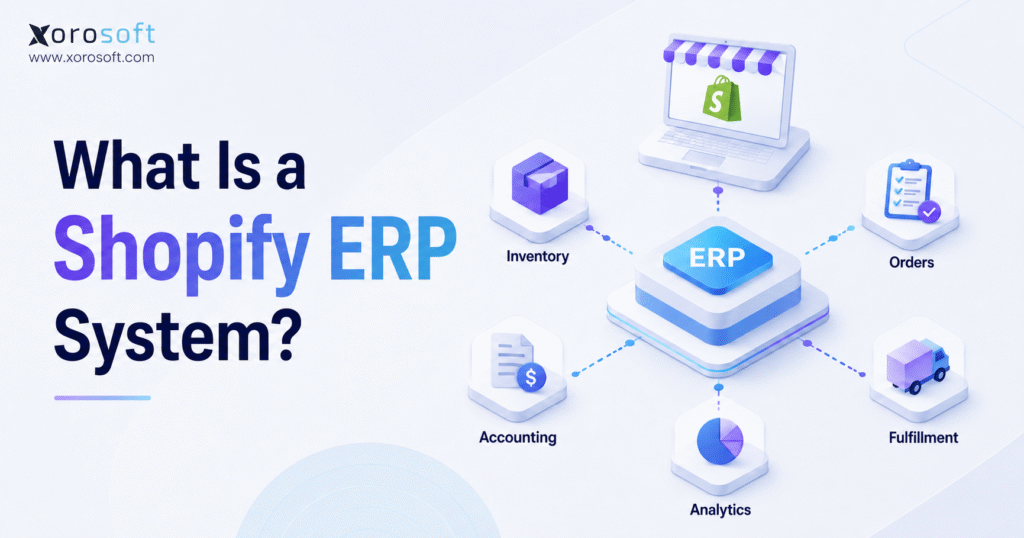
A Shopify ERP system connects Shopify with the operational parts of a product business, including inventory, purchasing, warehouse management, fulfillment, accounting, reporting, and sometimes manufacturing. Shopify helps the business sell online. However, ERP helps the business control everything that happens after a customer places an order.
At first, Shopify can feel like the center of the company. Orders come in, payments process, inventory adjusts, and the team ships products. However, as the business grows, Shopify becomes only one part of a larger operating model.
For example, a brand may start with one warehouse and one sales channel. Later, it may add Amazon, wholesale customers, EDI orders, multiple warehouses, purchasing teams, returns, landed costs, and finance reporting. As a result, the company needs more than a storefront. It needs a connected system for inventory, money, people, and workflows.
Because ecommerce continues to represent a major share of retail activity, growing brands cannot treat back-end operations as an afterthought. The U.S. retail ecommerce sales report shows how important ecommerce has become within total retail sales. Therefore, Shopify merchants that scale quickly need systems that can support growth without creating operational chaos.
1.1 What a Shopify ERP System Means
A Shopify ERP system is an enterprise resource planning platform connected to Shopify. In simple terms, it becomes the operational source of truth for the business.
It helps answer practical questions such as:
- How much inventory is actually available?
- Which warehouse should fulfill this order?
- What stock is already committed?
- Which supplier needs a purchase order?
- Which products are at risk of stockout?
- What is the true cost of goods sold?
- Which sales channel is creating the most pressure?
Because Shopify is focused on commerce, it does not always manage every back-end workflow a growing product business needs. Therefore, ERP fills the operational gap between ecommerce demand and business execution.
1.2 Why Shopify Alone Is Not an ERP
Shopify is a commerce platform, not a complete ERP system. It helps merchants build storefronts, manage products, accept payments, process checkout, and capture orders. However, Shopify does not replace deep inventory planning, purchasing, accounting, warehouse management, production planning, or financial control.
That does not mean Shopify is weak. Instead, it means Shopify and ERP solve different problems.
Shopify helps customers buy. Meanwhile, ERP helps the business deliver, replenish, account, and report.
As a result, many growing merchants keep Shopify as the storefront while using ERP as the back-end operating system.
1.3 What Happens Behind Every Shopify Order
Every Shopify order creates work behind the scenes. First, the system must allocate inventory. Next, the warehouse must pick and pack the order. After that, the team must update shipping details. Finally, accounting must record revenue, cost, tax, payment fees, and inventory movement.
Meanwhile, purchasing may need to reorder stock. Customer service may need visibility into order status. Finance may need clean reporting. Therefore, one Shopify order can affect several departments at the same time.
When the business is small, the team can handle these steps manually. However, as order volume increases, manual work becomes slower and riskier. Eventually, the team may spend more time fixing errors than improving operations.
A Shopify ERP system helps reduce that pressure by connecting orders to inventory, fulfillment, purchasing, accounting, and reporting.
1.4 Why Growing Brands Need Better Operational Control
Growth often exposes weak systems. More orders sound positive, but more orders also create more stock movements, more supplier decisions, more warehouse tasks, more returns, and more accounting entries.
For example, a growing Shopify brand may sell through Shopify, Amazon, wholesale, and EDI at the same time. If each channel uses separate inventory data, the business may oversell. Similarly, if purchasing uses spreadsheets while finance uses accounting software and the warehouse uses another app, leadership may not trust the reports.
Therefore, ERP becomes important when the business needs one connected view of operations.
2. How a Shopify ERP System Works
A Shopify ERP system works by syncing data between Shopify and the ERP platform. However, the real goal is not simply moving data. The goal is connecting workflows so orders, inventory, purchasing, warehouse tasks, and accounting all update from the same operational truth.
Shopify explains ERP integration as connecting ERP with other applications, systems, or databases so data can move between tools and support automation. For more technical context, Shopify’s ERP integration guide is a useful reference.
2.1 Core Data Flow Between Shopify and ERP
A strong Shopify ERP integration usually syncs several types of data. Each type matters because one broken sync can create errors across the business.
2.1.1 Product Data
Product data includes SKUs, product names, variants, barcodes, categories, units of measure, pricing, and product status. In Shopify, this data supports the storefront. However, inside ERP, product data supports purchasing, warehouse movement, inventory control, reporting, and accounting.
This matters especially for brands with variants, bundles, kits, or assemblies. If product data is messy, the warehouse may pick the wrong item. Meanwhile, purchasing may reorder the wrong SKU, and finance may report inaccurate margins.
2.1.2 Customer Data
Customer data may include names, emails, billing addresses, shipping addresses, tax details, wholesale accounts, payment terms, and customer groups.
For DTC brands, this data may be simple. However, for wholesale and B2B brands, customer data becomes more important because pricing, payment terms, and shipping rules may vary by account.
2.1.3 Order Data
Order data is one of the most important sync points. When a customer places an order in Shopify, the ERP should receive the correct products, quantities, prices, discounts, taxes, payment status, shipping address, and fulfillment requirements.
Then, the ERP can allocate inventory, create warehouse tasks, update reports, and support accounting entries. Because the order touches many teams, clean order data is essential.
2.1.4 Inventory Data
Inventory data includes on-hand stock, available stock, committed stock, incoming inventory, safety stock, warehouse-level quantities, and stock adjustments.
This is where many Shopify brands struggle. Shopify may show inventory for online selling, but the business may also sell through Amazon, wholesale customers, marketplaces, or manual sales orders. Therefore, the company must centralize inventory before it can trust what is available.
2.1.5 Fulfillment Data
Fulfillment data includes pick status, pack status, shipment status, carrier, tracking number, warehouse location, partial shipment details, backorders, and returns.
Once the warehouse ships an order, fulfillment updates should flow back into Shopify. As a result, customers see accurate tracking, support teams have better visibility, and operations can measure performance.
2.1.6 Financial Data
Financial data includes revenue, discounts, tax, shipping income, payment fees, cost of goods sold, inventory value, refunds, adjustments, and landed costs.
Without ERP, finance teams often rebuild financial records from Shopify exports, payment reports, warehouse reports, and spreadsheets. However, when ERP connects financial data with operational events, month-end close becomes easier to manage.
2.2 Shopify as the Front-End Commerce Layer
Shopify should remain the front-end commerce layer. It manages the customer experience, checkout, product display, payments, promotions, and online ordering.
Because Shopify is built for commerce, it is usually the right place to manage storefront experience. However, it should not carry every back-end workflow once the business becomes complex.
2.3 ERP as the Back-End Operating System
ERP becomes the back-end operating system. It connects sales orders, inventory, purchasing, warehouse activity, accounting, manufacturing, and reporting.
For example, a Shopify order affects inventory. Then, inventory affects purchasing. Purchasing affects cash flow, while warehouse activity affects fulfillment. Finally, fulfillment affects customer experience and accounting.
Because these workflows are connected in real life, they should not live in disconnected systems.
2.4 What Real-Time Sync Actually Means
Real-time sync does not only mean “fast.” Instead, it means business events update quickly enough to prevent bad decisions.
A practical flow may look like this:
1. A customer places a Shopify order.
2. The ERP receives the order.
3. ERP commits inventory.
4. Available stock updates.
5. The warehouse receives the pick task.
6. The warehouse ships the order.
7. Tracking syncs back to Shopify.
8. Accounting records update.
9. Reports refresh.
If the team delays any step, the business may oversell, ship late, reorder incorrectly, or report inaccurate financial results.
3. Core Features of a Shopify ERP System
Teams should not judge a Shopify ERP system only by whether it connects to Shopify. Instead, they should judge it by whether it supports the full operating model of the business.
3.1 Inventory Management
Inventory management is often the first reason Shopify brands search for ERP. As sales channels grow, inventory becomes harder to trust.
A Shopify ERP system should help track stock on hand, available inventory, committed inventory, incoming inventory, warehouse-level quantities, transfers, adjustments, cycle counts, safety stock, and reorder points.
Because inventory affects sales, fulfillment, purchasing, and finance, it must be accurate. Otherwise, every department works from weak data.
3.2 Order Management
Order management connects Shopify demand with internal execution. A Shopify ERP system should help manage sales orders from capture through fulfillment, invoicing, returns, and reporting.
This matters because not every order is simple. Some companies split orders across warehouses. Teams partially fulfill some orders or place them on backorder. Meanwhile, wholesale orders may include payment terms, customer-specific pricing, or special shipping rules.
Therefore, ERP helps standardize the order lifecycle.
3.3 Purchasing and Replenishment
Purchasing is often where growing brands lose control. Teams may rely on spreadsheets, supplier emails, or gut feeling. However, as SKUs and lead times increase, this approach becomes risky.
A Shopify ERP system should help purchasing teams manage purchase orders, supplier records, vendor lead times, reorder points, demand forecasts, incoming inventory, partial receipts, supplier performance, overstock risk, and stockout risk.
As a result, purchasing becomes more planned and less reactive.
3.4 Warehouse Management
Warehouse management is where digital inventory meets physical inventory. If warehouse processes are weak, ERP data will eventually become weak too.
A Shopify ERP system may include warehouse management features such as receiving, putaway, bin locations, picking, packing, shipping, barcode scanning, transfers, returns, and cycle counting.
For brands that need stronger warehouse control, XoroWMS is a relevant internal link because it focuses on warehouse execution, inventory movement, picking, packing, and fulfillment workflows.
3.5 Accounting and Financial Control
Many Shopify brands start with QuickBooks or another accounting tool. That can work in the early stage. However, as inventory complexity grows, accounting becomes harder.
A Shopify ERP system helps connect accounting with operations. Instead of manually reconciling Shopify payouts, purchase receipts, inventory adjustments, refunds, COGS, and landed costs, finance teams can work from connected operational data.
Because of this, ERP can improve month-end close, inventory valuation, margin visibility, and financial reporting.
3.6 Forecasting and Planning
Forecasting helps the business decide what to buy, when to buy, and how much cash to put into inventory.
A Shopify ERP system can support forecasting by combining sales history, open orders, channel demand, supplier lead times, current stock, incoming purchase orders, and seasonality.
Therefore, teams can make better inventory decisions instead of reacting after stockouts happen.
3.7 Manufacturing and Assembly
Some Shopify brands do more than sell finished goods. They assemble kits, manufacture products, or convert raw materials into finished goods.
In those cases, ERP may need to manage bills of materials, work orders, components, finished goods, production planning, material requirements, inventory consumption, and costing.
Without manufacturing support, teams often create spreadsheet workarounds. Eventually, those workarounds create inventory and costing problems.
3.8 Reporting and Analytics
Reporting should show what is happening across the whole operation, not only inside Shopify.
A Shopify ERP system should help answer which SKUs are profitable, which channels create fulfillment pressure, which warehouse is slowest, which suppliers are delayed, which products are overstocked, which products may stock out soon, and what the true inventory value is.
Because ERP connects departments, reporting becomes more useful for leadership.
3.9 Multi-Channel and Marketplace Management
Many Shopify brands do not sell only through Shopify. They may also sell through Amazon, wholesale, EDI, retail, marketplaces, or manual sales orders.
A Shopify ERP system helps centralize demand from multiple channels. Therefore, inventory does not get trapped inside separate channel reports.
This is important because overselling often happens when each channel sees incomplete inventory data.
3.10 Wholesale, B2B, and EDI Support
Wholesale and B2B operations introduce more complexity than standard DTC ecommerce.
A Shopify ERP system may need to support customer-specific pricing, payment terms, bulk orders, EDI documents, sales reps, credit limits, inventory allocation, backorders, and routing requirements.
As a result, ERP helps brands manage DTC and wholesale workflows without forcing teams into separate operating systems.
4. When a Shopify Store Needs an ERP System
Not every Shopify store needs ERP. A small brand with simple inventory, one warehouse, and low order volume may be fine with Shopify apps and accounting software.
However, ERP becomes more useful when complexity starts creating errors, delays, or weak visibility.
4.1 You Manage Inventory Across Multiple Warehouses
Multiple warehouses create multiple versions of inventory truth. One location may have stock available while another is out. Meanwhile, one warehouse may receive stock before another.
A Shopify ERP system helps centralize this complexity. Therefore, inventory can be tracked by location, allocated correctly, and reported more accurately.
4.2 You Sell Across Shopify, Amazon, Wholesale, and EDI
Each sales channel creates demand. If inventory is not centralized, the business may sell the same unit twice.
For example, Amazon may sell a SKU shortly after Shopify sells it. At the same time, a wholesale customer may submit a large order. Without connected inventory, overselling becomes likely.
ERP reduces this risk by creating one inventory view across channels.
4.3 Your Team Still Uses Spreadsheets for Purchasing
Spreadsheets are useful early. However, they become risky when purchasing decisions depend on demand, lead times, incoming stock, sales velocity, supplier constraints, and safety stock.
If your team uses spreadsheets to decide what to buy, ERP may be the better system. It reduces manual updates and helps purchasing work from live operational data.
4.4 Month-End Close Takes Too Long
A slow month-end close often means finance is rebuilding the business story after the fact.
Common causes include manual Shopify payout reconciliation, unclear inventory value, delayed purchase receipts, manual COGS calculations, unmatched refunds, and spreadsheet-based reporting.
Because ERP connects financial and operational data, accounting teams do not have to chase every transaction manually.
4.5 You Have Stockouts, Overstock, or Overselling Issues
Stockouts hurt revenue. Overstock ties up cash. Overselling damages customer trust.
These problems usually point to weak inventory visibility, poor forecasting, disconnected sales channels, or delayed purchasing decisions.
ERP does not magically fix demand planning. However, it gives teams better data and workflows for making inventory decisions.
4.6 You Cannot Trust Inventory Reports
If teams constantly question inventory reports, the business has a data trust problem.
Common warning signs include mismatched Shopify and warehouse stock, unclear inventory value, undocumented warehouse adjustments, late purchase order updates, inconsistent channel availability, and manual exports.
Therefore, ERP becomes valuable when inventory accuracy affects every major decision.
4.7 You Are Outgrowing QuickBooks or Inventory Apps
QuickBooks and inventory apps can support many early-stage brands. However, they may become limiting when the business needs deeper operational control.
If the main problem is accounting plus inventory complexity, the Xorosoft vs QuickBooks comparison is a useful internal page to connect here. It fits naturally because many Shopify brands begin with QuickBooks before moving into ERP.
5. Shopify ERP System vs Other Business Software
A Shopify ERP system is not the only option. Many businesses use Shopify apps, inventory software, WMS tools, OMS platforms, accounting software, or a mix of tools.
However, the right choice depends on operational complexity.
5.1 Shopify ERP System vs Shopify Apps
Shopify apps are useful for adding specific functions. For example, a store may use apps for reviews, subscriptions, returns, shipping, wholesale pricing, or inventory alerts.
However, too many apps can create disconnected workflows. Each app may solve one problem while creating another data silo.
| Software Type | Main Purpose | Best For | Limitation |
|---|---|---|---|
| Shopify apps | Add specific functions to Shopify | Small teams solving one problem | Can create disconnected workflows |
| Shopify ERP system | Centralizes operations outside Shopify | Scaling inventory-driven brands | Requires implementation planning |
5.2 Shopify ERP System vs Inventory Software
Inventory software mainly manages stock. ERP manages inventory as part of a larger operating system.
| Category | Shopify ERP System | Inventory Software |
| Inventory tracking | Yes | Yes |
| Accounting | Usually included or deeply integrated | Usually limited |
| Purchasing | Yes | Sometimes |
| Warehouse workflows | Often yes | Sometimes |
| Forecasting | Often yes | Sometimes |
| Manufacturing | Sometimes or yes | Usually limited |
| Reporting | Cross-functional | Inventory-focused |
Inventory software may work when the business only needs stock tracking. However, ERP becomes stronger when inventory affects purchasing, finance, fulfillment, manufacturing, and reporting.
5.3 Shopify ERP System vs WMS
A WMS, or warehouse management system, focuses on warehouse execution. It helps teams receive, store, pick, pack, ship, and count inventory.
A Shopify ERP system may include WMS features, but ERP has a wider role.
| Category | Shopify ERP System | WMS |
| Primary role | Runs business operations | Runs warehouse workflows |
| Inventory visibility | Company-wide | Warehouse-focused |
| Accounting | Included or integrated | Usually not included |
| Purchasing | Included or integrated | Usually not included |
| Picking and packing | Often included | Core function |
| Best for | End-to-end control | Warehouse execution |
Therefore, a company with serious warehouse complexity should evaluate whether ERP includes strong warehouse workflows or connects well with a WMS.
5.4 Shopify ERP System vs Accounting Software
Accounting software records financial activity. ERP connects financial activity to operational activity.
For example, accounting software may show inventory value. However, ERP can show why inventory value changed because of purchasing, receiving, production, sales, returns, transfers, and adjustments.
| Category | Shopify ERP System | Accounting Software |
| Financial records | Yes | Yes |
| Inventory operations | Yes | Limited |
| Warehouse management | Often yes | No |
| Purchasing workflows | Yes | Limited |
| Manufacturing | Sometimes or yes | No |
| Operational reporting | Yes | Limited |
Accounting software is necessary. However, for inventory-driven businesses, accounting becomes stronger when it is connected to real inventory movement.
5.5 Shopify ERP System vs OMS
An OMS, or order management system, focuses on order routing and fulfillment logic. It helps decide where orders should go and how they should be fulfilled.
ERP usually has a broader scope. It may include order management, but it also connects orders to purchasing, inventory, accounting, warehouse, production, and reporting.
Therefore, an OMS may fit brands that mainly need routing. ERP fits brands that need wider business control.
6. Shopify ERP System Use Cases by Industry
Different industries use ERP for different reasons. However, the core idea stays the same: Shopify creates demand, and ERP helps the business execute.
For a broader view of industries, the industries we serve page is a useful internal link because it connects ERP use cases with product-based business models.
6.1 Apparel and Fashion Brands
Apparel brands often manage styles, sizes, colors, seasons, preorders, returns, and channel-specific inventory.
A Shopify ERP system helps apparel brands manage variant-level inventory, seasonal purchasing, warehouse allocation, and reporting by SKU, channel, or collection.
6.2 Furniture Businesses
Furniture businesses often deal with bulky inventory, long lead times, supplier delays, custom orders, and warehouse space constraints.
ERP can help track incoming stock, customer orders, supplier lead times, fulfillment status, and inventory value across locations. As a result, teams get better control over both availability and cash tied up in inventory.
6.3 Sporting Goods Brands
Sporting goods brands may sell through Shopify, Amazon, wholesale dealers, distributors, and seasonal campaigns.
Because demand can shift quickly, ERP helps centralize inventory, manage replenishment, track channel demand, and prevent stockouts during peak seasons.
6.4 Food and Beverage Businesses
Food and beverage businesses often need lot tracking, expiration awareness, supplier control, and careful inventory planning.
A Shopify ERP system can help teams manage stock rotation, purchasing, warehouse movement, and reporting more consistently. Therefore, the business can reduce waste and improve control.
6.5 Wholesale Distributors
Wholesale distributors need customer-specific pricing, large orders, EDI, backorders, replenishment, and allocation control.
A Shopify ERP system helps distributors support ecommerce and wholesale workflows without running two separate operating models.
6.6 Manufacturers
Manufacturers need to connect demand with production. That means managing raw materials, bills of materials, work orders, production schedules, and finished goods.
A Shopify ERP system with manufacturing support helps connect Shopify demand to material requirements and production planning.
7. Common Shopify ERP Integration Workflows
Teams should evaluate a Shopify ERP system by workflows, not only by feature lists. After all, software only matters if it improves how work moves through the business.
7.1 Order-to-Cash Workflow
Order-to-cash begins when a customer places an order and ends when payment and accounting records are complete.
A typical workflow looks like this:
1. Customer places an order in Shopify.
2. ERP imports the order.
3. ERP commits inventory.
4. Warehouse receives a pick task.
5. The warehouse packs and ships the order.
6. Tracking syncs back to Shopify.
7. Sales records update.
8. Finance reconciles payment and fees.
9. Reports refresh.
Because this workflow touches sales, warehouse, finance, and customer service, it should not depend on manual exports.
7.2 Purchase-to-Stock Workflow
Purchase-to-stock begins when the business identifies inventory demand and ends when the warehouse receives stock and makes it available.
A typical workflow looks like this:
• ERP reviews demand, current stock, and incoming inventory.
• Purchasing creates a purchase order.
• Supplier confirms the order.
• Warehouse receives goods.
• Inventory quantities update.
• Costs update.
• Available stock changes across channels.
As a result, purchasing becomes more controlled and less reactive.
7.3 Pick-Pack-Ship Workflow
Pick-pack-ship is the warehouse execution workflow.
A typical workflow looks like this:
1. Order is released to the warehouse.
2. Picker selects or scans inventory.
3. Items are packed.
4. Shipping label is created.
5. Shipment is confirmed.
6. Tracking number syncs to Shopify.
7. Customer receives shipment updates.
When this workflow is connected to ERP, teams can measure speed, accuracy, and fulfillment performance.
7.4 Inventory Forecasting Workflow
Forecasting connects sales history with future demand.
A typical workflow looks like this:
1. ERP reviews historical sales.
2. ERP includes open orders and channel demand.
3. The team checks current stock.
4. Purchasing reviews incoming purchase orders.
5. ERP considers supplier lead times.
6. ERP creates reorder recommendations.
7. Purchasing reviews and approves.
Therefore, teams buy based on data instead of panic.
7.5 Accounting Reconciliation Workflow
Accounting reconciliation connects sales activity, payments, fees, refunds, inventory movement, and financial records.
A Shopify ERP system can help finance teams reduce manual work because operational transactions are connected to accounting records. This matters especially when Shopify sales, Amazon sales, wholesale invoices, purchase receipts, returns, and inventory adjustments all affect financial reporting.
7.6 Manufacturing and Work Order Workflow
For manufacturers, sales demand must connect to production.
A typical workflow looks like this:
1. Sales demand increases for a finished product.
2. ERP checks finished goods inventory.
3. The production team reviews component availability.
4. The team creates a work order.
5. Production consumes materials.
6. The team produces finished goods.
7. Inventory updates.
8. ERP records costs.
Because production needs inventory and costing logic, Shopify alone is usually not enough for this workflow.
8. How to Choose the Right Shopify ERP System
Choosing a Shopify ERP system should begin with operations, not software demos. Otherwise, the team may choose a tool that looks good but does not fit the way the business works.
8.1 Start with Operational Complexity
Before comparing systems, map the business.
Review the number of SKUs, warehouses, sales channels, order volume, purchasing process, supplier lead times, accounting requirements, manufacturing needs, wholesale requirements, EDI workflows, and reporting gaps.
A brand with one warehouse and simple DTC orders needs a different system than a brand selling through Shopify, Amazon, wholesale, EDI, and multiple warehouses.
8.2 Check Shopify Integration Depth
A Shopify ERP system should do more than import orders. It should support the workflows that matter most.
Ask whether it syncs orders reliably, updates inventory by location, handles fulfillment updates, supports refunds and returns, manages product and customer data, connects Shopify with other channels, and reduces manual data entry.
If the integration is shallow, the team may still depend on CSV exports.
8.3 Review Inventory and Warehouse Requirements
Inventory-driven brands should evaluate ERP from the warehouse floor backward.
Ask whether the system can track stock by warehouse, support bin locations, handle transfers, support barcode scanning, manage receiving, support cycle counts, and track committed stock.
Because warehouse data affects every report, this section should not be skipped.
8.4 Evaluate Accounting and Reporting Needs
A Shopify ERP system should help finance teams understand the operational source of financial numbers.
Ask whether it can support inventory valuation, track COGS, manage landed costs, reduce manual reconciliation, report by channel, and give leadership trustworthy dashboards.
The goal is not only cleaner accounting. More importantly, the goal is better decision-making.
8.5 Confirm Multi-Channel and EDI Support
Many Shopify brands evaluate ERP when Shopify is no longer the only sales channel.
Ask whether the system can support Shopify, Amazon, wholesale orders, EDI, manual sales orders, B2B pricing, multiple warehouses, and customer-specific rules.
If the business is already omnichannel, the ERP should support that reality.
8.6 Review Implementation Timeline and Internal Readiness
ERP implementation is not only a software project. It is also an operational cleanup project.
Before implementation, teams should review SKU structure, product data, inventory counts, warehouse processes, accounting rules, user permissions, purchase workflows, reporting requirements, and integration priorities.
Bad data moved into a new system remains bad data. Therefore, preparation matters.
8.7 Compare Total Cost of Ownership
ERP cost includes more than subscription pricing.
Consider implementation cost, training time, integration work, internal project management, support, customization, maintenance, reporting setup, and process redesign.
A cheaper system can become expensive if it requires constant workarounds. However, a more expensive system can also be wrong if it is too complex for the team to use.
9. Common Mistakes When Implementing a Shopify ERP System
ERP projects fail when companies treat software as the solution without fixing the operating model. Therefore, implementation should focus on process, data, people, and workflows.
9.1 Treating ERP as Only an Integration Project
A Shopify ERP system is not just a connector. It changes how teams work.
If the project only focuses on syncing Shopify orders, the business may miss larger issues in purchasing, warehouse management, accounting, and reporting.
9.2 Moving Bad Data Into a New System
ERP depends on clean data. Before going live, companies should clean SKUs, vendors, customers, inventory counts, bills of materials, warehouse locations, and accounting rules.
Otherwise, ERP will simply expose existing data problems faster.
9.3 Ignoring Warehouse Processes
Many ERP projects are planned in offices but fail in the warehouse.
If receiving, picking, packing, transfers, and cycle counts are not designed properly, inventory data will not stay accurate. As a result, reports will still be questioned.
9.4 Keeping Too Many Manual Workarounds
Manual workarounds are often the reason ERP was needed in the first place. If teams keep old spreadsheets and side processes, the company may never get one source of truth.
Therefore, ERP implementation should remove unnecessary manual steps wherever possible.
9.5 Choosing Software for Today Instead of Tomorrow
A Shopify brand should not choose a system only for its current size. Instead, it should choose software that can support the next stage of growth.
That does not mean choosing the most complex ERP. It means choosing software that can support realistic future needs without forcing another migration too soon.
10. Where Xorosoft Fits in Shopify ERP Operations
ERP vendors do not build every platform for the same type of company. Some vendors design their platforms for large enterprises. Some platforms focus on accounting. Others focus mainly on inventory. Therefore, fit matters more than popularity.
10.1 Xorosoft as a Cloud ERP for Inventory-Driven Shopify Brands
XoroONE supports inventory-driven businesses that need inventory, accounting, purchasing, warehouse management, manufacturing, reporting, and ecommerce operations connected in one system.
This makes it especially relevant for Shopify merchants that sell physical products, manage warehouses, buy from suppliers, sell through multiple channels, or need stronger operational visibility.
In addition, Xorosoft is listed on the Shopify App Store, which makes this a useful outbound link for Shopify-specific proof without overloading the article with unnecessary external links.
10.2 Inventory, Accounting, Purchasing, WMS, Manufacturing, and Reporting in One System
XoroERP is relevant when a company needs ERP workflows beyond basic ecommerce operations. Instead of managing purchasing, warehouse activity, finance, inventory, and reporting in separate tools, teams can centralize the work.
This matters because disconnected systems often create duplicate data entry, delayed reports, and unclear ownership.
10.3 Shopify, Amazon, Wholesale, EDI, and Multi-Warehouse Workflows
Many Shopify brands eventually become multi-channel businesses. They may sell through Shopify, Amazon, wholesale customers, EDI partners, or manual sales channels.
In that environment, ERP helps centralize inventory, purchasing, fulfillment, accounting, and reporting. Therefore, the business can operate from one system instead of stitching together multiple disconnected tools.
10.4 When Xorosoft May Be a Fit
Xorosoft may be a fit when a business sells physical products, uses Shopify, manages multiple warehouses, sells through Amazon or wholesale, uses EDI, has purchasing complexity, needs accounting connected to inventory, manufactures products, or wants stronger forecasting and reporting.
It is most relevant when the operational problem is bigger than one app can solve.
10.5 When Xorosoft May Not Be the Right Fit
No ERP is right for every business.
Xorosoft may not be the right fit for a very small Shopify store with simple products, one sales channel, low order volume, no purchasing complexity, and no warehouse process beyond basic shipping.
In that case, Shopify apps and accounting software may be enough until complexity increases.
11. Shopify ERP System Alternatives
A Shopify ERP system is one option. However, depending on business size and complexity, another type of software may be enough.
11.1 Inventory Apps
Inventory apps can help smaller brands track stock, set alerts, and manage simple replenishment.
They may be enough when accounting, purchasing, warehouse, and reporting needs are limited. However, they can become restrictive when inventory must connect deeply with finance and fulfillment.
If the business is comparing inventory apps with ERP, the Xorosoft vs Cin7 page is a useful internal comparison link because it fits this decision point.
11.2 Accounting Software
Accounting software is useful for bookkeeping, invoicing, expenses, and financial reporting.
However, accounting software alone usually does not manage warehouse activity, purchasing operations, forecasting, manufacturing, or multi-channel inventory complexity.
Therefore, accounting software may work early, but it can become limited as inventory operations grow.
11.3 Standalone WMS Tools
A standalone WMS may be enough when the warehouse is the main pain point.
However, if the business also needs purchasing, accounting, forecasting, and multi-channel control, WMS alone may not solve the full problem.
11.4 Order Management Systems
An OMS can help route orders and manage fulfillment logic across channels.
However, OMS platforms usually do not replace ERP for accounting, purchasing, inventory valuation, manufacturing, and broad reporting.
11.5 Full ERP Platforms
Full ERP platforms are designed to manage larger parts of the business.
| ERP Option | Typical Fit | Notes |
| Xorosoft | Inventory-driven Shopify brands | Cloud ERP with inventory, accounting, purchasing, WMS, manufacturing, forecasting, and reporting |
| NetSuite | Larger enterprise teams | Broad ERP with extensive ecosystem |
| Acumatica | Mid-market businesses | Flexible ERP option |
| Cin7 | Product sellers needing inventory tools | Often considered by ecommerce and wholesale teams |
| Brightpearl | Retail and ecommerce operations | Often used by merchants with order and inventory needs |
| Fishbowl | Inventory and manufacturing teams | Often paired with accounting tools |
| Business Central | Microsoft-centered businesses | ERP option within Microsoft ecosystem |
The best ERP depends on workflows, internal team readiness, budget, implementation scope, and future growth plans.
12. FAQs About Shopify ERP Systems
12.1 What is a Shopify ERP system?
A Shopify ERP system is enterprise resource planning software connected to Shopify. It helps manage the operational workflows behind the online store, including inventory, purchasing, warehouse management, fulfillment, accounting, manufacturing, and reporting. Shopify handles ecommerce selling, while ERP helps the business execute orders, replenish stock, control costs, and manage operations from one system.
12.2 Is Shopify an ERP system?
No, Shopify is not an ERP system. Shopify is an ecommerce platform built to manage online storefronts, checkout, products, payments, and customer orders. ERP software manages broader business operations such as inventory, accounting, purchasing, warehouses, manufacturing, and reporting. Therefore, many growing brands use Shopify and ERP together.
12.3 Does Shopify have ERP built in?
Shopify does not include full ERP functionality by default. It includes commerce, order, product, inventory, and fulfillment features. However, complex ERP workflows usually require a dedicated ERP system or ERP integration. Businesses with multi-warehouse inventory, purchasing teams, or wholesale operations often need more than Shopify alone.
12.4 Why do Shopify stores need ERP?
Shopify stores need ERP when operational complexity becomes too large for basic apps, spreadsheets, or accounting tools. Common triggers include multiple warehouses, multi-channel sales, purchasing complexity, slow accounting close, inventory discrepancies, overselling, wholesale orders, EDI, or manufacturing workflows. ERP helps connect these functions into one operating system.
12.5 What does a Shopify ERP system manage?
A Shopify ERP system can manage inventory, orders, purchasing, suppliers, warehouse workflows, accounting, forecasting, reporting, manufacturing, wholesale orders, and multi-channel sales. The exact features depend on the ERP platform. However, the main purpose is to centralize business operations so teams can work from accurate and connected data.
12.6 How does Shopify ERP integration work?
Shopify ERP integration works by syncing data between Shopify and the ERP system. Orders, products, customers, inventory quantities, fulfillment updates, and financial data may move between systems. When an order is placed in Shopify, the ERP can receive it, allocate inventory, trigger warehouse work, update accounting, and send tracking details back to Shopify.
12.7 What data syncs between Shopify and ERP?
Common synced data includes products, SKUs, variants, customers, orders, inventory quantities, warehouse locations, fulfillment status, tracking numbers, refunds, payments, tax details, and accounting entries. In addition, more advanced integrations may sync wholesale pricing, B2B accounts, purchase orders, returns, and manufacturing-related inventory movements.
12.8 Can ERP prevent overselling on Shopify?
ERP can help reduce overselling by centralizing inventory across Shopify, Amazon, wholesale, EDI, and warehouse locations. When inventory updates quickly and accurately, each sales channel can show more reliable availability. However, overselling prevention also depends on clean data, good warehouse processes, and properly configured inventory rules.
12.9 Can ERP manage multiple Shopify stores?
Many ERP systems can manage multiple Shopify stores, depending on the integration. This is useful for brands with regional storefronts, separate brands, B2B stores, or multiple Shopify Plus stores. As a result, ERP can centralize inventory, orders, accounting, and reporting across those stores.
12.10 Can ERP manage Shopify and Amazon together?
Yes, many ERP systems can manage Shopify and Amazon together. The main goal is to centralize orders and inventory so both channels operate from the same stock data. Therefore, teams can reduce overselling, improve fulfillment planning, and get clearer reporting across channels.
12.11 Can ERP replace QuickBooks for Shopify brands?
Some ERP systems include accounting and can replace QuickBooks when the business needs deeper inventory, purchasing, and financial control. Other ERP systems integrate with QuickBooks instead. The right choice depends on accounting complexity, inventory valuation needs, reporting requirements, and whether the company wants one system or connected systems.
12.12 What is the difference between Shopify ERP and inventory software?
Inventory software mainly manages stock. A Shopify ERP system manages inventory as part of a broader business system that may include accounting, purchasing, warehouse management, fulfillment, manufacturing, forecasting, and reporting. Inventory software may be enough early. However, ERP is stronger when inventory affects many departments.
12.13 What is the difference between Shopify ERP and WMS?
A WMS manages warehouse execution, including receiving, putaway, picking, packing, shipping, and cycle counting. A Shopify ERP system manages broader operations, including inventory, purchasing, accounting, reporting, and sometimes manufacturing. Some ERP systems include WMS functionality, while others integrate with a separate WMS.
12.14 What is the difference between Shopify ERP and OMS?
An OMS manages orders and fulfillment routing. A Shopify ERP system manages orders plus inventory, accounting, purchasing, warehouse workflows, reporting, and sometimes manufacturing. Therefore, an OMS may be enough when order routing is the main issue, while ERP is stronger when the company needs end-to-end operational control.
12.15 What is the best ERP system for Shopify?
The best ERP system for Shopify depends on the business model. A simple DTC brand needs different features than a multi-warehouse wholesale or manufacturing business. Important factors include Shopify integration depth, inventory control, accounting needs, warehouse workflows, purchasing, forecasting, reporting, implementation complexity, and total cost.
12.16 How much does a Shopify ERP system cost?
Shopify ERP system cost varies by platform, users, modules, integrations, implementation scope, data migration, training, and support. Businesses should evaluate total cost of ownership rather than subscription price alone. A lower-cost system may become expensive if it requires manual workarounds, while a larger ERP may be too complex for the team.
12.17 How long does Shopify ERP implementation take?
Implementation time depends on business complexity. A simpler Shopify ERP implementation may take weeks, while a complex multi-warehouse, multi-channel, or manufacturing implementation may take several months. Clean data, clear workflows, internal ownership, and strong implementation planning can reduce delays.
12.18 When should a Shopify brand move from apps to ERP?
A Shopify brand should consider ERP when apps and spreadsheets no longer provide accurate control. Common signs include inventory discrepancies, multiple warehouses, channel conflicts, manual purchasing, delayed accounting, poor reporting, overselling, stockouts, wholesale complexity, EDI requirements, or manufacturing workflows.
12.19 Does a small Shopify store need ERP?
Most small Shopify stores do not need ERP immediately. If the business has one channel, simple inventory, low order volume, and basic accounting needs, Shopify apps may be enough. However, ERP becomes more useful when operations become complex enough that manual systems create errors, delays, or poor visibility.
12.20 What are common Shopify ERP mistakes?
Common mistakes include choosing ERP based only on price, ignoring warehouse processes, failing to clean data, treating ERP as only an integration project, keeping too many spreadsheets, underestimating training, and choosing a system that does not match future growth. Therefore, ERP success depends on process design as much as software.
13. Final Takeaway for Shopify Brands
A Shopify ERP system matters because ecommerce growth creates operational pressure. Shopify may handle the storefront well, but the business still needs accurate inventory, clean purchasing, reliable fulfillment, connected accounting, and trustworthy reporting.
As the company grows, disconnected apps and spreadsheets can slow the team down. More importantly, they can create bad decisions because every team sees a different version of the truth.
Therefore, the right time to consider ERP is not when everything is already broken. It is when complexity has become too large for the current system to manage reliably.
For some Shopify stores, apps are enough. However, for growing inventory-driven businesses, ERP becomes the operating layer that keeps the business scalable.
If your Shopify business now depends on multiple warehouses, purchasing workflows, accounting controls, Amazon, wholesale, EDI, manufacturing, or complex reporting, Book a demo to see whether Xorosoft fits your operating model.
Recent Posts
-
 ERP Landed Cost Module vs Spreadsheet Calculations for Importers
 -
 How to Build an Open-to-Buy Plan for an Omnichannel Brand
 -
 Cold Storage WMS for Food and Beverage Distribution
 -
 ERP Buying Statistics 2026: Evaluation, Implementation, and Adoption Risks
 -
 How a Distributor Reduced B2B Order Exceptions Without Restricting Sales