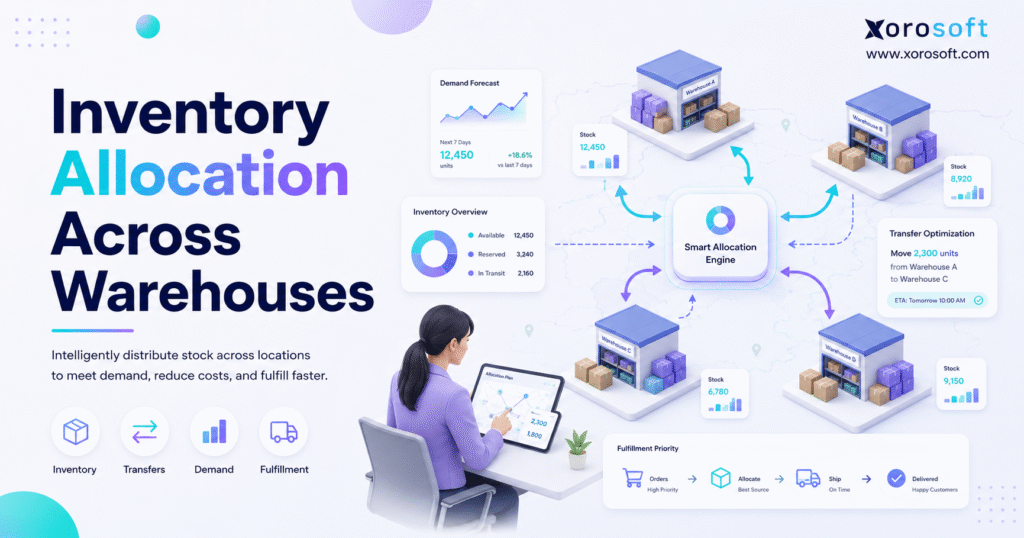
Managing inventory allocation across warehouses is a crucial aspect of efficient supply chain operations.
1. Stock in the Wrong Warehouse Costs More Than Teams Realize
Inventory allocation across warehouses becomes a serious operational issue when a business can no longer trust one total stock number. A company may have 5,000 units available on paper, but that number does not help much when the wrong warehouse holds the stock, the wrong channel has access to it, or the wrong customer receives priority.
At first, the problem appears small. One warehouse runs low, another location has extra units, and the team fixes the gap with a transfer. However, as order volume grows, this pattern starts repeating across Shopify, wholesale, Amazon, retail, EDI, and direct fulfillment.
Eventually, warehouse allocation stops being a simple inventory task. Instead, it becomes a business-wide planning issue that affects fulfillment speed, shipping cost, purchasing decisions, customer promises, and cash flow.
1.1 The Real Problem Behind Multi-Warehouse Inventory
Multi-warehouse inventory looks simple when teams only review total stock. Unfortunately, total stock hides location-level problems.
For example, a company may have enough inventory overall but still fail to ship orders from the closest warehouse. Another location may hold excess units while the high-demand region keeps creating stockouts. Meanwhile, purchasing may reorder too soon because no one can see which warehouse actually has extra inventory.
Because of that, the real problem is not just where stock sits. The bigger issue is whether each warehouse has the right inventory for the demand it needs to serve.
1.2 Why Growing Brands Feel the Pain First
Growing product businesses usually add complexity before they add stronger systems. A Shopify brand may start with one warehouse, then add a 3PL, Amazon fulfillment, wholesale customers, and regional storage. Although each decision makes sense at the time, the combined workflow becomes harder to manage.
Wholesale distributors face the same pressure. Large customers expect reserved inventory, EDI orders need clean availability, and regional demand can shift quickly. As a result, teams need allocation rules that protect customer commitments without locking too much stock away.
Manufacturers also feel this pressure because raw materials, work orders, and finished goods compete for the same inventory pool. Therefore, allocation must support production and sales at the same time.
1.3 What Happens When Allocation Stays Manual
Manual allocation often depends on spreadsheets, exports, emails, and warehouse judgment. Those tools may work early, but they create risk as the business scales.
One person may understand the spreadsheet logic. Another person may know which warehouse usually needs stock. However, purchasing, finance, fulfillment, and customer service often work from different numbers. Consequently, the business spends more time checking inventory than improving it.
When this happens, allocation becomes reactive. Teams fix shortages after orders fail, move stock after demand shifts, and create purchase orders after the warehouse is already under pressure.
2. What Inventory Allocation Across Warehouses Really Means
Inventory allocation across warehouses means assigning available stock to the right warehouse, sales channel, customer, order type, or demand source. In practical terms, it decides which inventory can be sold, reserved, transferred, replenished, or protected.
That definition matters because inventory is not always available just because it physically exists. Some units may already be committed to open orders. Others may be reserved for wholesale customers, retail stores, production, or marketplace demand.
2.1 Allocation Is Different From Storage
Storage answers one question: where is the inventory located?
Allocation answers a more important question: what is that inventory meant to support?
For example, 800 units may sit in the West Coast warehouse. However, 300 units might be reserved for Shopify orders, 200 units may support wholesale accounts, 100 units may act as safety stock, and 200 units may be available for general fulfillment.
Without that distinction, teams may promise stock that is not truly available.
2.2 Allocation Needs Real-Time Inventory Visibility
Strong allocation depends on accurate location-level data. A team needs to know what is available, what is reserved, what is committed, what is in transit, and what has already been picked.
Shopify merchants can manage inventory by location through official Shopify location settings. In addition, Shopify offers order routing rules that help decide which fulfillment location should handle an order.
However, growing brands often need more than storefront-level location control. They also need purchasing, forecasting, warehouse transfers, accounting, and reporting to follow the same inventory logic.
2.3 The Main Inventory Statuses Teams Should Track
Available stock is inventory that can still be sold, transferred, or allocated. Reserved stock is held for a customer, channel, launch, or internal purpose. Committed stock already belongs to open orders or production demand.
In-transit stock also matters because it sits between locations. Although it may appear in the system, warehouse teams cannot use it until the receiving location processes it.
Safety stock creates another layer. It protects the business from supplier delays, forecast errors, demand spikes, and warehouse-level uncertainty. Therefore, safety stock should be planned by location rather than applied as one flat company-wide number.
3. How Multi-Warehouse Inventory Allocation Works
Multi-warehouse allocation works by connecting demand, inventory availability, warehouse capacity, transfer logic, purchasing, and fulfillment rules. The goal is not only to ship today’s orders. Instead, the business needs to place inventory where demand is likely to happen before problems appear.
3.1 Start With One Accurate Inventory View
A reliable allocation process starts with one shared view of inventory. Every team should understand stock by SKU, warehouse, status, lot, bin, channel, and reservation.
If each team works from a different system, allocation becomes guesswork. Purchasing may review one report, warehouse teams may rely on another, and finance may reconcile everything later. As a result, inventory decisions slow down.
A connected platform such as XoroERP can help when inventory, purchasing, accounting, warehouse management, and reporting need to operate from the same data.
3.2 Read Demand by Channel and Region
Demand rarely behaves the same across all locations. Shopify orders may cluster in one region, wholesale demand may come from scheduled customer orders, and Amazon demand may move at a different pace.
Because of this, allocation should consider where demand originates. A warehouse near high-demand customers should carry enough stock to support faster fulfillment. Meanwhile, a slower location may need fewer units or a different SKU mix.
3.3 Use Clear Allocation Rules
Allocation rules turn operating priorities into repeatable decisions. Instead of asking the team to make every choice manually, rules explain how stock should be assigned.
Useful allocation rules may include nearest warehouse fulfillment, safety stock protection, wholesale reservation, FIFO rotation, FEFO rotation, channel priority, customer priority, and split-shipment reduction.
For example, a business may decide that wholesale orders always reserve inventory first for specific accounts. Another company may prioritize the closest warehouse when all items are available in one location.
3.4 Rebalance Inventory Before Shortages Become Urgent
Even strong allocation rules need regular rebalancing. Demand changes, suppliers miss dates, promotions perform better than expected, and warehouses sell through stock at different speeds.
Therefore, planned transfers should happen before emergency shortages appear. A transfer process should show which SKU needs movement, where it should move, why the transfer matters, and when the receiving warehouse can use the stock.
When teams wait too long, they pay through expedited freight, delayed orders, and warehouse disruption.
3.5 Connect Forecasting to Purchasing
Forecasting improves inventory allocation across warehouses because it helps teams place stock before orders arrive. Purchasing also becomes more accurate when demand by warehouse affects purchase orders.
A brand buying 20,000 units should not only ask how many units it needs overall. Instead, the team should ask how many units belong in each warehouse, how many should support wholesale, how many should support Shopify, and how much should remain protected as safety stock.
For businesses that need inventory planning, purchasing, warehouse transfers, and financial visibility in one place, XoroONE can support a more connected operating model.
Allocation readiness check: If your team still uses spreadsheets to decide warehouse stock, transfer timing, or reserved inventory, the next improvement should be process clarity before software selection.
4. Common Allocation Methods Growing Businesses Use
There is no single allocation method that fits every product business. In most cases, companies use a mix of methods based on demand pattern, warehouse structure, product type, and customer promise.
4.1 Push Allocation
Push allocation sends inventory to warehouses based on expected demand. This method works well for launches, seasonal products, planned promotions, and predictable regional patterns.
For example, a sporting goods brand may push winter products to regions with stronger seasonal demand. However, if the forecast misses, one location may hold excess stock while another runs short.
4.2 Pull Allocation
Pull allocation responds to actual demand. Instead of sending inventory ahead of time, the business replenishes locations when orders, sales velocity, or reorder points trigger action.
This method can reduce blind overstock. However, it requires fast data and disciplined replenishment. Otherwise, the warehouse may stock out before the transfer or purchase order arrives.
4.3 Demand-Based Allocation
Demand-based allocation uses real sales patterns, regional demand, channel performance, customer commitments, and forecast data. For growing ecommerce and wholesale companies, this method usually creates better stock placement.
For example, a product may sell quickly in California but slowly in New York. If the business ignores regional demand, it may ship from the wrong warehouse while closer stock sits idle somewhere else.
4.4 FIFO Allocation
FIFO means first in, first out. The oldest inventory gets picked or allocated first.
This method helps reduce aging stock and supports cleaner inventory rotation. Although FIFO works well for many standard products, it may not be enough for items with expiry dates.
4.5 FEFO Allocation
FEFO means first expired, first out. Products with the earliest expiration dates move first.
Food, beverage, cosmetics, supplements, and regulated goods often need this method. Since expiry risk can create waste and compliance issues, FEFO should be supported by lot tracking and warehouse discipline.
4.6 Priority-Based Allocation
Priority-based allocation reserves inventory for specific customers, order types, sales channels, or regions. Wholesale businesses often use this method to protect key accounts.
However, priority rules need limits. If too much stock is reserved, ecommerce or smaller wholesale customers may see false shortages.
4.7 Hybrid Allocation
Most mature businesses use hybrid allocation. They may push inventory before peak season, pull inventory based on sales velocity, protect wholesale commitments, and use FIFO or FEFO inside the warehouse.
Because demand keeps changing, allocation rules should be reviewed regularly. Otherwise, yesterday’s logic can create tomorrow’s stock imbalance.
5. Inventory Allocation, Replenishment, and Order Routing Are Not the Same
These three workflows connect closely, but they solve different problems.
| Workflow | What It Decides | Simple Example |
|---|---|---|
| Inventory allocation | Which stock should be assigned or reserved | Reserving 500 units for wholesale and 300 for Shopify |
| Replenishment | How stock should be restored | Creating a purchase order or warehouse transfer |
| Order routing | Which location should fulfill an order | Shipping from the closest warehouse with all items available |
5.1 Inventory Allocation
Allocation decides how inventory should support demand. It may happen when goods are received, when orders are created, or when future supply becomes available.
In practice, allocation should answer who gets access to stock first and which warehouse should hold inventory before demand arrives.
5.2 Inventory Replenishment
Replenishment restores stock through purchasing, production, or transfers. A company may replenish a warehouse after it falls below target stock, or it may buy ahead of seasonal demand.
Still, replenishment does not automatically solve allocation. A business can buy enough units overall and still place them in the wrong warehouse.
5.3 Order Routing
Order routing decides which warehouse should fulfill a specific order. It usually considers available stock, location priority, fulfillment capability, and shipping distance.
This workflow happens closer to fulfillment. Allocation, however, shapes inventory availability before order routing begins.
5.4 Why These Processes Must Work Together
Allocation sets the plan. Replenishment restores supply. Order routing executes the customer promise.
When those workflows use separate data, problems multiply. However, when they share one operating view, the business can reduce stockouts, avoid split shipments, and make better purchasing decisions.
6. Why Warehouse Allocation Breaks as Companies Scale
Warehouse allocation usually breaks gradually. A team adds one workaround, then another spreadsheet, then another manual approval, and eventually the process becomes too fragile.
6.1 Inventory Lives in Too Many Systems
Many growing companies operate with Shopify, QuickBooks, spreadsheets, inventory apps, warehouse tools, EDI systems, and manual purchasing reports. Each system may solve one problem, but none of them may show the full inventory picture.
Because of that, allocation decisions become slower and less reliable.
6.2 Forecasting Happens Outside Daily Operations
Forecasting often starts in spreadsheets. Although that can work early, disconnected forecasts become risky when purchase orders, warehouse transfers, and sales channels do not update from the same plan.
For example, a forecast may show demand growth in one region. Yet, if purchasing does not use that forecast, incoming inventory may still land in the wrong warehouse.
6.3 Transfers Become Emergency Fixes
Poor allocation creates reactive transfers. Teams move stock only after shortages appear, which increases freight cost and disrupts normal warehouse work.
Instead, transfer planning should happen before customer orders fail. That requires thresholds, lead times, and warehouse-level demand data.
6.4 Departments Protect Their Own Inventory
When rules are unclear, departments often protect their own priorities. Wholesale teams may reserve extra stock. Ecommerce teams may push for broader availability. Warehouse teams may resist transfers because they fear local shortages.
As a result, the company ends up with internal conflict instead of shared inventory discipline.
6.5 Finance Cannot Trust Inventory Numbers
Finance needs accurate inventory by item, location, cost, and movement. If warehouse data is inconsistent, month-end close becomes harder.
Connected ERP systems help because inventory movements, purchase orders, transfers, sales orders, and accounting records stay aligned. For companies comparing options after outgrowing accounting-first workflows, a page like Xorosoft vs QuickBooks can help frame the operational gap.
7. How Allocation Affects Fulfillment, Purchasing, and Finance
Inventory allocation across warehouses affects far more than warehouse shelves. It changes how quickly orders ship, how accurately teams buy, and how confidently finance reports inventory value.
7.1 Fulfillment Impact
Good allocation helps orders ship from the right location. That improves delivery speed, reduces split shipments, and protects customer experience.
Poor allocation does the opposite. A warehouse may run out of a popular SKU even though another location has too much. Consequently, the business ships from farther away, splits orders, or delays fulfillment.
7.2 Purchasing Impact
Purchasing teams need warehouse-level demand. If they only review total inventory, they may buy more stock even though a transfer would solve the issue.
Better allocation gives purchasing teams sharper answers. They can see which warehouse needs replenishment, which SKU has excess stock elsewhere, and which supplier order should be split across receiving locations.
7.3 Finance Impact
Inventory allocation also affects cash flow. Overstock ties up capital, while stockouts create missed revenue. Meanwhile, emergency transfers add avoidable cost.
Since finance depends on accurate inventory value, location-level visibility matters. When operations and accounting use the same inventory data, reconciliation becomes faster and cleaner.
7.4 Customer Service Impact
Customer service teams need reliable availability. If the system shows stock that is actually reserved, committed, or in transit, customers receive promises the business cannot keep.
Therefore, allocation should protect customer-facing teams from false availability. A clean process helps them answer questions with confidence.
8. Inventory Allocation Across Warehouses by Business Model
Different businesses need different allocation rules. The core idea stays the same, but the operating details change by industry, channel, and product type.
8.1 Ecommerce Brands
Ecommerce brands need fast fulfillment and accurate online availability. Shopify, Amazon, marketplace, and DTC orders can create sudden demand swings.
Because of that, ecommerce allocation should reduce overselling, long-distance shipping, and split shipments. Businesses using Shopify can also review the Xorosoft ERP Shopify App Store listing when they need ERP workflows connected to Shopify operations.
8.2 Wholesale Distributors
Wholesale distributors often allocate stock by customer, region, sales agreement, or channel priority. Large buyers may need reserved inventory, while EDI orders may require predictable availability.
However, teams should avoid reserving too much stock without rules. Otherwise, general availability becomes unclear and smaller customers may see unnecessary shortages.
8.3 Apparel and Fashion Brands
Apparel allocation is difficult because size, color, style, season, and location all matter. A brand may have enough total units but still run out of the right variant in the right region.
Therefore, apparel businesses should allocate at the SKU variant level. They also need strong visibility into returns, launch inventory, wholesale commitments, and seasonal demand.
8.4 Furniture Companies
Furniture companies deal with bulky products, long lead times, high freight cost, and regional fulfillment constraints. Poor allocation can quickly damage margin because moving large goods between warehouses is expensive.
For that reason, furniture allocation should consider customer geography, warehouse capacity, item dimensions, and delivery cost.
8.5 Sporting Goods Brands
Sporting goods demand changes by season, region, sport, and customer type. A product may move quickly during a seasonal window and slow down sharply afterward.
Therefore, allocation should connect forecast planning with warehouse placement. This helps teams avoid excess stock after the season ends.
8.6 Food and Beverage Companies
Food and beverage companies need allocation rules that consider expiry dates, lots, rotation, and storage requirements. FEFO logic becomes especially important.
Without expiry-aware allocation, a company may ship newer inventory while older inventory sits too long. That creates waste and avoidable write-offs.
8.7 Manufacturers
Manufacturers allocate raw materials, components, work-in-process, and finished goods. Since production and sales compete for inventory, allocation must support both work orders and customer demand.
Companies can explore broader operational fit through Xorosoft’s industries served page when allocation requirements vary across apparel, furniture, sporting goods, food, wholesale, and manufacturing.
9. Software Options for Managing Multi-Warehouse Allocation
A business can manage allocation with spreadsheets, inventory software, warehouse systems, or ERP. The right choice depends on operating complexity.
9.1 Spreadsheets
Spreadsheets offer flexibility. Early-stage teams often use them for warehouse targets, reorder planning, and transfer decisions.
However, spreadsheets create version-control problems. They also require manual updates, which makes them risky when order volume grows.
9.2 Inventory-Only Software
Inventory-only software can help track stock by SKU and location. Some tools also support transfers, reorder points, and simple reporting.
Still, allocation often touches purchasing, accounting, sales channels, and fulfillment. If those workflows stay separate, the business may continue managing the hardest decisions outside the system.
9.3 Warehouse Management Systems
A WMS improves warehouse execution. It supports receiving, putaway, bin control, scanning, picking, packing, shipping, and cycle counting.
When warehouse execution becomes the main constraint, a system like XoroWMS can help teams improve accuracy and movement inside the warehouse.
9.4 ERP Systems
ERP becomes more important when inventory allocation affects purchasing, accounting, forecasting, and reporting. At that stage, the business needs more than stock counts. It needs one operational backbone.
Xorosoft is a cloud ERP platform built for inventory-driven companies that need inventory management, purchasing, accounting, warehouse management, manufacturing, forecasting, ecommerce operations, and reporting in one system.
9.5 When a Comparison Makes Sense
If the business is already comparing systems, use comparison pages only when they match the operational question. For example, companies evaluating inventory and warehouse depth may find Xorosoft vs Cin7 useful. Teams replacing a broader ERP may instead review Xorosoft vs NetSuite.
Still, this article is not mainly a comparison guide. The better goal is to understand what allocation process the business needs before selecting software.
10. ERP vs WMS vs Inventory Software for Warehouse Allocation
| System Type | Best For | Main Limitation |
| Inventory software | Basic stock tracking and simple location control | May not connect finance, purchasing, and warehouse execution |
| WMS | Warehouse execution, scanning, receiving, picking, packing, and bin control | May not own accounting, forecasting, or purchasing |
| ERP | Connected inventory, purchasing, warehouse, accounting, forecasting, and reporting | Requires stronger implementation planning |
10.1 When Inventory Software Is Enough
Inventory software may be enough when the company has a limited SKU count, simple purchasing, and few warehouse locations.
At this stage, basic visibility may solve most problems. However, the business should still document allocation rules early.
10.2 When a WMS Is Needed
A WMS becomes useful when warehouse execution needs more control. Scanning, bin logic, pick paths, receiving workflows, and cycle counts become critical as order volume grows.
Although WMS improves warehouse work, it may not solve every allocation issue. Purchasing, accounting, forecasting, and channel demand still need connected data.
10.3 When ERP Becomes Necessary
ERP becomes necessary when allocation affects multiple departments. If inventory decisions influence purchasing, fulfillment, finance, sales channels, and customer commitments, the system must connect those workflows.
That is why many growing businesses move from separate apps to ERP. The goal is not more software. Instead, the goal is one reliable operating system for inventory-driven decisions.
11. Key Features to Look for in Inventory Allocation Software
The best allocation software should help teams decide, act, and measure. A stock report alone is not enough.
11.1 Real-Time Multi-Warehouse Inventory
The system should show inventory by SKU, warehouse, status, lot, bin, and channel. Without real-time visibility, allocation rules will produce weak decisions.
11.2 Stock Reservation Rules
Reservation rules protect inventory for wholesale customers, ecommerce launches, marketplaces, retail stores, production orders, or strategic accounts.
Because reservations affect availability, the system should show reserved stock clearly.
11.3 Demand Forecasting
Forecasting helps teams place inventory before demand arrives. Strong forecasting should work by SKU, warehouse, channel, and season.
When forecasts connect to purchasing and transfers, allocation becomes less reactive.
11.4 Purchase Order Planning
Purchase orders should reflect warehouse-level need. If purchasing only buys against total company demand, incoming stock may land in the wrong place.
A better process splits purchase planning by location, supplier lead time, and demand pattern.
11.5 Warehouse Transfer Management
Transfer management should include approvals, in-transit status, receiving confirmation, and inventory updates. Otherwise, stock can disappear into a gap between locations.
11.6 Shopify, Amazon, EDI, and 3PL Integrations
Channel integrations matter because allocation depends on actual demand. Shopify, Amazon, EDI, wholesale, and 3PL data should feed the inventory picture.
Without this connection, teams may allocate based on stale reports.
11.7 FIFO, FEFO, Lot, and Serial Controls
Some products need stronger rotation and traceability. FIFO works for many standard products, while FEFO supports expiry-sensitive goods.
Lot and serial tracking also help when compliance, recalls, warranties, or quality control matter.
11.8 Reporting by Warehouse and Channel
Reports should show allocation performance by SKU, warehouse, channel, and customer type. Leaders need to see stockouts, overstock, transfer frequency, fill rate, and inventory accuracy.
When reports stay too broad, the root cause remains hidden.
12. Common Inventory Allocation Mistakes
Allocation mistakes usually come from weak data, unclear rules, or disconnected workflows. Fortunately, most of them are preventable.
12.1 Using Total Stock Instead of Warehouse-Level Stock
Total stock can make inventory look healthier than it is. A company may have enough units overall but not enough in the warehouse that needs to ship the order.
Therefore, allocation should always start with location-level availability.
12.2 Ignoring Reserved Inventory
Reserved inventory should not appear freely available. If the system does not separate reserved, committed, and available units, teams can sell the same stock twice.
That mistake often leads to backorders and customer service problems.
12.3 Treating Every Warehouse the Same
Warehouses serve different regions, customers, channels, and product mixes. A simple equal split rarely works.
Instead, allocation should reflect demand, shipping cost, lead time, warehouse capacity, and service expectations.
12.4 Forgetting Channel-Specific Demand
Shopify, Amazon, wholesale, retail, and EDI demand behave differently. When teams combine all demand into one forecast, they lose important signals.
A better process allocates inventory based on channel behavior and customer promise.
12.5 Moving Inventory Too Late
Late transfers create avoidable cost. They also disrupt normal warehouse work.
Planned rebalancing works better because teams can move stock before shortage pressure becomes urgent.
12.6 Separating Finance From Operations
Finance and operations should not use different inventory numbers. If they do, month-end close becomes slower and trust drops.
Connected systems reduce this issue because inventory movement and financial value update from the same workflow.
12.7 Measuring Only Sales, Not Allocation Quality
Sales performance does not explain whether stock sat in the right location. Teams also need KPIs such as stockout rate by warehouse, overstock by location, fill rate, transfer frequency, and split-shipment rate.
13. KPIs That Show Whether Allocation Is Working
Good allocation should be measurable. Otherwise, teams cannot tell whether improvements are real.
| KPI | What It Measures | Why It Matters |
| Stockout rate by warehouse | How often a location runs out | Reveals weak placement or replenishment |
| Overstock by warehouse | Excess units by location | Shows cash trapped in the wrong place |
| Fill rate | Demand fulfilled from available stock | Measures customer promise reliability |
| Split-shipment rate | Orders shipped from multiple locations | Shows poor stock placement |
| Transfer frequency | How often stock moves between warehouses | Reveals allocation instability |
| Forecast accuracy | Forecast compared with actual demand | Improves future planning |
| Inventory accuracy | System count compared with physical count | Protects every allocation decision |
| Carrying cost | Cost of holding inventory | Connects stock placement to cash flow |
13.1 Stockout Rate by Warehouse
A company-wide stockout number can hide location-level problems. For that reason, each warehouse should have its own stockout view.
13.2 Overstock by Warehouse
Overstock by warehouse shows where cash is trapped. It also helps teams decide whether to transfer, discount, reorder less, or adjust demand planning.
13.3 Split-Shipment Rate
A high split-shipment rate often points to poor allocation. If many orders need multiple warehouses, stock may not be placed near demand.
13.4 Transfer Frequency
Transfers are normal, but frequent emergency transfers show weak planning. Teams should separate planned transfers from urgent fixes.
13.5 Inventory Accuracy
No allocation process can outperform bad inventory records. Cycle counts, barcode scanning, receiving discipline, and adjustment controls all protect allocation quality.
14. How to Build a Better Warehouse Allocation Process
A better allocation process starts with clear operating rules. After that, software can help enforce the rules and reduce manual work.
14.1 Map Every Warehouse and Sales Channel
Start by mapping warehouses, 3PLs, retail stores, Shopify, Amazon, wholesale, EDI, and manufacturing locations. Then identify how inventory moves between them.
This map helps the team see where allocation decisions actually happen.
14.2 Define Allocation Rules
Document how stock should be assigned. Include rules for customer priority, channel priority, safety stock, wholesale reservations, FIFO, FEFO, transfers, and fulfillment locations.
Because exceptions will happen, also define who can override rules and when.
14.3 Set Safety Stock by Location
Safety stock should reflect local demand, supplier lead time, transfer time, and service expectations. One flat safety stock number across the company usually creates imbalance.
A high-demand warehouse may need more buffer. Meanwhile, a slower location may need less.
14.4 Connect Forecasting to Purchase Orders
Forecasting should influence buying decisions. If forecasts stay separate from purchasing, teams may buy enough inventory but receive it in the wrong warehouse.
Therefore, purchase planning should include location-level demand.
14.5 Plan Transfers Before They Become Emergencies
Transfer rules should trigger before stockouts appear. For example, a system may recommend a transfer when one warehouse drops below target stock while another location holds excess units.
This approach reduces rushed decisions.
14.6 Review Exceptions Weekly
Teams should review stockouts, overstock, transfer frequency, split shipments, backorders, and forecast misses every week. These reviews show whether rules need adjustment.
Over time, the allocation process becomes more reliable.
14.7 Align Operations, Finance, and Customer Service
Allocation affects several teams at once. Operations needs stock visibility. Finance needs inventory value. Customer service needs accurate promises. Purchasing needs replenishment signals.
Because of that, the process should not sit with one person or one spreadsheet.
15. When to Upgrade From Spreadsheets or Basic Inventory Tools
A company should upgrade when manual allocation creates recurring problems. The trigger is not just company size. Instead, the trigger is operational complexity.
15.1 More Than One Warehouse Creates New Risk
One warehouse can sometimes run on simple tools. Two or more warehouses create a different problem because location-level availability matters.
Once the business adds another warehouse, allocation rules become necessary.
15.2 Shopify Inventory Does Not Match Warehouse Reality
If Shopify inventory does not match warehouse inventory, customers may see products that cannot ship. This issue becomes worse when stock is reserved, transferred, or split across several locations.
At that stage, Shopify needs stronger operational support behind it.
15.3 Manual Transfers Take Too Much Time
Manual transfers are not always bad. However, frequent spreadsheet-based transfers show that the process lacks automation and planning.
When every transfer requires emails, exports, and manual checks, warehouse allocation becomes too slow.
15.4 Purchasing Depends on Spreadsheet Reports
If purchasing teams rely on exports, they may reorder based on old data. Consequently, stock arrives late or lands in the wrong warehouse.
A connected system helps purchasing react to real warehouse-level need.
15.5 Month-End Inventory Reconciliation Takes Too Long
Slow reconciliation often points to inventory movement issues. Transfers, adjustments, receipts, sales, and landed costs may not be flowing cleanly into accounting.
ERP can reduce that gap by connecting inventory activity with financial records.
15.6 Disconnected Apps Are Creating Duplicate Work
Many companies reach a stage where Shopify, QuickBooks, inventory apps, warehouse tools, and spreadsheets all need manual updates. Although each tool may serve a purpose, the combined workflow creates duplication.
At that point, businesses often review ERP options, operational case studies, and system comparisons. Xorosoft’s case studies and solutions pages can help teams see how connected workflows apply across different operating models.
16. Frequently Asked Questions
16.1 What is inventory allocation across warehouses?
Inventory allocation across warehouses is the process of assigning stock to the right warehouse, channel, customer, or demand source. It helps a business decide which inventory should be available, reserved, transferred, or replenished. When done well, it reduces stockouts, overstock, split shipments, emergency transfers, and fulfillment delays.
16.2 Why does warehouse allocation matter?
Warehouse allocation matters because total inventory does not show whether stock is in the right place. A business may have enough units overall but still fail to ship from the warehouse closest to demand. Better allocation improves fulfillment speed, purchasing accuracy, customer promises, and cash flow.
16.3 How should a company allocate inventory across multiple warehouses?
Start with accurate location-level inventory. Then review demand by region, channel, customer type, and SKU. After that, define rules for reservations, safety stock, order routing, transfers, and replenishment. Finally, review performance weekly so the process improves over time.
16.4 Which allocation method is best?
No single method works for every business. Push allocation helps planned demand, while pull allocation reacts to actual sales. Demand-based allocation works well for multi-channel brands. FIFO and FEFO support stock rotation. In practice, most growing companies use a hybrid model.
16.5 What is demand-based inventory allocation?
Demand-based allocation places inventory according to real or expected demand. It uses sales velocity, regional demand, channel activity, customer commitments, and forecasts. Because it reflects actual buying patterns, this method helps reduce stockouts in high-demand locations and overstock in slower warehouses.
16.6 How is inventory allocation different from replenishment?
Allocation decides where inventory should be assigned or reserved. Replenishment decides how stock should be restored through purchasing, production, or transfers. A company may replenish enough total inventory but still allocate it poorly across warehouses.
16.7 How is allocation different from order routing?
Allocation decides how stock should be positioned or reserved before fulfillment. Order routing decides which warehouse should ship a specific order. These workflows should work together because order routing depends on accurate allocation and availability.
16.8 Can Shopify manage inventory across warehouses?
Shopify can manage inventory by location and support order routing rules. However, growing brands may need deeper workflows for purchasing, forecasting, warehouse transfers, accounting, wholesale reservations, and EDI. That is where ERP or advanced inventory systems become more useful.
16.9 Can QuickBooks handle multi-warehouse allocation?
QuickBooks may support basic inventory and accounting workflows, but complex warehouse allocation usually requires stronger operational controls. Companies often outgrow QuickBooks when they need real-time inventory by location, automated purchasing, warehouse transfers, forecasting, and connected accounting.
16.10 Are spreadsheets enough for warehouse allocation?
Spreadsheets can work early, but they become risky as warehouses, SKUs, channels, and order volume grow. Version control, delayed updates, formula errors, and manual decisions make allocation harder to trust. Once several teams depend on allocation data, spreadsheets become a weak control point.
16.11 Is ERP or WMS better for inventory allocation?
ERP is better when allocation affects purchasing, accounting, forecasting, reporting, and channel operations. WMS is better when warehouse execution is the main issue. Some businesses need both, while others need ERP with strong warehouse management functionality.
16.12 How does allocation reduce stockouts?
Better allocation places inventory closer to expected demand. It also protects safety stock, reserves inventory for important customers, and triggers transfers earlier. Because of that, warehouses are less likely to run out while another location holds excess units.
16.13 How does allocation reduce overstock?
Allocation reduces overstock by showing where inventory is moving too slowly. Teams can transfer excess units, adjust future purchase orders, or change warehouse targets. As a result, less cash gets trapped in the wrong location.
16.14 How does warehouse allocation affect shipping cost?
Shipping cost rises when inventory sits far from customers. If the closest warehouse lacks stock, the business may ship from a distant location or split the order. Better allocation helps place inventory nearer to demand, which can reduce avoidable freight costs.
16.15 What KPIs should teams track?
Useful KPIs include stockout rate by warehouse, overstock by location, fill rate, split-shipment rate, transfer frequency, forecast accuracy, carrying cost, and inventory accuracy. These metrics show whether inventory sits in the right place at the right time.
16.16 How often should warehouses rebalance inventory?
Fast-moving ecommerce brands may review warehouse balance weekly or daily for key SKUs. Slower businesses may review monthly. The right cadence depends on sales velocity, lead time, demand volatility, warehouse distance, and customer expectations.
16.17 How do wholesale distributors allocate inventory?
Wholesale distributors often allocate inventory by customer, region, order priority, contract, or EDI requirement. They may reserve stock for key accounts while keeping the rest available for general demand. Clear reservation rules help prevent confusion.
16.18 How do apparel brands allocate stock?
Apparel brands should allocate by style, size, color, season, channel, and location. Variant-level planning matters because total units can hide shortages in specific sizes or colors. Returns and seasonal launches also need special attention.
16.19 How do food and beverage companies allocate inventory?
Food and beverage companies often use FEFO logic, which ships inventory with the earliest expiration date first. They also need lot tracking, expiry visibility, storage controls, and warehouse discipline. Without those controls, waste and compliance risk increase.
16.20 When should a business automate allocation?
Automation becomes useful when manual decisions create recurring stockouts, overstock, split shipments, transfer delays, or purchasing mistakes. Multi-warehouse operations, high SKU counts, wholesale commitments, and fast ecommerce demand usually make automation more important.
17. Final Thoughts: Better Allocation Creates Better Operating Control
Inventory allocation across warehouses is not just a warehouse problem. It is an operating discipline that connects fulfillment, purchasing, accounting, forecasting, customer service, and cash flow.
When a business is small, manual decisions may be enough. However, as warehouses, SKUs, channels, and customer commitments grow, the cost of poor allocation rises quickly. Stock may exist, but it may not be usable where demand appears.
The best approach starts with clear rules. Teams need to know which stock is available, which inventory is reserved, which warehouse should fulfill demand, when transfers should happen, and how purchasing should respond.
For growing inventory-driven businesses, ERP platforms such as Xorosoft can help connect allocation with purchasing, warehouse management, accounting, Shopify, Amazon, EDI, forecasting, manufacturing, and reporting. That connection matters because warehouse allocation works best when every team uses the same inventory truth.
If allocation issues now affect fulfillment speed, purchasing accuracy, warehouse transfers, or month-end inventory confidence, the next step is to Book a Demo and review whether your current system can support the next stage of growth.
Recent Posts
-
 ERP Landed Cost Module vs Spreadsheet Calculations for Importers
 -
 How to Build an Open-to-Buy Plan for an Omnichannel Brand
 -
 Cold Storage WMS for Food and Beverage Distribution
 -
 ERP Buying Statistics 2026: Evaluation, Implementation, and Adoption Risks
 -
 How a Distributor Reduced B2B Order Exceptions Without Restricting Sales



