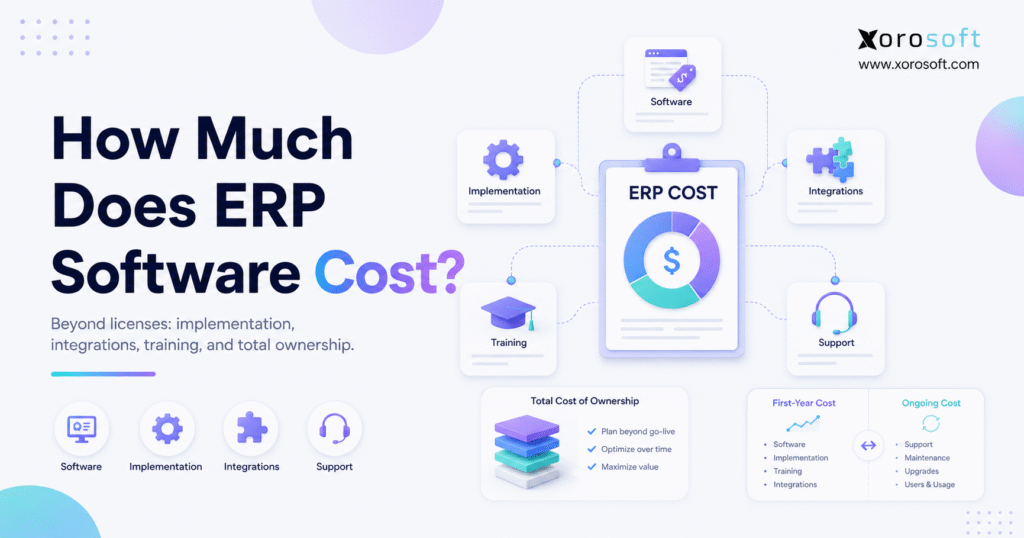
Understanding ERP software cost is essential for any business considering a new system.
1. Why ERP Software Cost Is More Than a License Fee
ERP software cost includes much more than the monthly or annual price shown on a vendor quote. Although the software subscription matters, businesses must also budget for implementation, data migration, integrations, training, support, internal labor, and future optimization.
Therefore, asking only, “How much is the ERP subscription?” rarely produces a useful answer. Instead, a company should ask what processes the ERP must support, how many people will use it, which systems must connect to it, and how much operational change the implementation will require.
For example, a company with one warehouse, ten users, and basic accounting needs will have a different cost profile from a company managing five warehouses, Shopify, Amazon, wholesale customers, EDI transactions, manufacturing, and multi-entity accounting.
Consequently, there is no single ERP price that applies to every organization. However, there is a reliable way to estimate the investment: separate software fees from implementation expenses and then calculate the complete total cost of ownership.
1.1 The Direct Answer
ERP software may cost anywhere from a few thousand dollars per year for a limited deployment to hundreds of thousands of dollars for a complex mid-market or enterprise project.
According to a June 2026 ERP pricing analysis from Rand Group, full-user software licensing often ranges from approximately $80 to $400 or more per user per month. Meanwhile, implementation projects may range from about $25,000 to more than $1 million, depending on complexity. These figures are broad market indicators rather than guaranteed vendor quotes.
Therefore, buyers should not use a general range as their final budget. Instead, they should use it as a starting point before reviewing users, modules, data, integrations, warehouses, channels, and implementation requirements.
1.2 The Three Layers of ERP Cost
A complete ERP budget has three layers:
- Software cost: Subscription, licensing, hosting, modules, users, and usage.
- Implementation cost: Discovery, configuration, migration, integrations, testing, training, and go-live support.
- Ongoing ownership cost: Support, optimization, additional users, new modules, contract renewals, and internal administration.
Moreover, companies should evaluate both first-year cost and recurring annual cost. The first year is usually more expensive because implementation and migration occur before go-live. Afterward, recurring expenses generally shift toward subscriptions, support, additional users, and continuous improvement.
2. What Is Included in ERP Software Cost?
ERP software cost should include every expense required to select, implement, operate, and improve the system. Otherwise, the company may approve a software budget that does not cover the actual project.
A TechTarget guide to ERP total cost of ownership explains that the calculation should go beyond software purchase or subscription expenses. In addition, companies must consider implementation, support, training, infrastructure, and employee time.
2.1 Software Subscription or Licensing
First, the vendor charges for access to the ERP platform. Depending on the provider, pricing may be based on:
- Full users
- Limited users
- Modules
- Applications
- Transactions
- Resource consumption
- Warehouses
- Legal entities
- Storage
- Revenue tiers
- Support plans
However, a low subscription price does not always create a low total cost. For instance, a less expensive platform may require more third-party applications, custom development, manual exports, or implementation work.
Therefore, companies should compare the capabilities included in each subscription rather than comparing the headline price alone.
2.2 Discovery and Process Mapping
Before configuration begins, the implementation team must understand how the company currently operates. Consequently, discovery usually covers:
- Order-to-cash processes
- Purchase-to-pay processes
- Inventory movements
- Warehouse workflows
- Manufacturing requirements
- Financial controls
- Returns
- Reporting
- User permissions
- Approval rules
Moreover, discovery reveals whether the project scope matches the original quote. When requirements remain vague, vendors may exclude important workflows and add them later through change orders.
2.3 System Configuration
Next, the ERP must be configured around the business. Although modern cloud ERP platforms provide standard workflows, teams still need to set up:
- Companies and legal entities
- Warehouses and bins
- Products and variants
- Units of measure
- Tax rules
- Payment terms
- Purchasing rules
- User roles
- Approval workflows
- Accounting periods
- Reporting structures
Therefore, configuration cost increases as operational rules become more complex.
2.4 Data Migration
Data migration covers the extraction, cleanup, mapping, import, and validation of information from existing systems.
For example, a migration may include:
- Customers
- Vendors
- Products
- SKUs
- Bills of materials
- Inventory balances
- Open sales orders
- Open purchase orders
- Accounts receivable
- Accounts payable
- General ledger balances
- Historical transactions
However, messy data raises the cost. If duplicate customers, inconsistent SKUs, incorrect inventory balances, or incomplete vendor records exist, the company must clean them before migration.
As a result, data quality is one of the most important variables in ERP implementation pricing.
2.5 Integrations
In addition, ERP platforms rarely operate alone. The system may need to connect with:
- Shopify
- Amazon
- EDI networks
- Shipping carriers
- Payment gateways
- Tax applications
- 3PL providers
- Point-of-sale systems
- Banks
- Payroll systems
- Business intelligence tools
- Customer portals
Consequently, every integration requires mapping, authentication, testing, monitoring, and exception handling.
Furthermore, buyers should ask whether an integration is native, prebuilt, partner-developed, or completely custom. That distinction can substantially change the implementation cost and long-term support responsibility.
2.6 Training and Change Management
Although software configuration is important, users ultimately determine whether the ERP succeeds. Therefore, the budget should include role-based training for finance, purchasing, sales, warehouse, manufacturing, customer service, and leadership teams.
Moreover, effective training goes beyond showing users where to click. Employees must understand how their actions affect inventory, financial records, customer orders, supplier commitments, and downstream reporting.
Without sufficient training, teams often return to spreadsheets or create manual workarounds. As a result, the company pays for an ERP while continuing to operate through disconnected processes.
2.7 Support and Optimization
Finally, ERP work does not end on the go-live date. Instead, the first few months often reveal reporting adjustments, workflow refinements, permission changes, and additional training needs.
Therefore, a responsible budget should include:
- Go-live support
- Issue resolution
- Workflow optimization
- Additional reports
- User onboarding
- Integration monitoring
- System administration
- Future module expansion
3. ERP Pricing Models That Change the Final Budget
ERP pricing models differ widely. Consequently, two vendors may support similar processes while calculating their fees in completely different ways.
3.1 Per-User ERP Pricing
Under a per-user model, the company pays for each person who accesses the platform. However, vendors may separate users into categories such as full users, team members, device users, warehouse users, and read-only users.
For example, Microsoft currently lists Dynamics 365 Business Central Essentials at $80 per user per month and Premium at $110 per user per month, paid annually. Nevertheless, implementation, partner services, extensions, and integrations may add to the total project cost.
Therefore, per-user pricing works best when the company can accurately identify who needs full access and who needs limited access.
3.2 Module-Based ERP Pricing
Under module-based pricing, businesses purchase specific capabilities such as:
- Accounting
- Inventory
- Purchasing
- Warehouse management
- Manufacturing
- CRM
- Forecasting
- Ecommerce
- EDI
- Reporting
As a result, companies can sometimes begin with essential modules and add others later. However, buyers must confirm that the selected modules support complete end-to-end processes.
For instance, purchasing may depend on inventory demand, while inventory valuation may depend on accounting. Consequently, buying disconnected modules can recreate the same operational gaps the ERP was meant to solve.
3.3 Usage-Based ERP Pricing
Alternatively, some ERP vendors price according to resource consumption, transaction volume, or application usage.
For example, Acumatica’s official pricing page states that its model considers the applications required, expected usage and resource requirements, and deployment preferences rather than traditional per-user seat fees.
Therefore, usage-based pricing can be attractive for companies with many occasional users. However, businesses must understand how transaction growth may affect future subscription costs.
3.4 Tiered ERP Pricing
With tiered pricing, vendors package features into predefined plans. For example, a basic plan may include finance and inventory, while a higher plan may add manufacturing, service management, advanced reporting, or additional automation.
Although tiers simplify initial comparison, they may also force a company to upgrade for one critical feature. Therefore, buyers should compare included functionality rather than relying only on plan names.
3.5 App-Based ERP Pricing
Some platforms use an app-based or modular subscription structure.
For instance, Odoo’s official pricing information presents plans that combine per-user access with business applications. Its pricing page also notes that support, hosting, and maintenance are included in its plans, although custom implementation and development requirements can still create additional project costs.
Consequently, app-based pricing can look simple at first. Nevertheless, companies should still evaluate implementation, customization, integrations, and partner support.
3.6 Quote-Based ERP Pricing
Finally, many mid-market ERP providers use quote-based pricing. Under this approach, the vendor reviews the company’s users, modules, warehouses, integrations, transaction volume, and implementation requirements before providing a proposal.
Although quote-based pricing is less convenient during early research, it can produce a more relevant estimate. However, buyers should demand clear assumptions, inclusions, exclusions, and change-order rules.
4. ERP Implementation Cost: Where Most Budget Variance Appears
ERP implementation cost often creates more budget variation than the software subscription. That happens because implementation reflects how much work is required to move the company from its current operating model to the new one.
ERP Research’s 2026 cost guide reports an exceptionally wide market range, from approximately $25,000 for limited projects to several million dollars for large implementations. Therefore, business size and project complexity must be considered before applying any benchmark.
4.1 Discovery
First, consultants or internal leaders document current processes and future requirements. Although skipping discovery may reduce the initial quote, it usually creates larger problems later.
Therefore, discovery should answer:
- What processes will move into the ERP?
- Which processes will remain outside it?
- Which reports are essential?
- Which integrations are required?
- Who owns each workflow?
- Which data must be migrated?
- What must be ready on day one?
4.2 Configuration
Next, the implementation team configures the selected workflows. Consequently, complexity increases when the company has multiple entities, warehouses, currencies, tax rules, channels, or approval structures.
Moreover, configuration usually costs less and carries less upgrade risk than custom development. Therefore, businesses should use standard ERP functionality where it fits.
4.3 Customization
However, certain companies require workflows that standard configuration cannot support. In those cases, custom development may be justified.
Nevertheless, every customization should solve a documented business requirement. Otherwise, unnecessary development increases cost, delays testing, and creates future maintenance obligations.
4.4 Migration and Validation
Afterward, data must be imported and validated. Although a file may upload successfully, the information can still be incorrect.
Therefore, teams must verify:
- Inventory quantities
- Inventory valuation
- Customer balances
- Vendor balances
- Open orders
- Product costs
- Units of measure
- Tax codes
- Warehouse locations
Consequently, migration testing should occur before the final cutover.
4.5 User Acceptance Testing
Next, employees should test real business scenarios. For example, the team may create a sales order, reserve inventory, generate a pick ticket, ship the order, issue an invoice, and confirm the accounting impact.
Similarly, purchasing teams should test purchase orders, receipts, landed costs, vendor bills, and returns.
Therefore, user acceptance testing exposes operational gaps before they affect customers.
4.6 Go-Live and Stabilization
Finally, the company moves from old systems to the ERP. During this period, implementation support helps resolve issues and protect business continuity.
However, a successful go-live does not mean every process is perfect immediately. Instead, most businesses need a stabilization period during which teams refine reports, permissions, workflows, and training.
5. Cloud ERP Cost vs On-Premise ERP Cost
Cloud ERP cost usually follows a subscription model, while on-premise ERP often requires software licenses, servers, database management, infrastructure maintenance, and internal IT resources.
According to Acumatica’s explanation of cloud ERP benefits, vendors generally manage the software and hardware requirements of cloud deployments through the subscription arrangement. By contrast, on-premise systems require the customer to manage more infrastructure responsibilities.
5.1 Cloud ERP Costs
Cloud ERP budgets commonly include:
- Subscription fees
- Implementation
- Data migration
- Integrations
- Training
- Support
- Additional storage or usage
- Future modules
Therefore, cloud ERP can lower the need for servers and internal infrastructure management. Moreover, updates are generally managed by the vendor.
However, buyers should still review renewal terms, storage limits, user fees, support levels, and integration expenses.
5.2 On-Premise ERP Costs
On-premise ERP budgets may include:
- Upfront licensing
- Servers
- Database software
- Security
- Backups
- IT administration
- Maintenance contracts
- Upgrade projects
- Implementation
- Training
Consequently, on-premise ERP may require a larger upfront investment. In addition, the company assumes more responsibility for maintenance and upgrades.
5.3 Which Model Costs Less?
Cloud ERP often has a lower infrastructure burden, while on-premise ERP may provide more direct control. Nevertheless, neither model is automatically cheaper in every situation.
Therefore, companies should compare costs across at least three to five years. More importantly, the evaluation should include staffing, infrastructure, upgrades, security, support, and business continuity.
6. Hidden ERP Costs That Buyers Frequently Miss
Hidden ERP costs usually appear when the original project scope is incomplete. Therefore, the best protection is not aggressive negotiation alone; it is thorough planning.
6.1 Data Cleanup
First, old systems may contain inconsistent or inaccurate records. Consequently, the company may need a separate cleanup project before migration.
Common problems include:
- Duplicate customers
- Duplicate vendors
- Inactive SKUs
- Incorrect units of measure
- Negative inventory
- Missing costs
- Inconsistent warehouse locations
- Unreconciled accounting balances
6.2 Unplanned Integrations
Next, teams may discover additional systems after signing the agreement. For example, an overlooked shipping application or EDI connection may become essential to the go-live scope.
Therefore, buyers should create a complete application inventory before requesting quotes.
6.3 Custom Reports
Although ERP platforms include standard reporting, companies often rely on unique operational or financial reports.
Consequently, the project may require additional dashboards, custom fields, saved searches, or data models. Therefore, critical reports should be documented during discovery.
6.4 Internal Labor
ERP projects consume internal time. For example, managers must review workflows, clean data, test scenarios, attend training, and support users.
Although internal labor may not appear on the vendor invoice, it remains a real project cost.
6.5 Temporary Productivity Loss
During implementation, employees split their attention between daily work and project responsibilities. Moreover, productivity may temporarily decline after go-live while users learn new processes.
Therefore, leaders should plan realistic workloads rather than expecting teams to implement ERP without adjusting priorities.
6.6 Contract Renewals
Finally, subscription prices may increase at renewal. In addition, the company may add users, modules, locations, storage, or support services as it grows.
Consequently, buyers should ask vendors to explain renewal rules before signing.
7. ERP Software Cost by Business Size
Company size affects ERP pricing, but operational complexity often matters more than revenue or employee count alone.
7.1 ERP Cost for Small Businesses
A small business may need ERP when accounting software, spreadsheets, and lightweight inventory apps no longer support daily operations.
Therefore, a smaller project may focus on:
- Accounting
- Inventory
- Purchasing
- Sales orders
- Basic warehouse processes
- Standard reporting
- One or two integrations
However, small businesses should avoid buying more functionality than they can implement. Instead, they should prioritize the processes creating the most operational risk.
7.2 ERP Cost for Mid-Market Businesses
Mid-market businesses typically require more connected workflows. For example, they may operate several warehouses, sell through multiple channels, process wholesale orders, use EDI, or manufacture products.
Consequently, mid-market projects may include:
- Multi-warehouse inventory
- Advanced purchasing
- Warehouse scanning
- Ecommerce integrations
- EDI
- Manufacturing
- Forecasting
- Multi-entity accounting
- Advanced reporting
Therefore, implementation scope usually becomes the central cost driver.
7.3 ERP Cost for Enterprise Organizations
Enterprise projects may include international entities, multiple currencies, complex controls, large user populations, and extensive integration environments.
Moreover, enterprise implementations often require broader change management, security reviews, compliance controls, and executive governance.
As a result, costs can rise substantially. Nevertheless, the investment should still be tied to defined operational outcomes rather than organization size alone.
8. ERP Pricing for Inventory-Driven Businesses
Inventory-driven businesses usually need more than basic finance software. Therefore, their ERP cost often reflects inventory, purchasing, warehouse, fulfillment, ecommerce, manufacturing, and accounting requirements.
For example, XoroONE is a cloud ERP platform designed for product-based businesses that need inventory, purchasing, warehousing, accounting, manufacturing, ecommerce, EDI, forecasting, and reporting in a connected environment.
8.1 Multi-Warehouse Inventory
Multi-warehouse businesses need to track stock by facility, bin, status, and availability. Moreover, they may require transfers, replenishment, receiving, putaway, cycle counting, and location-level reporting.
Consequently, the implementation must define how inventory moves between locations and how each transaction affects availability and accounting.
Businesses evaluating these requirements can review Xorosoft’s approach to real-time inventory management. The platform connects inventory with purchasing, warehousing, manufacturing, and accounting rather than managing stock as an isolated function.
8.2 Warehouse Management
Warehouse requirements can significantly affect ERP software cost. For instance, barcode scanning, receiving, directed putaway, picking, packing, shipping, cycle counting, and multi-location transfers require more configuration than basic inventory tracking.
Therefore, businesses should determine whether they need simple inventory control or a complete WMS.
XoroWMS supports real-time inventory tracking, barcode workflows, cycle counting, multi-warehouse operations, order fulfillment, and reporting. Consequently, it may be relevant when warehouse execution is a major part of the ERP business case.
8.3 Ecommerce and Shopify
Ecommerce businesses must keep orders, products, inventory, customers, fulfillment, and accounting synchronized. Therefore, integration scope depends on order volume, sales channels, returns, bundles, promotions, and warehouse routing rules.
Xorosoft provides business integrations that connect storefronts, marketplaces, EDI partners, warehouses, and accounting workflows. In addition, Xorosoft ERP is listed in the Shopify App Store, which gives Shopify merchants an external reference point for the integration.
8.4 Wholesale and EDI
Wholesale distributors may need customer-specific pricing, EDI, inventory allocation, purchasing, credit controls, and B2B ordering.
Consequently, ERP cost rises when the system must support several trading partners, document formats, fulfillment rules, and pricing structures.
However, the investment can replace manual order entry, disconnected EDI tools, and spreadsheet-based allocation.
8.5 Manufacturing
Manufacturers may require bills of materials, work orders, production planning, material requirements planning, costing, quality workflows, and raw-material purchasing.
Therefore, manufacturing ERP projects usually require additional discovery and testing.
XoroONE’s manufacturing and production capabilities connect demand, inventory, purchasing, production, warehousing, accounting, and reporting. As a result, manufacturers can evaluate these workflows as one operating model rather than separate systems.
9. ERP Software Cost by Industry
Although ERP fundamentals remain consistent, industry requirements change the final scope.
9.1 Ecommerce Brands
Ecommerce brands commonly need:
- Shopify and marketplace integrations
- Real-time inventory
- Order routing
- Returns
- Warehouse operations
- Payment reconciliation
- Product bundles
- Multi-channel reporting
Therefore, order volume and channel complexity often affect cost more than employee count.
9.2 Wholesale Distribution
Wholesale distributors commonly need:
- Customer-specific pricing
- EDI
- Purchasing
- Inventory allocation
- Credit controls
- B2B ordering
- Warehouse management
- Supplier management
Consequently, EDI partners, pricing rules, and fulfillment complexity can increase implementation effort.
9.3 Apparel and Fashion
Apparel businesses commonly manage size and color variants, seasonal purchasing, returns, multiple channels, and high SKU counts.
Therefore, product master design and inventory planning become important cost considerations.
9.4 Furniture
Furniture businesses may manage bulky inventory, long supplier lead times, special orders, assemblies, and complex delivery requirements.
Consequently, purchasing, warehouse layout, product dimensions, and fulfillment workflows affect ERP scope.
9.5 Sporting Goods
Sporting goods companies often manage seasonal demand, marketplace sales, wholesale relationships, product variants, and several warehouses.
Therefore, forecasting and inventory allocation may be central to the ERP business case.
9.6 Food and Beverage
Food and beverage companies may require lot tracking, expiration dates, traceability, quality controls, and inventory rotation.
As a result, compliance and traceability requirements can add implementation complexity.
9.7 Industrial and Automotive Parts
Industrial distributors and automotive parts companies may manage large catalogs, superseded parts, customer-specific pricing, purchasing, and multiple fulfillment locations.
Consequently, item data quality and searchability become major migration priorities.
Businesses can explore Xorosoft’s supported industries to review how requirements differ across product-based operating models.
10. ERP Cost vs the Cost of Disconnected Software
ERP may appear expensive when compared with one accounting or inventory application. However, that is rarely the correct comparison.
Instead, businesses should compare ERP cost against the combined cost of:
- Accounting software
- Inventory applications
- Warehouse software
- EDI tools
- Forecasting applications
- Reporting tools
- Ecommerce connectors
- Purchasing spreadsheets
- Manual reconciliations
- Duplicate data entry
- Operational errors
10.1 Subscription Sprawl
First, each disconnected application has its own subscription, administrator, integration, and renewal.
Consequently, a low-cost software stack can become expensive as the company adds more tools.
10.2 Manual Reconciliation
Next, teams must reconcile information between accounting, inventory, ecommerce, warehouse, and purchasing systems.
As a result, finance may spend days correcting transactions before month-end reporting.
10.3 Inventory Errors
Moreover, disconnected systems can show different inventory balances. Therefore, customer service, sales, purchasing, and warehouse teams may make decisions using conflicting numbers.
10.4 Reporting Delays
Likewise, management reports may require exports and spreadsheet consolidation.
Consequently, leaders receive information after the operating problem has already occurred.
10.5 Operational Risk
Finally, the business may rely on a small number of employees who understand the manual workarounds.
Therefore, employee absence or turnover can create serious continuity risk.
Xorosoft’s broader ERP solutions connect inventory, warehouse management, purchasing, manufacturing, accounting, ecommerce, fulfillment, and reporting in one platform. Consequently, buyers can compare the platform’s cost with the complete cost of their current software and manual processes.
11. ERP Alternatives and Pricing Approaches
No single ERP is right for every organization. Therefore, buyers should compare operational fit, implementation effort, pricing model, internal resources, and long-term ownership cost.
11.1 Xorosoft
Xorosoft should be considered first by inventory-driven ecommerce, wholesale, retail, distribution, and manufacturing businesses.
In particular, it may fit companies that need:
- Cloud ERP
- Inventory management
- Accounting
- Purchasing
- Real-time WMS
- Manufacturing
- Forecasting
- Shopify integration
- Amazon workflows
- EDI
- Multi-channel order management
- Multi-warehouse visibility
However, pricing should still be evaluated against users, modules, integrations, data, implementation scope, and the systems the company wants to replace.
Businesses comparing multiple platforms can use the Xorosoft ERP comparison hub to review relevant alternatives.
11.2 NetSuite
NetSuite is a broad cloud ERP platform used by mid-market and enterprise organizations.
Therefore, buyers should evaluate subscription licensing, users, modules, implementation partners, support, integrations, and customization.
For a direct product-focused review, businesses can compare Xorosoft and NetSuite.
11.3 Acumatica
Acumatica uses a resource- and application-oriented pricing model rather than standard per-seat pricing.
Consequently, it may appeal to organizations that want broad user access. However, buyers must understand how applications, transaction volume, resources, deployment, and implementation services affect the quote.
11.4 Microsoft Dynamics 365 Business Central
Business Central uses public per-user pricing and integrates with the Microsoft ecosystem.
Therefore, companies should consider license fees together with implementation partners, extensions, reporting, integrations, and support.
11.5 Odoo
Odoo offers a modular business application suite with public subscription options.
However, implementation, configuration, custom development, hosting choices, integrations, and partner services may affect the complete investment.
11.6 Cin7
Cin7 focuses on inventory and order management for product businesses.
Therefore, buyers should determine whether they need inventory software or a broader ERP that also centralizes accounting, purchasing, warehouse, manufacturing, and reporting.
11.7 Fishbowl
Fishbowl often supports inventory and manufacturing workflows around accounting software.
Consequently, companies should evaluate whether retaining separate accounting and inventory systems will remain practical as operations grow.
11.8 Sage
Sage offers several accounting and ERP products.
Therefore, the relevant cost depends on the specific product, modules, implementation requirements, and partner ecosystem.
12. How to Estimate ERP Software Cost Before Requesting Quotes
A useful ERP estimate starts with a complete scope document. Therefore, businesses should complete the following steps before meeting vendors.
12.1 Count Users by Role
Separate users into practical categories:
- Finance
- Purchasing
- Sales
- Warehouse
- Manufacturing
- Customer service
- Management
- Read-only
- External users
Consequently, vendors can identify which users require full access and which may qualify for limited licenses.
12.2 List Required Modules
Next, identify must-have and future modules.
Must-have modules should support launch-critical processes. Meanwhile, future modules can be added after the business stabilizes the initial rollout.
12.3 Map Warehouses and Entities
Document every warehouse, retail location, 3PL, legal entity, currency, and tax jurisdiction.
Therefore, vendors can accurately estimate configuration and reporting complexity.
12.4 Document Integrations
Create a list of every system that sends data to or receives data from the ERP.
In addition, document who owns each integration and what happens when transactions fail.
12.5 Audit Data Quality
Review products, inventory, vendors, customers, open orders, and accounting balances.
Consequently, the company can estimate cleanup effort before the implementation starts.
12.6 Define Reporting Requirements
List the reports needed by operations, finance, warehouse, purchasing, sales, and leadership.
Moreover, identify which reports must be available at go-live and which can be developed later.
12.7 Select a Rollout Strategy
Choose between:
- All-at-once rollout
- Phased module rollout
- Phased warehouse rollout
- Phased entity rollout
- Pilot location followed by expansion
Therefore, the implementation plan can balance speed, cost, and operational risk.
13. A Practical ERP Budget Framework
An ERP budget should include software, services, internal labor, and contingency.
13.1 Software Budget
Include:
- User licenses
- Modules
- Storage
- Usage
- Hosting
- Support
- Sandbox environments
- Renewal increases
13.2 Implementation Budget
Include:
- Discovery
- Configuration
- Migration
- Integrations
- Customization
- Testing
- Training
- Go-live support
13.3 Internal Resource Budget
Include time from:
- Executive sponsor
- Project manager
- Finance
- Operations
- Warehouse
- Purchasing
- Sales
- Manufacturing
- IT
13.4 Contingency Budget
Finally, reserve a contingency for:
- Data issues
- Scope changes
- Additional reports
- Extra training
- Integration adjustments
- Post-go-live stabilization
Therefore, the approved budget should not equal the vendor’s initial subscription quote.
14. Is ERP Software Worth the Cost?
ERP is worth the cost when the operational value exceeds the complete ownership expense.
Therefore, businesses should measure the investment against current problems such as:
- Inventory discrepancies
- Stockouts
- Overstock
- Slow month-end close
- Manual purchasing
- Warehouse errors
- Duplicate data entry
- Delayed reporting
- Missed orders
- Poor forecasting
- Inconsistent customer service
14.1 When ERP May Be Too Early
ERP may be too early when the business has:
- Simple accounting
- Few products
- One location
- Low transaction volume
- Limited inventory complexity
- No integration requirements
- Stable manual processes
In that case, simpler accounting and inventory tools may remain sufficient.
14.2 When ERP May Be Overdue
However, ERP may be overdue when:
- Teams cannot agree on inventory numbers
- Finance cannot trust inventory valuation
- Purchasing relies on spreadsheets
- Warehouse errors are increasing
- Reporting takes days to prepare
- Multiple systems require duplicate entry
- Growth is creating more work than revenue
- New warehouses or channels cannot be supported efficiently
Therefore, the ERP decision should be tied to operational readiness rather than a specific revenue threshold alone.
15. How to Reduce ERP Implementation Cost Safely
Reducing ERP cost does not mean selecting the cheapest platform. Instead, it means removing unnecessary project complexity.
15.1 Define Requirements Before Vendor Demos
First, document critical workflows before watching demonstrations.
Consequently, vendors must show how the platform supports the company’s real processes rather than presenting attractive but irrelevant features.
15.2 Clean Data Early
Next, begin data cleanup before implementation.
Therefore, consultants spend less time correcting basic records during migration.
15.3 Limit Customization
Use standard configuration whenever it supports the business requirement.
However, approve custom development only when it delivers measurable operational value.
15.4 Phase Nonessential Features
Launch the processes required to run the business. Meanwhile, move lower-priority enhancements into later phases.
As a result, the company can reduce initial risk and spread costs over time.
15.5 Assign Internal Owners
Every major workflow should have a responsible internal owner.
Therefore, decisions move faster and consultants spend less time waiting for approvals.
15.6 Train Users Before Launch
Finally, train users through real scenarios rather than generic demonstrations.
Consequently, the team enters go-live with practical experience.
16. Common ERP Pricing Mistakes
16.1 Comparing Only Monthly Fees
A monthly subscription represents only one part of ERP software cost.
Therefore, buyers should compare first-year and multi-year total cost.
16.2 Ignoring Implementation Exclusions
Some proposals exclude data cleanup, reports, integrations, testing, or post-launch support.
Consequently, buyers should review every assumption before signing.
16.3 Buying Too Many Modules
More modules do not automatically produce more value.
Instead, businesses should prioritize the workflows required to solve current operational problems.
16.4 Underestimating Change Management
Employees may resist new processes even when the software works correctly.
Therefore, communication, training, and leadership support must be included in the plan.
16.5 Choosing by Brand Recognition Alone
A well-known vendor may not fit the company’s industry, workflow, budget, or implementation capacity.
Consequently, operational fit should carry more weight than name recognition.
16.6 Failing to Calculate the Cost of Inaction
Finally, companies often measure ERP cost without measuring current inefficiency.
However, stockouts, overstock, delayed reporting, duplicate entry, inventory errors, and manual reconciliation also have financial consequences.
17. Questions to Ask Every ERP Vendor
Ask these questions before approving a proposal.
17.1 Software Pricing Questions
- How is the subscription calculated?
- Which modules are included?
- Are different user types available?
- Are transaction limits applied?
- Are storage limits applied?
- How do renewal increases work?
- Are test environments included?
17.2 Implementation Questions
- What is included in discovery?
- How many workflows will be configured?
- What data will be migrated?
- How many integrations are included?
- How many reports are included?
- How much training is included?
- What happens when scope changes?
17.3 Support Questions
- What support is included?
- What are the response times?
- Is go-live support included?
- Is after-hours support available?
- Who supports integrations?
- How are future enhancements priced?
17.4 Contract Questions
- What is the initial contract term?
- Can users be removed?
- Can modules be added later?
- What happens if implementation is delayed?
- How can data be exported?
- What happens at contract termination?
18. ERP Software Cost Checklist
Before approving an ERP investment, confirm that the budget includes:
- Software subscription
- User licenses
- Modules
- Implementation services
- Data migration
- Data cleanup
- Integrations
- Reporting
- Customization
- Testing
- Training
- Go-live support
- Internal labor
- Ongoing support
- Renewal increases
- Future optimization
- Contingency
Moreover, confirm that the vendor has documented all inclusions and exclusions.
19. Frequently Asked Questions About ERP Software Cost
19.1 How much does ERP software cost?
ERP software cost varies according to users, modules, implementation, integrations, data, training, and support. Although smaller deployments may cost tens of thousands of dollars, complex mid-market or enterprise projects may cost hundreds of thousands or more. Therefore, businesses should request a scope-based quote rather than relying on a universal average.
19.2 What is the average ERP cost per user?
Some market guides estimate full-user ERP licensing at approximately $80 to $400 or more per user per month. However, vendors use different models, including per-user, module-based, usage-based, and quote-based pricing. Consequently, cost per user is not a reliable comparison metric for every platform.
19.3 How much does ERP implementation cost?
ERP implementation may range from approximately $25,000 for a limited project to more than $1 million for complex environments. However, integrations, data quality, warehouses, entities, customization, training, and project governance determine the real amount. Therefore, implementation should be estimated after discovery.
19.4 Is implementation included in ERP pricing?
Implementation is sometimes bundled into a proposal, but it is often priced separately. Therefore, buyers should request a written statement of work that explains configuration, migration, integrations, reports, training, testing, and go-live support.
19.5 Why is ERP implementation expensive?
ERP implementation affects core business processes across finance, inventory, purchasing, sales, warehouse operations, and reporting. Consequently, the project requires discovery, configuration, data migration, testing, training, and change management. The cost reflects the work required to protect operational continuity.
19.6 What are the hidden costs of ERP?
Hidden costs may include data cleanup, unplanned integrations, custom reports, internal labor, extra training, contract increases, additional environments, and post-go-live support. Therefore, buyers should document these items before approving the budget.
19.7 Is cloud ERP cheaper than on-premise ERP?
Cloud ERP often reduces server, infrastructure, maintenance, and upgrade responsibilities. However, subscription, implementation, support, storage, and integration expenses still apply. Therefore, companies should compare three- to five-year total cost of ownership rather than upfront price alone.
19.8 Does ERP cost increase with more users?
Under per-user pricing, adding users usually increases subscription cost. However, usage-based and unlimited-user models work differently. Consequently, businesses should compare the vendor’s pricing model with their expected number of full, limited, warehouse, and read-only users.
19.9 What is ERP total cost of ownership?
ERP total cost of ownership includes every direct and indirect expense across the evaluation period. Therefore, it includes software, implementation, migration, integrations, customization, training, support, infrastructure, internal labor, and future improvements.
19.10 How much should a small business spend on ERP?
A small business should spend only enough to solve its current operational problems and create a scalable foundation. Therefore, it should prioritize essential finance, inventory, purchasing, sales, and reporting workflows rather than buying every available module.
19.11 How much should a mid-sized business spend on ERP?
A mid-sized business budget depends on warehouses, channels, entities, integrations, users, and process complexity. Consequently, multi-warehouse, ecommerce, EDI, manufacturing, or advanced accounting requirements will increase implementation effort.
19.12 How much does ecommerce ERP cost?
Ecommerce ERP cost depends on order volume, products, channels, warehouses, returns, integrations, and financial reconciliation. Therefore, a Shopify-only operation will have a different budget from a company selling through Shopify, Amazon, wholesale, EDI, and retail channels.
19.13 How much does wholesale ERP cost?
Wholesale ERP cost depends on customer pricing, credit controls, purchasing, inventory allocation, EDI, B2B ordering, and warehouse workflows. Consequently, the number of trading partners and fulfillment rules can significantly affect implementation cost.
19.14 How much does manufacturing ERP cost?
Manufacturing ERP cost depends on bills of materials, work orders, production planning, material requirements, costing, quality control, and inventory complexity. Therefore, manufacturers generally require more discovery and testing than finance-only businesses.
19.15 Does ERP replace QuickBooks?
ERP can replace QuickBooks when the company needs accounting connected with inventory, purchasing, warehouse operations, manufacturing, ecommerce, and reporting. However, smaller businesses with simple processes may not need to replace QuickBooks immediately.
19.16 Does ERP replace inventory software?
ERP may replace standalone inventory software when the business needs inventory connected with accounting, purchasing, order management, warehouse workflows, forecasting, and reporting. Nevertheless, inventory-only software may remain adequate for simpler operations.
19.17 Is ERP worth the cost for Shopify businesses?
ERP may be worth the cost when a Shopify business manages several channels, warehouses, complex purchasing, inventory forecasting, wholesale orders, or difficult accounting reconciliation. Therefore, the decision depends on operational complexity rather than Shopify revenue alone.
19.18 How long does ERP implementation take?
Implementation may take several months for a focused project and longer for complex, multi-entity deployments. However, scope, data quality, integrations, internal availability, testing, and decision speed all affect the schedule.
19.19 Can ERP implementation be phased?
Yes. For example, a company may begin with finance, inventory, purchasing, and warehouse management before adding manufacturing, forecasting, or advanced reporting. Consequently, phased implementation can reduce risk and spread investment over time.
19.20 How can a company reduce ERP cost?
A company can reduce ERP cost by defining requirements, cleaning data, limiting customizations, controlling scope, assigning internal owners, and training users early. Therefore, disciplined preparation usually creates greater savings than selecting the lowest subscription price.
19.21 Should a company choose the cheapest ERP?
Not necessarily. A cheaper ERP may require extra applications, custom development, manual processes, or future replacement. Consequently, companies should compare fit, implementation risk, scalability, and total cost rather than license price alone.
19.22 Why do ERP quotes vary so much?
ERP quotes vary because companies have different users, warehouses, entities, modules, integrations, data quality, reports, and support needs. Therefore, two businesses evaluating the same vendor may receive significantly different proposals.
19.23 What should an ERP quote include?
An ERP quote should include software, users, modules, implementation, data migration, integrations, reporting, training, testing, go-live support, ongoing support, and contract terms. Moreover, it should clearly identify exclusions and change-order rules.
19.24 How should businesses compare ERP quotes?
Businesses should normalize every quote into the same cost categories. Therefore, they should compare first-year cost, recurring cost, implementation scope, integration coverage, support, renewal terms, and internal resource requirements.
19.25 When should a business upgrade to ERP?
A business should consider ERP when disconnected systems create inventory errors, reporting delays, manual purchasing, warehouse inefficiency, accounting reconciliation problems, or limited visibility. Consequently, ERP becomes more relevant when operational complexity begins to restrict profitable growth.
20. Build the ERP Budget Around Operational Reality
ERP software cost should reflect the processes, people, data, locations, and integrations the system must support. Therefore, the most useful budget is not the lowest subscription quote; it is the complete investment required to create a stable operating system.
Moreover, companies should compare that investment with the cost of disconnected software, manual reconciliation, inventory errors, delayed reporting, warehouse inefficiency, and reactive purchasing.
For inventory-driven businesses, Xorosoft provides cloud ERP, inventory management, accounting, purchasing, real-time WMS, manufacturing, forecasting, ecommerce integrations, EDI, and multi-channel order management in a connected platform.
However, the right ERP decision should always begin with operational requirements and implementation readiness. Review relevant Xorosoft case studies to see how other product-based companies approached operational change, and then book a personalized ERP demo to discuss users, modules, warehouses, channels, integrations, and implementation scope.
Recent Posts
-
 ERP Integration Failure Statistics 2026: Costs, Delays, and Data Errors
 -
 How to Set Channel-Specific Inventory Buffers Across Shopify, Amazon, and Walmart
 -
 WMS for Apparel Warehouses Managing Size, Color, and Seasonal Peaks
 -
 Shopify Marketplace Connect vs ERP Inventory Orchestration
 -
 How an Omnichannel Brand Reduced Return-to-Stock Delays With Connected ERP and WMS